



01
—
主机名的配置
oracle@yaoyuan ~$ cat etc/hosts127.0.0.1 localhost localhost.localdomain localhost4 localhost4.localdomain4::1 localhost localhost.localdomain localhost6 localhost6.localdomain6192.168.56.107 yuan yuan.yaoyuanoracle@yaoyuan ~$ hostnameyuan.yaoyuanoracle@yaoyuan ~$ cat etc/hostnameyuan.yaoyuanoracle@yaoyuan ~$ ping yuanPING yuan (192.168.56.107) 56(84) bytes of data.64 bytes from yuan (192.168.56.107): icmp_seq=1 ttl=64 time=0.071 ms64 bytes from yuan (192.168.56.107): icmp_seq=2 ttl=64 time=0.057 ms^C--- yuan ping statistics ---2 packets transmitted, 2 received, 0% packet loss, time 1039msrtt min/avg/max/mdev = 0.057/0.064/0.071/0.007 msoracle@yaoyuan ~$ ping yuan.yaoyuanPING yuan (192.168.56.107) 56(84) bytes of data.64 bytes from yuan (192.168.56.107): icmp_seq=1 ttl=64 time=0.072 ms64 bytes from yuan (192.168.56.107): icmp_seq=2 ttl=64 time=0.075 ms^C--- yuan ping statistics ---2 packets transmitted, 2 received, 0% packet loss, time 1017msrtt min/avg/max/mdev = 0.072/0.073/0.075/0.008 ms
02
—
ifconfig
ifconfig命令用于显示或设置网络设备,还可设置网络设备的状态,或是显示目前的设置。
显示网络设备信息和配置IP地址
# ifconfig...# ifconfig eth0 192.168.1.56//给eth0网卡配置IP地址# ifconfig eth0 192.168.1.56 netmask 255.255.255.0// 给eth0网卡配置IP地址,并加上子掩码# ifconfig eth0 192.168.1.56 netmask 255.255.255.0 broadcast 192.168.1.255// 给eth0网卡配置IP地址,加上子掩码,加上个广播地址
查看网络配置文件
oracle@yaoyuan ~$ cat etc/sysconfig/network-scripts/ifcfg-enp0s8TYPE=EthernetPROXY_METHOD=noneBROWSER_ONLY=no...
配置网卡信息
配置网络服务的工作其实就是在编辑网卡配置文件
vim etc/sysconfig/network-scripts/ifcfg-ens33
➢ 设备类型:TYPE=Ethernet
➢ 地址分配模式:BOOTPROTO=static
➢ 网卡名称:NAME=eno16777736
➢ 是否启动:ONBOOT=yes
➢ IP 地址:IPADDR=192.168.10.10
➢ 子网掩码:NETMASK=255.255.255.0
➢ 网关地址:GATEWAY=192.168.10.1
➢ DNS 地址:DNS1=192.168.10.1
修改了网络配置后,重新启动网络服务:systemctl restart network
关注ONBOOT、IPADDR等
03
—
nmtui工具
文本方式的配置网络界面
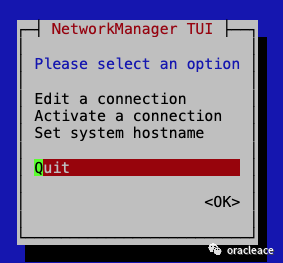
配置完成后重新启动网络:systemctl restart network
04
—
ip工具
ip命令也可以用于配置ip地址和激活网卡
# ip addr...# ip --help...ethtool
05
—
ethtool工具
ethtool 是用于查询及设置网卡参数的命令。
ethtool ethx 查询ethx网口基本设置,其中 x 是对应网卡的编号,如eth0、eth1等等
oracle@yaoyuan ~$ ethtool em1Settings for em1:Supported ports: [ TP ]Supported link modes: 10baseT/Half 10baseT/Full100baseT/Half 100baseT/Full1000baseT/Half 1000baseT/FullSupported pause frame use: NoSupports auto-negotiation: YesSupported FEC modes: Not reportedAdvertised link modes: 10baseT/Half 10baseT/Full100baseT/Half 100baseT/Full1000baseT/Half 1000baseT/FullAdvertised pause frame use: SymmetricAdvertised auto-negotiation: YesAdvertised FEC modes: Not reportedLink partner advertised link modes: 10baseT/Half 10baseT/Full100baseT/Half 100baseT/Full1000baseT/FullLink partner advertised pause frame use: NoLink partner advertised auto-negotiation: YesLink partner advertised FEC modes: Not reportedSpeed: 1000Mb/sDuplex: FullPort: Twisted PairPHYAD: 1Transceiver: internalAuto-negotiation: onMDI-X: offCannot get wake-on-lan settings: Operation not permittedCurrent message level: 0x000000ff (255)drv probe link timer ifdown ifup rx_err tx_errLink detected: yesoracle@yaoyuan ~$ ethtool p5p1Settings for p5p1:Supported ports: [ FIBRE ]Supported link modes: 1000baseT/Full10000baseT/FullSupported pause frame use: SymmetricSupports auto-negotiation: YesSupported FEC modes: Not reportedAdvertised link modes: 1000baseT/Full10000baseT/FullAdvertised pause frame use: SymmetricAdvertised auto-negotiation: YesAdvertised FEC modes: Not reportedSpeed: 10000Mb/sDuplex: FullPort: FIBREPHYAD: 0Transceiver: internalAuto-negotiation: onCannot get wake-on-lan settings: Operation not permittedCurrent message level: 0x00000007 (7)drv probe linkLink detected: yes
关注Link detected是否接网线,Speed速度:千兆网或者万兆网。上面两个例子第一个是千兆网第二个是万兆网
当服务器有多个网卡并且已经配置好运行当中,你却没记得eth0、eth1、eth2.....分别对应的是哪个物理的网卡,此时可以使用如下命令:
ethtool -p eth0
此时就会看到 eth0 对应的物理口一个灯在不停地闪烁,对了。这就是我们在系统看到的那个叫eth0的网卡了,就是这么简单。按ctrl+ c停止。
06
—
ping和telnet工具
测试到一个远端的ip通或者不同通常用ping,测试端口用telnet。
oracle@yaoyuan ~$ ping 192.168.56.107PING 192.168.56.107 (192.168.56.107) 56(84) bytes of data.64 bytes from 192.168.56.107: icmp_seq=1 ttl=64 time=0.072 ms64 bytes from 192.168.56.107: icmp_seq=2 ttl=64 time=0.038 ms^C--- 192.168.56.107 ping statistics ---2 packets transmitted, 2 received, 0% packet loss, time 1002msrtt min/avg/max/mdev = 0.038/0.055/0.072/0.017 msoracle@yaoyuan ~$ telnet 192.168.56.107 1521Trying 192.168.56.107...Connected to 192.168.56.107.
作者介绍:
姚远:Oracle ACE(Oracle和MySQL数据库方向),华为云MVP。拥有包括 Oracle 10g和12c OCM在内的20+数据库相关认证。曾任IBM公司数据库部门经理,现在一家第三方公司任首席数据库专家,服务2万+客户,《MySQL 8.0运维与优化》的作者。
需要全套《Linux系统管理》pdf文档请加姚远老师微信👇

近期热文
76条经典SQL语句均可不加修改地运行在MySQL、Oracle、SQL Server和PostgreSQL等4种数据库上。
想快速学好英语吗?来看看一个IT人是如何达到英语专业八级的水平的。
实际上学好Oracle数据库只需要看一本书,让Oracle ACE来告诉你如何学好Oracle数据库?
刚刚上市10天就卖了一千本,京东和当当都卖断了货!
B站上最火的MySQL性能优化课程。
