



在今天的文章中,我们一起学习如何设置日志归档跟踪(LOG_ARCHIVE_TRACE)参数。
此参数是可选参数,可开启并控制为日志归档和redo传输活动生成全面的跟踪信息,亦可用于故障排除。
Trace文件将写入 ADR(Automatic Diagnostic Repository)位置,此位置如下所示。
[Primary] SQL> show parameter diagnostic

NAME                                 TYPE        VALUE
------------------------------------ ----------- ------------------------------
diagnostic_dest                      string      /u01/app/oracle
ADR_HOME=<diagnostic_dest>diag/rdbms/<db_name>/<instance_name>/trace
该参数默认值为 0,如果我们希望打开多个功能,则可为参数设定以下选项值。
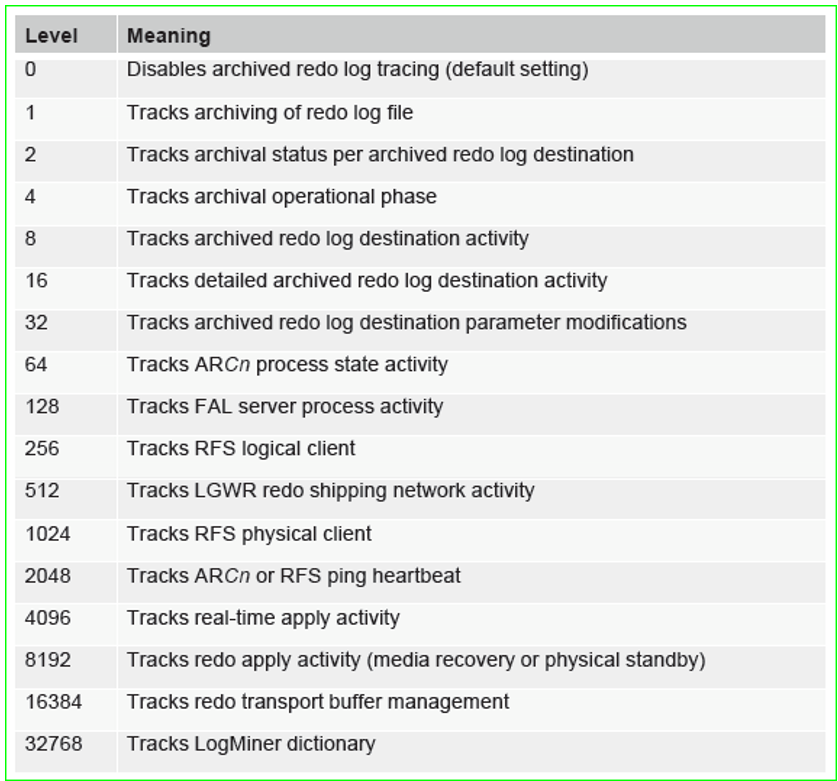

实践验证
1、我们根据文件生成(最后修改)时间,以倒序方式,列出ADR_HOME目录中的文件。
[oracle@primary trace]$ ls -alt | more
total 2332
-rw-r-----  1 oracle oinstall 579867 Feb 10 09:05 drcprimary.log
-rw-r-----  1 oracle oinstall  63006 Feb 10 09:05 primary_mmon_27780.trc
-rw-r-----  1 oracle oinstall   6211 Feb 10 09:05 primary_mmon_27780.trm
-rw-r-----  1 oracle oinstall  63515 Feb 10 09:04 primary_lgwr_27748.trc
-rw-r-----  1 oracle oinstall   6929 Feb 10 09:04 primary_lgwr_27748.trm
-rw-r-----  1 oracle oinstall 143012 Feb 10 08:59 alert_primary.log
-rw-r-----  1 oracle oinstall   2434 Feb 10 08:59 primary_arc3_27861.trc
-rw-r-----  1 oracle oinstall    250 Feb 10 08:59 primary_arc3_27861.trm
-rw-r-----  1 oracle oinstall   2135 Feb 10 08:41 primary_nsv4_9940.trc
-rw-r-----  1 oracle oinstall    142 Feb 10 08:41 primary_nsv4_9940.trm
-rw-r-----  1 oracle oinstall   2516 Feb 10 08:41 primary_rsm0_9983.trc
-rw-r-----  1 oracle oinstall    253 Feb 10 08:41 primary_rsm0_9983.trm
-rw-r-----  1 oracle oinstall   1710 Feb 10 08:41 primary_nsv1_9842.trc
-rw-r-----  1 oracle oinstall    118 Feb 10 08:41 primary_nsv1_9842.trm
-rw-r-----  1 oracle oinstall   2144 Feb 10 08:41 primary_arc2_27853.trc
-rw-r-----  1 oracle oinstall    254 Feb 10 08:41 primary_arc2_27853.trm
2、为LOG_ARCHIVE_TRACE参数赋值。
DGMGRL> sql "alter system set log_archive_trace=16 scope=both";
Succeeded.
DGMGRL> exit
[oracle@primary trace]$ sqlplus / as sysdba

SQL*Plus: Release 12.1.0.2.0 Production on Fri Feb 10 09:07:39 2017

Copyright (c) 1982, 2014, Oracle.  All rights reserved.


Connected to:
Oracle Database 12c Enterprise Edition Release 12.1.0.2.0 - 64bit Production
With the Partitioning, OLAP, Advanced Analytics and Real Application Testing options

[Primary] SQL> show parameter log_archive_trace

NAME                                 TYPE        VALUE
------------------------------------ ----------- ------------------------------
log_archive_trace                    integer     16
3、根据文件生成(最后修改)时间再次列出ADR_HOME目录内容。
[oracle@primary trace]$ ls -alt | more
total 2492
-rw-r-----  1 oracle oinstall 186176 Feb 10 09:08 primary_lgwr_27748.trc
-rw-r-----  1 oracle oinstall   9070 Feb 10 09:08 primary_lgwr_27748.trm
-rw-r-----  1 oracle oinstall  33647 Feb 10 09:08 primary_nss2_10361.trc
-rw-r-----  1 oracle oinstall    952 Feb 10 09:08 primary_nss2_10361.trm
-rw-r-----  1 oracle oinstall 581863 Feb 10 09:08 drcprimary.log
-rw-r-----  1 oracle oinstall  10666 Feb 10 09:07 primary_arc1_27849.trc
-rw-r-----  1 oracle oinstall    457 Feb 10 09:07 primary_arc1_27849.trm
-rw-r-----  1 oracle oinstall 143087 Feb 10 09:07 alert_primary.log
-rw-r-----  1 oracle oinstall  63006 Feb 10 09:05 primary_mmon_27780.trc
-rw-r-----  1 oracle oinstall   6211 Feb 10 09:05 primary_mmon_27780.trm
-rw-r-----  1 oracle oinstall   2434 Feb 10 08:59 primary_arc3_27861.trc
-rw-r-----  1 oracle oinstall    250 Feb 10 08:59 primary_arc3_27861.trm
-rw-r-----  1 oracle oinstall   2135 Feb 10 08:41 primary_nsv4_9940.trc
-rw-r-----  1 oracle oinstall    142 Feb 10 08:41 primary_nsv4_9940.trm
-rw-r-----  1 oracle oinstall   2516 Feb 10 08:41 primary_rsm0_9983.trc
-rw-r-----  1 oracle oinstall    253 Feb 10 08:41 primary_rsm0_9983.trm
-rw-r-----  1 oracle oinstall   1710 Feb 10 08:41 primary_nsv1_9842.trc
-rw-r-----  1 oracle oinstall    118 Feb 10 08:41 primary_nsv1_9842.trm
-rw-r-----  1 oracle oinstall   2144 Feb 10 08:41 primary_arc2_27853.trc
-rw-r-----  1 oracle oinstall    254 Feb 10 08:41 primary_arc2_27853.trm
设置参数后,新的文件应标记颜色已方便区分。
4、当日志文件非常大时,我们可以选择单词搜索方式快速定位。
[oracle@primary trace]$ grep Error primary_arc1_27849.trc
Linux-x86_64 Error: 2: No such file or directory
OCISessionBegin failed. Error -1
Linux-x86_64 Error: 2: No such file or directory
OCISessionBegin failed. Error -1
Linux-x86_64 Error: 2: No such file or directory
OCISessionBegin failed. Error -1
Linux-x86_64 Error: 2: No such file or directory
Error 1034 received logging on to the standby
Error 1034 connecting to destination LOG_ARCHIVE_DEST_2 standby host 'prmyFS'
krsi_verify_network: Error 1034 attaching to destination LOG_ARCHIVE_DEST_2 standby host 'prmyFS'
Linux-x86_64 Error: 2: No such file or directory
OCISessionBegin failed. Error -1
Linux-x86_64 Error: 2: No such file or directory
OCISessionBegin failed. Error -1
Linux-x86_64 Error: 2: No such file or directory
OCISessionBegin failed. Error -1
Linux-x86_64 Error: 2: No such file or directory
Error 1034 received logging on to the standby
Error 1034 connecting to destination LOG_ARCHIVE_DEST_2 standby host 'prmyFS'
krsi_verify_network: Error 1034 attaching to destination LOG_ARCHIVE_DEST_2 standby host 'prmyFS'
Linux-x86_64 Error: 2: No such file or directory
OCISessionBegin failed. Error -1
Linux-x86_64 Error: 2: No such file or directory
OCISessionBegin failed. Error -1
Linux-x86_64 Error: 2: No such file or directory
OCISessionBegin failed. Error -1
Linux-x86_64 Error: 2: No such file or directory
Error 1034 received logging on to the standby
Error 1034 connecting to destination LOG_ARCHIVE_DEST_2 standby host 'prmyFS'
krsi_verify_network: Error 1034 attaching to destination LOG_ARCHIVE_DEST_2 standby host 'prmyFS'
Linux-x86_64 Error: 2: No such file or directory
OCISessionBegin failed. Error -1
Linux-x86_64 Error: 2: No such file or directory
OCISessionBegin failed. Error -1
Linux-x86_64 Error: 2: No such file or directory
OCISessionBegin failed. Error -1
Linux-x86_64 Error: 2: No such file or directory
Error 1034 received logging on to the standby
Error 1034 connecting to destination LOG_ARCHIVE_DEST_2 standby host 'prmyFS'
krsi_verify_network: Error 1034 attaching to destination LOG_ARCHIVE_DEST_2 standby host 'prmyFS'
Linux-x86_64 Error: 2: No such file or directory
OCISessionBegin failed. Error -1
Linux-x86_64 Error: 2: No such file or directory
OCISessionBegin failed. Error -1
Linux-x86_64 Error: 2: No such file or directory
OCISessionBegin failed. Error -1
Linux-x86_64 Error: 2: No such file or directory
Error 1034 received logging on to the standby
Error 1034 connecting to destination LOG_ARCHIVE_DEST_2 standby host 'prmyFS'
krsi_verify_network: Error 1034 attaching to destination LOG_ARCHIVE_DEST_2 standby host 'prmyFS'
Error 3113 detaching RFS from standby instance at host 'logical'
Error 12537 received logging on to the standby
Error 12537 connecting to destination LOG_ARCHIVE_DEST_4 standby host 'logical'
krsi_verify_network: Error 12537 attaching to destination LOG_ARCHIVE_DEST_4 standby host 'logical'
5、验证完毕,恢复参数初始状态。
DGMGRL> sql "alter system set log_archive_trace=0 scope=both";
Succeeded.
[Primary] SQL> show parameter log_archive_trace

NAME                                 TYPE        VALUE
------------------------------------ ----------- ------------------------------
log_archive_trace                    integer     0
原文标题:Setting The Log Archive Trace Parameter
原文作者:Onur ARDAHANLI
原文地址:https://dbtut.com/index.php/2022/06/07/setting-the-log-archive-trace-parameter/
「喜欢这篇文章,您的关注和赞赏是给作者最好的鼓励」
关注作者
【版权声明】本文为墨天轮用户原创内容,转载时必须标注文章的来源(墨天轮),文章链接,文章作者等基本信息,否则作者和墨天轮有权追究责任。如果您发现墨天轮中有涉嫌抄袭或者侵权的内容,欢迎发送邮件至:contact@modb.pro进行举报,并提供相关证据,一经查实,墨天轮将立刻删除相关内容。
