



本课程每小节内容都很浓缩,所以本笔记将多小节内容合并记录。
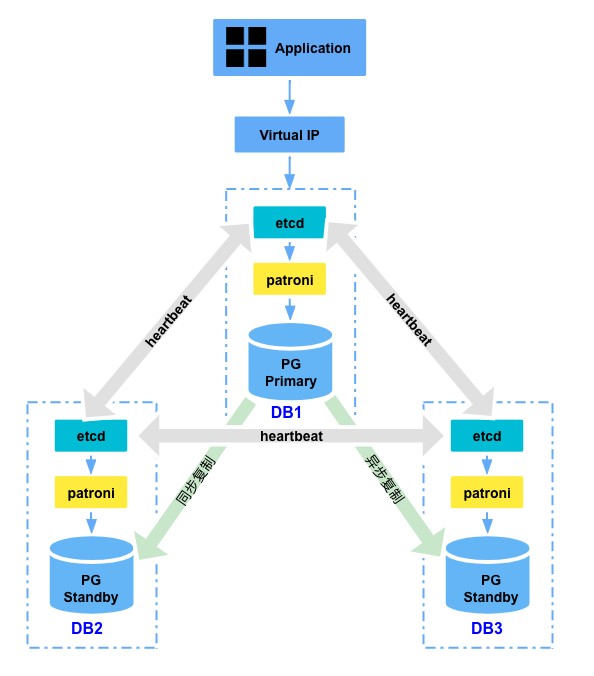
1.1 ~ 1.4 主要介绍了基础环境配置。
1.5 ~ 1.9 主要介绍了主备流复制的环境搭建、配置。
这里需要注意,需要创建流复制的专用用户:
CREATE USER replica REPLICATION ENCRYPTED PASSWORD 'replica';
并将其配置到 pg_hba.conf 中,使该用户可以正常做复制。
vi pg_hba.conf
host replication replica 10.10.10.101/32 trust
host replication replica 10.10.10.102/32 trust
host replication replica 10.10.10.103/32 trust
常用命名 – 查看同步状态
# 主库使用 pg_stat_replication 监控流复制
\d pg_stat_replication;
select usename,application_name,client_addr,sync_state from pg_stat_replication;

# 备库使用 pg_stat_wal_receiver 监控流复制
\d pg_stat_wal_receiver;
select * from pg_stat_wal_receiver;

# 查看备库落后主库多少字节的WAL日志:
SELECT pg_size_pretty(pg_wal_lsn_diff(pg_current_wal_flush_lsn(),write_lsn)) delay_wal_size,*
FROM pg_stat_replication;

# 查看备库接收WAL日志和应用WAL日志的状态:
select * from pg_last_wal_receive_lsn();
select * from pg_last_wal_replay_lsn();
select * from pg_last_xact_replay_timestamp();
常用命令 – 主备的判断方式
# 通过系统函数查看(f为主库,t为备库:如果恢复仍在进行中为true)
select pg_is_in_recovery();

# 查看只读模式
show transaction_read_only;

# 操作系统上查看WAL发送进程或WAL接收进程(看walsender或者walreceiver)
ps -ef | grep "wal" | grep -v "grep"
ps -ef | grep postgres

# 查看数据库控制文件信息(返回in production表示为主库,返回in archive recovery表示是备库)
pg_controldata | grep cluster
pg_promote
PG 12 开始新增了一个pg_promote()函数,让我们可以通过SQL命令激活备库。
https://www.postgresql.org/docs/14/functions-admin.html
pg_promote ( wait boolean DEFAULT true, wait_seconds integer DEFAULT 60 ) → boolean
Promotes a standby server to primary status. With wait set to true (the default), the function waits until promotion is completed or wait_seconds seconds have passed, and returns true if promotion is successful and false otherwise. If wait is set to false, the function returns true immediately after sending a SIGUSR1 signal to the postmaster to trigger promotion.
This function is restricted to superusers by default, but other users can be granted EXECUTE to run the function.
第一个参数wait,默认为true;等待备节点提升为主节点之后再返回;设置为flase后,会直接发送一个SIGUSR1信号后返回。
第二个参数wait_seconds是等待时间,默认60秒;
命令执行以后,备节点会与主节点断开连接。
备节点会提升自己为主节点。(备节点需要配置正确参数,比如最大连接数)
原来连接到备节点的只读连接会直接拥有读写权限,而不需要断开重连。
