




目录
一、从Docker Hub下载小麦苗上传的镜像二、创建容器2.1 注意事项(非常重要)三、尽情使用吧3.1 数据库使用示例:3.2 在外部访问容器内数据库3.3 访问容器内的EM3.4 使用ssh连接到容器内
一、从Docker Hub下载小麦苗上传的镜像
小麦苗的Docker Hub的地址:https://hub.docker.com/u/lhrbest Oracle 19c ASM的地址:https://hub.docker.com/r/lhrbest/oracle19casm_lhr/tags
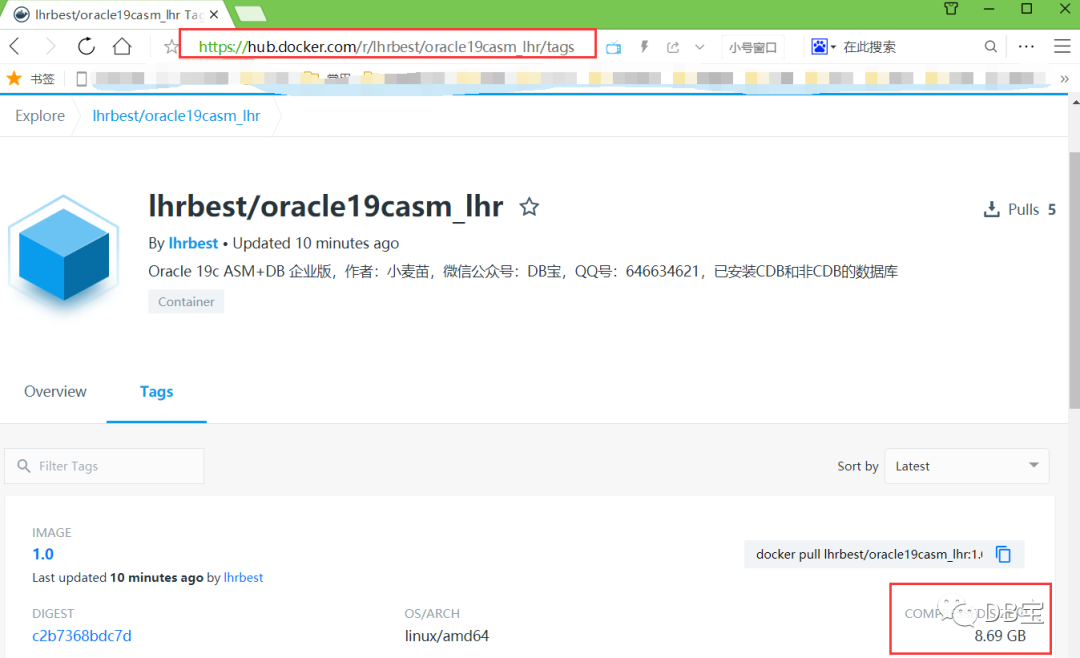
1-- 下载镜像命令:
2docker pull lhrbest/oracle19casm_lhr:1.0
镜像有点大,下载时间取决于自己的网络环境,建议晚上放后台下载:
1-- 放后台下载镜像命令:
2nohup docker pull lhrbest/oracle19casm_lhr:1.0 &
等待下载完成后,会自动进行解压,请确保至少有80G的空闲空间(Oracle就是这么耗磁盘、耗内存、耗CPU):
1[root@docker35 ~]# docker images | grep oracle19casm_lhr
2lhrbest/oracle19casm_lhr         1.0                 d695caf63520        17 hours ago        77.4GB
二、创建容器
1--创建容器
2docker run -itd -h lhr2019ocpasm --name oracle19casmlhr -p 222:22  -p 1521:1521 -p 5500:5500 -p 5501:5501 --privileged=true lhrbest/oracle19casm_lhr:1.0  /usr/sbin/init
3--进入容器
4docker exec -it oracle19casmlhr bash
在创建容器时,需要注意端口映射关系。在以上命令中,主机的222、1521、5500和5501这4个端口不能被占用,否则会创建失败。
2.1 注意事项(非常重要)
 1-- ① 使用二进制包的方式安装Oracle 19c企业版的ASM和db,包括一个CDB,名称为lhr19cdb,一个非cdb,名称为lhr19sdb,所有密码均为lhr
 2-- ② ASM磁盘脚本:/etc/initASMDISK.sh,请确保脚本/etc/initASMDISK.sh中的内容都可以正常执行
 3-- ③ 若oracleasmlib初始化错误,则需要在安装Docker的主机上也配置oracleasmlib并初始化正常。配置命令如下所示:
 4yum install -y kmod-oracleasm
 5wget https://yum.oracle.com/repo/OracleLinux/OL7/latest/x86_64/getPackage/oracleasm-support-2.1.11-2.el7.x86_64.rpm
 6wget https://download.oracle.com/otn_software/asmlib/oracleasmlib-2.0.12-1.el7.x86_64.rpm
 7rpm -ivh *.rpm
 8
 9
10systemctl enable oracleasm.service
11
12oracleasm init
13oracleasm status
14
15-- 返回yes
16[root@docker36 ~]# oracleasm init
17[root@docker36 ~]# oracleasm status
18Checking if ASM is loaded: yes
19Checking if /dev/oracleasm is mounted: yes
三、尽情使用吧
3.1 数据库使用示例:
  1[root@docker35 ~]# docker ps
  2CONTAINER ID        IMAGE                          COMMAND                  CREATED             STATUS              PORTS                                                                   NAMES
  3b9c33f914de6        lhrbest/oracle19casm_lhr:1.0   "/usr/sbin/init"         17 hours ago        Up 17 hours         0.0.0.0:1521->1521/tcp, 0.0.0.0:222->22/tcp, 5501-5501/tcp, 0.0.0.0:5500->5500/tcp   oracle19casmlhr
  4
  5[root@docker35 ~]# docker exec -it oracle19casmlhr bash
  6[root@lhr2019ocpasm /]# oracleasm listdisks
  7ASM1
  8ASM2
  9ASM3
 10ASM4
 11ASM5
 12ASM6
 13ASM7
 14[root@lhr2019ocpasm /]# crsctl stat res -t
 15--------------------------------------------------------------------------------
 16Name           Target  State        Server                   State details
 17--------------------------------------------------------------------------------
 18Local Resources
 19--------------------------------------------------------------------------------
 20ora.DATA.dg
 21               ONLINE  ONLINE       lhr2019ocpasm            STABLE
 22ora.FRA.dg
 23               ONLINE  ONLINE       lhr2019ocpasm            STABLE
 24ora.LISTENER.lsnr
 25               ONLINE  ONLINE       lhr2019ocpasm            STABLE
 26ora.asm
 27               ONLINE  ONLINE       lhr2019ocpasm            Started,STABLE
 28ora.ons
 29               OFFLINE OFFLINE      lhr2019ocpasm            STABLE
 30--------------------------------------------------------------------------------
 31Cluster Resources
 32--------------------------------------------------------------------------------
 33ora.cssd
 34      1        ONLINE  ONLINE       lhr2019ocpasm            STABLE
 35ora.diskmon
 36      1        OFFLINE OFFLINE                               STABLE
 37ora.evmd
 38      1        ONLINE  ONLINE       lhr2019ocpasm            STABLE
 39ora.lhr19cdb.db
 40      1        ONLINE  ONLINE       lhr2019ocpasm            Open,HOME=/u01/app/o
 41                                                             racle/product/19.3.0
 42                                                             /dbhome_1,STABLE
 43ora.lhr19sdb.db
 44      1        ONLINE  ONLINE       lhr2019ocpasm            Open,HOME=/u01/app/o
 45                                                             racle/product/19.3.0
 46                                                             /dbhome_1,STABLE
 47--------------------------------------------------------------------------------
 48
 49[root@lhr2019ocpasm /]# su - oracle
 50Last login: Sun Jun 28 16:36:43 CST 2020 on pts/0
 51[oracle@lhr2019ocpasm ~]$ sas
 52
 53SQL*Plus: Release 19.0.0.0.0 - Production on Mon Jun 29 10:13:11 2020
 54Version 19.3.0.0.0
 55
 56Copyright (c) 1982, 2019, Oracle.  All rights reserved.
 57
 58
 59Connected to:
 60Oracle Database 19c Enterprise Edition Release 19.0.0.0.0 - Production
 61Version 19.3.0.0.0
 62
 63SYS@lhr19cdb> show pdbs
 64
 65    CON_ID CON_NAME                       OPEN MODE  RESTRICTED
 66---------- ------------------------------ ---------- ----------
 67         2 PDB$SEED                       READ ONLY  NO
 68SYS@lhr19cdb> exit
 69Disconnected from Oracle Database 19c Enterprise Edition Release 19.0.0.0.0 - Production
 70Version 19.3.0.0.0
 71
 72
 73[oracle@lhr2019ocpasm dbs]$ . oraenv
 74ORACLE_SID = [lhr19cdb] ? lhr19sdb
 75The Oracle base remains unchanged with value /u01/app/oracle
 76[oracle@lhr2019ocpasm dbs]$ sas
 77
 78SQL*Plus: Release 19.0.0.0.0 - Production on Mon Jun 29 10:18:45 2020
 79Version 19.3.0.0.0
 80
 81Copyright (c) 1982, 2019, Oracle.  All rights reserved.
 82
 83
 84Connected to:
 85Oracle Database 19c Enterprise Edition Release 19.0.0.0.0 - Production
 86Version 19.3.0.0.0
 87
 88SYS@lhr19sdb> show pdbs
 89SYS@lhr19sdb> exit
 90Disconnected from Oracle Database 19c Enterprise Edition Release 19.0.0.0.0 - Production
 91Version 19.3.0.0.0
 92[oracle@lhr2019ocpasm dbs]$ ps -ef|grep pmon
 93grid      1173     1  0 Jun28 ?        00:00:05 asm_pmon_+ASM
 94oracle    1642     1  0 Jun28 ?        00:00:07 ora_pmon_lhr19cdb
 95oracle   23410     0  0 10:17 ?        00:00:00 ora_pmon_lhr19sdb
 96oracle   23882 23073  0 10:18 pts/2    00:00:00 grep --color=auto pmon
 97[oracle@lhr2019ocpasm dbs]$ lsnrctl status
 98
 99LSNRCTL for Linux: Version 19.0.0.0.0 - Production on 29-JUN-2020 10:19:02
100
101Copyright (c) 1991, 2019, Oracle.  All rights reserved.
102
103Connecting to (ADDRESS=(PROTOCOL=tcp)(HOST=)(PORT=1521))
104STATUS of the LISTENER
105------------------------
106Alias                     LISTENER
107Version                   TNSLSNR for Linux: Version 19.0.0.0.0 - Production
108Start Date                28-JUN-2020 17:29:47
109Uptime                    0 days 16 hr. 49 min. 14 sec
110Trace Level               off
111Security                  ON: Local OS Authentication
112SNMP                      OFF
113Listener Parameter File   /u01/app/19.3.0/grid/network/admin/listener.ora
114Listener Log File         /u01/app/grid/diag/tnslsnr/lhr2019ocpasm/listener/alert/log.xml
115Listening Endpoints Summary...
116  (DESCRIPTION=(ADDRESS=(PROTOCOL=tcp)(HOST=lhr2019ocpasm)(PORT=1521)))
117  (DESCRIPTION=(ADDRESS=(PROTOCOL=ipc)(KEY=EXTPROC1521)))
118  (DESCRIPTION=(ADDRESS=(PROTOCOL=tcps)(HOST=lhr2019ocpasm)(PORT=5500))(Security=(my_wallet_directory=/u01/app/oracle/product/19.3.0/dbhome_1/admin/lhr19cdb/xdb_wallet))(Presentation=HTTP)(Session=RAW))
119  (DESCRIPTION=(ADDRESS=(PROTOCOL=tcps)(HOST=lhr2019ocpasm)(PORT=5501))(Security=(my_wallet_directory=/u01/app/oracle/admin/lhr19sdb/xdb_wallet))(Presentation=HTTP)(Session=RAW))
120Services Summary...
121Service "+ASM" has 1 instance(s).
122  Instance "+ASM", status READY, has 1 handler(s) for this service...
123Service "+ASM_DATA" has 1 instance(s).
124  Instance "+ASM", status READY, has 1 handler(s) for this service...
125Service "+ASM_FRA" has 1 instance(s).
126  Instance "+ASM", status READY, has 1 handler(s) for this service...
127Service "86b637b62fdf7a65e053f706e80a27ca" has 1 instance(s).
128  Instance "lhr19cdb", status READY, has 1 handler(s) for this service...
129Service "lhr19cdb" has 1 instance(s).
130  Instance "lhr19cdb", status READY, has 1 handler(s) for this service...
131Service "lhr19cdbXDB" has 1 instance(s).
132  Instance "lhr19cdb", status READY, has 1 handler(s) for this service...
133Service "lhr19sdb" has 1 instance(s).
134  Instance "lhr19sdb", status READY, has 1 handler(s) for this service...
135Service "lhrsdbXDB" has 1 instance(s).
136  Instance "lhr19sdb", status READY, has 1 handler(s) for this service...
137The command completed successfully
从监听中可以看到,数据库lhr19cdb的EM端口为5500,数据库lhr19sdb的EM端口为5501,监听的端口号为1521,注意其映射关系。
3.2 在外部访问容器内数据库
 1Microsoft Windows [版本 10.0.17134.765]
 2(c) 2018 Microsoft Corporation。保留所有权利。
 3
 4C:\Users\lhrxxt>sqlplus sys/lhr@192.168.1.35:1521/lhr19cdb as sysdba
 5
 6SQL*Plus: Release 12.1.0.2.0 Production on Mon Jun 29 10:22:29 2020
 7
 8Copyright (c) 1982, 2014, Oracle.  All rights reserved.
 9
10
11Connected to:
12Oracle Database 19c Enterprise Edition Release 19.0.0.0.0 - Production
13
14SYS@192.168.1.35:1521/lhr19cdb> show pdbs
15
16    CON_ID CON_NAME                       OPEN MODE  RESTRICTED
17---------- ------------------------------ ---------- ----------
18         2 PDB$SEED                       READ ONLY  NO
19SYS@192.168.1.35:1521/lhr19cdb> exit
20Disconnected from Oracle Database 19c Enterprise Edition Release 19.0.0.0.0 - Production
21
22C:\Users\lhrxxt>sqlplus sys/lhr@192.168.1.35:1521/lhr19sdb as sysdba
23
24SQL*Plus: Release 12.1.0.2.0 Production on Mon Jun 29 10:22:40 2020
25
26Copyright (c) 1982, 2014, Oracle.  All rights reserved.
27
28
29Connected to:
30Oracle Database 19c Enterprise Edition Release 19.0.0.0.0 - Production
31
32SYS@192.168.1.35:1521/lhr19sdb>
3.3 访问容器内的EM
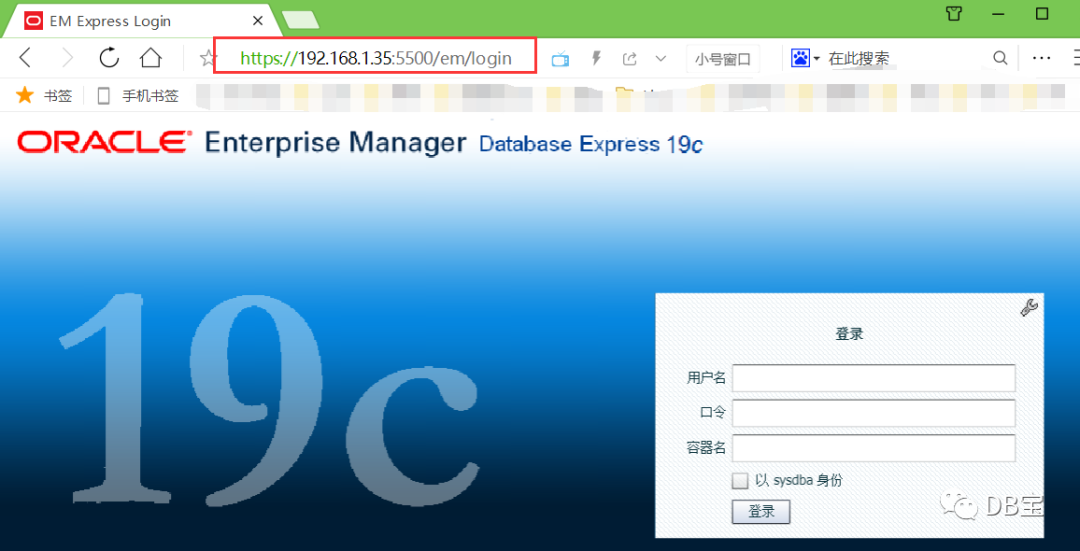
访问地址:
1https://192.168.1.35:5500/em
2https://192.168.1.35:5501/em
3.4 使用ssh连接到容器内
 1C:\Users\lhrxxt>ssh root@192.168.1.35 -p222
 2The authenticity of host '[192.168.1.35]:222 ([192.168.1.35]:222)' can't be established.
 3ECDSA key fingerprint is SHA256:F5eg+8MD/fIIF5xnbNr1P0ddok7orVtFb+jji5xq33I.
 4Are you sure you want to continue connecting (yes/no)? yes
 5Warning: Permanently added '[192.168.1.35]:222' (ECDSA) to the list of known hosts.
 6root@192.168.1.35's password:
 7Last login: Wed Jun 24 11:07:12 2020
 8[root@lhr2019ocpasm ~]#
 9[root@lhr2019ocpasm ~]#
10[root@lhr2019ocpasm ~]#
11[root@lhr2019ocpasm ~]# crsctl stat res -t
12--------------------------------------------------------------------------------
13Name           Target  State        Server                   State details
14--------------------------------------------------------------------------------
15Local Resources
16--------------------------------------------------------------------------------
17ora.DATA.dg
18               ONLINE  ONLINE       lhr2019ocpasm            STABLE
19ora.FRA.dg
20               ONLINE  ONLINE       lhr2019ocpasm            STABLE
21ora.LISTENER.lsnr
22               ONLINE  ONLINE       lhr2019ocpasm            STABLE
23ora.asm
24               ONLINE  ONLINE       lhr2019ocpasm            Started,STABLE
25ora.ons
26               OFFLINE OFFLINE      lhr2019ocpasm            STABLE
27--------------------------------------------------------------------------------
28Cluster Resources
29--------------------------------------------------------------------------------
30ora.cssd
31      1        ONLINE  ONLINE       lhr2019ocpasm            STABLE
32ora.diskmon
33      1        OFFLINE OFFLINE                               STABLE
34ora.evmd
35      1        ONLINE  ONLINE       lhr2019ocpasm            STABLE
36ora.lhr19cdb.db
37      1        ONLINE  OFFLINE      lhr2019ocpasm            Instance Shutdown,ST
38                                                             ARTING
39ora.lhr19sdb.db
40      1        ONLINE  ONLINE       lhr2019ocpasm            Open,HOME=/u01/app/o
41                                                             racle/product/19.3.0
42                                                             /dbhome_1,STABLE
43--------------------------------------------------------------------------------

• 微信公众号:DB宝,作者:小麦苗
• 作者博客地址:http://blog.itpub.net/26736162/
• 作者微信:db_bao• 作者QQ:646634621,QQ群:230161599、618766405
• 提供Oracle OCP、OCM、高可用(rac+dg+ogg)和MySQL最实用的技能培训
• 版权所有,欢迎分享本文,转载请保留出处• 若有侵权请联系小麦苗删除
★DB宝分享的IT资料:https://mp.weixin.qq.com/s/Iwsy-zkzwgs8nYkcMz29ag★DB宝笔试面试详解:https://mp.weixin.qq.com/s/Vm5PqNcDcITkOr9cQg6T7w
长按下图识别二维码或微信扫描下图二维码来关注小麦苗的微信公众号:DB宝,学习最实用的数据库技术。



文章转载自DB宝,如果涉嫌侵权,请发送邮件至:contact@modb.pro进行举报,并提供相关证据,一经查实,墨天轮将立刻删除相关内容。
