



二、初始化PostgreSQL
初始化数据库是在PG数据库软件安装完成后要做的第一件事。
1、检查目录权限及是否为空
备注:pg 初始化目录必须为空,且所属用户组必须是 postgresql;
[postgres@PostgreSQLDB ~]$ ll -d /usr/local/pgsql/pgdata && ll -l /usr/local/pgsql/pgdata
drwxr-xr-x 2 postgres postgres 4096 8月  18 06:58 /usr/local/pgsql/pgdata
2、初始化创建pgsql数据库
备注:过程中会提示输入用于登录 pg 的超级用户密码;
su – postgres
[postgres@PostgreSQLDB  bin]$ initdb -D $PGDATA -W -U postgres
属于此数据库系统的文件宿主为用户 "postgres".
此用户也必须为服务器进程的宿主.
数据库簇将使用本地化语言 "zh_CN.UTF-8"进行初始化.
默认的数据库编码已经相应的设置为 "UTF8".
initdb: could not find suitable text search configuration for locale "zh_CN.UTF-8"
缺省的文本搜索配置将会被设置到"simple"

禁止为数据页生成校验和.

输入新的超级用户口令:
再输入一遍:

修复已存在目录 /usr/local/pgsql/pgdata 的权限 ... 成功
正在创建子目录 ... 成功
选择动态共享内存实现 ......posix
选择默认最大联接数 (max_connections) ... 100
选择默认共享缓冲区大小 (shared_buffers) ... 128MB
selecting default time zone ... PRC
创建配置文件 ... 成功
正在运行自举脚本 ...成功
正在执行自举后初始化 ...成功
同步数据到磁盘...成功

initdb: 警告: 为本地连接启用"trust"身份验证
你可以通过编辑 pg_hba.conf 更改或你下次
执行 initdb 时使用 -A或者--auth-local和--auth-host选项.

成功。您现在可以用下面的命令开启数据库服务器:

    pg_ctl -D /usr/local/pgsql/pgdata -l 日志文件 start
3、修改配置文件
3.1 修改postgresql.conf 为如下:
[postgres@PostgreSQLDB bin]$ vi /usr/local/pgsql/pgdata/postgresql.conf

listen_addresses = '*'		#要监听的IP地址; 以逗号分隔的地址列表;默认为'localhost'; '*'所有
port = 5432			# (更改需要重新启动)
3.2 修改pg_hba.conf为如下:
[postgres@localhost bin]$ vi /usr/local/pgsql/pgdata/pg_hba.conf
local   replication     all                                     trust
host    replication     all             127.0.0.1/32            trust
host    replication     all             ::1/128                 trust
host    all             all             0.0.0.0/0                 md5#所有IP均可访问
4、启动数据库
-- 开始启动
[postgres@localhost ~]$ pg_ctl -D /usr/local/pgsql/pgdata -l logfile start
等待服务器进程启动 .... 完成
服务器进程已经启动

-- 查看日志
[postgres@localhost ~]$ cat logfile
2022-09-03 08:44:57.043 CST [11465] 日志:  正在启动 PostgreSQL 12.12 on x86_64-pc-linux-gnu, compiled by gcc (GCC) 4.8.5 20150623 (Red Hat 4.8.5-44), 64-bit
2022-09-03 08:44:57.043 CST [11465] 日志:  正在监听IPv6地址"::1",端口 5432
2022-09-03 08:44:57.044 CST [11465] 日志:  正在监听IPv4地址"127.0.0.1",端口 5432
2022-09-03 08:44:57.045 CST [11465] 日志:  在Unix套接字 "/tmp/.s.PGSQL.5432"上侦听
2022-09-03 08:44:57.058 CST [11465] 日志:  无效IP地址掩码"md5": 未知的名称或服务
2022-09-03 08:44:57.058 CST [11465] 上下文:  配置文件"/usr/local/pgsql/pgdata/pg_hba.conf"的第98行
2022-09-03 08:44:57.058 CST [11465] 致命错误:  无法加载pg_hba.conf
2022-09-03 08:44:57.061 CST [11465] 日志:  数据库系统已关闭
2022-09-03 08:48:55.854 CST [11475] 日志:  正在启动 PostgreSQL 12.12 on x86_64-pc-linux-gnu, compiled by gcc (GCC) 4.8.5 20150623 (Red Hat 4.8.5-44), 64-bit
2022-09-03 08:48:55.855 CST [11475] 日志:  正在监听IPv6地址"::1",端口 5432
2022-09-03 08:48:55.855 CST [11475] 日志:  正在监听IPv4地址"127.0.0.1",端口 5432
2022-09-03 08:48:55.856 CST [11475] 日志:  在Unix套接字 "/tmp/.s.PGSQL.5432"上侦听
2022-09-03 08:48:55.874 CST [11476] 日志:  数据库上次关闭时间为 2022-09-03 08:40:42 CST
2022-09-03 08:48:55.880 CST [11475] 日志:  数据库系统准备接受连接
-- 检查端口
[root@localhost ~]# netstat -tpnl | grep 5432
tcp        0      0 127.0.0.1:5432          0.0.0.0:*               LISTEN      11475/postgres
tcp6       0      0 ::1:5432                :::*                    LISTEN      11475/postgres
-- 检查进程
[root@localhost ~]# ps -ef | grep postgres
postgres 11475     1  0 08:48 ?        00:00:00 /usr/local/pgsql/bin/postgres -D /usr/local/pgsql/pgdata
postgres 11477 11475  0 08:48 ?        00:00:00 postgres: checkpointer
postgres 11478 11475  0 08:48 ?        00:00:00 postgres: background writer
postgres 11479 11475  0 08:48 ?        00:00:00 postgres: walwriter
postgres 11480 11475  0 08:48 ?        00:00:00 postgres: autovacuum launcher
postgres 11481 11475  0 08:48 ?        00:00:00 postgres: stats collector
postgres 11482 11475  0 08:48 ?        00:00:00 postgres: logical replication launcher
postgres 11486 32347  0 08:50 pts/2    00:00:00 psql
postgres 11487 11475  0 08:50 ?        00:00:00 postgres: postgres postgres [local] idle
root     11824 11513  0 08:57 pts/0    00:00:00 grep --color=auto postgres
root     32346  2105  0 08:29 pts/2    00:00:00 su - postgres
postgres 32347 32346  0 08:29 pts/2    00:00:00 -bash
-- 验证:
-- 修改.bash_profile
export PGHOME=/usr/local/pgsql-14.6
export LD_LIBRARY_PATH=${PGHOME}/lib:${LD_LIBRARY_PATH}
export PGDATA=${PGHOME}/pgdata
export PATH=${PGHOME}/bin:${PATH}
export PGPORT=5432
export PGUSER=postgres
export PGDATABASE=postgres

[postgres@localhost ~]$ source .bash_profile
[postgres@localhost ~]$ psql
psql (12.12)
输入 "help" 来获取帮助信息.

postgres=# \l
                                     数据库列表
   名称    |  拥有者  | 字元编码 |  校对规则   |    Ctype    |       存取权限
-----------+----------+----------+-------------+-------------+-----------------------
 postgres  | postgres | UTF8     | zh_CN.UTF-8 | zh_CN.UTF-8 |
 template0 | postgres | UTF8     | zh_CN.UTF-8 | zh_CN.UTF-8 | =c/postgres          +
           |          |          |             |             | postgres=CTc/postgres
 template1 | postgres | UTF8     | zh_CN.UTF-8 | zh_CN.UTF-8 | =c/postgres          +
           |          |          |             |             | postgres=CTc/postgres
(3 行记录)
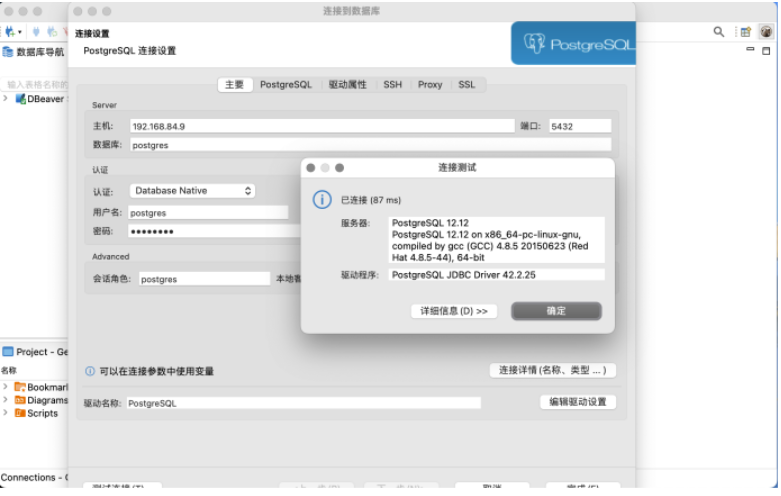
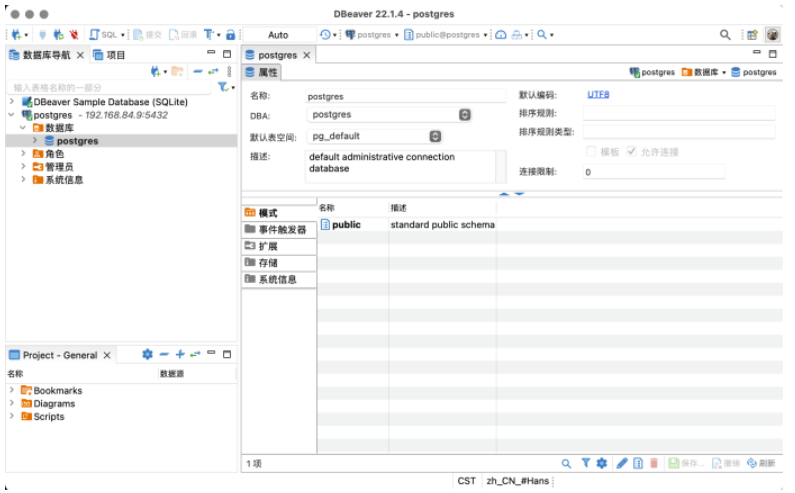
5、通过客户端登录数据库
文章推荐
| PostgreSQL | URL |
|---|---|
| 《课程笔记:PostgreSQL深入浅出》之 初识PostgreSQL(一) | https://www.modb.pro/db/475817 |
| 《课程笔记:PostgreSQL深入浅出》之 PostgreSQL源码安装(二) | https://www.modb.pro/db/475933 |
| 《课程笔记:PostgreSQL深入浅出》之初始化PostgreSQL(三) | https://www.modb.pro/db/479524 |
| 《课程笔记:PostgreSQL深入浅出》之PSQL管理工具-常用(四) | https://www.modb.pro/db/479560 |
| 《课程笔记:PostgreSQL深入浅出》之PSQL管理工具-高级命令(四) | https://www.modb.pro/db/479559 |
| 《课程笔记:PostgreSQL深入浅出》之内存与进程(五) | https://www.modb.pro/db/489936 |
| 《课程笔记:PostgreSQL深入浅出》之外存&永久存储 (六) | https://www.modb.pro/db/502267 |
| Oracle: | URL |
| 《Oracle 自动收集统计信息机制》 | https://www.modb.pro/db/403670 |
| 《Oracle_索引重建—优化索引碎片》 | https://www.modb.pro/db/399543 |
| 《DBA_TAB_MODIFICATIONS表的刷新策略测试》 | https://www.modb.pro/db/414692 |
| 《FY_Recover_Data.dbf》 | https://www.modb.pro/doc/74682 |
| 《Oracle RAC 集群迁移文件操作.pdf》 | https://www.modb.pro/doc/72985 |
| 《Oracle Date 字段索引使用测试.dbf》 | https://www.modb.pro/doc/72521 |
| 《Oracle 诊断案例 :因应用死循环导致的CPU过高》 | https://www.modb.pro/db/483047 |
| 《Oracle 慢SQL监控脚本》 | https://www.modb.pro/db/479620 |
| 《Oracle 慢SQL监控测试及监控脚本.pdf》 | https://www.modb.pro/doc/76068 |
| 《Oracle 脚本实现简单的审计功能》 | https://www.modb.pro/db/450052 |
| Greenplum: | URL |
| 《PL/Java.pdf》 | https://www.modb.pro/doc/70867 |
| 《GP的资源队列.pdf》 | https://www.modb.pro/doc/67644 |
| 《Greenplum psql客户端免交互执行SQL.pdf》 | https://www.modb.pro/doc/69806 |
最后修改时间:2025-06-30 15:45:07
「喜欢这篇文章,您的关注和赞赏是给作者最好的鼓励」
关注作者
【版权声明】本文为墨天轮用户原创内容,转载时必须标注文章的来源(墨天轮),文章链接,文章作者等基本信息,否则作者和墨天轮有权追究责任。如果您发现墨天轮中有涉嫌抄袭或者侵权的内容,欢迎发送邮件至:contact@modb.pro进行举报,并提供相关证据,一经查实,墨天轮将立刻删除相关内容。
