



前言
大家好,今天就来分享一下如何迁移 Oracle job。
定时任务
许多数据库(Oracle、MySQL、SQL Server)提供了一个内置的任务调度器job来进行维护或自动化。但 PostgreSQL并不是这样。官方文档有一段很有意思的特别说明。
PostgreSQL, like any database software, requires that certain tasks be performed regularly to achieve optimum performance. The tasks discussed here are required, but they are repetitive in nature and can easily be automated using standard tools such as cron scripts or Windows' Task Scheduler. It is the database administrator's responsibility to set up appropriate scripts, and to check that they execute successfully.
实际上我认为这样做也很好,可以保证内核代码的简洁。看一下其它数据库,现在代码量越来越多,但PostgreSQL却很少。因此, PostgreSQL在 docker中性能表现非常出色,这是相辅相成的。
所以说,现在 Oracle的 job要迁移到 PostgreSQL中了,我们该如何实现呢?我举出四种实现方法。
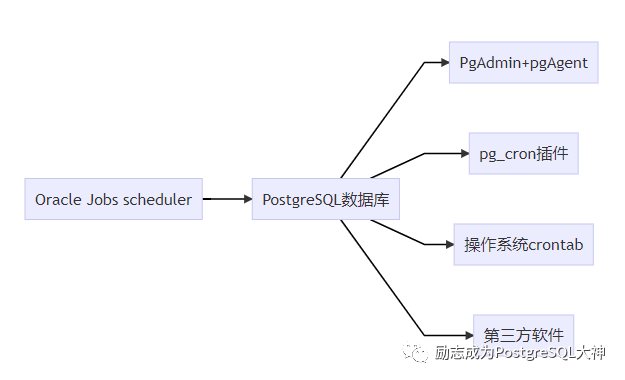
首先是 Pgadmin+ PgAgent。不推荐使用此方法,因为您需要搭建一套PgAdmin管理界面,然后将PgAgent部署到每个数据库组的主机上。然后才可以在图形界面中进行管理配置,感觉搭的东西有点多不划算。但这种软件的优点是它能够支持复杂的编排。
pg_cron是CitusData公司开发的一个插件,它相当简单,并且与标准 Linux Crontab类似,每次执行一个cron条目。适用于简单的重复性工作。要注意一点是安装它需要重启数据库。
我们客户比较支持的一种做法是把 job部署到应用主机上,然后通过客户端调用访问,这样应用就会自己维护,与 DBA没有任何关系,因为大部分 job是应用程序自己开发的任务。但这种方式没有重试机制,比如今天凌晨1点要跑一次 job,结果12点30点数据库系统出现故障,然后1点20才修复,错过了执行时间就再也不能运行了。而且写shell脚本远程调用存储过程也很麻烦。
最后一种是第三方软件,在这里我了解到比较有名的是Apache Airflow,它是专为解决 Linux下 Crontab Job依赖关系而生的。有兴趣可去看一些外国文章。Go Beyond Crontab with Airflow
pg_cron
以上讨论的问题有点开放,然后我们再回到 PostgreSQL中来讨论就是PgAgent或pg_cron。今天我们着重介绍pg_cron。
wget -c https://github.com/citusdata/pg_cron/archive/v1.3.0.tar.gz
tar -zxvf v1.3.0.tar
cd pg_cron-1.3.0
make
make install
在编译插件之后,您需要配置参数shared_preload_libraries,装载pg_cron并重新启动数据库以使参数生效。
postgres=# show shared_preload_libraries ;
    shared_preload_libraries
--------------------------------
 pg_stat_statements, pg_prewarm
(1 row)

postgres=# alter system set shared_preload_libraries='pg_stat_statements','pg_prewarm','pg_cron';
ALTER SYSTEM

pg_ctl stop
pg_ctl start

postgres=# show shared_preload_libraries;
        shared_preload_libraries
-----------------------------------------
 pg_stat_statements, pg_prewarm, pg_cron

postgres=# create extension pg_cron;
CREATE EXTENSION
postgres=# \dx
                                            List of installed extensions
        Name        | Version |   Schema   |                              Description
--------------------+---------+------------+-----------------------------------------------------------------------
 pg_cron            | 1.3     | public     | Job scheduler for PostgreSQL
 pg_stat_statements | 1.8     | public     | track planning and execution statistics of all SQL statements executed
 plpgsql            | 1.0     | pg_catalog | PL/pgSQL procedural language

postgres=# \dn
  List of schemas
  Name  |  Owner
--------+----------
 cron   | postgres
 public | postgres
在这里,它在 postgres数据库中自动创建一个cron的schema,如果你想要在其他数据库下配置,需要设置参数cron.database_name
。若其他用户需要使用cron,则需要进行授权。举例来说,为了使用 test用户调用 cron,我们需要使用下面的授权指令。
postgres=# GRANT USAGE ON SCHEMA cron TO test;
GRANT
下一步是配置定时任务, Github上给出了一个文本图表如下所示,实际上,它和Linux的Crontab意思一致。
 ┌───────────── min (0 - 59)
 │ ┌────────────── hour (0 - 23)
 │ │ ┌─────────────── day of month (1 - 31)
 │ │ │ ┌──────────────── month (1 - 12)
 │ │ │ │ ┌───────────────── day of week (0 - 6) (0 to 6 are Sunday to
 │ │ │ │ │                  Saturday, or use names; 7 is also Sunday)
 │ │ │ │ │
 │ │ │ │ │
 * * * * *
接下来,创建一个 job任务。
--登录数据库,切换到test用户
psql -d postgres -U test

--创建一个函数
CREATE OR REPLACE FUNCTION create_table(t_name varchar(30))
  RETURNS VOID AS
$func$
BEGIN

EXECUTE format('
   CREATE TABLE IF NOT EXISTS %I (
    id serial PRIMARY KEY,
    name varchar(20)
   )', 't_' || t_name);
END
$func$ LANGUAGE plpgsql;

--每天22点30执行建表,注意这里要使用第一个函数,带入job_name参数,主要是为了后面修改方便。因为修改的时候不指定job_name就会创建新的job。
postgres=# \df cron.schedule
                                    List of functions
 Schema |   Name   | Result data type |            Argument data types             | Type
--------+----------+------------------+--------------------------------------------+------
 cron   | schedule | bigint           | job_name name, schedule text, command text | func
 cron   | schedule | bigint           | schedule text, command text                | func
(2 rows)

SELECT cron.schedule('create table','30 22 * * *', 'select create_table(''aaa'')');

--查看cron.job表,验证是否配置成功
postgres=# select jobid,schedule,command,database,username,active,jobname from cron.job;
 jobid |  schedule   |                command                | database | username | active |   jobname
-------+-------------+---------------------------------------+----------+----------+--------+--------------
     4 | 30 22 * * * | select create_table('aaa')            | postgres | test     | t      | create table

--每天22点40往新建的表中插入数据
SELECT cron.schedule('insert table','40 22 * * *', 'insert into t_aaa values(''test data'')');

--查看cron.job表,验证是否配置成功
postgres=# select jobid,schedule,command,database,username,active,jobname from cron.job;
 jobid |  schedule   |                command                | database | username | active |   jobname
-------+-------------+---------------------------------------+----------+----------+--------+--------------
     4 | 30 22 * * * | select create_table('aaa')            | postgres | test     | t      | create table
     5 | 40 22 * * * | insert into t_aaa values('test data') | postgres | test     | t      | insert table

--修改两个job的执行时间
postgres=# select now();
              now
-------------------------------
 2021-01-20 14:35:44.883464+00
(1 row)

SELECT cron.schedule('create table','45 14 * * *', 'select create_table(''aaa'')');
SELECT cron.schedule('insert table','50 14 * * *', 'insert into t_aaa values(''test data'')');

--查看cron.job表,验证是否修改成功
postgres=# select jobid,schedule,command,database,username,active,jobname from cron.job;
 jobid |  schedule   |                command                | database | username | active |   jobname
-------+-------------+---------------------------------------+----------+----------+--------+--------------
     4 | 45 14 * * * | select create_table('aaa')            | postgres | test     | t      | create table
     5 | 50 14 * * * | insert into t_aaa values('test data') | postgres | test     | t      | insert table


--验证job是否运行成功
postgres=# SELECT jobid,runid,command,status,start_time from cron.job_run_details;
 jobid | runid |                command                |  status   |          start_time
-------+-------+---------------------------------------+-----------+-------------------------------
     4 |     1 | select create_table('aaa')            | succeeded | 2021-01-20 14:45:00.043385+00
     5 |     2 | insert into t_aaa values('test data') | failed    | 2021-01-20 14:50:00.005761+00

postgres=# select jobid, return_message from cron.job_run_details;
 jobid |                       return_message
-------+------------------------------------------------------------
     4 | 1 row
     5 | ERROR:  invalid input syntax for type integer: "test data"+
       | LINE 1: insert into t_aaa values('test data')             +

--这里插入语句运行失败了,没有重试的机制。

--删除job,两种方式,一种按job_name删除,一种按job_name删除
SELECT cron.unschedule('create table' );
SELECT cron.unschedule(5);

postgres=# TABLE cron.job;
 jobid | schedule | command | nodename | nodeport | database | username | active | jobname
-------+----------+---------+----------+----------+----------+----------+--------+---------
(0 rows)
注意:最后是一个技术细节的问题,也是可能会出现问题的地方,在内部,pg_cron使用libpq打开到本地数据库的新连接。对于运行cron作业的用户,需要在pg_hba.conf中配置身份认证。或者,您可以将密码添加到.pgpass文件,打开连接时libpq将使用该文件。
尽管如此, Bertrand和 Nathan两位大神现在已经在新版中解决了这个问题。您可以选择使用动态后台工作程序替代libpq连接,方法是设置参数cron.use_background_workers=on
。通过这种方式,无需配置pg_hba.conf文件。然而,它的缺点也是显而易见的,后台任务受到max_worker_processes
参数的限制,默认值是8。因此如果要使用后台任务,则需要将参数max_worker_processes设置得大一点。
后记
在 github上,pg_cron非常强大,各大云提供商已经支持它了,而在下图中,实际上Amazon RDS已经支持它了。
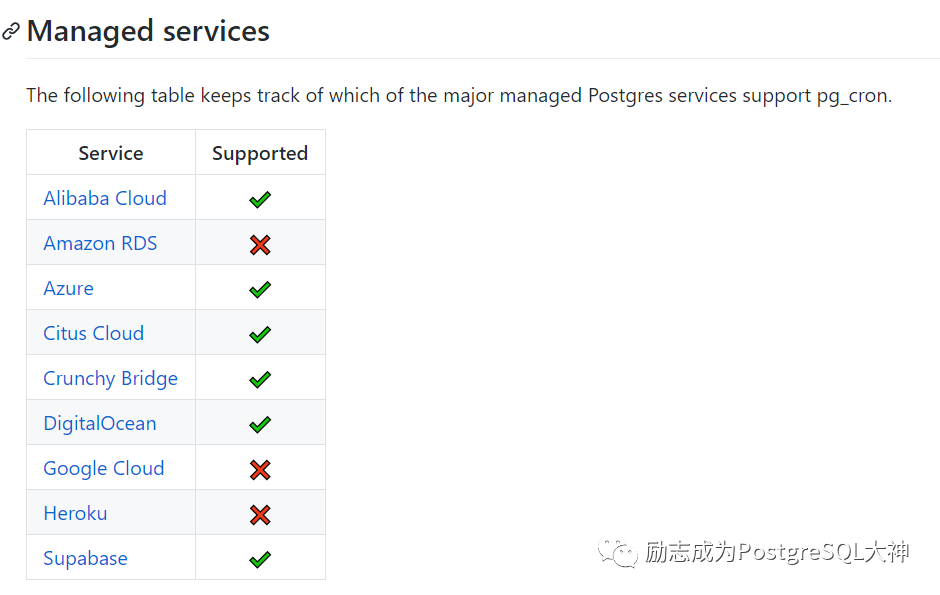
所以pg_cron,yyds!
