



自治事务
自治事务是在一个会话中独立地打开一个新事务,在其中处理不会影响到同一会话中的主事务,并且主事务出现回滚不会影响独立事务。
举例来说,某一应用程序开发了一个存储过程,该存储过程在内部是一个流程化作业,全部封装到一个事务中,当事务中的某个语句失败时,整个流程化作业都将失败。为了定位失败的流程化作业究竟是那一步出现了问题,客户需要在流程化作业中添加日志功能。但客户在再次运行后发现日志记录也无法记录,因为其中某个语句中出现故障,从而导致整个事务回滚。事务的原子性就是这样,要么全部成功,要么全部失败。为解决这一问题,Oracle这类数据库推出了自治事务Autonomous Transactions
。
PostgreSQL当前不支持此功能。有三种方法可以在当前事务中实现一个独立的事务。
使用dblink扩展,把要独立的语句使用dblink来执行。 通过使用pg_backgroundExtensions,新的后台进程可以打开,以实现自治事务。 可使用由社区开发的相关补丁,但此补丁时间有点久远,在新版PostgreSQL上不可用。
dblink实现自治事务
为了使用 dblink,首先需要安装 dblink扩展,然后用连接字符串测试它是否可以正常连接。
postgres=# create extension dblink;
CREATE EXTENSION
postgres=# SELECT dblink_connect('dbname=postgres user=postgres password=Sqlite123 host=127.0.0.1 port=5432');
 dblink_connect
----------------
 OK
(1 row)
下一步,我们将创建一个表来演示。
create table t1(id int,description varchar(30));
接着,创建一个函数,该函数里面封装了打开dblink插入数据的逻辑。
CREATE OR REPLACE FUNCTION insert_t1(v_id int,v_description varchar)
RETURNS void
AS
$BODY$
DECLARE
    v_sql text;
BEGIN
    PERFORM dblink_connect('conn','dbname=postgres user=postgres password=Sqlite123 host=127.0.0.1 port=5432');
    v_sql := format('INSERT INTO t1 VALUES (%L,%L)',v_id, v_description);
    PERFORM dblink_exec('myconn', v_sql);
    PERFORM dblink_disconnect('conn');
END;
$BODY$
LANGUAGE  plpgsql;
下一步我们将模拟一个完整的事务,向其内部插入数据,该函数也向其内部插入数据。全部插完之后模拟意外回滚,看效果如何。
postgres=# begin;
BEGIN
postgres=*# insert into t1 values(1,'aaa');
INSERT 0 1
postgres=*# SELECT insert_t1(2,'aaa');
 insert_t1
-----------

(1 row)

postgres=*# insert into t1 values(3,'aaa');
INSERT 0 1
postgres=*# rollback;
ROLLBACK
postgres=# select * from t1;
 id | description
----+-------------
  2 | aaa
(1 row)
因为回滚了,这里只看到一条数据,也就是函数中使用dblink方式插入的一条数据。这里实现了自治事务的功能。然后我们对函数进行修改,改为不使用 dblink插入。让我们看看效果。
CREATE OR REPLACE FUNCTION insert_t1_nodblink(v_id int,v_description varchar)
  RETURNS VOID AS
$BODY$
BEGIN
EXECUTE format('INSERT INTO t1(id,description) VALUES($1,$2);') using v_id, v_description;
END;
$BODY$
LANGUAGE plpgsql;

postgres=# select insert_t1_nodblink(9,'nodblink');
 insert_t1_nodblink
--------------------

(1 row)

postgres=# select * from t1;
 id | description
----+-------------
  9 | nodblink
(1 row)

postgres=# truncate table t1;
TRUNCATE TABLE
postgres=# begin;
BEGIN
postgres=*# insert into t1 values(1,'aaa');
INSERT 0 1
postgres=*# select insert_t1_nodblink(2,'aaa');
 insert_t1_nodblink
--------------------

(1 row)

postgres=*# insert into t1 values(3,'aaa');
INSERT 0 1
postgres=*# rollback;
ROLLBACK
postgres=# select * from t1;
 id | description
----+-------------
(0 rows)
如果使用非dblink函数,那么自治事务将无法实现。交易是保持原子性的,要么全部成功,要么全部失败。
pg_background实现自治事务
pg_background顾名思义就是直接fork一个新的进程来处理,然后告诉你正在执行进程的(PID)。它总共提供三个API,分别是:
正如其名称所示,pg_background是直接fork一个新进程,然后告诉您进程正在执行的(PID)。它总共提供三个API,分别是:
「pg_background_launch」 ,发送sql指令以及队列缓冲区的大小,返回后台work进程的ID。 「pg_background_result」,进程ID作为输入参数,返回后台work程序执行命令的结果。 「pg_background_detach」,进程ID作为输入参数,不取回结果直接释放work程序。
测试一下,首先下载编译,安装好插件。
git clone https://github.com/vibhorkum/pg_background.git
[postgres@centos8 ~]$ cd pg_background/
[postgres@centos8 pg_background]$ make
[postgres@centos8 pg_background]$ make install
[postgres@centos8 pg_background]$ psql
psql (13.1)
Type "help" for help.

postgres=# create extension pg_background;
CREATE EXTENSION
接着,创建一个封装pg_background操作的函数,该函数执行插入数据。
CREATE or REPLACE FUNCTION insert_t1_backgroud (v_id int,v_description varchar)
  RETURNS VOID
AS $BODY$
DECLARE
  v_sql text;
BEGIN
 v_sql := format('INSERT INTO t1 VALUES (%L,%L)',v_id, v_description);
 PERFORM * FROM pg_background_result(pg_background_launch(v_sql)) AS (result TEXT);
END;
$BODY$ LANGUAGE plpgsql;

postgres=# truncate table t1;
TRUNCATE TABLE
postgres=# select insert_t1_backgroud(1,'aaa');
 insert_t1_backgroud
---------------------

(1 row)

postgres=# select * from t1;
 id | description
----+-------------
  1 | aaa
(1 row)
这个函数创建成功了,那么接下来是模拟自治事务。
postgres=# truncate table t1;
TRUNCATE TABLE
postgres=# begin;
BEGIN
postgres=*# insert into t1 values(1,'aaa');
INSERT 0 1
postgres=*# insert into t1 values(2,'aaa');
INSERT 0 1
postgres=*# select insert_t1_backgroud(3,'aaa');
 insert_t1_backgroud
---------------------

(1 row)

postgres=*# rollback;
ROLLBACK
postgres=# select * from t1;
 id | description
----+-------------
  3 | aaa
(1 row)
可见,使用pg_background也可以实现自治事务。
自治事务补丁
此补丁目前只能用于低版本,而无法用于高版本的PG。有意者可参考社区交流贴。
社区交流:https://www.postgresql.org/message-id/659a2fce-b6ee-06de-05c0-c8ed6a01979e@2ndquadrant.com
补丁地址:https://www.postgresql.org/message-id/attachment/45863/autonomous.patch
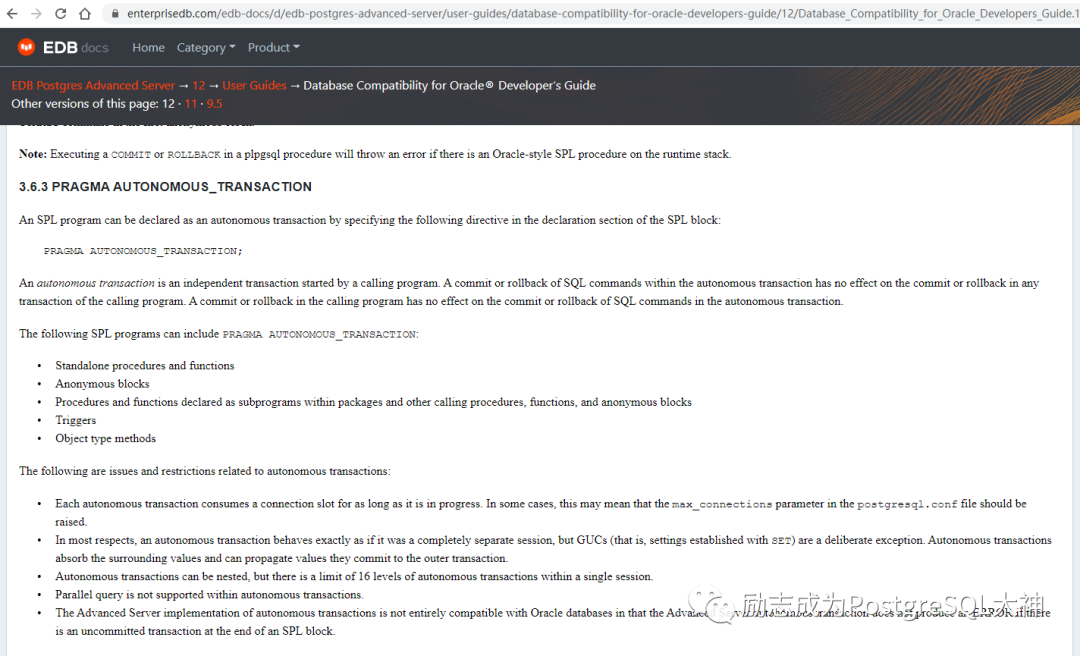
EDB有自治事务的功能,可以参考一下。
选哪个?
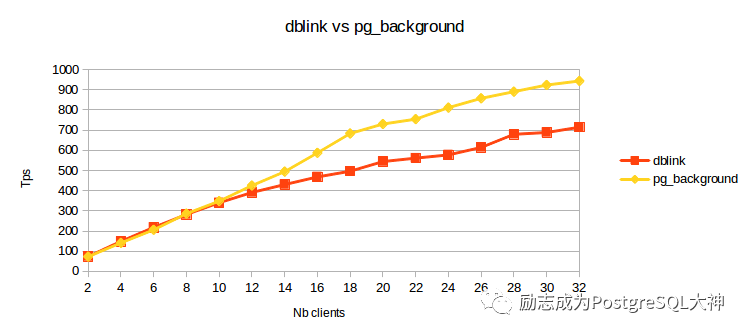
对于PostgreSQL12个以上的版本,建议选择pg_background。经过基准测试,它的效率要好一些。图片来源于
https://blog.dalibo.com/2016/08/19/Autonoumous_transactions_support_in_PostgreSQL.html#:~:text=An%20autonomous%20transaction%20is%20a,independently%20from%20the%20calling%20transaction.
参考链接
1.Migrating Oracle Autonomous Transactions to PostgreSQLhttps://aws.amazon.com/blogs/database/migrating-oracle-autonomous-transactions-to-postgresql/
2.Autonomous transaction support in PostgreSQLhttps://blog.dalibo.com/2016/08/19/Autonoumous_transactions_support_in_PostgreSQL.html#:~:text=An%20autonomous%20transaction%20is%20a,independently%20from%20the%20calling%20transaction
3.在 PostgreSQL 9.6 裡面實作 Autonomous Transactionhttps://ravenonhill.blogspot.com/2017/10/postgresql-96-autonomous-transaction.html
