概述
Percona XtraDB Cluster (PXC)是Percona旗下数据库集群产品,本文将介绍MySQL三主可写可读相互同步集群部署及Keepalived提供访问负载均衡部署过程。
架构图
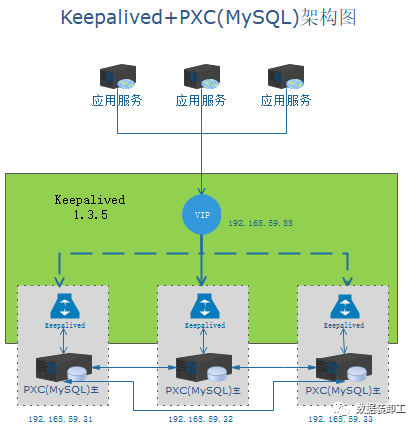
部署服务器信息
| 服务 | 主机名 | IP地址 | 操作系统 | 安装服务 |
| 主节点 | node5 | 192.168.59.31 | CentOS 7.6 | Percona XtraDB Cluster 8.0.28(MySQL)、Keepalived 1.3.5 |
| 主节点 | node6 | 192.168.59.32 | CentOS 7.6 | Percona XtraDB Cluster 8.0.28(MySQL)、Keepalived 1.3.5 |
| 主节点 | node7 | 192.168.59.33 | CentOS 7.6 | Percona XtraDB Cluster 8.0.28(MySQL)、Keepalived 1.3.5 |
环境准备
以下操作在三个节点上都执行
1.关闭防火墙和seLinux
[root@node5 ~]# systemctl disable firewalld.service
Removed symlink /etc/systemd/system/multi-user.target.wants/firewalld.service.
Removed symlink /etc/systemd/system/dbus-org.fedoraproject.FirewallD1.service.
[root@node5 ~]# systemctl stop firewalld.service
[root@node5 ~]# systemctl status firewalld.service
● firewalld.service - firewalld - dynamic firewall daemon
   Loaded: loaded (/usr/lib/systemd/system/firewalld.service; disabled; vendor preset: enabled)
   Active: inactive (dead)
     Docs: man:firewalld(1)

Sep 08 16:42:16 node5 systemd[1]: Starting firewalld - dynamic firewall daemon...
Sep 08 16:42:18 node5 systemd[1]: Started firewalld - dynamic firewall daemon.
Sep 08 16:45:06 node5 systemd[1]: Stopping firewalld - dynamic firewall daemon...
Sep 08 16:45:06 node5 systemd[1]: Stopped firewalld - dynamic firewall daemon.
[root@node5 ~]# sed -i '/^SELINUX=/d' /etc/selinux/config
[root@node5 ~]# echo "SELINUX=disabled" >> /etc/selinux/config
[root@node5 ~]# cat /etc/selinux/config|grep "SELINUX=disabled"
SELINUX=disabled
2.配置/etc/hosts
[root@node5 ~]# vi /etc/hosts
[root@node5 ~]# cat /etc/hosts
127.0.0.1   localhost localhost.localdomain localhost4 localhost4.localdomain4
::1         localhost localhost.localdomain localhost6 localhost6.localdomain6
192.168.59.31 node5
192.168.59.32 node6
192.168.59.33 node7
Percona XtraDB Cluster安装过程
使用yum方式安装Percona XtraDB Cluster,以下安装过程在三台服务器上都执行。
1.更新yum源为最新地址
yum install -y https://repo.percona.com/yum/percona-release-latest.noarch.rpm
[root@node5 ~]# yum install -y https://repo.percona.com/yum/percona-release-latest.noarch.rpm
Loaded plugins: fastestmirror
percona-release-latest.noarch.rpm                                                                                                                                                 |  20 kB  00:00:00
Examining /var/tmp/yum-root-Mlh1Lb/percona-release-latest.noarch.rpm: percona-release-1.0-27.noarch
Marking /var/tmp/yum-root-Mlh1Lb/percona-release-latest.noarch.rpm to be installed
Resolving Dependencies
--> Running transaction check
---> Package percona-release.noarch 0:1.0-27 will be installed
--> Finished Dependency Resolution
Dependencies Resolved
=========================================================================================================================================================================================================
 Package                                          Arch                                    Version                                  Repository                                                       Size
=========================================================================================================================================================================================================
Installing:
 percona-release                                  noarch                                  1.0-27                                   /percona-release-latest.noarch                                   32 k
Transaction Summary
=========================================================================================================================================================================================================
Install  1 Package
Total size: 32 k
Installed size: 32 k
Downloading packages:
Running transaction check
Running transaction test
Transaction test succeeded
Running transaction
  Installing : percona-release-1.0-27.noarch                                                                                                                                                         1/1
* Enabling the Percona Original repository
<*> All done!
* Enabling the Percona Release repository
<*> All done!
The percona-release package now contains a percona-release script that can enable additional repositories for our newer products.
For example, to enable the Percona Server 8.0 repository use:
  percona-release setup ps80
Note: To avoid conflicts with older product versions, the percona-release setup command may disable our original repository for some products.
For more information, please visit:
  https://www.percona.com/doc/percona-repo-config/percona-release.html
  Verifying  : percona-release-1.0-27.noarch                                                                                                                                                         1/1
Installed:
  percona-release.noarch 0:1.0-27
Complete!
2.设置需要安装的版本
使用percona-release setup pxc-80 命令进行设置
[root@node5 ~]# yum install percona-xtradb-cluster
Loaded plugins: fastestmirror
Loading mirror speeds from cached hostfile
 * base: mirror.lzu.edu.cn
 * extras: mirrors.bupt.edu.cn
 * updates: mirror.lzu.edu.cn
No package percona-xtradb-cluster available.
Error: Nothing to do
[root@node5 ~]# percona-release setup pxc-80
* Disabling all Percona Repositories
* Enabling the Percona XtraDB Cluster 8.0 repository
* Enabling the Percona Tools repository
<*> All done!
3.使用yum install percona-xtradb-cluster命令安装
[root@node5 ~]# yum install percona-xtradb-cluster
Loaded plugins: fastestmirror
Loading mirror speeds from cached hostfile
* base: mirror.lzu.edu.cn
* extras: mirrors.bupt.edu.cn
* updates: mirror.lzu.edu.cn
pxc-80-release-x86_64 | 2.9 kB 00:00:00
tools-release-x86_64 | 2.9 kB 00:00:00
(1/2): pxc-80-release-x86_64/7/primary_db | 104 kB 00:00:00
(2/2): tools-release-x86_64/7/primary_db | 131 kB 00:00:00
Resolving Dependencies
--> Running transaction check
---> Package percona-xtradb-cluster.x86_64 0:8.0.28-19.1.el7 will be installed
--> Processing Dependency: percona-xtradb-cluster-client = 8.0.28-19.1.el7 for package: percona-xtradb-cluster-8.0.28-19.1.el7.x86_64
--> Processing Dependency: percona-xtradb-cluster-server = 8.0.28-19.1.el7 for package: percona-xtradb-cluster-8.0.28-19.1.el7.x86_64
--> Running transaction check
.
..
...
---> Package perl-HTTP-Tiny.noarch 0:0.033-3.el7 will be installed
---> Package perl-parent.noarch 1:0.225-244.el7 will be installed
--> Finished Dependency Resolution
Dependencies Resolved
=========================================================================================================================================================================================================
Package Arch Version Repository Size
=========================================================================================================================================================================================================
Installing:
percona-xtradb-cluster x86_64 8.0.28-19.1.el7 pxc-80-release-x86_64 28 k
percona-xtradb-cluster-shared x86_64 8.0.28-19.1.el7 pxc-80-release-x86_64 1.5 M
replacing mariadb-libs.x86_64 1:5.5.60-1.el7_5
percona-xtradb-cluster-shared-compat x86_64 8.0.28-19.1.el7 pxc-80-release-x86_64 1.1 M
replacing mariadb-libs.x86_64 1:5.5.60-1.el7_5
Installing for dependencies:
audit-libs-python x86_64 2.8.5-4.el7 base 76 k
checkpolicy x86_64 2.5-8.el7 base 295 k
libcgroup x86_64 0.41-21.el7 base 66 k
libev x86_64 4.15-7.el7 extras 44 k
libsemanage-python x86_64 2.5-14.el7 base 113 k
percona-xtradb-cluster-client x86_64 8.0.28-19.1.el7 pxc-80-release-x86_64 13 M
percona-xtradb-cluster-server x86_64 8.0.28-19.1.el7 pxc-80-release-x86_64 97 M
perl x86_64 4:5.16.3-299.el7_9 updates 8.0 M
perl-Carp noarch 1.26-244.el7 base 19 k
perl-Compress-Raw-Bzip2 x86_64 2.061-3.el7 base 32 k
perl-Compress-Raw-Zlib x86_64 1:2.061-4.el7 base 57 k
perl-DBD-MySQL x86_64 4.023-6.el7 base 140 k
perl-DBI x86_64 1.627-4.el7 base 802 k
perl-Data-Dumper x86_64 2.145-3.el7 base 47 k
perl-Encode x86_64 2.51-7.el7 base 1.5 M
perl-Exporter noarch 5.68-3.el7 base 28 k
perl-File-Path noarch 2.09-2.el7 base 26 k
perl-File-Temp noarch 0.23.01-3.el7 base 56 k
perl-Filter x86_64 1.49-3.el7 base 76 k
perl-Getopt-Long noarch 2.40-3.el7 base 56 k
perl-HTTP-Tiny noarch 0.033-3.el7 base 38 k
perl-IO-Compress noarch 2.061-2.el7 base 260 k
perl-Net-Daemon noarch 0.48-5.el7 base 51 k
perl-PathTools x86_64 3.40-5.el7 base 82 k
perl-PlRPC noarch 0.2020-14.el7 base 36 k
perl-Pod-Escapes noarch 1:1.04-299.el7_9 updates 52 k
perl-Pod-Perldoc noarch 3.20-4.el7 base 87 k
perl-Pod-Simple noarch 1:3.28-4.el7 base 216 k
perl-Pod-Usage noarch 1.63-3.el7 base 27 k
perl-Scalar-List-Utils x86_64 1.27-248.el7 base 36 k
perl-Socket x86_64 2.010-5.el7 base 49 k
perl-Storable x86_64 2.45-3.el7 base 77 k
perl-Text-ParseWords noarch 3.29-4.el7 base 14 k
perl-Time-HiRes x86_64 4:1.9725-3.el7 base 45 k
perl-Time-Local noarch 1.2300-2.el7 base 24 k
perl-constant noarch 1.27-2.el7 base 19 k
perl-libs x86_64 4:5.16.3-299.el7_9 updates 690 k
perl-macros x86_64 4:5.16.3-299.el7_9 updates 44 k
perl-parent noarch 1:0.225-244.el7 base 12 k
perl-podlators noarch 2.5.1-3.el7 base 112 k
perl-threads x86_64 1.87-4.el7 base 49 k
perl-threads-shared x86_64 1.43-6.el7 base 39 k
policycoreutils-python x86_64 2.5-34.el7 base 457 k
python-IPy noarch 0.75-6.el7 base 32 k
qpress x86_64 11-1.el7 tools-release-x86_64 32 k
setools-libs x86_64 3.3.8-4.el7 base 620 k
socat x86_64 1.7.3.2-2.el7 base 290 k
Updating for dependencies:
audit x86_64 2.8.5-4.el7 base 256 k
audit-libs x86_64 2.8.5-4.el7 base 102 k
policycoreutils x86_64 2.5-34.el7 base 917 k
Transaction Summary
=========================================================================================================================================================================================================
Install 3 Packages (+47 Dependent packages)
Upgrade ( 3 Dependent packages)
Total download size: 128 M
Is this ok [y/d/N]: y
Downloading packages:
Delta RPMs disabled because /usr/bin/applydeltarpm not installed.
(1/53): audit-libs-2.8.5-4.el7.x86_64.rpm | 102 kB 00:00:00
(2/53): audit-2.8.5-4.el7.x86_64.rpm | 256 kB 00:00:00
(3/53): audit-libs-python-2.8.5-4.el7.x86_64.rpm | 76 kB 00:00:00
.
..
...
(51/53): qpress-11-1.el7.x86_64.rpm | 32 kB 00:00:00
(52/53): socat-1.7.3.2-2.el7.x86_64.rpm | 290 kB 00:00:00
(53/53): percona-xtradb-cluster-server-8.0.28-19.1.el7.x86_64.rpm | 97 MB 00:12:14
---------------------------------------------------------------------------------------------------------------------------------------------------------------------------------------------------------
Total 178 kB/s | 128 MB 00:12:15
Retrieving key from file:///etc/pki/rpm-gpg/PERCONA-PACKAGING-KEY
Importing GPG key 0x8507EFA5:
Userid : "Percona MySQL Development Team (Packaging key) <mysql-dev@percona.com>"
Fingerprint: 4d1b b29d 63d9 8e42 2b21 13b1 9334 a25f 8507 efa5
Package : percona-release-1.0-27.noarch (installed)
From : /etc/pki/rpm-gpg/PERCONA-PACKAGING-KEY
Is this ok [y/N]: y
Running transaction check
Running transaction test
Transaction test succeeded
Running transaction
Updating : audit-libs-2.8.5-4.el7.x86_64 1/57
Updating : policycoreutils-2.5-34.el7.x86_64 2/57
Installing : percona-xtradb-cluster-shared-compat-8.0.28-19.1.el7.x86_64 3/57
.
..
... 49/57
Installing : policycoreutils-python-2.5-34.el7.x86_64 50/57
Installing : percona-xtradb-cluster-server-8.0.28-19.1.el7.x86_64 51/57
Percona XtraDB Cluster is distributed with several useful UDFs from Percona Toolkit.
Run the following commands to create these functions:
mysql -e "CREATE FUNCTION fnv1a_64 RETURNS INTEGER SONAME 'libfnv1a_udf.so'"
mysql -e "CREATE FUNCTION fnv_64 RETURNS INTEGER SONAME 'libfnv_udf.so'"
mysql -e "CREATE FUNCTION murmur_hash RETURNS INTEGER SONAME 'libmurmur_udf.so'"
See http://www.percona.com/doc/percona-server/8.0/management/udf_percona_toolkit.html for more details
Installing : percona-xtradb-cluster-8.0.28-19.1.el7.x86_64 52/57
Updating : audit-2.8.5-4.el7.x86_64 53/57
Cleanup : audit-2.8.4-4.el7.x86_64 54/57
Cleanup : policycoreutils-2.5-29.el7.x86_64 55/57
Cleanup : audit-libs-2.8.4-4.el7.x86_64 56/57
Erasing : 1:mariadb-libs-5.5.60-1.el7_5.x86_64 57/57
Verifying : perl-HTTP-Tiny-0.033-3.el7.noarch 1/57
Verifying : perl-IO-Compress-2.061-2.el7.noarch 2/57
.
..
... 56/57
Verifying : audit-libs-2.8.4-4.el7.x86_64 57/57
Installed:
percona-xtradb-cluster.x86_64 0:8.0.28-19.1.el7 percona-xtradb-cluster-shared.x86_64 0:8.0.28-19.1.el7 percona-xtradb-cluster-shared-compat.x86_64 0:8.0.28-19.1.el7
Dependency Installed:
audit-libs-python.x86_64 0:2.8.5-4.el7 checkpolicy.x86_64 0:2.5-8.el7 libcgroup.x86_64 0:0.41-21.el7 libev.x86_64 0:4.15-7.el7
libsemanage-python.x86_64 0:2.5-14.el7 percona-xtradb-cluster-client.x86_64 0:8.0.28-19.1.el7 percona-xtradb-cluster-server.x86_64 0:8.0.28-19.1.el7 perl.x86_64 4:5.16.3-299.el7_9
...
qpress.x86_64 0:11-1.el7 setools-libs.x86_64 0:3.3.8-4.el7 socat.x86_64 0:1.7.3.2-2.el7
Dependency Updated:
audit.x86_64 0:2.8.5-4.el7 audit-libs.x86_64 0:2.8.5-4.el7 policycoreutils.x86_64 0:2.5-34.el7
Replaced:
mariadb-libs.x86_64 1:5.5.60-1.el7_5
Complete! 4.所有机器安装完成后,启动mysql
[root@node5 etc]# cd /var/lib/mysql
[root@node5 mysql]# ls
[root@node5 mysql]# systemctl start mysql
[root@node5 mysql]# ls
auto.cnf       ca-key.pem       client-key.pem  gvwstate.dat       ib_buffer_pool  ib_logfile1   mysql       mysql.sock.lock   performance_schema  server-cert.pem  undo_001
binlog.000001  ca.pem           galera.cache    #ib_16384_0.dblwr  ibdata1         ibtmp1        mysql.ibd   mysqlx.sock       private_key.pem     server-key.pem   undo_002
binlog.index   client-cert.pem  grastate.dat    #ib_16384_1.dblwr  ib_logfile0     #innodb_temp  mysql.sock  mysqlx.sock.lock  public_key.pem      sys
[root@node5 mysql]# cat /var/log/mysqld.log


2022-09-08T09:37:32.641514Z 0 [Warning] [MY-011068] [Server] The syntax 'wsrep_slave_threads' is deprecated and will be removed in a future release. Please use wsrep_applier_threads instead.
2022-09-08T09:37:32.641615Z 0 [Warning] [MY-000000] [WSREP] Node is running in bootstrap/initialize mode. Disabling pxc_strict_mode checks
2022-09-08T09:37:32.642805Z 0 [System] [MY-013169] [Server] /usr/sbin/mysqld (mysqld 8.0.28-19.1) initializing of server in progress as process 17633
2022-09-08T09:37:32.646253Z 0 [Note] [MY-000000] [Galera] Loading provider none initial position: 00000000-0000-0000-0000-000000000000:-1
2022-09-08T09:37:32.646356Z 0 [Note] [MY-000000] [Galera] wsrep_load(): loading provider library 'none'
2022-09-08T09:37:32.653272Z 1 [System] [MY-013576] [InnoDB] InnoDB initialization has started.
2022-09-08T09:37:33.991661Z 1 [System] [MY-013577] [InnoDB] InnoDB initialization has ended.
2022-09-08T09:37:35.028540Z 0 [Warning] [MY-010161] [Server] You need to use --log-bin to make --binlog-expire-logs-seconds work.
2022-09-08T09:37:35.028919Z 0 [Warning] [MY-013829] [Server] Missing data directory for ICU regular expressions: /usr/lib64/mysql/private/.
2022-09-08T09:37:35.744923Z 6 [Note] [MY-010454] [Server] A temporary password is generated for root@localhost: BhyO4A5g,rgs
2022-09-08T09:37:36.765773Z 6 [Note] [MY-000000] [WSREP] MDL conflict db=sys table=sys_config ticket=1 solved by abort
Log of wsrep recovery (--wsrep-recover):
 INFO: WSREP: Running position recovery with --log_error='/var/lib/mysql/wsrep_recovery_verbose.uZTCkK' --pid-file='/var/lib/mysql/node5-recover.pid'
 INFO: WSREP: Recovered position 00000000-0000-0000-0000-000000000000:-1
2022-09-08T09:37:41.850387Z 0 [Warning] [MY-011068] [Server] The syntax 'wsrep_slave_threads' is deprecated and will be removed in a future release. Please use wsrep_applier_threads instead.
2022-09-08T09:37:41.853294Z 0 [System] [MY-010116] [Server] /usr/sbin/mysqld (mysqld 8.0.28-19.1) starting as process 17772
2022-09-08T09:37:41.856644Z 0 [Warning] [MY-013595] [Server] Failed to initialize TLS for channel: mysql_main. See below for the description of exact issue.
2022-09-08T09:37:41.856662Z 0 [Warning] [MY-010069] [Server] Failed to set up SSL because of the following SSL library error: SSL_CTX_new failed
2022-09-08T09:37:41.856740Z 0 [Note] [MY-000000] [Galera] Loading provider /usr/lib64/galera4/libgalera_smm.so initial position: 00000000-0000-0000-0000-000000000000:-1
2022-09-08T09:37:41.856773Z 0 [Note] [MY-000000] [Galera] wsrep_load(): loading provider library '/usr/lib64/galera4/libgalera_smm.so'
2022-09-08T09:37:41.858847Z 0 [Note] [MY-000000] [Galera] wsrep_load(): Galera 4.11(a9008fc) by Codership Oy <info@codership.com> (modified by Percona <https://percona.com/>) loaded successfully.
2022-09-08T09:37:41.858932Z 0 [Note] [MY-000000] [Galera] CRC-32C: using 64-bit x86 acceleration.
2022-09-08T09:37:41.859767Z 0 [Warning] [MY-000000] [Galera] Could not open state file for reading: '/var/lib/mysql//grastate.dat'
2022-09-08T09:37:41.859790Z 0 [Warning] [MY-000000] [Galera] No persistent state found. Bootstraping with default state
2022-09-08T09:37:41.859862Z 0 [Note] [MY-000000] [Galera] Found saved state: 00000000-0000-0000-0000-000000000000:-1, safe_to_bootstrap: 1
2022-09-08T09:37:41.860826Z 0 [Note] [MY-000000] [Galera] GCache DEBUG: opened preamble:
Version: 0
UUID: 00000000-0000-0000-0000-000000000000
Seqno: -1 - -1
Offset: -1
Synced: 0
2022-09-08T09:37:41.860872Z 0 [Note] [MY-000000] [Galera] Skipped GCache ring buffer recovery: could not determine history UUID.
2022-09-08T09:37:41.862042Z 0 [Warning] [MY-000000] [Galera] Option 'gcs.fc_master_slave' is deprecated and will be removed in the future versions, please use 'gcs.fc_single_primary' instead.
2022-09-08T09:37:41.862718Z 0 [Note] [MY-000000] [Galera] Passing config to GCS: base_dir = /var/lib/mysql/; base_host = 192.168.59.31; base_port = 4567; cert.log_conflicts = no; cert.optimistic_pa = no; debug = no; evs.auto_evict = 0; evs.delay_margin = PT1S; evs.delayed_keep_period = PT30S; evs.inactive_check_period = PT0.5S; evs.inactive_timeout = PT15S; evs.join_retrans_period = PT1S; evs.max_install_timeouts = 3; evs.send_window = 10; evs.stats_report_period = PT1M; evs.suspect_timeout = PT5S; evs.user_send_window = 4; evs.view_forget_timeout = PT24H; gcache.dir = /var/lib/mysql/; gcache.freeze_purge_at_seqno = -1; gcache.keep_pages_count = 0; gcache.keep_pages_size = 0; gcache.mem_size = 0; gcache.name = galera.cache; gcache.page_size = 128M; gcache.recover = yes; gcache.size = 128M; gcomm.thread_prio = ; gcs.fc_debug = 0; gcs.fc_factor = 1.0; gcs.fc_limit = 100; gcs.fc_master_slave = no; gcs.fc_single_primary = no; gcs.max_packet_size = 64500; gcs.max_throttle = 0.25; gcs.recv_q_hard_limit = 9223372036854775807; gcs.recv_q_soft_limit = 0.25; gcs.sync_donor = no; gmcast.segment = 0; gmcast.version = 0; pc.announce_timeout = PT3S; pc.checksum = false; pc.ignore_quorum = false; pc.ignore_sb = false; pc.npvo = false; pc.recovery = true; pc.version = 0; pc.wait_prim = true; pc.wait_prim_timeout = PT30S; pc.weight = 1; protonet.backend = asio; protonet.version = 0; repl.causal_read_timeout = PT30S; repl.commit_order = 3; repl.key_format = FLAT8; repl.max_ws_size = 2147483647; repl.proto_max = 10; socket.checksum = 2; socket.recv_buf_size = auto; socket.send_buf_size = auto; socket.ssl = YES; socket.ssl_ca = ca.pem; socket.ssl_cert = server-cert.pem; socket.ssl_cipher = ; socket.ssl_compression = YES; socket.ssl_key = server-key.pem; socket.ssl_reload = 1;
2022-09-08T09:37:41.871681Z 0 [Note] [MY-000000] [WSREP] Starting replication
2022-09-08T09:37:41.871738Z 0 [Note] [MY-000000] [Galera] Connecting with bootstrap option: 1
2022-09-08T09:37:41.871775Z 0 [Note] [MY-000000] [Galera] Setting GCS initial position to 00000000-0000-0000-0000-000000000000:-1
2022-09-08T09:37:41.871852Z 0 [Note] [MY-000000] [Galera] protonet asio version 0
2022-09-08T09:37:41.872216Z 0 [Note] [MY-000000] [Galera] Using CRC-32C for message checksums.
2022-09-08T09:37:41.872254Z 0 [Note] [MY-000000] [Galera] backend: asio
2022-09-08T09:37:41.872328Z 0 [Note] [MY-000000] [Galera] gcomm thread scheduling priority set to other:0
2022-09-08T09:37:41.872459Z 0 [Warning] [MY-000000] [Galera] Fail to access the file (/var/lib/mysql//gvwstate.dat) error (No such file or directory). It is possible if node is booting for first time or re-booting after a graceful shutdown
2022-09-08T09:37:41.872481Z 0 [Note] [MY-000000] [Galera] Restoring primary-component from disk failed. Either node is booting for first time or re-booting after a graceful shutdown
2022-09-08T09:37:41.872709Z 0 [Note] [MY-000000] [Galera] GMCast version 0
2022-09-08T09:37:41.872832Z 0 [Note] [MY-000000] [Galera] (e29a8361-9fea, 'ssl://0.0.0.0:4567') listening at ssl://0.0.0.0:4567
2022-09-08T09:37:41.872858Z 0 [Note] [MY-000000] [Galera] (e29a8361-9fea, 'ssl://0.0.0.0:4567') multicast: , ttl: 1
2022-09-08T09:37:41.873283Z 0 [Note] [MY-000000] [Galera] EVS version 1
2022-09-08T09:37:41.873419Z 0 [Note] [MY-000000] [Galera] gcomm: bootstrapping new group 'pxc-cluster'
2022-09-08T09:37:41.873465Z 0 [Note] [MY-000000] [Galera] start_prim is enabled, turn off pc_recovery
2022-09-08T09:37:41.873741Z 0 [Note] [MY-000000] [Galera] EVS version upgrade 0 -> 1
2022-09-08T09:37:41.873785Z 0 [Note] [MY-000000] [Galera] PC protocol upgrade 0 -> 1
2022-09-08T09:37:41.873852Z 0 [Note] [MY-000000] [Galera] Node e29a8361-9fea state primary
2022-09-08T09:37:41.873917Z 0 [Note] [MY-000000] [Galera] Current view of cluster as seen by this node
view (view_id(PRIM,e29a8361-9fea,1)
memb {
  e29a8361-9fea,0
  }
joined {
  }
left {
  }
partitioned {
  }
)
2022-09-08T09:37:41.873949Z 0 [Note] [MY-000000] [Galera] Save the discovered primary-component to disk
2022-09-08T09:37:41.874983Z 0 [Note] [MY-000000] [Galera] gcomm: connected
2022-09-08T09:37:41.875018Z 0 [Note] [MY-000000] [Galera] Changing maximum packet size to 64500, resulting msg size: 32636
2022-09-08T09:37:41.875070Z 0 [Note] [MY-000000] [Galera] Shifting CLOSED -> OPEN (TO: 0)
2022-09-08T09:37:41.875093Z 0 [Note] [MY-000000] [Galera] Opened channel 'pxc-cluster'
2022-09-08T09:37:41.875297Z 0 [Note] [MY-000000] [Galera] New COMPONENT: primary = yes, bootstrap = no, my_idx = 0, memb_num = 1
2022-09-08T09:37:41.875416Z 0 [Note] [MY-000000] [Galera] Starting new group from scratch: e29af29f-2f59-11ed-968e-52cb9a992cad
2022-09-08T09:37:41.875496Z 0 [Note] [MY-000000] [Galera] STATE_EXCHANGE: sent state UUID: e29af553-2f59-11ed-bb74-e6ddddd60d48
2022-09-08T09:37:41.875533Z 0 [Note] [MY-000000] [Galera] STATE EXCHANGE: sent state msg: e29af553-2f59-11ed-bb74-e6ddddd60d48
2022-09-08T09:37:41.875567Z 0 [Note] [MY-000000] [Galera] STATE EXCHANGE: got state msg: e29af553-2f59-11ed-bb74-e6ddddd60d48 from 0 (node5)
2022-09-08T09:37:41.875595Z 0 [Note] [MY-000000] [Galera] Quorum results:
  version    = 6,
  component  = PRIMARY,
  conf_id    = 0,
  members    = 1/1 (primary/total),
  act_id     = 0,
  last_appl. = 0,
  protocols  = 2/10/4 (gcs/repl/appl),
  vote policy= 0,
  group UUID = e29af29f-2f59-11ed-968e-52cb9a992cad
2022-09-08T09:37:41.875652Z 0 [Note] [MY-000000] [Galera] Flow-control interval: [100, 100]
2022-09-08T09:37:41.875678Z 0 [Note] [MY-000000] [Galera] Restored state OPEN -> JOINED (1)
2022-09-08T09:37:41.875722Z 0 [Note] [MY-000000] [Galera] Member 0.0 (node5) synced with group.
2022-09-08T09:37:41.875743Z 0 [Note] [MY-000000] [Galera] Shifting JOINED -> SYNCED (TO: 1)
2022-09-08T09:37:41.875985Z 1 [Note] [MY-000000] [WSREP] Starting rollbacker thread 1
2022-09-08T09:37:41.876174Z 2 [Note] [MY-000000] [WSREP] Starting applier thread 2
2022-09-08T09:37:41.876236Z 2 [Note] [MY-000000] [Galera] ####### processing CC 1, local, ordered
2022-09-08T09:37:41.876272Z 2 [Note] [MY-000000] [Galera] Maybe drain monitors from -1 upto current CC event 1 upto:-1
2022-09-08T09:37:41.876293Z 2 [Note] [MY-000000] [Galera] Drain monitors from -1 up to -1
2022-09-08T09:37:41.876328Z 2 [Note] [MY-000000] [Galera] Process first view: e29af29f-2f59-11ed-968e-52cb9a992cad my uuid: e29a8361-2f59-11ed-9fea-dae805a22c26
2022-09-08T09:37:41.876365Z 2 [Note] [MY-000000] [Galera] Server node5 connected to cluster at position e29af29f-2f59-11ed-968e-52cb9a992cad:1 with ID e29a8361-2f59-11ed-9fea-dae805a22c26
2022-09-08T09:37:41.876392Z 2 [Note] [MY-000000] [WSREP] Server status change disconnected -> connected
2022-09-08T09:37:41.876420Z 2 [Note] [MY-000000] [WSREP] wsrep_notify_cmd is not defined, skipping notification.
2022-09-08T09:37:41.876463Z 2 [Note] [MY-000000] [Galera] ####### My UUID: e29a8361-2f59-11ed-9fea-dae805a22c26
2022-09-08T09:37:41.876495Z 2 [Note] [MY-000000] [Galera] Cert index reset to 00000000-0000-0000-0000-000000000000:-1 (proto: 10), state transfer needed: no
2022-09-08T09:37:41.876562Z 0 [Note] [MY-000000] [Galera] Service thread queue flushed.
2022-09-08T09:37:41.876601Z 2 [Note] [MY-000000] [Galera] ####### Assign initial position for certification: 00000000-0000-0000-0000-000000000000:-1, protocol version: -1
2022-09-08T09:37:41.876625Z 2 [Note] [MY-000000] [Galera] REPL Protocols: 10 (5)
2022-09-08T09:37:41.876651Z 2 [Note] [MY-000000] [Galera] ####### Adjusting cert position: -1 -> 1
2022-09-08T09:37:41.876679Z 0 [Note] [MY-000000] [Galera] Service thread queue flushed.
2022-09-08T09:37:41.877421Z 2 [Note] [MY-000000] [Galera] GCache history reset: 00000000-0000-0000-0000-000000000000:0 -> e29af29f-2f59-11ed-968e-52cb9a992cad:0
2022-09-08T09:37:41.878498Z 2 [Note] [MY-000000] [Galera] ================================================
View:
  id: e29af29f-2f59-11ed-968e-52cb9a992cad:1
  status: primary
  protocol_version: 4
  capabilities: MULTI-MASTER, CERTIFICATION, PARALLEL_APPLYING, REPLAY, ISOLATION, PAUSE, CAUSAL_READ, INCREMENTAL_WS, UNORDERED, PREORDERED, STREAMING, NBO
  final: no
  own_index: 0
  members(1):
  0: e29a8361-2f59-11ed-9fea-dae805a22c26, node5
=================================================
2022-09-08T09:37:41.878527Z 2 [Note] [MY-000000] [WSREP] Server status change connected -> joiner
2022-09-08T09:37:41.878549Z 2 [Note] [MY-000000] [WSREP] wsrep_notify_cmd is not defined, skipping notification.
2022-09-08T09:37:41.878571Z 2 [Note] [MY-000000] [WSREP] Server status change joiner -> initializing
2022-09-08T09:37:41.878594Z 2 [Note] [MY-000000] [WSREP] wsrep_notify_cmd is not defined, skipping notification.
2022-09-08T09:37:41.879445Z 0 [Warning] [MY-013245] [Server] The SSL library function CRYPTO_set_mem_functions failed. This is typically caused by the SSL library already being used. As a result the SSL memory allocation will not be instrumented.
2022-09-08T09:37:41.883926Z 3 [System] [MY-013576] [InnoDB] InnoDB initialization has started.
2022-09-08T09:37:42.519360Z 3 [System] [MY-013577] [InnoDB] InnoDB initialization has ended.
2022-09-08T09:37:42.687705Z 3 [Note] [MY-000000] [WSREP] wsrep_init_schema_and_SR (nil)
2022-09-08T09:37:42.696282Z 3 [System] [MY-000000] [WSREP] PXC upgrade completed successfully
2022-09-08T09:37:42.880327Z 0 [Warning] [MY-013829] [Server] Missing data directory for ICU regular expressions: /usr/lib64/mysql/private/.
2022-09-08T09:37:42.881952Z 0 [Warning] [MY-010068] [Server] CA certificate ca.pem is self signed.
2022-09-08T09:37:42.882001Z 0 [System] [MY-013602] [Server] Channel mysql_main configured to support TLS. Encrypted connections are now supported for this channel.
2022-09-08T09:37:42.904400Z 0 [Note] [MY-000000] [WSREP] Initialized wsrep sidno 2
2022-09-08T09:37:42.904442Z 0 [Note] [MY-000000] [Galera] Server initialized
2022-09-08T09:37:42.904462Z 0 [Note] [MY-000000] [WSREP] Server status change initializing -> initialized
2022-09-08T09:37:42.904487Z 0 [Note] [MY-000000] [WSREP] wsrep_notify_cmd is not defined, skipping notification.
2022-09-08T09:37:42.904536Z 2 [Note] [MY-000000] [Galera] Bootstrapping a new cluster, setting initial position to 00000000-0000-0000-0000-000000000000:-1
2022-09-08T09:37:42.910207Z 0 [System] [MY-010931] [Server] /usr/sbin/mysqld: ready for connections. Version: '8.0.28-19.1'  socket: '/var/lib/mysql/mysql.sock'  port: 3306  Percona XtraDB Cluster (GPL), Release rel19, Revision f544540, WSREP version 26.4.3.
2022-09-08T09:37:42.910297Z 0 [System] [MY-011323] [Server] X Plugin ready for connections. Bind-address: '::' port: 33060, socket: /var/lib/mysql/mysqlx.sock
2022-09-08T09:37:42.911662Z 11 [Note] [MY-000000] [WSREP] Starting applier thread 11
2022-09-08T09:37:42.911786Z 12 [Note] [MY-000000] [WSREP] Starting applier thread 12
2022-09-08T09:37:42.911903Z 13 [Note] [MY-000000] [WSREP] Starting applier thread 13
2022-09-08T09:37:42.911995Z 14 [Note] [MY-000000] [WSREP] Starting applier thread 14
2022-09-08T09:37:42.912098Z 15 [Note] [MY-000000] [WSREP] Starting applier thread 15
2022-09-08T09:37:42.912208Z 16 [Note] [MY-000000] [WSREP] Starting applier thread 16
2022-09-08T09:37:42.912329Z 17 [Note] [MY-000000] [WSREP] Starting applier thread 17
2022-09-08T09:37:42.921415Z 8 [Note] [MY-000000] [WSREP] Cluster table is empty, not recovering transactions
2022-09-08T09:37:42.921511Z 2 [Note] [MY-000000] [WSREP] Server status change initialized -> joined
2022-09-08T09:37:42.921526Z 2 [Note] [MY-000000] [WSREP] wsrep_notify_cmd is not defined, skipping notification.
2022-09-08T09:37:42.921551Z 2 [Note] [MY-000000] [WSREP] wsrep_notify_cmd is not defined, skipping notification.
2022-09-08T09:37:42.945153Z 2 [Note] [MY-000000] [Galera] Recording CC from group: 1
2022-09-08T09:37:42.945188Z 2 [Note] [MY-000000] [Galera] Lowest cert index boundary for CC from group: 1
2022-09-08T09:37:42.945212Z 2 [Note] [MY-000000] [Galera] Min available from gcache for CC from group: 1
2022-09-08T09:37:42.945249Z 2 [Note] [MY-000000] [Galera] Server node5 synced with group
2022-09-08T09:37:42.945265Z 2 [Note] [MY-000000] [WSREP] Server status change joined -> synced
2022-09-08T09:37:42.945275Z 2 [Note] [MY-000000] [WSREP] Synchronized with group, ready for connections
2022-09-08T09:37:42.945285Z 2 [Note] [MY-000000] [WSREP] wsrep_notify_cmd is not defined, skipping notification.
配置群集并启动
注意以下操作顺序
1.修改第一个节点配置文件/etc/my.cnf,修改后内容如下:
[root@node5 ~]# vi /etc/my.cnf
[root@node5 ~]# cat /etc/my.cnf
# Template my.cnf for PXC
# Edit to your requirements.
[client]
socket=/var/lib/mysql/mysql.sock

[mysqld]
server-id=1
datadir=/var/lib/mysql
socket=/var/lib/mysql/mysql.sock
log-error=/var/log/mysqld.log
pid-file=/var/run/mysqld/mysqld.pid
ssl-ca=/var/lib/mysql/ca.pem
ssl-cert=/var/lib/mysql/server-cert.pem
ssl-key=/var/lib/mysql/server-key.pem
wsrep_provider_options="socket.ssl_key=server-key.pem;socket.ssl_cert=server-cert.pem;socket.ssl_ca=ca.pem"
# Binary log expiration period is 604800 seconds, which equals 7 days
binlog_expire_logs_seconds=604800
######## wsrep ###############
# Path to Galera library
wsrep_provider=/usr/lib64/galera4/libgalera_smm.so
# Cluster connection URL contains IPs of nodes
#If no IP is found, this implies that a new cluster needs to be created,
#in order to do that you need to bootstrap this node
wsrep_cluster_address=gcomm://192.168.59.31,192.168.59.32,192.168.59.33
# In order for Galera to work correctly binlog format should be ROW
binlog_format=ROW
# Slave thread to use
wsrep_slave_threads=8
wsrep_log_conflicts
# This changes how InnoDB autoincrement locks are managed and is a requirement for Galera
innodb_autoinc_lock_mode=2
# Node IP address
wsrep_node_address=192.168.59.31
# Cluster name
wsrep_cluster_name=pxc-cluster
#If wsrep_node_name is not specified,  then system hostname will be used
wsrep_node_name=node5
#pxc_strict_mode allowed values: DISABLED,PERMISSIVE,ENFORCING,MASTER
pxc_strict_mode=ENFORCING
# SST method
wsrep_sst_method=xtrabackup-v2

[sst]
encrypt=4
ssl-key=server-key.pem
ssl-ca=ca.pem
ssl-cert=server-cert.pem
2.关闭第一个节点mysql服务,使用systemctl start mysql@bootstrap.service 命令再次启动
[root@node5 etc]# systemctl status mysql
● mysql.service - Percona XtraDB Cluster
   Loaded: loaded (/usr/lib/systemd/system/mysql.service; enabled; vendor preset: disabled)
   Active: active (running) since Thu 2022-09-08 17:37:42 CST; 6min ago
  Process: 17550 ExecStopPost=/usr/bin/mysql-systemd stop-post (code=exited, status=0/SUCCESS)
  Process: 17521 ExecStop=/usr/bin/mysql-systemd stop (code=exited, status=2)
  Process: 17831 ExecStartPost=/usr/bin/mysql-systemd start-post $MAINPID (code=exited, status=0/SUCCESS)
  Process: 17829 ExecStartPost=/bin/sh -c systemctl unset-environment _WSREP_START_POSITION (code=exited, status=0/SUCCESS)
  Process: 17680 ExecStartPre=/bin/sh -c VAR=`bash /usr/bin/mysql-systemd galera-recovery`; [ $? -eq 0 ] && systemctl set-environment _WSREP_START_POSITION=$VAR || exit 1 (code=exited, status=0/SUCCESS)
  Process: 17677 ExecStartPre=/bin/sh -c systemctl unset-environment _WSREP_START_POSITION (code=exited, status=0/SUCCESS)
  Process: 17593 ExecStartPre=/usr/bin/mysql-systemd start-pre (code=exited, status=0/SUCCESS)
 Main PID: 17772 (mysqld)
   Status: "Server is operational"
   CGroup: /system.slice/mysql.service
           └─17772 /usr/sbin/mysqld --wsrep_start_position=00000000-0000-0000-0000-000000000000:-1


Sep 08 17:37:32 node5 systemd[1]: Starting Percona XtraDB Cluster...
Sep 08 17:37:42 node5 systemd[1]: Started Percona XtraDB Cluster.
[root@node5 etc]# systemctl stop mysql
[root@node5 etc]# systemctl status mysql
● mysql.service - Percona XtraDB Cluster
   Loaded: loaded (/usr/lib/systemd/system/mysql.service; enabled; vendor preset: disabled)
   Active: inactive (dead) since Thu 2022-09-08 17:44:22 CST; 10s ago
  Process: 17904 ExecStopPost=/usr/bin/mysql-systemd stop-post (code=exited, status=0/SUCCESS)
  Process: 17875 ExecStop=/usr/bin/mysql-systemd stop (code=exited, status=0/SUCCESS)
  Process: 17831 ExecStartPost=/usr/bin/mysql-systemd start-post $MAINPID (code=exited, status=0/SUCCESS)
  Process: 17829 ExecStartPost=/bin/sh -c systemctl unset-environment _WSREP_START_POSITION (code=exited, status=0/SUCCESS)
  Process: 17772 ExecStart=/usr/sbin/mysqld $_WSREP_START_POSITION (code=exited, status=0/SUCCESS)
  Process: 17680 ExecStartPre=/bin/sh -c VAR=`bash /usr/bin/mysql-systemd galera-recovery`; [ $? -eq 0 ] && systemctl set-environment _WSREP_START_POSITION=$VAR || exit 1 (code=exited, status=0/SUCCESS)
  Process: 17677 ExecStartPre=/bin/sh -c systemctl unset-environment _WSREP_START_POSITION (code=exited, status=0/SUCCESS)
  Process: 17593 ExecStartPre=/usr/bin/mysql-systemd start-pre (code=exited, status=0/SUCCESS)
 Main PID: 17772 (code=exited, status=0/SUCCESS)
   Status: "Server shutdown complete"


Sep 08 17:37:32 node5 systemd[1]: Starting Percona XtraDB Cluster...
Sep 08 17:37:42 node5 systemd[1]: Started Percona XtraDB Cluster.
Sep 08 17:44:08 node5 systemd[1]: Stopping Percona XtraDB Cluster...
Sep 08 17:44:22 node5 systemd[1]: Stopped Percona XtraDB Cluster.
[root@node5 etc]# systemctl start mysql@bootstrap.service
[root@node5 etc]# systemctl status mysql@bootstrap.service
● mysql@bootstrap.service - Percona XtraDB Cluster with config /etc/sysconfig/mysql.bootstrap
   Loaded: loaded (/usr/lib/systemd/system/mysql@.service; disabled; vendor preset: disabled)
   Active: active (running) since Thu 2022-09-08 17:44:36 CST; 8s ago
  Process: 17000 ExecStopPost=/usr/bin/mysql-systemd stop-post (code=exited, status=0/SUCCESS)
  Process: 16971 ExecStop=/usr/bin/mysql-systemd stop (code=exited, status=2)
  Process: 18093 ExecStartPost=/usr/bin/mysql-systemd start-post $MAINPID (code=exited, status=0/SUCCESS)
  Process: 18091 ExecStartPost=/bin/sh -c systemctl unset-environment _WSREP_START_POSITION (code=exited, status=0/SUCCESS)
  Process: 17983 ExecStartPre=/bin/sh -c VAR=`bash /usr/bin/mysql-systemd galera-recovery`; [ $? -eq 0 ] && systemctl set-environment _WSREP_START_POSITION=$VAR || exit 1 (code=exited, status=0/SUCCESS)
  Process: 17980 ExecStartPre=/bin/sh -c systemctl unset-environment _WSREP_START_POSITION (code=exited, status=0/SUCCESS)
  Process: 17940 ExecStartPre=/usr/bin/mysql-systemd start-pre (code=exited, status=0/SUCCESS)
 Main PID: 18034 (mysqld)
   Status: "Server is operational"
   CGroup: /system.slice/system-mysql.slice/mysql@bootstrap.service
           └─18034 /usr/sbin/mysqld --wsrep-new-cluster --wsrep_start_position=e29af29f-2f59-11ed-968e-52cb9a992cad:1


Sep 08 17:44:34 node5 systemd[1]: Starting Percona XtraDB Cluster with config /etc/sysconfig/mysql.bootstrap...
Sep 08 17:44:36 node5 systemd[1]: Started Percona XtraDB Cluster with config /etc/sysconfig/mysql.bootstrap.
3.登录第一个节点mysql,查看状态
[root@node5 etc]# cat /var/log/mysqld.log |grep temp
2022-09-08T09:37:35.744923Z 6 [Note] [MY-010454] [Server] A temporary password is generated for root@localhost: BhyO4A5g,rgs
[root@node5 etc]# mysql -u root -p
Enter password:
Welcome to the MySQL monitor.  Commands end with ; or \g.
Your MySQL connection id is 18
Server version: 8.0.28-19.1

Copyright (c) 2009-2022 Percona LLC and/or its affiliates
Copyright (c) 2000, 2022, Oracle and/or its affiliates.

Oracle is a registered trademark of Oracle Corporation and/or its
affiliates. Other names may be trademarks of their respective
owners.

Type 'help;' or '\h' for help. Type '\c' to clear the current input statement.

mysql> alter user 'root'@'localhost' identified by 'Lsq@12345';
Query OK, 0 rows affected (0.01 sec)

mysql> show status like 'wsrep%';
+----------------------------------+------------------------------------------------------------------------------------------------------------------------------------------------+
| Variable_name                    | Value                                                                                                                                          |
+----------------------------------+------------------------------------------------------------------------------------------------------------------------------------------------+
|wsrep_local_state_uuid           | e29af29f-2f59-11ed-968e-52cb9a992cad                                                                                                           |
...
|wsrep_local_state                | 4                                                                                                                                              |
|wsrep_local_state_comment        | Synced                                                                                                                                         |
...
|wsrep_cluster_size               | 1                                                                                                                                              |
|srep_cluster_state_uuid          | e29af29f-2f59-11ed-968e-52cb9a992cad                                                                                                           |
|wsrep_cluster_status             | Primary                                                                                                                                        |
|wsrep_connected                  | ON                                                                                                                                             |
...
|wsrep_provider_version           | 4.11(a9008fc)                                                                                                                                  |
|srep_ready                       | ON                                                                                                                                             |
|wsrep_thread_count               | 9                                                                                                                                              |
+----------------------------------+------------------------------------------------------------------------------------------------------------------------------------------------+
79 rows in set (0.00 sec)
4.编辑第二个节点/etc/my.cnf,修改后内容如下:
[root@node6 mysql]# vi /etc/my.cnf
[root@node6 mysql]# cat /etc/my.cnf
# Template my.cnf for PXC
# Edit to your requirements.
[client]
socket=/var/lib/mysql/mysql.sock

[mysqld]
server-id=2
datadir=/var/lib/mysql
socket=/var/lib/mysql/mysql.sock
log-error=/var/log/mysqld.log
pid-file=/var/run/mysqld/mysqld.pid
ssl-ca=/var/lib/mysql/ca.pem
ssl-cert=/var/lib/mysql/server-cert.pem
ssl-key=/var/lib/mysql/server-key.pem
wsrep_provider_options="socket.ssl_key=server-key.pem;socket.ssl_cert=server-cert.pem;socket.ssl_ca=ca.pem"
# Binary log expiration period is 604800 seconds, which equals 7 days
binlog_expire_logs_seconds=604800
######## wsrep ###############
# Path to Galera library
wsrep_provider=/usr/lib64/galera4/libgalera_smm.so
# Cluster connection URL contains IPs of nodes
#If no IP is found, this implies that a new cluster needs to be created,
#in order to do that you need to bootstrap this node
wsrep_cluster_address=gcomm://192.168.59.31,192.168.59.32,192.168.59.33
# In order for Galera to work correctly binlog format should be ROW
binlog_format=ROW
# Slave thread to use
wsrep_slave_threads=8
wsrep_log_conflicts
# This changes how InnoDB autoincrement locks are managed and is a requirement for Galera
innodb_autoinc_lock_mode=2
# Node IP address
wsrep_node_address=192.168.59.32
# Cluster name
wsrep_cluster_name=pxc-cluster
#If wsrep_node_name is not specified,  then system hostname will be used
wsrep_node_name=node6
#pxc_strict_mode allowed values: DISABLED,PERMISSIVE,ENFORCING,MASTER
pxc_strict_mode=ENFORCING
# SST method
wsrep_sst_method=xtrabackup-v2

[sst]
encrypt=4
ssl-key=server-key.pem
ssl-ca=ca.pem
ssl-cert=server-cert.pem
5.在第二个节点上复制第一个节点的密钥文件,并且修改文件为mysql用户所属
[root@node6 lib]# scp root@192.168.59.31:/var/lib/mysql/*.pem /var/lib/mysql/
root@192.168.59.31's password:
ca-key.pem                                                                                                                                                             100% 1676     1.3MB/s   00:00
ca.pem                                                                                                                                                                 100% 1120   683.5KB/s   00:00
client-cert.pem                                                                                                                                                        100% 1120     1.5MB/s   00:00
client-key.pem                                                                                                                                                         100% 1680     2.1MB/s   00:00
private_key.pem                                                                                                                                                        100% 1680     4.3MB/s   00:00
public_key.pem                                                                                                                                                         100%  452     1.4MB/s   00:00
server-cert.pem                                                                                                                                                        100% 1120     1.5MB/s   00:00
server-key.pem                                                                                                                                                         100% 1680     2.1MB/s   00:00
[root@node6 lib]# cd /var/lib/mysql
[root@node6 mysql]# chown mysql:mysql *.pem
6.重启第二个节点mysql服务
[root@node6 mysql]# systemctl status mysql
● mysql.service - Percona XtraDB Cluster
   Loaded: loaded (/usr/lib/systemd/system/mysql.service; enabled; vendor preset: disabled)
   Active: active (running) since Thu 2022-09-08 18:02:32 CST; 14min ago
  Process: 26187 ExecStopPost=/usr/bin/mysql-systemd stop-post (code=exited, status=0/SUCCESS)
  Process: 26158 ExecStop=/usr/bin/mysql-systemd stop (code=exited, status=2)
  Process: 27214 ExecStartPost=/usr/bin/mysql-systemd start-post $MAINPID (code=exited, status=0/SUCCESS)
  Process: 27212 ExecStartPost=/bin/sh -c systemctl unset-environment _WSREP_START_POSITION (code=exited, status=0/SUCCESS)
  Process: 26268 ExecStartPre=/bin/sh -c VAR=`bash /usr/bin/mysql-systemd galera-recovery`; [ $? -eq 0 ] && systemctl set-environment _WSREP_START_POSITION=$VAR || exit 1 (code=exited, status=0/SUCCESS)
  Process: 26265 ExecStartPre=/bin/sh -c systemctl unset-environment _WSREP_START_POSITION (code=exited, status=0/SUCCESS)
  Process: 26225 ExecStartPre=/usr/bin/mysql-systemd start-pre (code=exited, status=0/SUCCESS)
 Main PID: 26360 (mysqld)
   Status: "Server is operational"
   CGroup: /system.slice/mysql.service
           └─26360 /usr/sbin/mysqld --wsrep_start_position=00000000-0000-0000-0000-000000000000:-1

Sep 08 18:02:01 node6 systemd[1]: Starting Percona XtraDB Cluster...
Sep 08 18:02:27 node6 systemd[1]: mysql.service: Got notification message from PID 27090, but reception only permitted for main PID 26360
Sep 08 18:02:28 node6 systemd[1]: mysql.service: Got notification message from PID 27090, but reception only permitted for main PID 26360
Sep 08 18:02:29 node6 systemd[1]: mysql.service: Got notification message from PID 27090, but reception only permitted for main PID 26360
Sep 08 18:02:31 node6 systemd[1]: mysql.service: Got notification message from PID 27090, but reception only permitted for main PID 26360
Sep 08 18:02:32 node6 systemd[1]: Started Percona XtraDB Cluster.
[root@node6 mysql]# systemctl stop mysql
[root@node6 mysql]# systemctl status mysql
● mysql.service - Percona XtraDB Cluster
   Loaded: loaded (/usr/lib/systemd/system/mysql.service; enabled; vendor preset: disabled)
   Active: inactive (dead) since Thu 2022-09-08 18:17:34 CST; 17s ago
  Process: 27285 ExecStopPost=/usr/bin/mysql-systemd stop-post (code=exited, status=0/SUCCESS)
  Process: 27255 ExecStop=/usr/bin/mysql-systemd stop (code=exited, status=0/SUCCESS)
  Process: 27214 ExecStartPost=/usr/bin/mysql-systemd start-post $MAINPID (code=exited, status=0/SUCCESS)
  Process: 27212 ExecStartPost=/bin/sh -c systemctl unset-environment _WSREP_START_POSITION (code=exited, status=0/SUCCESS)
  Process: 26360 ExecStart=/usr/sbin/mysqld $_WSREP_START_POSITION (code=exited, status=0/SUCCESS)
  Process: 26268 ExecStartPre=/bin/sh -c VAR=`bash /usr/bin/mysql-systemd galera-recovery`; [ $? -eq 0 ] && systemctl set-environment _WSREP_START_POSITION=$VAR || exit 1 (code=exited, status=0/SUCCESS)
  Process: 26265 ExecStartPre=/bin/sh -c systemctl unset-environment _WSREP_START_POSITION (code=exited, status=0/SUCCESS)
  Process: 26225 ExecStartPre=/usr/bin/mysql-systemd start-pre (code=exited, status=0/SUCCESS)
 Main PID: 26360 (code=exited, status=0/SUCCESS)
   Status: "Server shutdown complete"

Sep 08 18:02:01 node6 systemd[1]: Starting Percona XtraDB Cluster...
Sep 08 18:02:27 node6 systemd[1]: mysql.service: Got notification message from PID 27090, but reception only permitted for main PID 26360
Sep 08 18:02:28 node6 systemd[1]: mysql.service: Got notification message from PID 27090, but reception only permitted for main PID 26360
Sep 08 18:02:29 node6 systemd[1]: mysql.service: Got notification message from PID 27090, but reception only permitted for main PID 26360
Sep 08 18:02:31 node6 systemd[1]: mysql.service: Got notification message from PID 27090, but reception only permitted for main PID 26360
Sep 08 18:02:32 node6 systemd[1]: Started Percona XtraDB Cluster.
Sep 08 18:17:19 node6 systemd[1]: Stopping Percona XtraDB Cluster...
Sep 08 18:17:34 node6 systemd[1]: Stopped Percona XtraDB Cluster.
[root@node6 mysql]# systemctl start mysql
[root@node6 mysql]# systemctl status mysql
● mysql.service - Percona XtraDB Cluster
   Loaded: loaded (/usr/lib/systemd/system/mysql.service; enabled; vendor preset: disabled)
   Active: active (running) since Thu 2022-09-08 18:31:14 CST; 14s ago
  Process: 27285 ExecStopPost=/usr/bin/mysql-systemd stop-post (code=exited, status=0/SUCCESS)
  Process: 27255 ExecStop=/usr/bin/mysql-systemd stop (code=exited, status=0/SUCCESS)
  Process: 28019 ExecStartPost=/usr/bin/mysql-systemd start-post $MAINPID (code=exited, status=0/SUCCESS)
  Process: 28017 ExecStartPost=/bin/sh -c systemctl unset-environment _WSREP_START_POSITION (code=exited, status=0/SUCCESS)
  Process: 27367 ExecStartPre=/bin/sh -c VAR=`bash /usr/bin/mysql-systemd galera-recovery`; [ $? -eq 0 ] && systemctl set-environment _WSREP_START_POSITION=$VAR || exit 1 (code=exited, status=0/SUCCESS)
  Process: 27364 ExecStartPre=/bin/sh -c systemctl unset-environment _WSREP_START_POSITION (code=exited, status=0/SUCCESS)
  Process: 27324 ExecStartPre=/usr/bin/mysql-systemd start-pre (code=exited, status=0/SUCCESS)
 Main PID: 27418 (mysqld)
   Status: "Server is operational"
   CGroup: /system.slice/mysql.service
           └─27418 /usr/sbin/mysqld --wsrep_start_position=e29af29f-2f59-11ed-968e-52cb9a992cad:4

Sep 08 18:31:09 node6 systemd[1]: Starting Percona XtraDB Cluster...
Sep 08 18:31:14 node6 systemd[1]: Started Percona XtraDB Cluster.
7.编辑第三个节点/etc/my.cnf,修改后内容如下:
[root@node7 ~]# vi /etc/my.cnf
[root@node7 ~]# cat /etc/my.cnf
# Template my.cnf for PXC
# Edit to your requirements.
[client]
socket=/var/lib/mysql/mysql.sock

[mysqld]
server-id=3
datadir=/var/lib/mysql
socket=/var/lib/mysql/mysql.sock
log-error=/var/log/mysqld.log
pid-file=/var/run/mysqld/mysqld.pid
ssl-ca=/var/lib/mysql/ca.pem
ssl-cert=/var/lib/mysql/server-cert.pem
ssl-key=/var/lib/mysql/server-key.pem
wsrep_provider_options="socket.ssl_key=server-key.pem;socket.ssl_cert=server-cert.pem;socket.ssl_ca=ca.pem"
# Binary log expiration period is 604800 seconds, which equals 7 days
binlog_expire_logs_seconds=604800
######## wsrep ###############
# Path to Galera library
wsrep_provider=/usr/lib64/galera4/libgalera_smm.so
# Cluster connection URL contains IPs of nodes
#If no IP is found, this implies that a new cluster needs to be created,
#in order to do that you need to bootstrap this node
wsrep_cluster_address=gcomm://192.168.59.31,192.168.59.32,192.168.59.33
# In order for Galera to work correctly binlog format should be ROW
binlog_format=ROW
# Slave thread to use
wsrep_slave_threads=8
wsrep_log_conflicts
# This changes how InnoDB autoincrement locks are managed and is a requirement for Galera
innodb_autoinc_lock_mode=2
# Node IP address
wsrep_node_address=192.168.59.33
# Cluster name
wsrep_cluster_name=pxc-cluster
#If wsrep_node_name is not specified,  then system hostname will be used
wsrep_node_name=node7
#pxc_strict_mode allowed values: DISABLED,PERMISSIVE,ENFORCING,MASTER
pxc_strict_mode=ENFORCING
# SST method
wsrep_sst_method=xtrabackup-v2

[sst]
encrypt=4
ssl-key=server-key.pem
ssl-ca=ca.pem
ssl-cert=server-cert.pem
8.在第三个节点上复制第一个节点的密钥文件,并且修改文件为mysql用户所属
[root@node7 mysql]# scp root@192.168.59.31:/var/lib/mysql/*.pem /var/lib/mysql/
The authenticity of host '192.168.59.31 (192.168.59.31)' can't be established.
ECDSA key fingerprint is SHA256:utPCyUbj1X7yjN1r7emBpsim/PO2aREYDN71V1m/Srw.
ECDSA key fingerprint is MD5:ca:bf:c1:e4:5d:df:bc:13:d9:cb:63:f9:c0:52:41:c3.
Are you sure you want to continue connecting (yes/no)? yes
Warning: Permanently added '192.168.59.31' (ECDSA) to the list of known hosts.
root@192.168.59.31's password:
ca-key.pem                                                                                                                                                             100% 1676     1.3MB/s   00:00
ca.pem                                                                                                                                                                 100% 1120     1.3MB/s   00:00
client-cert.pem                                                                                                                                                        100% 1120     1.4MB/s   00:00
client-key.pem                                                                                                                                                         100% 1680     2.0MB/s   00:00
private_key.pem                                                                                                                                                        100% 1680     2.0MB/s   00:00
public_key.pem                                                                                                                                                         100%  452     1.1MB/s   00:00
server-cert.pem                                                                                                                                                        100% 1120     1.3MB/s   00:00
server-key.pem                                                                                                                                                         100% 1680   886.0KB/s   00:00
[root@node7 mysql]# chown mysql:mysql *.pem

[root@node7 mysql]# ls -l *.pem
-rw-------. 1 mysql mysql 1676 Sep  8 18:34 ca-key.pem
-rw-r--r--. 1 mysql mysql 1120 Sep  8 18:34 ca.pem
-rw-r--r--. 1 mysql mysql 1120 Sep  8 18:34 client-cert.pem
-rw-------. 1 mysql mysql 1680 Sep  8 18:34 client-key.pem
-rw-------. 1 mysql mysql 1680 Sep  8 18:34 private_key.pem
-rw-r--r--. 1 mysql mysql  452 Sep  8 18:34 public_key.pem
-rw-r--r--. 1 mysql mysql 1120 Sep  8 18:34 server-cert.pem
-rw-------. 1 mysql mysql 1680 Sep  8 18:34 server-key.pem
9.重启第三个节点mysql服务
[root@node7 mysql]# systemctl stop mysql
[root@node7 mysql]# systemctl start mysql
[root@node7 mysql]# systemctl status mysql
● mysql.service - Percona XtraDB Cluster
   Loaded: loaded (/usr/lib/systemd/system/mysql.service; enabled; vendor preset: disabled)
   Active: active (running) since Thu 2022-09-08 18:39:35 CST; 6s ago
  Process: 17907 ExecStopPost=/usr/bin/mysql-systemd stop-post (code=exited, status=0/SUCCESS)
  Process: 17878 ExecStop=/usr/bin/mysql-systemd stop (code=exited, status=0/SUCCESS)
  Process: 18637 ExecStartPost=/usr/bin/mysql-systemd start-post $MAINPID (code=exited, status=0/SUCCESS)
  Process: 18635 ExecStartPost=/bin/sh -c systemctl unset-environment _WSREP_START_POSITION (code=exited, status=0/SUCCESS)
  Process: 17985 ExecStartPre=/bin/sh -c VAR=`bash /usr/bin/mysql-systemd galera-recovery`; [ $? -eq 0 ] && systemctl set-environment _WSREP_START_POSITION=$VAR || exit 1 (code=exited, status=0/SUCCESS)
  Process: 17982 ExecStartPre=/bin/sh -c systemctl unset-environment _WSREP_START_POSITION (code=exited, status=0/SUCCESS)
  Process: 17942 ExecStartPre=/usr/bin/mysql-systemd start-pre (code=exited, status=0/SUCCESS)
 Main PID: 18036 (mysqld)
   Status: "Server is operational"
   CGroup: /system.slice/mysql.service
           └─18036 /usr/sbin/mysqld --wsrep_start_position=e29af29f-2f59-11ed-968e-52cb9a992cad:7


Sep 08 18:39:29 node7 systemd[1]: Starting Percona XtraDB Cluster...
Sep 08 18:39:35 node7 systemd[1]: Started Percona XtraDB Cluster.
10.登录验证第二个节点和第三节点
因为第二个节点和第三节点加入群集时会同步了第一个节点的数据,所有登录第二个节点和第三个节点mysql的密码不能使用日志里面的初始密码,需要使用第一个节点上修改后的密码。
[root@node6 mysql]# mysql -u root -p
Enter password:
Welcome to the MySQL monitor.  Commands end with ; or \g.
Your MySQL connection id is 41
Server version: 8.0.28-19.1 Percona XtraDB Cluster (GPL), Release rel19, Revision f544540, WSREP version 26.4.3

Copyright (c) 2009-2022 Percona LLC and/or its affiliates
Copyright (c) 2000, 2022, Oracle and/or its affiliates.

Oracle is a registered trademark of Oracle Corporation and/or its
affiliates. Other names may be trademarks of their respective
owners.

Type 'help;' or '\h' for help. Type '\c' to clear the current input statement.

mysql> show database;
ERROR 1064 (42000): You have an error in your SQL syntax; check the manual that corresponds to your MySQL server version for the right syntax to use near 'database' at line 1
mysql> show status like 'wsrep%';
+----------------------------------+------------------------------------------------------------------------------------------------------------------------------------------------+
| Variable_name                    | Value                                                                                                                                          |
+----------------------------------+------------------------------------------------------------------------------------------------------------------------------------------------+
| wsrep_local_state_uuid           | e29af29f-2f59-11ed-968e-52cb9a992cad                                                                                                           |
...

| wsrep_local_state                | 4                                                                                                                                              |
| wsrep_local_state_comment        | Synced                                                                                                                                         |
...
|wsrep_cluster_size               | 3                                                                                                                                              |
| wsrep_cluster_state_uuid         | e29af29f-2f59-11ed-968e-52cb9a992cad                                                                                                           |
| wsrep_cluster_status             | Primary                                                                                                                                        |
| wsrep_connected                  | ON                                                                                                                                             |
| wsrep_local_bf_aborts            | 0                                                                                                                                              |
| wsrep_local_index                | 0                                                                                                                                              |
| wsrep_provider_capabilities      | :MULTI_MASTER:CERTIFICATION:PARALLEL_APPLYING:TRX_REPLAY:ISOLATION:PAUSE:CAUSAL_READS:INCREMENTAL_WRITESET:UNORDERED:PREORDERED:STREAMING:NBO: |
| wsrep_provider_name              | Galera                                                                                                                                         |
| wsrep_provider_vendor            | Codership Oy <info@codership.com> (modified by Percona <https://percona.com/>)                                                                 |
| wsrep_provider_version           | 4.11(a9008fc)                                                                                                                                  |
| wsrep_ready                      | ON                                                                                                                                             |
| wsrep_thread_count               | 9                                                                                                                                              |
+----------------------------------+------------------------------------------------------------------------------------------------------------------------------------------------+
79 rows in set (0.01 sec)
[root@node7 mysql]# mysql -u root -p
Enter password:
Welcome to the MySQL monitor. Commands end with ; or \g.
Your MySQL connection id is 20
Server version: 8.0.28-19.1 Percona XtraDB Cluster (GPL), Release rel19, Revision f544540, WSREP version 26.4.3
Copyright (c) 2009-2022 Percona LLC and/or its affiliates
Copyright (c) 2000, 2022, Oracle and/or its affiliates.
Oracle is a registered trademark of Oracle Corporation and/or its
affiliates. Other names may be trademarks of their respective
owners.
Type 'help;' or '\h' for help. Type '\c' to clear the current input statement.
mysql> show status like 'wsrep%';
+----------------------------------+------------------------------------------------------------------------------------------------------------------------------------------------+
| Variable_name | Value |
+----------------------------------+------------------------------------------------------------------------------------------------------------------------------------------------+
| wsrep_local_state_uuid | e29af29f-2f59-11ed-968e-52cb9a992cad |
| wsrep_protocol_version | 10 |
| wsrep_last_applied | 9 |
| wsrep_last_committed | 9 |
| wsrep_monitor_status (L/A/C) | [ (4, 4), (9, 9), (9, 9) ] |
...
| wsrep_commit_window | 1 |
| wsrep_local_state | 4 |
| wsrep_local_state_comment | Synced |
...
| wsrep_evs_state | OPERATIONAL |
| wsrep_gcomm_uuid | 84e6944f-2f62-11ed-8210-67e50cc33883 |
| wsrep_gmcast_segment | 0 |
| wsrep_cluster_capabilities | |
| wsrep_cluster_conf_id | 7 |
| wsrep_cluster_size | 3 |
| wsrep_cluster_state_uuid | e29af29f-2f59-11ed-968e-52cb9a992cad |
| wsrep_cluster_status | Primary |
| wsrep_connected | ON |
| wsrep_local_bf_aborts | 0 |
| wsrep_local_index | 1 |
| wsrep_provider_capabilities | :MULTI_MASTER:CERTIFICATION:PARALLEL_APPLYING:TRX_REPLAY:ISOLATION:PAUSE:CAUSAL_READS:INCREMENTAL_WRITESET:UNORDERED:PREORDERED:STREAMING:NBO: |
| wsrep_provider_name | Galera |
| wsrep_provider_vendor | Codership Oy <info@codership.com> (modified by Percona <https://percona.com/>) |
| wsrep_provider_version | 4.11(a9008fc) |
| wsrep_ready | ON |
| wsrep_thread_count | 9 |
+----------------------------------+------------------------------------------------------------------------------------------------------------------------------------------------+
79 rows in set (0.01 sec)三节点可读可写同步验证
通过如下验证三个节点都为主节点,都可读可写,相互同步。
1.node5主机操作如下
创建数据库,创建表,向表里写入数据。
[root@node5 etc]# mysql -u root -p
Enter password:
Welcome to the MySQL monitor.  Commands end with ; or \g.
Your MySQL connection id is 26
Server version: 8.0.28-19.1 Percona XtraDB Cluster (GPL), Release rel19, Revision f544540, WSREP version 26.4.3

Copyright (c) 2009-2022 Percona LLC and/or its affiliates
Copyright (c) 2000, 2022, Oracle and/or its affiliates.

Oracle is a registered trademark of Oracle Corporation and/or its
affiliates. Other names may be trademarks of their respective
owners.

Type 'help;' or '\h' for help. Type '\c' to clear the current input statement.

mysql> drop database test;
ERROR 1008 (HY000): Can't drop database 'test'; database doesn't exist
mysql> show databases;
+--------------------+
| Database           |
+--------------------+
| information_schema |
| mysql              |
| performance_schema |
| sys                |
+--------------------+
4 rows in set (0.00 sec)

mysql> create database test;
Query OK, 1 row affected (0.04 sec)

mysql> use test;
Database changed
mysql> create table t (id int primary key,hostname varchar(50));
Query OK, 0 rows affected (0.13 sec)

mysql> insert into t values (1,'node5');
Query OK, 1 row affected (0.01 sec)
2.node6主机操作
查看node5上写入的数据是否同步,并再次向表写入数据。
mysql> show databases;
+--------------------+
| Database           |
+--------------------+
| information_schema |
| mysql              |
| performance_schema |
| sys                |
| test               |
+--------------------+
5 rows in set (0.00 sec)

mysql> use test;
Reading table information for completion of table and column names
You can turn off this feature to get a quicker startup with -A

Database changed
mysql> select * from t;
+----+----------+
| id | hostname |
+----+----------+
|  1 | node5    |
+----+----------+
1 row in set (0.00 sec)

mysql> insert into t values (2,'node6');
Query OK, 1 row affected (0.00 sec)

mysql> select * from t;
+----+----------+
| id | hostname |
+----+----------+
|  1 | node5    |
|  2 | node6    |
+----+----------+
2 rows in set (0.00 sec)
3.node7主机操作
查看node5、node6上写入的数据是否同步,并再次向表写入数据。
mysql> show databases;
+--------------------+
| Database           |
+--------------------+
| information_schema |
| mysql              |
| performance_schema |
| sys                |
| test               |
+--------------------+
5 rows in set (0.00 sec)

mysql> use test;
Reading table information for completion of table and column names
You can turn off this feature to get a quicker startup with -A

Database changed
mysql> select * from t;
+----+----------+
| id | hostname |
+----+----------+
|  1 | node5    |
|  2 | node6    |
+----+----------+
2 rows in set (0.00 sec)

mysql> insert into t values (3,'node7');
Query OK, 1 row affected (0.01 sec)

mysql> select * from t;
+----+----------+
| id | hostname |
+----+----------+
|  1 | node5    |
|  2 | node6    |
|  3 | node7    |
+----+----------+
3 rows in set (0.00 sec)
Keepalived安装配置
安装Keepalived
1.使用yum方式安装
[root@node5 etc]# yum install keepalived
Loaded plugins: fastestmirror
Loading mirror speeds from cached hostfile
 * base: mirror.lzu.edu.cn
 * extras: mirrors.bupt.edu.cn
 * updates: mirror.lzu.edu.cn
Resolving Dependencies
--> Running transaction check
---> Package keepalived.x86_64 0:1.3.5-19.el7 will be installed
...
---> Package ipset.x86_64 0:7.1-1.el7 will be an update
---> Package lm_sensors-libs.x86_64 0:3.4.0-8.20160601gitf9185e5.el7 will be installed
--> Finished Dependency Resolution
Dependencies Resolved
=========================================================================================================================================================================================================
 Package                                             Arch                                   Version                                                        Repository                               Size
=========================================================================================================================================================================================================
Installing:
 keepalived                                          x86_64                                 1.3.5-19.el7                                                   base                                    332 k
Installing for dependencies:
 lm_sensors-libs                                     x86_64                                 3.4.0-8.20160601gitf9185e5.el7                                 base                                     42 k
 net-snmp-agent-libs                                 x86_64                                 1:5.7.2-49.el7_9.2                                             updates                                 707 k
 net-snmp-libs                                       x86_64                                 1:5.7.2-49.el7_9.2                                             updates                                 752 k
Updating for dependencies:
 ipset                                               x86_64                                 7.1-1.el7                                                      base                                     39 k
 ipset-libs                                          x86_64                                 7.1-1.el7                                                      base                                     64 k

Transaction Summary
=========================================================================================================================================================================================================
Install  1 Package  (+3 Dependent packages)
Upgrade             ( 2 Dependent packages)

Total download size: 1.9 M
Is this ok [y/d/N]: y
Downloading packages:
Delta RPMs disabled because /usr/bin/applydeltarpm not installed.
(1/6): ipset-7.1-1.el7.x86_64.rpm                                                                                                                                                 |  39 kB  00:00:00
(2/6): ipset-libs-7.1-1.el7.x86_64.rpm                                                                                                                                            |  64 kB  00:00:00
(3/6): lm_sensors-libs-3.4.0-8.20160601gitf9185e5.el7.x86_64.rpm                                                                                                                  |  42 kB  00:00:00
(4/6): keepalived-1.3.5-19.el7.x86_64.rpm                                                                                                                                         | 332 kB  00:00:00
(5/6): net-snmp-agent-libs-5.7.2-49.el7_9.2.x86_64.rpm                                                                                                                            | 707 kB  00:00:00
(6/6): net-snmp-libs-5.7.2-49.el7_9.2.x86_64.rpm                                                                                                                                  | 752 kB  00:00:00
---------------------------------------------------------------------------------------------------------------------------------------------------------------------------------------------------------
Total                                                                                                                                                                    2.9 MB/s | 1.9 MB  00:00:00
Running transaction check
Running transaction test
Transaction test succeeded
Running transaction
  Updating   : ipset-libs-7.1-1.el7.x86_64                                                                                                                                                           1/8
  ...                                                                                                                                        4/8
  Installing : keepalived-1.3.5-19.el7.x86_64                                                                                                                                                        5/8
  Updating   : ipset-7.1-1.el7.x86_64                                                                                                                                                                6/8
  Cleanup    : ipset-6.38-2.el7.x86_64                                                                                                                                                               7/8
  Cleanup    : ipset-libs-6.38-2.el7.x86_64                                                                                                                                                          8/8
  Verifying  : 1:net-snmp-libs-5.7.2-49.el7_9.2.x86_64                                                                                                                                               1/8
  ...                                                                                                                                                   7/8
  Verifying  : ipset-6.38-2.el7.x86_64                                                                                                                                                               8/8
Installed:
  keepalived.x86_64 0:1.3.5-19.el7
Dependency Installed:
  lm_sensors-libs.x86_64 0:3.4.0-8.20160601gitf9185e5.el7                    net-snmp-agent-libs.x86_64 1:5.7.2-49.el7_9.2                    net-snmp-libs.x86_64 1:5.7.2-49.el7_9.2
Dependency Updated:
  ipset.x86_64 0:7.1-1.el7                                                                         ipset-libs.x86_64 0:7.1-1.el7
Complete!
2.修改配置
yum方式安装后会在/etc/下生成keepalived文件夹,里面有默认的配置文件keepalived.conf,本次实验三个节点的配置文件除了virtual_router_id参数不同,其它参数修改后保持一致,如下:
[root@node5 keepalived]# vi keepalived.conf
[root@node5 keepalived]# cat keepalived.conf
global_defs {
   notification_email {
     acassen@firewall.loc
     failover@firewall.loc
     sysadmin@firewall.loc
   }
   notification_email_from Alexandre.Cassen@firewall.loc
   smtp_server 192.168.200.1
   smtp_connect_timeout 30
   router_id LVS_DEVEL
}

vrrp_sync_group mysql {
   group {
           mysql
   }
}

vrrp_script check_apps {
    script "/etc/keepalived/pxc-check.sh"
    interval 3
    weight -20
    fall 2
    rise 1
}

vrrp_instance mysql {
    state MASTER
    nopreempt
    interface ens160
    virtual_router_id 51
    priority 100
    advert_int 1
    authentication {
        auth_type PASS
        auth_pass 1111
    }
    virtual_ipaddress {
        192.168.59.88/24 brd 192.168.59.255 dev ens160 scope global label ens160:1
    }
    track_script {
         check_apps
    }
}
配置文件中有设置使用pxc-check.sh脚本检查MySQL服务状态,三台服务器上都是用此脚本,如果服务丢失或者未提供主节点服务时会关闭Keepalived服务,脚本内容如下:
[root@node5 keepalived]# cat pxc-check.sh
#!/bin/bash
set -e
#判断MySQL进程是否存在,不存在停止Keepalived服务
is_live=$(ps -C mysqld --no-heading|wc -l)
if [ "${is_live}" = "0" ];then
    echo "`date`,MySQL服务丢失!" >> /var/log/keepalived.log
    systemctl stop keepalived
    if [ $? == 0 ];then
        echo "Keepalived 已经成功停止服务!" >> /var/log/keepalived.log
    else
        echo " Keepalived 停止服务失败!"
    fi
fi

#判断MySQL是否提供主节点服务,如不是primary状态停止Keepalived服务
is_primary=$(mysql -AEe "show global status like 'wsrep_cluster_status'"|grep Value|awk -F ':' '{print$2}')
if [ "${is_primary}" = "Primary" ];then
    echo "`date`,MySQL未提供主节点服务!" >> /var/log/keepalived.log
    systemctl stop keepalived
    if [ $? == 0 ];then
        echo "Keepalived 已经成功停止服务!" >> /var/log/keepalived.log
    else
        echo " Keepalived 停止服务失败!"
    fi
fi
此脚本会写日志到/var/log/keepalived.log所有三个节点都必须先创建keepalived.log文件。
[root@node6 keepalived]# touch /var/log/keepalived.log
[root@node6 keepalived]#
3.启动keepalived
依次使用systemctl start keepalived命令启动。
4.验证
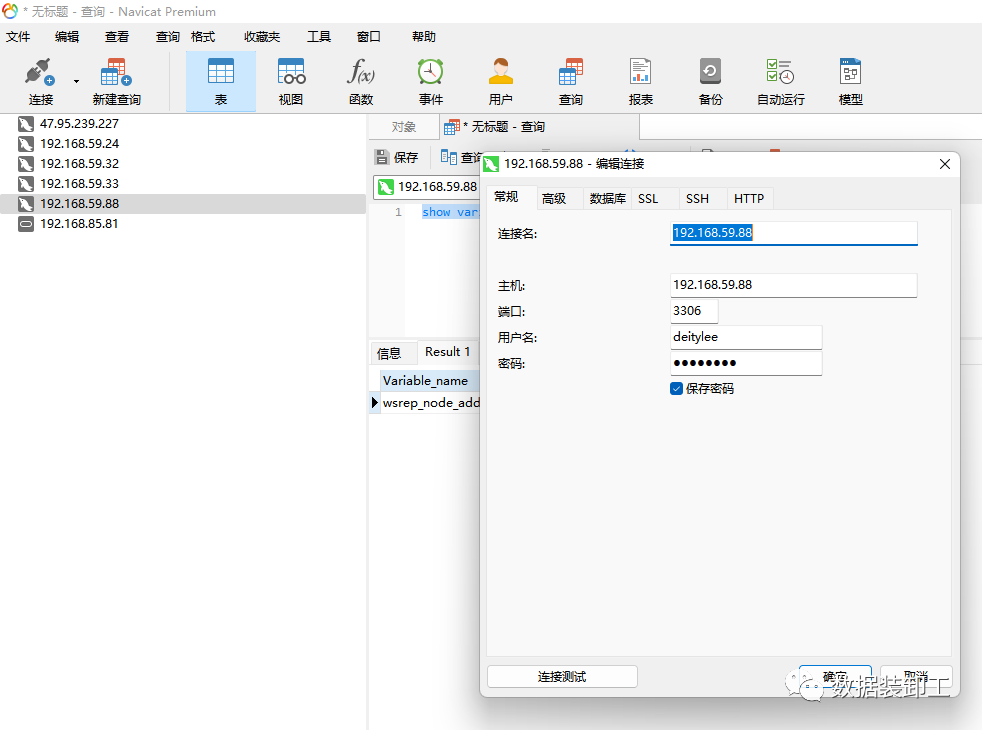
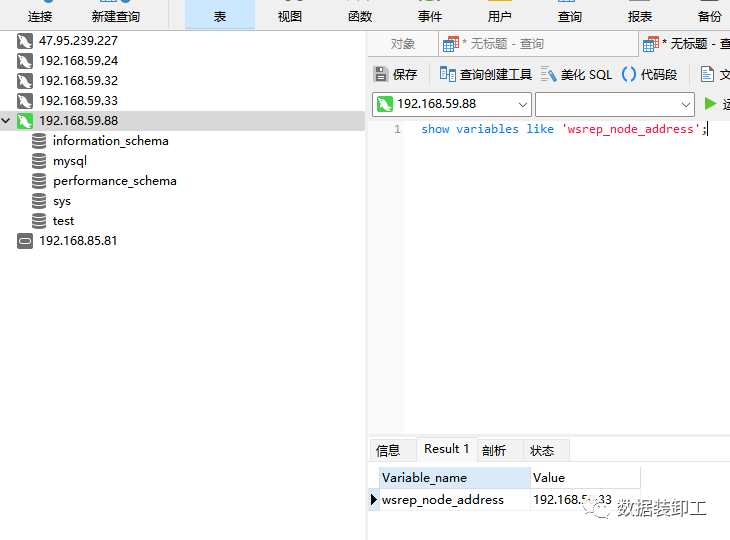
使用Navicat工具通过192.168.59.88登录MySQL数据库。
验证VIP漂移
VIP会在第一个启动keepalived的节点上。
[root@node7 mysql]# ifconfig
ens160: flags=4163<UP,BROADCAST,RUNNING,MULTICAST>  mtu 1500
        inet 192.168.59.33  netmask 255.255.255.0  broadcast 192.168.59.255
        inet6 fe80::df6d:b5c7:c8a3:3f83  prefixlen 64  scopeid 0x20<link>
        inet6 fe80::247:58b0:73c9:226e  prefixlen 64  scopeid 0x20<link>
        inet6 fe80::701e:b728:2872:9246  prefixlen 64  scopeid 0x20<link>
        ether 00:0c:29:d3:9c:4d  txqueuelen 1000  (Ethernet)
        RX packets 1166769  bytes 400104114 (381.5 MiB)
        RX errors 0  dropped 46  overruns 0  frame 0
        TX packets 1129340  bytes 169920136 (162.0 MiB)
        TX errors 0  dropped 0 overruns 0  carrier 0  collisions 0

ens160:1: flags=4163<UP,BROADCAST,RUNNING,MULTICAST>  mtu 1500
        inet 192.168.59.88  netmask 255.255.255.0  broadcast 0.0.0.0
        ether 00:0c:29:d3:9c:4d  txqueuelen 1000  (Ethernet)

lo: flags=73<UP,LOOPBACK,RUNNING>  mtu 65536
        inet 127.0.0.1  netmask 255.0.0.0
        inet6 ::1  prefixlen 128  scopeid 0x10<host>
        loop  txqueuelen 1000  (Local Loopback)
        RX packets 34  bytes 12632 (12.3 KiB)
        RX errors 0  dropped 0  overruns 0  frame 0
        TX packets 34  bytes 12632 (12.3 KiB)
        TX errors 0  dropped 0 overruns 0  carrier 0  collisions 0
关闭node7上的keepalived服务。
[root@node7 mysql]# systemctl stop keepalived
[root@node7 mysql]# ifconfig
ens160: flags=4163<UP,BROADCAST,RUNNING,MULTICAST>  mtu 1500
        inet 192.168.59.33  netmask 255.255.255.0  broadcast 192.168.59.255
        inet6 fe80::df6d:b5c7:c8a3:3f83  prefixlen 64  scopeid 0x20<link>
        inet6 fe80::247:58b0:73c9:226e  prefixlen 64  scopeid 0x20<link>
        inet6 fe80::701e:b728:2872:9246  prefixlen 64  scopeid 0x20<link>
        ether 00:0c:29:d3:9c:4d  txqueuelen 1000  (Ethernet)
        RX packets 1176107  bytes 401426921 (382.8 MiB)
        RX errors 0  dropped 46  overruns 0  frame 0
        TX packets 1138484  bytes 171282007 (163.3 MiB)
        TX errors 0  dropped 0 overruns 0  carrier 0  collisions 0

lo: flags=73<UP,LOOPBACK,RUNNING>  mtu 65536
        inet 127.0.0.1  netmask 255.0.0.0
        inet6 ::1  prefixlen 128  scopeid 0x10<host>
        loop  txqueuelen 1000  (Local Loopback)
        RX packets 34  bytes 12632 (12.3 KiB)
        RX errors 0  dropped 0  overruns 0  frame 0
        TX packets 34  bytes 12632 (12.3 KiB)
        TX errors 0  dropped 0 overruns 0  carrier 0  collisions 0
vip已经漂移到node5上
[root@node5 keepalived]# ifconfig
ens160: flags=4163<UP,BROADCAST,RUNNING,MULTICAST>  mtu 1500
        inet 192.168.59.31  netmask 255.255.255.0  broadcast 192.168.59.255
        inet6 fe80::df6d:b5c7:c8a3:3f83  prefixlen 64  scopeid 0x20<link>
        inet6 fe80::247:58b0:73c9:226e  prefixlen 64  scopeid 0x20<link>
        inet6 fe80::701e:b728:2872:9246  prefixlen 64  scopeid 0x20<link>
        ether 00:0c:29:43:7e:75  txqueuelen 1000  (Ethernet)
        RX packets 1174503  bytes 328533027 (313.3 MiB)
        RX errors 0  dropped 11  overruns 0  frame 0
        TX packets 1086391  bytes 242480172 (231.2 MiB)
        TX errors 0  dropped 0 overruns 0  carrier 0  collisions 0

ens160:1: flags=4163<UP,BROADCAST,RUNNING,MULTICAST>  mtu 1500
        inet 192.168.59.88  netmask 255.255.255.0  broadcast 0.0.0.0
        ether 00:0c:29:43:7e:75  txqueuelen 1000  (Ethernet)

lo: flags=73<UP,LOOPBACK,RUNNING>  mtu 65536
        inet 127.0.0.1  netmask 255.0.0.0
        inet6 ::1  prefixlen 128  scopeid 0x10<host>
        loop  txqueuelen 1000  (Local Loopback)
        RX packets 53  bytes 13758 (13.4 KiB)
        RX errors 0  dropped 0  overruns 0  frame 0
        TX packets 53  bytes 13758 (13.4 KiB)
        TX errors 0  dropped 0 overruns 0  carrier 0  collisions 0
数据库连接保持原链接,直接执行参数查询,已经切换到node5主机上,但本次执行使用8.077秒,大部分时间用来切换链接地址。
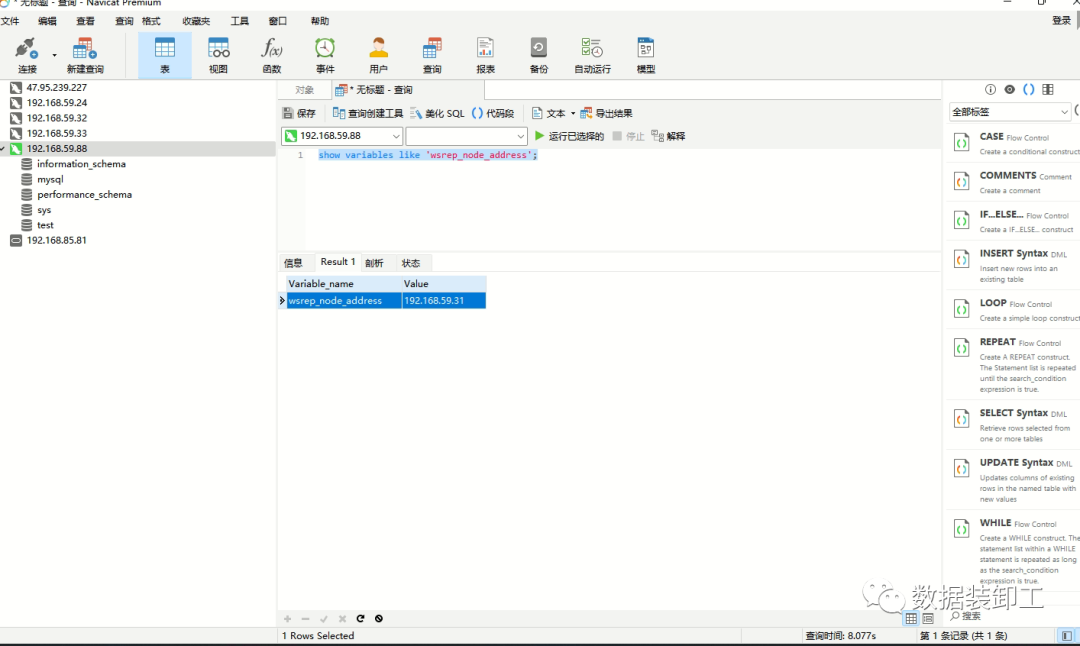
本文参考官方文档地址:
https://docs.percona.com/percona-xtradb-cluster/8.0/index.html