



1 安装说明
openGauss支持单机部署和单机HA部署两种部署方式。
本文档介绍 OpenGauss 1.1.0 在CentOS7.6操作系统上“一主一备一级联”HA安装过程。
参考文档:
https://opengauss.org/zh/docs/1.1.0/docs/installation/installation.html
https://www.modb.pro/doc/25142
https://www.modb.pro/doc/6301
2 安装规划

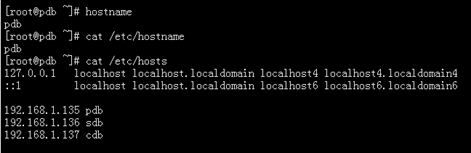
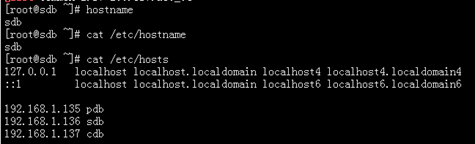
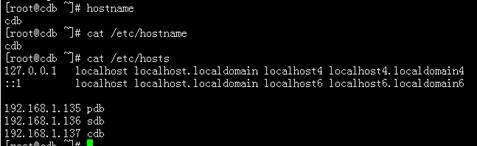
各节点,主机名、网络等相关配置
pdb 节点:
sdb 节点:
cdb节点:
3 安装准备
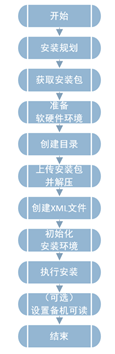
3.1 安装流程
openGauss的安装流程如下图所示。
3.2 获取安装包
通过https://opengauss.org/zh/download.html登录openGauss开源社区,选择1.1.0版本下载对应平台安装包。
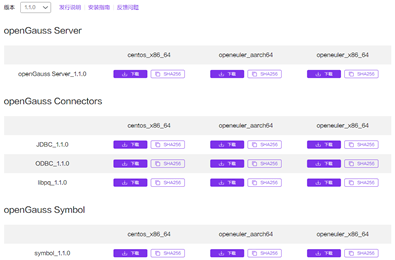
说明:关于安装包说明,可参见:官方文档
3.3 准备软硬件安装环境
注:建议部署openGauss的各服务器具有等价的软硬件配置。
注:关于软硬件环境要求,参见:官方文档。
3.3.1 硬件环境
由于本次安装为测试环境学习使用,相应资源配置较低。
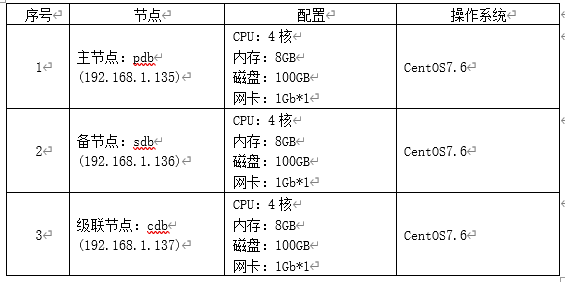
生产环境硬件要求可参考官方文档。
3.3.2 软件环境
1)CentOS 7.6 要求,python 3.6.x
步骤1:检查python 当前版本:
[root@pdb ~]# python -V
Python 2.7.5
需要更新到 Python3.6.x
步骤2:安装 Python3(所有节点都要安装)
注:Centos 如果可以连接互联网,可以直接通过yum安装;如果无法连接外网,可能通过下载Python3安装包进行安装(注意依赖包的安装)。
[root@pdb ~]# yum install python3*
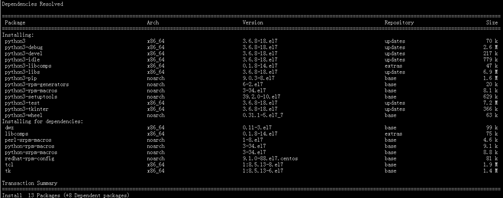
步骤3:检查Python3版本:
[root@pdb ~]# python3 -V
Python 3.6.8
2)软件包依赖要求
libaio-devel
flex
bison
ncurses-devel
glibc.devel
patch
lsb_release — 修改为: rdhat-lsb
readline-devel
以下是官方文档关于软件依赖要求:
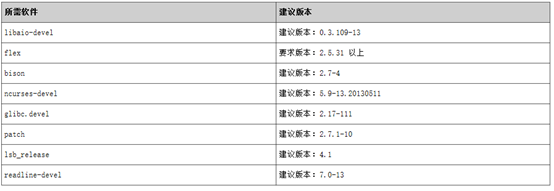
建议:使用Centos7.6操作系统安装光盘中的下列依赖软件的默认安装包,若不存在可参看官方文档中关于软件对应的建议版本。
检查当前安装环境中的软件依赖包(所有节点都要检查)。
[root@pdb ~]# rpm -qa libaio-devel flex bison ncurses-devel glibc-devel patch lsb_release readline-devel
[root@pdb ~]#
上述软件包均未安装,通过yum 进行全部安装。可通过互联网yum源安装,也可以通过配置本地yum源安装。
[root@pdb ~]# yum install libaio-devel flex bison ncurses-devel glibc-devel patch lsb_release readline-devel
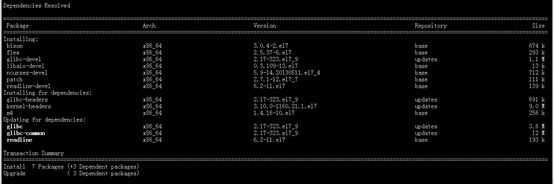
安装完成后,再次检查:
[root@pdb ~]# rpm -qa libaio-devel flex bison ncurses-devel glibc-devel patch lsb_release readline-devel
ncurses-devel-5.9-14.20130511.el7_4.x86_64
patch-2.7.1-12.el7_7.x86_64
glibc-devel-2.17-323.el7_9.x86_64
libaio-devel-0.3.109-13.el7.x86_64
bison-3.0.4-2.el7.x86_64
flex-2.5.37-6.el7.x86_64
readline-devel-6.2-11.el7.x86_64
[root@pdb ~]#
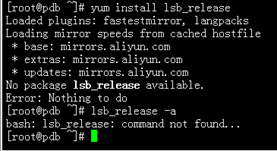
从检查结果,可以看出,lsb_release 包提示未找到并未安装成功,通过 lsb_release 命令也未找到。 通过排查, lsb_release 并不是安装包名称,而是命令名称。对应的包名称为:rdhat-lsb
[root@pdb ~]# yum install redhat-lsb
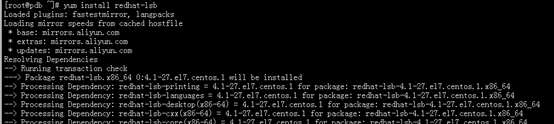
再次检查:
[root@pdb ~]# lsb_release -a

3.3.3 操作系统配置
1)关闭操作系统防火墙和SELINUX
步骤1:修改/etc/selinux/config文件中的“SELINUX”值为“disabled”。
……
SELINUX=disabled
……
步骤2:检查防火墙是否关闭。
systemctl status firewalld
若防火墙状态显示为active (running),则表示防火墙未关闭,请执行步骤3;
若防火墙状态显示为inactive (dead),则无需再关闭防火墙。
步骤3:关闭防火墙。
systemctl disable firewalld.service
systemctl stop firewalld.service
步骤4:重新启动操作系统。
reboot
步骤5:在其他主机上重复步骤1到步骤4。
2)设置字符集参数
将各数据库节点的字符集设置为相同的字符集,可以在/etc/profile文件中添加"export LANG=XXX"(XXX为具体字条集的Unicode编码)。
vi /etc/profile
添加以下行:
export LANG=en_US.UTF-8
3)设置时区和时间
cp /usr/share/zoneinfo/Asia/Shanghai /etc/localtime
说明:安装时如果与当前时间一致,会出现:
cp: ‘/usr/share/zoneinfo/Asia/Shanghai’ and ‘/etc/localtime’ are the same file
检查系统时间,如不一致:可使用date -s 命令将各主机的时间设置为统一时间。建议:通过配置ntp服务以确保所有节点时间一致。如果没有ntp,可以通过 date -s先设置集群中的一个节点,然后通过命令 ntpdate 将其他节点与之同步。
4)(可选)关闭swap交换内存
虽然没有强制要求,建议关闭swap。
在各节点上,使用swapoff -a命令将交换内存关闭。
swapoff -a
注:此命令临时生效,重启后失效!安装前注意检查,可以重新执行一下。
【官方文档说明】
关闭swap交换内存是为了保障数据库的访问性能,避免把数据库的缓冲区内存淘汰到磁盘上。 如果服务器内存比较小,内存过载时,可打开swap交换内存保障正常运行。
5)关闭RemoveIPC
在各数据库节点上,关闭RemoveIPC。CentOS操作系统默认为关闭,可以跳过该步骤。
6)设置网卡MTU值
检查MUT值
[root@pdb ~]# ifconfig
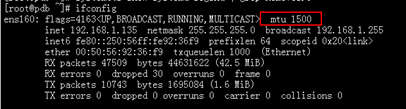
可通过命令配置:
ifconfig ens160 mtu 1500
【官方文档推荐】
对于X86,MTU值推荐1500(默认值,可不修改);对于ARM,MTU值推荐8192。
有其他文档说明:对于10GB网卡设置8192,对于1GB网卡设置1500,未在10GB上验证。
7)root用户远程登录设置
修改 /etc/ssh/sshd_config 参数
PermitRootLogin yes
……
Banner none
注:Banner 配置,去掉连接到系统时,系统提示的欢迎信息。欢迎信息会干扰安装时远程操作的返回结果,影响安装正常执行。
重启SSH服务生效。
systemctl restart sshd.service
以root用户重新登录
8)配置系统参数
步骤1:以root用户,修改操作系统参数 /etc/sysctl.conf 添加如下行:
net.ipv4.tcp_fin_timeout=60
net.ipv4.tcp_retries1=5
net.ipv4.tcp_syn_retries=5
net.sctp.path_max_retrans=10
net.sctp.max_init_retransmits=10
步骤2:使参数生效
sysctl -p
步骤3:修改文件系统参数 /etc/security/limits.conf ,添加如下行:
- soft nofile 1000000
- hard nofile 1000000
步骤4:修改系统支持的最大进程数 /etc/security/limits.d/90-nproc.conf ,添加如下行:
- soft nproc unlimited
注:预安装时大多数系统参数可由脚本自动设置:
soft nproc数用来限制每个用户的最大processes数量。此参数需要手工设置,预安装脚本不会自动更改。
注:其他参数配置要求,参见:官方文档建议
步骤5:(可选)transparent_hugepage参数设置
openGauss默认关闭使用transparent_hugepage服务,并将关闭命令写入操作系统启动文件。本次安装采用系统默认。
3.3.4 安装用户及用户组
预安装脚本在安装过程中会自动按照用户指定内容创建安装用户,并将此用户作为后续运行和维护openGauss的管理员帐户。
4 安装软件
【说明】
安装软件前,建议重启各节点服务器。
重启完成后,检查并关闭 swap (swapoff -a )
安装软件只在主节点操作。
4.1 创建目录
在主节点,使用root用户进行软件安装包上传、解压等操作。
1)创建目标,用于存储安装包
[root@pdb ~]# mkdir -p /opt/software/opengauss
[root@pdb ~]# chmod 755 -R /opt/software
2)上传安装包

4.2 创建XML配置文件
配置文件模板来至官方文档中的模板,根据实际环境进行修改。
[root@pdb opengauss]# vi opengaussconfig.xml
[root@pdb opengauss]# cat opengaussconfig.xml
</CLUSTER>
<!-- 每台服务器上的节点部署信息 -->
<DEVICELIST>
    <!-- node1上的节点部署信息 -->
    <DEVICE sn="db001">
        <PARAM name="name" value="pdb"/>
        <PARAM name="azName" value="AZ1"/>
        <PARAM name="azPriority" value="1"/>
        <!-- 如果服务器只有一个网卡可用,将backIP1和sshIP1配置成同一个IP -->
        <PARAM name="backIp1" value="192.168.1.135"/>
        <PARAM name="sshIp1" value="192.168.1.135"/>

    <!--dn-->
        <PARAM name="dataNum" value="1"/>
    <PARAM name="dataPortBase" value="26000"/>
    <PARAM name="dataNode1" value="/opt/opengauss/install/data/d1,sdb,/opt/opengauss/install/data/d1,cdb,/opt/opengauss/install/data/d1"/>
        <PARAM name="dataNode1_syncNum" value="0"/>
    </DEVICE>

    <!-- node2上的节点部署信息,其中“name”的值配置为主机名称 -->
    <DEVICE sn="db002">
        <PARAM name="name" value="sdb"/>
        <PARAM name="azName" value="AZ1"/>
        <PARAM name="azPriority" value="1"/>
        <!-- 如果服务器只有一个网卡可用,将backIP1和sshIP1配置成同一个IP -->
        <PARAM name="backIp1" value="192.168.1.136"/>
        <PARAM name="sshIp1" value="192.168.1.136"/>
</DEVICE>

    <!-- node3上的节点部署信息,其中“name”的值配置为主机名称 -->
    <DEVICE sn="db003">
        <PARAM name="name" value="cdb"/>
        <PARAM name="azName" value="AZ1"/>
        <PARAM name="azPriority" value="1"/>
        <!-- 如果服务器只有一个网卡可用,将backIP1和sshIP1配置成同一个IP -->
        <PARAM name="backIp1" value="192.168.1.137"/>
        <PARAM name="sshIp1" value="192.168.1.137"/>
        <PARAM name="cascadeRole" value="on"/>
</DEVICE>
</DEVICELIST>
注:红包字体部分,需根据实际情况修改。
4.3 初始化安装环境
说明:
可以通过执行gs_preinstall 脚本完成环境初始化
执行这个脚本会完成如下内容:
自动设置Linux 内核参数以达到提高服务器负载能力的目的。这些参数直接影响数据库系统的运行状态,请仅在确认必要时调整。
自动将openGauss 配置文件、安装包拷贝到openGauss 主机的相同目录下。
openGauss 安装用户、用户组不存在时,自动创建安装用户以及用户组。
读取openGauss 配置文件中的目录信息并创建,将目录权限授予安装用户。
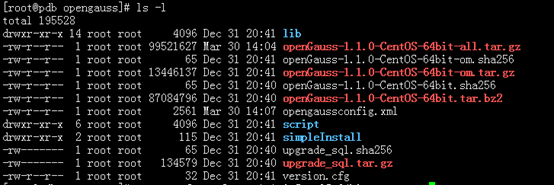
1)解压安装包
[root@pdb opengauss]# cd /opt/software/opengauss
[root@pdb opengauss]# tar -zxvf openGauss-1.1.0-CentOS-64bit-all.tar.gz
[root@pdb opengauss]# tar -zxvf openGauss-1.1.0-CentOS-64bit-om.tar.gz
2)安装前设置lib库,同时将lib库在 /etc/profile 中配置
export LD_LIBRARY_PATH=/opt/software/opengauss/script/gspylib/clib:$LD_LIBRARY_PATH
同时,修改 /etc/profile,添加行:
export LD_LIBRARY_PATH=/opt/software/opengauss/script/gspylib/clib:$LD_LIBRARY_PATH
3)安装前检查
在进行正式安装前,建议将之前配置再次进行检查,以确保无误。
4)执行交互式 gs_preinstall 准备安装环境
[root@pdb opengauss]# python3 /opt/software/opengauss/script/gs_preinstall -U omm -G dbgrp -X /opt/software/opengauss/opengaussconfig.xml
Parsing the configuration file.
Successfully parsed the configuration file.
Installing the tools on the local node.
Successfully installed the tools on the local node.
Are you sure you want to create trust for root (yes/no)? yes
Please enter password for root.
Password:
Creating SSH trust for the root permission user.
Checking network information.
All nodes in the network are Normal.
Successfully checked network information.
Creating SSH trust.
Creating the local key file.
Successfully created the local key files.
Appending local ID to authorized_keys.
Successfully appended local ID to authorized_keys.
Updating the known_hosts file.
Successfully updated the known_hosts file.
Appending authorized_key on the remote node.
Successfully appended authorized_key on all remote node.
Checking common authentication file content.
Successfully checked common authentication content.
Distributing SSH trust file to all node.
Successfully distributed SSH trust file to all node.
Verifying SSH trust on all hosts.
Successfully verified SSH trust on all hosts.
Successfully created SSH trust.
Successfully created SSH trust for the root permission user.
Setting pssh path
Successfully set core path.
Distributing package.
Begin to distribute package to tool path.
Successfully distribute package to tool path.
Begin to distribute package to package path.
Successfully distribute package to package path.
Successfully distributed package.
Are you sure you want to create the user[omm] and create trust for it (yes/no)? yes
Please enter password for cluster user.
Password:
Please enter password for cluster user again.
Password:
Successfully created [omm] user on all nodes.
Preparing SSH service.
Successfully prepared SSH service.
Installing the tools in the cluster.
Successfully installed the tools in the cluster.
Checking hostname mapping.
Successfully checked hostname mapping.
Creating SSH trust for [omm] user.
Checking network information.
All nodes in the network are Normal.
Successfully checked network information.
Creating SSH trust.
Creating the local key file.
Successfully created the local key files.
Appending local ID to authorized_keys.
Successfully appended local ID to authorized_keys.
Updating the known_hosts file.
Successfully updated the known_hosts file.
Appending authorized_key on the remote node.
Successfully appended authorized_key on all remote node.
Checking common authentication file content.
Successfully checked common authentication content.
Distributing SSH trust file to all node.
Successfully distributed SSH trust file to all node.
Verifying SSH trust on all hosts.
Successfully verified SSH trust on all hosts.
Successfully created SSH trust.
Successfully created SSH trust for [omm] user.
Checking OS software.
Successfully check os software.
Checking OS version.
Successfully checked OS version.
Creating cluster’s path.
Successfully created cluster’s path.
Setting SCTP service.
Successfully set SCTP service.
Set and check OS parameter.
Setting OS parameters.
Successfully set OS parameters.
Warning: Installation environment contains some warning messages.
Please get more details by “/opt/software/opengauss/script/gs_checkos -i A -h pdb,sdb,cdb --detail”.
Set and check OS parameter completed.
Preparing CRON service.
Successfully prepared CRON service.
Setting user environmental variables.
Successfully set user environmental variables.
Setting the dynamic link library.
Successfully set the dynamic link library.
Setting Core file
Successfully set core path.
Setting pssh path
Successfully set pssh path.
Set ARM Optimization.
No need to set ARM Optimization.
Fixing server package owner.
Setting finish flag.
Successfully set finish flag.
Preinstallation succeeded.
[root@pdb opengauss]#
预安装有警告,通过/opt/software/opengauss/script/gs_checkos -i A -h pdb,sdb,cdb –detail 查看具体警告信息。
[root@pdb opengauss]# /opt/software/opengauss/script/gs_checkos -i A -h pdb,sdb,cdb --detail
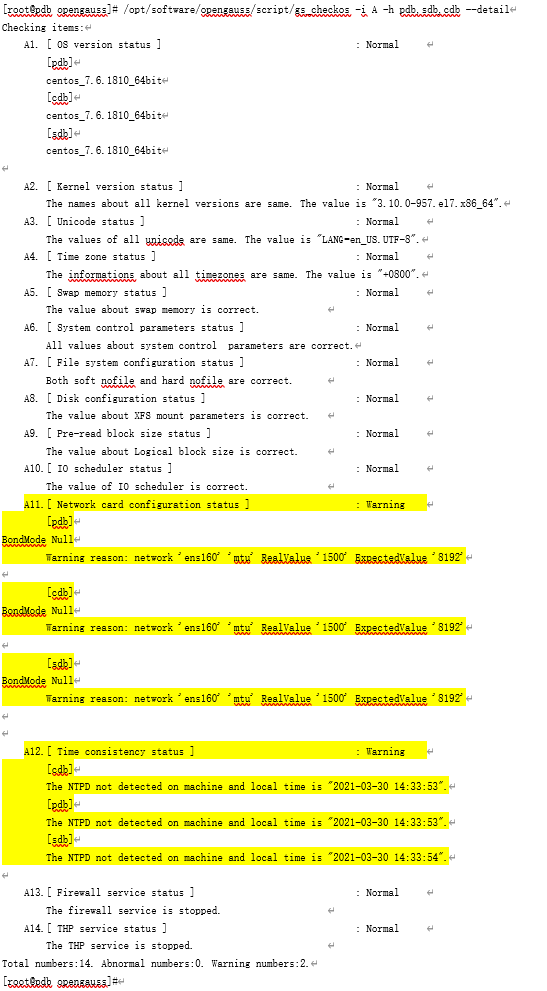
从上述可以看出,具体告警信息为:
1、网卡MTU 值,未配置为推荐值。
2、系统未配置NTP
这些告警可忽略,不影响安装。
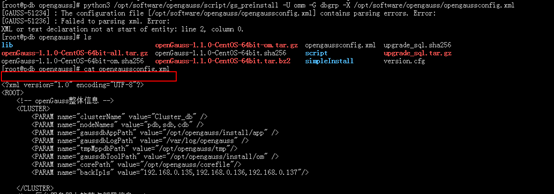
问题1: xml 文件首行空行,引起xml 解析错误
4.4 执行安装
1)前提
已成功执行前置脚本gs_preinstall。即完成了准备安装用户及环境。
所有服务器操作系统和网络均正常运行。
用户需确保各个主机上的locale保持一致。
2)切换到 omm 用户
su - omm
3)使用 gs_install 安装
[omm@pdb ~]$ gs_install -X /opt/software/opengauss/opengaussconfig.xml
Parsing the configuration file.
Check preinstall on every node.
Successfully checked preinstall on every node.
Creating the backup directory.
Successfully created the backup directory.
begin deploy…
Installing the cluster.
begin prepare Install Cluster…
Checking the installation environment on all nodes.
begin install Cluster…
Installing applications on all nodes.
Successfully installed APP.
begin init Instance…
encrypt cipher and rand files for database.
Please enter password for database:
Please repeat for database:
begin to create CA cert files
The sslcert will be generated in /opt/opengauss/install/app/share/sslcert/om
Cluster installation is completed.
Configuring.
Deleting instances from all nodes.
Successfully deleted instances from all nodes.
Checking node configuration on all nodes.
Initializing instances on all nodes.
Updating instance configuration on all nodes.
Check consistence of memCheck and coresCheck on database nodes.
Successful check consistence of memCheck and coresCheck on all nodes.
Configuring pg_hba on all nodes.
Configuration is completed.
Successfully started cluster.
Successfully installed application.
end deploy…
[omm@pdb ~]$
到些,安装完成。
【错误排查】
如果安装失败请根据openGauss日志目录下的“gs_install-YYYY-MM-DD_HHMMSS.log”和“gs_local-YYYY-MM-DD_HHMMSS.log”中的日志信息排查错误。
4.5 安装后,状态查看(安装验证)
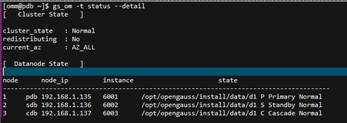
1)gs_om -t status --detail
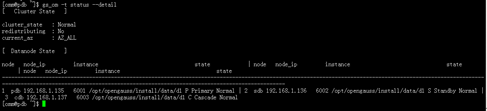
说明:状态信息输出可读性较差,通过文本格式化后,如下:
2)gs_om -t status --all
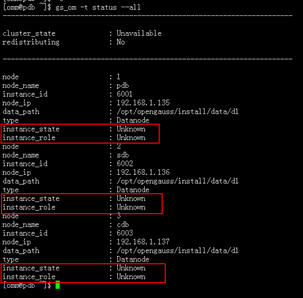
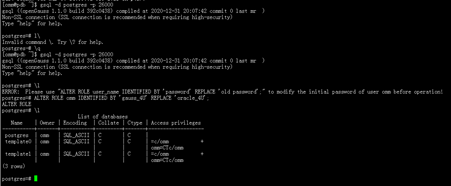
安装完成后,通过gs_om -t status –all查看时,存在unknown 信息,需要连接数据库并修改omm用户密码后,才能查看具体信息。
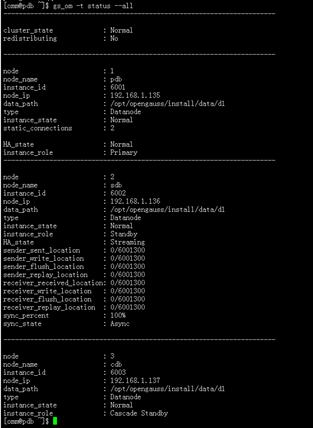
再次使用 gs_om -t status --all 查看集群状态信息。
4.6 (可选)设置备机可读
本次安装未设置
本文档未对集群数据库其他功能(创建数据库、创建表、集群节点间同步等)进行测试,后续会完善。
5 卸载openGauss
注:为了完善本文档内容,本小节内容来至官方文档—安装指南部分。
卸载openGauss的过程包含卸载openGauss和对openGauss服务器的环境做清理。
1)执行卸载
openGauss提供了卸载脚本帮助用户完整的卸载openGauss。
操作步骤:
步骤1:以操作系统用户omm登录数据库主节点。
步骤2:使用gs_uninstall卸载openGauss。
gs_uninstall --delete-data
或者在openGauss中每个节点执行本地卸载。
gs_uninstall --delete-data -L
【错误排查】
如果卸载失败请根据“$GAUSSLOG/om/gs_uninstall-YYYY-MM-DD_HHMMSS.log”中的日志信息排查错误。
2)一键式环境清理
在openGauss卸载完成后,如果不需要在环境上重新部署openGauss,可以运行脚本gs_postuninstall对openGauss服务器上环境信息做清理。openGauss环境清理是对环境准备脚本gs_preinstall所做设置的清理。
前提条件
openGauss卸载执行成功。
root用户互信可用。
只能使用root用户执行gs_postuninstall命令。
操作步骤:
步骤1:以root用户登录openGauss服务器。
步骤2:查看root用户互信是否建立,如果root用户没有建立互信,需要手工建立root
用户互信,操作参考官方文档(安装指南)3.2.2手工建立互信。
查看互信是否建成功,可以互相ssh主机名。输入exit退出。
plat1:~ # ssh plat2
Last login: Tue Jan 5 10:28:18 2016 from plat1
Huawei’s internal systems must only be used for conducting Huawei’s business or for purposes authorized by Huawei management.Use is subject to audit at any time by Huawei management.
plat2:~ # exit
logout
Connection to plat2 closed.
plat1:~ #
步骤3:进入script路径下
cd /opt/software/openGauss/script
步骤4:使用gs_postuninstall进行清理。若为环境变量分离的模式安装的数据库需要source环境变量分离文件ENVFILE。
./gs_postuninstall -U omm -X /opt/software/opengauss/opengaussconfig.xml --delete-user --delete-group
或者在openGauss中每个节点执行本地后置清理。
./gs_postuninstall -U omm -X /opt/software/opengauss/opengaussconfig.xml --delete-user --delete-group -L
omm为运行openGauss的操作系统用户名,/opt/software/opengauss/opengaussconfig.xml为openGauss配置文件路径。
若为环境变量分离的模式安装的数据库需删除之前source的环境变量分离的env参数。
unset MPPDB_ENV_SEPARATE_PATH
步骤5:删除openGauss数据库各节点root用户的互信,操作参考官方文档(安装指南)3.2.2手工建立互信的删除root用户互信部分内容。
【错误排查】
如果一键式环境清理失败请根据“$GAUSSLOG/om/gs_postuninstall-YYYY-MM-DD_HHMMSS.log”中的日志信息排查错误。
