



项目场景:
之前帮客户在Oracle Linux 7.9下搭建了一套HA集群(pacemaker),最近做测试时候发现了一个集群切换后的BUG。
问题①描述(主机名已脱敏)
在实现切换后节点二的监听和数据库实例状态是STOP,HA提示比较明显:listener_orac_start_0 on cxl-pcs02 ‘unknown error’
[root@cxl-pcs01 ~]# pcs status Cluster name: cluster01 Stack: corosync Current DC: cxl-pcs01 (version 1.1.23-1.0.1.el7-9acf116022) - partition with quorum Last updated: Wed Sep 14 19:03:29 2022 Last change: Wed Sep 14 18:40:13 2022 by root via cibadmin on cxl-pcs01 2 nodes configured 8 resource instances configured Online: [ cxl-pcs01 cxl-pcs02 ] Full list of resources: Resource Group: oracle clustervip01 (ocf::heartbeat:IPaddr2): Started cxl-pcs02 vg01 (ocf::heartbeat:LVM): Started cxl-pcs02 vg02 (ocf::heartbeat:LVM): Started cxl-pcs02 data1 (ocf::heartbeat:Filesystem): Started cxl-pcs02 data2 (ocf::heartbeat:Filesystem): Started cxl-pcs02 listener_orac (ocf::heartbeat:oralsnr): Stopped orac (ocf::heartbeat:oracle): Stopped sbd_fencing (stonith:fence_sbd): Started cxl-pcs01 Failed Resource Actions: * listener_orac_start_0 on cxl-pcs01 'unknown error' (1): call=48, status=complete, exitreason='Listener listener appears to have started, but is not running properly: ', last-rc-change='Wed Sep 14 19:01:46 2022', queued=0ms, exec=60196ms * listener_orac_start_0 on cxl-pcs02 'unknown error' (1): call=44, status=complete, exitreason='Listener listener appears to have started, but is not running properly: ', last-rc-change='Wed Sep 14 19:00:38 2022', queued=0ms, exec=61821ms Daemon Status: corosync: active/enabled pacemaker: active/enabled pcsd: active/enabledsbd: active/enabled
拿到以上提示就去看看listener.ora配置,果然发现了问题,之前为了测试主机加了一行本机的IP地址
[oracle@cxl-pcs01 admin]$ cat listener.ora
# listener.ora Network Configuration File: /data1/app/oracle/product/11.2.0/db_1/network/admin/listener.ora
# Generated by Oracle configuration tools.
LISTENER =
(DESCRIPTION_LIST =
(DESCRIPTION =
(ADDRESS = (PROTOCOL = IPC)(KEY = EXTPROC1521))
#本机IP:
(ADDRESS = (PROTOCOL = TCP)(HOST = 192.168.84.173)(PORT = 1521))
#虚拟IP:
(ADDRESS = (PROTOCOL = TCP)(HOST = 192.168.125.231)(PORT = 1521))
)
)
SID_LIST_LISTENER =
(SID_LIST =
(SID_DESC =
(GLOBAL_DBNAME = orac)
(ORACLE_HOME = /data1/app/oracle/product/11.2.0/db_1)
(SID_NAME = orac)
)
)


ADR_BASE_LISTENER = /data1/app/oracle
问题②描述(主机名已脱敏)
当我去掉cxl-pcs01主机名的监听IP后还是有问题:VIP居然和物理IP不是一个网段的,之前没有考虑到此方面原因,遂将虚拟IP更改为了同网段IP地址[root@cxl-pcs01 ~]# pcs resource update clustervip01 Ipaddr2 ip=192.168.84.167 cidr_netmask=24 op monitor interval=30s
[oracle@cxl-pcs01 admin]$ cat listener.ora
# listener.ora Network Configuration File: /data1/app/oracle/product/11.2.0/db_1/network/admin/listener.ora
# Generated by Oracle configuration tools.
LISTENER =
(DESCRIPTION_LIST =
(DESCRIPTION =
(ADDRESS = (PROTOCOL = IPC)(KEY = EXTPROC1521))
#虚拟IP:
(ADDRESS = (PROTOCOL = TCP)(HOST = 192.168.84.167)(PORT = 1521))
)
)
SID_LIST_LISTENER =
(SID_LIST =
(SID_DESC =
(GLOBAL_DBNAME = orac)
(ORACLE_HOME = /data1/app/oracle/product/11.2.0/db_1)
(SID_NAME = orac)
)
)
ADR_BASE_LISTENER = /data1/app/oracle问题③描述(主机名已脱敏)
但是还是不好使,没道理啊!我又删除了资源重新创建并更改了资源依赖和启动顺序,但和这个没啥关系[root@cxl-pcs01 ~]#pcs resource delete orac
[root@cxl-pcs01 ~]#pcs resource delete listener_orac
[root@cxl-pcs01 ~]# pcs resource create orac oracle sid="orac" --group=oracle
Assumed agent name 'ocf:heartbeat:oracle' (deduced from 'oracle')
[root@cxl-pcs01 ~]# pcs constraint colocation add orac with listener_orac
[root@cxl-pcs01 ~]# pcs constraint order start listener_orac then start orac
Adding listener_orac orac (kind: Mandatory) (Options: first-action=start then-action=start)
[root@cxl-pcs01 ~]# pcs constraint show --full
Location Constraints:
Resource: clustervip01
Enabled on: cxl-pcs01 (score:INFINITY) (role: Started) (id:cli-prefer-clustervip01)
Resource: vg01
Enabled on: cxl-pcs01 (score:INFINITY) (role: Started) (id:cli-prefer-vg01)
Resource: vg02
Enabled on: cxl-pcs01 (score:INFINITY) (role: Started) (id:cli-prefer-vg02)
Ordering Constraints:
start clustervip01 then start vg01 (kind:Mandatory) (id:order-clustervip01-vg01-mandatory)
start clustervip01 then start vg02 (kind:Mandatory) (id:order-clustervip01-vg02-mandatory)
start vg01 then start data1 (kind:Mandatory) (id:order-vg01-data1-mandatory)
start vg02 then start data2 (kind:Mandatory) (id:order-vg02-data2-mandatory)
start data1 then start orac (kind:Mandatory) (id:order-data1-listener_orac-mandatory)
start orac then start listener_orac (kind:Mandatory) (id:order-listener_orac-orac-mandatory)
Colocation Constraints:
vg01 with clustervip01 (score:INFINITY) (id:colocation-vg01-clustervip01-INFINITY)
vg02 with clustervip01 (score:INFINITY) (id:colocation-vg02-clustervip01-INFINITY)
data1 with vg01 (score:INFINITY) (id:colocation-data1-vg01-INFINITY)
data2 with vg02 (score:INFINITY) (id:colocation-data2-vg02-INFINITY)
orac with data1 (score:INFINITY) (id:colocation-listener_orac-data1-INFINITY)
listener_orac with orac (score:INFINITY) (id:colocation-orac-listener_orac-INFINITY)
Ticket Constraints:> stderr: Attempting to contact (DESCRIPTION = (ADDRESS = (PROTOCOL = TCP)(HOST = 192.168.125.231)(PORT = 1521)) (CONNECT_DATA = (SERVER = DEDICATED) (SERVICE_NAME = orac)))
[root@cxl-pcs01 ~]# pcs resource debug-start listener_orac
Operation start for listener_orac (ocf:heartbeat:oralsnr) returned: 'unknown error' (1)
> stderr: ocf-exit-reason:tnsping orac failed:
> stderr: TNS Ping Utility for Linux: Version 11.2.0.4.0 - Production on 14-SEP-2022 18:34:36
> stderr:
> stderr: Copyright (c) 1997, 2013, Oracle. All rights reserved.
> stderr:
> stderr: Used parameter files:
> stderr: /data1/app/oracle/product/11.2.0/db_1/network/admin/sqlnet.ora
> stderr:
> stderr:
> stderr: Used TNSNAMES adapter to resolve the alias
> stderr: Attempting to contact (DESCRIPTION = (ADDRESS = (PROTOCOL = TCP)(HOST = 192.168.125.231)(PORT = 1521)) (CONNECT_DATA = (SERVER = DEDICATED) (SERVICE_NAME = orac)))
> stderr: TNS-12535: TNS:operation timed out
> stderr: ocf-exit-reason:Listener listener appears to have started, but is not running properly:
> stderr: LSNRCTL for Linux: Version 11.2.0.4.0 - Production on 14-SEP-2022 18:34:36
> stderr:
> stderr: Copyright (c) 1991, 2013, Oracle. All rights reserved.
> stderr:
> stderr: Starting /data1/app/oracle/product/11.2.0/db_1/bin/tnslsnr: please wait...
> stderr:
> stderr: TNSLSNR for Linux: Version 11.2.0.4.0 - Production
> stderr: System parameter file is /data1/app/oracle/product/11.2.0/db_1/network/admin/listener.ora
> stderr: Log messages written to /data1/app/oracle/diag/tnslsnr/cxl-pcs01/listener/alert/log.xml
> stderr: Listening on: (DESCRIPTION=(ADDRESS=(PROTOCOL=ipc)(KEY=EXTPROC1521)))
> stderr: Listening on: (DESCRIPTION=(ADDRESS=(PROTOCOL=tcp)(HOST=192.168.84.167)(PORT=1521)))
> stderr:
> stderr: Connecting to (DESCRIPTION=(ADDRESS=(PROTOCOL=IPC)(KEY=EXTPROC1521)))
> stderr: STATUS of the LISTENER
> stderr: ------------------------
> stderr: Alias listener
> stderr: Version TNSLSNR for Linux: Version 11.2.0.4.0 - Production
> stderr: Start Date 14-SEP-2022 18:34:36
> stderr: Uptime 0 days 0 hr. 0 min. 0 sec
> stderr: Trace Level off
> stderr: Security ON: Local OS Authentication
> stderr: SNMP OFF
> stderr: Listener Parameter File /data1/app/oracle/product/11.2.0/db_1/network/admin/listener.ora
> stderr: Listener Log File /data1/app/oracle/diag/tnslsnr/cxl-pcs01/listener/alert/log.xml
> stderr: Listening Endpoints Summary...
> stderr: (DESCRIPTION=(ADDRESS=(PROTOCOL=ipc)(KEY=EXTPROC1521)))
> stderr: (DESCRIPTION=(ADDRESS=(PROTOCOL=tcp)(HOST=192.168.84.167)(PORT=1521)))
> stderr: Services Summary...
> stderr: Service "orac" has 1 instance(s).
> stderr: Instance "orac", status UNKNOWN, has 1 handler(s) for this service...
> stderr: The command completed successfully
> stderr: Last login: Wed Sep 14 18:28:25 CST 2022 on pts/0
> stderr: Sep 14 18:35:36 ERROR: Probable Oracle configuration error修改后结果:
[oracle@cxl-pcs01 admin]$ cat tnsnames.ora
# tnsnames.ora Network Configuration File: /data1/app/oracle/product/11.2.0/db_1/network/admin/tnsnames.ora
# Generated by Oracle configuration tools.

ORAC =
(DESCRIPTION =
(ADDRESS = (PROTOCOL = TCP)(HOST = 192.168.84.167)(PORT = 1521))
(CONNECT_DATA =
(SERVER = DEDICATED)
(SERVICE_NAME = orac)
)
)原因分析:
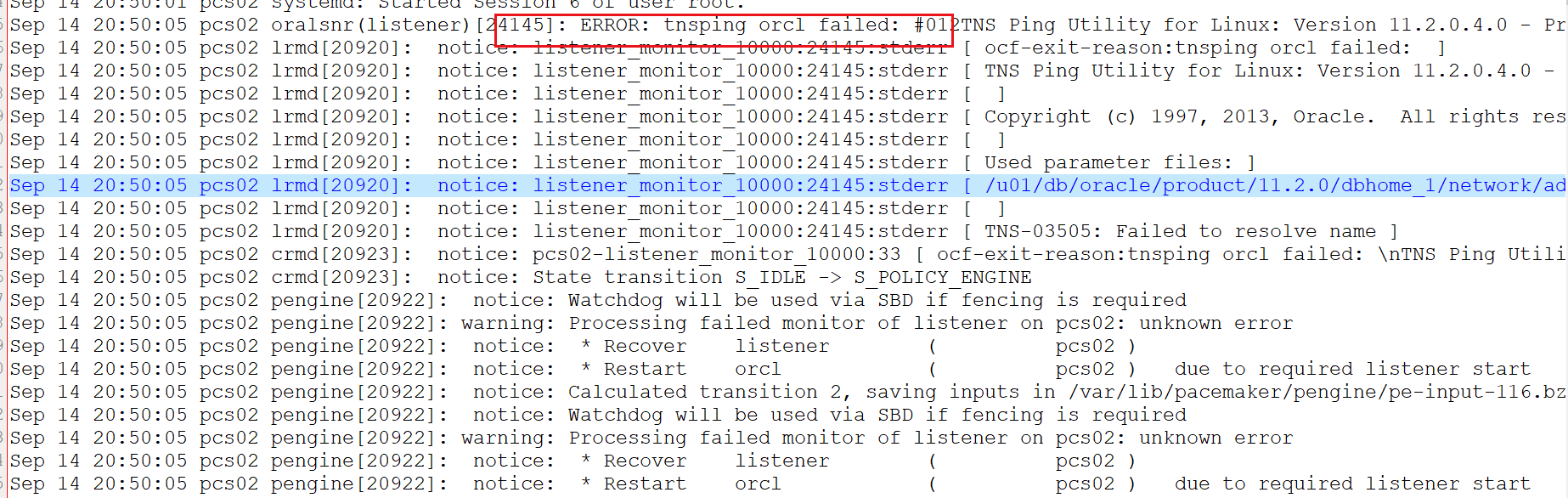
原因是pacemaker在启监听时候,oraLsnr会去tnsping服务名,如果不通就宕掉,主动关闭了监听服务。所以要更改tnsname.ora的配置文件。
「喜欢这篇文章,您的关注和赞赏是给作者最好的鼓励」
关注作者
【版权声明】本文为墨天轮用户原创内容,转载时必须标注文章的来源(墨天轮),文章链接,文章作者等基本信息,否则作者和墨天轮有权追究责任。如果您发现墨天轮中有涉嫌抄袭或者侵权的内容,欢迎发送邮件至:contact@modb.pro进行举报,并提供相关证据,一经查实,墨天轮将立刻删除相关内容。
