



环境
NODE1(主库) | NODE2(从库) | |
Hostname | opengauss1 | Opengauss2 |
IP | 192.168.3.250 | 192.168.3.249 |
安装一主一备
1、准备Linux服务器
这里就不在赘述Linux的安装和配置了,可以参考《https://www.modb.pro/db/453770》,我的Linux操作系统是CentOS,选择操作系统的时候候去官网查看支持的操作系统。
2、下载openGauss数据库企业版
下载地址:https://opengauss.org/zh/download.html
3、上传包并解压(主节点)
[root@localhost ~]# cd /soft/ [root@localhost soft]# ls openGauss-3.0.0-CentOS-64bit-all.tar.gz [root@localhost soft]# tar -zxvf openGauss-3.0.0-CentOS-64bit-all.tar.gz openGauss-3.0.0-CentOS-64bit-cm.tar.gz openGauss-3.0.0-CentOS-64bit-om.tar.gz openGauss-3.0.0-CentOS-64bit.tar.bz2 openGauss-3.0.0-CentOS-64bit-cm.sha256 openGauss-3.0.0-CentOS-64bit-om.sha256 openGauss-3.0.0-CentOS-64bit.sha256 upgrade_sql.tar.gz upgrade_sql.sha256 |
4、安装依赖包(所有节点)
yum install libaio-devel flex bison ncurses-devel glibc-devel patch redhat-lsb-core readline-devel libnsl python3 expect |
5、关闭防火墙(所有节点)
systemctl status firewalld.service systemctl stop firewalld.service systemctl status firewalld.service systemctl disable firewalld.service |
6、禁用selinux(所有节点)
vi /etc/selinux/config #修改“SELINUX”的值“disabled” #需要重启生效,也可以使用命令临时生效:setenforce 0 |
7、配置本机root到root的互信(所有节点)
[root@localhost ~]# ssh-keygen -t rsa [root@localhost ~]# cat ~/.ssh/id_rsa.pub >> ~/.ssh/authorized_keys #使用ssh命令不需要输入密码的时候就表示互信成功 [root@localhost .ssh]# ssh 172.20.10.8 Last login: Wed Sep 14 17:40:53 2022 from opengauss |
8、创建安装openGauss的配置文件(主节点)
[root@opengauss1 soft]# cat cluster_config.xml <?xml version="1.0" encoding="UTF-8"?> <ROOT> <!-- openGauss整体信息 --> <CLUSTER> <!-- 数据库名称 --> <PARAM name="clusterName" value="db_cluster" /> <!-- 数据库节点名称(hostname) --> <PARAM name="nodeNames" value="opengauss1,opengauss2" /> <!-- 数据库安装目录--> <PARAM name="gaussdbAppPath" value="/opt/random/install/app" /> <!-- 日志目录--> <PARAM name="gaussdbLogPath" value="/var/log/omm" /> <!-- 临时文件目录--> <PARAM name="tmpMppdbPath" value="/opt/random/tmp" /> <!-- 数据库工具目录--> <PARAM name="gaussdbToolPath" value="/opt/random/install/om" /> <!-- 数据库core文件目录--> <PARAM name="corePath" value="/opt/random/corefile" /> <!-- 节点IP,与数据库节点名称列表一一对应 --> <PARAM name="backIp1s" value="192.168.3.250,192.168.3.249"/> </CLUSTER> <!-- 每台服务器上的节点部署信息 --> <DEVICELIST> <!-- 节点1上的部署信息 --> <DEVICE sn="opengauss1"> <!-- 节点1的主机名称 --> <PARAM name="name" value="opengauss1"/> <!-- 节点1所在的AZ及AZ优先级 --> <PARAM name="azName" value="AZ1"/> <PARAM name="azPriority" value="1"/> <!-- 节点1的IP,如果服务器只有一个网卡可用,将backIP1和sshIP1配置成同一个IP --> <PARAM name="backIp1" value="192.168.3.250"/> <PARAM name="sshIp1" value="192.168.3.250"/> <!--CM主节点部署信息--> <PARAM name="cmsNum" value="1"/> <PARAM name="cmServerPortBase" value="15000"/> <PARAM name="cmServerListenIp1" value="192.168.3.250,192.168.3.249"/> <PARAM name="cmServerHaIp1" value="192.168.3.250,192.168.3.249"/> <PARAM name="cmServerlevel" value="1"/> <PARAM name="cmServerRelation" value="opengauss1,opengauss2"/> <PARAM name="cmDir" value="/opt/random/data/cmserver"/> <!--dbnode--> <PARAM name="dataNum" value="1"/> <PARAM name="dataPortBase" value="15400"/> <!--数据库主节点上的数据目录,及备机数据目录--> <PARAM name="dataNode1" value="/opt/random/install/data/dn,opengauss2,/opt/random/install/data/dn"/> <PARAM name="dataNode1_syncNum" value="0"/> </DEVICE> <!-- 节点2上的节点部署信息,其中“name”的值配置为主机名称 --> <DEVICE sn="opengauss2"> <!-- 节点2的主机名称 --> <PARAM name="name" value="opengauss2"/> <!-- 节点2所在的AZ及AZ优先级 --> <PARAM name="azName" value="AZ1"/> <PARAM name="azPriority" value="1"/> <!-- 节点2的IP,如果服务器只有一个网卡可用,将backIP1和sshIP1配置成同一个IP --> <PARAM name="backIp1" value="192.168.3.249"/> <PARAM name="sshIp1" value="192.168.3.249"/> <!--CM备节点部署信息--> <PARAM name="cmServerPortStandby" value="15000"/> <PARAM name="cmDir" value="/opt/random/data/cmserver"/> </DEVICE> </DEVICELIST> </ROOT> |
9、解压可执行程序所在的包(主节点)
tar -zxvf openGauss-3.0.0-CentOS-64bit-all.tar.gz tar -zxvf openGauss-3.0.0-CentOS-64bit-om.tar.gz #会解压出script文件夹 |
10、执行预安装(主节点)
#进入刚才解压得到的script文件夹cd /soft/script ./gs_preinstall -U omm -G dbgrp -X /soft/cluster_config.xml #期间需要操作如下:1、输入root密码来配置互信,2、输入是否需要创建omm用户,选择yes,3、输入omm的密码,4、配置omm用户的互信。 [root@opengauss1 script]# ./gs_preinstall -U omm -G dbgrp -X /soft/cluster_config.xml Parsing the configuration file. Successfully parsed the configuration file. Installing the tools on the local node. Successfully installed the tools on the local node. Are you sure you want to create trust for root (yes/no)?yes Please enter password for root Password: Successfully created SSH trust for the root permission user. Setting host ip env Successfully set host ip env. Distributing package. Begin to distribute package to tool path. Successfully distribute package to tool path. Begin to distribute package to package path. Successfully distribute package to package path. Successfully distributed package. Are you sure you want to create the user[omm] and create trust for it (yes/no)? yes Please enter password for cluster user. Password: Please enter password for cluster user again. Password: Generate cluster user password files successfully. Successfully created [omm] user on all nodes. Preparing SSH service. Successfully prepared SSH service. Installing the tools in the cluster. Successfully installed the tools in the cluster. Checking hostname mapping. Successfully checked hostname mapping. Creating SSH trust for [omm] user. Please enter password for current user[omm]. Password: Checking network information. All nodes in the network are Normal. Successfully checked network information. Creating SSH trust. Creating the local key file. Successfully created the local key files. Appending local ID to authorized_keys. Successfully appended local ID to authorized_keys. Updating the known_hosts file. Successfully updated the known_hosts file. Appending authorized_key on the remote node. Successfully appended authorized_key on all remote node. Checking common authentication file content. Successfully checked common authentication content. Distributing SSH trust file to all node. Distributing trust keys file to all node successfully. Successfully distributed SSH trust file to all node. Verifying SSH trust on all hosts. Successfully verified SSH trust on all hosts. Successfully created SSH trust. Successfully created SSH trust for [omm] user. Checking OS software. Successfully check os software. Checking OS version. Successfully checked OS version. Creating cluster's path. Successfully created cluster's path. Set and check OS parameter. Setting OS parameters. Successfully set OS parameters. Warning: Installation environment contains some warning messages. Please get more details by "/soft/script/gs_checkos -i A -h opengauss1,opengauss2 --detail". Set and check OS parameter completed. Preparing CRON service. Successfully prepared CRON service. Setting user environmental variables. Successfully set user environmental variables. Setting the dynamic link library. Successfully set the dynamic link library. Setting Core file Successfully set core path. Setting pssh path Successfully set pssh path. Setting Cgroup. Successfully set Cgroup. Set ARM Optimization. No need to set ARM Optimization. Fixing server package owner. Setting finish flag. Successfully set finish flag. Preinstallation succeeded. |
11、执行安装(主节点)
切换到omm用户,期间要输入数据库的密码
[root@opengauss1 script]# su - omm Last login: Thu Sep 15 15:35:08 CST 2022 [omm@opengauss1 ~]$ gs_install -X /soft/cluster_config.xml Parsing the configuration file. Check preinstall on every node. Successfully checked preinstall on every node. Creating the backup directory. Successfully created the backup directory. begin deploy.. Installing the cluster. begin prepare Install Cluster.. Checking the installation environment on all nodes. begin install Cluster.. Installing applications on all nodes. Successfully installed APP. begin init Instance.. encrypt cipher and rand files for database. Please enter password for database: 输入数据库密码 Please repeat for database:输入数据库密码 begin to create CA cert files The sslcert will be generated in /opt/random/install/app/share/sslcert/om Create CA files for cm beginning. Create CA files on directory [/opt/random/install/app_02c14696/share/sslcert/cm]. file list: ['cacert.pem', 'server.key', 'server.crt', 'client.key', 'client.crt', 'server.key.cipher', 'server.key.rand', 'client.key.cipher', 'client.key.rand'] Cluster installation is completed. Configuring. Deleting instances from all nodes. Successfully deleted instances from all nodes. Checking node configuration on all nodes. Initializing instances on all nodes. Updating instance configuration on all nodes. Check consistence of memCheck and coresCheck on database nodes. Successful check consistence of memCheck and coresCheck on all nodes. Configuring pg_hba on all nodes. Configuration is completed. Starting cluster. ====================================================================== Successfully started primary instance. Wait for standby instance. ====================================================================== . Successfully started cluster. ====================================================================== cluster_state : Normal redistributing : No node_count : 2 Datanode State primary : 1 standby : 1 secondary : 0 cascade_standby : 0 building : 0 abnormal : 0 down : 0 Successfully installed application. end deploy.. |
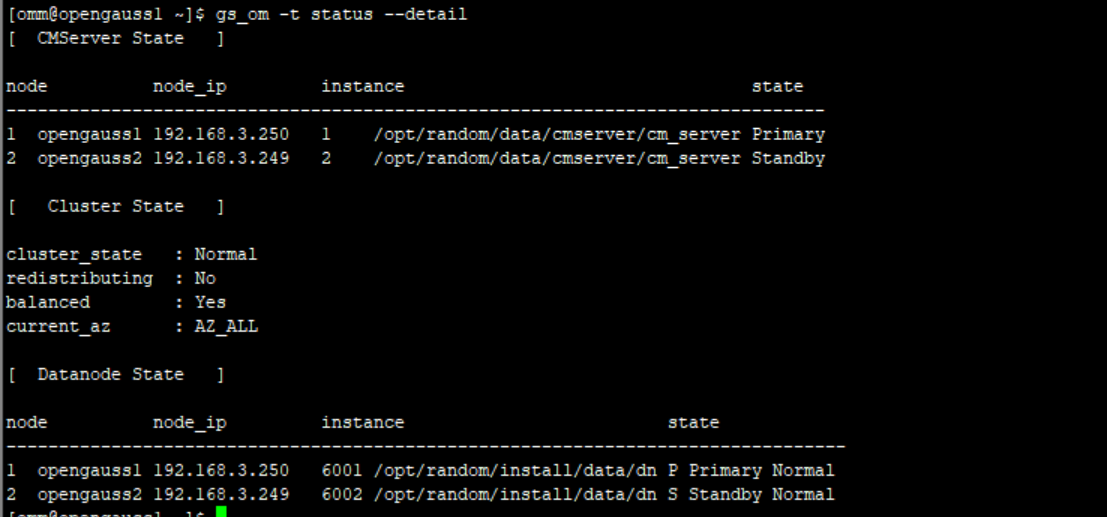
12、查看集群状态
gs_om -t status --detail
其中有两部分,上半部分是cm节点信息,下半部分是数据库节点信息
13、创建数据库
#连接数据库 [omm@opengauss1 ~]$ gsql -d postgres -p 15400 gsql ((openGauss 3.0.0 build 02c14696) compiled at 2022-04-01 18:12:34 commit 0 last mr ) Non-SSL connection (SSL connection is recommended when requiring high-security) Type "help" for help. openGauss=# #创建一个业务数据库 openGauss=# CREATE DATABASE mydb WITH ENCODING 'utf8' template = template0; CREATE DATABASE |
14、从库登录新建的数据库是否创建成功
[omm@opengauss2 ~]$ gsql -d mydb -p 15400 gsql ((openGauss 3.0.0 build 02c14696) compiled at 2022-04-01 18:12:34 commit 0 last mr ) Non-SSL connection (SSL connection is recommended when requiring high-security) Type "help" for help. mydb=# |
