



WSL2中安装Docker服务
请参考:https://www.xmmup.com/wsl2zhonganzhuangdockerfuwu.html
效果:
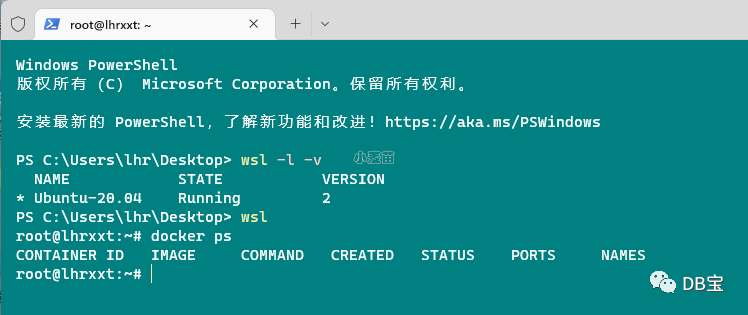
使用CentOS 7.6环境
 1docker run -d --name lhrcentos76 -h lhrcentos76 \
 2  -p 227:22 -p 3387:3389 \
 3  -v /sys/fs/cgroup:/sys/fs/cgroup \
 4  --privileged=true lhrbest/lhrcentos76:9.0 \
 5  /usr/sbin/init
 6
 7root@lhrxxt:~# docker ps
 8CONTAINER ID   IMAGE                     COMMAND            CREATED       STATUS         PORTS                                                                            NAMES
 9c542bc126bbc   lhrbest/lhrcentos76:9.0   "/usr/sbin/init"   11 days ago   Up 7 seconds   0.0.0.0:227->22/tcp, :::227->22/tcp, 0.0.0.0:3387->3389/tcp, :::3387->3389/tcp   lhrcentos76
10root@lhrxxt:~#
11root@lhrxxt:~# docker exec -it lhrcentos76 bash
12[root@lhrcentos76 /]# cat /etc/redhat-release
13CentOS Linux release 7.6.1810 (Core)
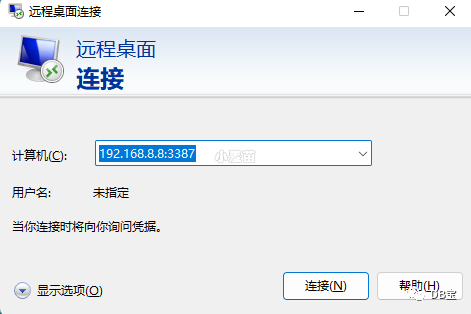
开启远程桌面mstsc
:
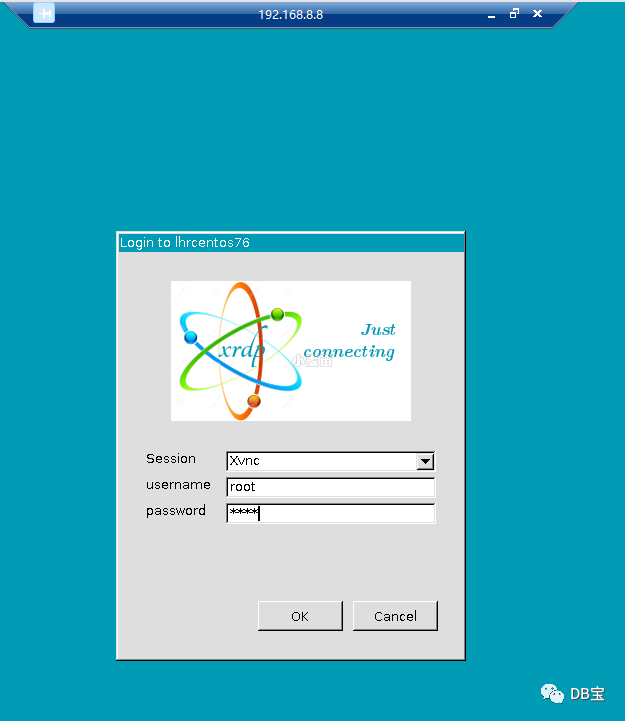
用户名:root
密码:lhr
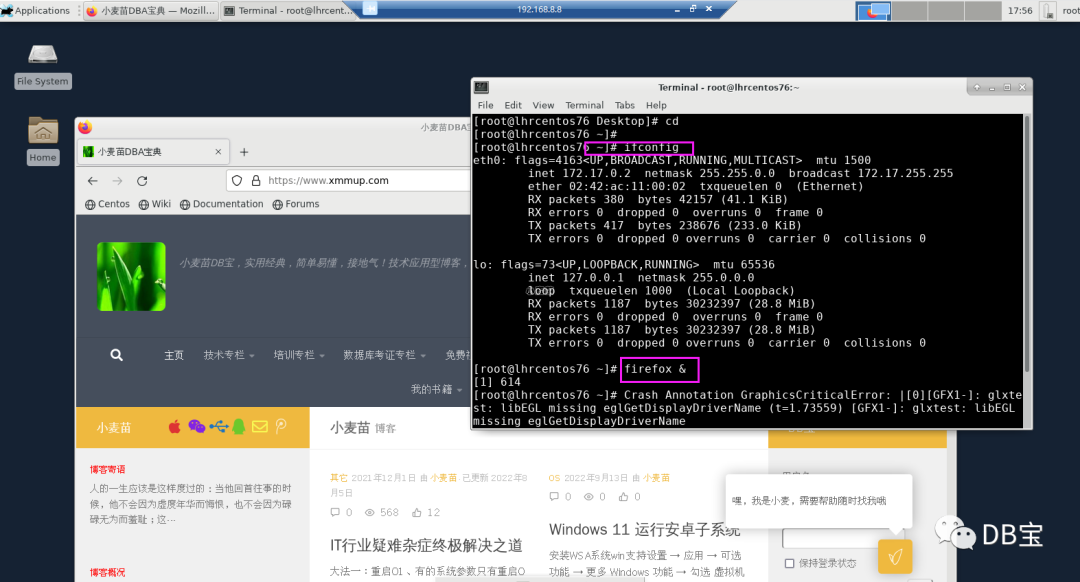
完全可以运行Linux图形界面:
使用Oracle数据库
请参考:https://www.xmmup.com/dbbao37zaidockerzhongkuaisushiyonggegebanbencong10gdao19cdeoracleshu.html
https://www.xmmup.com/dbbao76zaidockerzhongzhixu2bujikeyongyouoracle-21chuanjing.html
示例:
 1root@lhrxxt:~# docker start lhroracle21c
 2lhroracle21c
 3root@lhrxxt:~# docker exec -it lhroracle21c bash
 4[root@lhroracle21c /]# su - oracle
 5Last login: Sun Sep  4 20:45:52 CST 2022 on pts/0
 6[oracle@lhroracle21c ~]$ sas
 7
 8SQL*Plus: Release 21.0.0.0.0 - Production on Tue Sep 13 15:07:53 2022
 9Version 21.3.0.0.0
10
11Copyright (c) 1982, 2021, Oracle.  All rights reserved.
12
13Connected to an idle instance.
14
15SYS@LHRCDB> startup
16ORACLE instance started.
17
18Total System Global Area  859829400 bytes
19Fixed Size                  9692312 bytes
20Variable Size             532676608 bytes
21Database Buffers          310378496 bytes
22Redo Buffers                7081984 bytes
23Database mounted.
24Database opened.
25SYS@LHRCDB> show pbds
26SP2-0158: unknown SHOW option "pbds"
27SYS@LHRCDB> show pdbs
28
29    CON_ID CON_NAME                       OPEN MODE  RESTRICTED
30---------- ------------------------------ ---------- ----------
31         2 PDB$SEED                       READ ONLY  NO
32         3 PDB2                           READ WRITE NO
33SYS@LHRCDB> exit
34Disconnected from Oracle Database 21c Enterprise Edition Release 21.0.0.0.0 - Production
35Version 21.3.0.0.0
36[oracle@lhroracle21c ~]$ exit
37logout
38[root@lhroracle21c /]# exit
39exit
40root@lhrxxt:~# exit
41logout
42PS C:\Users\lhr\Desktop> wsl
43root@lhrxxt:~# docker ps
44CONTAINER ID   IMAGE                              COMMAND            CREATED       STATUS         PORTS
45
46                                                NAMES
4768ef9ba74c02   lhrbest/oracle21c_ee_db_21.3.0.0   "/usr/sbin/init"   10 days ago   Up 7 minutes   5502-5510/tcp, 0.0.0.0:1530->1521/tcp, :::1530->1521/tcp, 0.0.0.0:3400->3389/tcp, :::3400->3389/tcp, 0.0.0.0:5510->5500/tcp, :::5510->5500/tcp, 0.0.0.0:55100->5501/tcp, :::55100->5501/tcp   lhroracle21c
48root@lhrxxt:~#
使用PG数据库
请参考:https://www.xmmup.com/dbbao69zaidockerzhongkuaisushiyonggegebanbendepostgresqlshujuku.html
示例:
 1root@lhrxxt:~# docker pull postgres:14.5
 214.5: Pulling from library/postgres
 37a6db449b51b: Pull complete
 4b4f184bc0704: Pull complete
 5606a73c0d34a: Pull complete
 6c39f1600d2b6: Pull complete
 731f42f92b0fe: Pull complete
 8c8b67d2b0354: Pull complete
 931107b8480ee: Pull complete
10b26434cf8bfa: Pull complete
1136220bd76bfa: Pull complete
12b79e75c4a0c2: Pull complete
13cc1ab699dda5: Pull complete
1437312064dd9b: Pull complete
154bce56fcbfe5: Pull complete
16Digest: sha256:10e195b76c4e51f5a8c0c5686ce15c3d701f7f13c7003d50f40502b69c18fe5f
17Status: Downloaded newer image for postgres:14.5
18docker.io/library/postgres:14.5
19root@lhrxxt:~# docker run --name lhrpg14 -h lhrpg14 -d -p 54327:5432 -e POSTGRES_PASSWORD=lhr -e TZ=Asia/Shanghai postgres:14.5
209395477ca203bc5f4b82f886e888a5724b22cddf051e528e00db68b281c53e25
21root@lhrxxt:~# docker exec -it lhrpg14 bash
22root@lhrpg14:/# su - postgres
23postgres@lhrpg14:~$ psql
24psql (14.5 (Debian 14.5-1.pgdg110+1))
25Type "help" for help.
26
27postgres=# \l
28                                 List of databases
29   Name    |  Owner   | Encoding |  Collate   |   Ctype    |   Access privileges
30-----------+----------+----------+------------+------------+-----------------------
31 postgres  | postgres | UTF8     | en_US.utf8 | en_US.utf8 |
32 template0 | postgres | UTF8     | en_US.utf8 | en_US.utf8 | =c/postgres          +
33           |          |          |            |            | postgres=CTc/postgres
34 template1 | postgres | UTF8     | en_US.utf8 | en_US.utf8 | =c/postgres          +
35           |          |          |            |            | postgres=CTc/postgres
36(3 rows)
37
MySQL数据库
请参考:https://www.xmmup.com/zaidockerzhongkuaisushiyonggegebanbendemysqlshujuku.html
示例:
 1root@lhrxxt:~# docker run -d --name mysql8030 -h mysql8030 -p 3418:3306 \
 2>   -v /etc/mysql/mysql8030/conf:/etc/mysql/conf.d \
 3>   -e MYSQL_ROOT_PASSWORD=lhr -e TZ=Asia/Shanghai \
 4>   mysql:8.0.30
 5f6e94a91fd69e26d0e9e7bd5b4ef11ecde0f4b8502299c537342141ea01bf80a
 6root@lhrxxt:~#
 7root@lhrxxt:~# cat >  /etc/mysql/mysql8030/conf/my.cnf <<"EOF"
 8> [mysqld]
 9> default-time-zone = '+8:00'
10> log_timestamps = SYSTEM
11> skip-name-resolve
12> log-bin
13> server_id=80303418
14> character_set_server=utf8mb4
15> EOF
16root@lhrxxt:~# docker restart mysql8030
17mysql8030
18root@lhrxxt:~# docker exec -it mysql8030 bash
19bash-4.4# mysql
20ERROR 1045 (28000): Access denied for user 'root'@'localhost' (using password: NO)
21bash-4.4# mysql -uroot -plhr
22mysql: [Warning] Using a password on the command line interface can be insecure.
23Welcome to the MySQL monitor.  Commands end with ; or \g.
24Your MySQL connection id is 9
25Server version: 8.0.30 MySQL Community Server - GPL
26
27Copyright (c) 2000, 2022, Oracle and/or its affiliates.
28
29Oracle is a registered trademark of Oracle Corporation and/or its
30affiliates. Other names may be trademarks of their respective
31owners.
32
33Type 'help;' or '\h' for help. Type '\c' to clear the current input statement.
34
35mysql> show databases;
36+--------------------+
37| Database           |
38+--------------------+
39| information_schema |
40| mysql              |
41| performance_schema |
42| sys                |
43+--------------------+
444 rows in set (0.05 sec)
45
46mysql> create database lhrdb;
47Query OK, 1 row affected (0.04 sec)
48
49mysql> show databases;
50+--------------------+
51| Database           |
52+--------------------+
53| information_schema |
54| lhrdb              |
55| mysql              |
56| performance_schema |
57| sys                |
58+--------------------+
595 rows in set (0.00 sec)
SQL Server
请参考:
https://hub.docker.com/r/microsoft/mssql-server-windows-developer/tags
https://hub.docker.com/_/microsoft-mssql-server
参考:https://docs.microsoft.com/zh-cn/sql/linux/quickstart-install-connect-docker?view=sql-server-2017&pivots=cs1-bash
 1docker pull mcr.microsoft.com/mssql/server:2017-latest
 2docker pull mcr.microsoft.com/mssql/server:2019-latest
 3
 4
 5
 6docker run -d --name mssql20171401 \
 7-p 1401:1433  \
 8-e "ACCEPT_EULA=Y" -e "SA_PASSWORD=lhr@zr123" \
 9mcr.microsoft.com/mssql/server:2017-latest
10
11docker exec -it mssql20171401 bash
12/opt/mssql-tools/bin/sqlcmd  -S localhost -U SA -P "lhr@zr123"
13sqlcmd -S 192.168.1.35,1401 -U SA -P "lhr@zr123"
14
15SELECT Name from sys.Databases
16go
17
18SELECT @@VERSION
19SELECT SERVERPROPERTY('Edition')
20go
21
22
23docker run -d --name mssql20191402 -p 1402:1433  \
24-e "ACCEPT_EULA=Y" -e "SA_PASSWORD=lhr@zr123" \
25mcr.microsoft.com/mssql/server:2019-latest
26
27docker exec -it mssql20191402 bash
28/opt/mssql-tools/bin/sqlcmd  -S localhost -U SA -P "lhr@zr123"
29sqlcmd -S 192.168.1.35,1402 -U SA -P "lhr@zr123"
30
31
32sqlcmd -S 192.168.66.236,1433 -U sa -P lhr
33sqlcmd -S 192.168.66.236,1433 -d master -h -1 -U sa -P lhr -W -Q "set nocount on;SELECT name FROM master..sysdatabases"
34
35
36
37curl -o /etc/yum.repos.d/msprod.repo https://packages.microsoft.com/config/rhel/7/prod.repo
38yum install -y mssql-tools unixODBC-devel mssql-cli
39
40echo "PATH=/opt/mssql-tools/bin:$PATH" >> /root/.bashrc
41source /root/.bashrc
其它数据库
Redis
请参考:https://hub.docker.com/_/redis?tab=tags
1docker run -itd -h redis-lhr --name redis-lhr -p 6379:6379 redis
openGauss
请参考:
https://www.xmmup.com/zaidockerzhongkuaisutiyanopengaussshujuku.html
https://www.xmmup.com/zaidockerzhongkuaisutiyanopengausszhubeihuanjingshujuku.html
OGG
请参考:https://www.xmmup.com/tag/ogg
https://www.xmmup.com/dbbao20zaidockerzhongfenfenzhongjikeyongyouogg-directorhuanjing.html
OceanBase
请参考:https://www.xmmup.com/oceanbase-dockeranzhuangtiyan.html
https://www.xmmup.com/liyongdockerdajianoceanbase-3-1-1shequbandejiqun.html
达梦
请参考:https://www.xmmup.com/dbbao77zaidockerzhongfenfenzhongyongyoudamengshujuku.html
TiDB
请参考:https://www.xmmup.com/dbbao57shiyongdocker-composekuaisubushutidbjiqunhuanjing.html
https://www.xmmup.com/shiyongtiupkuaisubushutidbshangshouhuanjing.html
监控系统
zabbix
请参考:https://www.xmmup.com/dbbao39shiyongdockerfenfenzhongdajianzabbix-5-0peizhimysqljiankong.html
普罗米修斯
请参考:https://www.xmmup.com/dbbao36shiyongdockerfenfenzhongdajianpiaoliangdeprometheusgrafanajiankong.html
EMCC
请参考:https://www.xmmup.com/dbbao74zaidockerzhongfenfenzhongyongyouoracle-emcc-13-5huanjing.html
天兔
请参考:https://www.xmmup.com/dbbao5fenfenzhongyongyoutiantulepusshujukujiankongxitong.html
