



正所谓好记性不如烂笔头
打开PostgreSQL的官网
映入眼帘的是这么一句话
PostgreSQL: The World's Most Advanced Open Source Relational Database
PostgreSQL标榜自己是世界上最先进的开源数据库。
敢这么吹牛逼
肯定还是有两把刷子的
是骡子是马
遛一下遛一下
安装PostgreSQL
使用最方便的docker进行PostgreSQL安装
1、拉取postgresql镜像
docker pull postgresql
2、启动容器
docker run --name pg -e POSTGRES_PASSWORD=123456 -p5432:5432 -d postgres
3、进入容器
docker exec -it pg bin/bash
基本操作
登录数据库、查看数据库版本、列出所有的数据库
psql -U postgresselect version();\l
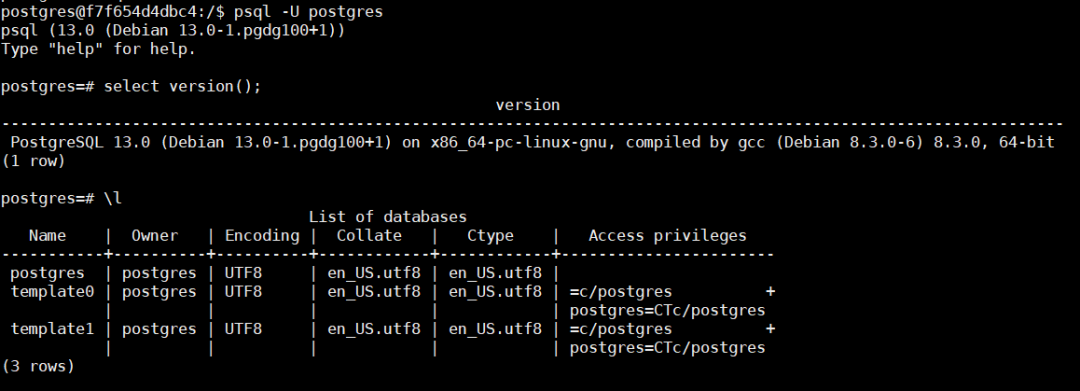
可以看到数据库版本为13.0,是pg的最新版本
数据库初始化之后, 就有了 template0, template1 库,开始时这两个库的内容是一样的
为啥需要模板数据库
模板数据库就是创建新database时,PostgreSQL会基于模板数据库制作一份副本,其中会包含所有的数据库设置和数据文件
为啥需要2个模板数据库
1、如果希望定制自己的模板数据库,那么可以基于template1进行修改
PostgreSQL默认的模板数据库为 template1
试一下:
连接template1数据库并创建一张表,创建成功,说明template1是可以修改的
postgres=# \c template1You are now connected to database "template1" as user "postgres".template1=# create table t1(a int);CREATE TABLE
此时创建1个数据库,查看新建的数据库中是否有表t1
template1=# create database db1;CREATE DATABASEtemplate1=# \c db1;You are now connected to database "db1" as user "postgres".db1=# \dtList of relationsSchema | Name | Type | Owner--------+------+-------+----------public | t1 | table | postgres(1 row)
可以证明新建的数据库是基于template1
2、template0是原始的干净模板,不允许进行修改,如果其它模板数据库被搞坏了,基于这个数据库做一个副本就可以了
我们试着连接一下template0数据库,可以发现是连接不上的,因此也无法对其进行修改
db1=# \c template0FATAL: database "template0" is not currently accepting connectionsPrevious connection kept
3、对基于template1或你自建的模板数据库创建的数据库来说,你不能修改其字符集编码和排序规则,template0可以。
create database db2 TEMPLATE template0 ENCODING ‘SQL_ASCII’;create database db3 TEMPLATE template1 ENCODING ‘SQL_ASCII’;

4、template0 库和 template1 都不可删除
postgres=# drop database template0;ERROR: cannot drop a template databasepostgres=# drop database template1;ERROR: cannot drop a template database

非学,无以致疑,非问,无以广识~
文章转载自北重楼,如果涉嫌侵权,请发送邮件至:contact@modb.pro进行举报,并提供相关证据,一经查实,墨天轮将立刻删除相关内容。
