暂无图片
暂无图片
暂无图片
暂无图片
暂无图片

MATLAB连接MySQL(基于JDBC驱动)

白日翀举 2021-04-07
2124
测试版本:MATLAB R2015b 、 MySQL5.7

一、ODBC还是JDBC?
ODBC由微软用C语言开发的数据库驱动程序,而JDBC是由Sun公司用JAVA语言开发。
JDBC的优点:
1、比ODBC简易易懂。
2、是面向对象的,完全遵循JAVA语言的优良特性。
3、移植性要比ODBC要好。
 
JDBC/ODBC桥是一个JAVA库,可以让JAVA应用程序访问ODBC接口。
 
MATLAB Database Toolbox™ has a C++ library that connects natively to an ODBC driver. Database Toolbox has a Java library that connects directly to a pure JDBC driver or uses the JDBC/ODBC bridge to connect to an ODBC driver. The JDBC/ODBC bridge is automatically installed as part of the MATLAB® JVM™.
 
二、首先,下载安装JDBC驱动
下载地址:https://cn.mathworks.com/products/database/driver-installation.html
三、然后,Add the JDBC driver to the MATLAB static Java class path.
  1. 1、Run the prefdir command in the Command Window. The output of this command is a file path to a folder on your computer.
  2. 2、Close MATLAB® if it is running.
  3. 3、Navigate to the folder and create a file called javaclasspath.txt in the folder.
  4. 4、Open javaclasspath.txt. Add the full path to the database driver JAR file in javaclasspath.txt. The full path includes the path to the folder where you downloaded the JAR file from the database provider and the JAR file name. For example, C:\DB_Drivers\mysql-connector-java-5.1.17-bin.jar. Save and close javaclasspath.txt.
  5. 5、Restart MATLAB.
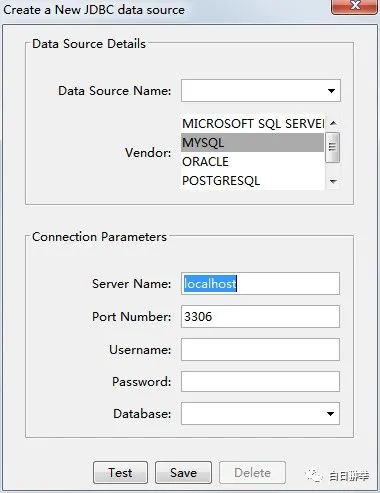
四、创建数据源
打开MATLAB Database Explorer,选择New-JDBC,然后创建MySQL数据源,save。
 

五、,连接到MySQL数据库。
方式1:用database explorer连接


方式2:用命令行命令database连接
conn = database('dbname','username','pwd',...
               
'Vendor','MySQL',...
               
'Server','sname');
其中,
dbname:要连接的数据库名
sname数据库服务器名称
示例:
conn = database('samp_db','root','2513',...
               'Vendor','MySQL',...
               'Server','localhost');
curs=exec(conn,'select * from tb6');
curs = fetch(curs);
FruitsData=curs.Data;
close(conn); %关闭连接

文章转载自白日翀举,如果涉嫌侵权,请发送邮件至:contact@modb.pro进行举报,并提供相关证据,一经查实,墨天轮将立刻删除相关内容。

评论