



毕竟以前也没写过代码这东西,大学学的java已经忘了是个啥,第一次写这么简单的东西还是折腾了一周时间,脑阔疼,晚上睡觉梦里都有这东西。
这东西容易上头啊。
This is 出自我手里的垃圾代码。
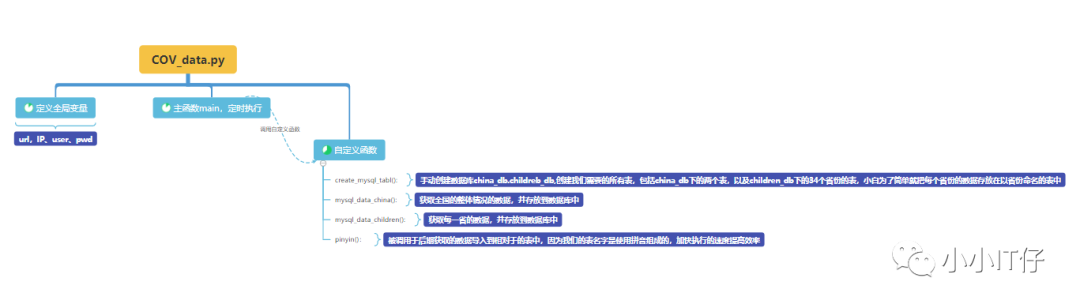
框架分析:
标题:爬取腾讯的疫情更新数据,保存至mysql中使用库:request json pymysql time datetime pypinyin框架分析:1.准备好我们可以获取数据的url,并使用requests模块,将数据捕捉下来2.对爬取的内容进行解析,因为爬取到的内容为js格式,(str),为了后续好匹配,使用py自带json模块将str转为字典格式,作为我们步骤下来的我们想要的数据的数据使用json的keys()看到有两个key,对我们有用的数据为"data"的数据,将匹配到的"data"的数据转为字典格式,并作为我们后面需要匹配的根数据。3.数据库表的创建,(只用执行一次)手动创建两个数据库,china_db,children_db用于存放表。(注意,要给我们在函数中用到的user关于两个数据库的权限才能创建表。函数create_mysql_table,用于创建我们需要的所有表,包括china_db下的两个表,以及children_db下的34个省份的表,小白为了简单就把每个省份的数据存放在以省份命名的表中。使用for循环一条语句创建34个表,提高效率。4.从根数据()获取我们想要的数并存储,全部依靠字典匹配方式,如果遇到list格式先转为字典格式再匹配。(定期执行)函数mysql_data_china():获取全国的整体情况的数据,并存放到数据库中函数mysql_data_children():获取每一省的数据,并存放到数据库中5.使用汉字转拼音的函数pinyin(),导入模块pypinyin,被调用于后期获取的数据导入到相对于的表中,因为我们的表名字是使用拼音组成的,加快执行的速度提高效率
"""
python3.8+requests+json+re+mysql
抓取腾讯的数据,存储到MySQL数据库
前期准备:1.需求分析,需要的最终数据2.找到URL,发起请求,通过url向服务器发起request请求,请求可以包含额外的header信息。
获取响应内容:如果服务器正常响应,那我们将会收到一个response,response即为我们所请求的网页内容,
或许包含HTML,Json字符串或者二进制的数据(视频、图片)等。3.工如果是HTML代码,则可以使用网页解析器进行解析,---BeautifulSoup+re
如果是Json数据,则可以转换成Json对象进行解析,----json+re
如果是二进制的数据,则可以保存到文件进行进一步处理。4.数据存储5.抓取的频率周期6.数据的用途"""
import requests
import json
import pymysql
import time
import datetime
import pypinyin

# 1.定义全局变量,
url_qq = "https://view.inews.qq.com/g2/getOnsInfo?name=disease_h5"  # 定义要爬取的url
agent_qq = {
    "user-agent": "Mozilla/5.0 (Windows NT 10.0; WOW64) AppleWebKit/537.36 (KHTML, like Gecko) Chrome/88.0.4324.190 Safari/537.36"
}

mysql_ip = "10.160.1.11"  # 定义数据库的IP地址,用户名,密码,用于后续的mysql连接
db_user = "cov"
db_pwd = "cov"
# 3.分支函数,创建数据库表、存储数据等函数模块
""""
3.1该函数用于创建存储数据库的表格————————china_db-----china_Total
                                              |-----china_Add
————————children_db---YunNan_data
                  |---HuBei_data
                  |---
                  ...一共34省份表databases
用户授权#sql: grant all privileges on *.* to 'cov'@'%' identified by 'cov;'
存储国内的整体数据database:china_db
sql:CREATE DATABASE IF NOT EXISTS china_db DEFAULT CHARACTER SET utf8 COLLATE utf8_bin;
(1)存储国内现状的表table:china_Total
(ID:ID,上次数据更新时间:updatatime,全国累计确诊:confirm,全国累计治愈:heal,全国累计死亡:dead,全国累计境外输入:importedCase,全国累计无症状感染:noInfect,现存确诊:nowConfirm,现存本土确诊:localConfirm):sql:create table china_Total(ID int(11) primary key auto_increment,updatatime datetime,confirm int(11),heal int(11),dead int(11),importedCase int(11),noInfect int(11),nowConfirm int(11),localConfirm int(11));
(2)存储国内当天新增的情况表table:china_Today
(ID,上次数据更新时间:updatatime,全国累计确诊_新增:confirm_add,全国累计治愈_新增:heal_add,全国累计死亡_新增:dead_add,全国累计境外输入_新增:importedCase_add,全国累计无症状感染_新增:noInfect_add,现存确诊_新增:nowConfirm_add,现存本土确诊_新增:localConfirm_add):sql:create table china_Add(ID int(11) primary key auto_increment,updatatime datetime,confirm_add int(11),heal_add int(11),dead_add int(11),importedCase_add int(11),noInfect_add int(11),nowConfirm_add int(11),localConfirm_add int(11));
存储34个省份的数据:database:children_db
sql:CREATE DATABASE IF NOT EXISTS children_db DEFAULT CHARACTER SET utf8 COLLATE utf8_bin;
(1)存储**省的所有数据的表():table:**_data
(ID:ID,省份名字:children_name,上次数据更新时间:updatatime,新增确诊:today_confirm, 新增死亡:today_confirmCuts,
                        新增无症状感染:today_wzz_add,
                        全省累计确诊:total_confirm, 全省累计死亡:total_dead, 全省累计治愈:total_heal,
                        全省现有确诊:nowConfirm,
                        新增死亡:today_confirmCuts,新增密切接触:total_suspect, 全省累计无症状感染:total_wzz)
sql:create table yn_data(ID int(11) primary key auto_increment,updatatime datetime,today_confirm int(11),today_confirmCuts int(11),today_wzz_add int(11),total_confirm int(11),total_dead int(11),total_heal int(11),nowConfirm int(11),total_suspect int(11),total_wzz int(11));
....
(34)存储**省的所有数据的表():table:**_data
"""
def create_mysql_table():
    # 1连接数据库信息-创建china_db下的表
    num = 0  # 统计表的数量
    conn_mysql_1 = pymysql.connect(
        host=mysql_ip,
        user=db_user,
        password=db_pwd,
        db="china_db",
    )
    cursor1 = conn_mysql_1.cursor()  # 游标
    # 创建表china_Total,china_Add
    sql_create_tb_china_Total = "create table if not exists china_Total(ID int(11) primary key auto_increment,updatatime datetime,confirm int(11),heal int(11),dead int(11),importedCase int(11),noInfect int(11),nowConfirm int(11),localConfirm int(11));"
    num += 1
    sql_create_tb_china_Add = "create table if not exists china_Add(ID int(11) primary key auto_increment,updatatime datetime,confirm_add int(11),heal_add int(11),dead_add int(11),importedCase_add int(11),noInfect_add int(11),nowConfirm_add int(11),localConfirm_add int(11));"
    num += 1
    cursor1.execute(sql_create_tb_china_Add)
    cursor1.execute(sql_create_tb_china_Total)
    conn_mysql_1.commit()  # 提交
    cursor1.close()  # 释放进程
    conn_mysql_1.close()  # 释放进程
    # 2连接数据库信息,使用for循环创建children_db下34个省的表
    conn_mysql_2 = pymysql.connect(
        host=mysql_ip,
        user=db_user,
        password=db_pwd,
        db="children_db",
    )
    cursor2 = conn_mysql_2.cursor()
    # 使用for循环创建34个省份表
    for i in (
            "xianggang", "guangdong", "shanghai", "sichuan", "taiwan", "beijing", "tianjin", "shanxi_XiAn", "zhejiang",
            "hunan",
            "fujian", "jiangsu", "yunnan", "shandong", "shanxi", "liaoning", "henan", "aomen", "neimenggu", "hubei",
            "guangxi",
            "gansu", "chongqing", "qinghai", "jiangxi", "ningxia", "heilongjiang", "hebei", "hainan", "guizhou",
            "xizang",
            "xinjiang", "anhui", "jilin"):
        sql_create_tb_children = "create table if not exists " + i + "_data(ID int(11) primary key auto_increment,children_name varchar(11),updatatime datetime,today_confirm int(11),today_confirmCuts int(11),today_wzz_add int(11),total_confirm int(11),total_dead int(11),total_heal int(11),total_nowConfirm int(11),total_suspect int(11),total_wzz int(11));"
        cursor2.execute(sql_create_tb_children)
        num += 1
    conn_mysql_2.commit()
    # 释放进程
    cursor2.close()
    conn_mysql_2.close()
    print("表已创建成功!可以开始存放数据,总计" + str(num) + "个表")


"""
3.2 该函数用于获取china_db的数据
并存储到mysql中"""
def mysql_data_china():
    # 3.2.1.1 匹配china_Total的数据,直接用字典格式的匹配方式进行匹配
    data_chinaTotal = data_all["chinaTotal"]  # 字典格式
    confirm = data_chinaTotal["confirm"]
    heal = data_chinaTotal["heal"]
    dead = data_chinaTotal["dead"]
    nowConfirm = data_chinaTotal["nowConfirm"]
    importedCase = data_chinaTotal["importedCase"]
    noInfect = data_chinaTotal["noInfect"]
    localConfirmH5 = data_chinaTotal["localConfirmH5"]
    #print("上次数据源刷新时间:" + update_time, confirm, heal, dead, nowConfirm, importedCase, noInfect, localConfirmH5)
    # 3.2.1.2匹配china_Add的数据,直接用字典格式的匹配方式进行匹配
    data_chinaAdd = data_all["chinaAdd"]  # dict格式
    confirm_add = data_chinaAdd["confirm"]
    heal_add = data_chinaAdd["heal"]
    dead_add = data_chinaAdd["dead"]
    nowConfirm_add = data_chinaAdd["nowConfirm"]
    importedCase_add = data_chinaAdd["importedCase"]
    noInfect_add = data_chinaAdd["noInfect"]
    localConfirm_add = data_chinaAdd["localConfirm"]
    # print("上次数据源刷新时间:" + update_time, confirm_add, heal_add, dead_add, nowConfirm_add, importedCase_add, noInfect_add,
    #     localConfirm_add)
    # 3.2.2将获取到数据存储到mysql数据库中,使用pymysql
    # 定义连接属性
    con_table = pymysql.connect(
        host=mysql_ip,
        user=db_user,
        password=db_pwd,
        db="china_db"
    )
    # 游标
    cursor = con_table.cursor()
    sql_insert_Total = "insert into china_Total (updatatime,confirm,heal,dead,importedCase,noInfect,nowConfirm,localConfirm) values(%s,%s,%s,%s,%s,%s,%s,%s)"
    sql_insert_Add = "insert into china_Add (updatatime,confirm_add,heal_add,dead_add,importedCase_add,noInfect_add,nowConfirm_add,localConfirm_add) values(%s,%s,%s,%s,%s,%s,%s,%s)"
    cursor.execute(sql_insert_Total,
                   [update_time, confirm, heal, dead, importedCase, noInfect, nowConfirm, localConfirmH5])
    cursor.execute(sql_insert_Add,
                   [update_time, confirm_add, heal_add, dead_add, importedCase_add, noInfect_add, nowConfirm_add,
                    localConfirm_add])
    # 提交事务
    con_table.commit()
    # 释放进程
    cursor.close()
    con_table.close()


"""
3.3定义函数抓取每个省的数据
根据格式匹配数据
因为key="areaTree"的数据为list,所以接下来关键难点就是列表匹配数据,
"""
def mysql_data_children():
    data_areaTree = data_all["areaTree"]  # list格式
    children = data_areaTree[0]["children"]  # 所有省份的数据都在列表[0]内
    # print(type(children))
    # 定义变量存储某一省份的数据集合,使用For 循环
    for i in range(len(children)):
        children_list = children[i]  # 该省份所有数据
        children_name = children_list["name"]  # 输出该省份的名字
        # print(children_name)
        # today--
        today_confirm = children_list["today"]["confirm"]
        today_confirmCuts = children_list["today"]["confirmCuts"]
        today_wzz_add = children_list["today"]["wzz_add"]
        # print(today_confirm, today_confirmCuts, today_wzz_add)
        # total--
        total_nowConfirm = children_list["total"]["nowConfirm"]
        total_confirm = children_list["total"]["confirm"]
        total_suspect = children_list["total"]["suspect"]
        total_dead = children_list["total"]["dead"]
        total_wzz = children_list["total"]["wzz"]
        total_heal = children_list["total"]["heal"]
        # print(total_confirm, total_dead, total_heal, total_nowConfirm, total_suspect, total_wzz)
        # print(update_time, children_name, today_confirm, today_wzz_add, today_confirmCuts, total_confirm, total_dead,
        #      total_heal, total_nowConfirm, total_suspect, total_wzz)
        # ***4将获取到数据存储到mysql数据库中,使用pymysql
        # 定义链接属性
        con_table = pymysql.connect(
            host=mysql_ip,
            user=db_user,
            password=db_pwd,
            db="children_db"
        )
        # 游标
        cursor = con_table.cursor()
        # 将数据分别插入相对于的表格中,调用了汉字转拼音的函数,因为陕西和山西拼音一样,所以使用if排开这两个省份的数据,陕西shanxi_XiAn,山西shanxi
        if (children_name == "陕西"):
            sql_insert = "insert into shanxi_XiAn_data (updatatime,children_name,today_confirm,today_confirmCuts,today_wzz_add,total_confirm,total_dead,total_heal,total_nowConfirm,total_suspect,total_wzz)values(%s,%s,%s,%s,%s,%s,%s,%s,%s,%s,%s)"
        else:
            sql_insert = "insert into " + pinyin(
                children_name) + "_data (updatatime,children_name,today_confirm,today_confirmCuts,today_wzz_add,total_confirm,total_dead,total_heal,total_nowConfirm,total_suspect,total_wzz)values(%s,%s,%s,%s,%s,%s,%s,%s,%s,%s,%s)"
        cursor.execute(sql_insert,
                       [update_time, children_name, today_confirm, today_confirmCuts, today_wzz_add,
                        total_confirm, total_dead, total_heal, total_nowConfirm, total_suspect, total_wzz])

        #   提交事务
        con_table.commit()
        # 释放进程
        cursor.close()
        con_table.close()


"""
使用汉字转拼音的函数,导入模块pypinyin
用于后期获取的数据导入到相对于的表中,因为我们的表名字是使用拼音组成的,加快执行的速度提高效率"""
def pinyin(a):
    s = ''
    for i in pypinyin.pinyin(a, style=pypinyin.NORMAL):
        s += ''.join(i)
    return s


# 主函数调用其他函数
if __name__ == '__main__':

    create_mysql_table()  # 创建table
    while True:
        #2.1爬取数据
        re_qq = requests.get(url_qq, agent_qq)  # 将爬取的数据存在此变量内
        # 2.2.解析,使用json转换为字典格式
        json_data1 = json.loads(re_qq.text)  # 转换为字典格式
        data_all = json.loads(json_data1["data"])  # 将筛选出的data属性再次进行转换为字典,作为我们要匹配的数据源
        update_time = data_all["lastUpdateTime"]#数据更新时间
        #3调用函数
        start_time = time.time()  # 开始时间
        mysql_data_china()  # 匹配存储数据
        mysql_data_children()  # 匹配存储数据
        end_time = time.time()  # 结束时间
        use_time = float(end_time) - float(start_time)  # 用时
        print("当前时间:" +str(datetime.datetime.now()) +"\n数据更新时间:"+str(update_time)+ ",数据导入已完成,用时:" + str(use_time) + "秒")
        time.sleep(3600)
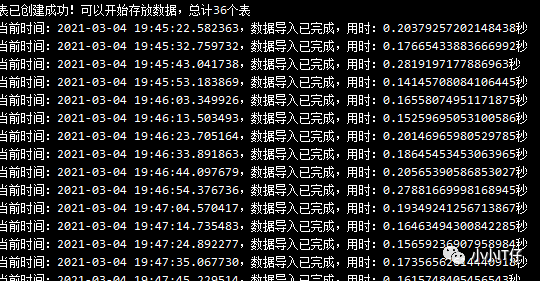
执行后的效果:(为了数据,我先用了10s执行一次),后期我用1h执行一次
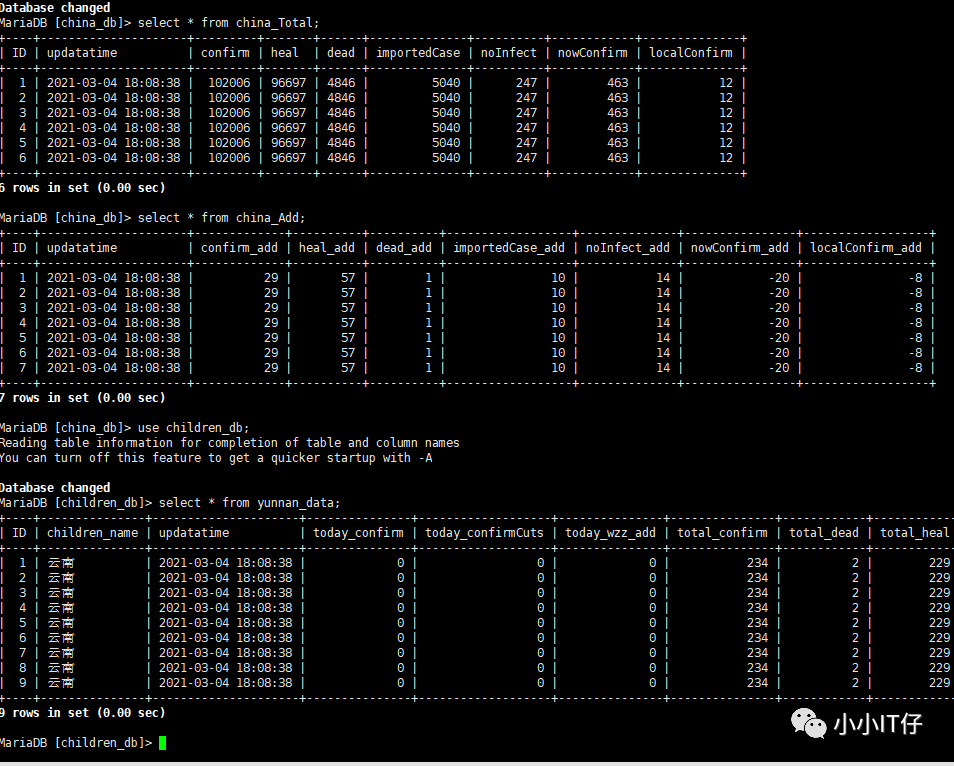
数据库中:
文章转载自小小IT仔,如果涉嫌侵权,请发送邮件至:contact@modb.pro进行举报,并提供相关证据,一经查实,墨天轮将立刻删除相关内容。
