
概述
Alibaba Sentinel 介绍

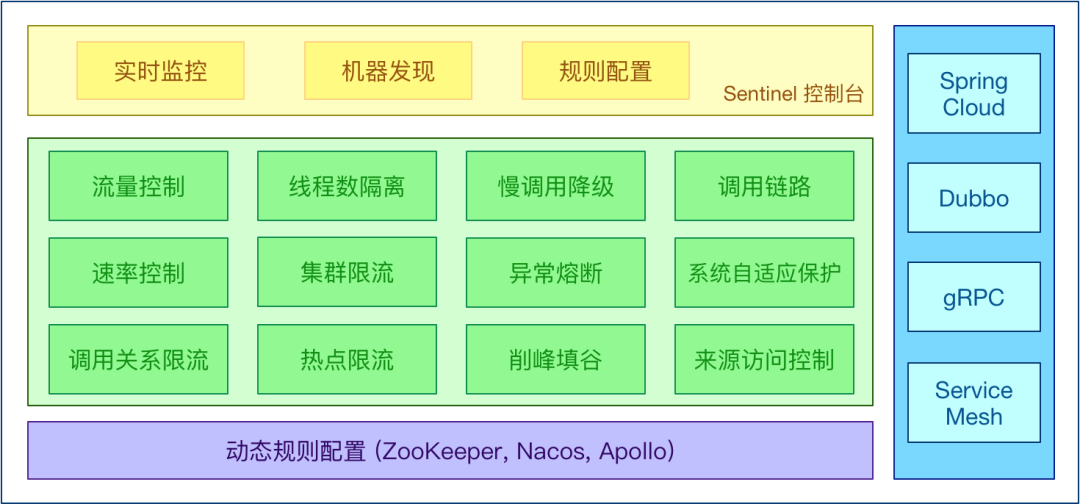
Sentinel具有以下特性:
· 丰富的应用场景:
Sentinel 承接了阿里巴巴近 10 年的双十一大促流量的核心场景,例如秒杀(即突发流量控制在系统容量可以承受的范围)、消息削峰填谷、集群流量控制、实时熔断下游不可用应用等。
· 完备的实时监控:
Sentinel 同时提供实时的监控功能。您可以在控制台中看到接入应用的单台机器秒级数据,甚至 500 台以下规模的集群的汇总运行情况。
· 广泛的开源生态:
Sentinel 提供开箱即用的与其他开源框架/库的整合模块,例如与 Spring Cloud、Dubbo、gRPC 整合只需要引入相应的依赖并进行简单的配置即可快速地接入 Sentinel。
· 完善的 SPI 扩展点:
Sentinel 提供简单易用、完善的 SPI 扩展接口。您可以通过实现扩展接口来快速地定制逻辑。例如定制规则管理、适配动态数据源等。
熔断降级
1、什么是熔断降级
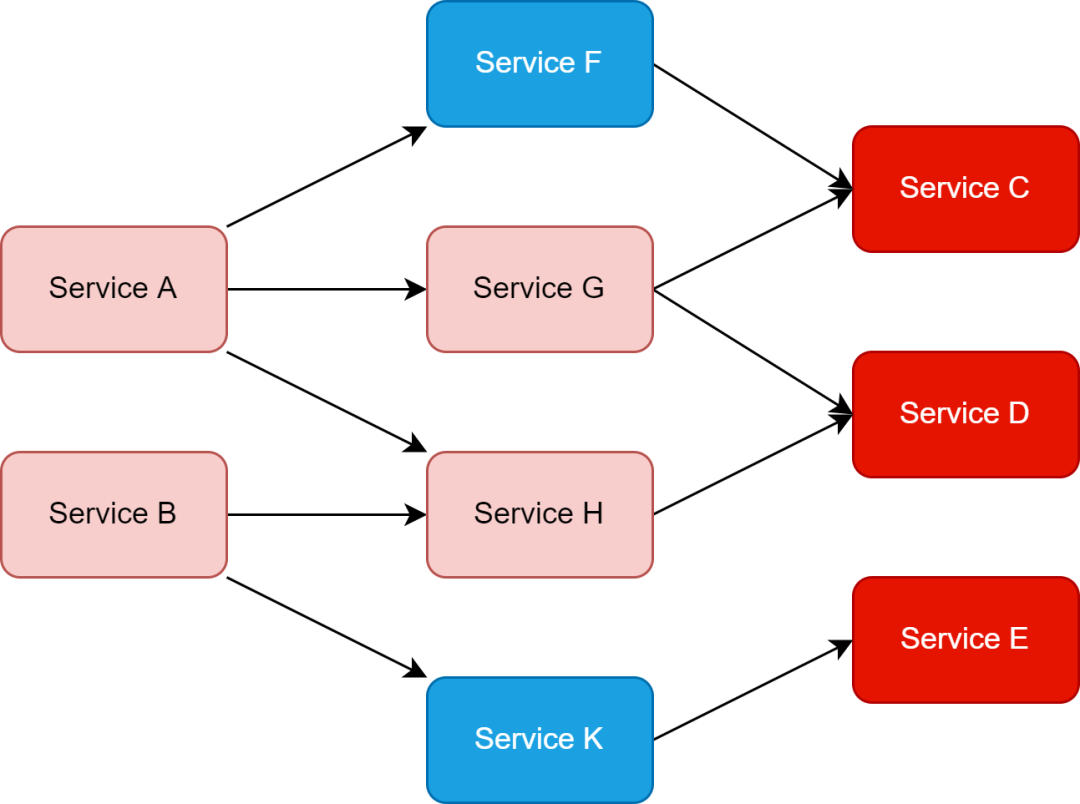
Sentinel的使命之一。由于调用关系的复杂性,如果调用链路中的某个资源出现了不稳定,最终会导致请求发生堆积。这个问题和 Hystrix 里面描述的问题是一样的。
Sentinel和
Hystrix的原则是一致的: 当调用链路中某个资源出现不稳定,例如,表现为
timeout,异常比例升高的时候,则对这个资源的调用进行限制,并让请求快速失败,避免影响到其它资源,以至于最后产生雪崩的效应。
2、熔断降级设计理念
Sentinel和
Hystrix采取了完全不一样的方法。
Hystrix通过线程池的方式,来对依赖(在我们的概念中对应资源)进行了隔离。这样做的好处是资源和资源之间做到了最彻底的隔离。缺点是除了增加了线程切换的成本,还需要预先给各个资源做线程池大小的分配。
Sentinel对这个问题采取了两种手段:
1、通过并发线程数进行限制
Sentinel通过限制资源并发线程的数量,来减少不稳定资源对其它资源的影响。这样不但没有线程切换的损耗,也不需要您预先分配线程池的大小。当某个资源出现不稳定的情况下,例如响应时间变长,对资源的直接影响就是会造成线程数的逐步堆积。当线程数在特定资源上堆积到一定的数量之后,对该资源的新请求就会被拒绝。堆积的线程完成任务后才开始继续接收请求。
2、通过响应时间对资源进行降级
Sentinel还可以通过响应时间来快速降级不稳定的资源。当依赖的资源出现响应时间过长后,所有对该资源的访问都会被直接拒绝,直到过了指定的时间窗口之后才重新恢复。
系统负载保护
Sentinel同时提供系统维度的自适应保护能力(https://sentinelguard.io/zh-cn/docs/system-adaptive-protection.html)。防止雪崩,是系统防护中重要的一环。当系统负载较高的时候,如果还持续让请求进入,可能会导致系统崩溃,无法响应。
Sentinel提供了对应的保护机制,让系统的入口流量和系统的负载达到一个平衡,保证系统在能力范围之内处理最多的请求。
Sentinel 是如何工作的
Sentinel的主要工作机制如下:
· 对主流框架提供适配或者显示的 API,来定义需要保护的资源,并提供设施对资源进行实时统计和调用链路分析。
· 根据预设的规则,结合对资源的实时统计信息,对流量进行控制。同时,Sentinel 提供开放的接口,方便您定义及改变规则。
· Sentinel 提供实时的监控系统,方便您快速了解目前系统的状态。
Sentinel进行配置,以达到对我们的微服务进行保护。
Sentinel 配置实战
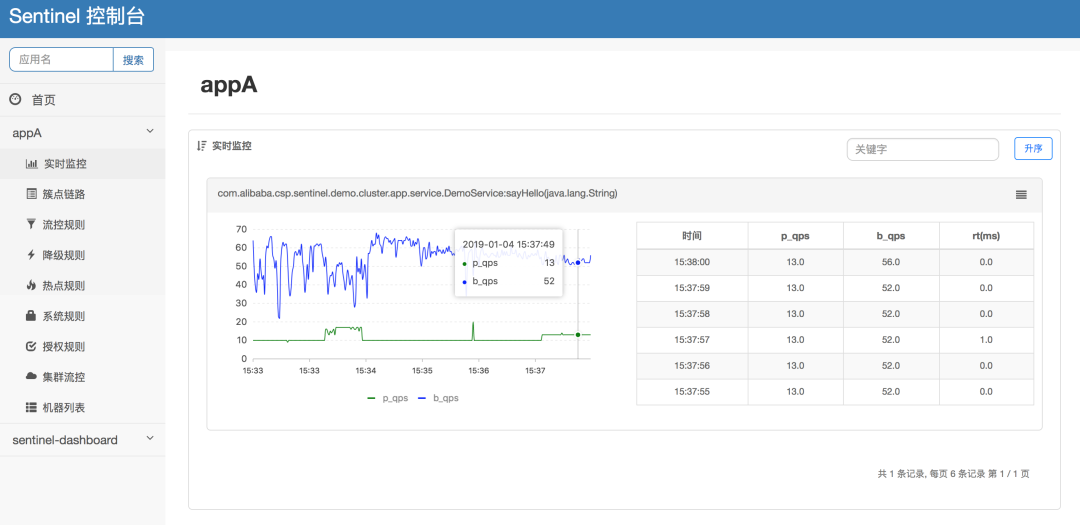
· Sentinel 客户端:Sentinel 客户端需要集成在 Spring Boot 微服务应用中,用于接收来自 Dashboard 配置的各种规则,并通过 Spring MVC Interceptor 拦截器技术实现应用限流、熔断保护。
部署 Sentinel Dashboard
wget -c https://github.com/alibaba/Sentinel/releases/download/1.8.4/sentinel-dashboard-1.8.4.jar
java -jar -Dserver.port=18080 sentinel-dashboard-1.8.4.jar
sentinel/sentinel,便可进入 Dashboard。
微服务引入 Sentinel 客户端
pom.xml增加以下三项依赖。
<dependency>
    <groupId>com.alibaba.cloud</groupId>
    <artifactId>spring-cloud-starter-alibaba-nacos-discovery</artifactId>
</dependency>

<dependency>
    <groupId>com.alibaba.cloud</groupId>
    <artifactId>spring-cloud-starter-alibaba-sentinel</artifactId>
</dependency>

<dependency>
    <groupId>org.springframework.boot</groupId>
    <artifactId>spring-boot-starter-actuator</artifactId>
</dependency>
Nacos与
Sentinel客户端。
spring:
  application:
    name: micro-service
  cloud:
    sentinel:
      transport:
        dashboard: 127.0.0.1:18080
      eager: true
    nacos:
      server-addr: localhost:8848
      username: nacos
      password: nacos
server:
  port: 80
management:
  endpoints:
    web:
      exposure:
        include: '*'
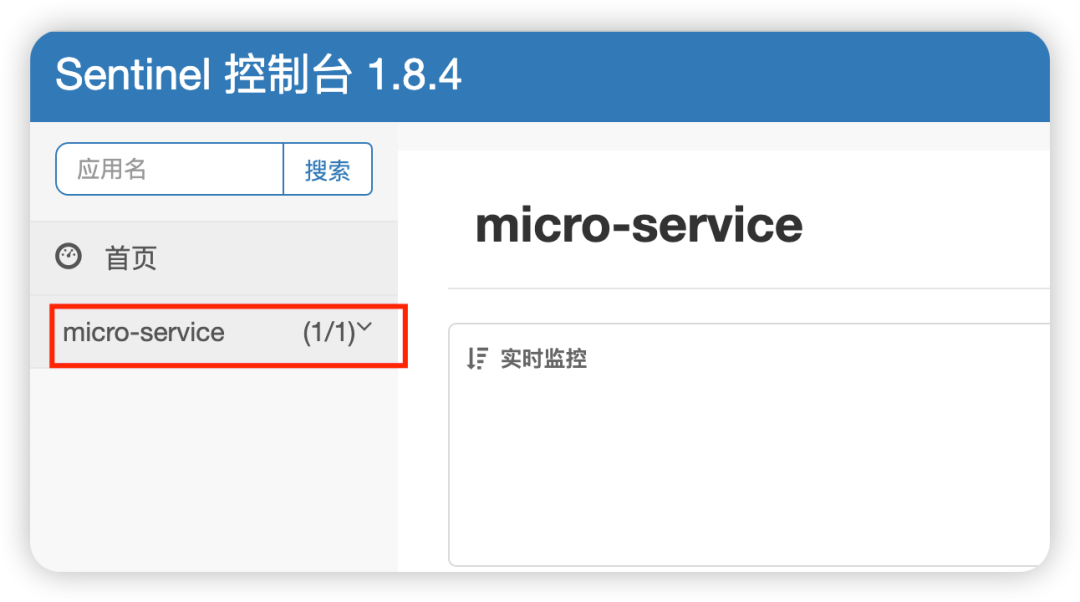
curl命令试着访问一下:
for i in {1..50}; do curl http://localhost:8080/api/nacosConfig; sleep 0.1; done
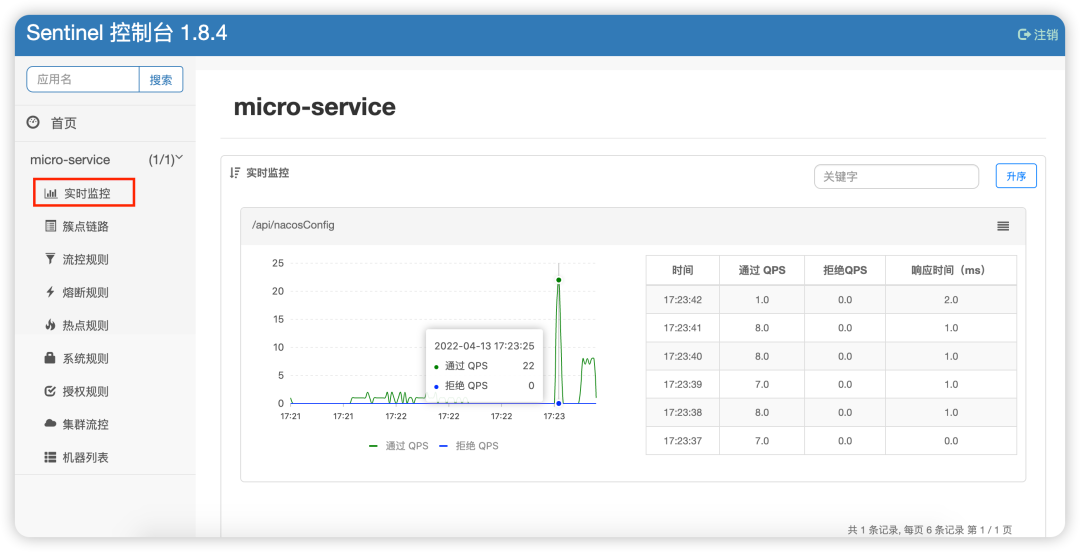
Sentinel的用法。
通过 Sentinel Dashboard 配置限流规则
NacosConfigTestController类,用于演示
Sentinel限流规则。
`package cn.lavenliu.springboot.cruddemo.controller;

import org.springframework.beans.factory.annotation.Value;
import org.springframework.web.bind.annotation.GetMapping;
import org.springframework.web.bind.annotation.RequestMapping;
import org.springframework.web.bind.annotation.RestController;

@RestController
@RequestMapping("/api")
public class NacosConfigTestController {
    @Value("${url.name}")
    private String name;

    @Value("${url.address}")
    private String address;

    @GetMapping("/nacosConfig")
    public String nacosConfig() {
        return "name: " + name + "; address: " + address;
    }
}
➜  springdemo git:(master) ✗ for i in {1..50}; do curl -w "\n" http://localhost:8080/api/nacosConfig; sleep 0.1; done
name: tyun; address: www.tyun.cn
......
name: tyun; address: www.tyun.cn
name: tyun; address: www.tyun.cn
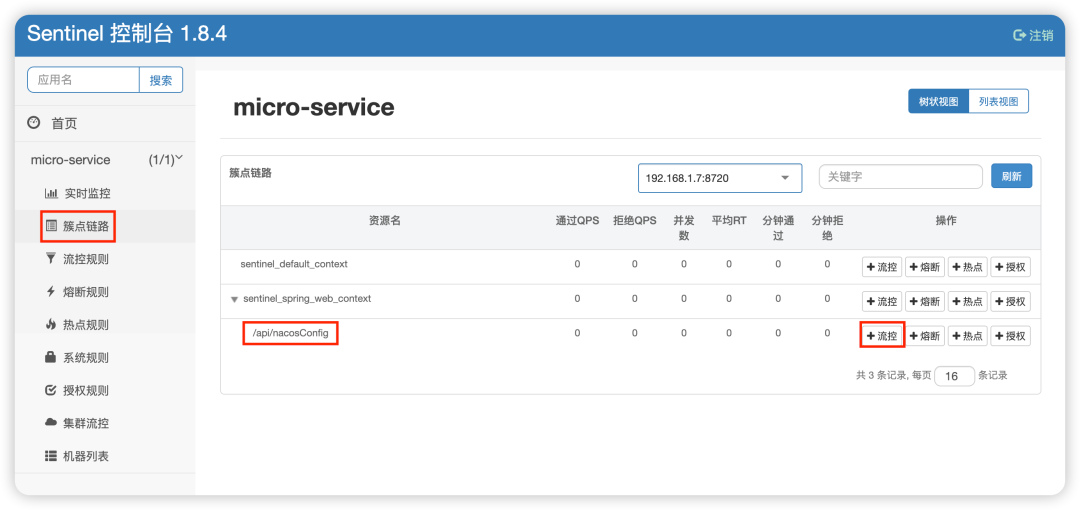
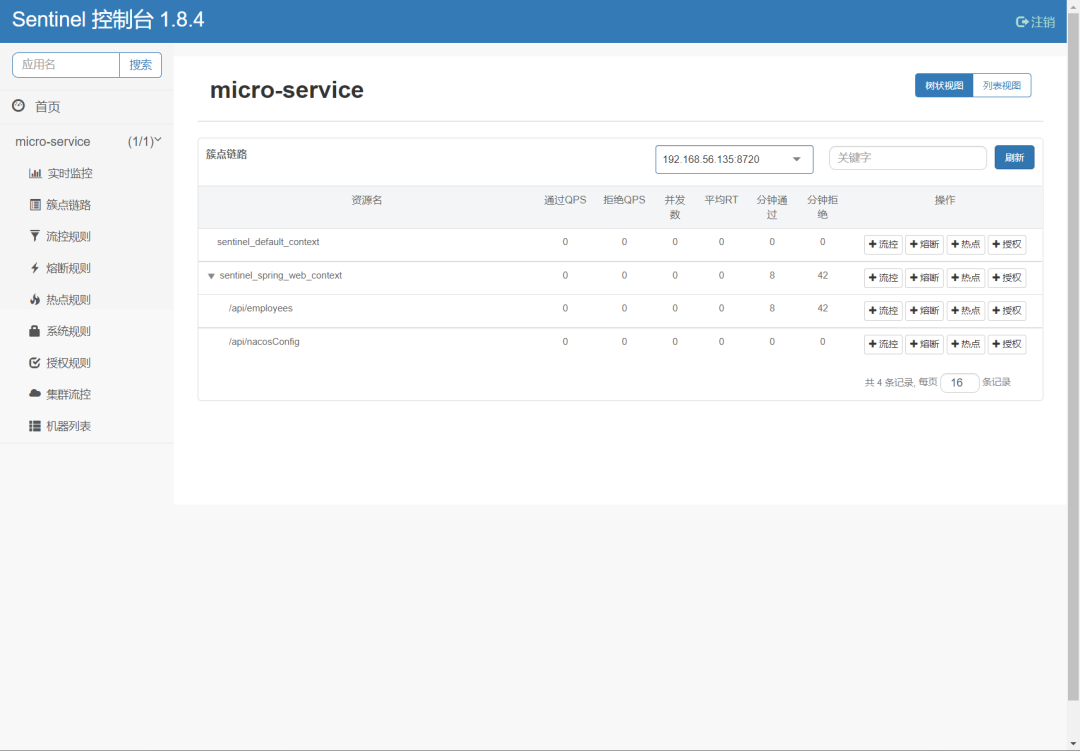
/api/nacosConfig,点击后面的“流控”按钮。
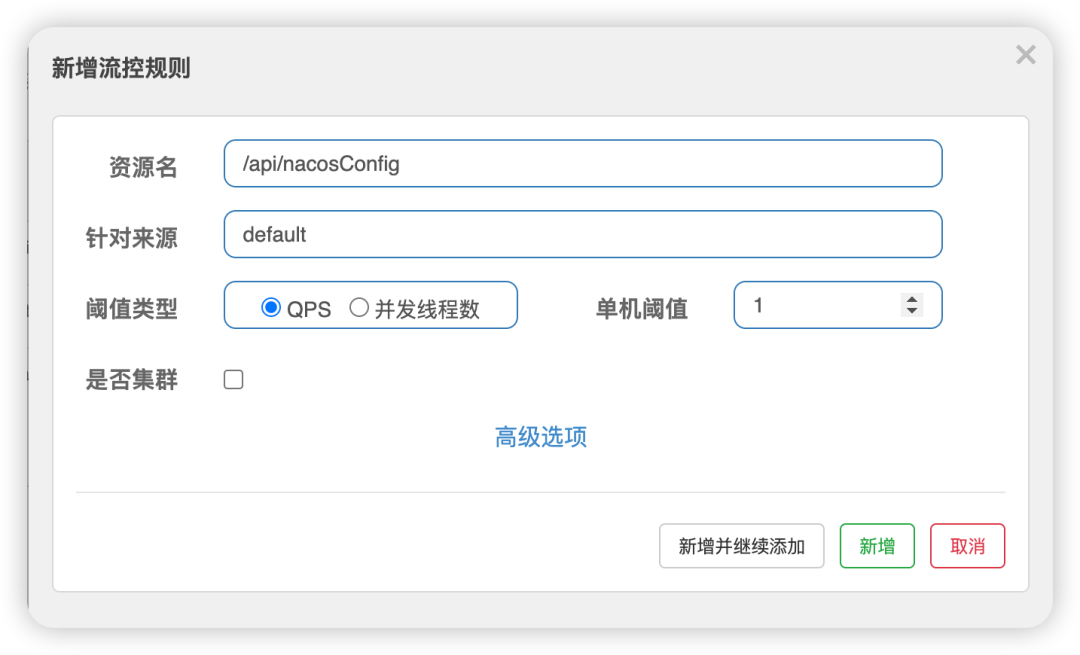
/api/nacosConfig接口每秒钟只允许 1QPS 访问,超出的请求直接服务降级返回异常。最后点击“新增”完成规则设置。
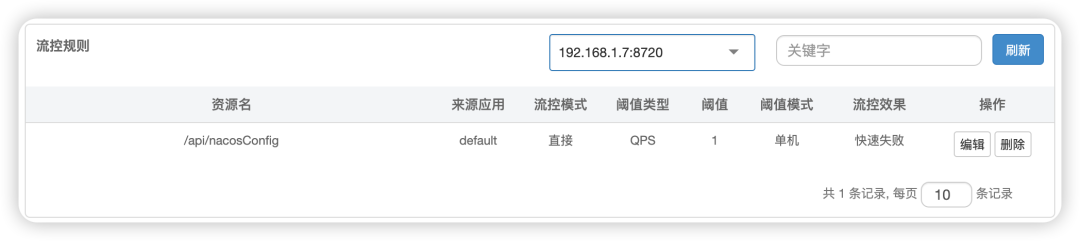
/api/nacosConfig接口的流控规则已生效,可以在“流控规则”的界面上看到。
➜ springdemo git:(master) ✗ for i in {1..50}; do curl -w "\n" http://localhost:8080/api/nacosConfig; sleep 0.6; done
name: tyun; address: www.tyun.cn
Blocked by Sentinel (flow limiting)
name: tyun; address: www.tyun.cn
......
name: tyun; address: www.tyun.cn
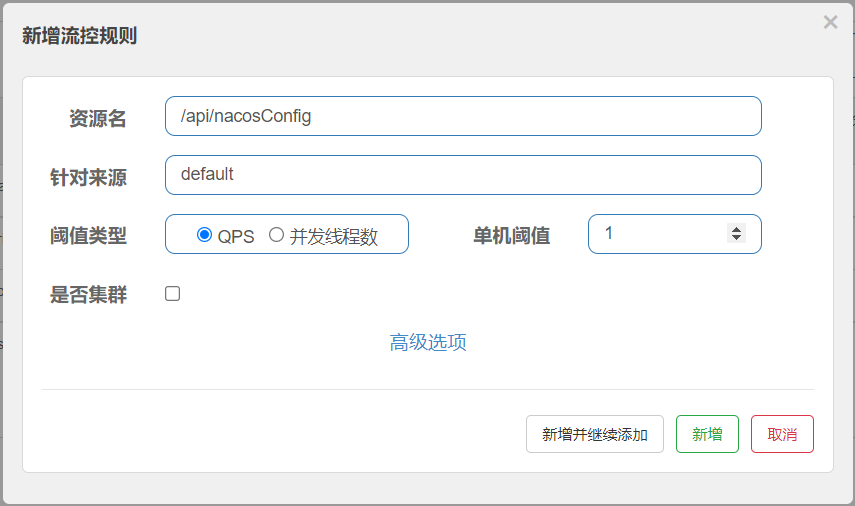
资源名:要流控的 URI,在 Sentinel 中 URI 被称为“资源”;
针对来源:默认 default 代表所有来源,可以针对某个微服务或者调用者单独设置;
阈值类型:是按每秒访问数量(QPS)还是并发数(线程数)进行流控;
单机阈值:具体限流的数值是多少。
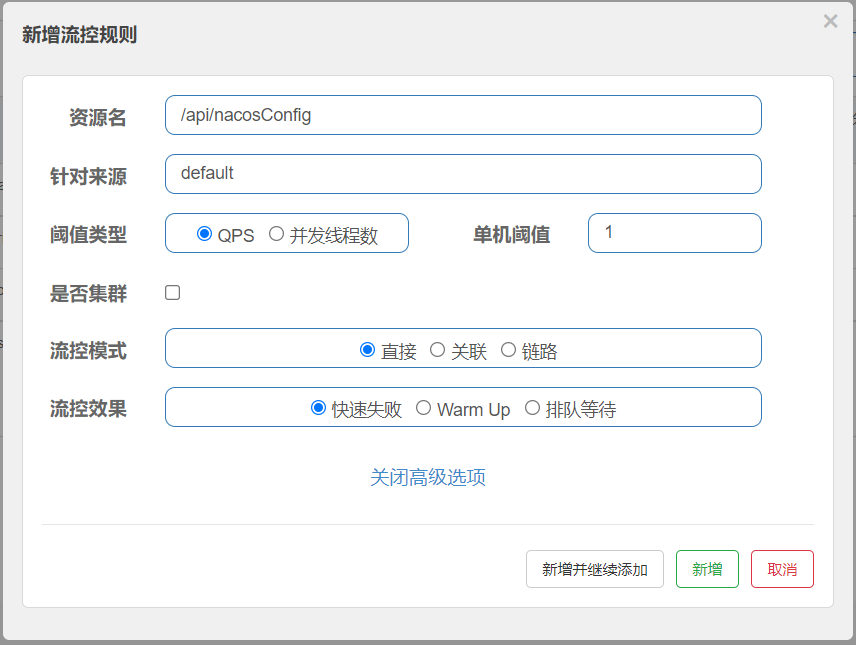
直接模式
/api/nacosConfig接口 QPS 超过 1个时限流,浏览器会出现 “Blocked by Sentinel”。
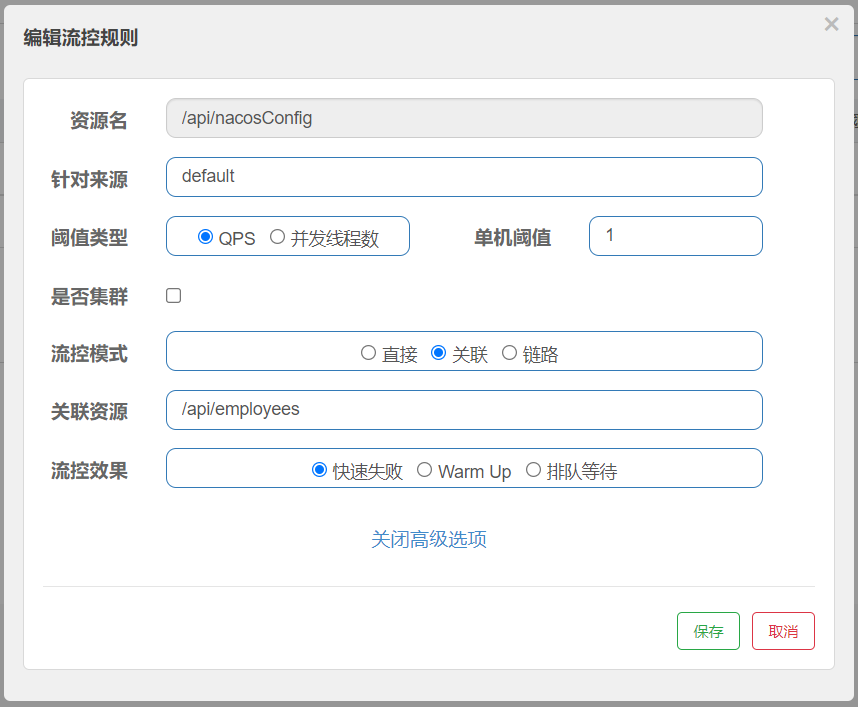
关联模式
/api/nacosConfig接口关联的
/api/employees接口 QPS 超过 1 时,再次访问
/api/nacosConfig接口便会响应 “Blocked by Sentinel”。
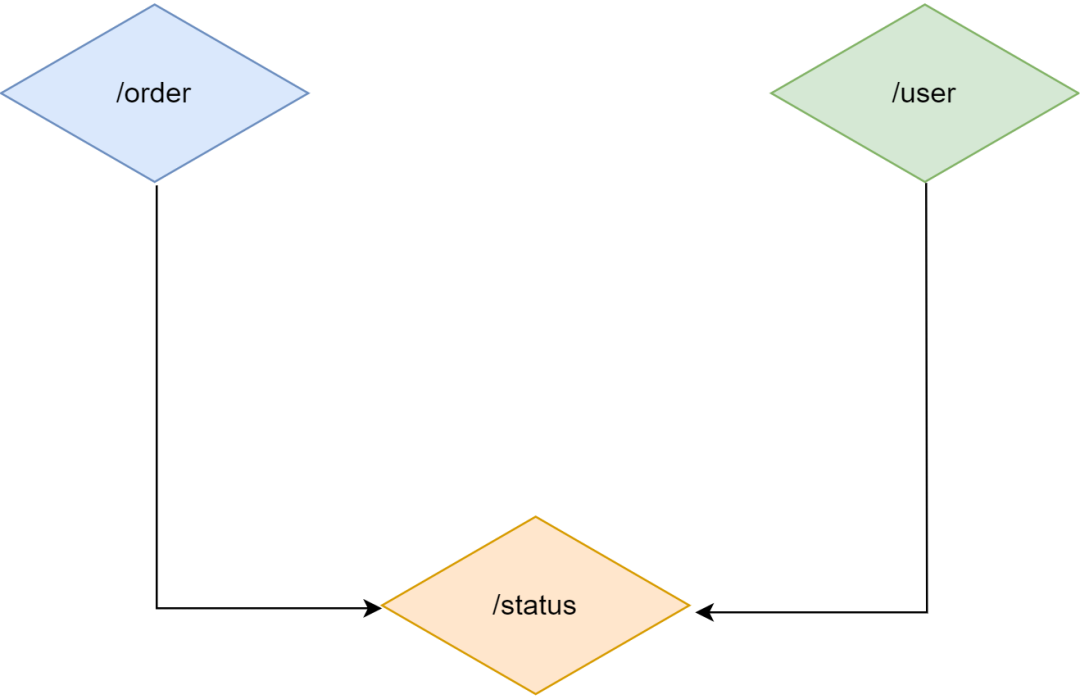
链路模式
/status接口,会被
/order接口调用;在另一个业务,
/status接口也会被
/user接口调用。
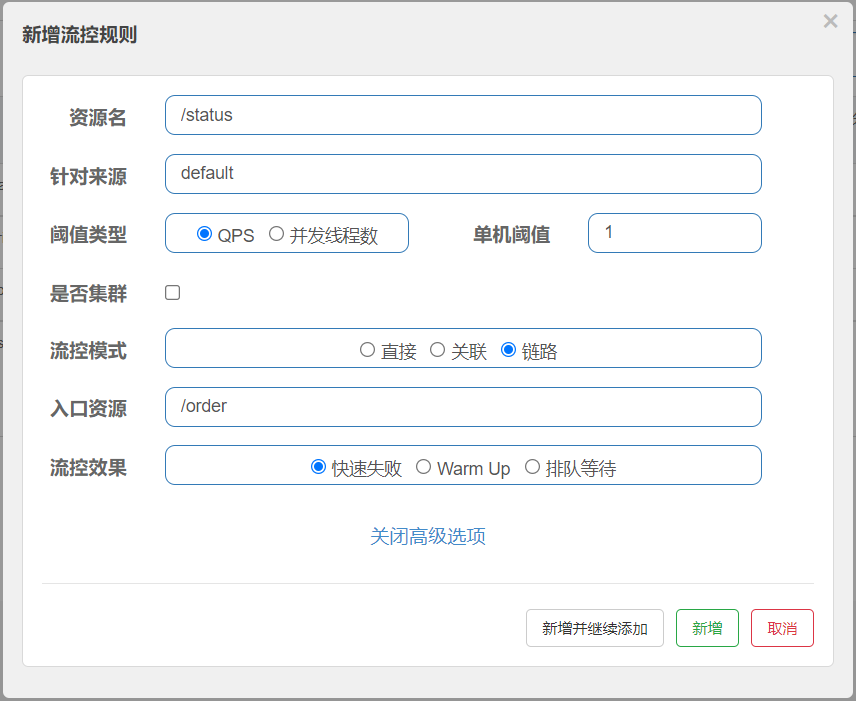
/order”,则只会针对
/order接口的调用链路生效。当访问
/order接口的 QPS 超过 1 时,
/status接口就会被限流。而另一条链路从
/user接口到
/status接口的链路则不会受到任何影响。链路模式与关联模式最大的区别是
/order接口与
/status接口必须是在同一个调用链路中才会限流,而关联模式是任意两个资源只要设置关联就可以进行限流。
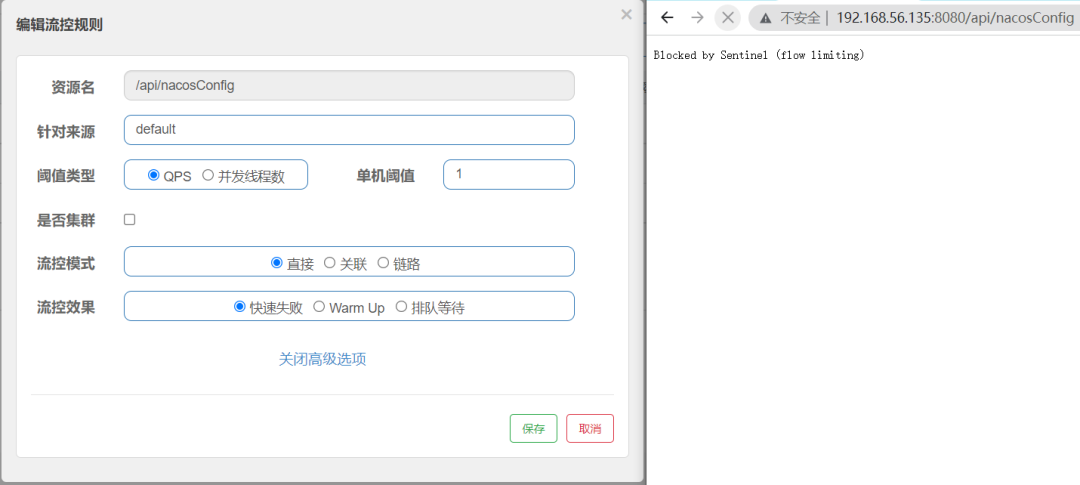
快速失败:
BlockException,快速失败是最常用的处理形式。如下图所示,当
/api/nacosConfig接口每秒 QPS 超过 1 时,可以直接抛出 “Blocked By Sentinel (flow limiting)” 异常。
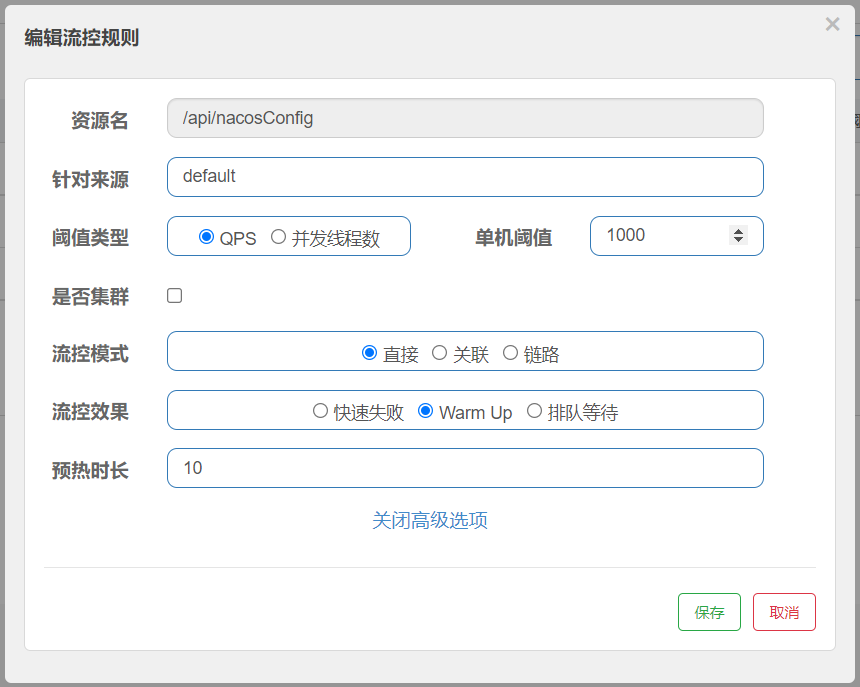
Warm Up(预热):
BlockException。
/api/nacosConfig接口平时单机阈值 QPS 处于低水位:默认为 1000/3 (冷加载因子)≈333,当瞬时大流量进来,10 秒钟内将 QPS 阈值逐渐拉升至 1000,为系统留出缓冲时间,预防突发性系统崩溃。
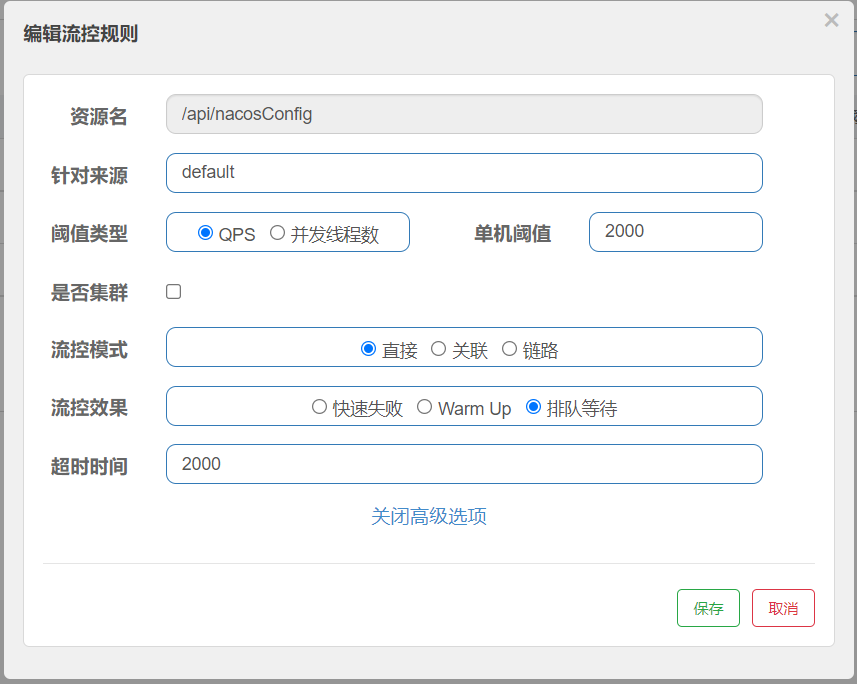
排队等待:
Sentinel的熔断降级策略。
通过 Sentinel Dashboard 配置熔断
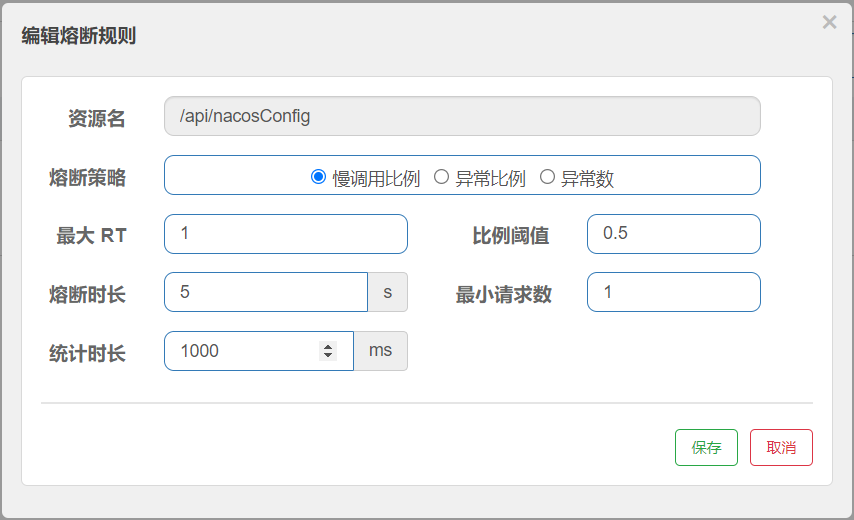
慢调用比例 ( SLOW_REQUEST_RATIO
):选择以慢调用比例作为阈值,需要设置允许的慢调用 RT(即最大的响应时间),请求的响应时间大于该值则统计为慢调用。当单位统计时长(statIntervalMs
)内请求数目大于设置的最小请求数目,并且慢调用的比例大于阈值,则接下来的熔断时长内请求会自动被熔断。经过熔断时长后熔断器会进入探测恢复状态(HALF-OPEN 状态),若接下来的一个请求响应时间小于设置的慢调用 RT 则结束熔断,若大于设置的慢调用 RT 则会再次被熔断。
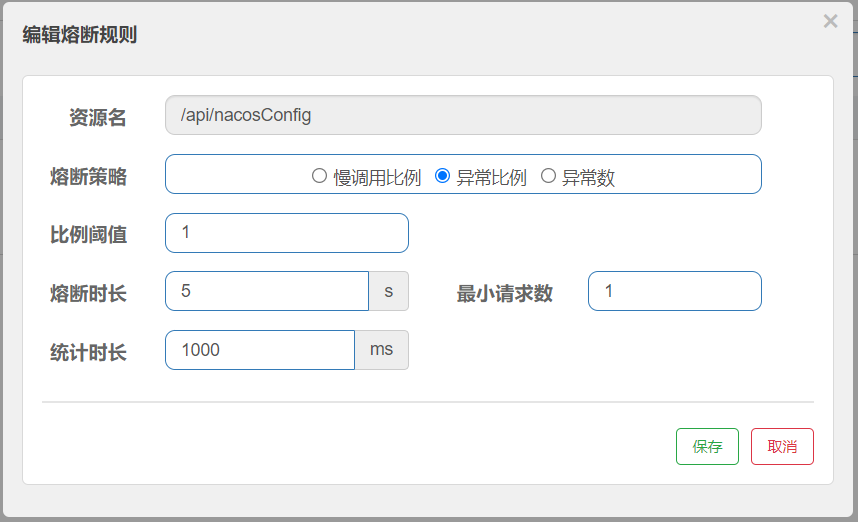
异常比例:当单位统计时长( statIntervalMs
)内请求数目大于设置的最小请求数目,并且异常的比例大于阈值,则接下来的熔断时长内请求会自动被熔断。经过熔断时长后熔断器会进入探测恢复状态(HALF-OPEN 状态),若接下来的一个请求成功完成(没有错误)则结束熔断,否则会再次被熔断。异常比率的阈值范围是[0.0, 1.0]
,代表 0% - 100%。
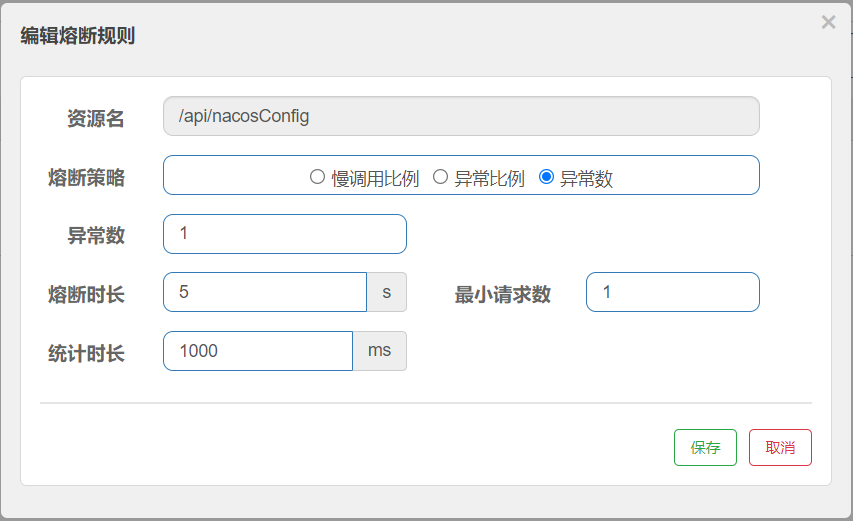
异常数 ( ERROR_COUNT
):当单位统计时长内的异常数目超过阈值之后会自动进行熔断。经过熔断时长后熔断器会进入探测恢复状态(HALF-OPEN 状态),若接下来的一个请求成功完成(没有错误)则结束熔断,否则会再次被熔断。
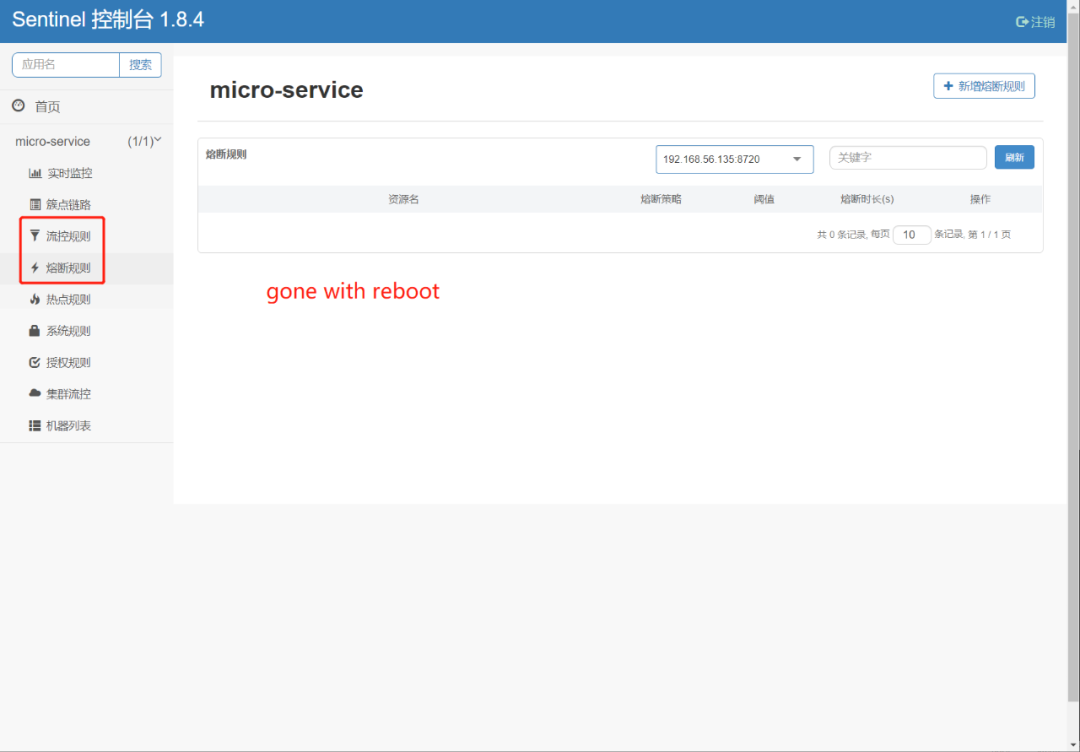
Sentinel 与 Nacos 整合实现规则持久化
DataSource接口的方式,来自定义规则的存储数据源。通常我们的建议有:
整合动态配置系统,如 ZooKeeper、Nacos、Apollo 等,动态地实时刷新配置规则 结合 RDBMS、NoSQL、VCS 等来实现该规则 配合 Sentinel Dashboard 使用
当微服务重启以后所有的配置规则都会丢失,其中的根源是默认微服务将 Sentinel 的规则保存在 JVM 内存中,当应用重启后 JVM 内存销毁,规则就会丢失。
项目准备
micro-service。
添加依赖
<dependency>
    <groupId>com.alibaba.cloud</groupId>
    <artifactId>spring-cloud-starter-alibaba-nacos-discovery</artifactId>
</dependency>

<dependency>
    <groupId>com.alibaba.cloud</groupId>
    <artifactId>spring-cloud-starter-alibaba-sentinel</artifactId>
</dependency>
配置 Nacos 与 Sentinel 客户端
server:
  port: 8080
spring:
  application:
    name: micro-service
  datasource:
    url: jdbc:mysql://localhost:3306/employee_directory?useSSL=false&serverTimezone=UTC
    username: employee
    password: employEE!@#123
  cloud:
    sentinel:
      transport:
        dashboard: 127.0.0.1:18080
      eager: true
    nacos:
      discovery:
        server-addr: localhost:8848
        username: nacos
        password: nacos
url:
  name: tyun
  address: www.tyun.cn
management:
  endpoints:
    web:
      exposure:
        include: '*'
演示代码
package cn.lavenliu.springboot.cruddemo.controller;

import org.springframework.web.bind.annotation.GetMapping;
import org.springframework.web.bind.annotation.RequestMapping;
import org.springframework.web.bind.annotation.RestController;

import cn.lavenliu.springboot.cruddemo.service.SentinelDemoService;

@RestController
@RequestMapping("/api")
public class SentinelDemoController {

    private SentinelDemoService sentinelDemoService;

    @GetMapping("/flowControl")
    public String testFlowRule() {
        return new String("创建成功");
    }
}
package cn.lavenliu.springboot.cruddemo.controller;

import org.springframework.web.bind.annotation.GetMapping;
import org.springframework.web.bind.annotation.RequestMapping;
import org.springframework.web.bind.annotation.RestController;

import cn.lavenliu.springboot.cruddemo.service.SentinelDemoService;

@RestController
@RequestMapping("/api")
public class SentinelDemoController {

    private SentinelDemoService sentinelDemoService;

    @GetMapping("/flowControl")
    public String testFlowRule() {
        return new String("创建成功");
    }
}
流控规则持久化
Sentinel接入
Nacos配置中心。
新增依赖
pom.xml新增
sentinel-datasource-nacos依赖。
<dependency>
    <groupId>com.alibaba.csp</groupId>
    <artifactId>sentinel-datasource-nacos</artifactId>
</dependency>
sentinel-datasource-nacos是
Sentinel为
Nacos扩展的数据源模块,允许将规则数据存储在
Nacos配置中心,在微服务启动时利用该模块
Sentinel会自动在
Nacos下载对应的规则数据。
Nacos 中加载规则
Nacos的
micro-service-dev.yml配置中增加
Nacos下载规则,在原有的
Sentinel配置下新增
datasource选项。如下:
server:
  port: 8080
spring:
  application:
    name: micro-service
  datasource:
    url: jdbc:mysql://localhost:3306/employee_directory?useSSL=false&serverTimezone=UTC
    username: employee
    password: employEE!@#123
  cloud:
    sentinel:
      transport:
        dashboard: 127.0.0.1:18080
      eager: true
      datasource:
        flow:
          nacos:
            server-addr: ${spring.cloud.nacos.server-addr}
            dataId: ${spring.application.name}-flow-rules
            groupId: DEFAULT_GROUP
            rule-type: flow
            username: nacos
            password: nacos
    nacos:
      server-addr: localhost:8848
      username: nacos
      password: nacos
url:
  name: tyun
  address: www.tyun.cn
management:
  endpoints:
    web:
      exposure:
        include: '*'
Nacos配置中心
DEFAULT_GROUP分组下载
data-id为
micro-service-flow-rules的配置信息,并将其作为流控规则。
新增流控配置
Nacos配置中心页面,新增
data-id为
micro-service-flow-rules的配置项。
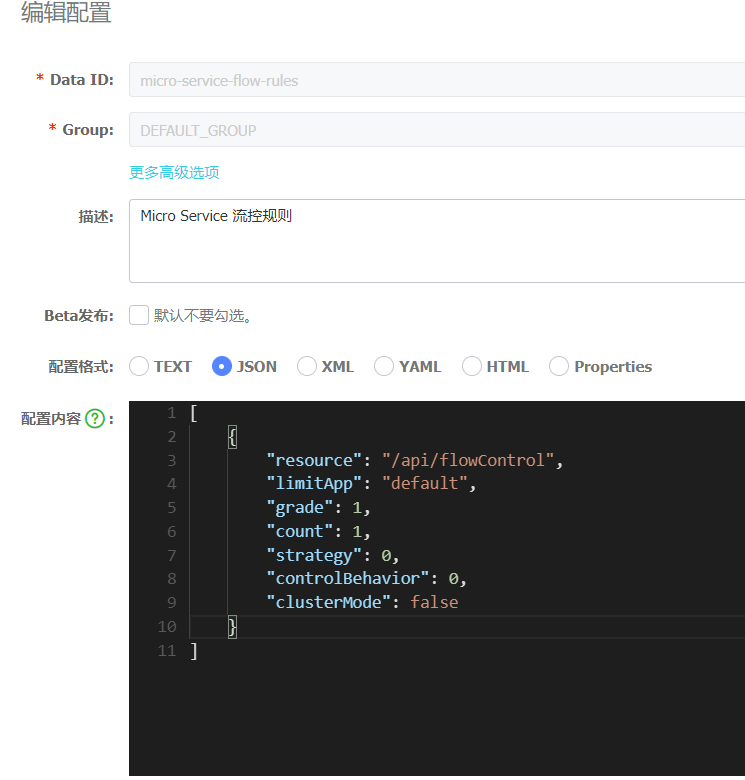
data-id与
groups与微服务应用的配置保持对应,最核心的配置内容采用
JSON格式进行书写,我们来看下这段流控规则:
[
    {
        "resource": "/api/flowControl",
        "limitApp": "default",
        "grade": 1,
        "count": 2,
        "strategy": 0,
        "controlBehavior": 0,
        "clusterMode": false
    }
]
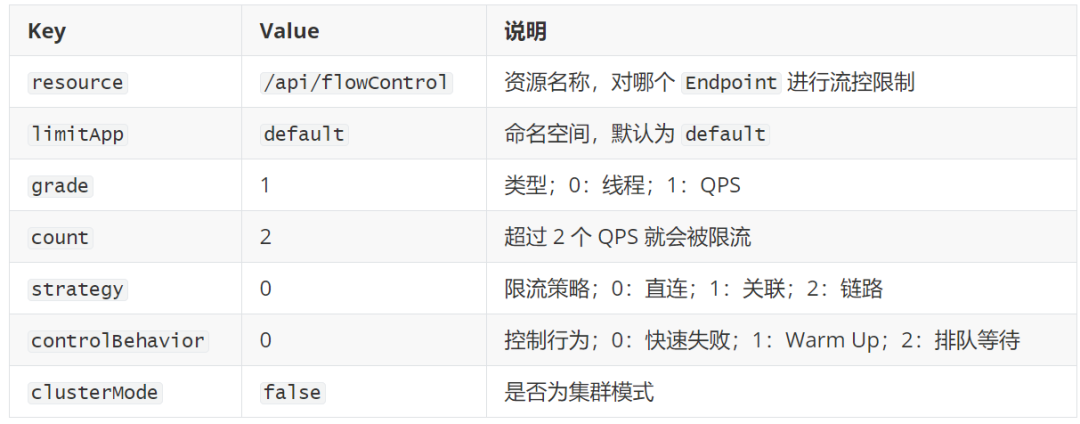
JSON配置,会生成如下
Dashboard中的配置:
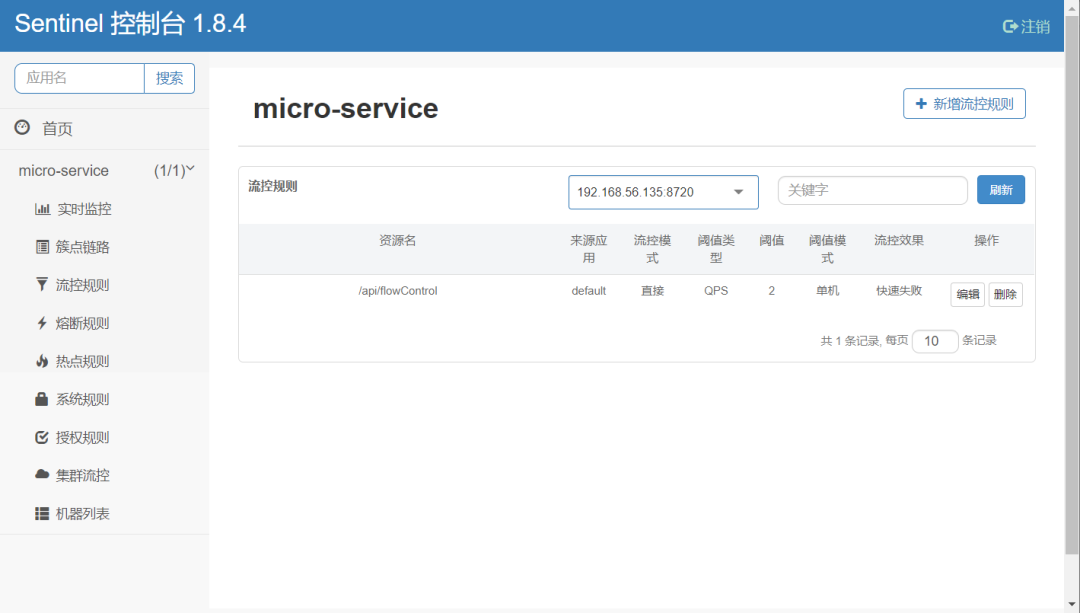
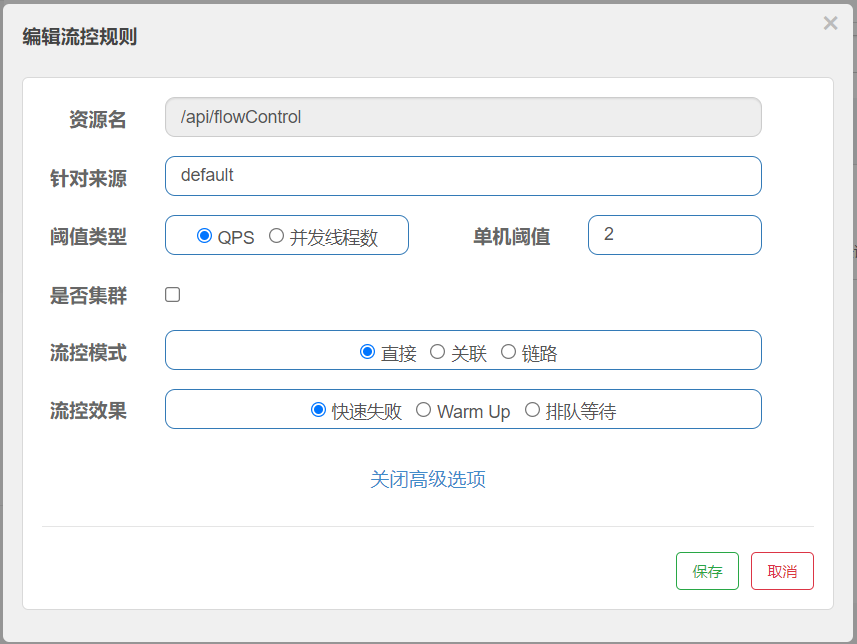
[root@node01 alibaba]#  for i in {1..50}; do curl -w "\n" http://localhost:8080/api/flowControl; sleep 0.1; done
创建成功
创建成功
Blocked by Sentinel (flow limiting)
Blocked by Sentinel (flow limiting)
Blocked by Sentinel (flow limiting)
Blocked by Sentinel (flow limiting)
创建成功
创建成功
Blocked by Sentinel (flow limiting)
Blocked by Sentinel (flow limiting)
Blocked by Sentinel (flow limiting)
Blocked by Sentinel (flow limiting)
Blocked by Sentinel (flow limiting)
Blocked by Sentinel (flow limiting)
创建成功
创建成功
Blocked by Sentinel (flow limiting)
Blocked by Sentinel (flow limiting)
Blocked by Sentinel (flow limiting)
Blocked by Sentinel (flow limiting)
Blocked by Sentinel (flow limiting)
创建成功
创建成功
Blocked by Sentinel (flow limiting)
Blocked by Sentinel (flow limiting)
Blocked by Sentinel (flow limiting)
Blocked by Sentinel (flow limiting)
Blocked by Sentinel (flow limiting)
创建成功
创建成功
Blocked by Sentinel (flow limiting)
Blocked by Sentinel (flow limiting)
Blocked by Sentinel (flow limiting)
Blocked by Sentinel (flow limiting)
Blocked by Sentinel (flow limiting)
Blocked by Sentinel (flow limiting)
创建成功
创建成功
Blocked by Sentinel (flow limiting)
Blocked by Sentinel (flow limiting)
Blocked by Sentinel (flow limiting)
Blocked by Sentinel (flow limiting)
Blocked by Sentinel (flow limiting)
创建成功
创建成功
Blocked by Sentinel (flow limiting)
Blocked by Sentinel (flow limiting)
Blocked by Sentinel (flow limiting)
Blocked by Sentinel (flow limiting)
Blocked by Sentinel (flow limiting)
[root@node01 alibaba]#
Sentinel已经限流了,会出现 “Blocked by Sentinel (flow limiting)” 的错误信息,说明流控规则已生效。
Nacos配置中心中流控规则 count 选项改为 1。
[
    {
        "resource": "/api/flowControl",
        "limitApp": "default",
        "grade": 1,
        "count": 1,
        "strategy": 0,
        "controlBehavior": 0,
        "clusterMode": false
    }
]
2022-04-28 12:53:40.379  INFO 18327 --- [-localhost_8848] c.a.n.client.config.impl.ClientWorker    : [fixed-localhost_8848] [polling-resp] config changed. dataId=micro-service-flow-rules, group=DEFAULT_GROUP
2022-04-28 12:53:40.379  INFO 18327 --- [-localhost_8848] c.a.n.client.config.impl.ClientWorker    : get changedGroupKeys:[micro-service-flow-rules+DEFAULT_GROUP]
2022-04-28 12:53:40.405  INFO 18327 --- [-localhost_8848] c.a.n.client.config.impl.ClientWorker    : [fixed-localhost_8848] [data-received] dataId=micro-service-flow-rules, group=DEFAULT_GROUP, tenant=null, md5=2e4c95b045fbc027c1d3b71199f263b9, content=[
    {
        "resource": "/api/flowControl",
        "limitApp": "default",
        "grade": 1,
 ..., type=json
2022-04-28 12:53:40.405  INFO 18327 --- [-localhost_8848] c.a.nacos.client.config.impl.CacheData   : [fixed-localhost_8848] [notify-listener] time cost=0ms in ClientWorker, dataId=micro-service-flow-rules, group=DEFAULT_GROUP, md5=2e4c95b045fbc027c1d3b71199f263b9, listener=com.alibaba.csp.sentinel.datasource.nacos.NacosDataSource$1@4c21f712
2022-04-28 12:53:40.406  INFO 18327 --- [update-thread-1] c.a.nacos.client.config.impl.CacheData   : [fixed-localhost_8848] [notify-ok] dataId=micro-service-flow-rules, group=DEFAULT_GROUP, md5=2e4c95b045fbc027c1d3b71199f263b9, listener=com.alibaba.csp.sentinel.datasource.nacos.NacosDataSource$1@4c21f712
[root@node01 alibaba]#  for i in {1..50}; do curl -w "\n" http://localhost:8080/api/flowControl; sleep 0.1; done
创建成功
Blocked by Sentinel (flow limiting)
Blocked by Sentinel (flow limiting)
Blocked by Sentinel (flow limiting)
Blocked by Sentinel (flow limiting)
Blocked by Sentinel (flow limiting)
创建成功
Blocked by Sentinel (flow limiting)
Blocked by Sentinel (flow limiting)
Blocked by Sentinel (flow limiting)
Blocked by Sentinel (flow limiting)
Blocked by Sentinel (flow limiting)
Blocked by Sentinel (flow limiting)
Blocked by Sentinel (flow limiting)
创建成功
Blocked by Sentinel (flow limiting)
Blocked by Sentinel (flow limiting)
Blocked by Sentinel (flow limiting)
Blocked by Sentinel (flow limiting)
Blocked by Sentinel (flow limiting)
Blocked by Sentinel (flow limiting)
创建成功
Blocked by Sentinel (flow limiting)
Blocked by Sentinel (flow limiting)
Blocked by Sentinel (flow limiting)
Blocked by Sentinel (flow limiting)
Blocked by Sentinel (flow limiting)
Blocked by Sentinel (flow limiting)
创建成功
Blocked by Sentinel (flow limiting)
Blocked by Sentinel (flow limiting)
Blocked by Sentinel (flow limiting)
Blocked by Sentinel (flow limiting)
Blocked by Sentinel (flow limiting)
Blocked by Sentinel (flow limiting)
创建成功
Blocked by Sentinel (flow limiting)
Blocked by Sentinel (flow limiting)
Blocked by Sentinel (flow limiting)
Blocked by Sentinel (flow limiting)
Blocked by Sentinel (flow limiting)
Blocked by Sentinel (flow limiting)
Blocked by Sentinel (flow limiting)
创建成功
Blocked by Sentinel (flow limiting)
Blocked by Sentinel (flow limiting)
Blocked by Sentinel (flow limiting)
Blocked by Sentinel (flow limiting)
Blocked by Sentinel (flow limiting)
Blocked by Sentinel (flow limiting)
Sentinel的规则并持久化到
Nacos中。关于更多
Sentinel的用法可以参考官方文档。
附录
Spring Cloud Alibaba 简介
技术选型推荐
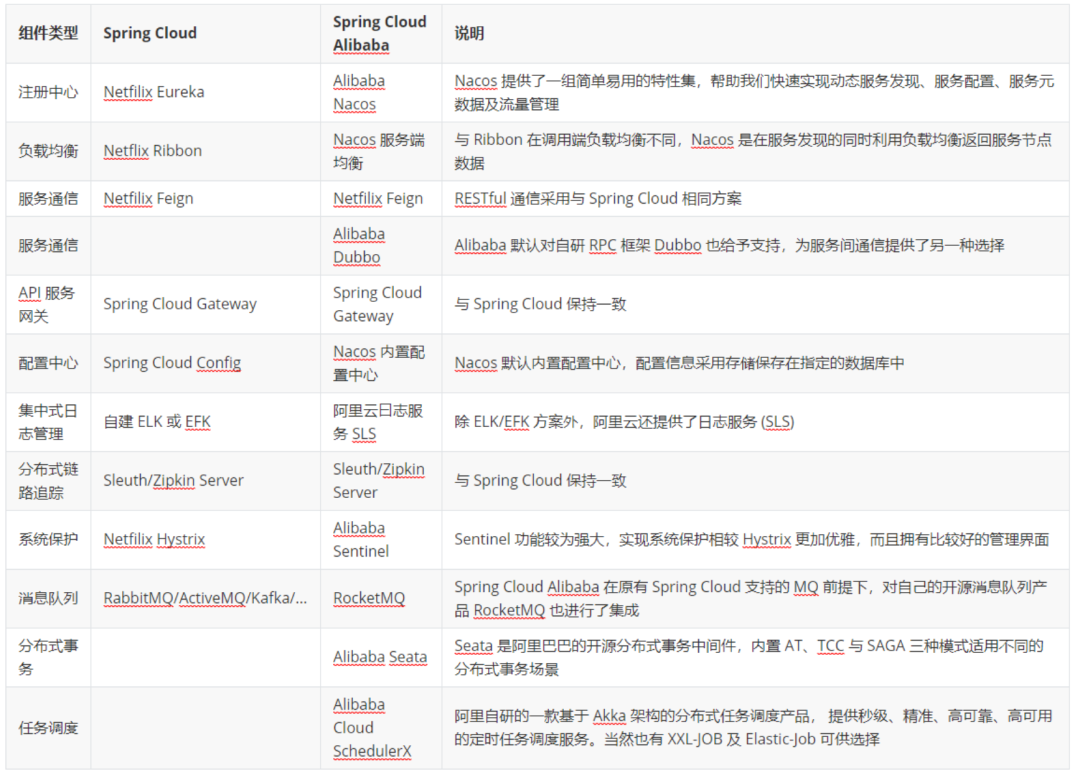
Sentinel 官方文档:https://sentinelguard.io/zh-cn/docs/introduction.html Nacos 官方文档:https://nacos.io/zh-cn/docs/what-is-nacos.html
推荐阅读


推荐视频