1. 容易陷入的知识盲区:闪回数据库
有个客户跟我抱怨,数据库开了闪回让开发测试,才一周产生了1T多闪回日志,ASM空间快撑不住了。虽然自己平时需要也知道闪回数据库,但实际使用的很少,固定思维,要保证闪回不就得闪回日志嘛,正常正常,没空间就加空间。
下班后琢磨琢磨,回来一查,原来闪回数据库可不用闪回日志!!
官方文档有非常详细的说明:https://docs.oracle.com/cd/E18283_01/backup.112/e10642/flashdb.htm#insertedID0
如果你不想看官方文档,直接阅读本文就行。太入门的知识就不讲了,总结几点就行。
2. 闪回数据库的局限性
因为闪回数据库通过撤消对运行命令时存在的数据文件的更改来工作,所以它具有以下限制:
闪回数据库只能撤消对Oracle数据库所做的数据文件的更改。它不能用于修复介质故障或从意外删除数据文件中恢复。 不能使用闪回数据库撤消收缩数据文件操作。但是,您可以使缩小的文件脱机,闪回数据库的其余部分,然后在以后还原和恢复缩小的数据文件。 不能单独使用闪回数据库来找回被删除的数据文件。如果将数据库闪回至数据库中存在删除的数据文件的时间,则仅将数据文件条目添加到控制文件中。您只能通过使用RMAN完全还原和恢复数据文件来恢复已删除的数据文件。 如果从备份还原数据库控制文件或重新创建数据库控制文件,则所有累积的闪回日志信息都将被丢弃。您不能用于FLASHBACK DATABASE返回到还原或重新创建控制文件之前的时间点。 在NOLOGGING执行操作的目标时间使用闪回数据库时,受NOLOGGING操作影响的数据库对象和数据文件中的块损坏很可能会发生。
3. Normal闪回点
我们创建闪回点有两种:Normal和Guaranteed, 比如:
create restore point BEFORE_UPGRADE {guarantee flashback database};
Normal restore point相当于某个时间点或者SCN的一个别名。
restore point的名字和对应的SCN会保存在控制文件中。
创建了normal restore point后,如果需要执行RMAN中的RECOVER DATABASE和FLASHBACK DATABASE命令,FLASHBACK TABLE的SQL语句,就可以制定目标时间点为该normal restore point,而不需要指定当时的SCN了。从而消除预先手动记录SCN或事后使用Flashback Query之类的功能确定正确的SCN的麻烦。
normal还原点是轻量级的。控制文件可以保留数千个normal还原点的记录,而对数据库性能没有重大影响。如果不手动删除,normal还原点最终会在控制文件中老化,因此它们不需要进行持续的维护。
创建normal restore point仅仅是创建了SCN的一个别名,甚至不需要开归档和开闪回日志,当然这样就无法闪回数据库了。
4. Guaranteed闪回点
Guaranteed restore point的功能和normal restore point的功能基本一致,也是作为SCN的一个别名。主要区别在于,Guaranteed还原点永远不会超出控制文件的范围,因此必须明确地将其删除。 即使数据库没有启用flashback database日志, 也可以创建一个guaranteed restore point,它可以保证能将数据库flashback到该点。因为在创建guaranteed restore point后,对于任何block的第一次变更,都会将其前镜像整个的记录下来(快速恢复区)。以后对同一块的修改不会导致再次记录该内容,除非在最后一次修改该块之后创建了另一个guaranteed restore point。 如果系统启用了flashback database日志,那么guaranteed restore point可以保证能将数据库flashback到guaranteed restore point之后的任何时间点。
完全可以不开启数据库闪回功能,只需要开归档后,就可以创建guaranteed restore point,这样只会产生很少量的闪回数据(就是修改前的块镜像)。
5. 闪回数据库为什么需要归档
这个问题我一开始也很疑惑,后面查到网上别人的一段解释:
Flashback Logs contain old versions of Oracle Blocks. But not every Block Modifications leads to the generation of Flashback Logs. Therefore, if you do a flashback database operation, you will never reach exactly the point in time in the past with flashback logs only. You 'grow your datafiles older' than the point in time you want to reach (very much faster than a complete restore from backup would achieve the same). The rest is then recovered with Redo Protocol from Archivelogs or Online Logs. Basically, flashback database does 2 steps under the cover:
make datafiles sufficiently old with old blocks from flashback logs recover with redo protocol to the exact point in time you want to get to
我自已还有一个想法:数据库不是实时落盘的,所以数据文件可能缺乏最新的已提交块内容,也可能包含了未提交的块内容。当我们创建数据库闪回点后,块内容不一致,闪回日志可以帮我们将块闪回到一开始的状态,但还需要当时的归档日志来前滚和回滚(利用当时的undo表空间)。
当然闪回数据库的操作不是说需要所有的归档日志,只需要少量几个而已。具体哪些归档呢?可以通过以下sql查看:
  SELECT DISTINCT al.thread#, al.sequence#, al.resetlogs_change#, al.resetlogs_time
    FROM v$archived_log al,
         (select grsp.rspfscn               from_scn,
                 grsp.rspscn                to_scn,
                 dbinc.resetlogs_change#    resetlogs_change#,
                 dbinc.resetlogs_time       resetlogs_time
            from x$kccrsp grsp,  v$database_incarnation dbinc
           where grsp.rspincarn = dbinc.incarnation#
             and bitand(grsp.rspflags, 2) != 0
             and bitand(grsp.rspflags, 1) = 1 -- guaranteed
             and grsp.rspfscn <= grsp.rspscn -- filter clean grp
             and grsp.rspfscn != 0
         ) grsp
      WHERE al.next_change#   >= grsp.from_scn
          AND al.first_change#    <= (grsp.to_scn + 1)
          AND al.resetlogs_change# = grsp.resetlogs_change#
          AND al.resetlogs_time       = grsp.resetlogs_time
          AND al.archived = 'YES';
这些归档文件也是可以备走的,闪回用到时会自动恢复出来 (反正不多,不备也行)。
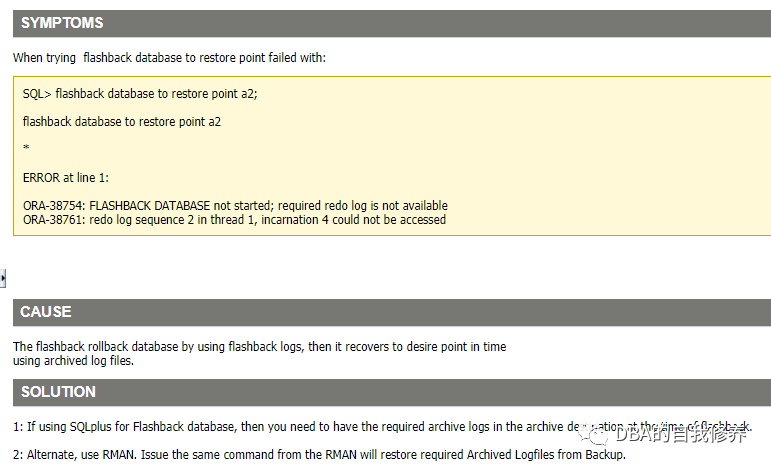
ORA-38754: FLASHBACK DATABASE NOT STARTED - REQUIRED REDO LOG IS NOT AVAILABLE (Doc ID 560686.1)
Files in the fast recovery area are not eligible for deletion if they are required to satisfy a guaranteed restore point. However, archived redo logs required to satisfy a guaranteed restore point may be deleted after they are backed up to disk or tape. When you use the RMAN FLASHBACK DATABASE command, if the archived redo logs required to satisfy a specified guaranteed restore point are not available in the fast recovery area, they are restored from the backups.
不过考虑到实际归档的备份可能也就保留几天,闪回数据库还是别开太久了,否则如果归档日志和备份都被删了,你就闪回不了了。