



上周我们讲了bat的一些常规操作,这次咱们换换环境,改用shell吧!
本期咱们还是从背景、思路、源码、详解、实战的角度来剖析整个shell脚本。
文末有linux和mac的版本的脚本噢!linux和类unix在脚本方面还是有点差距的,比如date函数,for循环等。
如对上期内容感兴趣的小伙伴们,可点击下面链接。


我司因历史规划原因,有个索引超10T数据。硬盘空间快不足。虽10T查询因为ES本身特性,还是很快能返回,但是还是给日常运维造成不变。
1.数据过大, 考虑crontab -e定时任务迁移;
2.可传开始时间和结束时间作为变量;
3.单天可执行脚本;
4.按条件删除脚本(下期);
5.直接删除脚本(下期)。
mac版:cycleES.sh
#!/bin/bash
start_date=$1;
end_date=$2;

 ##cycle the date
dmMonth=${start_date:0:7}
echo month ${dmMonth}

curl -XPUT "http://localhost:9200/kibana_sample_data_ecommerce_${dmMonth}" -d'{ "settings": { "index": { "number_of_shards": 10, "number_of_replicas": 0 } }}';

#creating mapping!
curl -XPUT "http://localhost:9200/kibana_sample_data_ecommerce_${dmMonth}/_mapping/_doc" -d'{ "properties": { "geoip": { "properties": { "continent_name": { "type": "keyword"},"city_name": { "type": "keyword"},"country_iso_code": { "type": "keyword"},"location": { "type": "geo_point"},"region_name": { "type": "keyword"}}},"customer_first_name": { "type": "text","fields": { "keyword": { "ignore_above": 256,"type": "keyword"}}},"customer_phone": { "type": "keyword"},"type": { "type": "keyword"},"manufacturer": { "type": "text","fields": { "keyword": { "type": "keyword"}}},"products": { "properties": { "tax_amount": { "type": "half_float"},"taxful_price": { "type": "half_float"},"quantity": { "type": "integer"},"taxless_price": { "type": "half_float"},"discount_amount": { "type": "half_float"},"base_unit_price": { "type": "half_float"},"discount_percentage": { "type": "half_float"},"product_name": { "analyzer": "english","type": "text","fields": { "keyword": { "type": "keyword"}}},"manufacturer": { "type": "text","fields": { "keyword": { "type": "keyword"}}},"min_price": { "type": "half_float"},"created_on": { "type": "date"},"price": { "type": "half_float"},"unit_discount_amount": { "type": "half_float"},"product_id": { "type": "long"},"base_price": { "type": "half_float"},"_id": { "type": "text","fields": { "keyword": { "ignore_above": 256,"type": "keyword"}}},"category": { "type": "text","fields": { "keyword": { "type": "keyword"}}},"sku": { "type": "keyword"}}},"customer_birth_date": { "type": "date"},"customer_full_name": { "type": "text","fields": { "keyword": { "ignore_above": 256,"type": "keyword"}}},"order_date": { "type": "date"},"customer_last_name": { "type": "text","fields": { "keyword": { "ignore_above": 256,"type": "keyword"}}},"day_of_week_i": { "type": "integer"},"total_quantity": { "type": "integer"},"currency": { "type": "keyword"},"taxless_total_price": { "type": "half_float"},"total_unique_products": { "type": "integer"},"category": { "type": "text","fields": { "keyword": { "type": "keyword"}}},"customer_id": { "type": "keyword"},"sku": { "type": "keyword"},"order_id": { "type": "keyword"},"user": { "type": "keyword"},"customer_gender": { "type": "keyword"},"email": { "type": "keyword"},"day_of_week": { "type": "keyword"},"taxful_total_price": { "type": "half_float"}}}';

for i in `seq 0 1000000`;do

t_date=$(date -f "%Y-%m-%d" -v+"$i"d $start_date +"%Y-%m-%d")
echo $t_date
sh reIndexByDay.sh $t_date ${dmMonth}

  if [ $t_date == $end_date ]
  then
  break
  fi

done
mac版:reIndexByDay.sh
#!/bin/bash

dmDate=$1
dmMonth=$2

#reindex!
curl -POST 'http://localhost:9200/_reindex?slices=10&refresh'   -H 'Content-Type:application/json' -d"{\"source\": {\"index\": \"kibana_sample_data_ecommerce\",\"type\": \"_doc\",\"query\": { \"bool\": { \"must\": [ { \"term\": { \"order_date\": \"${dmDate}\"}}],\"must_not\": [ ],\"should\": [ ]}}},\"dest\": {\"index\": \"kibana_sample_data_ecommerce_${dmMonth}\"}}";
linux版:cycleES.sh
#!/bin/bash
start_date=$1;
end_date=$2;


#important!!!before reindex!must set mapping,otherwise!
#setting shard=10 and replicas=0,in order to increase the sending speed!

##cycle the date
dmMonth=${start_date:0:7}
echo month ${dmMonth}

curl -XPUT "http://localhost:9200/kibana_sample_data_ecommerce_${dmMonth}" -d'{ "settings": { "index": { "number_of_shards": 10, "number_of_replicas": 0 } }}';

#creating mapping!
curl -XPUT "http://localhost:9200/kibana_sample_data_ecommerce_${dmMonth}/_mapping/_doc" -d'{ "properties": { "geoip": { "properties": { "continent_name": { "type": "keyword"},"city_name": { "type": "keyword"},"country_iso_code": { "type": "keyword"},"location": { "type": "geo_point"},"region_name": { "type": "keyword"}}},"customer_first_name": { "type": "text","fields": { "keyword": { "ignore_above": 256,"type": "keyword"}}},"customer_phone": { "type": "keyword"},"type": { "type": "keyword"},"manufacturer": { "type": "text","fields": { "keyword": { "type": "keyword"}}},"products": { "properties": { "tax_amount": { "type": "half_float"},"taxful_price": { "type": "half_float"},"quantity": { "type": "integer"},"taxless_price": { "type": "half_float"},"discount_amount": { "type": "half_float"},"base_unit_price": { "type": "half_float"},"discount_percentage": { "type": "half_float"},"product_name": { "analyzer": "english","type": "text","fields": { "keyword": { "type": "keyword"}}},"manufacturer": { "type": "text","fields": { "keyword": { "type": "keyword"}}},"min_price": { "type": "half_float"},"created_on": { "type": "date"},"price": { "type": "half_float"},"unit_discount_amount": { "type": "half_float"},"product_id": { "type": "long"},"base_price": { "type": "half_float"},"_id": { "type": "text","fields": { "keyword": { "ignore_above": 256,"type": "keyword"}}},"category": { "type": "text","fields": { "keyword": { "type": "keyword"}}},"sku": { "type": "keyword"}}},"customer_birth_date": { "type": "date"},"customer_full_name": { "type": "text","fields": { "keyword": { "ignore_above": 256,"type": "keyword"}}},"order_date": { "type": "date"},"customer_last_name": { "type": "text","fields": { "keyword": { "ignore_above": 256,"type": "keyword"}}},"day_of_week_i": { "type": "integer"},"total_quantity": { "type": "integer"},"currency": { "type": "keyword"},"taxless_total_price": { "type": "half_float"},"total_unique_products": { "type": "integer"},"category": { "type": "text","fields": { "keyword": { "type": "keyword"}}},"customer_id": { "type": "keyword"},"sku": { "type": "keyword"},"order_id": { "type": "keyword"},"user": { "type": "keyword"},"customer_gender": { "type": "keyword"},"email": { "type": "keyword"},"day_of_week": { "type": "keyword"},"taxful_total_price": { "type": "half_float"}}}';

##cycle the date
for i in `seq 0 100000`
do
t_date=`date -d "${start_date} +$(($i)) day" "+%Y-%m-%d"`
echo >>dmEsData.log
echo dm is doning the curl shell to migrating the es data,the date is : $t_date >>dmEsData.log
echo please wait about 1h/Day,totally 10h,please do not close the shell! >>dmEsData.log
echo curling......>>dmEsData.log
sh reIndexByDay.sh $t_date
echo >>dmEsData.log
cnt_days=$i

##if the enddate,break!
if [ $t_date == $end_date ]
then
break
fi
done

echo "The days between two date is "+$cnt_days+" !",and the es data is migrating succuess!congratulations!!!!>>dmEsData.log
linux版:reIndexByDay.sh
与mac一致,此处不赘述。
mac版:cycleES.sh
start_date=$1;
end_date=$2;
$1表示的是脚本传入的变量,如
sh cycleES.sh 2021-01-01 2021-01-31
则:start_date=2021-01-01 ,end_date=2021-01-31
dmMonth=${start_date:0:7}
表示截取日期到月份,即从0开始截取7位,如dmMonth=2021-01
curl -XPUT "http://localhost:9200/kibana_sample_data_ecommerce_${dmMonth}" -d'{ "settings": { "index": { "number_of_shards": 10, "number_of_replicas": 0 } }}';
curl是常用的综合传输工具,非常好用和强大,在传文件方面一流。不需要安装postman,十分容易操作。
此处我们用的是curl -XPUT "http://域名:端口/索引" -d‘{}’来创建索引。
{
    "settings": {
        "index": {
            "number_of_shards": 10,
            "number_of_replicas": 0
        }
    }
}
-d的内容如上,shards表示分片数,一般一个分片30G左右,之所以设置0的副本是为了迁移加速,等迁移完之后在设置回来就好。非常快的。
接着我们用的是curl -XPUT "http://域名:端口/新索引名/_mapping/类型名" -d‘{}’来创建映射。
虽然ES设置了模板之后,在不设置mapping的情况下会自动建mapping,但默认的mapping的最外层是text,里面才是keyword结构的。我们的查询都是基于head或者kibana自动生成的查询。老的索引是直接就是keyword,不会再包一层text。如用match没有关系,但是如果是用term来查询的话,由于不是keyword类型,以前的查询语句就失效了。导致查询不到。各位有兴趣可以看看这位大牛写的文章:https://blog.csdn.net/Tony_zt/article/details/111868756
{
    "properties": {
        "geoip": {
            "properties": {
                "continent_name": {
                    "type": "keyword"
                },
                "city_name": {
                    "type": "keyword"
                },
                "country_iso_code": {
                    "type": "keyword"
                },
                "location": {
                    "type": "geo_point"
                },
                "region_name": {
                    "type": "keyword"
                }
            }
        },
        "customer_first_name": {
            "type": "text",
            "fields": {
                "keyword": {
                    "ignore_above": 256,
                    "type": "keyword"
                }
            }
        },
        "customer_phone": {
            "type": "keyword"
        },
        "type": {
            "type": "keyword"
        },
        "manufacturer": {
            "type": "text",
            "fields": {
                "keyword": {
                    "type": "keyword"
                }
            }
        },
        "products": {
            "properties": {
                "tax_amount": {
                    "type": "half_float"
                },
                "taxful_price": {
                    "type": "half_float"
                },
                "quantity": {
                    "type": "integer"
                },
                "taxless_price": {
                    "type": "half_float"
                },
                "discount_amount": {
                    "type": "half_float"
                },
                "base_unit_price": {
                    "type": "half_float"
                },
                "discount_percentage": {
                    "type": "half_float"
                },
                "product_name": {
                    "analyzer": "english",
                    "type": "text",
                    "fields": {
                        "keyword": {
                            "type": "keyword"
                        }
                    }
                },
                "manufacturer": {
                    "type": "text",
                    "fields": {
                        "keyword": {
                            "type": "keyword"
                        }
                    }
                },
                "min_price": {
                    "type": "half_float"
                },
                "created_on": {
                    "type": "date"
                },
                "price": {
                    "type": "half_float"
                },
                "unit_discount_amount": {
                    "type": "half_float"
                },
                "product_id": {
                    "type": "long"
                },
                "base_price": {
                    "type": "half_float"
                },
                "_id": {
                    "type": "text",
                    "fields": {
                        "keyword": {
                            "ignore_above": 256,
                            "type": "keyword"
                        }
                    }
                },
                "category": {
                    "type": "text",
                    "fields": {
                        "keyword": {
                            "type": "keyword"
                        }
                    }
                },
                "sku": {
                    "type": "keyword"
                }
            }
        },
        "customer_birth_date": {
            "type": "date"
        },
        "customer_full_name": {
            "type": "text",
            "fields": {
                "keyword": {
                    "ignore_above": 256,
                    "type": "keyword"
                }
            }
        },
        "order_date": {
            "type": "date"
        },
        "customer_last_name": {
            "type": "text",
            "fields": {
                "keyword": {
                    "ignore_above": 256,
                    "type": "keyword"
                }
            }
        },
        "day_of_week_i": {
            "type": "integer"
        },
        "total_quantity": {
            "type": "integer"
        },
        "currency": {
            "type": "keyword"
        },
        "taxless_total_price": {
            "type": "half_float"
        },
        "total_unique_products": {
            "type": "integer"
        },
        "category": {
            "type": "text",
            "fields": {
                "keyword": {
                    "type": "keyword"
                }
            }
        },
        "customer_id": {
            "type": "keyword"
        },
        "sku": {
            "type": "keyword"
        },
        "order_id": {
            "type": "keyword"
        },
        "user": {
            "type": "keyword"
        },
        "customer_gender": {
            "type": "keyword"
        },
        "email": {
            "type": "keyword"
        },
        "day_of_week": {
            "type": "keyword"
        },
        "taxful_total_price": {
            "type": "half_float"
        }
    }
}
上述的是ELK的demo里自带的mapping结构,在文末的实战环节将会展示给大家。如果一个对象是不确定的,可以用object,设置为object之后,后续的对象会自动拓展,如开头所说一般。一般确定的对象就可以用keyword进行索引了,速度超快。
for i in `seq 0 1000000`;do
echo $i
done
for循环的目的是为了对输入的日期期间进行遍历,即按天迁移,这个比较简单。直接上语法如上。
t_date=$(date -f "%Y-%m-%d" -v+"$i"d $start_date +"%Y-%m-%d")
真正的难点其实是兼容性问题,unix下的date和linux下的date的用法不尽相似,linux正常运行的在mac就报错了。就跟python的海龟画图一样。有时候兼容性问题虽然不会很难,但是就是解决起来比较的繁琐。
上述date的意思是:我输入的start_date是个格式化的时间,并且需要计算后再格式话。这个date的变量要放右边。可以先看:
date -f "%Y-%m-%d" $start_date

这个就是个时间。
我们常规的想法可能是对这个时间要+1天的话,在这个日期后面-v+1d,但实际上这个逻辑是往左的,也就是运算操作的时候,要把运算放左边,这个和linux的思路有点不一样。让我们见证奇迹的时刻!-v+1d放左的时刻,可以得出正确之2021-01-02,而放右不行。

mac版:reIndexByDay.sh
迁移的脚本非常的简单,就是curl -XPUT "http://域名:端口/_reindex" -d‘{}’来创建索引。可按需求正确设置slice,比如我们是10个分片,slice设置成10并refresh。
{
    "source": {
        "index": "kibana_sample_data_ecommerce",
        "type": "_doc",
        "query": {
            "bool": {
                "must": [
                    {
                        "term": {
                            "order_date": "${dmDate}"
                        }
                    }
                ],
                "must_not": [ ],
                "should": [ ]
            }
        }
    },
    "dest": {
        "index": "kibana_sample_data_ecommerce_${dmMonth}"
    }
}
source表示旧索引,可加query查询条件进行迁移。比如我们10T的数据进行迁移,就是按月迁移,通过shellfor循环执行。dest表示目标索引。
需要注意的是!curl的时候如果存在变量,是需要用反斜杠\进行转义的,且-d要用双引号。这也是为啥源码中要用-d"{\"A\":\"a\"}"这种形式,可用notepad++或者sublime text批量替换即可,将{}内容单独放出,再将双引号替换成反斜杠双引号""->\"。
首先百度安装ELK,简书上有很多好文章讲ELK的安装的。
E=ElasticSearch
L=Logstash
K=Kibana
另外再装个header搭配使用。大家装好后可以用一个shell将他们的启动命令都放一起,直接终端挂后台运行。
mac版的一键运行脚本如下:
cd Users/DAMI/elasticsearch/elasticsearch-7.2.0/bin
nohup ./elasticsearch &
cd Users/DAMI/elasticsearch/elasticsearch-head-master
nohup npm run start &
cd Users/DAMI/elasticsearch/es_slave/es_slave1/bin
nohup ./elasticsearch &
cd Users/DAMI/elasticsearch/es_slave/es_slave2/bin
nohup ./elasticsearch &
cd ~
nohup kibana &
打开常用的地址:
http://127.0.0.1:9200/
http://localhost:9100/,要用9200链接
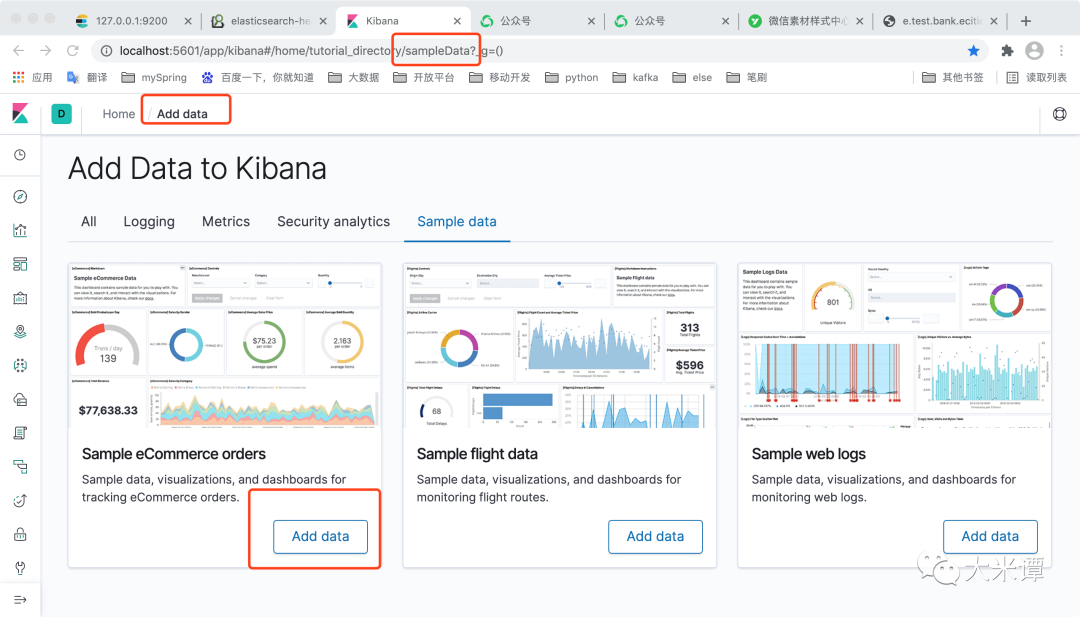
http://localhost:5601/app/kibana#/home/tutorial_directory/sampleData?_g=()
在sampledata下选择第一个商品数据作为模板,点击add data
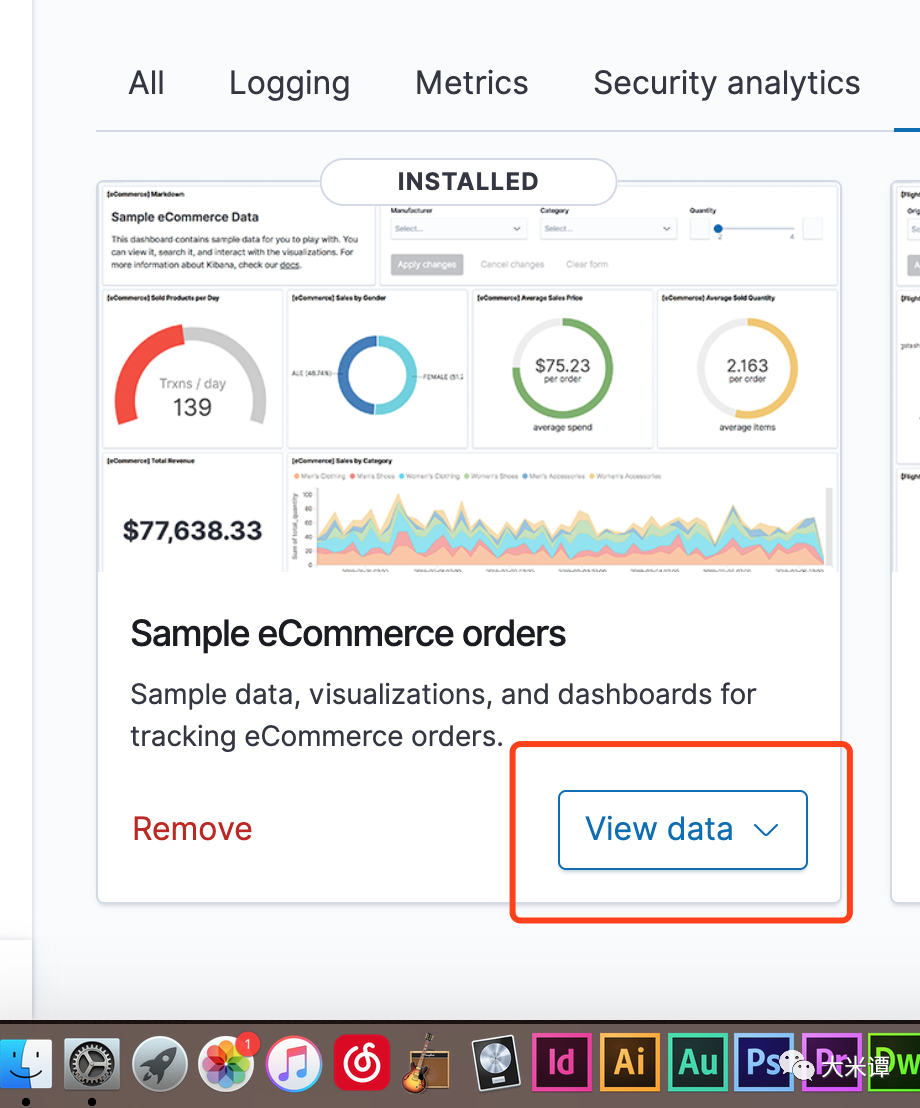
等出现了view data,说明已经生成好了。
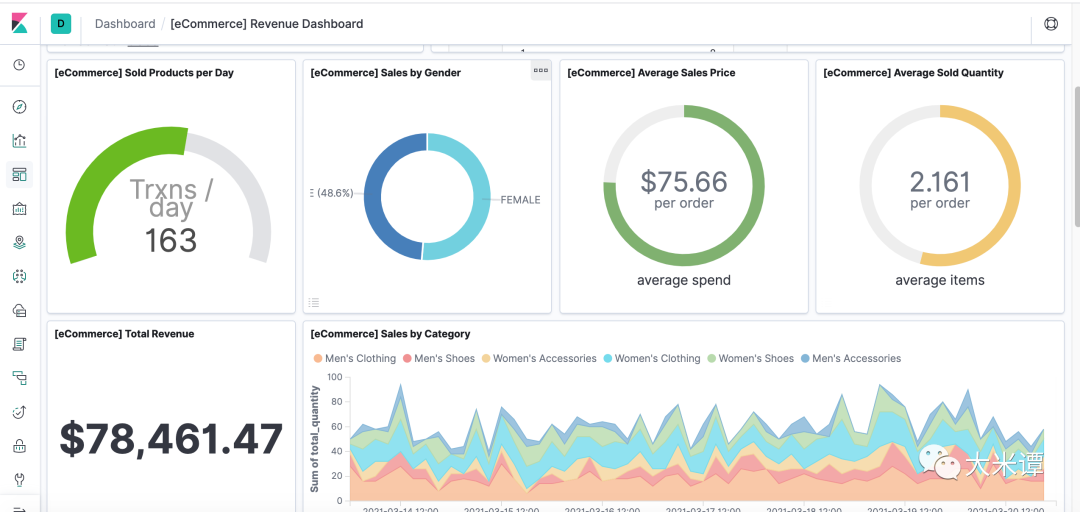
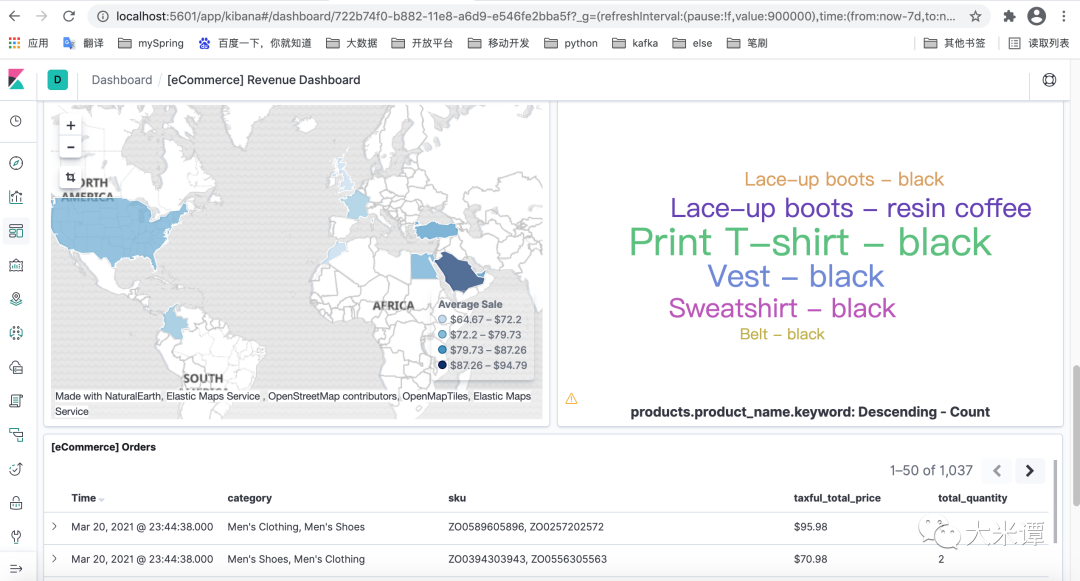
我们来欣赏下kibana生成的图吧!(安利一款非常好的自动制作图表工具,制作好的图表只需要iframe嵌入即可)
下面我们正式开始迁移。
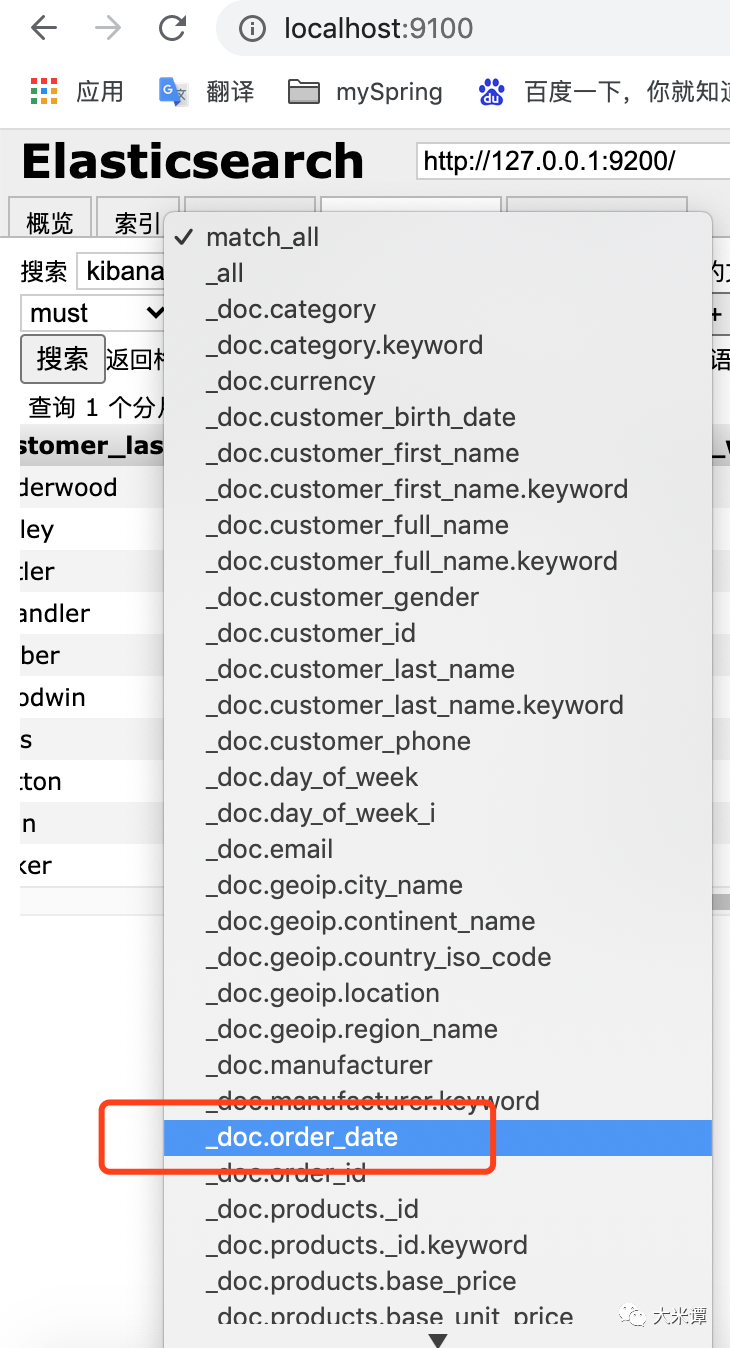
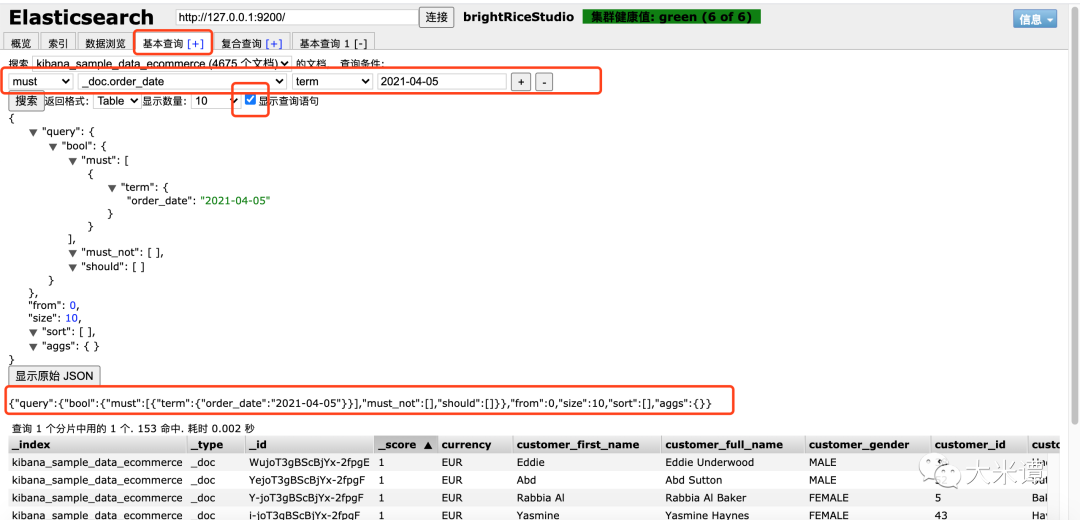
比如我们要按订单日期进行迁移,以便查找。我们可以打开head,然后基本查询,搜索,显示查询语句,就可以知道curl ...... -d 里的query的参数了。
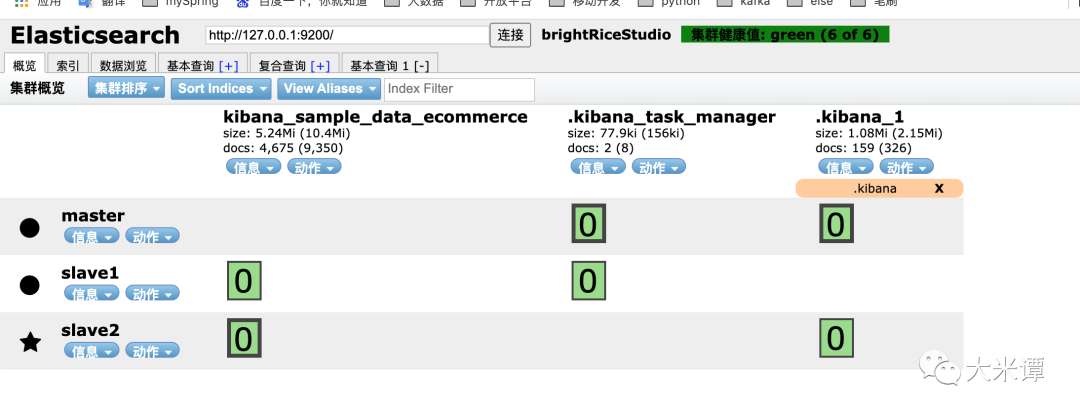
在迁移前,我们在概览里看到,是只有一个样例索引:kibana_sample_data_ecommerce。我们range以下看下要迁移的数量是1557。
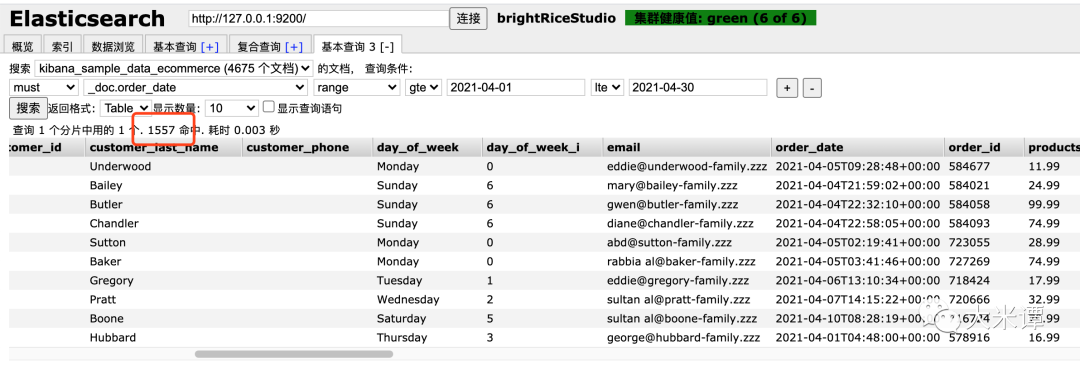
终端放上脚本,开始迁移。(gif动画过大,超限,因此截图运行结果)
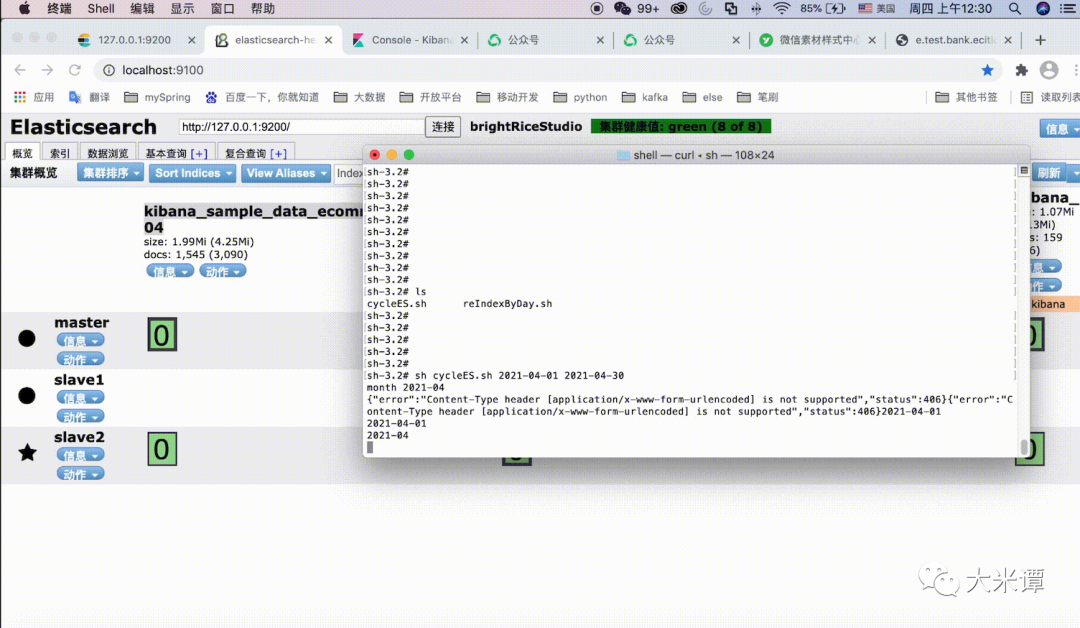
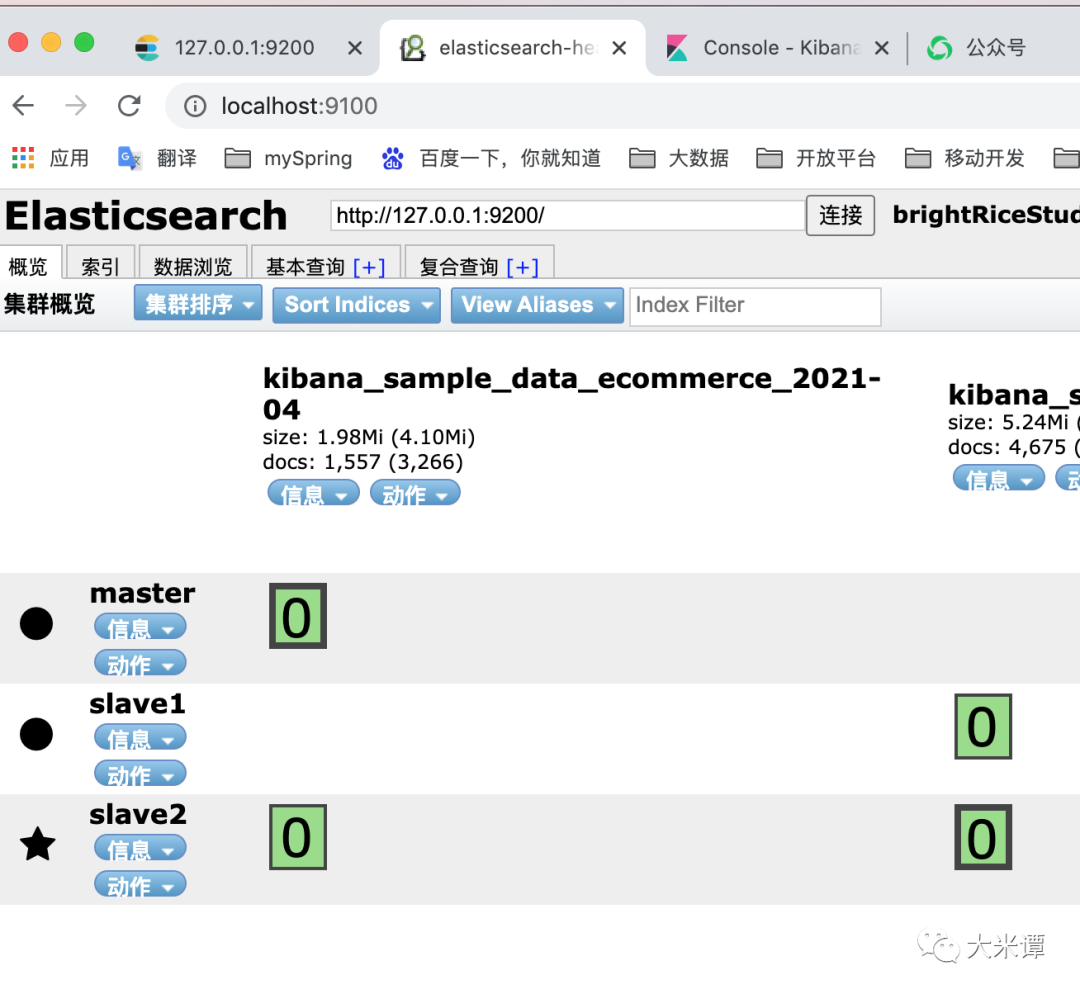
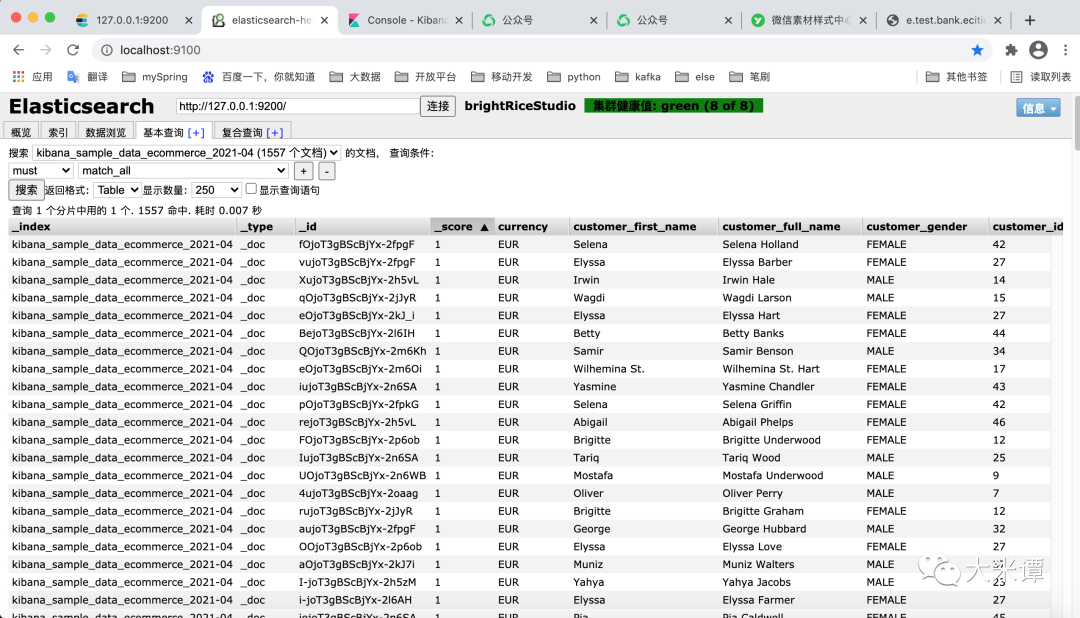
迁移完截图,并核对数量,doc=1557,数量一致,迁移成功!

| bat捞IP | 闲谈FGC | 大大与吉吉 | Honk! |
| 妖怪的宫殿 | HEAVY RAIN | HYMN TO BIRTH
| 没了的灵感 | 夜月 | PILIPIA FIRE专栏 | 月光牧童
| pilipia fire-pat3-间奏 | 20111001钢琴曲 | 赞歌
| ChinaTown | 变调421 | ICE | 20121216钢琴曲
| the music 's always with you
| learn to be lonely | the lord bless u and keep u



喜欢就关注我吧!
