



点击上方“IT那活儿”公众号,关注后了解更多内容,不管IT什么活儿,干就完了!!!
文章前言
目前Java主流操作linux服务器基本都是基于Jsch与ganymed-ssh2。Jsch与ganymed-ssh2都是用纯Java实现SSH-2协议的一个包。两者大同小异,下面笔者重点讲解下如何在Java代码中基于Jsch连接并操作linux系统。
实际应用
<!--https://mvnrepository.com/artifact/com.jcraft/jsch -->
<dependency>
<groupId>com.jcraft</groupId>
<artifactId>jsch</artifactId>
<version>0.1.54</version>
</dependency>
publicstatic Session openSession(String sshHost, int sshPort, StringsshUser, String sshPass)
throwsDeployException {
finalJSch jsch = new JSch();
Sessionsession;
try{
session= jsch.getSession(sshUser, sshHost, sshPort);
}catch (JSchException e) {
logger.error(sshHost,e);
thrownew DeployException("创建一个新的session异常");
}
//设置第一次登录的时候提示,可选值:(ask| yes | no)
session.setConfig("StrictHostKeyChecking","no");
session.setPassword(sshPass);
try{
session.connect();
}catch (JSchException e) {
logger.error("openSession异常",e);
thrownew DeployException("创建一个新的session异常");
}
returnsession;
}
publicstatic String execCommand(Session session, String cmd, Charsetcharset, long timeout)
throwsDeployException, TimeOutException {
StringBufferresult = new StringBuffer();
ChannelExecexec = null;
try{
exec= (ChannelExec)createChannel(session, ChannelType.EXEC);
cmd= cmd + " 2>&1";
exec.setCommand(cmd);
exec.setInputStream(null);
logger.info(newStringBuilder(exec.getSession().getHost()).append(",执行输出命令:").append(cmd).toString());
try(InputStream stdout = exec.getInputStream()) {
exec.connect();
longstartTime = System.currentTimeMillis();
byte[]tmp = new byte[1024];
while(true) {
while(stdout.available() > 0) {
inti = stdout.read(tmp, 0, 1024);
if(i < 0)
break;
result.append(newString(tmp, 0, i, Charset.defaultCharset()));
}
if(exec.isClosed()) {
if(stdout.available() > 0)
continue;
break;
}
//超时
if(System.currentTimeMillis() - startTime > timeout) {
thrownew TimeOutException("sh命令执行超时:"+ cmd);
}
}
}
}catch (TimeOutException t) {
throwt;
}catch (Exception e) {
//result.append(e.getMessage());
logger.error("execCommand异常",e);
thrownew DeployException("ssh 异常",e);
}finally {
close(exec);
}
if(result.length() > 0)
result.deleteCharAt(result.length()- 1);
returnresult.toString();
}

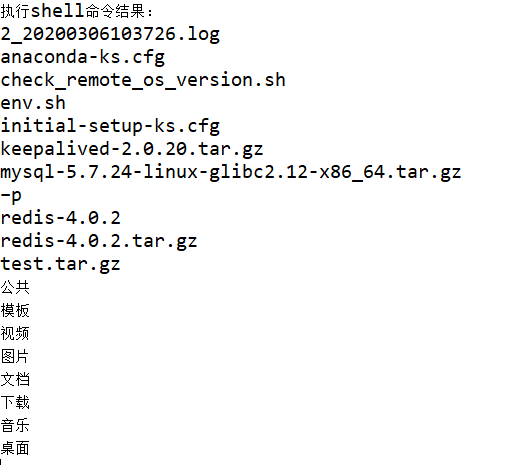
publicstatic Channel openChannel(Session session, ChannelType channelType)throws DeployException {
Channelchannel;
try{
if(false == session.isConnected()) {
session.connect();
}
channel= session.openChannel(ChannelType.SFTP.getValue());
}catch (JSchException e) {
logger.error(session.getHost(),e);
thrownew DeployException("创建一个新的Channel异常");
}
try{
channel.connect();
}catch (JSchException e) {
logger.error(session.getHost(),e);
thrownew DeployException("创建一个新的Channel异常");
}
return(ChannelSftp)channel;
}
ChannelSftp类是JSch实现SFTP核心类,它包含了所有SFTP的方法,如:
put(): 文件上传 get(): 文件下载 cd(): 进入指定目录 ls(): 得到指定目录下的文件列表 rename(): 重命名指定文件或目录 rm(): 删除指定文件 mkdir(): 创建目录 rmdir(): 删除目录
...等等(这里省略了方法的参数,put和get都有多个重载方法,大家如需使用请看具体源代码,这里篇幅有限就不一一列出。)
使用总结
我们再次回顾总结下使用Jsch步骤:
new一个JSch对象; 从JSch对象中获取Session,用于连接,并设置连接信息; 使用session对象调用opnChannel("xxx")打开通信信道,并连接; 后面就是不同的channel,不同的操作(常用的有三种通道,即ChannelShell、ChannelExec、ChannelSftp,前两类用于执行命令,后一种是用于上传下载文件)在实际项目中,我们可以基于jsch实现java操作linux服务器执行相应的命令,或者上传下发删除文件以及远程调用脚本,最终达到实现项目自动化运维的这个小目标。
文章首发于2020年10月1日.

本文作者:邓 鑫(上海新炬王翦团队)
本文来源:“IT那活儿”公众号

文章转载自IT那活儿,如果涉嫌侵权,请发送邮件至:contact@modb.pro进行举报,并提供相关证据,一经查实,墨天轮将立刻删除相关内容。
