



作者:IT邦德
中国DBA联盟(ACDU)成员,目前从事DBA及程序编程
(Web\java\Python)工作,主要服务于生产制造
现拥有 Oracle 11g  OCP/OCM、
Mysql、Oceanbase(OBCA)认证
分布式TBase\TDSQL数据库、国产达梦数据库以及红帽子认证
从业8年DBA工作,在数据库领域有丰富的经验
B站主播Oracle、Mysql、PG实战课程,请搜索:jeames007

微信:jem_db
QQ:2243967774
详情关注公众号:IT邦德
QQ群:168797397、587159446

前言
Nginx是一款自由的、开源的、高性能的HTTP服务器和反向代理服务器;同时也是一个IMAP、POP3、SMTP代理服务器;nginx可以作为一个HTTP服务器进行网站的发布处理,另外nginx可以作为反向代理进行负载均衡的实现。
详细配置请观看视频:
https://www.bilibili.com/video/BV1av411J777/
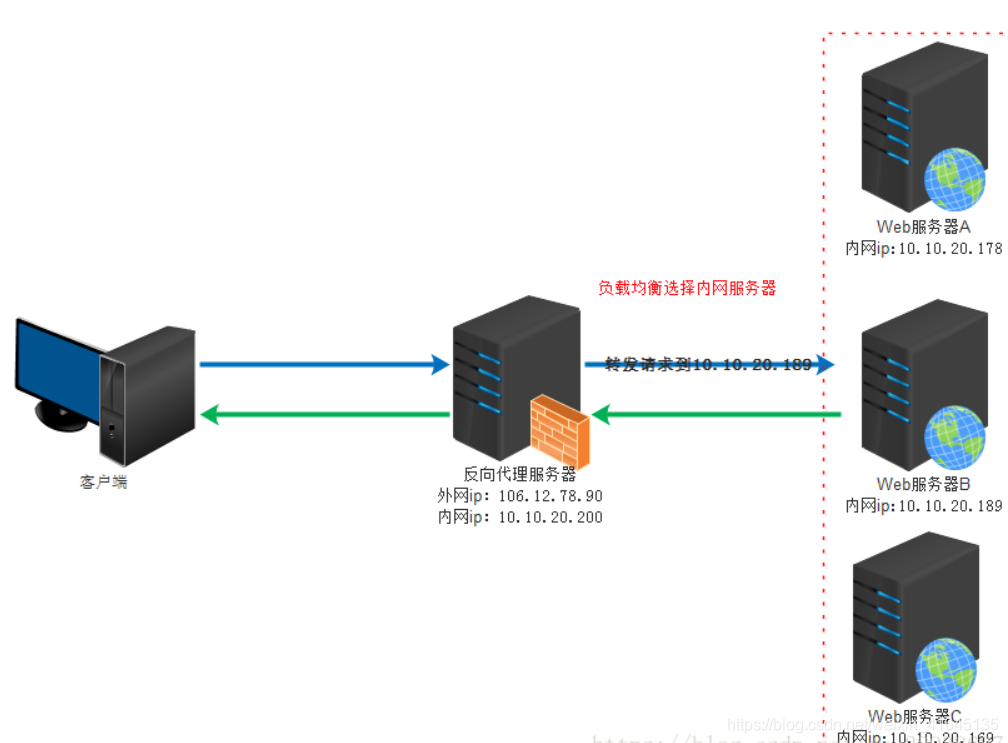
反向代理
反向代理的处理方式,例如某大型网站,每天同时连接到网站的访问人数已经爆表,
单个服务器不能满足用户访问量的要求,就出现分布式部署;
也就就是用户访问URL时,nginx通过一定的规则把用户的请求分发到不同的服务器上,实现负载均衡。

实际运行方式是指以代理服务器来接受internet上的连接请求,
然后将请求转发给内部网络上的服务器,
并将从服务器上得到的结果返回给internet上请求连接的客户端,
此时代理服务器对外就表现为一个服务器
1.nginx安装部署
通过https://nginx.org/en/download.html 下载
2.常用命令
查看nginx的版本
G:\nginx-1.18.0>nginx -v

在命令行中启动nginx服务
.\nginx.exe(或者nginx即可)
start nginx  --启动命令

强制停止nginx服务器,如果有未处理的数据,丢弃
nginx -s stop

如果有未处理的数据,等待处理完成之后停止
nginx -s quit

重新加载
nginx -s reload
3.配置文件
在conf文件夹中找到nginx.conf配置文件,主要由6个部分组成:
main:用于进行nginx全局信息的配置
events:用于nginx工作模式的配置
http:用于进行http协议信息的一些配置
server:用于进行服务器访问信息的配置
location:用于进行访问路由的配置
upstream:用于进行负载均衡的配置
4. nginx支持的负载均衡调度算法
4.1、轮询(默认)
每个请求按时间顺序逐一分配到不同的后端服务器,如果后端服务器down掉,
能自动剔除。
upstream backserver {
server 192.168.0.14;
server 192.168.0.15;
}
4.2、指定权重
指定轮询几率,weight和访问比率成正比,用于后端服务器性能不均的情况。
upstream backserver {
server 192.168.0.14 weight=10;
server 192.168.0.15 weight=10;
}
4.3 IP绑定 ip_hash
每个请求按访问ip的hash结果分配,
这样每个访客固定访问一个后端服务器,
可以解决集群部署环境下session共享的问题。
upstream backserver {
ip_hash;
server 192.168.0.14:88;
server 192.168.0.15:80;
}
5.修改Tomcat端口配置文件
G:\apache-tomcat-8.5.32\conf\server.xml
##注:修改4个配置文件即可
<Server port="8006" shutdown="SHUTDOWN">
<Connector port="8081" protocol="HTTP/1.1"
               connectionTimeout="20000"
               redirectPort="8444" />
<Connector port="8010" protocol="AJP/1.3" redirectPort="8444" />
6. nginx.conf配置文件
#user  nobody;
worker_processes  1;

#error_log  logs/error.log;
#error_log  logs/error.log  notice;
#error_log  logs/error.log  info;

#pid        logs/nginx.pid;


events {
    worker_connections  1024;
}


http {
    include       mime.types;
    default_type  application/octet-stream;

    #log_format  main  '$remote_addr - $remote_user [$time_local] "$request" '
    #                  '$status $body_bytes_sent "$http_referer" '
    #                  '"$http_user_agent" "$http_x_forwarded_for"';

    #access_log  logs/access.log  main;

    sendfile        on;
    #tcp_nopush     on;

    #keepalive_timeout  0;
    keepalive_timeout  65;

    #gzip  on;

    upstream backserver {
    server 127.0.0.1:8080;
    server 127.0.0.1:8081;
    }

    server {
        listen       80;
        server_name  localhost;

        #charset koi8-r;

        #access_log  logs/host.access.log  main;

        location / {
            root   html;
            index  index.html index.htm;
            proxy_pass http://backserver;
        }

        #error_page  404              /404.html;

        # redirect server error pages to the static page /50x.html
        #
        error_page   500 502 503 504  /50x.html;
        location = /50x.html {
            root   html;
        }

        # proxy the PHP scripts to Apache listening on 127.0.0.1:80
        #
        #location ~ \.php$ {
        #    proxy_pass   http://127.0.0.1;
        #}

        # pass the PHP scripts to FastCGI server listening on 127.0.0.1:9000
        #
        #location ~ \.php$ {
        #    root           html;
        #    fastcgi_pass   127.0.0.1:9000;
        #    fastcgi_index  index.php;
        #    fastcgi_param  SCRIPT_FILENAME  /scripts$fastcgi_script_name;
        #    include        fastcgi_params;
        #}

        # deny access to .htaccess files, if Apache's document root
        # concurs with nginx's one
        #
        #location ~ /\.ht {
        #    deny  all;
        #}
    }


    # another virtual host using mix of IP-, name-, and port-based configuration
    #
    #server {
    #    listen       8000;
    #    listen       somename:8080;
    #    server_name  somename  alias  another.alias;

    #    location / {
    #        root   html;
    #        index  index.html index.htm;
    #    }
    #}

    # HTTPS server
    #
    #server {
    #    listen       443 ssl;
    #    server_name  localhost;

    #    ssl_certificate      cert.pem;
    #    ssl_certificate_key  cert.key;

    #    ssl_session_cache    shared:SSL:1m;
    #    ssl_session_timeout  5m;

    #    ssl_ciphers  HIGH:!aNULL:!MD5;
    #    ssl_prefer_server_ciphers  on;

    #    location / {
    #        root   html;
    #        index  index.html index.htm;
    #    }
    #}
}
本文如有错误或不完善的地方请大家多多指正,留言或 QQ 皆可,您的批评指正是我写作的最大动力!
「喜欢这篇文章,您的关注和赞赏是给作者最好的鼓励」
关注作者
【版权声明】本文为墨天轮用户原创内容,转载时必须标注文章的来源(墨天轮),文章链接,文章作者等基本信息,否则作者和墨天轮有权追究责任。如果您发现墨天轮中有涉嫌抄袭或者侵权的内容,欢迎发送邮件至:contact@modb.pro进行举报,并提供相关证据,一经查实,墨天轮将立刻删除相关内容。
