



准备环境
1.1 准备网络环境
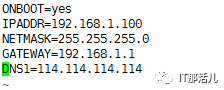
因为是本地测试 首先关闭SElinux和防火墙。
systemctl stop firewalld.service #停止firewall

systemctl disable firewalld.service #禁止firewall开机启动

firewall-cmd --state #查看默认防火墙状态(关闭后显示notrunning,开启后显示running)

vim etc/selinux/config
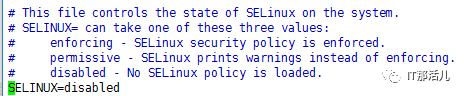
保存并退出后重启。
getenforce(查看当前selinux的状态)。
1.2 准备安装包
1)然后安装阿里源 (安装PHP要用)
yum -y install wget

wget -O etc/yum.repos.d/CentOS-Base.repo http://mirrors.aliyun.com/repo/Centos-7.repo

wget -P etc/yum.repos.d/ http://mirrors.aliyun.com/repo/epel-7.repo


sudo yum clean all

sudo yum makecache

yum -y install gcc-c++ php-fpm php-mysql php bzip2 lrzsz
2)常用的PHP开发库(php-gd、curl、php-mysql)
systemctl restart php-fpm

systemctl enable php-fpm
要下载的包 nginx、openssl、zlib、pcre
安装nginx服务
2.1 安装zlib
tar xf zlib-1.2.8.tar

cd zlib1.2.8

./configure --prefix=/usr/local/zlib

make && make install
2.2 安装pcre
cd pcre-8.38

./configure --prefix=/usr/local/pcre

make && make install
2.3 安装 openssl
tar xf openssl-1.0.1c.tar

mv openssl-1.0.1c usr/local/openssl (直接解压换路径即可,不用安装)
2.4 安装nginx
cd nginx-1.12.0

./configure --prefix=/usr/local/nginx --with-
pcre=/root/pcre-8.38 --with-zlib=/root/zlib-1.2.8 --with-openssl=/usr/local/openssl

make && make install
配置nginx服务
3.1 配置虚拟主机配置文件地址
/usr/local/nginx/conf路径为nginx的主配置路径。
/usr/local/nginx/conf/nginx.conf 这个为nginx的主配置文件。
打开nginx.conf文件在第32行 (server行上面)添加 这一句。
include /usr/local/nginx/vhosts_web/*;(这句话的意思是 配置文件包含了 这个路径下的所有文件 。)
3.2 配置反向代理配置
在server行上面添加反向代理的配置:
server {

listen 80;

server_name www.123.com; (网站名字)

index index.html index.htm index.jsp index.php;

location /{

proxy_pass http://127.0.0.1:123; (网站在这台服务器的内网端口)

proxy_redirect off;

proxy_set_header X-Real-IP $remote_addr;

proxy_set_header X-Forwarded-For $proxy_add_x_forwarded_for;

proxy_set_header Host $host;

}

}
3.3 配置虚拟主机配置文件
添加完以后 去我们刚刚包含的那个目录(没有就创一个)。
cd /usr/local/nginx/vhosts_web/
创建一个网站名字的.conf文件。
比如我现在代理了三个网站,就有三个.conf文件。
server {

listen 123;(代理的端口)

# access_log /usr/local/nginx/logs/access_aaa.log main;

location / {

root /usr/local/nginx/html/123;(这是真正的网站的源码地址)

index index.php index.html index.htm;

}

error_page 500 502 503 504 /50x.html;

location = /50x.html {

root /usr/local/nginx/html;

}

# pass the PHP scripts to FastCGI server listening on 127.0.0.1:9000

location ~ .php$ {

fastcgi_pass 127.0.0.1:9000;

fastcgi_index index.php;

fastcgi_param SCRIPT_FILENAME /usr/local/nginx/html/123/$fastcgi_script_name;(这是PHP环境的地址 ,这个地址必须和源码地址一致)

include fastcgi_params;

}

location ~ /.ht {

deny all;

}

}
测试
网站的源码地址 /usr/local/nginx/html/
在这个路径下创建需要反向代理的网站名文件。
在这里放源码,然后重启服务。
systemctl restart php-fpm

systemctl enable php-fpm

cd /usr/local/nginx/sbin/

./nginx -t (测试nginx配置是否正确)

这样代表配置正确。
./nginx -s reload(第一次要先启动./nginx )
然后去访问 那个网站,这里我用linux下的访问网页的 elinks:
以上就是nginx中一个虚拟主机的配置。
(php连接mysql的配置文件是config.inc.php)

本文作者:王小峰(上海新炬王翦团队)
本文来源:“IT那活儿”公众号

