orchestrator是一款开源对MySQL复制提供高可用、拓扑的可视化管理工具,采用go语言编写,它能够主动发现当前拓扑结构和主从复制状态,支持MySQL主从复制拓扑关系的调整、支持MySQL主库故障自动切换(failover)、手动主从切换(switchover)等功能。
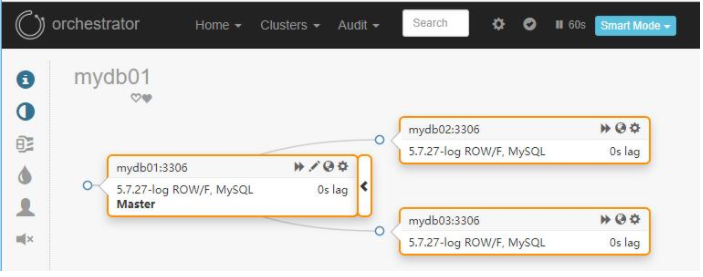
orchestrator后台依赖于MySQL存储元数据,能够提供Web界面展示MySQL集群的拓扑关系及实例状态,可以通过Web界面可更改MySQL实例的部分配置信息,同时也提供命令行和api接口,以便更加灵活的自动化运维管理。
Orchestrator 对MySQL主库的故障切换分为自动切换和手动切换。手动切换又分为recover、force-master-failover、force-master-takeover以及graceful-master-takeover. 相比于MHA,Orchestrator更加偏重于复制拓扑关系的管理,能够实现MySQL任一复制拓扑关系的调整,并在此基础上,实现MySQL高可用。
Orchestrator本身也可以部署多个节点,通过raft分布式一致性协议,保证其自身高可用性。
Orchestrator 是 MySQL 复制拓扑管理和可视化工具,支持:
检测和审查复制集群
安全拓扑重构:转移服务于另外一台计算机的系统拓扑 S
整洁的拓扑可视化
复制问题可视化
通过简单的拖拽修改拓扑
维护模式声明和执行
审计操作
重构拓扑只需要简单的拖拽,堪称神器。
参考:
https://github.com/openark/orchestrator/blob/master/docs/install.md
版本:
https://github.com/openark/orchestrator/releases
环境说明:
orchestrator主机环境
10.186.65.5
10.186.65.11
10.186.65.26
orchestrator 后端数据库链接(MySQL 数据库)
10.186.65.29:3307
安装步骤:
# 下载指定版本orchestrator(此处以3.2.6为例)
yum -y install wget jq
dir_software="/opt/software/"
mkdir -p ${dir_software}
cd ${dir_software}
wget -c https://github.com/openark/orchestrator/releases/download/v3.2.6/orchestrator-3.2.6-linux-amd64.tar.gz
# 安装
dir_software="/opt/software/"
cd
tar -zxvf ${dir_software}/orchestrator-3.2.6-linux-amd64.tar.gz
-- 创建orchestrator的元数据存储schema
CREATE DATABASE IF NOT EXISTS orchestrator;
-- 创建数据库账号,以便orchestrator连接后端数据库
CREATE USER 'orchestrator'@'10.186.65.5' IDENTIFIED BY 'Orch@123';
GRANT ALL PRIVILEGES ON orchestrator.* TO 'orchestrator'@'10.186.65.5';
CREATE USER 'orchestrator'@'10.186.65.11' IDENTIFIED BY 'Orch@123';
GRANT ALL PRIVILEGES ON orchestrator.* TO 'orchestrator'@'10.186.65.11';
CREATE USER 'orchestrator'@'10.186.65.26' IDENTIFIED BY 'Orch@123';
GRANT ALL PRIVILEGES ON orchestrator.* TO 'orchestrator'@'10.186.65.26';
"MySQLOrchestratorHost": "10.186.65.29",                // 后端数据库连接ip
"MySQLOrchestratorPort": 3307,  后端数据库端⼝
"MySQLOrchestratorDatabase": "orchestrator",  后端数据库使⽤的schema
"MySQLOrchestratorUser": "orchestrator",  后端数据库连接账户
"MySQLOrchestratorPassword": "Orch@123",  后端数据库连接密码
.........
"MySQLTopologyUser": "orchestrator",  接管的MySQL需要创建的账户,运维数据库使⽤
"MySQLTopologyPassword": "orch_topology_password",  接管的MySQL创建账户的密码,运维数据库使⽤
.........
"MySQLOrchestratorUseMutualTLS": false,
........
"HostnameResolveMethod": "none",
"MySQLHostnameResolveMethod": "@@report_host", // 确保接管的数据库都配置了report_host
........
"RaftEnabled": true, // 是否开启raft,使⽤orch⾼可⽤时需要开启
"BackendDB": "mysql", // 后端连接的数据库类型
"RaftBind": "10.186.65.26", // raft的bind地址,写本机的ip
"RaftDataDir": "/usr/local/orchestrator", // raft的数据⽬录
"DefaultRaftPort": 10008, // raft使⽤的端⼝
"RaftNodes": [ // raft的节点,即3个orch的主机
  "10.186.65.5",
  "10.186.65.11",
  "10.186.65.26"
]
说明:设置配置⽂件记得去掉配置⽂件中的注释;
# 启动
vi /etc/profile
export PATH=$PATH:/usr/local/orchestrator/:/usr/local/orchestrator/resources/bin/
文章推荐:
转文至此。
以下是个人微信公众号,欢迎关注: