




01
引言
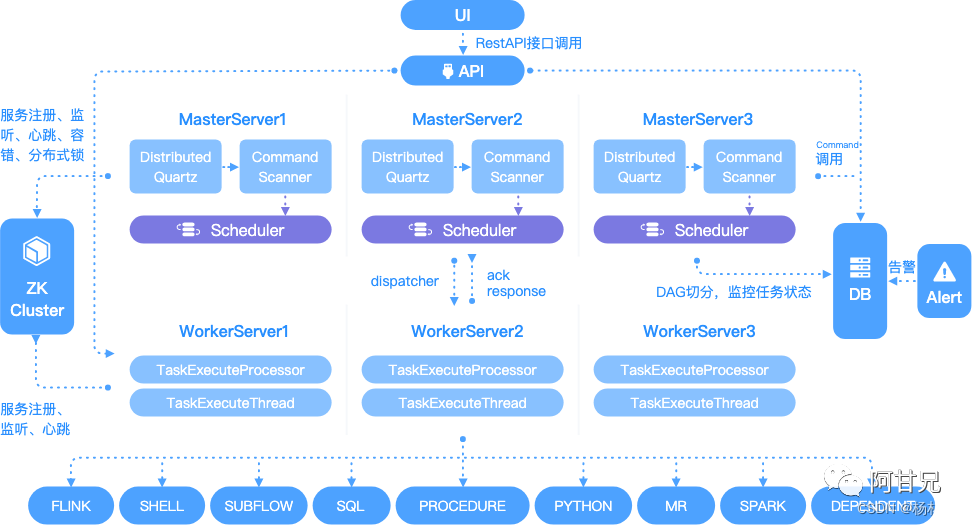
02
DolphinScheduler 项目结构
2.1 结构分析
DS
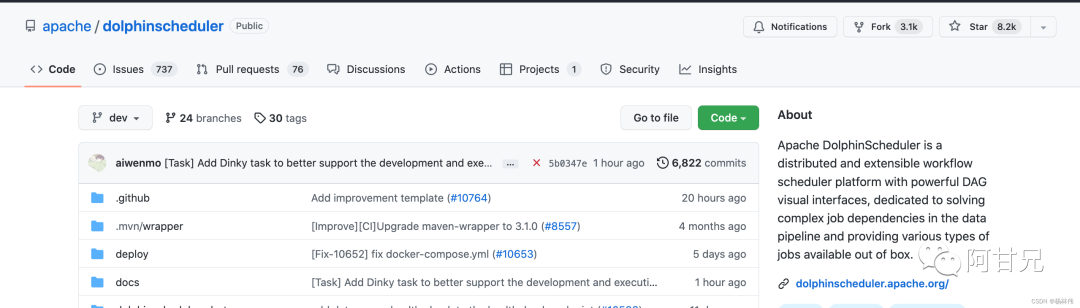
| 模块 | 描述 |
|---|---|
| dolphinscheduler-alert | 告警模块,提供 AlertServer 服务。 |
| dolphinscheduler-api | web应用模块,提供 ApiServer 服务。 |
| dolphinscheduler-common | 通用的常量枚举、工具类、数据结构或者基类 |
| dolphinscheduler-dao | 提供数据库访问等操作。 |
| dolphinscheduler-remote | 基于 netty 的客户端、服务端 |
| dolphinscheduler-server | MasterServer 和 WorkerServer 服务 |
| dolphinscheduler-service | service模块,包含Quartz、Zookeeper、日志客户端访问服务,便于server模块和api模块调用 |
| dolphinscheduler-ui | 前端模块 |
2.2 表分析
DS
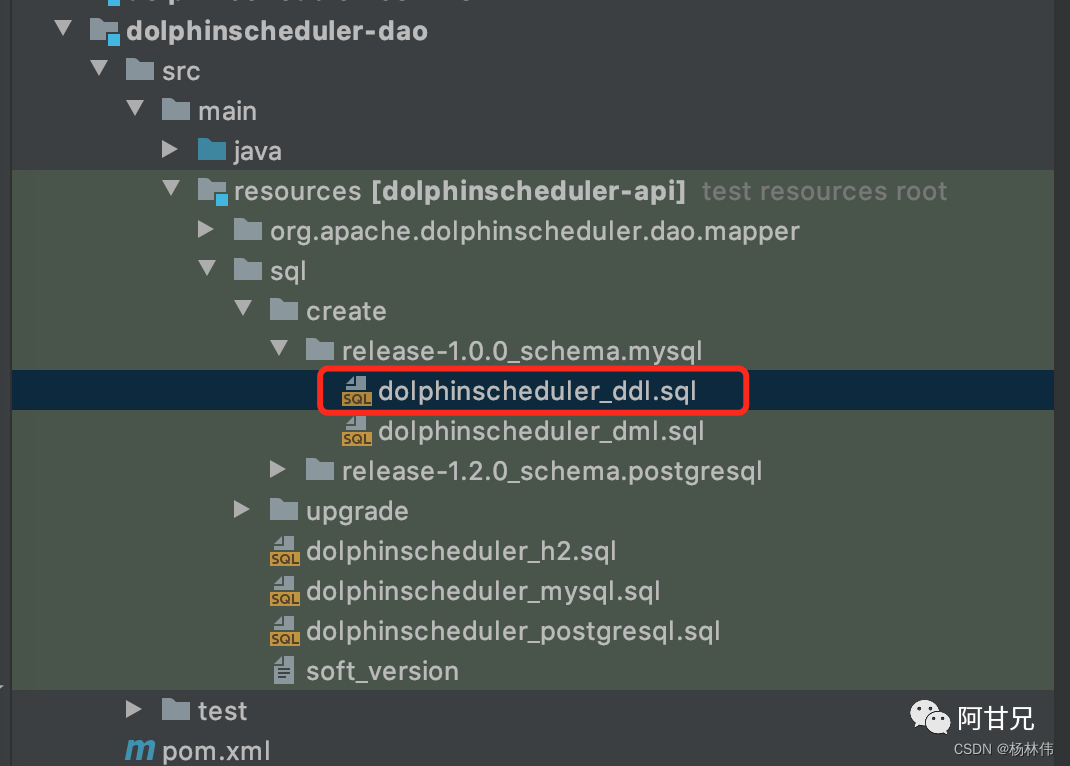
执行完后,可以在数据库里看到有如下表:
| 表名 | 表信息 |
|---|---|
| t_ds_access_token | 访问ds后端的token |
| t_ds_alert | 告警信息 |
| t_ds_alertgroup | 告警组 |
| t_ds_command | 执行命令 |
| t_ds_datasource | 数据源 |
| t_ds_error_command(核心表) | 错误命令 |
| t_ds_process_definition(核心表) | 流程定义 |
| t_ds_process_instance(核心表) | 流程实例 |
| t_ds_project | 项目 |
| t_ds_queue | 队列 |
| t_ds_relation_datasource_user | 用户关联数据源 |
| t_ds_relation_process_instance | 子流程 |
| t_ds_relation_project_user | 用户关联项目 |
| t_ds_relation_resources_user | 用户关联资源 |
| t_ds_relation_udfs_user | 用户关联UDF函数 |
| t_ds_relation_user_alertgroup | 用户关联告警组 |
| t_ds_resources | 资源文件 |
| t_ds_schedules(核心表) | 流程定时调度 |
| t_ds_session | 用户登录的session |
| t_ds_task_instance(核心表) | 任务实例 |
| t_ds_tenant | 租户 |
| t_ds_udfs | UDF资源 |
| t_ds_user | 用户 |
| t_ds_version | ds版本信息 |
2.2.1 类关系图 (用户/队列/数据源)
DS
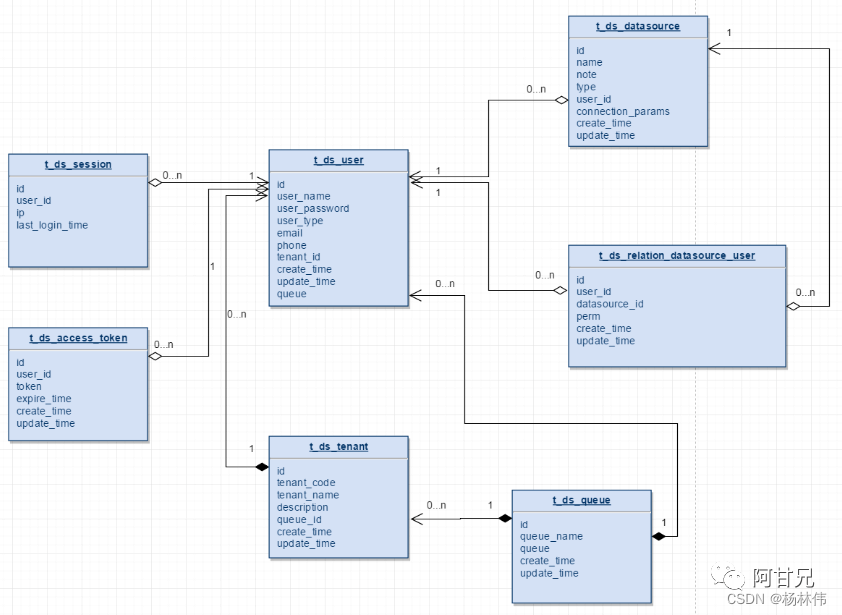
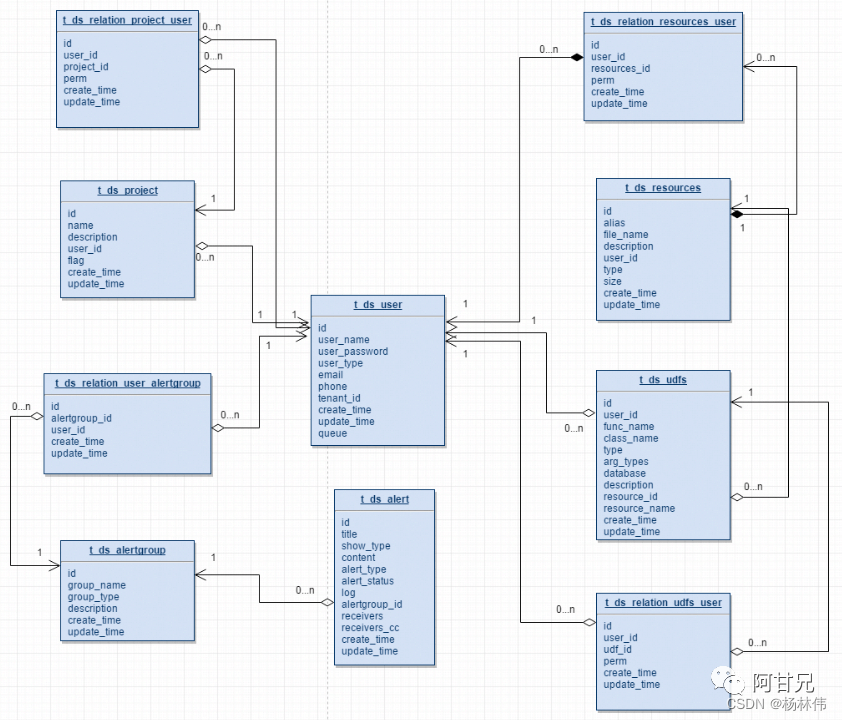
2.2.2 类关系图 (项目/资源/告警)
DS
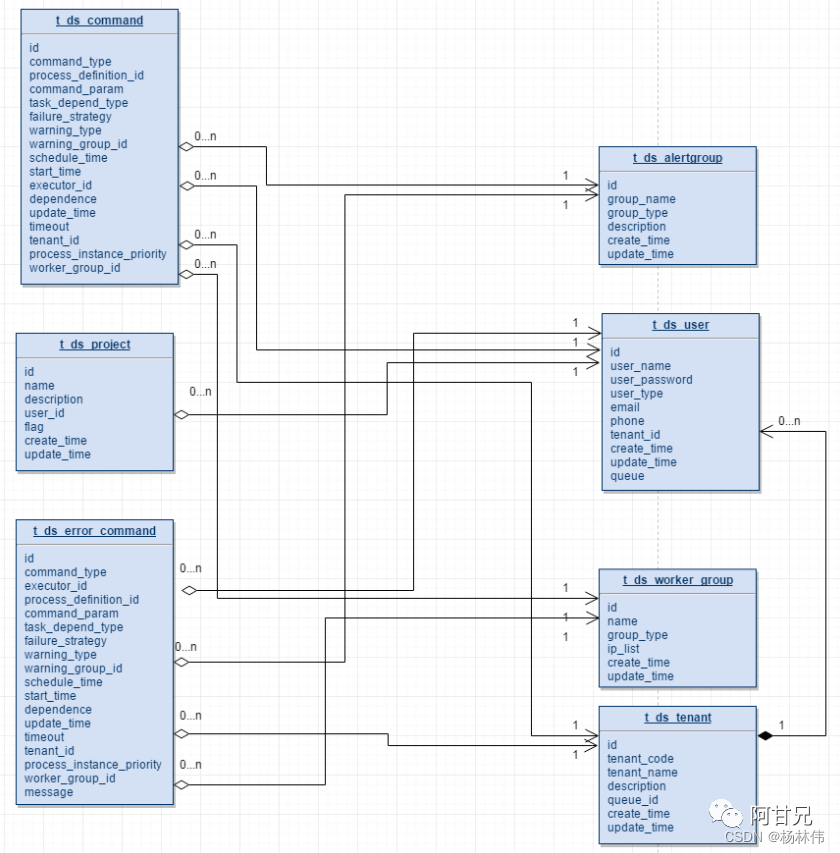
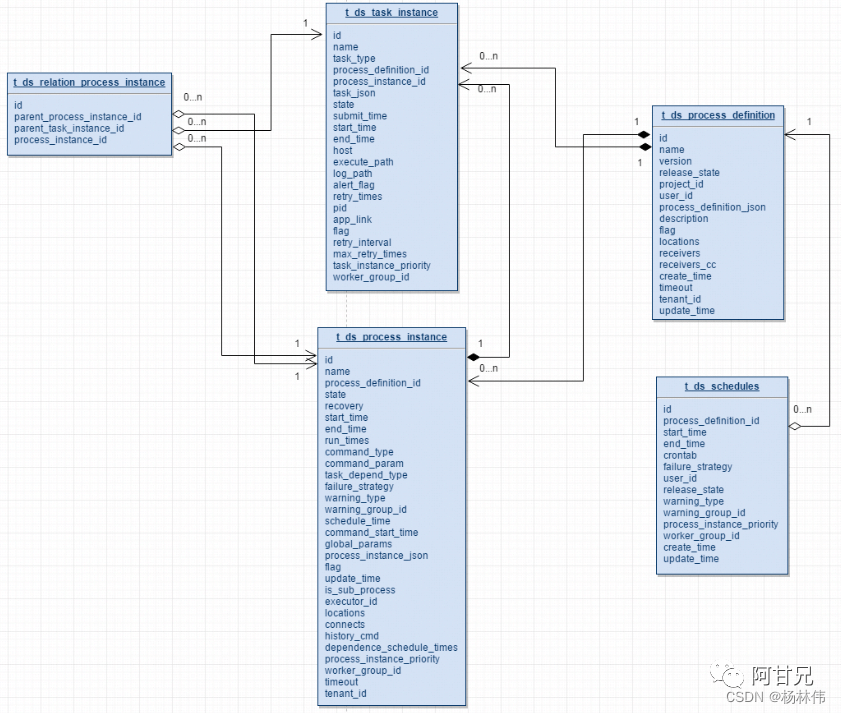
2.2.3 类关系图 ( 命令/流程/任务)
DS
03
DolphinScheduler 源码分析
3.1 ExecutorController
DS

| 接口 | 描述 |
|---|---|
| /start-process-instance | 执行流程实例 |
| /batch-start-process-instance | 批量执行流程实例 |
| /execute | 操作流程实例,如:暂停, 停止, 重跑, 从暂停恢复,从停止恢复 |
| /batch-execute | 批量操作流程实例 |
| /start-check | 检查流程定义或检查所有的子流程定义是否在线 |
/*** do action to process instance: pause, stop, repeat, recover from pause, recover from stop** @param loginUser login user* @param projectCode project code* @param processInstanceId process instance id* @param executeType execute type* @return execute result code*/@ApiOperation(value = "execute", notes = "EXECUTE_ACTION_TO_PROCESS_INSTANCE_NOTES")@ApiImplicitParams({@ApiImplicitParam(name = "processInstanceId", value = "PROCESS_INSTANCE_ID", required = true, dataType = "Int", example = "100"),@ApiImplicitParam(name = "executeType", value = "EXECUTE_TYPE", required = true, dataType = "ExecuteType")})@PostMapping(value = "/execute")@ResponseStatus(HttpStatus.OK)@ApiException(EXECUTE_PROCESS_INSTANCE_ERROR)@AccessLogAnnotation(ignoreRequestArgs = "loginUser")public Result execute(@ApiIgnore @RequestAttribute(value = Constants.SESSION_USER) User loginUser,@ApiParam(name = "projectCode", value = "PROJECT_CODE", required = true) @PathVariable long projectCode,@RequestParam("processInstanceId") Integer processInstanceId,@RequestParam("executeType") ExecuteType executeType) {Map result = execService.execute(loginUser, projectCode, processInstanceId, executeType);return returnDataList(result);}
3.2 ExecService
DS
/*** 操作工作流实例** @param loginUser 登录用户* @param projectCode 项目编码* @param processInstanceId 流程实例ID* @param executeType 执行类型(repeat running、resume pause、resume failure、stop、pause)* @return 执行结果*/@Overridepublic Map<String, Object> execute(User loginUser, long projectCode, Integer processInstanceId, ExecuteType executeType) {/*** 查询项目信息 **/Project project = projectMapper.queryByCode(projectCode);//check user access for project/*** 判断当前用户是否有操作权限 **/Map<String, Object> result = projectService.checkProjectAndAuth(loginUser, project, projectCode, ApiFuncIdentificationConstant.map.get(executeType));if (result.get(Constants.STATUS) != Status.SUCCESS) {return result;}/*** 检查Master节点是否存在 **/if (!checkMasterExists(result)) {return result;}/*** 查询工作流实例详情 **/ProcessInstance processInstance = processService.findProcessInstanceDetailById(processInstanceId);if (processInstance == null) {putMsg(result, Status.PROCESS_INSTANCE_NOT_EXIST, processInstanceId);return result;}/*** 根据工作流实例绑定的流程定义ID查询流程定义 **/ProcessDefinition processDefinition = processService.findProcessDefinition(processInstance.getProcessDefinitionCode(),processInstance.getProcessDefinitionVersion());if (executeType != ExecuteType.STOP && executeType != ExecuteType.PAUSE) {/*** 校验工作流定义能否执行(工作流是否存在?是否上线状态?存在子工作流定义不是上线状态?) **/result = checkProcessDefinitionValid(projectCode, processDefinition, processInstance.getProcessDefinitionCode(), processInstance.getProcessDefinitionVersion());if (result.get(Constants.STATUS) != Status.SUCCESS) {return result;}}/*** 根据当前工作流实例的状态判断能否执行对应executeType类型的操作 **/result = checkExecuteType(processInstance, executeType);if (result.get(Constants.STATUS) != Status.SUCCESS) {return result;}/*** 判断是否已经选择了合适的租户 **/if (!checkTenantSuitable(processDefinition)) {logger.error("there is not any valid tenant for the process definition: id:{},name:{}, ",processDefinition.getId(), processDefinition.getName());putMsg(result, Status.TENANT_NOT_SUITABLE);}/*** 在executeType为重跑的状态下,获取用户指定的启动参数 **/Map<String, Object> commandMap = JSONUtils.parseObject(processInstance.getCommandParam(), new TypeReference<Map<String, Object>>() {});String startParams = null;if (MapUtils.isNotEmpty(commandMap) && executeType == ExecuteType.REPEAT_RUNNING) {Object startParamsJson = commandMap.get(Constants.CMD_PARAM_START_PARAMS);if (startParamsJson != null) {startParams = startParamsJson.toString();}}/*** 根据不同的ExecuteType去执行相应的操作 **/switch (executeType) {case REPEAT_RUNNING: // 重跑result = insertCommand(loginUser, processInstanceId, processDefinition.getCode(), processDefinition.getVersion(), CommandType.REPEAT_RUNNING, startParams);break;case RECOVER_SUSPENDED_PROCESS: // 恢复挂载的工作流result = insertCommand(loginUser, processInstanceId, processDefinition.getCode(), processDefinition.getVersion(), CommandType.RECOVER_SUSPENDED_PROCESS, startParams);break;case START_FAILURE_TASK_PROCESS: // 启动失败的工作流result = insertCommand(loginUser, processInstanceId, processDefinition.getCode(), processDefinition.getVersion(), CommandType.START_FAILURE_TASK_PROCESS, startParams);break;case STOP: // 停止if (processInstance.getState() == ExecutionStatus.READY_STOP) {putMsg(result, Status.PROCESS_INSTANCE_ALREADY_CHANGED, processInstance.getName(), processInstance.getState());} else {result = updateProcessInstancePrepare(processInstance, CommandType.STOP, ExecutionStatus.READY_STOP);}break;case PAUSE: // 暂停if (processInstance.getState() == ExecutionStatus.READY_PAUSE) {putMsg(result, Status.PROCESS_INSTANCE_ALREADY_CHANGED, processInstance.getName(), processInstance.getState());} else {result = updateProcessInstancePrepare(processInstance, CommandType.PAUSE, ExecutionStatus.READY_PAUSE);}break;default:logger.error("unknown execute type : {}", executeType);putMsg(result, Status.REQUEST_PARAMS_NOT_VALID_ERROR, "unknown execute type");break;}return result;}
3.2.1 insertCommand
DS
/*** 插入命令(re run, recovery (pause failure) execution)** @param loginUser 登录用户* @param instanceId 工作流实例id* @param processDefinitionCode 工作流定义id* @param processVersion 工作流版本* @param commandType 命令类型* @return 操作结果*/private Map<String, Object> insertCommand(User loginUser, Integer instanceId, long processDefinitionCode, int processVersion, CommandType commandType, String startParams) {Map<String, Object> result = new HashMap<>();/*** 封装启动参数 **/Map<String, Object> cmdParam = new HashMap<>();cmdParam.put(CMD_PARAM_RECOVER_PROCESS_ID_STRING, instanceId);if (!StringUtils.isEmpty(startParams)) {cmdParam.put(CMD_PARAM_START_PARAMS, startParams);}Command command = new Command();command.setCommandType(commandType);command.setProcessDefinitionCode(processDefinitionCode);command.setCommandParam(JSONUtils.toJsonString(cmdParam));command.setExecutorId(loginUser.getId());command.setProcessDefinitionVersion(processVersion);command.setProcessInstanceId(instanceId);/*** 判断工作流实例是否正在执行 **/if (!processService.verifyIsNeedCreateCommand(command)) {putMsg(result, Status.PROCESS_INSTANCE_EXECUTING_COMMAND, String.valueOf(processDefinitionCode));return result;}/*** 保存命令 **/int create = processService.createCommand(command);if (create > 0) {putMsg(result, Status.SUCCESS);} else {putMsg(result, Status.EXECUTE_PROCESS_INSTANCE_ERROR);}return result;}
3.2.2 updateProcessInstancePrepare
DS
/*** 准备更新工作流实例的命令类型和状态** @param processInstance 工作流实例* @param commandType 命令类型* @param executionStatus 执行状态* @return 更新结果*/private Map<String, Object> updateProcessInstancePrepare(ProcessInstance processInstance, CommandType commandType, ExecutionStatus executionStatus) {Map<String, Object> result = new HashMap<>();processInstance.setCommandType(commandType);processInstance.addHistoryCmd(commandType);processInstance.setState(executionStatus);int update = processService.updateProcessInstance(processInstance);// 判断流程是否正常if (update > 0) {StateEventChangeCommand stateEventChangeCommand = new StateEventChangeCommand(processInstance.getId(), 0, processInstance.getState(), processInstance.getId(), 0);Host host = new Host(processInstance.getHost());stateEventCallbackService.sendResult(host, stateEventChangeCommand.convert2Command());putMsg(result, Status.SUCCESS);} else {putMsg(result, Status.EXECUTE_PROCESS_INSTANCE_ERROR);}return result;}
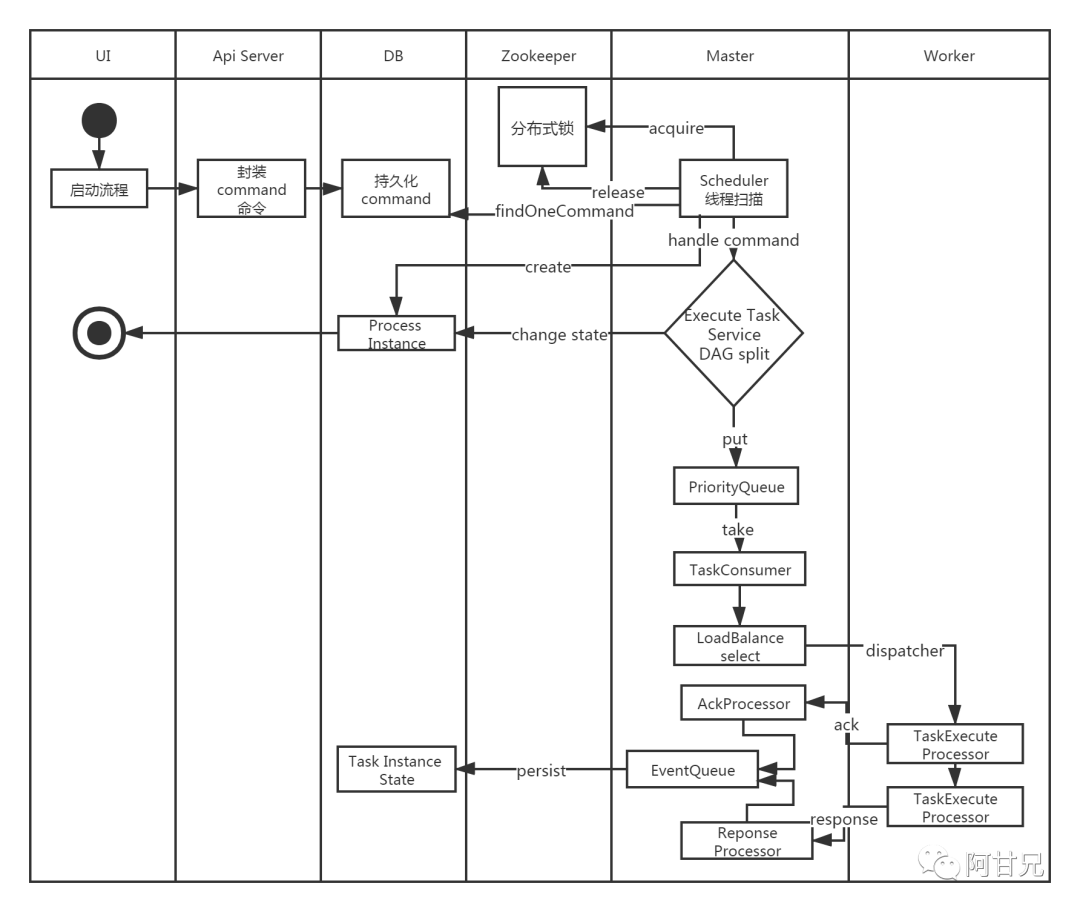
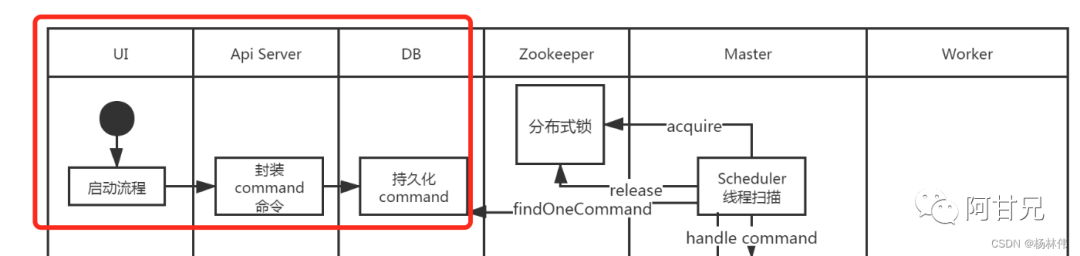
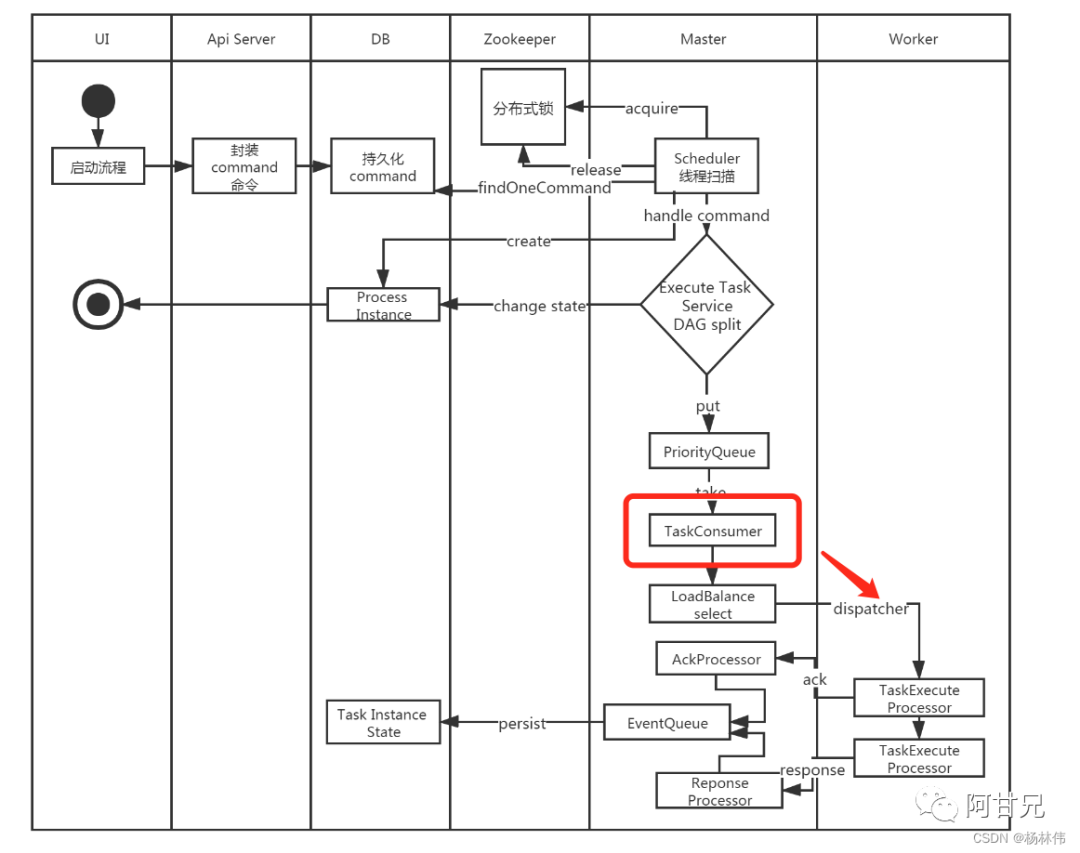
根据流程图,我们可以看到了已经执行了如下红框的代码,也就是把我们的command已经缓存到了DB。
接下来需要看看Master的代码。
3.3 MasterServer
DS
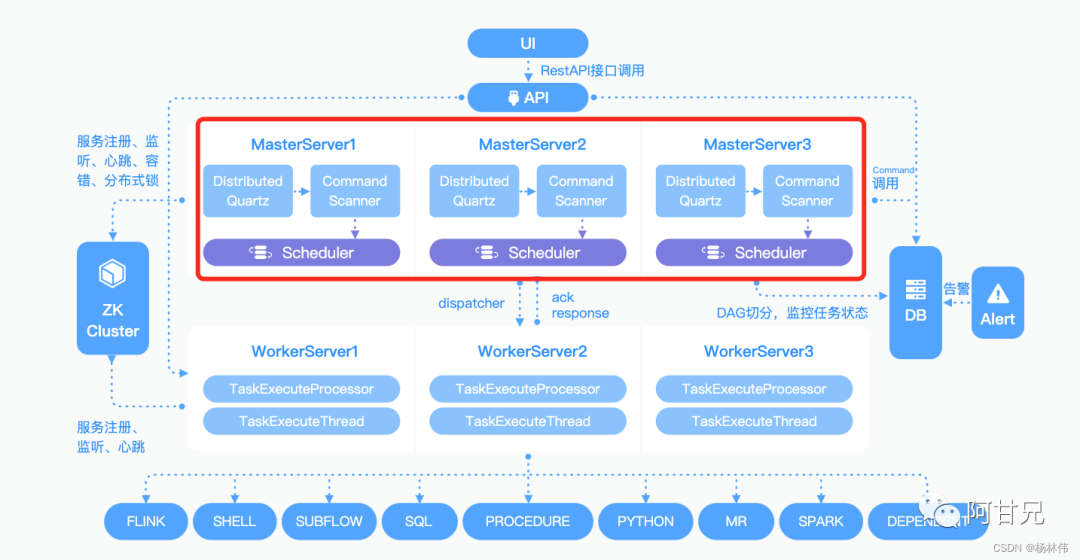
@SpringBootApplication@ComponentScan("org.apache.dolphinscheduler")@EnableTransactionManagement@EnableCachingpublic class MasterServer implements IStoppable {private static final Logger logger = LoggerFactory.getLogger(MasterServer.class);@Autowiredprivate SpringApplicationContext springApplicationContext;@Autowiredprivate MasterRegistryClient masterRegistryClient;@Autowiredprivate TaskPluginManager taskPluginManager;@Autowiredprivate MasterSchedulerService masterSchedulerService;@Autowiredprivate SchedulerApi schedulerApi;@Autowiredprivate EventExecuteService eventExecuteService;@Autowiredprivate FailoverExecuteThread failoverExecuteThread;@Autowiredprivate MasterRPCServer masterRPCServer;public static void main(String[] args) {Thread.currentThread().setName(Constants.THREAD_NAME_MASTER_SERVER);SpringApplication.run(MasterServer.class);}/*** 启动 master server*/@PostConstructpublic void run() throws SchedulerException {// 初始化 RPC服务this.masterRPCServer.start();//安装任务插件this.taskPluginManager.installPlugin();/*** MasterServer 注册客户端,用于连接到注册表并传递注册表事件。* 当主节点启动时,它将在注册中心注册,并调度一个{@link HeartBeatTask}来更新注册表中的元数据**/this.masterRegistryClient.init();this.masterRegistryClient.start();this.masterRegistryClient.setRegistryStoppable(this);// 主调度程序线程,该线程将使用来自数据库的命令并触发执行的processInstance。this.masterSchedulerService.init();this.masterSchedulerService.start();this.eventExecuteService.start();this.failoverExecuteThread.start();//这是调度器的接口,包含操作调度任务的方法。this.schedulerApi.start();Runtime.getRuntime().addShutdownHook(new Thread(() -> {if (Stopper.isRunning()) {close("MasterServer shutdownHook");}}));}/*** 优雅的关闭方法** @param cause 关闭的原因*/public void close(String cause) {try {// set stop signal is true// execute only onceif (!Stopper.stop()) {logger.warn("MasterServer is already stopped, current cause: {}", cause);return;}logger.info("Master server is stopping, current cause : {}", cause);// thread sleep 3 seconds for thread quietly stopThreadUtils.sleep(Constants.SERVER_CLOSE_WAIT_TIME.toMillis());// closethis.schedulerApi.close();this.masterSchedulerService.close();this.masterRPCServer.close();this.masterRegistryClient.closeRegistry();// close spring Context and will invoke method with @PreDestroy annotation to destroy beans.// like ServerNodeManager,HostManager,TaskResponseService,CuratorZookeeperClient,etcspringApplicationContext.close();logger.info("MasterServer stopped, current cause: {}", cause);} catch (Exception e) {logger.error("MasterServer stop failed, current cause: {}", cause, e);}}@Overridepublic void stop(String cause) {close(cause);}}
3.1.1 MasterRPCServer
DS
@PostConstructprivate void init() {// 初始化远程服务NettyServerConfig serverConfig = new NettyServerConfig();serverConfig.setListenPort(masterConfig.getListenPort());this.nettyRemotingServer = new NettyRemotingServer(serverConfig);this.nettyRemotingServer.registerProcessor(CommandType.TASK_EXECUTE_RESPONSE, taskExecuteResponseProcessor);this.nettyRemotingServer.registerProcessor(CommandType.TASK_EXECUTE_RUNNING, taskExecuteRunningProcessor);this.nettyRemotingServer.registerProcessor(CommandType.TASK_KILL_RESPONSE, taskKillResponseProcessor);this.nettyRemotingServer.registerProcessor(CommandType.STATE_EVENT_REQUEST, stateEventProcessor);this.nettyRemotingServer.registerProcessor(CommandType.TASK_FORCE_STATE_EVENT_REQUEST, taskEventProcessor);this.nettyRemotingServer.registerProcessor(CommandType.TASK_WAKEUP_EVENT_REQUEST, taskEventProcessor);this.nettyRemotingServer.registerProcessor(CommandType.CACHE_EXPIRE, cacheProcessor);this.nettyRemotingServer.registerProcessor(CommandType.TASK_RECALL, taskRecallProcessor);// 日志服务this.nettyRemotingServer.registerProcessor(CommandType.GET_LOG_BYTES_REQUEST, loggerRequestProcessor);this.nettyRemotingServer.registerProcessor(CommandType.ROLL_VIEW_LOG_REQUEST, loggerRequestProcessor);this.nettyRemotingServer.registerProcessor(CommandType.VIEW_WHOLE_LOG_REQUEST, loggerRequestProcessor);this.nettyRemotingServer.registerProcessor(CommandType.REMOVE_TAK_LOG_REQUEST, loggerRequestProcessor);this.nettyRemotingServer.start();}
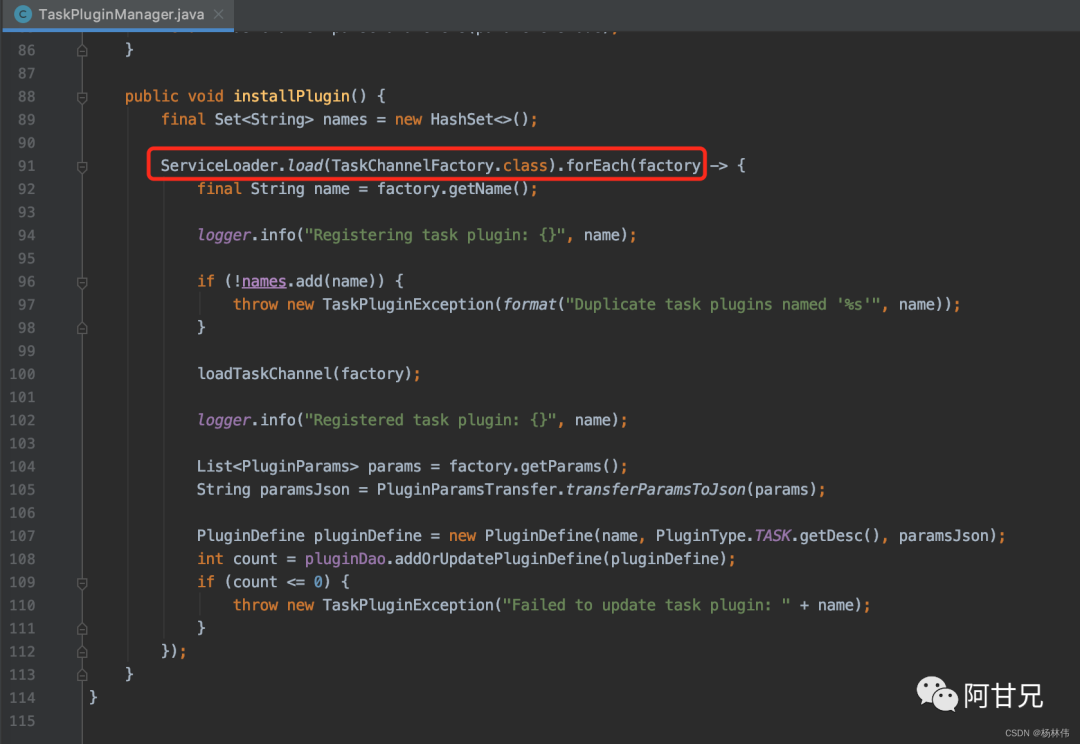
3.2.2 TaskPluginManager
DS
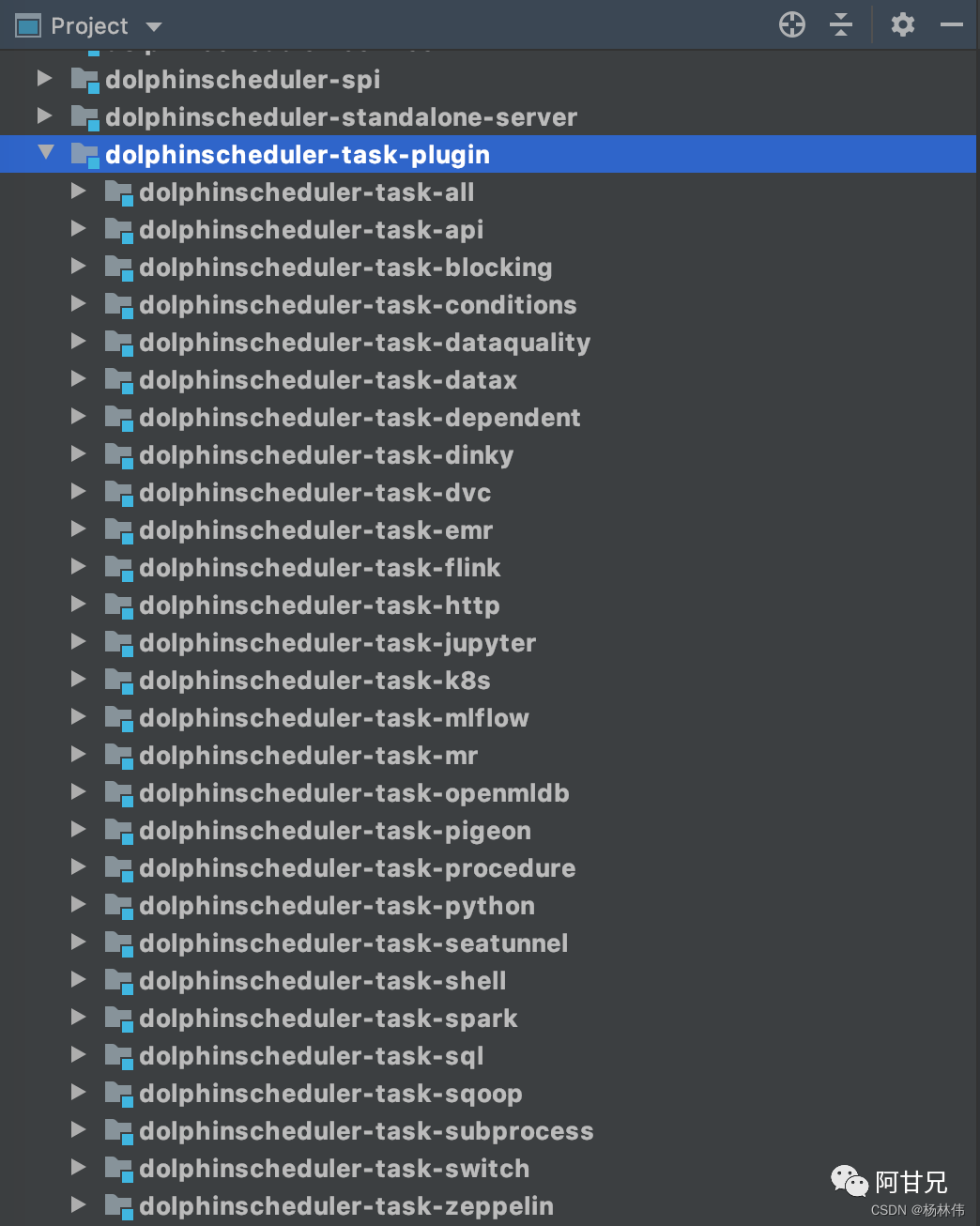
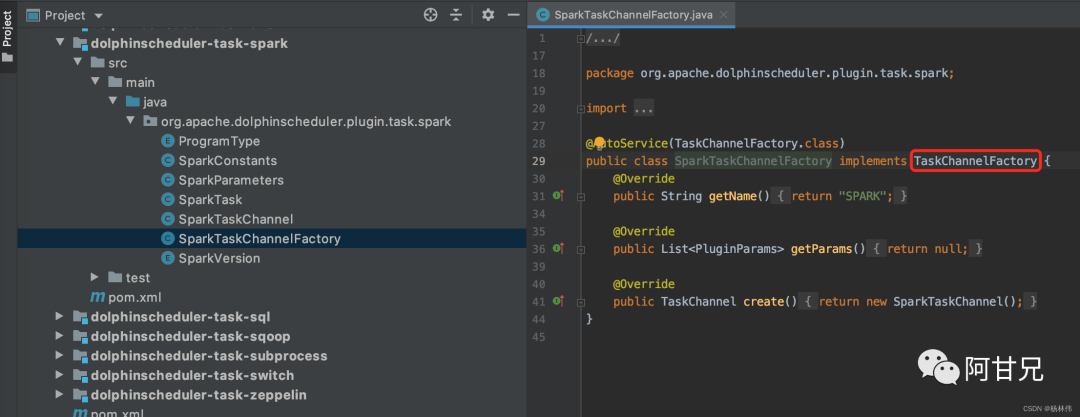
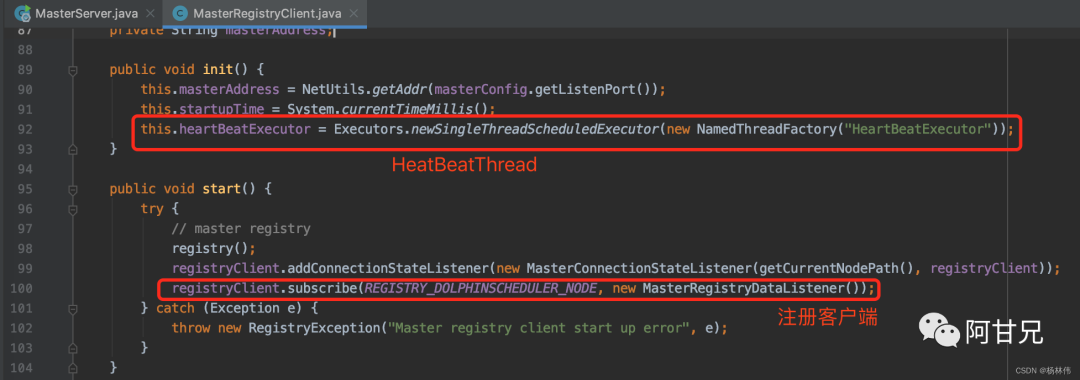
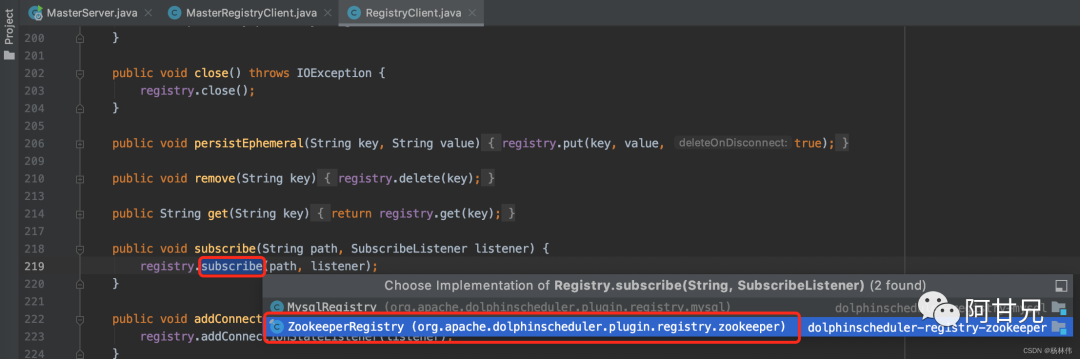
3.3.3 MasterRegistryClient
DS
3.3.4 MasterSchedulerService
DS
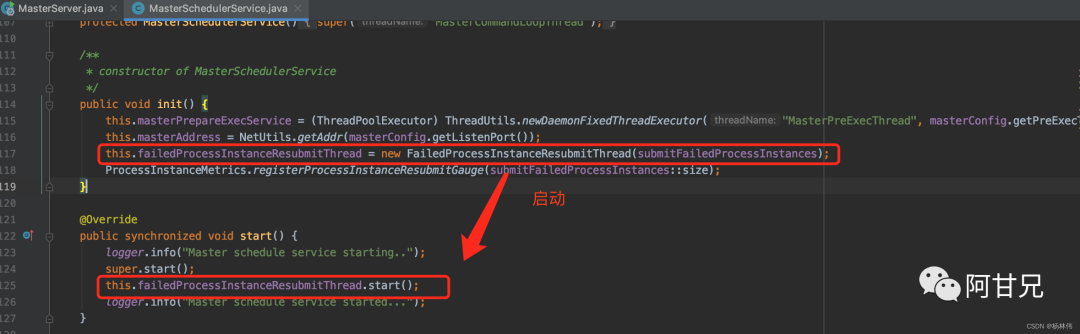
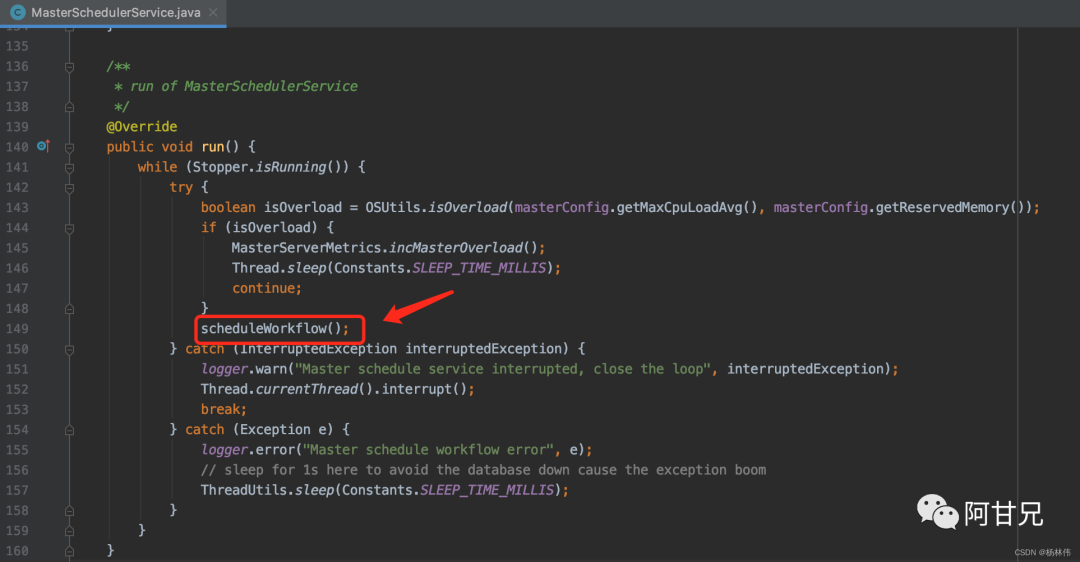
/*** 从数据库中按槽位查询命令,转换为工作流实例,然后提交给workflowExecuteThreadPool。*/private void scheduleWorkflow() throws InterruptedException, MasterException {// 从数据库中按槽位查询命令List commands = findCommands();if (CollectionUtils.isEmpty(commands)) {// indicate that no command ,sleep for 1sThread.sleep(Constants.SLEEP_TIME_MILLIS);return;}// 转换为工作流实例List processInstances = command2ProcessInstance(commands);if (CollectionUtils.isEmpty(processInstances)) {// indicate that the command transform to processInstance error, sleep for 1sThread.sleep(Constants.SLEEP_TIME_MILLIS);return;}MasterServerMetrics.incMasterConsumeCommand(commands.size());for (ProcessInstance processInstance : processInstances) {//提交给workflowExecuteThreadPoolsubmitProcessInstance(processInstance);}}
提交工作流实例方法如下,注意提交到了workflowExecuteThreadPool:
/*** 提交工作流实例给 workflowExecuteThreadPool** @param processInstance 工作流实例*/private void submitProcessInstance(@NonNull ProcessInstance processInstance) {try {LoggerUtils.setWorkflowInstanceIdMDC(processInstance.getId());logger.info("Master schedule service starting workflow instance");// 封装工作流实例Runnablefinal WorkflowExecuteRunnable workflowExecuteRunnable = new WorkflowExecuteRunnable(processInstance, processService, nettyExecutorManager, processAlertManager, masterConfig, stateWheelExecuteThread, curingGlobalParamsService);this.processInstanceExecCacheManager.cache(processInstance.getId(), workflowExecuteRunnable);if (processInstance.getTimeout() > 0) {stateWheelExecuteThread.addProcess4TimeoutCheck(processInstance);}ProcessInstanceMetrics.incProcessInstanceSubmit();// 提交封装好的工作流实例Runnable给workflowExecuteThreadPoolCompletableFuture workflowSubmitFuture = CompletableFuture.supplyAsync(workflowExecuteRunnable::call, workflowExecuteThreadPool);workflowSubmitFuture.thenAccept(workflowSubmitStatue -> {if (WorkflowSubmitStatue.FAILED == workflowSubmitStatue) {// submit failedprocessInstanceExecCacheManager.removeByProcessInstanceId(processInstance.getId());stateWheelExecuteThread.removeProcess4TimeoutCheck(processInstance.getId());submitFailedProcessInstances.add(processInstance);}});logger.info("Master schedule service started workflow instance");} catch (Exception ex) {processInstanceExecCacheManager.removeByProcessInstanceId(processInstance.getId());stateWheelExecuteThread.removeProcess4TimeoutCheck(processInstance.getId());logger.info("Master submit workflow to thread pool failed, will remove workflow runnable from cache manager", ex);} finally {LoggerUtils.removeWorkflowInstanceIdMDC();}}
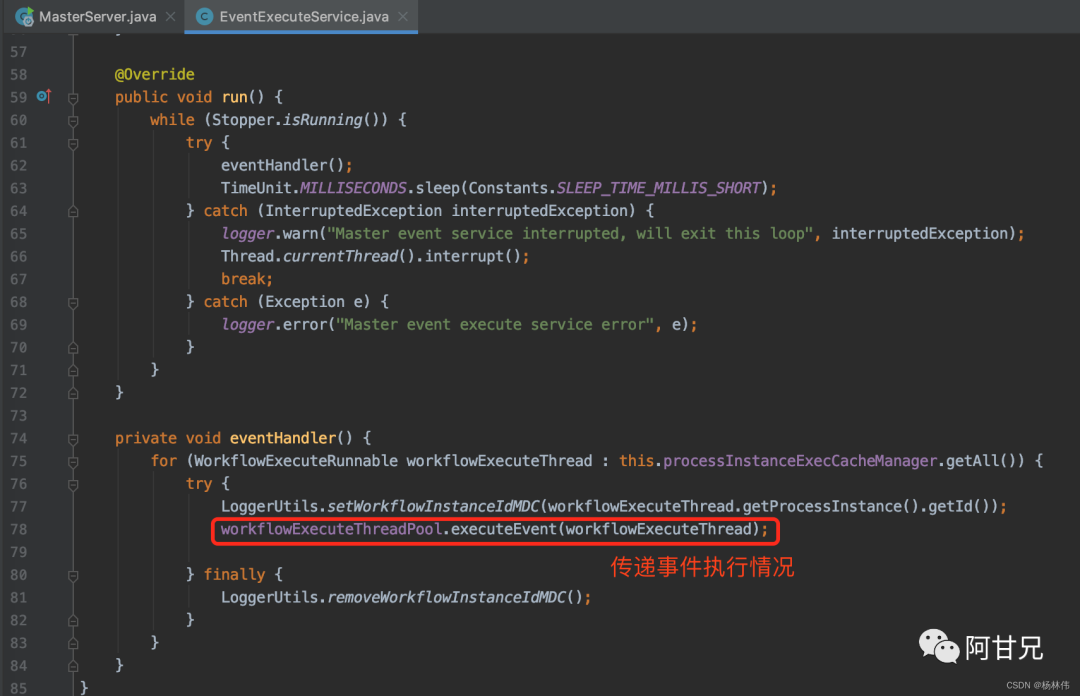
3.3.5 EventExecuteService
DS
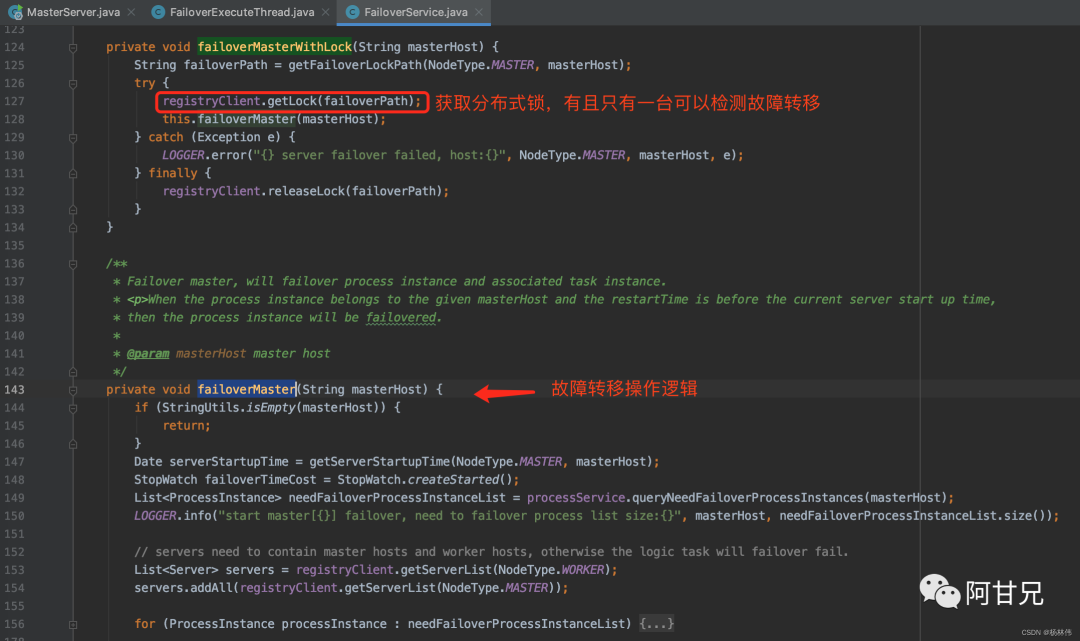
3.3.6 FailoverExecuteThread
DS
3.3.7 结构分析SchedulerApi
DS
3.3.8 TaskPriorityQueueConsumer
DS
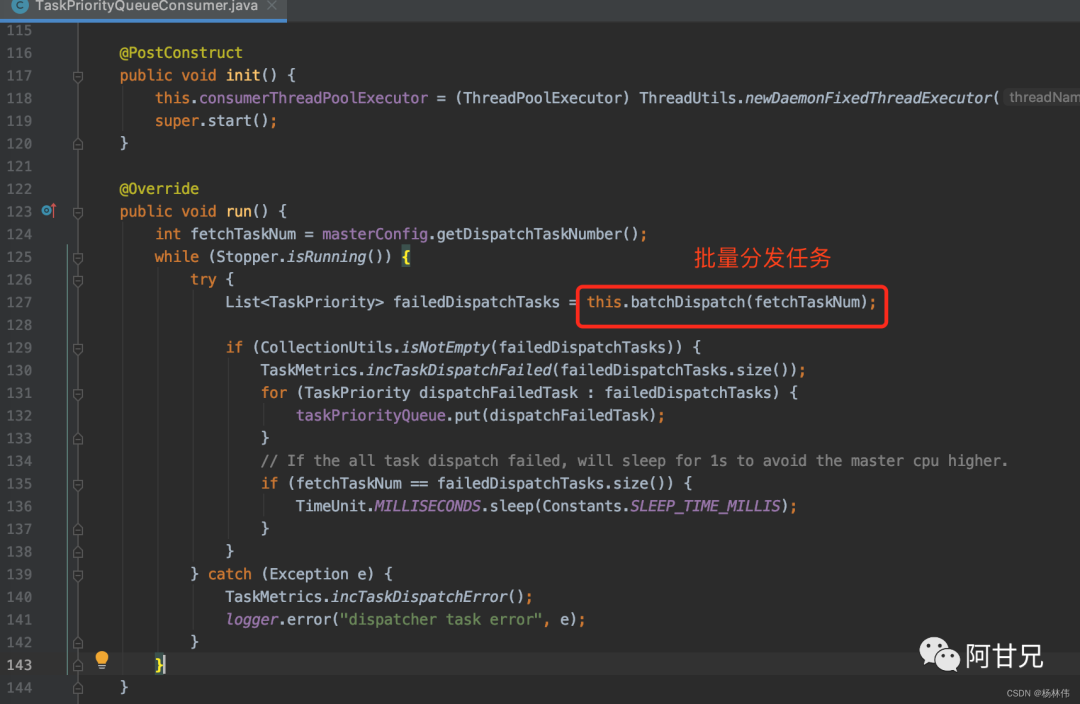
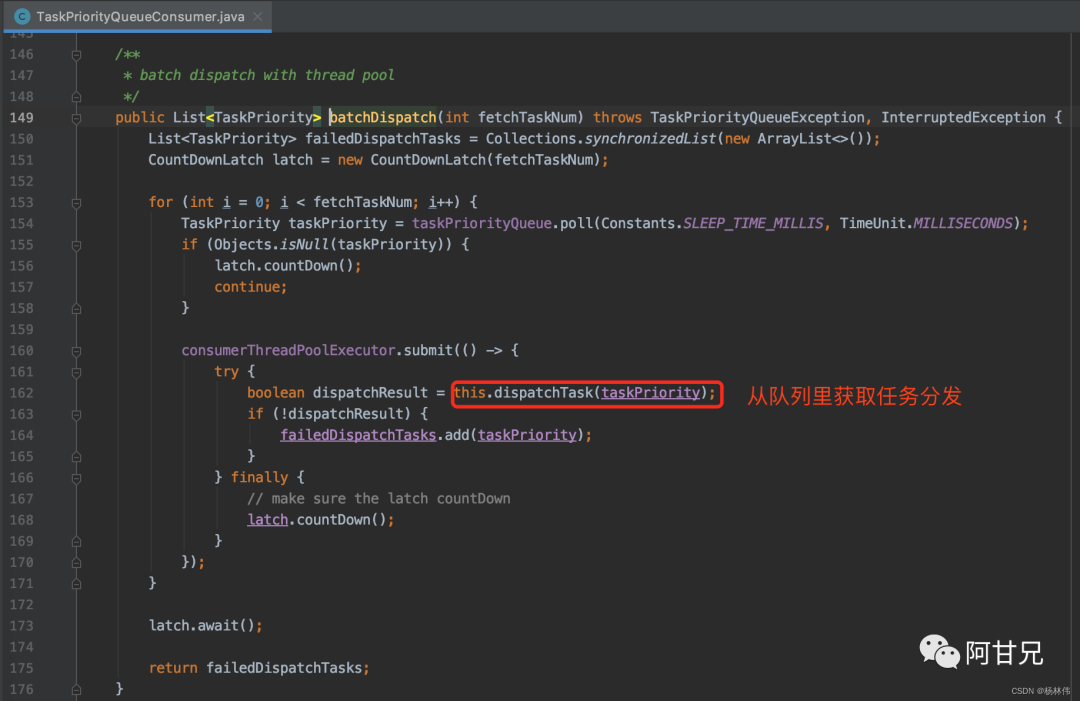
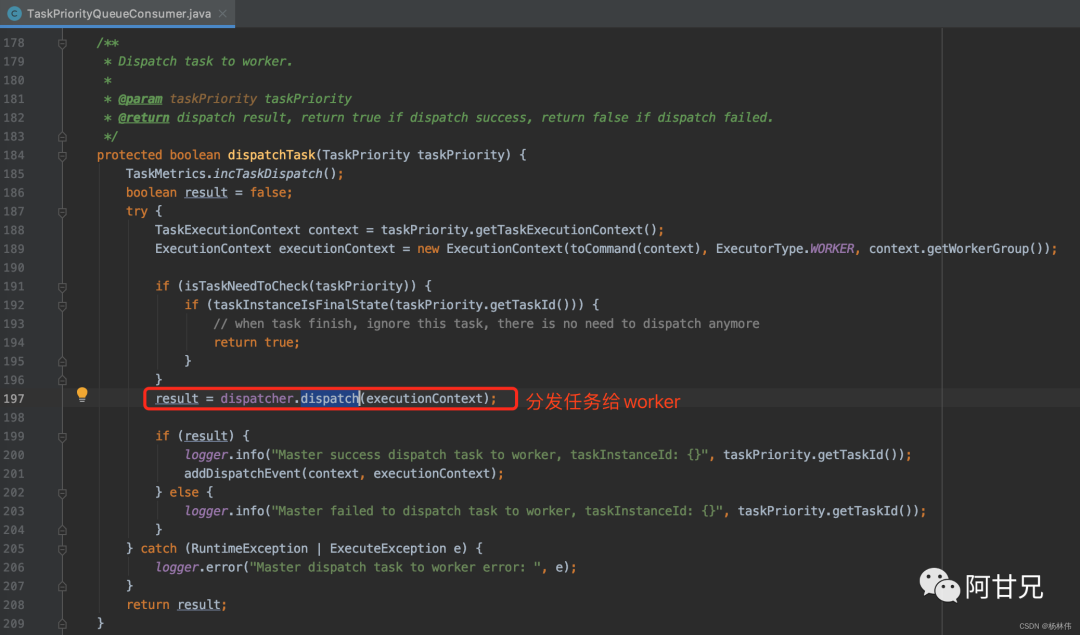
3.4 WorkerServer
DS
@PostConstructpublic void run() {// worker rpc服务this.workerRpcServer.start();// 任务插件安装this.taskPluginManager.installPlugin();// 向Zookeeper注册客户端this.workerRegistryClient.registry();this.workerRegistryClient.setRegistryStoppable(this);Set workerZkPaths = this.workerRegistryClient.getWorkerZkPaths();this.workerRegistryClient.handleDeadServer(workerZkPaths, NodeType.WORKER, Constants.DELETE_OP);// 管理Worker线程this.workerManagerThread.start();// 报告状态线程this.retryReportTaskStatusThread.start();/** registry hooks, which are called before the process exits*/Runtime.getRuntime().addShutdownHook(new Thread(() -> {if (Stopper.isRunning()) {close("WorkerServer shutdown hook");}}));}
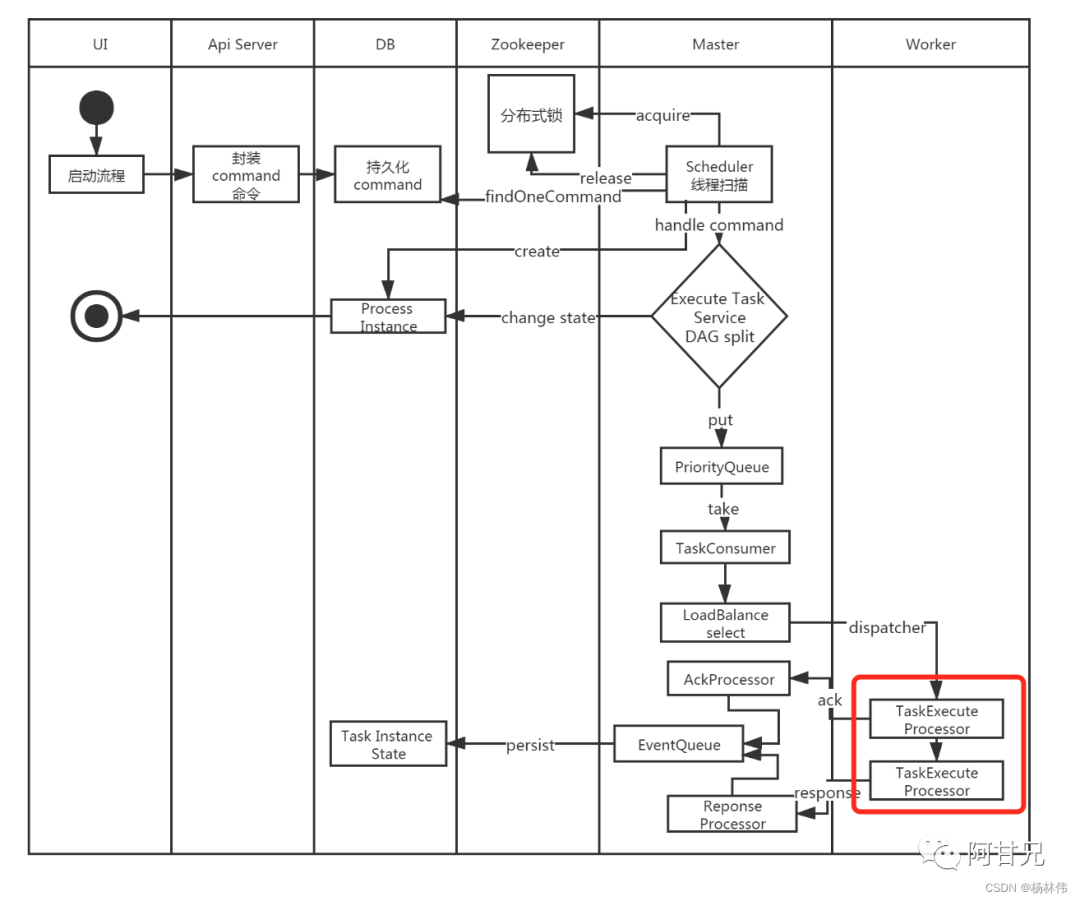
3.4.1 TaskExecutePorcessor
DS
@Counted(value = "ds.task.execution.count", description = "task execute total count")@Timed(value = "ds.task.execution.duration", percentiles = {0.5, 0.75, 0.95, 0.99}, histogram = true)@Overridepublic void process(Channel channel, Command command) {// code ...}

3.4.2 TaskExecuteThread
DS
@Overridepublic void run() {// dry run 预演模式if (Constants.DRY_RUN_FLAG_YES == taskExecutionContext.getDryRun()) {taskExecutionContext.setCurrentExecutionStatus(ExecutionStatus.SUCCESS);taskExecutionContext.setStartTime(new Date());taskExecutionContext.setEndTime(new Date());TaskExecutionContextCacheManager.removeByTaskInstanceId(taskExecutionContext.getTaskInstanceId());taskCallbackService.sendTaskExecuteResponseCommand(taskExecutionContext);logger.info("[WorkflowInstance-{}][TaskInstance-{}] Task dry run success",taskExecutionContext.getProcessInstanceId(), taskExecutionContext.getTaskInstanceId());return;}try {LoggerUtils.setWorkflowAndTaskInstanceIDMDC(taskExecutionContext.getProcessInstanceId(), taskExecutionContext.getTaskInstanceId());logger.info("script path : {}", taskExecutionContext.getExecutePath());if (taskExecutionContext.getStartTime() == null) {taskExecutionContext.setStartTime(new Date());}logger.info("the task begins to execute. task instance id: {}", taskExecutionContext.getTaskInstanceId());//回调任务执行状态taskExecutionContext.setCurrentExecutionStatus(ExecutionStatus.RUNNING_EXECUTION);taskCallbackService.sendTaskExecuteRunningCommand(taskExecutionContext);// 拷贝 hdfs/minio 文件到本地List<pair> fileDownloads = downloadCheck(taskExecutionContext.getExecutePath(), taskExecutionContext.getResources());</pairif (!fileDownloads.isEmpty()) {downloadResource(taskExecutionContext.getExecutePath(), logger, fileDownloads);}taskExecutionContext.setEnvFile(CommonUtils.getSystemEnvPath());taskExecutionContext.setTaskAppId(String.format("%s_%s",taskExecutionContext.getProcessInstanceId(),taskExecutionContext.getTaskInstanceId()));TaskChannel taskChannel = taskPluginManager.getTaskChannelMap().get(taskExecutionContext.getTaskType());if (null == taskChannel) {throw new ServiceException(String.format("%s Task Plugin Not Found,Please Check Config File.", taskExecutionContext.getTaskType()));}String taskLogName = LoggerUtils.buildTaskId(taskExecutionContext.getFirstSubmitTime(),taskExecutionContext.getProcessDefineCode(),taskExecutionContext.getProcessDefineVersion(),taskExecutionContext.getProcessInstanceId(),taskExecutionContext.getTaskInstanceId());taskExecutionContext.setTaskLogName(taskLogName);// 给当前线程设置名称Thread.currentThread().setName(taskLogName);task = taskChannel.createTask(taskExecutionContext);// 执行任务插件方法 - initthis.task.init();//init varPoolthis.task.getParameters().setVarPool(taskExecutionContext.getVarPool());// 执行任务插件方法 - handlethis.task.handle();// 判断是否需要发送告警if (this.task.getNeedAlert()) {sendAlert(this.task.getTaskAlertInfo(), this.task.getExitStatus().getCode());}taskExecutionContext.setCurrentExecutionStatus(ExecutionStatus.of(this.task.getExitStatus().getCode()));taskExecutionContext.setEndTime(DateUtils.getCurrentDate());taskExecutionContext.setProcessId(this.task.getProcessId());taskExecutionContext.setAppIds(this.task.getAppIds());taskExecutionContext.setVarPool(JSONUtils.toJsonString(this.task.getParameters().getVarPool()));logger.info("task instance id : {},task final status : {}", taskExecutionContext.getTaskInstanceId(), this.task.getExitStatus());} catch (Throwable e) {logger.error("task scheduler failure", e);kill();taskExecutionContext.setCurrentExecutionStatus(ExecutionStatus.FAILURE);taskExecutionContext.setEndTime(DateUtils.getCurrentDate());taskExecutionContext.setProcessId(this.task.getProcessId());taskExecutionContext.setAppIds(this.task.getAppIds());} finally {TaskExecutionContextCacheManager.removeByTaskInstanceId(taskExecutionContext.getTaskInstanceId());taskCallbackService.sendTaskExecuteResponseCommand(taskExecutionContext);clearTaskExecPath();LoggerUtils.removeWorkflowAndTaskInstanceIdMDC();}}
04
附录
4.1 核心表
DS
| 字段 | 类型 | 注释 |
|---|---|---|
| id | int | 主键 |
| name | varchar | 流程定义名称 |
| version | int | 流程定义版本 |
| release_state | tinyint | 流程定义的发布状态:0 未上线 1已上线 |
| project_id | int | 项目id |
| user_id | int | 流程定义所属用户id |
| process_definition_json | longtext | 流程定义json串 |
| description | text | 流程定义描述 |
| global_params | text | 全局参数 |
| flag | tinyint | 流程是否可用:0 不可用,1 可用 |
| locations | text | 节点坐标信息 |
| connects | text | 节点连线信息 |
| receivers | text | 收件人 |
| receivers_cc | text | 抄送人 |
| create_time | datetime | 创建时间 |
| timeout | int | 超时时间 |
| tenant_id | int | 租户id |
| update_time | datetime | 更新时间 |
| modify_by | varchar | 修改用户 |
| resource_ids | varchar | 资源id集 |
| 字段 | 类型 | 注释 |
|---|---|---|
| id | int | 主键 |
| name | varchar | 流程实例名称 |
| process_definition_id | int | 流程定义id |
| state | tinyint | 流程实例状态:0 提交成功,1 正在运行,2 准备暂停,3 暂停,4 准备停止,5 停止,6 失败,7 成功,8 需要容错,9 kill,10 等待线程,11 等待依赖完成 |
| recovery | tinyint | 流程实例容错标识:0 正常,1 需要被容错重启 |
| start_time | datetime | 流程实例开始时间 |
| end_time | datetime | 流程实例结束时间 |
| run_times | int | 流程实例运行次数 |
| host | varchar | 流程实例所在的机器 |
| command_type | tinyint | 命令类型:0 启动工作流,1 从当前节点开始执行,2 恢复被容错的工作流,3 恢复暂停流程,4 从失败节点开始执行,5 补数,6 调度,7 重跑,8 暂停,9 停止,10 恢复等待线程 |
| command_param | text | 命令的参数(json格式) |
| task_depend_type | tinyint | 节点依赖类型:0 当前节点,1 向前执行,2 向后执行 |
| max_try_times | tinyint | 最大重试次数 |
| failure_strategy | tinyint | 失败策略 0 失败后结束,1 失败后继续 |
| warning_type | tinyint | 告警类型:0 不发,1 流程成功发,2 流程失败发,3 成功失败都发 |
| warning_group_id | int | 告警组id |
| schedule_time | datetime | 预期运行时间 |
| command_start_time | datetime | 开始命令时间 |
| global_params | text | 全局参数(固化流程定义的参数) |
| process_instance_json | longtext | 流程实例json(copy的流程定义的json) |
| flag | tinyint | 是否可用,1 可用,0不可用 |
| update_time | timestamp | 更新时间 |
| is_sub_process | int | 是否是子工作流 1 是,0 不是 |
| executor_id | int | 命令执行用户 |
| locations | text | 节点坐标信息 |
| connects | text | 节点连线信息 |
| history_cmd | text | 历史命令,记录所有对流程实例的操作 |
| dependence_schedule_times | text | 依赖节点的预估时间 |
| process_instance_priority | int | 流程实例优先级:0 Highest,1 High,2 Medium,3 Low,4 Lowest |
| worker_group | varchar | 任务指定运行的worker分组 |
| timeout | int | 超时时间 |
| tenant_id | int | 租户id |
| 字段 | 类型 | 注释 |
|---|---|---|
| id | int | 主键 |
| name | varchar | 任务名称 |
| task_type | varchar | 任务类型 |
| process_definition_id | int | 流程定义id |
| process_instance_id | int | 流程实例id |
| task_json | longtext | 任务节点json |
| state | tinyint | 任务实例状态:0 提交成功,1 正在运行,2 准备暂停,3 暂停,4 准备停止,5 停止,6 失败,7 成功,8 需要容错,9 kill,10 等待线程,11 等待依赖完成 |
| submit_time | datetime | 任务提交时间 |
| start_time | datetime | 任务开始时间 |
| end_time | datetime | 任务结束时间 |
| host | varchar | 执行任务的机器 |
| execute_path | varchar | 任务执行路径 |
| log_path | varchar | 任务日志路径 |
| alert_flag | tinyint | 是否告警 |
| retry_times | int | 重试次数 |
| pid | int | 进程pid |
| app_link | varchar | yarn app id |
| flag | tinyint | 是否可用:0 不可用,1 可用 |
| retry_interval | int | 重试间隔 |
| max_retry_times | int | 最大重试次数 |
| task_instance_priority | int | 任务实例优先级:0 Highest,1 High,2 Medium,3 Low,4 Lowest |
| worker_group | varchar | 任务指定运行的worker分组 |
| 字段 | 类型 | 注释 |
|---|---|---|
| id | int | 主键 |
| process_definition_id | int | 流程定义id |
| start_time | datetime | 调度开始时间 |
| end_time | datetime | 调度结束时间 |
| crontab | varchar | crontab 表达式 |
| failure_strategy | tinyint | 失败策略:0 结束,1 继续 |
| user_id | int | 用户id |
| release_state | tinyint | 状态:0 未上线,1 上线 |
| warning_type | tinyint | 告警类型:0 不发,1 流程成功发,2 流程失败发,3 成功失败都发 |
| warning_group_id | int | 告警组id |
| process_instance_priority | int | 流程实例优先级:0 Highest,1 High,2 Medium,3 Low,4 Lowest |
| worker_group | varchar | 任务指定运行的worker分组 |
| create_time | datetime | 创建时间 |
| update_time | datetime | 更新时间 |
| 字段 | 类型 | 注释 |
|---|---|---|
| id | int | 主键 |
| command_type | tinyint | 命令类型:0 启动工作流,1 从当前节点开始执行,2 恢复被容错的工作流,3 恢复暂停流程,4 从失败节点开始执行,5 补数,6 调度,7 重跑,8 暂停,9 停止,10 恢复等待线程 |
| process_definition_id | int | 流程定义id |
| command_param | text | 命令的参数(json格式) |
| task_depend_type | tinyint | 节点依赖类型:0 当前节点,1 向前执行,2 向后执行 |
| failure_strategy | tinyint | 失败策略:0结束,1继续 |
| warning_type | tinyint | 告警类型:0 不发,1 流程成功发,2 流程失败发,3 成功失败都发 |
| warning_group_id | int | 告警组 |
| schedule_time | datetime | 预期运行时间 |
| start_time | datetime | 开始时间 |
| executor_id | int | 执行用户id |
| dependence | varchar | 依赖字段 |
| update_time | datetime | 更新时间 |
| process_instance_priority | int | 流程实例优先级:0 Highest,1 High,2 Medium,3 Low,4 Lowest |
| worker_group | varchar | 任务指定运行的worker分组 |
05
文末


文章转载自海豚调度,如果涉嫌侵权,请发送邮件至:contact@modb.pro进行举报,并提供相关证据,一经查实,墨天轮将立刻删除相关内容。
