



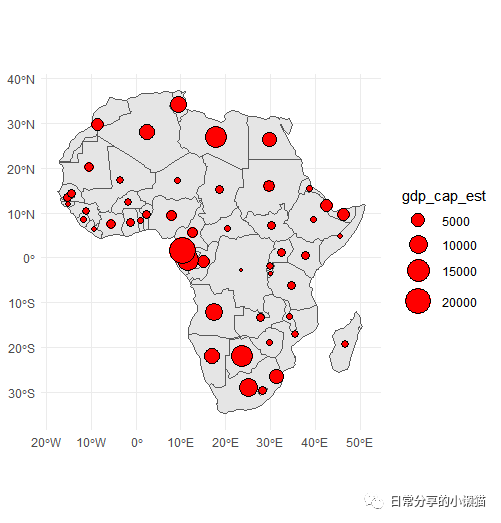
上一期介绍了如何利用ggplot2绘制分级颜色填充地图,本期接上期内容继续介绍如何利用ggplot2绘制气泡形式的填充地图,具体下图所示:
1、绘图
library(tmap)
library(sf)
library(see)
library(dplyr)
library(viridis)
library(ggplot2)
World <- data("World")
countries <- World %>% filter(continent == "Africa") #提取Africa地理信息
countries
#Simple feature collection with 51 features and 15 fields
#Geometry type: MULTIPOLYGON
#Dimension:     XY
#Bounding box:  xmin: -17.62504 ymin: -34.81917 xmax: 51.13387 ymax: 37.34999
#Geodetic CRS:  WGS 84
countries.point <- st_centroid(countries, of_largest_polygon = TRUE) #convert to
#绘图
ggplot() +
  geom_sf(data = countries) +
  geom_sf(data = countries.point, aes(size = gdp_cap_est)) +
  theme_minimal()

2、修改填充颜色及映射
1.修改填充颜色
ggplot() +
  geom_sf(data = countries) +
  geom_sf(data = countries.point,shape = 21, aes(size = gdp_cap_est), fill = "red") +
  scale_size_continuous(range = c(1, 9)) +
  theme_minimal()
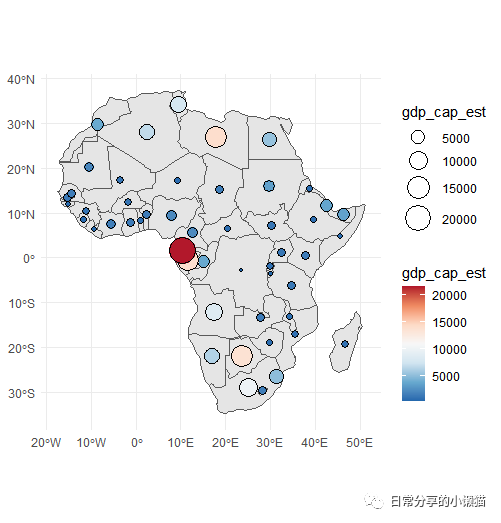
2.加入fill映射
ggplot() +
  geom_sf(data = countries) +
  geom_sf(data = countries.point,shape = 21, aes(size = gdp_cap_est, fill = gdp_cap_est)) +
  scale_fill_distiller(palette = "RdBu") +
  scale_size_continuous(range = c(1, 9)) +
  theme_minimal()
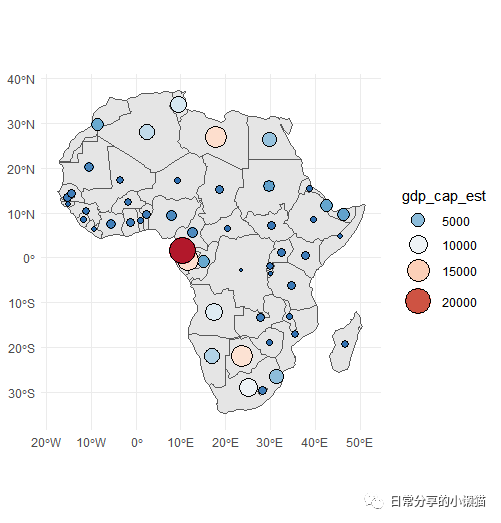
3.合并size与fill映射图例
ggplot() + #合并图例
  geom_sf(data = countries) +
  geom_sf(data = countries.point,shape = 21, aes(size = gdp_cap_est, fill = gdp_cap_est)) +
  scale_fill_distiller(palette = "RdBu") +
  scale_size_continuous(range = c(1, 9)) +
  theme_minimal() +
  guides(fill = guide_legend(), size = guide_legend())
3、其他
关于ggplot2绘制颜色绘制可参考R语言绘图|色彩填充地图。关于Python绘制地图可参考Python空间分析|分级颜色地图绘制,tmap包绘制地图可参考R语言绘图 | 利用tmap绘制分级色彩地图。更多绘图方法可进一步阅读公众号其他文章。
如有帮助请多多点赞哦!
文章转载自日常分享的小懒猫,如果涉嫌侵权,请发送邮件至:contact@modb.pro进行举报,并提供相关证据,一经查实,墨天轮将立刻删除相关内容。
