蓝字 关注我吧

阅读本文大概需要18分钟
MyBatis常用注解
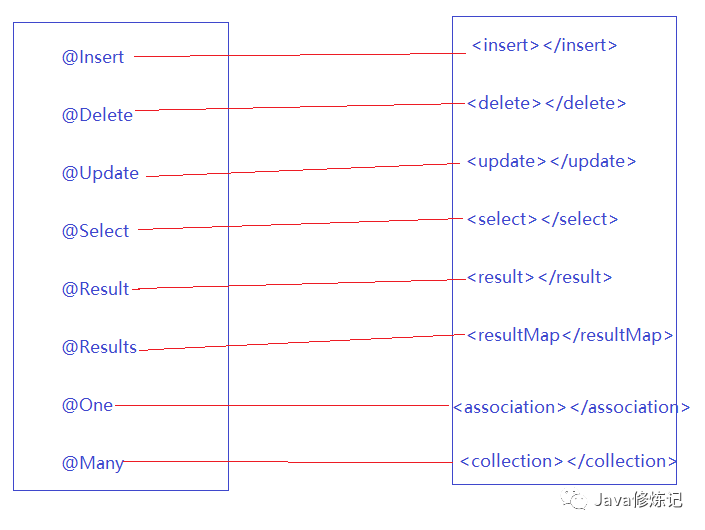
这几年来注解开发越来越流行,Mybatis也可以使用注解开发方式,这样我们就可以减少编写Mapper映射文件了。我们先了解一些基本的CRUD,再看一下复杂映射多表操作。
* @Insert:实现新增,代替了<insert></insert>
* @Delete:实现删除,代替了<delete></delete>
* @Update:实现更新,代替了<update></update>
* @Select:实现查询,代替了<select></select>
* @Result:实现结果集封装,代替了<result></result>
* @Results:可以与@Result一起使用,封装多个结果集,代替了<resultMap></resultMap>
* @One:实现一对一结果集封装,代替了<association></association>
* @Many:实现一对多结果集封装,代替了<collection></collection>
MyBatis注解的增删改查【重点】
1. 创建UserMapper接口
public interface UserMapper {

    /*
        查询用户
     */
    @Select("select * from user")
    public List<User> findAll();

    /*
        添加用户
     */
    @Insert("insert into user(username,birthday,sex,address)
           values(#{username},#{birthday},#{sex},#{address})")
    public void save(User user);

    /*
        更新用户
     */
    @Update("update user set username = #{username},birthday=#{birthday}
             where id = #{id}")
    public void update(User user);

    /*
        删除用户
     */
    @Delete("delete from user where id = #{id}")
    public void delete(Integer id);
}
2. 编写核心配置文件
sqlMapConfig.xml
    <!-- xml文件方式,引入映射文件 -->
    <mappers>
        <mapper resource="com/zwt/mapper/UserMapper.xml"></mapper>
    </mappers>
    <!-- 注解方式,引入映射文件 -->
    <mappers>
        <!-- 方式一:这里使用了注解替代的映射文件,
                    所以我们只需要加载使用了注解的Mapper接口即可-->
        <!-- <mapper class="com.zwt.mapper.UserMapper"></mapper>-->

        <!-- 方式二:扫描使用注解的Mapper类所在的包,批量加载映射-->
        <package name="com.zwt.mapper"/>
    </mappers>
3. 测试代码
public class MybatisTest {

    private SqlSessionFactory sqlSessionFactory;
    private SqlSession sqlSession;

    // 在 @Test方法标注的方法执行之前来执行
    @Before
    public void before() throws IOException {
        InputStream resourceAsStream = Resources.getResourceAsStream("sqlMapConfig.xml");
        sqlSessionFactory = new SqlSessionFactoryBuilder().build(resourceAsStream);
        sqlSession = sqlSessionFactory.openSession();
    }

    // 在 @Test方法标注的方法执行之后来执行
    @After
    public void after(){
        sqlSession.commit();
        sqlSession.close();
    }

    // 查询
    @Test
    public void testSelect() throws IOException {
        UserMapper mapper = sqlSession.getMapper(UserMapper.class);
        List<User> all = mapper.findAll();
        for (User user : all) {
            System.out.println(user);
        }
    }

    // 添加
    @Test
    public void testInsert(){
        UserMapper mapper = sqlSession.getMapper(UserMapper.class);
        User user = new User();
        user.setUsername("汤唯");
        user.setSex("女");
        user.setBirthday(new Date());
        user.setAddress("北京");
        mapper.save(user);
    }

    // 更新
    @Test
    public void testUpdate(){
        UserMapper mapper = sqlSession.getMapper(UserMapper.class);
        User user = new User();
        user.setUsername("柳岩真美");
        user.setBirthday(new Date());
        user.setId(9);
        mapper.update(user);
    }

    // 删除
    @Test
    public void testDelete(){
        UserMapper mapper = sqlSession.getMapper(UserMapper.class);
        mapper.delete(9);
    }
}
使用注解实现复杂映射开发
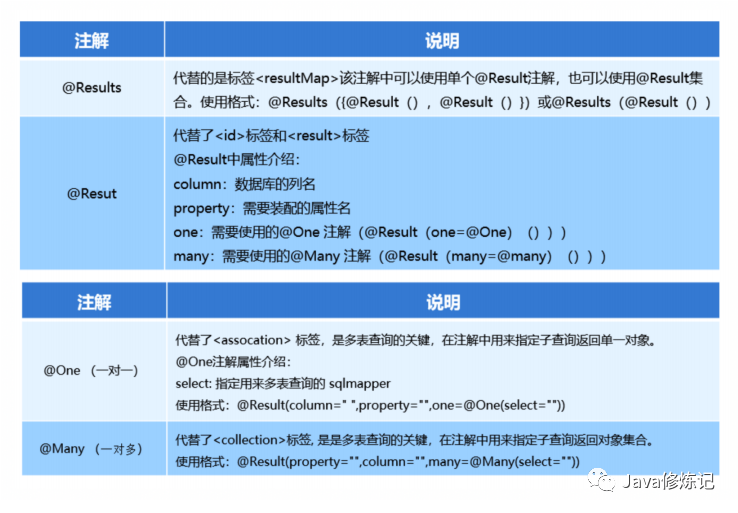
之前我们在映射文件中通过配置 <resultMap>、<association>、<collection> 来实现复杂关系映射。
使用注解开发后,我们可以使用 @Results、@Result,@One、@Many 注解组合完成复杂关系的配置。
一对一查询
1. 介绍
需求:查询一个订单,与此同时查询出该订单所属的用户
一对一查询语句
SELECT * FROM orders;
SELECT * FROM `user` WHERE id = #{订单的uid};
2. 代码实现
a)OrderMapper接口
OrderMapper.java
/*
    查询所有订单,同时查询订单所属的用户信息
*/
@Select("select * from orders")
@Results({  // 代替的就是resultMap标签 id标签  result标签
    @Result(property = "id",column = "id",id = true),
    @Result(property = "ordertime",column = "ordertime"),
    @Result(property = "total",column = "total"),
    @Result(property = "uid",column = "uid"),
    @Result(property = "user",javaType = User.class,column = "uid",
            one = @One(select = "com.zwt.mapper.UserMapper.findById"))
    })
public List<Orders> findAllWithUser();
对应 xml 写法如下:
OrderMapper.xml
    <resultMap id="orderMap" type="com.zwt.domain.Orders">
        <id property="id" column="id"/>
        <result property="ordertime" column="ordertime"/>
        <result property="total" column="total"/>
        <result property="uid" column="uid"/>

        <!--
            根据订单中uid外键,查询用户表
            property:属性名
            javaType:属性类型
            select:子查询语句的statementId
            column: 子查询参数 所对应的列名
         -->
        <association property="user" javaType="com.zwt.domain.User"
                     select="com.zwt.mapper.UserMapper.findById"
                     column="uid" />
    </resultMap>

    <!--一对一嵌套查询-->
    <select id="findAllWithUser" resultMap="orderMap">
        SELECT * FROM orders
    </select>
b)UserMapper接口
public interface UserMapper {
     /*
       子查询:根据id查询用户
     */
     @Select("SELECT * FROM `user` WHERE id = #{id}")
     public User findById(Integer id);
}
c)测试代码
    /*
        一对一查询(注解方式)
     */
    @Test
    public void testOneToOne(){
        OrderMapper mapper = sqlSession.getMapper(OrderMapper.class);

        List<Orders> allWithUser = mapper.findAllWithUser();

        for (Orders orders : allWithUser) {
            System.out.println(orders);
        }
    }
一对多查询
1. 介绍
需求:查询一个用户,与此同时查询出该用户具有的订单
一对多查询语句
SELECT * FROM `user`;
SELECT * FROM orders where uid = #{用户id};
2. 代码实现
a)UserMapper接口
userMapper.java
/*
   查询所有用户,及关联的订单信息
*/
@Select("select * from user")
@Results({
     @Result(property = "id",column = "id",id = true),
     @Result(property = "username",column = "username"),
     @Result(property = "birthday",column = "birthday"),
     @Result(property = "sex",column = "sex"),
     @Result(property = "address",column = "address"),
     @Result(property = "ordersList",javaType = List.class,column = "id",
             many = @Many(select = "com.zwt.mapper.OrderMapper.findOrderByUid"))
    })
public List<User> findAllWithOrder();
对应 xml 写法如下:
userMapper.xml
 <!-- 一对多嵌套查询:
      查询所有的用户,同时还要查询出每个用户所关联的订单信息 -->

    <resultMap id="userOrderMap" type="com.zwt.domain.User">
        <id property="id" column="id"/>
        <result property="username" column="username"></result>
        <result property="birthday" column="birthday"></result>
        <result property="sex" column="sex"></result>
        <result property="address" column="address"></result>

        <!--根据用户id,查询订单表-->
        <collection property="ordersList" ofType="com.zwt.domain.Orders"
             column="id" select="com.zwt.mapper.OrderMapper.findOrderByUid" >
        </collection>

    </resultMap>

    <select id="findAllWithOrder" resultMap="userOrderMap">
        SELECT * FROM USER
    </select>
b)OrderMapper接口
public interface OrderMapper {
    /*
        根据传递过来的用户id,查询该用户所具有的订单信息
     */
    @Select("select * from orders where uid = #{uid}")
    public List<Orders> findOrderByUid(Integer uid);
}
c)测试代码
    /*
       一对多查询(注解方式)
    */
    @Test
    public void testOneToMany(){

        UserMapper mapper = sqlSession.getMapper(UserMapper.class);

        List<User> allWithOrder = mapper.findAllWithOrder();

        for (User user : allWithOrder) {
            System.out.println(user);
            System.out.println(user.getOrdersList());
        }
    }
多对多查询
1. 介绍
需求:查询所有用户,同时查询出该用户的所有角色
多对多查询语句
SELECT * FROM `user`;
SELECT * FROM role r INNER JOIN user_role ur ON r.`id` = ur.`rid`
WHERE ur.`uid` = #{用户id};
2. 代码实现
a)UserMapper接口
userMapper.java
    /*
        查询所有用户及关联的角色信息
     */
    @Select("select * from user")
    @Results({
            @Result(property = "id",column = "id",id = true),
            @Result(property = "username",column = "username"),
            @Result(property = "birthday",column = "birthday"),
            @Result(property = "sex",column = "sex"),
            @Result(property = "address",column = "address"),
            @Result(property = "roleList",javaType = List.class,column = "id",
                    many = @Many(select = "com.zwt.mapper.RoleMapper.findAllByUid")),
    })
    public List<User> findAllWithRole();
对应 xml 写法如下:
userMapper.xml
    <resultMap id="userRoleMap" type="com.zwt.domain.User">
        <id property="id" column="id"/>
        <result property="username" column="username"></result>
        <result property="birthday" column="birthday"></result>
        <result property="sex" column="sex"></result>
        <result property="address" column="address"></result>

        <!--根据用户id,查询角色列表-->
        <collection property="roleList" ofType="com.zwt.domain.Role"
             column="id" select="com.zwt.mapper.RoleMapper.findByUid">
        </collection>

    </resultMap>

    <!--
        多对多嵌套查询:
        查询所有的用户,同时还要查询出每个用户所关联的角色信息
    -->
    <select id="findAllWithRole" resultMap="userRoleMap">
        SELECT * FROM USER
    </select>
b)RoleMapper接口
public interface RoleMapper {

    /*
        子查询:根据传递过来的用户id,查询该用户所具有的角色信息
     */
    @Select("SELECT * FROM sys_role r INNER JOIN sys_user_role ur
             ON ur.roleid = r.id WHERE ur.userid = #{uid}")
    public List<Role> findAllByUid(Integer uid);
}
c)测试代码
    /*
      多对多查询(注解方式)
    */
    @Test
    public void testManyToMany(){
        UserMapper mapper = sqlSession.getMapper(UserMapper.class);

        List<User> allWithRole = mapper.findAllWithRole();

        for (User user : allWithRole) {
            System.out.println(user);
            System.out.println(user.getRoleList());
        }
    }
基于注解的二级缓存
1. 配置SqlMapConfig.xml文件开启二级缓存的支持
sqlMapConfig.xml
<settings>
      <!--
         因为cacheEnabled的取值默认就为true,所以这一步可以省略不配置。
         为true代表开启二级缓存;为false代表不开启二级缓存。
     -->
     <setting name="cacheEnabled" value="true"/>
</settings>
2. 在Mapper接口中使用注解配置二级缓存
@CacheNamespace
public interface UserMapper {...}
注解延迟加载
不管是一对一还是一对多 ,在注解配置中都有fetchType的属性
fetchType = FetchType.LAZY 表示懒加载
fetchType = FetchType.EAGER 表示立即加载
fetchType = FetchType.DEFAULT 表示使用全局配置
举个栗子
在如下一对一查询中,设置 fetchType 属性为:FetchType.EAGER,表示立即加载
/*
    查询所有订单,同时查询订单所属的用户信息
*/
@Select("select * from orders")
@Results({  // 代替的就是resultMap标签 id标签  result标签
    @Result(property = "id",column = "id",id = true),
    @Result(property = "ordertime",column = "ordertime"),
    @Result(property = "total",column = "total"),
    @Result(property = "uid",column = "uid"),
    @Result(property = "user",javaType = User.class,column = "uid",
            one = @One(select = "com.zwt.mapper.UserMapper.findById",
            fetchType = FetchType.EAGER))
    })
public List<Orders> findAllWithUser();
在如下一对多查询中,设置 fetchType 属性为:FetchType.LAZY,表示延迟加载
/*
   查询所有用户,及关联的订单信息
*/
@Select("select * from user")
@Results({ // 代替的就是resultMap标签 id标签  result标签
     @Result(property = "id",column = "id",id = true),
     @Result(property = "username",column = "username"),
     @Result(property = "birthday",column = "birthday"),
     @Result(property = "sex",column = "sex"),
     @Result(property = "address",column = "address"),
     @Result(property = "ordersList",javaType = List.class,column = "id",
             many = @Many(select = "com.zwt.mapper.OrderMapper.findOrderByUid",
             fetchType = FetchType.LAZY))
    })
public List<User> findAllWithOrder();
* 注解开发和xml配置优劣分析
1.注解开发和xml配置相比,从开发效率来说,注解编写更简单,效率更高。
2.从可维护性来说,注解如果要修改,必须修改源码,会导致维护成本增加。xml维护性更强。
至此,mybatis系列就完结啦~
长按二维码
识别关注
共同成长