



5. Kdbndp.EntityFrameworkCore.KingbaseES在.net Framework 中使用
本部分介绍了Kdbndp.EntityFrameworkCore.KingbaseES 在.net Framework 中的使用方法,包括数据库连接和参考用例。
5.1. 数据库连接字符串
作用:
连接数据库参数配置。
格式:
相关使用,以及参数设置可参考 KingbaseES客户端编程接口指南-ado.net 中kdbndp中连接字串的解析。
5.2. 参考用例
作用
通过用例可了解如何在.net framework中如何引用和使用Kdbndp.EntityFrameworkCore.KingbaseES.dll。
操作步骤
创建新项目:
打开 Visual Studio 2017;
“文件”>“新建”>“项目...”;
从左侧菜单中选择“已安装” > “Visual C#” > “.Net Core”;
选择“控制台应用(.NET Framework)”项目模板;
确保项目面向 .NET Framework 4.6.1 或更高版本;
将项目命名为 Kdbndp_net_framework (项目名),并单击“确定”。
安装 Entity Framework:
要使用 EF Core,为要作为目标对象的数据库提供程序安装程序包(本例提供:Kdbndp.dll、Kdbndp.EntityFrameworkCore.KingbaseES.dll)。
使用某些 Entity Framework Tools维护数据库,请同时安装该工具包:
运行 Install-Package Microsoft.EntityFrameworkCore.Tools(备注:如果没有安装工具包的话,会无法在Nuget“包控制台”中使用Add-Migration 的相关命令)命令执行之后可见如下引用包:
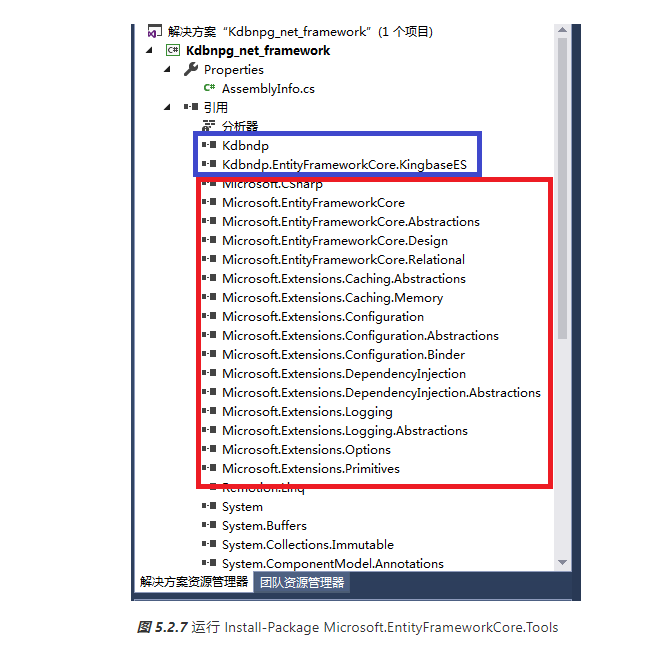
4)创建模型(实例):
选择“项目”>“添加类...”;
输入“Model.cs”作为名称,然后单击“确定”;
将此文件的内容替换为以下代码:
  C#
    using System;
    using Microsoft.EntityFrameworkCore;
    using System.ComponentModel.DataAnnotations;
    using System.Collections.Generic;
    using System.IO;
    using System.Linq;
    using System.Text;

    namespace Kdbndp_net_framework
    {
        public enum State
       {
           None,
           有用,
          无用
      }

       public class Modules : DbContext
       {
         public DbSet Kdb_Blog_Tests { get; set; }

          protected override void OnConfiguring(DbContextOptionsBuilder optionsBuilder)
              => optionsBuilder.UseKdbndp("Server=192.168.28.212;User ID=SYSTEM;Password=MANAGER;Database=KDBNDP_TESTS;Port=54328");
     }

      public class Blog_Test
      {
          [Key]
          public Guid Id { get; set; }
          public Guid? Ids { get; set; }
          public string Name { get; set; }
          public bool Sex { get; set; }
          public bool? Sexy { get; set; }
          public int Age { get; set; }
          public int? Ager { get; set; }
          public DateTime Birth { get; set; }
          public DateTime? Birthy { get; set; }
          public float Money { get; set; }
          public float? Moneies { get; set; }
          public double Pi { get; set; }
          public double? Pis { get; set; }
          public State State { get; set; }
          public State? States { get; set; }
          [Timestamp]
          public byte[] RowVersion { get; set; }
        }

}
创建数据库
现在有了模型,就可以使用迁移创建数据库:
“工具”>“NuGet 包管理器”>“包管理器控制台”;
运行 Add-Migration InitialCreate为迁移搭建基架,以便为模型创建一组初始表;
运行 Update-Database 以将新迁移应用到数据库。
由于数据库尚不存在,因此将在应用迁移之前进行创建。
创建之后参考以下模型文件: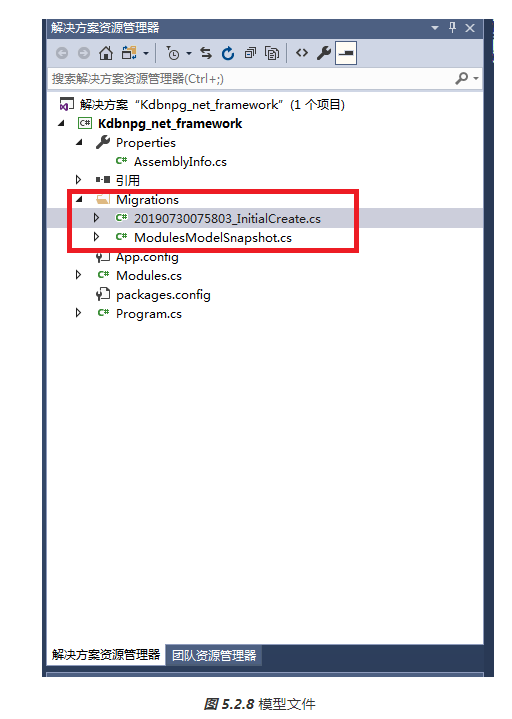
使用模型
打开 Program.cs;
将此文件的内容替换为以下代码;
using System;
using System.Collections.Generic;
using System.Linq;
using System.Text;
using System.Threading.Tasks;

namespace Kdbndp_net_framework
{
    class Program
    {
        /* Kdbndp _efcode测试用例 */
        static void TestKdbndp_efcode()
        {
            using (var db = new Modules())
            {
                /* 添加数据 */
                db.Kdb_Blog_Tests.Add(new Blog_Test
                {
                    Id = Guid.NewGuid(),
                    Ids = Guid.NewGuid(),
                    Name = "刘备",
                    Sex = true,
                    Sexy = true,
                    Age = 45,
                    Ager = 45,
                    Birth = DateTime.Now,
                    Birthy = DateTime.Now,
                    Money = 1.5f,
                    Moneies = 1.5f,
                    Pi = 36.25,
                    Pis = 36.25,
                    State = State.无用,
                    States = State.有用
                });


                var count = db.SaveChanges();
                Console.WriteLine("{0} records saved to database", count);
                Console.WriteLine("All blogs in database:");

                /* 搜索 */
                foreach (var blog in db.Kdb_Blog_Tests)
                {
                    Console.WriteLine("Id: {0}", blog.Id);
                    Console.WriteLine("Ids: {0}", blog.Ids);
                    Console.WriteLine("Name: {0}", blog.Name);
                    Console.WriteLine("Sex: {0}", blog.Sex);
                    Console.WriteLine("Sexy: {0}", blog.Sexy);
                    Console.WriteLine("Age: {0}", blog.Age);
                    Console.WriteLine("Ager: {0}", blog.Ager);
                    Console.WriteLine("Birth: {0}", blog.Birth);
                    Console.WriteLine("Birthy: {0}", blog.Birthy);
                    Console.WriteLine("Money: {0}", blog.Money);
                    Console.WriteLine("Birthy: {0}", blog.Birthy);
                    Console.WriteLine("Money: {0}", blog.Money);
                    Console.WriteLine("Moneies: {0}", blog.Moneies);
                    Console.WriteLine("Pi: {0}", blog.Pi);
                    Console.WriteLine("Pis: {0}", blog.Pis);
                    Console.WriteLine("State: {0}", blog.State);
                    Console.WriteLine("States: {0}", blog.States);
                }
            }

        }

        static void Main(string[] args)
        {
            Console.WriteLine("Hello World!");

            TestKdbndp_efcode();

            Console.ReadKey();
        }
    }
}