





一、EasyPdf是什么?
它是一个用搭积木的方式构建pdf的框架(基于pdfbox/fop)。
二、EasyPdf的项目概述有哪些?
x-easypdf基于pdfbox/fop二次封装,拥有两大模块:pdfbox模块极大降低pdfbox的使用门槛,以组件化的形式进行pdf的构建;fop模块采用数据源的方式对xsl-fo模板进行转换。两个模块均可单独使用,也可以结合使用,帮助开发者快速生成pdf文档。
三、EasyPdf的软件架构是怎样的?
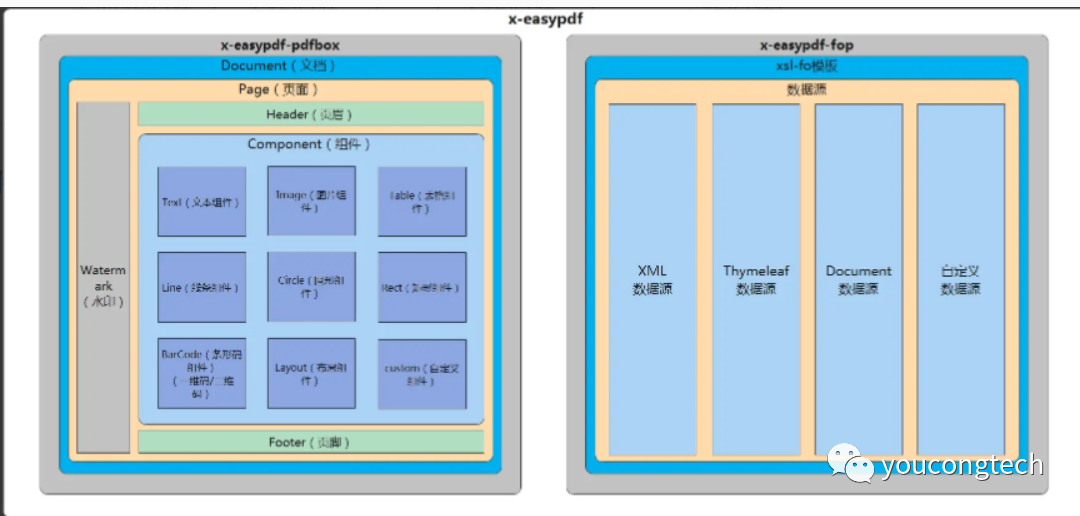
四、关于EasyPdf的资料有哪些?
EasyPdf官网:
https://www.x-easypdf.cn/#/
EasyPdf官方文档:
https://www.x-easypdf.cn/#/README
EasyPdf源代码:
https://gitee.com/dromara/x-easypdf
五、YC-Framework中如何使用EasyPdf?
1.引入依赖
<dependency><groupId>com.yc.framework</groupId><artifactId>yc-common-easypdf</artifactId></dependency>
2.参考文档,编写对应的代码示例测试
public class TestEasyPdf {// 根据自身情况选择对应保存路径private static final String OUTPUT_PATH = "D:\\test\\x-easypdf.pdf";public static void main(String[] args) throws IOException {// 创建文档XEasyPdfDocument document = XEasyPdfHandler.Document.build();// 创建页面XEasyPdfPage page = XEasyPdfHandler.Page.build();// 创建文本组件XEasyPdfText text = XEasyPdfHandler.Text.build("It is a test");// 将组件添加到页面page.addComponent(text);// 将页面添加到文档document.addPage(page);// 保存文档并关闭document.save(OUTPUT_PATH).close();}}
相关示例代码已上传:
https://github.com/developers-youcong/yc-framework/tree/main/yc-example/yc-example-easypdf
YC-Framework官网:
https://framework.youcongtech.com/
YC-Framework Github源代码:
https://github.com/developers-youcong/yc-framework
YC-Framework Gitee源代码:
https://gitee.com/developers-youcong/yc-framework
以上源代码均已开源,开源不易,如果对你有帮助,不妨给个star!!!
文章转载自youcongtech,如果涉嫌侵权,请发送邮件至:contact@modb.pro进行举报,并提供相关证据,一经查实,墨天轮将立刻删除相关内容。
