





一、Panda3D是什么?
Panda3D是一个3D游戏引擎,一个3D渲染和游戏开发库。
二、Panda3D它具有哪些功能特性?
1.平台可移植性:Panda3D核心是用可移植的c++编写的。当结合适当的平台支持代码,Panda3D将在任何地方运行。
2.灵活的资产处理:Panda3D包括用于处理和优化源资产的命令行工具,允许您自动化和编写内容生产管道以满足您的确切需求。
3.库绑定:Panda3D自带对许多流行的第三方库的开箱即用的支持,如Bullet物理引擎,Assimp模型加载器,OpenAL和FMOD声音库,以及更多。
4.可扩展性:Panda3D向应用程序公开了它所有的底层图形原语。发明你自己的图形技术和渲染管道。
5.性能分析:Panda3D包括pstats—一个网络分析系统,旨在帮助您了解帧时间的每一毫秒都去了哪里。
6.快速原型:Panda3D不需要模板和复杂的初始化代码。你在这里看到的是一个用Python编写的完整的Panda3D应用程序。
三、如何安装Panda3D?
Python环境执行如下命令即可:
pip install panda3d==1.10.11
以参考Panda3D官方网站为准:
https://www.panda3d.org/
四、如何编写一个简单的Panda 3D程序?
这里以官方文档示例为基准!!!
Panda 3D官方文档:
https://docs.panda3d.org/1.10/python/index
简单示例代码如下(test.py):
from math import pi, sin, cosfrom direct.showbase.ShowBase import ShowBasefrom direct.task import Taskfrom direct.actor.Actor import Actorfrom direct.interval.IntervalGlobal import Sequencefrom panda3d.core import Point3class MyApp(ShowBase):def __init__(self):ShowBase.__init__(self)# Disable the camera trackball controls.self.disableMouse()# Load the environment model.self.scene = self.loader.loadModel("models/environment")# Reparent the model to render.self.scene.reparentTo(self.render)# Apply scale and position transforms on the model.self.scene.setScale(0.25, 0.25, 0.25)self.scene.setPos(-8, 42, 0)# Add the spinCameraTask procedure to the task manager.self.taskMgr.add(self.spinCameraTask, "SpinCameraTask")# Load and transform the panda actor.self.pandaActor = Actor("models/panda-model",{"walk": "models/panda-walk4"})self.pandaActor.setScale(0.005, 0.005, 0.005)self.pandaActor.reparentTo(self.render)# Loop its animation.self.pandaActor.loop("walk")# Create the four lerp intervals needed for the panda to# walk back and forth.posInterval1 = self.pandaActor.posInterval(13,Point3(0, -10, 0),startPos=Point3(0, 10, 0))posInterval2 = self.pandaActor.posInterval(13,Point3(0, 10, 0),startPos=Point3(0, -10, 0))hprInterval1 = self.pandaActor.hprInterval(3,Point3(180, 0, 0),startHpr=Point3(0, 0, 0))hprInterval2 = self.pandaActor.hprInterval(3,Point3(0, 0, 0),startHpr=Point3(180, 0, 0))# Create and play the sequence that coordinates the intervals.self.pandaPace = Sequence(posInterval1, hprInterval1,posInterval2, hprInterval2,name="pandaPace")self.pandaPace.loop()# Define a procedure to move the camera.def spinCameraTask(self, task):angleDegrees = task.time * 6.0angleRadians = angleDegrees * (pi 180.0)self.camera.setPos(20 * sin(angleRadians), -20 * cos(angleRadians), 3)self.camera.setHpr(angleDegrees, 0, 0)return Task.contapp = MyApp()app.run()
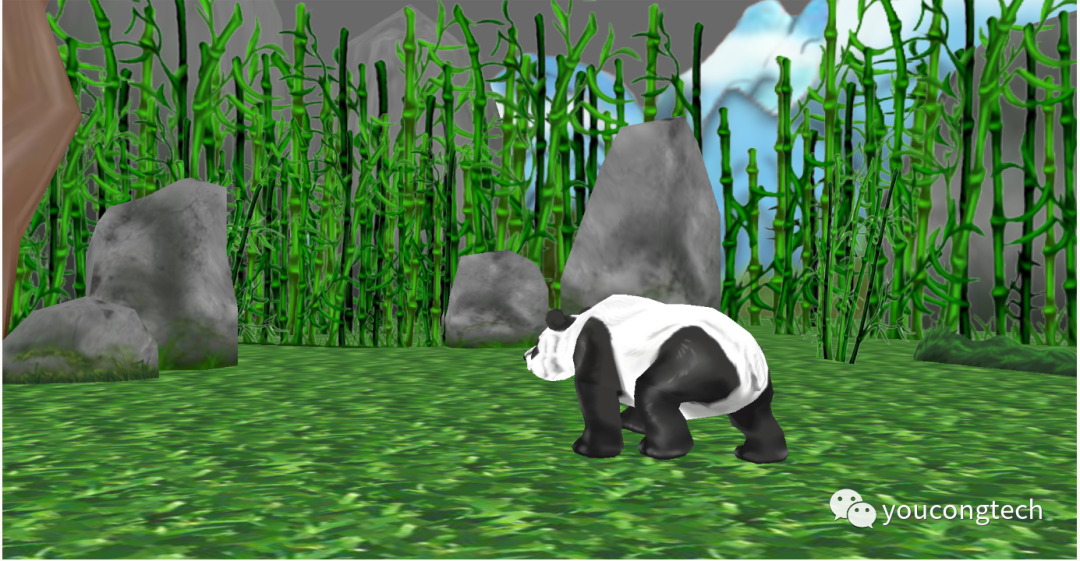
运行效果如下图所示:
文章转载自youcongtech,如果涉嫌侵权,请发送邮件至:contact@modb.pro进行举报,并提供相关证据,一经查实,墨天轮将立刻删除相关内容。
