



基础配置
网络(双网卡ens33、ens34)
controller节点:
vi  etc/sysconfig/network-scripts/ifcfg-ens33

#更改BOOTPROTO=dhcp改为BOOTPROTO=static,更改ONBOOT=no改为ONBOOT=yes
#添加:
IPADDR=192.168.200.10
NETMASK=255.255.255.0
GATEWAY=192.168.200.2
DNS1=172.16.100.134
DNS2=8.8.8.8
#保存并退出:wq

vi etc/sysconfig/network-scripts/ifcfg-ens34

#将内容改为:
TYPE=Ethernet
BOOTPROTO=none
NAME=ens34
UUID=23c654ba-c24e-4ad5-a213-e361c48a3933  #UUID不需要改变
DEVICE=ens34
ONBOOT=yes
#保存并退出:wq

systemctl restart network
ip a
compute节点:
vi  etc/sysconfig/network-scripts/ifcfg-ens33

#更改BOOTPROTO=dhcp改为BOOTPROTO=static,更改ONBOOT=no改为ONBOOT=yes
#添加:
IPADDR=192.168.200.10
NETMASK=255.255.255.0
GATEWAY=192.168.200.2
DNS1=172.16.100.134
DNS2=8.8.8.8
#保存并退出:wq

vi etc/sysconfig/network-scripts/ifcfg-ens34

#将内容改为:
TYPE=Ethernet
BOOTPROTO=none
NAME=ens34
UUID=56c364ba-c24e-4ad5-a213-e361c48b3461  #UUID不需要改变
DEVICE=ens34
ONBOOT=yes
#保存并退出:wq

systemctl restart network
ip a
主机名称配置
controller节点:
hostnamectl set-hostname controller
bash
compute节点:
hostnamectl set-hostname compute
bash
主机映射配置
所有节点配置:
vi etc/hosts

#添加:
192.168.200.10 controller
192.168.200.20 compute
#保存并退出:wq

ping -c 4 compute
安全配置(防火墙、selinux)
所有节点配置:
systemctl stop firewalld;systemctl disable firewalld
vi etc/selinux/config

#更改SELINUX=enforcing改为SELINUX=disabled
#保存并退出:wq
yum源配置
所有节点网络源验证:
yum clean all
yum repolist
关机拍摄快照
poweroff #拍快照网络时间服务配置
controller节点:
yum install -y chrony
vi etc/chrony.conf

 #注释所有server
 #添加:
server controller iburst
allow 192.168.200.0/24
 #保存并退出:wq

systemctl enable  chronyd.service;systemctl start chronyd.service
systemctl status chronyd
chronyc sources
compute节点:
yum install -y chrony
vi etc/chrony.conf

 #注释所有server
 #添加:
server controller iburst
 #保存并退出:wq

systemctl enable  chronyd.service;systemctl start chronyd.service
systemctl status chronyd
chronyc sources
安装OpenStack包
所有节点:
yum install -y centos-release-openstack-train
yum upgrade    #如果升级过程包含新内核,请重新启动主机以激活它。
yum install python-openstackclient openstack-selinux -y
安装SQL数据库
controller节点:
yum install mariadb mariadb-server python2-PyMySQL -y

vi etc/my.cnf.d/openstack.cnf
#创建和编辑
[mysqld]
bind-address = 192.168.200.10
default-storage-engine = innodb
innodb_file_per_table = on
max_connections = 4096
collation-server = utf8_general_ci
character-set-server = utf8
#保存并退出:wq

systemctl enable mariadb.service;systemctl start mariadb.service

mysql_secure_installation

#输入root密码,默认为空,点击回车
Set root password? [Y/n] y
#输入root密码"000000"两次
Remove anonymous users? [Y/n] y

Disallow root login remotely? [Y/n] n

Remove test database and access to it? [Y/n] y

Reload privilege tables now? [Y/n] y
安装消息队列 rabbitMQ
controller节点:
yum install -y rabbitmq-server
systemctl enable rabbitmq-server.service
systemctl restart rabbitmq-server.service
rabbitmqctl add_user openstack 000000
rabbitmqctl set_permissions openstack ".*" ".*" ".*"
#查看是否创建成功
rabbitmqctl list_users
#查看需要启动的服务
 rabbitmq-plugins list
#开启图形化界面(选做,可通过http://192.168.200.10:15672访问,用户名guest,密码guest)
rabbitmq-plugins enable rabbitmq_management rabbitmq_management_agent
安装memcahce服务(内存缓存服务)
controller节点:
yum install -y memcached python-memcached
vi etc/sysconfig/memcached
#将服务配置为使用控制器节点的管理 IP 地址。这是为了允许其他节点通过管理网络访问:
OPTIONS="-l 127.0.0.1,::1,controller"
#保存并退出:wq

systemctl enable memcached.service;systemctl start memcached.service

#查看运行状态
systemctl status  memcached.service
安装etcd服务
controller节点:
yum install -y etcd
vi etc/etcd/etcd.conf
#删除原内容,添加以下内容
#[Member]
ETCD_DATA_DIR="/var/lib/etcd/default.etcd"
ETCD_LISTEN_PEER_URLS="http://192.168.200.10:2380"
ETCD_LISTEN_CLIENT_URLS="http://192.168.200.10:2379"
ETCD_NAME="controller"
#[Clustering]
ETCD_INITIAL_ADVERTISE_PEER_URLS="http://192.168.200.10:2380"
ETCD_ADVERTISE_CLIENT_URLS="http://192.168.200.10:2379"
ETCD_INITIAL_CLUSTER="controller=http://192.168.200.10:2380"
ETCD_INITIAL_CLUSTER_TOKEN="etcd-cluster-01"
ETCD_INITIAL_CLUSTER_STATE="new"
#保存并退出:wq

systemctl enable etcd;systemctl start etcd
安装Keystone服务
controller节点:
mysql -u root -p000000
MariaDB [(none)]> CREATE DATABASE keystone;
MariaDB [(none)]> GRANT ALL PRIVILEGES ON keystone.* TO 'keystone'@'localhost' \
IDENTIFIED BY '000000';
MariaDB [(none)]> GRANT ALL PRIVILEGES ON keystone.* TO 'keystone'@'%'  IDENTIFIED BY  '000000';
MariaDB [(none)]> exit;

yum install openstack-keystone httpd mod_wsgi -y

vi etc/keystone/keystone.conf
#删除原内容,添加以下内容
[database]
connection = mysql+pymysql://keystone:000000@controller/keystone
[token]
provider = fernet
#保存并退出:wq

su -s bin/sh -c "keystone-manage db_sync" keystone           #填充身份服务数据库

keystone-manage fernet_setup --keystone-user keystone --keystone-group keystone
keystone-manage credential_setup --keystone-user keystone --keystone-group keystone

keystone-manage bootstrap --bootstrap-password 000000 \
  --bootstrap-admin-url http://controller:5000/v3/ \
  --bootstrap-internal-url http://controller:5000/v3/ \
  --bootstrap-public-url http://controller:5000/v3/ \
  --bootstrap-region-id RegionOne
配置Apache HTTP
controller节点:
vi etc/httpd/conf/httpd.conf

#仅添加
ServerName controller
#保存并退出:wq

ln -s usr/share/keystone/wsgi-keystone.conf etc/httpd/conf.d/
systemctl enable httpd.service;systemctl start httpd.service
#设置变量配置管理帐户
export OS_USERNAME=admin
export OS_PASSWORD=000000
export OS_PROJECT_NAME=admin
export OS_USER_DOMAIN_NAME=Default
export OS_PROJECT_DOMAIN_NAME=Default
export OS_AUTH_URL=http://controller:5000/v3
export OS_IDENTITY_API_VERSION=3
创建域、项目、用户和角色
controller节点:
openstack domain create --description "An Example Domain" example

openstack project create --domain default \
  --description "Service Project" service
openstack project create --domain default \
  --description "Demo Project" myproject
openstack user create --domain default \
  --password-prompt myuser             #输入两次密码000000

openstack role create myrole
openstack role add --project myproject --user myuser myrole


#验证
unset OS_AUTH_URL OS_PASSWORD

openstack --os-auth-url http://controller:5000/v3 \
  --os-project-domain-name Default --os-user-domain-name Default \
  --os-project-name admin --os-username admin token issue
   #密码000000
openstack --os-auth-url http://controller:5000/v3 \
  --os-project-domain-name Default --os-user-domain-name Default \
  --os-project-name myproject --os-username myuser token issue
 #密码000000
创建admin与demo用户脚本
controller节点:
vi admin-openrc
#新建文件,添加以下内容
export OS_PROJECT_DOMAIN_NAME=Default
export OS_USER_DOMAIN_NAME=Default
export OS_PROJECT_NAME=admin
export OS_USERNAME=admin
export OS_PASSWORD=000000
export OS_AUTH_URL=http://controller:5000/v3
export OS_IDENTITY_API_VERSION=3
export OS_IMAGE_API_VERSION=2
#保存并退出:wq

vi demo-openrc
#新建文件,添加以下内容
export OS_PROJECT_DOMAIN_NAME=Default
export OS_USER_DOMAIN_NAME=Default
export OS_PROJECT_NAME=myproject
export OS_USERNAME=myuser
export OS_PASSWORD=myuser
export OS_AUTH_URL=http://controller:5000/v3
export OS_IDENTITY_API_VERSION=3
export OS_IMAGE_API_VERSION=2
#保存并退出:wq

. admin-openrc
openstack token issue
安装Glance服务
controller节点:
mysql -u root -p000000

MariaDB [(none)]> CREATE DATABASE glance;
MariaDB [(none)]> GRANT ALL PRIVILEGES ON glance.* TO 'glance'@'localhost' \
  IDENTIFIED BY '000000';
MariaDB [(none)]> GRANT ALL PRIVILEGES ON glance.* TO 'glance'@'%' \
  IDENTIFIED BY '000000';
MariaDB [(none)]> exit;

. admin-openrc
openstack user create --domain default --password-prompt glance #密码000000
openstack role add --project service --user glance admin

openstack service create --name glance \
  --description "OpenStack Image" image
openstack endpoint create --region RegionOne \
  image public http://controller:9292
openstack endpoint create --region RegionOne \
  image internal http://controller:9292
openstack endpoint create --region RegionOne \
  image admin http://controller:9292

  #查看端口
openstack endpoint list

yum install openstack-glance -y

vi etc/glance/glance-api.conf

#删除原内容,添加以下内容
[database]
connection = mysql+pymysql://glance:000000@controller/glance
[keystone_authtoken]
www_authenticate_uri  = http://controller:5000
auth_url = http://controller:5000
memcached_servers = controller:11211
auth_type = password
project_domain_name = Default
user_domain_name = Default
project_name = service
username = glance
password = 000000
[paste_deploy]
flavor = keystone
[glance_store]
stores = file,http
default_store = file
filesystem_store_datadir = var/lib/glance/images/
#保存并退出:wq

su -s bin/sh -c "glance-manage db_sync" glance

systemctl enable openstack-glance-api.service;systemctl start openstack-glance-api.service

#验证
#可通过浏览器下载http://download.cirros-cloud.net/0.4.0/cirros-0.4.0-x86_64-disk.img
#上传镜像 cirros-0.4.0-x86_64-disk.img

glance image-create --name "cirros4" \
  --file cirros-0.4.0-x86_64-disk.img \
  --disk-format qcow2 --container-format bare \
  --visibility public

 openstack image list
安装Placement服务
controller节点:
mysql -u root -p000000

MariaDB [(none)]> CREATE DATABASE placement;
MariaDB [(none)]> GRANT ALL PRIVILEGES ON placement.* TO 'placement'@'localhost' \
  IDENTIFIED BY '000000';
MariaDB [(none)]> GRANT ALL PRIVILEGES ON placement.* TO 'placement'@'%' \
  IDENTIFIED BY '000000';
MariaDB [(none)]> exit;

. admin-openrc
openstack user create --domain default --password-prompt placement #密码000000
openstack role add --project service --user placement admin

openstack service create --name placement \
  --description "Placement API" placement
 openstack endpoint create --region RegionOne \
  placement public http://controller:8778
openstack endpoint create --region RegionOne \
  placement internal http://controller:8778
openstack endpoint create --region RegionOne \
  placement admin http://controller:8778

yum install openstack-placement-api -y


vi etc/placement/placement.conf

#删除原内容,添加以下内容
[placement_database]
connection = mysql+pymysql://placement:000000@controller/placement
[api]
auth_strategy = keystone
[keystone_authtoken]
auth_url = http://controller:5000/v3
memcached_servers = controller:11211
auth_type = password
project_domain_name = Default
user_domain_name = Default
project_name = service
username = placement
password = 000000
#保存并退出:wq

su -s bin/sh -c "placement-manage db sync" placement
#注意如有一下提醒,可忽略此输出中的任何弃用消息
/usr/lib/python2.7/site-packages/pymysql/cursors.py:170: Warning: (1280, u"Name 'alembic_version_pkc' ignored for PRIMARY key.")
  result = self._query(query)
httpd -v
#官方文档:由于打包错误,您必须通过添加以下配置来启用对 Placement API 的访问 etc/httpd/conf.d/00-nova-placement-api.conf:

vi etc/httpd/conf.d/00-placement-api.conf
#添加
<Directory usr/bin>
   <IfVersion >= 2.4>
      Require all granted
   </IfVersion>
   <IfVersion < 2.4>
      Order allow,deny
      Allow from all
   </IfVersion>
</Directory>
#保存并退出:wq

systemctl restart httpd
#验证
placement-status upgrade check
安装Nova服务
controller节点:
mysql -u root -p000000

MariaDB [(none)]> CREATE DATABASE nova_api;
MariaDB [(none)]> CREATE DATABASE nova;
MariaDB [(none)]> CREATE DATABASE nova_cell0;
MariaDB [(none)]> GRANT ALL PRIVILEGES ON nova_api.* TO 'nova'@'localhost' \
  IDENTIFIED BY '000000';
MariaDB [(none)]> GRANT ALL PRIVILEGES ON nova_api.* TO 'nova'@'%' \
  IDENTIFIED BY '000000';
MariaDB [(none)]> GRANT ALL PRIVILEGES ON nova.* TO 'nova'@'localhost' \
  IDENTIFIED BY '000000';
MariaDB [(none)]> GRANT ALL PRIVILEGES ON nova.* TO 'nova'@'%' \
  IDENTIFIED BY '000000';
MariaDB [(none)]> GRANT ALL PRIVILEGES ON nova_cell0.* TO 'nova'@'localhost' \
  IDENTIFIED BY '000000';
MariaDB [(none)]> GRANT ALL PRIVILEGES ON nova_cell0.* TO 'nova'@'%' \
  IDENTIFIED BY '000000';
MariaDB [(none)]>exit;

openstack user create --domain default --password-prompt nova     #密码000000
openstack role add --project service --user nova admin

openstack service create --name nova \
  --description "OpenStack Compute" compute
openstack endpoint create --region RegionOne \
  compute public http://controller:8774/v2.1
openstack endpoint create --region RegionOne \
  compute internal http://controller:8774/v2.1
openstack endpoint create --region RegionOne \
  compute admin http://controller:8774/v2.1


yum install openstack-nova-api openstack-nova-conductor openstack-nova-novncproxy openstack-nova-scheduler -y

vi etc/nova/nova.conf

#删除原内容,添加以下内容
[DEFAULT]
enabled_apis = osapi_compute,metadata
my_ip = 192.168.200.10
use_neutron = true
firewall_driver = nova.virt.firewall.NoopFirewallDriver
[api_database]
connection = mysql+pymysql://nova:000000@controller/nova_api
[database]
connection = mysql+pymysql://nova:000000@controller/nova
[DEFAULT]
transport_url = rabbit://openstack:000000@controller:5672/
[api]
auth_strategy = keystone
[keystone_authtoken]
www_authenticate_uri = http://controller:5000/
auth_url = http://controller:5000/
memcached_servers = controller:11211
auth_type = password
project_domain_name = Default
user_domain_name = Default
project_name = service
username = nova
password = 000000
[vnc]
enabled = true
server_listen = $my_ip
server_proxyclient_address = $my_ip
[glance]
api_servers = http://controller:9292
[oslo_concurrency]
lock_path = var/lib/nova/tmp
[placement]
region_name = RegionOne
project_domain_name = Default
project_name = service
auth_type = password
user_domain_name = Default
auth_url = http://controller:5000/v3
username = placement
password = 000000
#保存并退出:wq

su -s bin/sh -c "nova-manage api_db sync" nova
su -s bin/sh -c "nova-manage cell_v2 map_cell0" nova
su -s bin/sh -c "nova-manage cell_v2 create_cell --name=cell1 --verbose" nova
su -s bin/sh -c "nova-manage db sync" nova
#验证
su -s bin/sh -c "nova-manage cell_v2 list_cells" nova

systemctl enable \
    openstack-nova-api.service \
    openstack-nova-scheduler.service \
    openstack-nova-conductor.service \
    openstack-nova-novncproxy.service

systemctl start \
    openstack-nova-api.service \
    openstack-nova-scheduler.service \
    openstack-nova-conductor.service \
    openstack-nova-novncproxy.service
compute节点:
yum install openstack-nova-compute -y

vi etc/nova/nova.conf

#删除原内容,添加以下内容
[DEFAULT]
enabled_apis = osapi_compute,metadata
transport_url = rabbit://openstack:000000@controller
my_ip = 192.168.200.20
use_neutron = true
firewall_driver = nova.virt.firewall.NoopFirewallDriver
[api]
auth_strategy = keystone
[keystone_authtoken]
www_authenticate_uri = http://controller:5000/
auth_url = http://controller:5000/
memcached_servers = controller:11211
auth_type = password
project_domain_name = Default
user_domain_name = Default
project_name = service
username = nova
password = 000000
[vnc]
enabled = true
server_listen = 0.0.0.0
server_proxyclient_address = $my_ip
novncproxy_base_url = http://192.168.200.10:6080/vnc_auto.html
[glance]
api_servers = http://controller:9292
[oslo_concurrency]
lock_path = var/lib/nova/tmp
[placement]
region_name = RegionOne
project_domain_name = Default
project_name = service
auth_type = password
user_domain_name = Default
auth_url = http://controller:5000/v3
username = placement
password = 000000

#保存并退出:wq

#确定节点是否支持虚拟机的硬件加速,显示非0数字表示支持
egrep -c '(vmx|svm)' proc/cpuinfo
#如不支持可在nova.conf添加以下内容
[libvirt]
virt_type = qemu

systemctl enable libvirtd.service openstack-nova-compute.service;systemctl start libvirtd.service openstack-nova-compute.service
controller节点:
. admin-openrc
#验证操作
openstack compute service list --service nova-compute

su -s bin/sh -c "nova-manage cell_v2 discover_hosts --verbose" nova
#注添加新计算节点时,必须在控制器节点上运行以注册这些新计算节点。或者,您可以在 中设置适当的间隔 :nova-manage cell_v2 discover_hosts/etc/nova/nova.conf

vi etc/nova/nova.conf
#添加:
[scheduler]
discover_hosts_in_cells_interval = 300
#保存并退出:wq

systemctl restart openstack-nova*
openstack compute service list
openstack catalog list
openstack image list
nova-status upgrade check
安装Neutron服务
controller节点:
mysql -u root -p000000

MariaDB [(none)]> CREATE DATABASE neutron;
MariaDB [(none)]> GRANT ALL PRIVILEGES ON neutron.* TO 'neutron'@'localhost' \
  IDENTIFIED BY '000000';
MariaDB [(none)]> GRANT ALL PRIVILEGES ON neutron.* TO 'neutron'@'%' \
  IDENTIFIED BY '000000';
MariaDB [(none)]> exit;

openstack user create --domain default --password-prompt neutron  #密码000000
openstack role add --project service --user neutron admin

openstack service create --name neutron \
  --description "OpenStack Networking" network
openstack endpoint create --region RegionOne \
  network public http://controller:9696
openstack endpoint create --region RegionOne \
  network internal http://controller:9696
openstack endpoint create --region RegionOne \
  network admin http://controller:9696

#自助服务网络配置
yum install -y openstack-neutron openstack-neutron-ml2 \
  openstack-neutron-linuxbridge ebtables

vi etc/neutron/neutron.conf

#删除原内容,添加以下内容
[database]
connection = mysql+pymysql://neutron:000000@controller/neutron
[DEFAULT]
core_plugin = ml2
service_plugins = router
allow_overlapping_ips = true
transport_url = rabbit://openstack:000000@controller
auth_strategy = keystone
notify_nova_on_port_status_changes = true
notify_nova_on_port_data_changes = true
[keystone_authtoken]
www_authenticate_uri = http://controller:5000
auth_url = http://controller:5000
memcached_servers = controller:11211
auth_type = password
project_domain_name = default
user_domain_name = default
project_name = service
username = neutron
password = 000000
[nova]
auth_url = http://controller:5000
auth_type = password
project_domain_name = default
user_domain_name = default
region_name = RegionOne
project_name = service
username = nova
password = 000000
[oslo_concurrency]
lock_path = var/lib/neutron/tmp
#保存并退出:wq

#配置 Modular Layer 2 (ML2) 插件
vi etc/neutron/plugins/ml2/ml2_conf.ini

#删除原内容,添加以下内容
[ml2]
type_drivers = flat,vlan,vxlan
tenant_network_types = vxlan
mechanism_drivers = linuxbridge,l2population
extension_drivers = port_security
[ml2_type_flat]
flat_networks = provider
[ml2_type_vxlan]
vni_ranges = 1:1000
[securitygroup]
enable_ipset = true
#保存并退出:wq


#配置 Linux 网桥代理
#查看网卡,第二块网卡名称ens34
ip addr

vi etc/neutron/plugins/ml2/linuxbridge_agent.ini
#删除原内容,添加以下内容
[linux_bridge]
physical_interface_mappings = provider:ens34
[vxlan]
enable_vxlan = true
local_ip = 192.168.200.10
l2_population = true
[securitygroup]
enable_security_group = true
firewall_driver = neutron.agent.linux.iptables_firewall.IptablesFirewallDriver
#保存并退出:wq

vi etc/sysctl.conf
#添加:
net.bridge.bridge-nf-call-iptables = 1
net.bridge.bridge-nf-call-ip6tables = 1
#保存并退出:wq

#加载内核参数
modprobe br_netfilter
#查看内核参数
sysctl -p
#要启用网络桥接支持,通常br_netfilter需要加载内核模块

#配置第三层代理
vi etc/neutron/l3_agent.ini
#删除原内容,添加以下内容
[DEFAULT]
interface_driver = linuxbridge
#保存并退出:wq


#配置 DHCP 代理
vi etc/neutron/dhcp_agent.ini

#删除原内容,添加以下内容
[DEFAULT]
interface_driver = linuxbridge
dhcp_driver = neutron.agent.linux.dhcp.Dnsmasq
enable_isolated_metadata = true
#保存并退出:wq

#配置元数据代理
vi etc/neutron/metadata_agent.ini

#删除原内容,添加以下内容
[DEFAULT]
nova_metadata_host = controller
metadata_proxy_shared_secret = 000000
#保存并退出:wq

#配置计算服务以使用网络服务
vi etc/nova/nova.conf
#添加:
[neutron]
auth_url = http://controller:5000
auth_type = password
project_domain_name = default
user_domain_name = default
region_name = RegionOne
project_name = service
username = neutron
password = 000000
service_metadata_proxy = true
metadata_proxy_shared_secret = 000000
#保存并退出:wq


ln -s etc/neutron/plugins/ml2/ml2_conf.ini etc/neutron/plugin.ini

su -s bin/sh -c "neutron-db-manage --config-file etc/neutron/neutron.conf \
  --config-file etc/neutron/plugins/ml2/ml2_conf.ini upgrade head" neutron

systemctl restart neutron-server.service  neutron-linuxbridge-agent.service neutron-dhcp-agent.service neutron-metadata-agent.service

systemctl restart openstack-nova-api.service

systemctl enable neutron-server.service \
  neutron-linuxbridge-agent.service neutron-dhcp-agent.service \
  neutron-metadata-agent.service

systemctl start neutron-server.service \
  neutron-linuxbridge-agent.service neutron-dhcp-agent.service \
  neutron-metadata-agent.service

systemctl enable neutron-l3-agent.service;systemctl start neutron-l3-agent.service
compute节点:
yum install openstack-neutron-linuxbridge ebtables ipset -y

vi etc/neutron/neutron.conf
#删除原内容,添加以下内容
[DEFAULT]
transport_url = rabbit://openstack:000000@controller
auth_strategy = keystone
[keystone_authtoken]
www_authenticate_uri = http://controller:5000
auth_url = http://controller:5000
memcached_servers = controller:11211
auth_type = password
project_domain_name = default
user_domain_name = default
project_name = service
username = neutron
password = 000000
[oslo_concurrency]
lock_path = var/lib/neutron/tmp
#保存并退出:wq


#自助服务网络
vi etc/neutron/plugins/ml2/linuxbridge_agent.ini

#删除原内容,添加以下内容
[linux_bridge]
physical_interface_mappings = provider:ens34
[vxlan]
enable_vxlan = true
local_ip = 192.168.200.20
l2_population = true
[securitygroup]
enable_security_group = true
firewall_driver = neutron.agent.linux.iptables_firewall.IptablesFirewallDriver
#保存并退出:wq

vi etc/sysctl.conf
#添加:
net.bridge.bridge-nf-call-iptables = 1
net.bridge.bridge-nf-call-ip6tables = 1
#保存并退出:wq

#加载内核参数
modprobe br_netfilter
#查看内核参数
sysctl -p

#配置计算服务以使用网络服务
vi etc/nova/nova.conf
#添加:
[neutron]
auth_url = http://controller:5000
auth_type = password
project_domain_name = default
user_domain_name = default
region_name = RegionOne
project_name = service
username = neutron
password = 000000
[libvirt]
hw_machine_type = x86_64=pc-i440fx-rhel7.2.0
#保存并退出:wq

systemctl restart openstack-nova-compute.service

systemctl enable neutron-linuxbridge-agent.service;systemctl start neutron-linuxbridge-agent.service
controller节点:
#验证
. admin-openrc
openstack extension list --network
openstack network agent list

+--------------------------------------+--------------------+------------+-------------------+-------+-------+---------------------------+
| ID                                   | Agent Type         | Host       | Availability Zone | Alive | State | Binary                    |
+--------------------------------------+--------------------+------------+-------------------+-------+-------+---------------------------+
| f49a4b81-afd6-4b3d-b923-66c8f0517099 | Metadata agent     | controller | None              | True  | UP    | neutron-metadata-agent    |
| 27eee952-a748-467b-bf71-941e89846a92 | Linux bridge agent | controller | None              | True  | UP    | neutron-linuxbridge-agent |
| 08905043-5010-4b87-bba5-aedb1956e27a | Linux bridge agent | compute1   | None              | True  | UP    | neutron-linuxbridge-agent |
| 830344ff-dc36-4956-84f4-067af667a0dc | L3 agent           | controller | nova              | True  | UP    | neutron-l3-agent          |
| dd3644c9-1a3a-435a-9282-eb306b4b0391 | DHCP agent         | controller | nova              | True  | UP    | neutron-dhcp-agent        |
+--------------------------------------+--------------------+------------+-------------------+-------+-------+---------------------------+
安装Dashboard服务
controller节点:
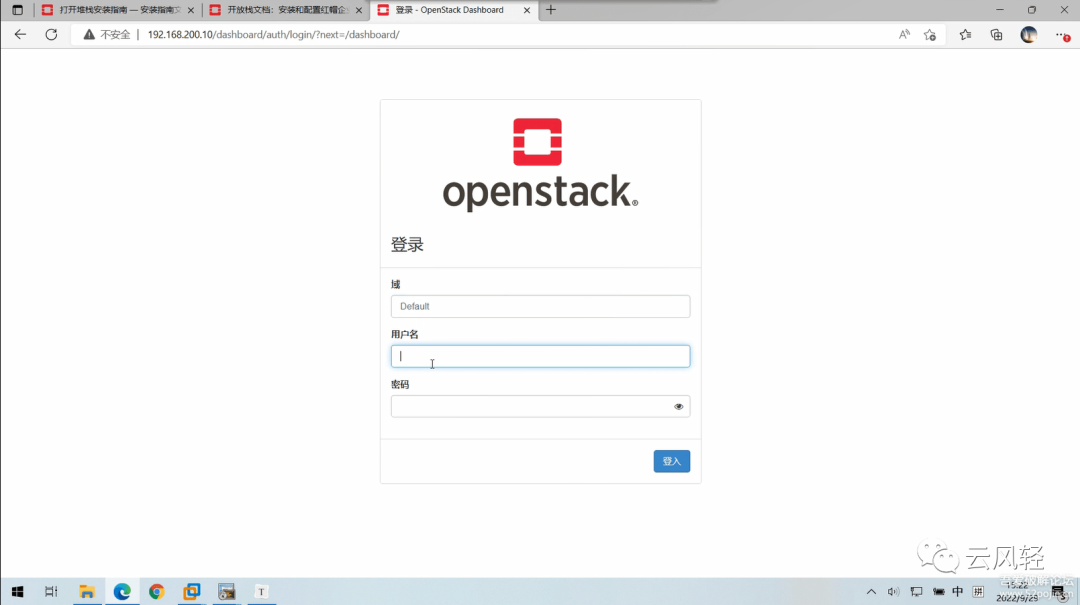
yum install openstack-dashboard -y

vi etc/openstack-dashboard/local_settings
#更改内容:
OPENSTACK_HOST = "controller"
ALLOWED_HOSTS = ['*']
SESSION_ENGINE = 'django.contrib.sessions.backends.cache'
CACHES = {
    'default': {
         'BACKEND': 'django.core.cache.backends.memcached.MemcachedCache',
         'LOCATION': 'controller:11211',
    }
}
OPENSTACK_KEYSTONE_URL = "http://%s:5000/v3" % OPENSTACK_HOST
OPENSTACK_KEYSTONE_MULTIDOMAIN_SUPPORT = True
OPENSTACK_API_VERSIONS = {
    "identity": 3,
    "image": 2,
    "volume": 3,
}
OPENSTACK_KEYSTONE_DEFAULT_DOMAIN = "Default"
OPENSTACK_KEYSTONE_DEFAULT_ROLE = "user"
#如配置三层网络不需要改以下注释设置
#OPENSTACK_NEUTRON_NETWORK = {
#    'enable_auto_allocated_network': False,
#    'enable_distributed_router': False,
#    'enable_fip_topology_check': False,
#    'enable_ha_router': False,
#    'enable_ipv6': False,
#    # TODO(amotoki): Drop OPENSTACK_NEUTRON_NETWORK completely from here.
#    # enable_quotas has the different default value here.
#    'enable_quotas': False,
#    'enable_rbac_policy': False,
#    'enable_router': True,
#    'enable_fip_topology_check': False,
#    'default_dns_nameservers': [],
#    'supported_provider_types': ['*'],
#    'segmentation_id_range': {},
#    'extra_provider_types': {},
#    'supported_vnic_types': ['*'],
#    'physical_networks': [],
# }
TIME_ZONE = "Asia/Shanghai"
#保存并退出:wq


vi etc/httpd/conf.d/openstack-dashboard.conf
#添加:
WSGIApplicationGroup %{GLOBAL}
#保存并退出:wq

#注意,编辑以下文件,找到WEBROOT = '/' 修改为WEBROOT = '/dashboard' (官方未提及坑点之一)
vi usr/share/openstack-dashboard/openstack_dashboard/defaults.py
vi usr/share/openstack-dashboard/openstack_dashboard/test/settings.py
vi usr/share/openstack-dashboard/static/dashboard/js/1453ede06e9f.js

systemctl restart httpd.service memcached.service
命令行创建云主机
#启动实例
#创建m1.nano主机类型
openstack flavor create --id 0 --vcpus 1 --ram 64 --disk 1 m1.nano

#生成密钥对选作
ssh-keygen -q -N ""          #需执行回车操作
openstack keypair create --public-key ~/.ssh/id_rsa.pub mykey
openstack keypair list

#添加安全组规则
#查看默认规则
openstack security group rule list default
#通过ID删除现有规则
openstack security group rule delete <ID>
#添加规则(如有多条同名规则请使用id)
openstack security group rule create --proto icmp default
openstack security group rule create --proto tcp default
openstack security group rule create --proto udp default
openstack security group rule create --proto icmp --egress default
openstack security group rule create --proto tcp --egress default
openstack security group rule create --proto udp --egress default

#创建内外网络及路由
openstack network create  --share --external \
  --provider-physical-network provider \
  --provider-network-type flat flat-provider

openstack subnet create --network flat-provider \
  --allocation-pool start=192.168.100.100,end=192.168.100.200 \
  --dns-nameserver 172.16.100.134 --gateway 192.168.100.1 \
  --subnet-range 192.168.100.0/24 flat-subnet

 openstack network create int-net
 openstack subnet create --network int-net \
  --dns-nameserver 172.16.100.134 --gateway 10.0.0.1 \
  --subnet-range 10.0.0.0/24 int-subnet

openstack router create router
openstack router add subnet router int-subnet
openstack router set --external-gateway flat-provider router

#创建云主机
openstack server create --flavor m1.nano --image  cirros \
  --nic net-id=e41e72a0-e11f-449c-a13b-18cae8347ba4 --security-group default \
  --key-name mykey vm1
#查询云主机
openstack server list
#查询主机控制台链接
openstack console url show vm1

#在浏览器访问,或在dashboard平台打开
 http://192.168.200.10:6080/vnc_auto.html?path=%3Ftoken%3D2d424de0-0a9b-4961-b7ab-4aa458222a03
安装Cinder服务
controller节点:
mysql -u root -p000000

MariaDB [(none)]>CREATE DATABASE cinder;
MariaDB [(none)]> GRANT ALL PRIVILEGES ON cinder.* TO 'cinder'@'localhost' \
  IDENTIFIED BY '000000';
MariaDB [(none)]>GRANT ALL PRIVILEGES ON cinder.* TO 'cinder'@'%' \
  IDENTIFIED BY '000000';
MariaDB [(none)]>exit;

. admin-openrc
openstack user create --domain default --password-prompt cinder    #密码000000
openstack role add --project service --user cinder admin

openstack service create --name cinderv2 \
  --description "OpenStack Block Storage" volumev2
openstack service create --name cinderv3 \
  --description "OpenStack Block Storage" volumev3
openstack endpoint create --region RegionOne \
  volumev2 public http://controller:8776/v2/%\(project_id\)s
openstack endpoint create --region RegionOne \
  volumev2 internal http://controller:8776/v2/%\(project_id\)s
openstack endpoint create --region RegionOne \
  volumev2 admin http://controller:8776/v2/%\(project_id\)s

openstack endpoint create --region RegionOne \
  volumev3 public http://controller:8776/v3/%\(project_id\)s
openstack endpoint create --region RegionOne \
  volumev3 internal http://controller:8776/v3/%\(project_id\)s
 openstack endpoint create --region RegionOne \
  volumev3 admin http://controller:8776/v3/%\(project_id\)s

#安装软件包
yum install openstack-cinder -y

vi etc/cinder/cinder.conf
#删除原内容,添加以下内容
[database]
connection = mysql+pymysql://cinder:000000@controller/cinder
[DEFAULT]
transport_url = rabbit://openstack:000000@controller
auth_strategy = keystone
my_ip = 192.168.200.10
[keystone_authtoken]
www_authenticate_uri = http://controller:5000
auth_url = http://controller:5000
memcached_servers = controller:11211
auth_type = password
project_domain_name = default
user_domain_name = default
project_name = service
username = cinder
password = 000000
[oslo_concurrency]
lock_path = /var/lib/cinder/tmp
#保存并退出:wq

su -s /bin/sh -c "cinder-manage db sync" cinder
#忽略此输出中的任何弃用消息。

vi /etc/nova/nova.conf
#添加:
[cinder]
os_region_name = RegionOne
#保存并退出:wq

systemctl restart openstack-nova-api.service

systemctl enable openstack-cinder-api.service openstack-cinder-scheduler.service;systemctl start openstack-cinder-api.service openstack-cinder-scheduler.service
compute(块存储)节点:
yum install lvm2 device-mapper-persistent-data -y

systemctl enable lvm2-lvmetad.service;systemctl start lvm2-lvmetad.service
#请提前添加磁盘sdb
pvcreate /dev/sdb
vgcreate cinder-volumes /dev/sdb

vi /etc/lvm/lvm.conf
#根据lvm硬盘添加:
devices {
filter = [ "a/sda/", "a/sdb/", "r/.*/"]
#保存并退出:wq

yum install openstack-cinder targetcli python-keystone -y

vi /etc/cinder/cinder.conf
#删除原内容,添加以下内容
[database]
connection = mysql+pymysql://cinder:000000@controller/cinder
[DEFAULT]
transport_url = rabbit://openstack:000000@controller
auth_strategy = keystone
my_ip = 192.168.200.20
enabled_backends = lvm
glance_api_servers = http://controller:9292
[keystone_authtoken]
www_authenticate_uri = http://controller:5000
auth_url = http://controller:5000
memcached_servers = controller:11211
auth_type = password
project_domain_name = default
user_domain_name = default
project_name = service
username = cinder
password = 000000
[lvm]
volume_driver = cinder.volume.drivers.lvm.LVMVolumeDriver
volume_group = cinder-volumes
target_protocol = iscsi
target_helper = lioadm
[oslo_concurrency]
lock_path = /var/lib/cinder/tmp
#保存并退出:wq

systemctl enable openstack-cinder-volume.service target.service;systemctl start openstack-cinder-volume.service target.service
文章转载自云风轻,如果涉嫌侵权,请发送邮件至:contact@modb.pro进行举报,并提供相关证据,一经查实,墨天轮将立刻删除相关内容。
