



环境
| 主机名 | ip | 角色 |
|---|---|---|
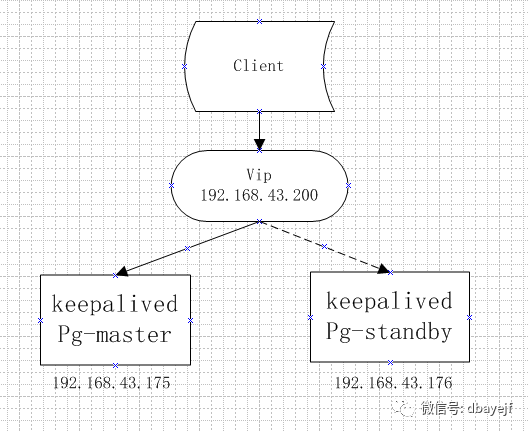
| sdw3 | 192.168.43.175 | master |
| sdw4 | 192.168.43.176 | standby |
部署架构
keepalived简介
Keepalived的作用是检测服务器的状态,如果有一台web服务器宕机,或工作出现故障,Keepalived将检测到,并将有故障的服务器从系统中剔除,同时使用其他服务器代替该服务器的工作,当服务器工作正常后Keepalived自动将服务器加入到服务器群中,这些工作全部自动完成,不需要人工干涉,需要人工做的只是修复故障的服务器。
keepalived安装
tar -zxvf keepalived-2.0.18.tar.gz
cd /usr/local/keepalived-2.0.18
./configure --prefix=/usr/local/keepalived
make && make install
keepalived配置
sdw3上的配置文件
cat > /home/postgres/keepalive/keepalived.conf <<EOF
global_defs {
   router_id sdw3
}

vrrp_instance VI_1 {
    state MASTER
    interface ens33
    virtual_router_id 51
    priority 100
    advert_int 10
    authentication {
        auth_type PASS
        auth_pass 1234
    }
    virtual_ipaddress {
        192.168.43.200
    }
    notify_master "sh /home/postgres/keepalive/up.sh"
}

EOF
sdw4上的配置文件
cat > /home/postgres/keepalive/keepalived.conf <<EOF
global_defs {
   router_id sdw4
}

vrrp_instance VI_1 {
    state BACKUP
    interface ens33
    virtual_router_id 51
    priority 100
    advert_int 10
    nopreempt #非抢占模式,master恢复后不会抢回vip,根据pg主备特性开启
    authentication {
        auth_type PASS
        auth_pass 1234
    }
    virtual_ipaddress {
        192.168.43.200
    }
    notify_master "sh /home/postgres/keepalive/up.sh"
}

EOF
notify_master选项指定提升为master时运行的脚本/home/postgres/keepalived/up.sh
,提升从库为主库的功能
#vi /home/postgres/keepalived/up.sh
touch /data/pg11data/pgsql.recovery.trigger
chown -R postgres:postgres /data/pg11data/pgsql.recovery.trigger
两台主机指定服务配置
#/usr/local/keepalived/etc/sysconfig/keepalived
KEEPALIVED_OPTIONS="-D -f /home/postgres/keepalived/keepalived.conf"
配置服务自启动
systemctl start keepalived
systemctl enable keepalived
可以看到sdw3上多了配置的vip
[postgres@sdw3 bin]$ ip a show ens33
2: ens33: <BROADCAST,MULTICAST,UP,LOWER_UP> mtu 1500 qdisc pfifo_fast state UP group default qlen 1000
    link/ether 00:0c:29:54:3e:8f brd ff:ff:ff:ff:ff:ff
    inet 192.168.43.175/24 brd 192.168.43.255 scope global noprefixroute ens33
       valid_lft forever preferred_lft forever
    inet 192.168.43.200/32 scope global ens33
       valid_lft forever preferred_lft forever
    inet6 fe80::3f72:149c:96b4:f995/64 scope link noprefixroute
       valid_lft forever preferred_lft forever
    inet6 fe80::cd01:8153:a2c8:23d8/64 scope link tentative noprefixroute dadfailed
       valid_lft forever preferred_lft forever
验证高可用
正常状态
分别连接vip、master、standby对数据库插入数据,因为176此时是standby,不支持写入操作。
[postgres@sdw4 ~]$ psql -h 192.168.43.200 -d postgres -U postgres -c "insert into test values(1,'test');"
INSERT 0 1
[postgres@sdw4 ~]$ psql -h 192.168.43.175 -d postgres -U postgres -c "insert into test values(1,'test');"
INSERT 0 1
[postgres@sdw4 ~]$ psql -h 192.168.43.176 -d postgres -U postgres -c "insert into test values(1,'test');"
ERROR:  cannot execute INSERT in a read-only transaction
模拟故障
重启sdw3(175),再连接数据库插入数据
[postgres@sdw4 ~]$ psql -h 192.168.43.200 -d postgres -U postgres -c "insert into test values(1,'test');"
INSERT 0 1
[postgres@sdw4 ~]$ psql -h 192.168.43.175 -d postgres -U postgres -c "insert into test values(1,'test');"
psql: could not connect to server: 拒绝连接
        Is the server running on host "192.168.43.175" and accepting
        TCP/IP connections on port 6432?
[postgres@sdw4 ~]$ psql -h 192.168.43.176 -d postgres -U postgres -c "insert into test values(1,'test');"
INSERT 0 1
可以看到,vip(192.168.43.200)始终插入成功,ip进行了飘移,实现了高可用。
文章转载自叶同学专栏,如果涉嫌侵权,请发送邮件至:contact@modb.pro进行举报,并提供相关证据,一经查实,墨天轮将立刻删除相关内容。
