



生产环境部署Chrony时间服务器,基于CentOS7系统。
1.Linux服务器运行很久时,系统时间就会存在一定的误差。
2.有时因为各种业务需求,需要分析日志。如果时间不一致,会导致日志信息时间不准确,从而无法正确判断分析故障原因。
3.在多主机协作工作时,各个主机的时间同步很重要,时间不一致会造成很多重要应用的故障,如:加密协议,日志,集群等。
4.目前主流实现时间同步工具:ntp,chrony。
ntp:将系统时钟和世界协调时UTC同步,精度在局域网内可达0.1ms,在互联网上绝大多数的地方精度可以达到1-50ms,项目官网:http://www.ntp.org
chrony:实现NTP协议的的自由软件。可使系统时钟与NTP服务器,参考时钟(例如GPS接收器)以及使用手表和键盘的手动输入进行同步。还可以作为NTPv4(RFC 5905)服务器和对等体运行,为网络中的计算机提供时间服务。设计用于在各种条件下良好运行,包括间歇性和高度拥挤的网络连接,温度变化(计算机时钟对温度敏感),以及不能连续运行或在虚拟机上运行的系统。通过Internet同步的两台机器之间的典型精度在几毫秒之内,在LAN上,精度通常为几十微秒。利用硬件时间戳或硬件参考时钟,可实现亚微秒的精度。
第 1 部分 介绍Chrony
第 1 章
说明
ntp同步时间原理:逐步同步时间,查看两台电脑时间差异,一点一点得同步;如果相差较大如1000秒,ntp将直接同步失败。因为有一些服务如日志,如果直接同步时间,日志的时间会直接有空白期,所以这也是ntp逐步同步时间的原因。
chrony不会有时间相差较大同步失败的问题,并且同步时间比ntp更快。
CentOS7上默认安装chrony(查看命令“rpm -qi chrony”)
CentOS6默认安装ntp(查看命令“rpm -qi ntp”)
Chrony可以向“ntp服务器端”及“chrony服务端”同步时间,兼容性很强。
第 2 章
优势
更快的同步只需要数分钟而非数小时时间,从而最大程度减少了时间和频率误差,对于并非全天 24 小时运行的虚拟计算机而言非常有用。
能够更好地响应时钟频率的快速变化,对于具备不稳定时钟的虚拟机或导致时钟频率发生变化的节能技术而言非常有用。
在初始同步后,它不会停止时钟,以防对需要系统时间保持单调的应用程序造成影响。
在应对临时非对称延迟时(例如,在大规模下载造成链接饱和时)提供了更好的稳定性。
无需对服务器进行定期轮询,因此具备间歇性网络连接的系统仍然可以快速同步时钟。
1)chrony官网:https://chrony.tuxfamily.org2)chrony官方文档:https://chrony.tuxfamily.org/documentation.html
第 3 章
基本信息
安装包:chrony
chrony的两个主要程序:chronyd和chronyc
chronyd:后台运行的守护进程,用于调整内核中运行的系统时钟和时钟服务器同步。它确定计算机增减时间的比率,并对此进行补偿
chronyc:命令行用户工具,用于监控性能并进行多样化的配置。它可以在chronyd实例控制的计算机上工作,也可在一台不同的远程计算机上工作
服务unit 文件:
/usr/lib/systemd/system/chronyd.service
监听端口:chrony:323/udp,ntp:123/udp
1.配置文件 /etc/chrony.conf架构
1)server可用于时钟服务器,iburst 选项当服务器可达时,发送一个八个数据包而不是通常的一个数据包。包间隔通常为2秒,可加快初始同步速度2)driftfile根据实际时间计算出计算机增减时间的比率,将它记录到一个文件中,会在重启后为系统时钟作出补偿3)rtcsync启用内核模式,系统时间每11分钟会拷贝到实时时钟(RTC)4)allow deny指定一台主机、子网,或者网络以允许或拒绝访问本服务器5)cmdallow cmddeny可以指定哪台主机可以通过chronyd使用控制命令6)bindcmdaddress允许chronyd监听哪个接口来接收由chronyc执行的命令7)makestep通常chronyd将根据需求通过减慢或加速时钟,使得系统逐步纠正所有时间偏差。在某些特定情况下,系统时钟可能会漂移过快,导致该调整过程消耗很长的时间来纠正系统时钟。该指令强制chronyd在调整期大于某个阀值时调整系统时钟8)local stratum 10即使server指令中时间服务器不可用,也允许将本地时间作为标准时间授时给其它客户端
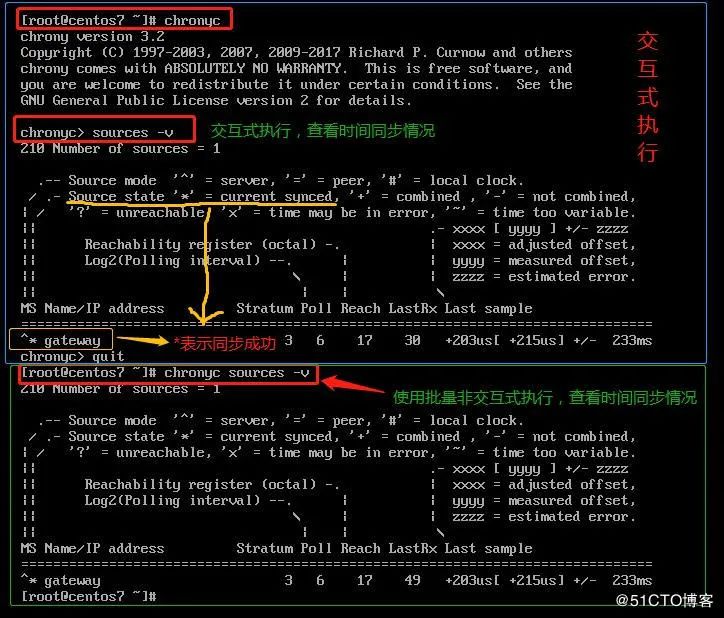
chrony支持交互式执行,也支持非交互式执行。
交互式执行:输入chronyc回车,在输入命令,help查看帮助
非交互式执行:chronyc后面跟子命令。
输入chronyc回车后,在输入help命令,可以查看更多chronyc的交互命令sources [-v] 显示当前时间源的同步信息(常用)sourcestats [-v]显示当前时间源的同步统计信息accheck 检查是否对特定主机可访问当前服务器activity 显示有多少NTP源在线/离线add server 手动添加一台新的NTP服务器clients 报告已访问本服务器的客户端列表delete 手动移除NTP服务器或对等服务器settime 手动设置守护进程时间sracking 显示系统时间信息
第 4 章
互联网NTP时间服务器
1) pool.ntp.org:项目是一个提供可靠易用的NTP服务的虚拟集群cn.pool.ntp.org0-3.cn.pool.ntp.org2) 阿里云公共NTP服务器Unix/linux类:ntp.aliyun.com ntp1-7.aliyun.comwindows类:time.pool.aliyun.com3) 大学ntp服务s1a.time.edu.cn 北京邮电大学s1b.time.edu.cn 清华大学s1c.time.edu.cn 北京大学4) 国家授时中心服务器210.72.145.44
第 2 部分 配置Chrony服务器端
第 1 章
配置chrony.conf文件
# Use public servers from the pool.ntp.org project.# Please consider joining the pool (http://www.pool.ntp.org/join.html).#server 0.centos.pool.ntp.org iburst#server 1.centos.pool.ntp.org iburst#server 2.centos.pool.ntp.org iburst#server 3.centos.pool.ntp.org iburstserver ntp1.aliyun.com iburstserver ntp2.aliyun.com iburstserver ntp3.aliyun.com iburstserver ntp4.aliyun.com iburst# Record the rate at which the system clock gains/losses time.driftfile /var/lib/chrony/drift# Allow the system clock to be stepped in the first three updates# if its offset is larger than 1 second.makestep 1.0 3# Enable kernel synchronization of the real-time clock (RTC).rtcsync# Enable hardware timestamping on all interfaces that support it.#hwtimestamp *# Increase the minimum number of selectable sources required to adjust# the system clock.#minsources 2# Allow NTP client access from local network.(允许NTP客户端可以同步本主机的时间服务)#allow 192.168.0.0/16allow 192.168.0.0/16(允许192.168.0.0网段的主机同步本主机时间)# Serve time even if not synchronized to a time source.(即使本主机与互联网的NTP时间服务器同步失败,我也要向我的NTP客户端提供同步时间服务)local stratum 10# Specify file containing keys for NTP authentication.#keyfile etc/chrony.keys# Specify directory for log files.logdir /var/log/chrony# Select which information is logged.#log measurements statistics tracking
2.启动chrony服务并设置开机自启
systemctl start chronydsystemctl enable chronydsystemctl status chronyd
3.查看与互联网NTP时间服务器的同步情况
chronyc sources -v同步需要一定时间,出现“*”号表示同步时间成功,如下图所示
第 3 部分 配置Chrony客户端
做到这里我们已经有了一台自己的时间服务器。如果我们想让局域网内的其他“客户端”都进行时间同步的话,可以配合"crontab计划任务和chrony服务"向Chrony服务器端同步时间。
注意:客户端和服务器端的时区必须一致,且时间如果相差太大需先手动同步时间。
第 1 章
crontab计划任务
crontab计划任务,适用于SUSE、CentOS、Ubuntu系统的新、老版本。
crontab -e30 * * * * usr/sbin/ntpdate -u 192.168.4.206
第 2 章
chrony服务
chrony服务适用于SUSE、CentOS、Ubuntu系统的新版本。chrony即能当服务器端,也能当客户端。事实上chrony比ntp更好用。
下面以CentOS7系统为例,配置chrony在客户端是怎么配置。chrony使用UDP协议的323端口。
CentOS7默认安装了chrony服务,使用"rpm -qi | grep chrony"命令查看。如果没有,使用"yum -y install chrony"命令安装。
# Use public servers from the pool.ntp.org project.# Please consider joining the pool (http://www.pool.ntp.org/join.html).server 192.168.4.206 iburstserver 192.168.4.207 iburst# Record the rate at which the system clock gains/losses time.driftfile /var/lib/chrony/drift# Allow the system clock to be stepped in the first three updates# if its offset is larger than 1 second.makestep 1.0 3# Enable kernel synchronization of the real-time clock (RTC).rtcsync# Enable hardware timestamping on all interfaces that support it.#hwtimestamp *# Increase the minimum number of selectable sources required to adjust# the system clock.#minsources 2# Allow NTP client access from local network.#allow 192.168.0.0/16# Serve time even if not synchronized to a time source.#local stratum 10# Specify file containing keys for NTP authentication.#keyfile etc/chrony.keys# Specify directory for log files.logdir /var/log/chrony# Select which information is logged.#log measurements statistics tracking
systemctl start chronydsystemctl enable chronydsystemctl status chronyd
[root@centos7 ~]# chronyc (交互式执行)chrony version 3.2Copyright (C) 1997-2003, 2007, 2009-2017 Richard P. Curnow and otherschrony comes with ABSOLUTELY NO WARRANTY. This is free software, andyou are welcome to redistribute it under certain conditions. See theGNU General Public License version 2 for details.chronyc> activity200 OK1 sources online0 sources offline0 sources doing burst (return to online)0 sources doing burst (return to offline)0 sources with unknown addresschronyc> quit[root@centos7 ~]# chronyc activity (非交互式执行)200 OK1 sources online0 sources offline0 sources doing burst (return to online)0 sources doing burst (return to offline)0 sources with unknown address[root@centos7 ~]#
[root@centos7 ~]# chronycchrony version 3.2Copyright (C) 1997-2003, 2007, 2009-2017 Richard P. Curnow and otherschrony comes with ABSOLUTELY NO WARRANTY. This is free software, andyou are welcome to redistribute it under certain conditions. See theGNU General Public License version 2 for details.chronyc> accheck 172.22.0.100209 Access denied(访问被拒绝)chronyc>
▼
