作者:林浩
DBA ,专注于 MySQL ,擅长问题分析解决。
本文来源:原创投稿
*爱可生开源社区出品,原创内容未经授权不得随意使用,转载请联系小编并注明来源。
为了解决这个问题,查阅了很多资料,涉及终端 ncurses 编程、进程的地址空间(堆和栈)、cmake、gcc 编译等,遇到不少“陷阱”,好在算是比较好的解决了这个问题。
环境:centos8.4 gcc8.4.1 mysql8.0.21 x86_64
问题描述:对 MySQL8.0.21 源码进行 make,由于一开始没安装 ncurses 库,在链接时遇到错误 undefined reference to,后来安装了该库,再次 make 成功。于是将 mysqld 启动,再用 mysql -u root -p 连接,输好密码回车后 MySQL 客户端发生 Segmentation fault。
第一次 make 时有编译警告(第二次 make 时不会有,因为.o 文件在第一次 make 时已经生成),摘要如下:
/opt/resource/mysql-8.0.21/extra/libedit/libedit-20190324-3.1/src/terminal.c: In function ‘ter
minal_set’:
/opt/resource/mysql-8.0.21/extra/libedit/libedit-20190324-3.1/src/terminal.c:877:6: warning: i
mplicit declaration of function ‘tgetent’; did you mean ‘getenv’? [-Wimplicit-function
-declaration]
  i = tgetent(el->el_terminal.t_cap, term);
       ^~~~~~~
       getenv
/opt/resource/mysql-8.0.21/extra/libedit/libedit-20190324-3.1/src/terminal.c:899:15: warning:
implicit declaration of function ‘tgetflag’; did you mean ‘tigetflag’? [-Wimplicit-functi
on-declaration]
   Val(T_am) = tgetflag("am");
                ^~~~~~~~
                tigetflag
/opt/resource/mysql-8.0.21/extra/libedit/libedit-20190324-3.1/src/terminal.c:908:15: warning:
implicit declaration of function ‘tgetnum’; did you mean ‘tigetnum’? [-Wimplicit-fun
ction-declaration]
    Val(T_co) = tgetnum("co");
                ^~~~~~~
                tigetnum
/opt/resource/mysql-8.0.21/extra/libedit/libedit-20190324-3.1/src/terminal.c:917:19: warning:
implicit declaration of function ‘tgetstr’; did you mean ‘tigetstr’? [-Wimplicit-functio
n-declaration]
        char *tmp = tgetstr(strchr(t->name, *t->name), &area);
                    ^~~~~~~
                    tigetstr
/opt/resource/mysql-8.0.21/extra/libedit/libedit-20190324-3.1/src/terminal.c:917:19: warning:
initialization of ‘ char * ’ from ‘ int ’ makes pointer from integer without a cast
[-Wint-conversion]
centos8.4 默认不能生成 core 文件,为了能临时生成 core 文件,需要对操作系统做如下配置:
# echo "core-%t.%p" > proc/sys/kernel/core_pattern
gdb 查看 core 文件的函数堆栈信息如下:
gdb bin/mysql ~/core-1637149273.2955
(gdb) bt
#0 0x00000000004e4eed in terminal_alloc (el=0x286eee0, t=<optimized out>, cap=0x52a9
aaa0 <error: Cannot access memory at address 0x52a9aaa0>)
  at opt/resource/mysql-8.0.21/extra/libedit/libedit-20190324-3.1/src/terminal.c:350
#1 0x00000000004e5da7 in terminal_set (el=el@entry=0x286eee0, term=<optimized out>,
term@entry=0x0)
  at opt/resource/mysql-8.0.21/extra/libedit/libedit-20190324-3.1/src/terminal.c:900
#2 0x00000000004e5ee1 in terminal_init (el=el@entry=0x286eee0) at opt/resource/mysql
-8.0.21/extra/libedit/libedit-20190324-3.1/src/terminal.c:297
#3 0x00000000004ea220 in el_init_internal (prog=0x7ffd52a9c6c9 "./mysql", fin=0x7fcd6f9
c09c0 <_IO_2_1_stdin_>,
  fout=0x7fcd6f9c16e0 <_IO_2_1_stdout_>, ferr=0x7fcd6f9c1600 <_IO_2_1_stderr_>, fdin=
0, fdout=fdout@entry=1, fderr=2, flags=128)
  at opt/resource/mysql-8.0.21/extra/libedit/libedit-20190324-3.1/src/el.c:139
#4 0x00000000004e22d5 in rl_initialize () at opt/resource/mysql-8.0.21/extra/libedit/libedi
t-20190324-3.1/src/readline.c:297
#5 0x00000000004e2b55 in read_history (filename=filename@entry=0x286eec0 "/root/.my
sql_history")
  at opt/resource/mysql-8.0.21/extra/libedit/libedit-20190324-3.1/src/readline.c:1359
#6 0x000000000040924a in main (argc=<optimized out>, argv=<optimized out>) at opt/r
esource/mysql-8.0.21/client/mysql.cc:1403
来看看 terminal.c 350 行附近的内容:
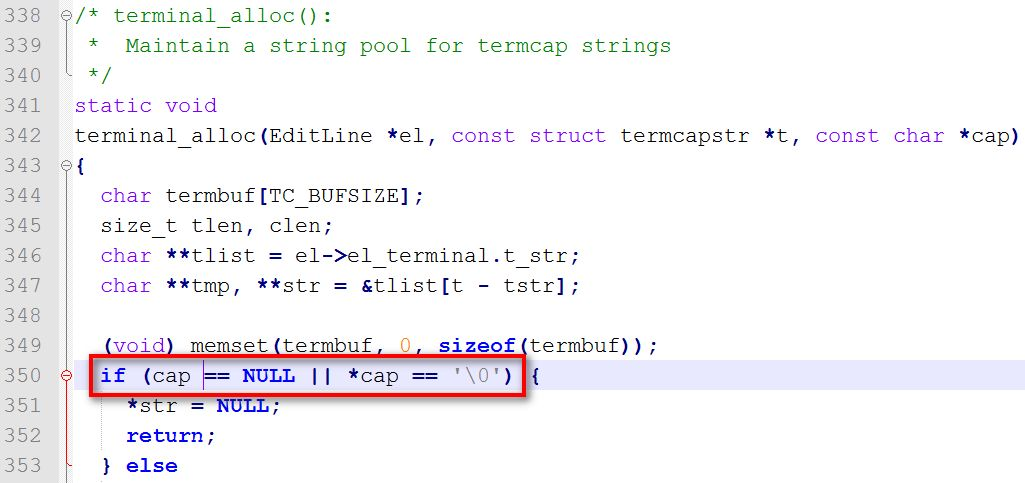
看这行的内容应该是内存地址非法访问造成 crash 的。再来看看 terminal.c 900 行附近的内容:

输入:man 3 tgetstr
来查看该函数的使用帮助,如下所示,我们可以知道终端能力有 3 种,分别是布尔值、数字值和字符串值,而该函数是用来获取字符串值的终端能力。同时,我们也可以知道,这个函数是给使用 termcap 库的应用使用的,后台会转换为 terminfo 库中的值。termcap 和 terminfo 都是描述终端能力的库,termcap 出现的比较早,已经被 terminfo 取代,但为了兼容性,termcap 的接口仍然保留。
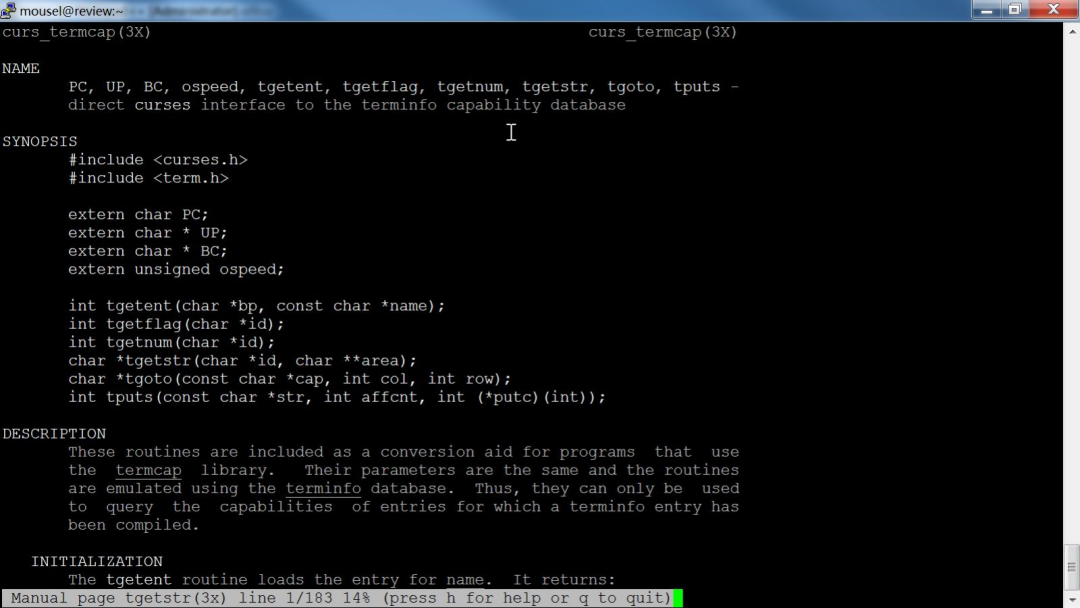
infocmp来查看当前终端的能力,位于/usr/share/terminfo,terminfo 数据库保存的是编译后的内容。
tgetstr
Use tgetstr to get a string value. It returns a pointer to a string which is the capability v alue, or a null pointer if the capability is not present in the terminal description. There are two ways tgetstr can find space to store the string value:
You can ask tgetstr to allocate the space.
Pass a null pointer for the argument area, and tgetstr will use malloc to allocate storage big enough for the value. Termcap will never free this storage or refer to it again; you should free it when you are finished with it. This method is more robust, since there is no need to guess how much space is needed. But it is supported only by the GNU termcap library.
You can provide the space.
Provide for the argument area the address of a pointer variable of type char *. Before calling tgetstr, initialize the variable to point at available space. Then tgetstr will store the string value in that space and will increment the pointer variable to point after the space that has been used. You can use the same pointer variable for many calls to tgetstr. There is no way to determine how much space is needed for a single string, and no way for you to prevent or handle overflow of the area you have provided. However, you can be sure that the total size of all the string values you will obtain from the terminal description is no greater than the size of the description (unless you get the same capability twice). You can determine that size with strlen on the buffer you provided to tgetent. See below for an example. Providing the space yourself is the only method supported by the Unix version of termcap.
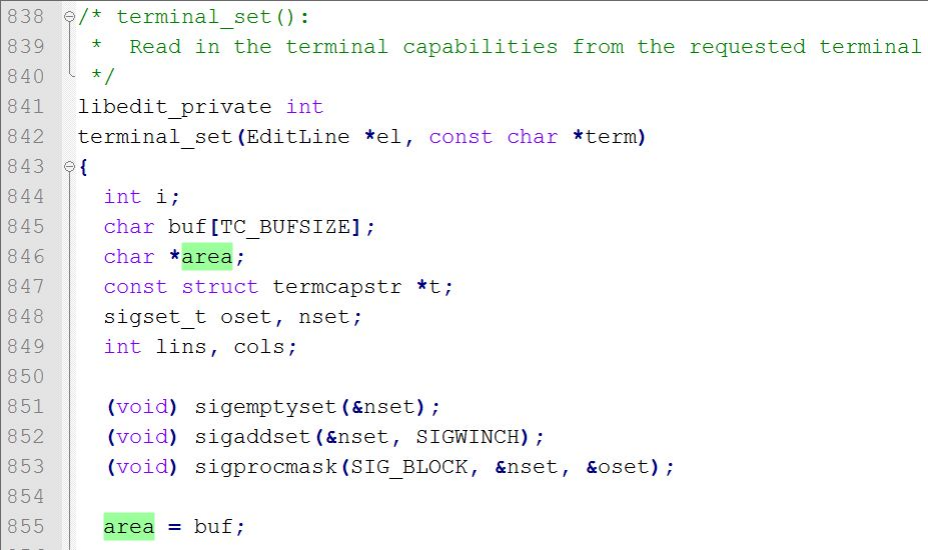
在 terminal.c 中加上打印来看看 buf、area 和 tgetstr 的值的变化情况:
char buf[TC_BUFSIZE];
printf("buf addr:%p\n", buf);

...

for (t = tstr; t->name != NULL; t++) {
     * XXX: some systems' tgetstr needs non const */
     terminal_alloc(el, t, tgetstr(strchr(t->name, *t->name),
      &area));
     char *tmp = tgetstr(strchr(t->name, *t->name), &area);
     printf("area:%p\n", area);
     printf("tgetstr ret val:%p\n", tmp);
     terminal_alloc(el, t, tmp);
}
打印结果如下:
buf addr:0x7ffe0ec93660
area:0x7ffe0ec93664(第 1 次 for 循环)
tgetstr ret val:0xec93660(第 1 次 for 循环)
可以发现第 1 次 for 循环 tgetstr 的返回值是 buf 被截断低 4 个字节后的值,按道理应该和 buf 的值一样,所以会产生内存非法访问的错误,导致 segmentation fault。
foo.h
#ifndef __FOO_H__
#define __FOO_H__
void foo();
#endif
foo.c
#include <stdlib.h>
#include <stdio.h>
void foo()
{
char buffer[1024];
printf("buffer:%p\n", buffer);
  char *str = bar(buffer);
  printf("str:%p\n", str);
  printf("sizeof pointer:%d\n", sizeof(str));
  printf("sizeof int:%d\n", sizeof(int));
}
bar.c
#include <stdio.h>
char *bar(char *buffer)
{
  char *buf = buffer;
  printf("buf:%p\n", buf);
  return buf;
}
main.c
#include "foo.h"
int main(int argc, char *argv[])
{
  foo();
  return 0;
}
$ gcc foo.c -c -o foo.o
foo.c: In function ‘foo’:
foo.c:7:15: warning: implicit declaration of function ‘bar’ [-Wimplicit-function-declaration]
   char *str = bar(buffer);
                ^~~

foo.c:7:15: warning: initialization of ‘char *’ from ‘int’ makes pointer from integer
without a cast [-Wint-conversion]
执行结果:
$ ./main
buffer:0x7ffd563a8720
buf:0x7ffd563a8720
str:0x563a8720
sizeof pointer:8
sizeof int:4
解决方法:
从该警告“implicit declaration of function”来看是由于缺少函数的原型声明,从 man 手册里知道 tgetstr 函数在 term.h 中有原型声明,只要 terminal.c 中 include 了这个头文件就可以了。在 terminal.c 中有如下代码,也就是说预编译 if 条件没成立。

在目录:extra\libedit\libedit-20191231-3.1\src 中打开 CMakeLists.txt,发现有如下内容:

这一步很必要,如果不清理缓存,cmake 还是会认为没有相应头文件 term.h 。进到相应的二进制目录,执行:rm CMakeCache.txt; rm -rf CMakeFiles
buf addr:0x7ffd8cc1e1a0
area:(nil)(第 1 次 for 循环)
tgetstr ret val:0x23e72fa(第 1 次 for 循环)
本文关键字:#MySQL client# #crash#
相关推荐:
MySQL binlog 分析工具 analysis_binlog 的使用介绍
爱可生开源社区的 SQLE 是一款面向数据库使用者和管理者,支持多场景审核,支持标准化上线流程,原生支持 MySQL 审核且数据库类型可扩展的 SQL 审核工具。
| 类型 | 地址 |
|---|---|
| 版本库 | https://github.com/actiontech/sqle |
| 文档 | https://actiontech.github.io/sqle-docs-cn/ |
| 发布信息 | https://github.com/actiontech/sqle/releases |
| 数据审核插件开发文档 | https://actiontech.github.io/sqle-docs-cn/3.modules/3.7_auditplugin/auditplugin_development.html |
更多关于 SQLE 的信息和交流,请加入官方QQ交流群:637150065...