# 前言
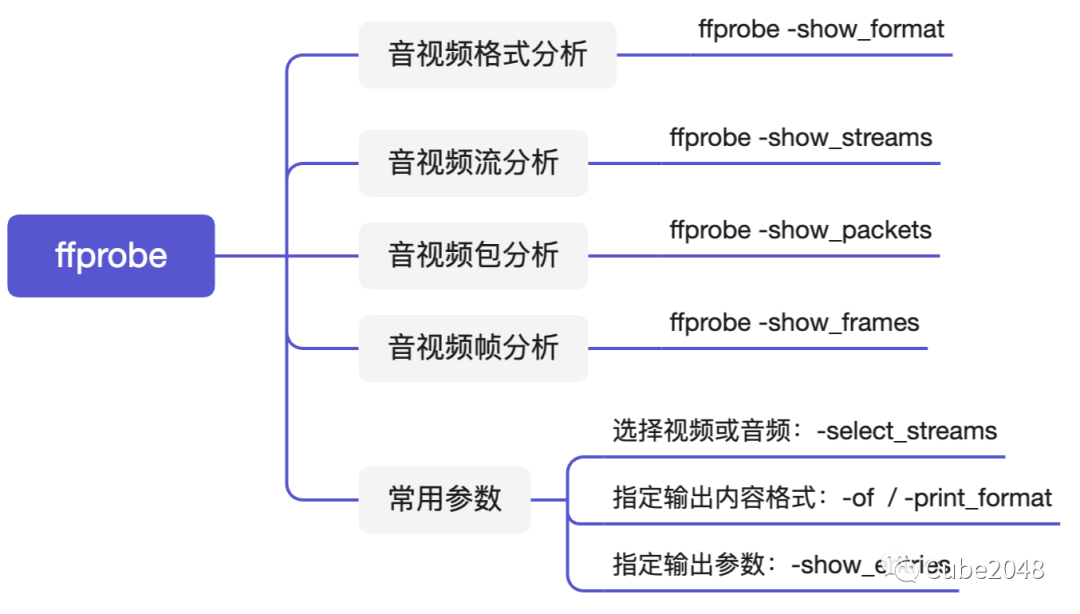
今天来学习一款视频分析神器——ffprobe。ffprobe是FFmpeg提供的工具之一,常被用来分析音视频容器格式、音视频流信息、音视频包和音视频帧等信息。在对音视频作转码、故障分析时,该工具能够提供很大的帮助。下面我们就来看看如何使用ffprobe对音视频相关信息进行分析。
# 分析
## 音视频各信息之间的关系
音视频信息主要可以分为音视频封装容器、音视频流、音视频包、音视频帧,它们的关系主要为:封装容器可以包含多路流,每个流里面包含了多个音视频包,而每个音视频包通过解码后可以得到对应的音视频帧。它们之间的对应关系可以用下图表示
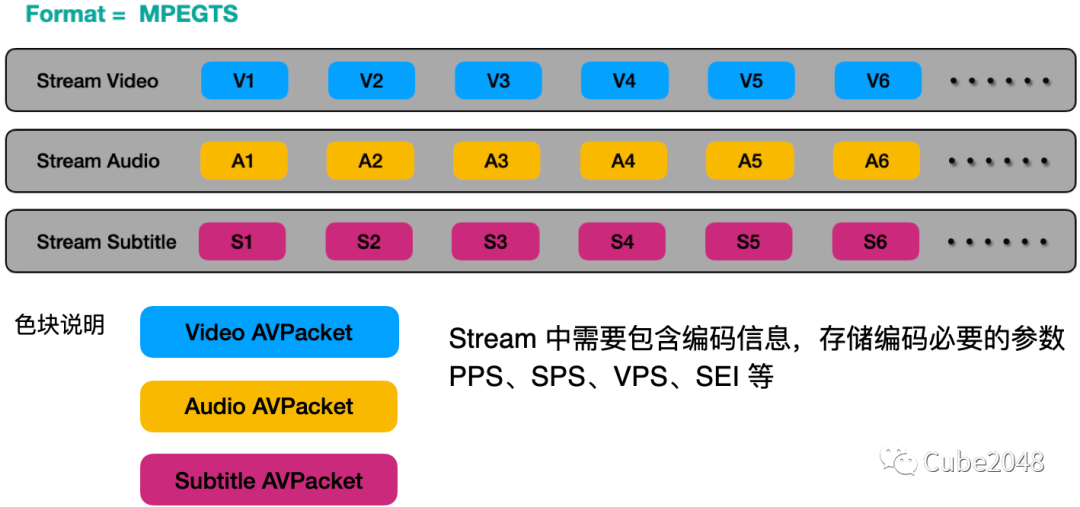
这里以MPEGTS封装为例,容器里有三路流,分别是视频流、音频流、字幕流;视频流、音频流中存储了对应的编码参数信息,在解码器解码时都要用到。

上图可以看出,音视频包和音视频帧之间的关系,可以理解为一个音视频包对应一个音视频帧,在FFmpeg中就是一个AVPacket对应一个AVFrame
了解了音视频各信息之间的关系,接下来就来对音视频信息进行分析。
当我们拿到一个视频文件、视频流URL链接或是直播视频URL链接时,就可以通过ffprobe相关命令来分析。
## 音视频信息分析
可以使用ffprobe直接提取音视频信息,执行如下命令
ffprobe Users/allenchen/Desktop/xxx01.mov
输出信息如下:
Input #0, mov,mp4,m4a,3gp,3g2,mj2, from '/Users/allenchen/Desktop/xxx01.mov':Metadata:major_brand : isomminor_version : 512compatible_brands: isomiso2avc1mp41encoder : Lavf58.20.100copyright :copyright-eng :Duration: 00:00:14.23, start: 0.000000, bitrate: 597 kb/sStream #0:0[0x1](und): Video: h264 (High) (avc1 0x31637661), yuv420p(tv, bt709, progressive), 720x720, 541 kb/s, 30 fps, 30 tbr, 90k tbn (default)Metadata:handler_name : VideoHandlervendor_id : [0][0][0][0]Stream #0:1[0x2](und): Audio: aac (LC) (mp4a 0x6134706D), 44100 Hz, mono, fltp, 47 kb/s (default)Metadata:handler_name : SoundHandlervendor_id : [0][0][0][0]
先看Metadata信息,比如encoder是Lavf58.20.100,Lavf表示的是FF mpeg输出的文件,后面的编号代表了FF mpeg的版本代号,
接着下一行的Duration信息,可以看出视频时长为14秒230毫秒,开始播放的时间从0毫秒开始,整个文件的比特率为597Kbit/s
继续往下看,可以看到下面有两行Stream信息,表示的是该视频有两路流
第一路Stream是视频流,编码方式为H264格式,封装格式为AVC1,每帧的数据格式为YUV420P,分辨率为720x720,比特率为541Kbit/s,帧率为每秒30帧(fps是30)
第二路Stream是音频流,编码方式是AAC,封装格式为MP4A,采样率为44100Hz,声道数为单声道(mono单声道,stereo为立体声道)数据表示格式为浮点数,比特率为47Kbit/s
## 音视频容器格式分析
音视频容器格式可以使用 ffprobe -show_format 来分析,对一个本地视频进行格式分析
输入命令:
ffprobe -show_format Users/allenchen/Desktop/xxx01.mov
输出信息如下:
[FORMAT]filename=/Users/allenchen/Desktop/xxx01.movnb_streams=2nb_programs=0format_name=mov,mp4,m4a,3gp,3g2,mj2format_long_name=QuickTime MOVstart_time=0.000000duration=14.233000size=1062397bit_rate=597145probe_score=100TAG:major_brand=isomTAG:minor_version=512TAG:compatible_brands=isomiso2avc1mp41TAG:encoder=Lavf58.20.100TAG:copyright=TAG:copyright-eng=[/FORMAT]
上面输出信息可以看出音视频格式信息会用[FORMAT]标签括起来,字段解析如下:
filename:文件名,文件格式为mov
nb_streams:表示这个容器里有两个流
nb_programs:为0表示这里面不存在 program 信息,这个 program 信息常见于广电用的 mpegts 流里,比如某个卫视频道的节目
start_time: 表示这个容器里正常的显示开始的时间 0.00000
duration:表示这个容器文件的总时长 14.233 秒
size:表示文件大小
bit_rate:表示文件的码率
probe_score:查找容器格式的得分,FFmpeg 在 probe 这个文件中对应的得分是 100,这个得分通常用来确定使用哪个容器模块来解析这个 probe 文件
TAG:对应容器的TAG
可以看到其实容器格式分析得到的信息并没有很多,如果需要拿到更加详细的信息,我们可以进一步对音视频流进行分析。
## 音视频流分析
音视频流信息可以通过ffprobe -show_streams来获取
输入命令:
ffprobe -show_streams /Users/allenchen/Desktop/xxx01.mov
从上面知道,我们的视频有两路流,所以输出的信息包含了两路流的信息,由于内容较多,我们以视频流信息为例来分析:
[STREAM]index=0 // 索引codec_name=h264 //编码格式codec_long_name=H.264 / AVC / MPEG-4 AVC / MPEG-4 part 10 //编码详细描述profile=High //流d的profilecodec_type=video //codec类型codec_tag_string=avc1 //codec tag 字符串codec_tag=0x31637661 //codec tag 字符串16进制方式存储width=720 //视频宽height=720 //视频搞coded_width=720 //编码视频的宽,编解码时对齐的数据,显示时不用coded_height=720 //编码视频的高,编解码时对齐的数据,显示时不用closed_captions=0film_grain=0has_b_frames=0 // IPB帧排列时,两个P之间有多少个B帧,为0表示没有B帧sample_aspect_ratio=N/A //像素点采样比例display_aspect_ratio=N/A //显示图像比例pix_fmt=yuv420p //像素点格式level=31 //与profile一起出现,对应d的时参考标准中有对应的参数描述color_range=tv //调色必备参数color_space=bt709 //调色必备参数color_transfer=bt709 //调色必备参数color_primaries=bt709 //调色必备参数chroma_location=leftfield_order=progressiverefs=1is_avc=truenal_length_size=4id=0x1r_frame_rate=30/1 //实际帧率avg_frame_rate=427000/14233 //平均帧率time_base=1/90000 //时间基,通常和帧率有对应关系start_pts=0 //开始时间戳start_time=0.000000 开始时间duration_ts=1280970 //时长时间戳duration=14.233000 //时长时间bit_rate=541517 //码率max_bit_rate=N/A //最大码率bits_per_raw_sample=8 //原始数据每个采样展位nb_frames=427 //总帧数nb_read_frames=N/Anb_read_packets=N/Aextradata_size=33 //extradata大小TAG:language=und //语种TAG:handler_name=VideoHandler //句柄名TAG:vendor_id=[0][0][0][0][/STREAM]
音视频流的信息会用[STREAM]标签括起来,字段比较多,其中比如codec_type是用来区分音频流还是视频流;通过codec_name可以确定流是什么编码
## 音视频包分析
音视频包信息可以通过ffprobe -show_packets来获取
输入命令:
ffprobe -show_packets -of xml /Users/allenchen/Desktop/xxx01.mov
输出信息如下:
<packets><packet codec_type="video" stream_index="0" pts="0" pts_time="0.000000" dts="-2970" dts_time="-0.033000" duration="3000" duration_time="0.033333" size="5228" pos="13984" flags="K_"/><packet codec_type="video" stream_index="0" pts="3000" pts_time="0.033333" dts="0" dts_time="0.000000" duration="3000" duration_time="0.033333" size="286" pos="19212" flags="__"/><packet codec_type="audio" stream_index="1" pts="0" pts_time="0.000000" dts="0" dts_time="0.000000" duration="1023" duration_time="0.023197" size="139" pos="19498" flags="K_"/><packet codec_type="audio" stream_index="1" pts="1023" pts_time="0.023197" dts="1023" dts_time="0.023197" duration="1024" duration_time="0.023220" size="139" pos="19637" flags="K_"/><packet codec_type="audio" stream_index="1" pts="2047" pts_time="0.046417" dts="2047" dts_time="0.046417" duration="1024" duration_time="0.023220" size="139" pos="19776" flags="K_"/><packet codec_type="video" stream_index="0" pts="6000" pts_time="0.066667" dts="3000" dts_time="0.033333" duration="3000" duration_time="0.033333" size="916" pos="19915" flags="__"/><packet codec_type="audio" stream_index="1" pts="3071" pts_time="0.069637" dts="3071" dts_time="0.069637" duration="1024" duration_time="0.023220" size="140" pos="20831" flags="K_"/><packet codec_type="audio" stream_index="1" pts="4095" pts_time="0.092857" dts="4095" dts_time="0.092857" duration="1024" duration_time="0.023220" size="142" pos="20971" flags="K_"/><packet codec_type="video" stream_index="0" pts="9000" pts_time="0.100000" dts="6000" dts_time="0.066667" duration="3000" duration_time="0.033333" size="968" pos="21113" flags="__"/><packet codec_type="audio" stream_index="1" pts="5119" pts_time="0.116077" dts="5119" dts_time="0.116077" duration="3072" duration_time="0.069660" size="148" pos="22081" flags="K_"/>......</packets>
由于输出信息较多,我们使用了-of xml来指明输出格式xml,支持的格式有
default
compact
csv
flat
ini
json
xml
从上面可以看到输出的信息中,视频包和音频包放在一起交错显示了,我们也可以通过添加添加“-select_streams v“或是”-select_streams a"来只读视频流或是音频流的包
ffprobe -show_packets -select_streams v -of xml /Users/allenchen/Desktop/xxx01.mov
输出信息就只有视频包信息了:
<packets><packet codec_type="video" stream_index="0" pts="0" pts_time="0.000000" dts="-2970" dts_time="-0.033000" duration="3000" duration_time="0.033333" size="5228" pos="13984" flags="K_"/><packet codec_type="video" stream_index="0" pts="3000" pts_time="0.033333" dts="0" dts_time="0.000000" duration="3000" duration_time="0.033333" size="286" pos="19212" flags="__"/><packet codec_type="video" stream_index="0" pts="6000" pts_time="0.066667" dts="3000" dts_time="0.033333" duration="3000" duration_time="0.033333" size="916" pos="19915" flags="__"/><packet codec_type="video" stream_index="0" pts="9000" pts_time="0.100000" dts="6000" dts_time="0.066667" duration="3000" duration_time="0.033333" size="968" pos="21113" flags="__"/><packet codec_type="video" stream_index="0" pts="12000" pts_time="0.133333" dts="9000" dts_time="0.100000" duration="3000" duration_time="0.033333" size="945" pos="22229" flags="__"/><packet codec_type="video" stream_index="0" pts="15000" pts_time="0.166667" dts="12000" dts_time="0.133333" duration="3000" duration_time="0.033333" size="95" pos="23174" flags="__"/><packet codec_type="video" stream_index="0" pts="18000" pts_time="0.200000" dts="15000" dts_time="0.166667" duration="3000" duration_time="0.033333" size="206" pos="23269" flags="__"/><packet codec_type="video" stream_index="0" pts="21000" pts_time="0.233333" dts="18000" dts_time="0.200000" duration="3000" duration_time="0.033333" size="464" pos="23904" flags="__"/><packet codec_type="video" stream_index="0" pts="24000" pts_time="0.266667" dts="21000" dts_time="0.233333" duration="3000" duration_time="0.033333" size="969" pos="24512" flags="__"/><packet codec_type="video" stream_index="0" pts="27000" pts_time="0.300000" dts="24000" dts_time="0.266667" duration="3000" duration_time="0.033333" size="1309" pos="25633" flags="__"/>......</packets>
从上面信息中,可以看出show_packets信息中包含了多个packet包,codec_type是视频,流的索引是0,后面就是 pts 与 pts_time、dts 与 dts_time、duratrion 和 duration_time、包的 size 大小、包的数据所在文件的偏移位置,最后是查看这个数据包是 Keyframe 关键帧还是普通帧,是不是 Discard 包等。
Discard 包通常会在解码或者播放的时候被丢弃,这个是需要注意的,分析问题的时候可能会遇到这种情况。在这些信息中,我们发现 pts 还有对应的 pts_time,这是为什么呢?因为 pts 是跟 stream 的 timebase 做时间转换之前的数值,而 pts_time 这个值是与 stream 的 timebase 做时间转换之后的值,pts、dts、duration 是 int64 的类型,pts_time、dts_time、duration_time 是 double 浮点类型。
我们还可以看到,pts 与 dts 数值的排列顺序有些不太一样,dts 是顺序排列的,pts 是前后跳的,这是因为编码的时候视频数据中有 B 帧,解码的时候可以顺序解码,但是显示的时候需要重新按照 pts 的顺序显示。用 show_packet 我们能看到 pts 与 dts 的顺序不是一一对应的,也能看到是否是 keyframe,但无法确认 packet 是 I 帧、P 帧还是 B 帧。
接下来我们就看一下音视频帧的分析。
## 音视频帧分析
音频帧信息可以通过ffprobe -show_frames来获取
输入命令
ffprobe -show_frames -select_streams v -of xml /Users/allenchen/Desktop/xxx01.mov
输出内容:
<frames><frame media_type="video" stream_index="0" key_frame="1" pts="0" pts_time="0.000000" pkt_dts="-2970" pkt_dts_time="-0.033000" best_effort_timestamp="0" best_effort_timestamp_time="0.000000" pkt_duration="3000" pkt_duration_time="0.033333" duration="3000" duration_time="0.033333" pkt_pos="13984" pkt_size="5228" width="720" height="720" pix_fmt="yuv420p" pict_type="I" coded_picture_number="0" display_picture_number="0" interlaced_frame="0" top_field_first="0" repeat_pict="0" color_range="tv" color_space="bt709" color_primaries="bt709" color_transfer="bt709" chroma_location="left"/><frame media_type="video" stream_index="0" key_frame="0" pts="3000" pts_time="0.033333" pkt_dts="0" pkt_dts_time="0.000000" best_effort_timestamp="3000" best_effort_timestamp_time="0.033333" pkt_duration="3000" pkt_duration_time="0.033333" duration="3000" duration_time="0.033333" pkt_pos="19212" pkt_size="286" width="720" height="720" pix_fmt="yuv420p" pict_type="P" coded_picture_number="1" display_picture_number="0" interlaced_frame="0" top_field_first="0" repeat_pict="0" color_range="tv" color_space="bt709" color_primaries="bt709" color_transfer="bt709" chroma_location="left"/><frame media_type="video" stream_index="0" key_frame="0" pts="6000" pts_time="0.066667" pkt_dts="3000" pkt_dts_time="0.033333" best_effort_timestamp="6000" best_effort_timestamp_time="0.066667" pkt_duration="3000" pkt_duration_time="0.033333" duration="3000" duration_time="0.033333" pkt_pos="19915" pkt_size="916" width="720" height="720" pix_fmt="yuv420p" pict_type="P" coded_picture_number="2" display_picture_number="0" interlaced_frame="0" top_field_first="0" repeat_pict="0" color_range="tv" color_space="bt709" color_primaries="bt709" color_transfer="bt709" chroma_location="left"/><frame media_type="video" stream_index="0" key_frame="0" pts="9000" pts_time="0.100000" pkt_dts="6000" pkt_dts_time="0.066667" best_effort_timestamp="9000" best_effort_timestamp_time="0.100000" pkt_duration="3000" pkt_duration_time="0.033333" duration="3000" duration_time="0.033333" pkt_pos="21113" pkt_size="968" width="720" height="720" pix_fmt="yuv420p" pict_type="P" coded_picture_number="3" display_picture_number="0" interlaced_frame="0" top_field_first="0" repeat_pict="0" color_range="tv" color_space="bt709" color_primaries="bt709" color_transfer="bt709" chroma_location="left"/><frame media_type="video" stream_index="0" key_frame="0" pts="12000" pts_time="0.133333" pkt_dts="9000" pkt_dts_time="0.100000" best_effort_timestamp="12000" best_effort_timestamp_time="0.133333" pkt_duration="3000" pkt_duration_time="0.033333" duration="3000" duration_time="0.033333" pkt_pos="22229" pkt_size="945" width="720" height="720" pix_fmt="yuv420p" pict_type="P" coded_picture_number="4" display_picture_number="0" interlaced_frame="0" top_field_first="0" repeat_pict="0" color_range="tv" color_space="bt709" color_primaries="bt709" color_transfer="bt709" chroma_location="left"/>......</frames>
上面的信息就是每一帧的信息,输出的字段还是挺多的,其中
media_type表示的是视频帧还是音频帧,stream_index表示流的索引,key_frame表示是否为关键帧,为1表示关键帧,两个keyframe之间就是我们一个GOP。除此之外,我们还能看到帧的类型、图像宽高、像素点格式、宽高比等场编码一类的信息。
这里输出的内容字段较多,实际我们不一定要关注所有字段信息,因此我们可以通过show_entries参数来设置要显示的字段,比如:
ffprobe -show_frames -select_streams v -show_entries frame=key_frame,pts,pts_time -of xml /Users/allenchen/Desktop/xxx01.mov
输出内容如下:
<frames><frame key_frame="1" pts="0" pts_time="0.000000"/><frame key_frame="0" pts="3000" pts_time="0.033333"/><frame key_frame="0" pts="6000" pts_time="0.066667"/><frame key_frame="0" pts="9000" pts_time="0.100000"/><frame key_frame="0" pts="12000" pts_time="0.133333"/><frame key_frame="0" pts="15000" pts_time="0.166667"/><frame key_frame="0" pts="18000" pts_time="0.200000"/><frame key_frame="0" pts="21000" pts_time="0.233333"/><frame key_frame="0" pts="24000" pts_time="0.266667"/><frame key_frame="0" pts="27000" pts_time="0.300000"/></frames>
# 结尾
本文主要讲了如何通过ffprobe获取音视频封装容器、音视频流、音视频包、音视频帧信息,总结如下