
目录
一、MHA简介和架构1.1 MHA简介1.2 MHA工具包的组成1.3 MHA架构二、准备MHA环境2.1 下载MHA镜像2.2 编辑yml文件,创建MHA相关容器2.3 安装docker-compose软件(若已安装,可忽略)2.4 创建MHA容器2.5 初始化MHA环境2.5.1 添加网卡2.5.2 修改Manager节点的hosts文件2.5.3 主库131添加VIP2.5.4 分别进入132和133启动复制进程三、测试MHA相关功能3.1 检查MHA环境的配置3.1.1 检查SSH情况:3.1.2 检查复制情况:3.1.3 检查MHA状态:3.1.4 启动MHA Manager3.1.5 关闭MHA-manager3.2 测试场景一:自动故障转移+邮件告警3.2.1 启动客户端连接到VIP135,后端其实是连接到主库1313.2.2 模拟主库131宕机,即停止MySQL服务3.2.3 观察如下现象:3.2.4 启动131,恢复131为备库3.2.5 Switchover切换:手动切换131为主库,132为备库3.3 测试场景二:主库故障手动转移3.4 mysql-utilities包
一、MHA简介和架构
1.1 MHA简介
MHA(Master High Availability Manager and tools for MySQL)目前在MySQL高可用方面是一个相对成熟的解决方案,它是由日本人youshimaton采用Perl语言编写的一个脚本管理工具。MHA是一套优秀的作为MySQL高可用性环境下故障切换和主从提升的高可用软件。MHA仅适用于MySQL Replication环境,目的在于维持Master主库的高可用性。在MySQL故障切换过程中,MHA能做到0~30秒之内自动完成数据库的故障切换操作,并且在进行故障切换的过程中,MHA能最大程度上保证数据库的一致性,以达到真正意义上的高可用。
目前MHA主要支持一主多从的架构,要搭建MHA,要求一个复制集群必须最少有3台数据库服务器,一主二从,即一台充当Master,一台充当备用Master,另一台充当从库。
1.2 MHA工具包的组成
MHA由两部分组成:MHA Manager(管理节点)和MHA Node(数据节点)。MHA Manager可以独立部署在一台独立的机器上管理多个Master-Slave集群,也可以部署在一台Slave上。MHA Node运行在每台MySQL服务器上,MHA Manager会定时探测集群中Master节点。当Master出现故障时,它可以自动将具有最新数据的Slave提升为新的Master,然后将所有其他的Slave重新指向新的Master。整个故障转移过程对应用程序是完全透明的。MHA node运行在每台MySQL服务器上,它通过监控具备解析和清理logs功能的脚本来加快故障转移的。
Manager工具包情况如下:
masterha_check_ssh:检查MHA的SSH配置情况。
masterha_check_repl:检查MySQL复制状况。
masterha_manager:启动MHA。
masterha_check_status:检测当前MHA运行状态。
masterha_master_monitor:检测Master是否宕机。
masterha_master_switch:控制故障转移(自动或手动)。
masterha_conf_host:添加或删除配置的server信息。
Node工具包(通常由MHA Manager的脚本触发,无需人工操作)情况如下:l
save_binary_logs:保存和复制Master的binlog日志。
apply_diff_relay_logs:识别差异的中级日志时间并将其应用到其他Slave。
filter_mysqlbinlog:去除不必要的ROOLBACK事件(已经废弃)
purge_relay_logs:清除中继日志(不阻塞SQL线程)
1.3 MHA架构
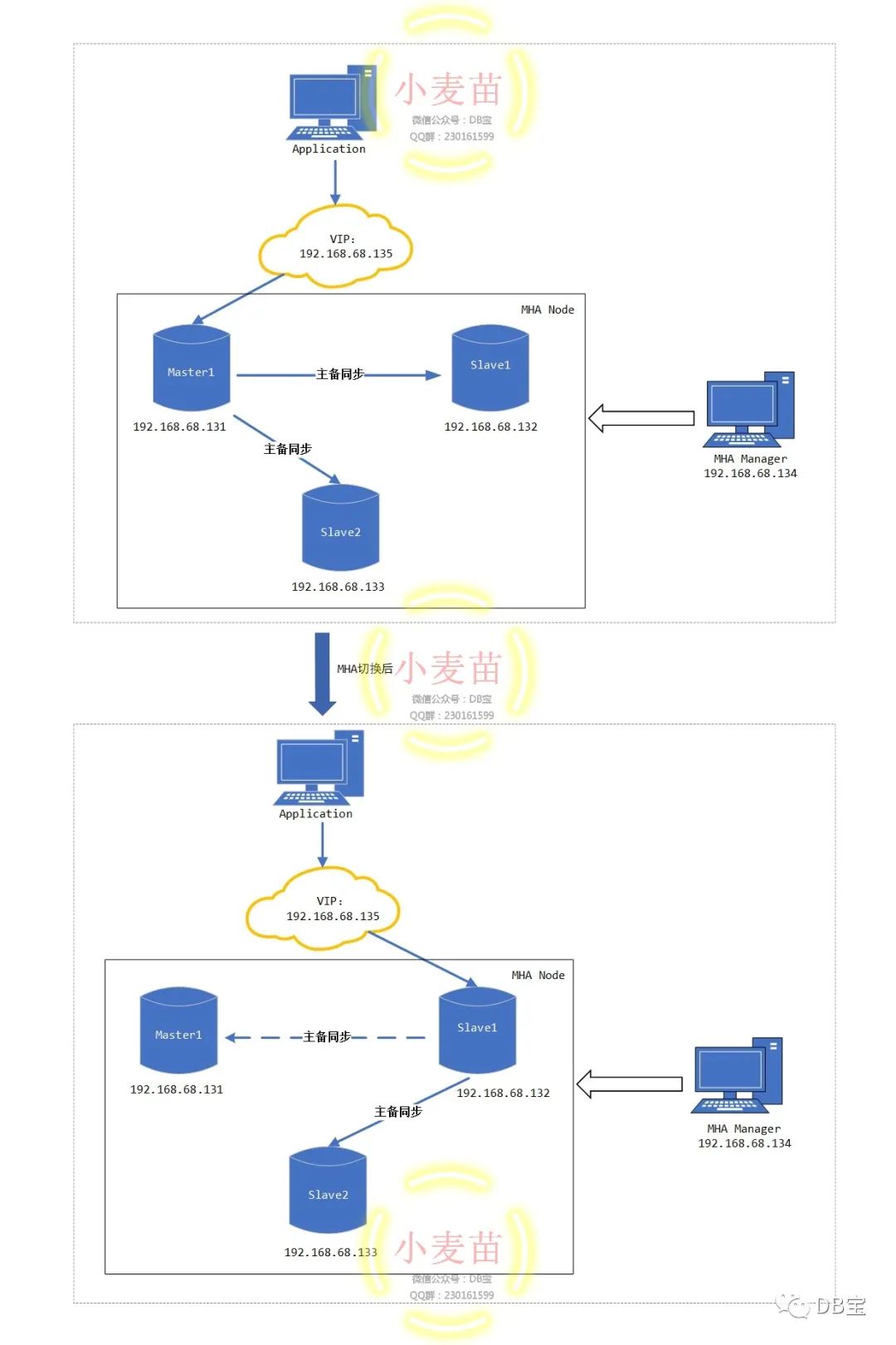
本文所使用的MHA架构规划如下表:

MHA切换前和切换后的架构图:
二、准备MHA环境
2.1 下载MHA镜像
小麦苗的Docker Hub的地址:https://hub.docker.com/u/lhrbest
 1# 下载镜像
 2docker pull registry.cn-hangzhou.aliyuncs.com/lhrbest/mha-lhr-master1-ip131
 3docker pull registry.cn-hangzhou.aliyuncs.com/lhrbest/mha-lhr-slave1-ip132
 4docker pull registry.cn-hangzhou.aliyuncs.com/lhrbest/mha-lhr-slave2-ip133
 5docker pull registry.cn-hangzhou.aliyuncs.com/lhrbest/mha-lhr-monitor-ip134
 6
 7# 重命名镜像
 8docker tag     registry.cn-hangzhou.aliyuncs.com/lhrbest/mha-lhr-master1-ip131  lhrbest/mha-lhr-master1-ip131
 9docker tag    registry.cn-hangzhou.aliyuncs.com/lhrbest/mha-lhr-slave1-ip132   lhrbest/mha-lhr-slave1-ip132
10docker tag    registry.cn-hangzhou.aliyuncs.com/lhrbest/mha-lhr-slave2-ip133   lhrbest/mha-lhr-slave2-ip133
11docker tag    registry.cn-hangzhou.aliyuncs.com/lhrbest/mha-lhr-monitor-ip134  lhrbest/mha-lhr-monitor-ip134
一共4个镜像,3个MHA Node,一个MHA Manager,压缩包大概3G,下载完成后:
1[root@lhrdocker ~]# docker images | grep mha
2registry.cn-hangzhou.aliyuncs.com/lhrbest/mha-lhr-monitor-ip134          latest              7d29597dc997        14 hours ago        1.53GB
3registry.cn-hangzhou.aliyuncs.com/lhrbest/mha-lhr-slave2-ip133           latest              d3717794e93a        40 hours ago        4.56GB
4registry.cn-hangzhou.aliyuncs.com/lhrbest/mha-lhr-slave1-ip132           latest              f62ee813e487        40 hours ago        4.56GB
5registry.cn-hangzhou.aliyuncs.com/lhrbest/mha-lhr-master1-ip131          latest              ae7be48d83dc        40 hours ago        4.56GB
2.2 编辑yml文件,创建MHA相关容器
编辑yml文件,使用docker-compose来创建MHA相关容器,注意docker-compose.yml文件的格式,对空格、缩进、对齐都有严格要求:
 1# 创建存放yml文件的路径
 2mkdir -p /root/mha
 3
 4# 编辑文件/root/mha/docker-compose.yml
 5cat > /root/mha/docker-compose.yml <<"EOF"
 6version: '3.8'
 7
 8services:
 9  MHA-LHR-Master1-ip131:
10    container_name: "MHA-LHR-Master1-ip131"
11    restart: "always"
12    hostname: MHA-LHR-Master1-ip131
13    privileged: true
14    image: lhrbest/mha-lhr-master1-ip131
15    ports:
16      - "33061:3306"
17      - "2201:22"
18    networks:
19      mhalhr:
20        ipv4_address: 192.168.68.131
21
22  MHA-LHR-Slave1-ip132:
23    container_name: "MHA-LHR-Slave1-ip132"
24    restart: "always"
25    hostname: MHA-LHR-Slave1-ip132
26    privileged: true
27    image: lhrbest/mha-lhr-slave1-ip132
28    ports:
29      - "33062:3306"
30      - "2202:22"
31    networks:
32      mhalhr:
33        ipv4_address: 192.168.68.132
34
35  MHA-LHR-Slave2-ip133:
36    container_name: "MHA-LHR-Slave2-ip133"
37    restart: "always"
38    hostname: MHA-LHR-Master1-ip131
39    privileged: true
40    image: lhrbest/mha-lhr-slave2-ip133
41    ports:
42      - "33063:3306"
43      - "2203:22"
44    networks:
45      mhalhr:
46        ipv4_address: 192.168.68.133
47
48  MHA-LHR-Monitor-ip134:
49    container_name: "MHA-LHR-Monitor-ip134"
50    restart: "always"
51    hostname: MHA-LHR-Monitor-ip134
52    privileged: true
53    image: lhrbest/mha-lhr-monitor-ip134
54    ports:
55      - "33064:3306"
56      - "2204:22"
57    networks:
58      mhalhr:
59        ipv4_address: 192.168.68.134
60
61networks:
62  mhalhr:
63    name: mhalhr
64    ipam:
65      config:
66         - subnet: "192.168.68.0/16"
67
68EOF
2.3 安装docker-compose软件(若已安装,可忽略)
安装 Docker Compose官方文档:https://docs.docker.com/compose/
编辑docker-compose.yml文件官方文档:https://docs.docker.com/compose/compose-file/
1[root@lhrdocker ~]# curl --insecure -L https://github.com/docker/compose/releases/download/1.26.2/docker-compose-Linux-x86_64 -o /usr/local/bin/docker-compose
2  % Total    % Received % Xferd  Average Speed   Time    Time     Time  Current
3                                 Dload  Upload   Total   Spent    Left  Speed
4100   638  100   638    0     0    530      0  0:00:01  0:00:01 --:--:--   531
5100 11.6M  100 11.6M    0     0  1994k      0  0:00:06  0:00:06 --:--:-- 2943k
6[root@lhrdocker ~]# chmod +x /usr/local/bin/docker-compose
7[root@lhrdocker ~]# docker-compose -v
8docker-compose version 1.26.2, build eefe0d31
2.4 创建MHA容器
 1# 启动mha环境的容器,一定要进入文件夹/root/mha/后再操作
 2[root@lhrdocker ~]# cd /root/mha/
 3[root@lhrdocker mha]#
 4[root@lhrdocker mha]# docker-compose up -d
 5Creating network "mhalhr" with the default driver
 6Creating MHA-LHR-Monitor-ip134 ... done
 7Creating MHA-LHR-Slave2-ip133  ... done
 8Creating MHA-LHR-Master1-ip131 ... done
 9Creating MHA-LHR-Slave1-ip132  ... done
10[root@lhrdocker mha]# docker ps
11CONTAINER ID        IMAGE                           COMMAND             CREATED             STATUS              PORTS                                                            NAMES
12d5b1af2ca979        lhrbest/mha-lhr-slave1-ip132    "/usr/sbin/init"    12 seconds ago      Up 9 seconds        16500-16599/tcp, 0.0.0.0:2202->22/tcp, 0.0.0.0:33062->3306/tcp   MHA-LHR-Slave1-ip132
138fa79f476aaa        lhrbest/mha-lhr-master1-ip131   "/usr/sbin/init"    12 seconds ago      Up 10 seconds       16500-16599/tcp, 0.0.0.0:2201->22/tcp, 0.0.0.0:33061->3306/tcp   MHA-LHR-Master1-ip131
1474407b9df567        lhrbest/mha-lhr-slave2-ip133    "/usr/sbin/init"    12 seconds ago      Up 10 seconds       16500-16599/tcp, 0.0.0.0:2203->22/tcp, 0.0.0.0:33063->3306/tcp   MHA-LHR-Slave2-ip133
1583f1cab03c9b        lhrbest/mha-lhr-monitor-ip134   "/usr/sbin/init"    12 seconds ago      Up 10 seconds       0.0.0.0:2204->22/tcp, 0.0.0.0:33064->3306/tcp                    MHA-LHR-Monitor-ip134
16[root@lhrdocker mha]#
2.5 初始化MHA环境
2.5.1 添加网卡
1# 给MHA加入默认的网卡
2docker network connect bridge MHA-LHR-Master1-ip131
3docker network connect bridge MHA-LHR-Slave1-ip132
4docker network connect bridge MHA-LHR-Slave2-ip133
5docker network connect bridge MHA-LHR-Monitor-ip134
注意:请确保这4个节点的eth0都是192.168.68.0网段,否则后续的MHA切换可能会出问题。如果不一致,那么可以使用如下命令修改:
 1# 删除网卡
 2docker network disconnect bridge MHA-LHR-Master1-ip131
 3docker network disconnect mhalhr MHA-LHR-Master1-ip131
 4
 5# 重启容器
 6docker restart MHA-LHR-Master1-ip131
 7
 8# 添加网卡
 9docker network connect mhalhr MHA-LHR-Master1-ip131 --ip 192.168.68.131
10docker network connect bridge MHA-LHR-Master1-ip131
2.5.2 修改Manager节点的hosts文件
 1# 进入管理节点134
 2docker exec -it MHA-LHR-Monitor-ip134 bash
 3
 4# 修改/etc/hosts文件
 5cat >> /etc/hosts << EOF
 6192.168.68.131  MHA-LHR-Master1-ip131
 7192.168.68.132  MHA-LHR-Slave1-ip132
 8192.168.68.133  MHA-LHR-Slave2-ip133
 9192.168.68.134  MHA-LHR-Monitor-ip134
10EOF
2.5.3 主库131添加VIP
1# 进入主库131
2docker exec -it MHA-LHR-Master1-ip131 bash
3
4# 添加VIP135
5/sbin/ifconfig eth0:1 192.168.68.135/24
6ifconfig
添加完成后:
 1[root@MHA-LHR-Master1-ip131 /]# ifconfig
 2eth0: flags=4163<UP,BROADCAST,RUNNING,MULTICAST>  mtu 1500
 3        inet 192.168.68.131  netmask 255.255.0.0  broadcast 192.168.255.255
 4        ether 02:42:c0:a8:44:83  txqueuelen 0  (Ethernet)
 5        RX packets 220  bytes 15883 (15.5 KiB)
 6        RX errors 0  dropped 0  overruns 0  frame 0
 7        TX packets 189  bytes 17524 (17.1 KiB)
 8        TX errors 0  dropped 0 overruns 0  carrier 0  collisions 0
 9
10eth0:1: flags=4163<UP,BROADCAST,RUNNING,MULTICAST>  mtu 1500
11        inet 192.168.68.135  netmask 255.255.255.0  broadcast 192.168.68.255
12        ether 02:42:c0:a8:44:83  txqueuelen 0  (Ethernet)
13
14eth1: flags=4163<UP,BROADCAST,RUNNING,MULTICAST>  mtu 1500
15        inet 172.17.0.2  netmask 255.255.0.0  broadcast 172.17.255.255
16        ether 02:42:ac:11:00:02  txqueuelen 0  (Ethernet)
17        RX packets 31  bytes 2697 (2.6 KiB)
18        RX errors 0  dropped 0  overruns 0  frame 0
19        TX packets 14  bytes 3317 (3.2 KiB)
20        TX errors 0  dropped 0 overruns 0  carrier 0  collisions 0
21
22lo: flags=73<UP,LOOPBACK,RUNNING>  mtu 65536
23        inet 127.0.0.1  netmask 255.0.0.0
24        loop  txqueuelen 1000  (Local Loopback)
25        RX packets 5  bytes 400 (400.0 B)
26        RX errors 0  dropped 0  overruns 0  frame 0
27        TX packets 5  bytes 400 (400.0 B)
28        TX errors 0  dropped 0 overruns 0  carrier 0  collisions 0
29
30# 管理节点已经可以ping通VIP了
31[root@MHA-LHR-Monitor-ip134 /]# ping 192.168.68.135
32PING 192.168.68.135 (192.168.68.135) 56(84) bytes of data.
3364 bytes from 192.168.68.135: icmp_seq=1 ttl=64 time=0.172 ms
3464 bytes from 192.168.68.135: icmp_seq=2 ttl=64 time=0.076 ms
35^C
36--- 192.168.68.135 ping statistics ---
372 packets transmitted, 2 received, 0% packet loss, time 1000ms
38rtt min/avg/max/mdev = 0.076/0.124/0.172/0.048 ms
2.5.4 分别进入132和133启动复制进程
 1-- 132节点
 2mysql -h192.168.59.220 -uroot -plhr -P33062
 3reset slave;
 4start slave;
 5show slave status \G
 6
 7-- 133节点
 8mysql -h192.168.59.220 -uroot -plhr -P33063
 9reset slave;
10start slave;
11show slave status \G
结果:
 1C:\Users\lhrxxt>mysql -h192.168.59.220 -uroot -plhr -P33062
 2mysql: [Warning] Using a password on the command line interface can be insecure.
 3Welcome to the MySQL monitor.  Commands end with ; or \g.
 4Your MySQL connection id is 2
 5Server version: 5.7.30-log MySQL Community Server (GPL)
 6
 7Copyright (c) 2000, 2019, Oracle and/or its affiliates. All rights reserved.
 8
 9Oracle is a registered trademark of Oracle Corporation and/or its
10affiliates. Other names may be trademarks of their respective
11owners.
12
13Type 'help;' or '\h' for help. Type '\c' to clear the current input statement.
14
15MySQL [(none)]> start slave;
16ERROR 1872 (HY000): Slave failed to initialize relay log info structure from the repository
17
18MySQL [(none)]> reset slave;
19Query OK, 0 rows affected (0.02 sec)
20
21MySQL [(none)]> start slave;
22Query OK, 0 rows affected (0.01 sec)
23
24MySQL [(none)]> show slave status \G
25*************************** 1. row ***************************
26               Slave_IO_State: Waiting for master to send event
27                  Master_Host: 192.168.68.131
28                  Master_User: repl
29                  Master_Port: 3306
30                Connect_Retry: 60
31              Master_Log_File: MHA-LHR-Master1-ip131-bin.000011
32          Read_Master_Log_Pos: 234
33               Relay_Log_File: MHA-LHR-Master1-ip131-relay-bin.000003
34                Relay_Log_Pos: 399
35        Relay_Master_Log_File: MHA-LHR-Master1-ip131-bin.000011
36             Slave_IO_Running: Yes
37            Slave_SQL_Running: Yes
38              Replicate_Do_DB:
39          Replicate_Ignore_DB: information_schema,performance_schema,mysql,sys
40           Replicate_Do_Table:
41       Replicate_Ignore_Table:
42      Replicate_Wild_Do_Table:
43  Replicate_Wild_Ignore_Table:
44                   Last_Errno: 0
45                   Last_Error:
46                 Skip_Counter: 0
47          Exec_Master_Log_Pos: 234
48              Relay_Log_Space: 799
49              Until_Condition: None
50               Until_Log_File:
51                Until_Log_Pos: 0
52           Master_SSL_Allowed: No
53           Master_SSL_CA_File:
54           Master_SSL_CA_Path:
55              Master_SSL_Cert:
56            Master_SSL_Cipher:
57               Master_SSL_Key:
58        Seconds_Behind_Master: 0
59Master_SSL_Verify_Server_Cert: No
60                Last_IO_Errno: 0
61                Last_IO_Error:
62               Last_SQL_Errno: 0
63               Last_SQL_Error:
64  Replicate_Ignore_Server_Ids:
65             Master_Server_Id: 573306131
66                  Master_UUID: c8ca4f1d-aec3-11ea-942b-0242c0a84483
67             Master_Info_File: /usr/local/mysql-5.7.30-linux-glibc2.12-x86_64/data/master.info
68                    SQL_Delay: 0
69          SQL_Remaining_Delay: NULL
70      Slave_SQL_Running_State: Slave has read all relay log; waiting for more updates
71           Master_Retry_Count: 86400
72                  Master_Bind:
73      Last_IO_Error_Timestamp:
74     Last_SQL_Error_Timestamp:
75               Master_SSL_Crl:
76           Master_SSL_Crlpath:
77           Retrieved_Gtid_Set:
78            Executed_Gtid_Set: c8ca4f1d-aec3-11ea-942b-0242c0a84483:1-11,
79d24a77d1-aec3-11ea-9399-0242c0a84484:1-3
80                Auto_Position: 1
81         Replicate_Rewrite_DB:
82                 Channel_Name:
83           Master_TLS_Version:
841 row in set (0.00 sec)
至此,我们就把MHA环境准备好了,接下来就开始测试MHA的各项功能。
三、测试MHA相关功能
在正式测试之前,我们要保证MHA环境已经配置正确,且MHA管理进程已经启动。
3.1 检查MHA环境的配置
在Manager节点检查SSH、复制及MHA的状态。
3.1.1 检查SSH情况:
 1[root@MHA-LHR-Monitor-ip134 /]# masterha_check_ssh --conf=/etc/mha/mha.cnf
 2Sat Aug  8 09:57:42 2020 - [warning] Global configuration file /etc/masterha_default.cnf not found. Skipping.
 3Sat Aug  8 09:57:42 2020 - [info] Reading application default configuration from /etc/mha/mha.cnf..
 4Sat Aug  8 09:57:42 2020 - [info] Reading server configuration from /etc/mha/mha.cnf..
 5Sat Aug  8 09:57:42 2020 - [info] Starting SSH connection tests..
 6Sat Aug  8 09:57:43 2020 - [debug]
 7Sat Aug  8 09:57:42 2020 - [debug]  Connecting via SSH from root@192.168.68.131(192.168.68.131:22) to root@192.168.68.132(192.168.68.132:22)..
 8Sat Aug  8 09:57:42 2020 - [debug]   ok.
 9Sat Aug  8 09:57:42 2020 - [debug]  Connecting via SSH from root@192.168.68.131(192.168.68.131:22) to root@192.168.68.133(192.168.68.133:22)..
10Sat Aug  8 09:57:42 2020 - [debug]   ok.
11Sat Aug  8 09:57:43 2020 - [debug]
12Sat Aug  8 09:57:42 2020 - [debug]  Connecting via SSH from root@192.168.68.132(192.168.68.132:22) to root@192.168.68.131(192.168.68.131:22)..
13Sat Aug  8 09:57:42 2020 - [debug]   ok.
14Sat Aug  8 09:57:42 2020 - [debug]  Connecting via SSH from root@192.168.68.132(192.168.68.132:22) to root@192.168.68.133(192.168.68.133:22)..
15Sat Aug  8 09:57:43 2020 - [debug]   ok.
16Sat Aug  8 09:57:44 2020 - [debug]
17Sat Aug  8 09:57:43 2020 - [debug]  Connecting via SSH from root@192.168.68.133(192.168.68.133:22) to root@192.168.68.131(192.168.68.131:22)..
18Sat Aug  8 09:57:43 2020 - [debug]   ok.
19Sat Aug  8 09:57:43 2020 - [debug]  Connecting via SSH from root@192.168.68.133(192.168.68.133:22) to root@192.168.68.132(192.168.68.132:22)..
20Sat Aug  8 09:57:43 2020 - [debug]   ok.
21Sat Aug  8 09:57:44 2020 - [info] All SSH connection tests passed successfully.
结果“All SSH connection tests passed successfully.”表示MHA的3个数据节点之间的SSH是正常的。
3.1.2 检查复制情况:
 1[root@MHA-LHR-Monitor-ip134 /]# masterha_check_repl --conf=/etc/mha/mha.cnf
 2Sat Aug  8 09:59:31 2020 - [warning] Global configuration file /etc/masterha_default.cnf not found. Skipping.
 3Sat Aug  8 09:59:31 2020 - [info] Reading application default configuration from /etc/mha/mha.cnf..
 4Sat Aug  8 09:59:31 2020 - [info] Reading server configuration from /etc/mha/mha.cnf..
 5Sat Aug  8 09:59:31 2020 - [info] MHA::MasterMonitor version 0.58.
 6Sat Aug  8 09:59:33 2020 - [info] GTID failover mode = 1
 7Sat Aug  8 09:59:33 2020 - [info] Dead Servers:
 8Sat Aug  8 09:59:33 2020 - [info] Alive Servers:
 9Sat Aug  8 09:59:33 2020 - [info]   192.168.68.131(192.168.68.131:3306)
10Sat Aug  8 09:59:33 2020 - [info]   192.168.68.132(192.168.68.132:3306)
11Sat Aug  8 09:59:33 2020 - [info]   192.168.68.133(192.168.68.133:3306)
12Sat Aug  8 09:59:33 2020 - [info] Alive Slaves:
13Sat Aug  8 09:59:33 2020 - [info]   192.168.68.132(192.168.68.132:3306)  Version=5.7.30-log (oldest major version between slaves) log-bin:enabled
14Sat Aug  8 09:59:33 2020 - [info]     GTID ON
15Sat Aug  8 09:59:33 2020 - [info]     Replicating from 192.168.68.131(192.168.68.131:3306)
16Sat Aug  8 09:59:33 2020 - [info]     Primary candidate for the new Master (candidate_master is set)
17Sat Aug  8 09:59:33 2020 - [info]   192.168.68.133(192.168.68.133:3306)  Version=5.7.30-log (oldest major version between slaves) log-bin:enabled
18Sat Aug  8 09:59:33 2020 - [info]     GTID ON
19Sat Aug  8 09:59:33 2020 - [info]     Replicating from 192.168.68.131(192.168.68.131:3306)
20Sat Aug  8 09:59:33 2020 - [info] Current Alive Master: 192.168.68.131(192.168.68.131:3306)
21Sat Aug  8 09:59:33 2020 - [info] Checking slave configurations..
22Sat Aug  8 09:59:33 2020 - [info]  read_only=1 is not set on slave 192.168.68.132(192.168.68.132:3306).
23Sat Aug  8 09:59:33 2020 - [info]  read_only=1 is not set on slave 192.168.68.133(192.168.68.133:3306).
24Sat Aug  8 09:59:33 2020 - [info] Checking replication filtering settings..
25Sat Aug  8 09:59:33 2020 - [info]  binlog_do_db= , binlog_ignore_db= information_schema,mysql,performance_schema,sys
26Sat Aug  8 09:59:33 2020 - [info]  Replication filtering check ok.
27Sat Aug  8 09:59:33 2020 - [info] GTID (with auto-pos) is supported. Skipping all SSH and Node package checking.
28Sat Aug  8 09:59:33 2020 - [info] Checking SSH publickey authentication settings on the current master..
29Sat Aug  8 09:59:33 2020 - [info] HealthCheck: SSH to 192.168.68.131 is reachable.
30Sat Aug  8 09:59:33 2020 - [info]
31192.168.68.131(192.168.68.131:3306) (current master)
32 +--192.168.68.132(192.168.68.132:3306)
33 +--192.168.68.133(192.168.68.133:3306)
34
35Sat Aug  8 09:59:33 2020 - [info] Checking replication health on 192.168.68.132..
36Sat Aug  8 09:59:33 2020 - [info]  ok.
37Sat Aug  8 09:59:33 2020 - [info] Checking replication health on 192.168.68.133..
38Sat Aug  8 09:59:33 2020 - [info]  ok.
39Sat Aug  8 09:59:33 2020 - [info] Checking master_ip_failover_script status:
40Sat Aug  8 09:59:33 2020 - [info]   /usr/local/mha/scripts/master_ip_failover --command=status --ssh_user=root --orig_master_host=192.168.68.131 --orig_master_ip=192.168.68.131 --orig_master_port=3306
41
42
43IN SCRIPT TEST====/sbin/ip addr del 192.168.68.135/24 dev eth0==/sbin/ifconfig eth0:1 192.168.68.135/24===
44
45Checking the Status of the script.. OK
46Sat Aug  8 09:59:33 2020 - [info]  OK.
47Sat Aug  8 09:59:33 2020 - [warning] shutdown_script is not defined.
48Sat Aug  8 09:59:33 2020 - [info] Got exit code 0 (Not master dead).
49
50MySQL Replication Health is OK.
“MySQL Replication Health is OK.”表示1主2从的架构目前是正常的。
3.1.3 检查MHA状态:
1[root@MHA-LHR-Monitor-ip134 /]# masterha_check_status --conf=/etc/mha/mha.cnf
2mha is stopped(2:NOT_RUNNING).
注意:如果正常,会显示“PING_OK",否则会显示“NOT_RUNNING",这代表MHA监控没有开启。
3.1.4 启动MHA Manager
1[root@MHA-LHR-Monitor-ip134 /]# nohup masterha_manager --conf=/etc/mha/mha.cnf  --ignore_last_failover < /dev/null > /usr/local/mha/manager_start.log 2>&1 &
2[1] 216
3[root@MHA-LHR-Monitor-ip134 /]# masterha_check_status --conf=/etc/mha/mha.cnf
4mha (pid:216) is running(0:PING_OK), master:192.168.68.131
检查结果显示“PING_OK”,表示MHA监控软件已经启动了,主库为192.168.68.131。
启动参数介绍:
--remove_dead_master_conf 该参数代表当发生主从切换后,老的主库的IP将会从配置文件中移除。
--manger_log 日志存放位置
--ignore_last_failover 在缺省情况下,如果MHA检测到连续发生宕机,且两次宕机间隔不足8小时的话,则不会进行Failover,之所以这样限制是为了避免ping-pong效应。该参数代表忽略上次MHA触发切换产生的文件,默认情况下,MHA发生切换后会在日志目录下产生mha.failover.complete文件,下次再次切换的时候如果发现该目录下存在该文件将不允许触发切换,除非在第一次切换后收到删除该文件,为了方便,这里设置为--ignore_last_failover。
注意,一旦自动failover发生,mha manager就停止监控了,如果需要请手动再次开启。
3.1.5 关闭MHA-manager
1masterha_stop --conf=/etc/mha/mha.cnf
我们当然不关闭,不能执行这句哟。
3.2 测试场景一:自动故障转移+邮件告警
自动故障转移后的架构如下图所示:

按照以下流程测试:
3.2.1 启动客户端连接到VIP135,后端其实是连接到主库131
 1[root@lhrdocker ~]# mysql -uroot -plhr -h192.168.68.135 -P3306
 2mysql: [Warning] Using a password on the command line interface can be insecure.
 3Welcome to the MySQL monitor.  Commands end with ; or \g.
 4Your MySQL connection id is 10
 5Server version: 5.7.30-log MySQL Community Server (GPL)
 6
 7Copyright (c) 2000, 2020, Oracle and/or its affiliates. All rights reserved.
 8
 9Oracle is a registered trademark of Oracle Corporation and/or its
10affiliates. Other names may be trademarks of their respective
11owners.
12
13Type 'help;' or '\h' for help. Type '\c' to clear the current input statement.
14
15mysql> select @@hostname;
16+-----------------------+
17| @@hostname            |
18+-----------------------+
19| MHA-LHR-Master1-ip131 |
20+-----------------------+
211 row in set (0.00 sec)
22
23mysql> show slave hosts;
24+-----------+----------------+------+-----------+--------------------------------------+
25| Server_id | Host           | Port | Master_id | Slave_UUID                           |
26+-----------+----------------+------+-----------+--------------------------------------+
27| 573306133 | 192.168.68.133 | 3306 | 573306131 | d391ce7e-aec3-11ea-94cd-0242c0a84485 |
28| 573306132 | 192.168.68.132 | 3306 | 573306131 | d24a77d1-aec3-11ea-9399-0242c0a84484 |
29+-----------+----------------+------+-----------+--------------------------------------+
302 rows in set (0.00 sec)
3.2.2 模拟主库131宕机,即停止MySQL服务
1docker stop MHA-LHR-Master1-ip131
3.2.3 观察如下现象:
① VIP135自动漂移到132
 1[root@MHA-LHR-Slave1-ip132 /]# ifconfig
 2eth0: flags=4163<UP,BROADCAST,RUNNING,MULTICAST>  mtu 1500
 3        inet 192.168.68.132  netmask 255.255.0.0  broadcast 192.168.255.255
 4        ether 02:42:c0:a8:44:84  txqueuelen 0  (Ethernet)
 5        RX packets 411  bytes 58030 (56.6 KiB)
 6        RX errors 0  dropped 0  overruns 0  frame 0
 7        TX packets 343  bytes 108902 (106.3 KiB)
 8        TX errors 0  dropped 0 overruns 0  carrier 0  collisions 0
 9
10eth0:1: flags=4163<UP,BROADCAST,RUNNING,MULTICAST>  mtu 1500
11        inet 192.168.68.135  netmask 255.255.255.0  broadcast 192.168.68.255
12        ether 02:42:c0:a8:44:84  txqueuelen 0  (Ethernet)
② 主库自动变为132,命令为:show slave hosts;
 1mysql> select @@hostname;
 2ERROR 2013 (HY000): Lost connection to MySQL server during query
 3mysql> select @@hostname;
 4ERROR 2006 (HY000): MySQL server has gone away
 5No connection. Trying to reconnect...
 6Connection id:    15
 7Current database: *** NONE ***
 8
 9+----------------------+
10| @@hostname           |
11+----------------------+
12| MHA-LHR-Slave1-ip132 |
13+----------------------+
141 row in set (0.00 sec)
15
16mysql> show slave hosts;
17+-----------+----------------+------+-----------+--------------------------------------+
18| Server_id | Host           | Port | Master_id | Slave_UUID                           |
19+-----------+----------------+------+-----------+--------------------------------------+
20| 573306133 | 192.168.68.133 | 3306 | 573306132 | d391ce7e-aec3-11ea-94cd-0242c0a84485 |
21+-----------+----------------+------+-----------+--------------------------------------+
221 row in set (0.00 sec)
③ MHA进程自动停止
1[1]+  Done                    nohup masterha_manager --conf=/etc/mha/mha.cnf --ignore_last_failover < /dev/null > /usr/local/mha/manager_start.log 2>&1
2[root@MHA-LHR-Monitor-ip134 /]#
3[root@MHA-LHR-Monitor-ip134 /]#
4[root@MHA-LHR-Monitor-ip134 /]# ps -ef|grep mha
5root        486    120  0 11:03 pts/0    00:00:00 grep --color=auto mha
④ MHA切换过程日志:
  1[root@MHA-LHR-Monitor-ip134 /]# tailf /usr/local/mha/manager_running.log
  2
  3Sat Aug  8 11:01:23 2020 - [warning] Got error on MySQL select ping: 2013 (Lost connection to MySQL server during query)
  4Sat Aug  8 11:01:23 2020 - [info] Executing secondary network check script: /usr/local/bin/masterha_secondary_check -s MHA-LHR-Slave1-ip132 -s MHA-LHR-Slave2-ip133 --user=root --master_host=MHA-LHR-Master1-ip131 --master_ip=192.168.68.131 --master_port=3306  --user=root  --master_host=192.168.68.131  --master_ip=192.168.68.131  --master_port=3306 --master_user=mha --master_password=lhr --ping_type=SELECT
  5Sat Aug  8 11:01:23 2020 - [info] Executing SSH check script: exit 0
  6Sat Aug  8 11:01:23 2020 - [warning] HealthCheck: SSH to 192.168.68.131 is NOT reachable.
  7Monitoring server MHA-LHR-Slave1-ip132 is reachable, Master is not reachable from MHA-LHR-Slave1-ip132. OK.
  8Monitoring server MHA-LHR-Slave2-ip133 is reachable, Master is not reachable from MHA-LHR-Slave2-ip133. OK.
  9Sat Aug  8 11:01:23 2020 - [info] Master is not reachable from all other monitoring servers. Failover should start.
 10Sat Aug  8 11:01:24 2020 - [warning] Got error on MySQL connect: 2003 (Can't connect to MySQL server on '192.168.68.131' (4))
 11Sat Aug  8 11:01:24 2020 - [warning] Connection failed 2 time(s)..
 12Sat Aug  8 11:01:25 2020 - [warning] Got error on MySQL connect: 2003 (Can't connect to MySQL server on '192.168.68.131' (4))
 13Sat Aug  8 11:01:25 2020 - [warning] Connection failed 3 time(s)..
 14Sat Aug  8 11:01:26 2020 - [warning] Got error on MySQL connect: 2003 (Can't connect to MySQL server on '192.168.68.131' (4))
 15Sat Aug  8 11:01:26 2020 - [warning] Connection failed 4 time(s)..
 16Sat Aug  8 11:01:26 2020 - [warning] Master is not reachable from health checker!
 17Sat Aug  8 11:01:26 2020 - [warning] Master 192.168.68.131(192.168.68.131:3306) is not reachable!
 18Sat Aug  8 11:01:26 2020 - [warning] SSH is NOT reachable.
 19Sat Aug  8 11:01:26 2020 - [info] Connecting to a master server failed. Reading configuration file /etc/masterha_default.cnf and /etc/mha/mha.cnf again, and trying to connect to all servers to check server status..
 20Sat Aug  8 11:01:26 2020 - [warning] Global configuration file /etc/masterha_default.cnf not found. Skipping.
 21Sat Aug  8 11:01:26 2020 - [info] Reading application default configuration from /etc/mha/mha.cnf..
 22Sat Aug  8 11:01:26 2020 - [info] Reading server configuration from /etc/mha/mha.cnf..
 23Sat Aug  8 11:01:27 2020 - [info] GTID failover mode = 1
 24Sat Aug  8 11:01:27 2020 - [info] Dead Servers:
 25Sat Aug  8 11:01:27 2020 - [info]   192.168.68.131(192.168.68.131:3306)
 26Sat Aug  8 11:01:27 2020 - [info] Alive Servers:
 27Sat Aug  8 11:01:27 2020 - [info]   192.168.68.132(192.168.68.132:3306)
 28Sat Aug  8 11:01:27 2020 - [info]   192.168.68.133(192.168.68.133:3306)
 29Sat Aug  8 11:01:27 2020 - [info] Alive Slaves:
 30Sat Aug  8 11:01:27 2020 - [info]   192.168.68.132(192.168.68.132:3306)  Version=5.7.30-log (oldest major version between slaves) log-bin:enabled
 31Sat Aug  8 11:01:27 2020 - [info]     GTID ON
 32Sat Aug  8 11:01:27 2020 - [info]     Replicating from 192.168.68.131(192.168.68.131:3306)
 33Sat Aug  8 11:01:27 2020 - [info]     Primary candidate for the new Master (candidate_master is set)
 34Sat Aug  8 11:01:27 2020 - [info]   192.168.68.133(192.168.68.133:3306)  Version=5.7.30-log (oldest major version between slaves) log-bin:enabled
 35Sat Aug  8 11:01:27 2020 - [info]     GTID ON
 36Sat Aug  8 11:01:27 2020 - [info]     Replicating from 192.168.68.131(192.168.68.131:3306)
 37Sat Aug  8 11:01:27 2020 - [info] Checking slave configurations..
 38Sat Aug  8 11:01:27 2020 - [info]  read_only=1 is not set on slave 192.168.68.132(192.168.68.132:3306).
 39Sat Aug  8 11:01:27 2020 - [info]  read_only=1 is not set on slave 192.168.68.133(192.168.68.133:3306).
 40Sat Aug  8 11:01:27 2020 - [info] Checking replication filtering settings..
 41Sat Aug  8 11:01:27 2020 - [info]  Replication filtering check ok.
 42Sat Aug  8 11:01:27 2020 - [info] Master is down!
 43Sat Aug  8 11:01:27 2020 - [info] Terminating monitoring script.
 44Sat Aug  8 11:01:27 2020 - [info] Got exit code 20 (Master dead).
 45Sat Aug  8 11:01:27 2020 - [info] MHA::MasterFailover version 0.58.
 46Sat Aug  8 11:01:27 2020 - [info] Starting master failover.
 47Sat Aug  8 11:01:27 2020 - [info]
 48Sat Aug  8 11:01:27 2020 - [info] * Phase 1: Configuration Check Phase..
 49Sat Aug  8 11:01:27 2020 - [info]
 50Sat Aug  8 11:01:29 2020 - [info] GTID failover mode = 1
 51Sat Aug  8 11:01:29 2020 - [info] Dead Servers:
 52Sat Aug  8 11:01:29 2020 - [info]   192.168.68.131(192.168.68.131:3306)
 53Sat Aug  8 11:01:29 2020 - [info] Checking master reachability via MySQL(double check)...
 54Sat Aug  8 11:01:30 2020 - [info]  ok.
 55Sat Aug  8 11:01:30 2020 - [info] Alive Servers:
 56Sat Aug  8 11:01:30 2020 - [info]   192.168.68.132(192.168.68.132:3306)
 57Sat Aug  8 11:01:30 2020 - [info]   192.168.68.133(192.168.68.133:3306)
 58Sat Aug  8 11:01:30 2020 - [info] Alive Slaves:
 59Sat Aug  8 11:01:30 2020 - [info]   192.168.68.132(192.168.68.132:3306)  Version=5.7.30-log (oldest major version between slaves) log-bin:enabled
 60Sat Aug  8 11:01:30 2020 - [info]     GTID ON
 61Sat Aug  8 11:01:30 2020 - [info]     Replicating from 192.168.68.131(192.168.68.131:3306)
 62Sat Aug  8 11:01:30 2020 - [info]     Primary candidate for the new Master (candidate_master is set)
 63Sat Aug  8 11:01:30 2020 - [info]   192.168.68.133(192.168.68.133:3306)  Version=5.7.30-log (oldest major version between slaves) log-bin:enabled
 64Sat Aug  8 11:01:30 2020 - [info]     GTID ON
 65Sat Aug  8 11:01:30 2020 - [info]     Replicating from 192.168.68.131(192.168.68.131:3306)
 66Sat Aug  8 11:01:30 2020 - [info] Starting GTID based failover.
 67Sat Aug  8 11:01:30 2020 - [info]
 68Sat Aug  8 11:01:30 2020 - [info] ** Phase 1: Configuration Check Phase completed.
 69Sat Aug  8 11:01:30 2020 - [info]
 70Sat Aug  8 11:01:30 2020 - [info] * Phase 2: Dead Master Shutdown Phase..
 71Sat Aug  8 11:01:30 2020 - [info]
 72Sat Aug  8 11:01:30 2020 - [info] Forcing shutdown so that applications never connect to the current master..
 73Sat Aug  8 11:01:30 2020 - [info] Executing master IP deactivation script:
 74Sat Aug  8 11:01:30 2020 - [info]   /usr/local/mha/scripts/master_ip_failover --orig_master_host=192.168.68.131 --orig_master_ip=192.168.68.131 --orig_master_port=3306 --command=stop
 75
 76
 77IN SCRIPT TEST====/sbin/ip addr del 192.168.68.135/24 dev eth0==/sbin/ifconfig eth0:1 192.168.68.135/24===
 78
 79Disabling the VIP on old master: 192.168.68.131
 80Sat Aug  8 11:01:30 2020 - [info]  done.
 81Sat Aug  8 11:01:30 2020 - [warning] shutdown_script is not set. Skipping explicit shutting down of the dead master.
 82Sat Aug  8 11:01:30 2020 - [info] * Phase 2: Dead Master Shutdown Phase completed.
 83Sat Aug  8 11:01:30 2020 - [info]
 84Sat Aug  8 11:01:30 2020 - [info] * Phase 3: Master Recovery Phase..
 85Sat Aug  8 11:01:30 2020 - [info]
 86Sat Aug  8 11:01:30 2020 - [info] * Phase 3.1: Getting Latest Slaves Phase..
 87Sat Aug  8 11:01:30 2020 - [info]
 88Sat Aug  8 11:01:30 2020 - [info] The latest binary log file/position on all slaves is MHA-LHR-Master1-ip131-bin.000011:234
 89Sat Aug  8 11:01:30 2020 - [info] Latest slaves (Slaves that received relay log files to the latest):
 90Sat Aug  8 11:01:30 2020 - [info]   192.168.68.132(192.168.68.132:3306)  Version=5.7.30-log (oldest major version between slaves) log-bin:enabled
 91Sat Aug  8 11:01:30 2020 - [info]     GTID ON
 92Sat Aug  8 11:01:30 2020 - [info]     Replicating from 192.168.68.131(192.168.68.131:3306)
 93Sat Aug  8 11:01:30 2020 - [info]     Primary candidate for the new Master (candidate_master is set)
 94Sat Aug  8 11:01:30 2020 - [info]   192.168.68.133(192.168.68.133:3306)  Version=5.7.30-log (oldest major version between slaves) log-bin:enabled
 95Sat Aug  8 11:01:30 2020 - [info]     GTID ON
 96Sat Aug  8 11:01:30 2020 - [info]     Replicating from 192.168.68.131(192.168.68.131:3306)
 97Sat Aug  8 11:01:30 2020 - [info] The oldest binary log file/position on all slaves is MHA-LHR-Master1-ip131-bin.000011:234
 98Sat Aug  8 11:01:30 2020 - [info] Oldest slaves:
 99Sat Aug  8 11:01:30 2020 - [info]   192.168.68.132(192.168.68.132:3306)  Version=5.7.30-log (oldest major version between slaves) log-bin:enabled
100Sat Aug  8 11:01:30 2020 - [info]     GTID ON
101Sat Aug  8 11:01:30 2020 - [info]     Replicating from 192.168.68.131(192.168.68.131:3306)
102Sat Aug  8 11:01:30 2020 - [info]     Primary candidate for the new Master (candidate_master is set)
103Sat Aug  8 11:01:30 2020 - [info]   192.168.68.133(192.168.68.133:3306)  Version=5.7.30-log (oldest major version between slaves) log-bin:enabled
104Sat Aug  8 11:01:30 2020 - [info]     GTID ON
105Sat Aug  8 11:01:30 2020 - [info]     Replicating from 192.168.68.131(192.168.68.131:3306)
106Sat Aug  8 11:01:30 2020 - [info]
107Sat Aug  8 11:01:30 2020 - [info] * Phase 3.3: Determining New Master Phase..
108Sat Aug  8 11:01:30 2020 - [info]
109Sat Aug  8 11:01:30 2020 - [info] Searching new master from slaves..
110Sat Aug  8 11:01:30 2020 - [info]  Candidate masters from the configuration file:
111Sat Aug  8 11:01:30 2020 - [info]   192.168.68.132(192.168.68.132:3306)  Version=5.7.30-log (oldest major version between slaves) log-bin:enabled
112Sat Aug  8 11:01:30 2020 - [info]     GTID ON
113Sat Aug  8 11:01:30 2020 - [info]     Replicating from 192.168.68.131(192.168.68.131:3306)
114Sat Aug  8 11:01:30 2020 - [info]     Primary candidate for the new Master (candidate_master is set)
115Sat Aug  8 11:01:30 2020 - [info]  Non-candidate masters:
116Sat Aug  8 11:01:30 2020 - [info]  Searching from candidate_master slaves which have received the latest relay log events..
117Sat Aug  8 11:01:30 2020 - [info] New master is 192.168.68.132(192.168.68.132:3306)
118Sat Aug  8 11:01:30 2020 - [info] Starting master failover..
119Sat Aug  8 11:01:30 2020 - [info]
120From:
121192.168.68.131(192.168.68.131:3306) (current master)
122 +--192.168.68.132(192.168.68.132:3306)
123 +--192.168.68.133(192.168.68.133:3306)
124
125To:
126192.168.68.132(192.168.68.132:3306) (new master)
127 +--192.168.68.133(192.168.68.133:3306)
128Sat Aug  8 11:01:30 2020 - [info]
129Sat Aug  8 11:01:30 2020 - [info] * Phase 3.3: New Master Recovery Phase..
130Sat Aug  8 11:01:30 2020 - [info]
131Sat Aug  8 11:01:30 2020 - [info]  Waiting all logs to be applied..
132Sat Aug  8 11:01:30 2020 - [info]   done.
133Sat Aug  8 11:01:30 2020 - [info] Getting new master's binlog name and position..
134Sat Aug  8 11:01:30 2020 - [info]  MHA-LHR-Slave1-ip132-bin.000008:234
135Sat Aug  8 11:01:30 2020 - [info]  All other slaves should start replication from here. Statement should be: CHANGE MASTER TO MASTER_HOST='192.168.68.132', MASTER_PORT=3306, MASTER_AUTO_POSITION=1, MASTER_USER='repl', MASTER_PASSWORD='xxx';
136Sat Aug  8 11:01:30 2020 - [info] Master Recovery succeeded. File:Pos:Exec_Gtid_Set: MHA-LHR-Slave1-ip132-bin.000008, 234, c8ca4f1d-aec3-11ea-942b-0242c0a84483:1-11,
137d24a77d1-aec3-11ea-9399-0242c0a84484:1-3
138Sat Aug  8 11:01:30 2020 - [info] Executing master IP activate script:
139Sat Aug  8 11:01:30 2020 - [info]   /usr/local/mha/scripts/master_ip_failover --command=start --ssh_user=root --orig_master_host=192.168.68.131 --orig_master_ip=192.168.68.131 --orig_master_port=3306 --new_master_host=192.168.68.132 --new_master_ip=192.168.68.132 --new_master_port=3306 --new_master_user='mha'   --new_master_password=xxx
140Unknown option: new_master_user
141Unknown option: new_master_password
142
143
144IN SCRIPT TEST====/sbin/ip addr del 192.168.68.135/24 dev eth0==/sbin/ifconfig eth0:1 192.168.68.135/24===
145
146Enabling the VIP - 192.168.68.135/24 on the new master - 192.168.68.132
147Sat Aug  8 11:01:30 2020 - [info]  OK.
148Sat Aug  8 11:01:30 2020 - [info] ** Finished master recovery successfully.
149Sat Aug  8 11:01:30 2020 - [info] * Phase 3: Master Recovery Phase completed.
150Sat Aug  8 11:01:30 2020 - [info]
151Sat Aug  8 11:01:30 2020 - [info] * Phase 4: Slaves Recovery Phase..
152Sat Aug  8 11:01:30 2020 - [info]
153Sat Aug  8 11:01:30 2020 - [info]
154Sat Aug  8 11:01:30 2020 - [info] * Phase 4.1: Starting Slaves in parallel..
155Sat Aug  8 11:01:30 2020 - [info]
156Sat Aug  8 11:01:30 2020 - [info] -- Slave recovery on host 192.168.68.133(192.168.68.133:3306) started, pid: 474. Check tmp log /usr/local/mha/192.168.68.133_3306_20200808110127.log if it takes time..
157Sat Aug  8 11:01:32 2020 - [info]
158Sat Aug  8 11:01:32 2020 - [info] Log messages from 192.168.68.133 ...
159Sat Aug  8 11:01:32 2020 - [info]
160Sat Aug  8 11:01:30 2020 - [info]  Resetting slave 192.168.68.133(192.168.68.133:3306) and starting replication from the new master 192.168.68.132(192.168.68.132:3306)..
161Sat Aug  8 11:01:30 2020 - [info]  Executed CHANGE MASTER.
162Sat Aug  8 11:01:31 2020 - [info]  Slave started.
163Sat Aug  8 11:01:31 2020 - [info]  gtid_wait(c8ca4f1d-aec3-11ea-942b-0242c0a84483:1-11,
164d24a77d1-aec3-11ea-9399-0242c0a84484:1-3) completed on 192.168.68.133(192.168.68.133:3306). Executed 0 events.
165Sat Aug  8 11:01:32 2020 - [info] End of log messages from 192.168.68.133.
166Sat Aug  8 11:01:32 2020 - [info] -- Slave on host 192.168.68.133(192.168.68.133:3306) started.
167Sat Aug  8 11:01:32 2020 - [info] All new slave servers recovered successfully.
168Sat Aug  8 11:01:32 2020 - [info]
169Sat Aug  8 11:01:32 2020 - [info] * Phase 5: New master cleanup phase..
170Sat Aug  8 11:01:32 2020 - [info]
171Sat Aug  8 11:01:32 2020 - [info] Resetting slave info on the new master..
172Sat Aug  8 11:01:32 2020 - [info]  192.168.68.132: Resetting slave info succeeded.
173Sat Aug  8 11:01:32 2020 - [info] Master failover to 192.168.68.132(192.168.68.132:3306) completed successfully.
174Sat Aug  8 11:01:32 2020 - [info]
175
176----- Failover Report -----
177
178mha: MySQL Master failover 192.168.68.131(192.168.68.131:3306) to 192.168.68.132(192.168.68.132:3306) succeeded
179
180Master 192.168.68.131(192.168.68.131:3306) is down!
181
182Check MHA Manager logs at MHA-LHR-Monitor-ip134:/usr/local/mha/manager_running.log for details.
183
184Started automated(non-interactive) failover.
185Invalidated master IP address on 192.168.68.131(192.168.68.131:3306)
186Selected 192.168.68.132(192.168.68.132:3306) as a new master.
187192.168.68.132(192.168.68.132:3306): OK: Applying all logs succeeded.
188192.168.68.132(192.168.68.132:3306): OK: Activated master IP address.
189192.168.68.133(192.168.68.133:3306): OK: Slave started, replicating from 192.168.68.132(192.168.68.132:3306)
190192.168.68.132(192.168.68.132:3306): Resetting slave info succeeded.
191Master failover to 192.168.68.132(192.168.68.132:3306) completed successfully.
192Sat Aug  8 11:01:32 2020 - [info] Sending mail..
⑤ 同时,邮件收到告警
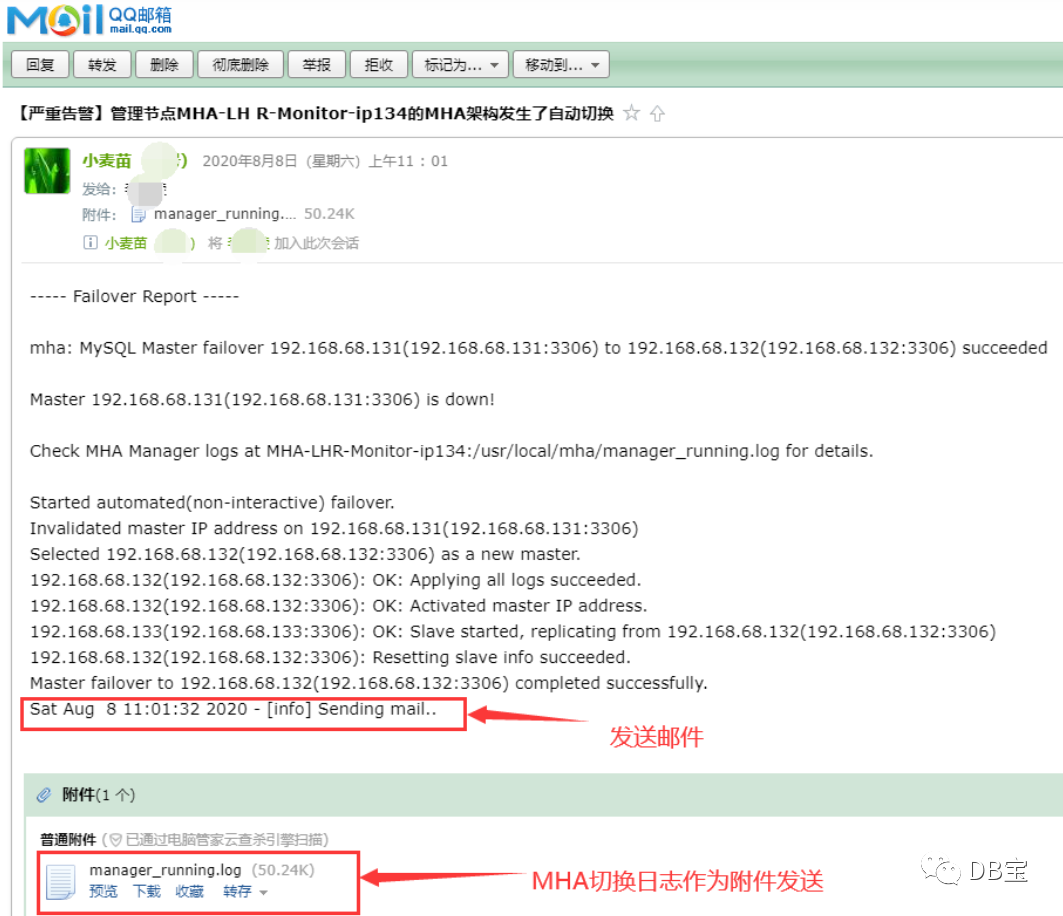
注意:
1、首先确保你的134环境可以上外网
 1[root@MHA-LHR-Monitor-ip134 /]# ping 8.8.8.8
 2PING 8.8.8.8 (8.8.8.8) 56(84) bytes of data.
 364 bytes from 8.8.8.8: icmp_seq=1 ttl=127 time=109 ms
 464 bytes from 8.8.8.8: icmp_seq=2 ttl=127 time=152 ms
 564 bytes from 8.8.8.8: icmp_seq=3 ttl=127 time=132 ms
 6^C
 7--- 8.8.8.8 ping statistics ---
 83 packets transmitted, 3 received, 0% packet loss, time 2004ms
 9rtt min/avg/max/mdev = 109.295/131.671/152.728/17.758 ms
10[root@MHA-LHR-Monitor-ip134 /]#
2、如果你想修改邮件的收件人,那么需要修改134管理节点的/usr/local/bin/send_report文件,将其中的lhrbest@qq.com修改为收件人的邮箱地址即可。文件/usr/local/bin/send_report内容如下所示:
1[root@MHA-LHR-Monitor-ip134 /]# cat /usr/local/bin/send_report
2#!/bin/bash
3start_num=+`awk '/Failover Report/{print NR}' /usr/local/mha/manager_running.log | tail -n 1`
4tail -n $start_num /usr/local/mha/manager_running.log | mail  -s  '【严重告警】'管理节点`hostname -s`'的MHA架构发生了自动切换' -a '/usr/local/mha/manager_running.log' lhrbest@qq.com
5[root@MHA-LHR-Monitor-ip134 /]#
3.2.4 启动131,恢复131为备库
 1# 启动131
 2docker start MHA-LHR-Master1-ip131
 3
 4# 在134的日志文件中找到恢复的语句
 5grep "All other slaves should start replication from here" /usr/local/mha/manager_running.log
 6
 7# 在131上执行恢复
 8CHANGE MASTER TO MASTER_HOST='192.168.68.132', MASTER_PORT=3306, MASTER_AUTO_POSITION=1, MASTER_USER='repl', MASTER_PASSWORD='lhr';
 9
10start slave;
11show slave status;
12
13# 在134上检查
14masterha_check_repl --conf=/etc/mha/mha.cnf
执行过程:
 1[root@MHA-LHR-Monitor-ip134 /]# grep "All other slaves should start replication from here" /usr/local/mha/manager_running.log
 2Mon Jun 15 14:16:31 2020 - [info]  All other slaves should start replication from here. Statement should be: CHANGE MASTER TO MASTER_HOST='192.168.68.132', MASTER_PORT=3306, MASTER_AUTO_POSITION=1, MASTER_USER='repl', MASTER_PASSWORD='xxx';
 3Sat Aug  8 11:01:30 2020 - [info]  All other slaves should start replication from here. Statement should be: CHANGE MASTER TO MASTER_HOST='192.168.68.132', MASTER_PORT=3306, MASTER_AUTO_POSITION=1, MASTER_USER='repl', MASTER_PASSWORD='xxx';
 4[root@MHA-LHR-Monitor-ip134 /]#
 5[root@MHA-LHR-Monitor-ip134 /]# masterha_check_repl --conf=/etc/mha/mha.cnf
 6Sat Aug  8 11:23:30 2020 - [warning] Global configuration file /etc/masterha_default.cnf not found. Skipping.
 7Sat Aug  8 11:23:30 2020 - [info] Reading application default configuration from /etc/mha/mha.cnf..
 8Sat Aug  8 11:23:30 2020 - [info] Reading server configuration from /etc/mha/mha.cnf..
 9Sat Aug  8 11:23:30 2020 - [info] MHA::MasterMonitor version 0.58.
10Sat Aug  8 11:23:32 2020 - [info] GTID failover mode = 1
11Sat Aug  8 11:23:32 2020 - [info] Dead Servers:
12Sat Aug  8 11:23:32 2020 - [info] Alive Servers:
13Sat Aug  8 11:23:32 2020 - [info]   192.168.68.131(192.168.68.131:3306)
14Sat Aug  8 11:23:32 2020 - [info]   192.168.68.132(192.168.68.132:3306)
15Sat Aug  8 11:23:32 2020 - [info]   192.168.68.133(192.168.68.133:3306)
16Sat Aug  8 11:23:32 2020 - [info] Alive Slaves:
17Sat Aug  8 11:23:32 2020 - [info]   192.168.68.131(192.168.68.131:3306)  Version=5.7.30-log (oldest major version between slaves) log-bin:enabled
18Sat Aug  8 11:23:32 2020 - [info]     GTID ON
19Sat Aug  8 11:23:32 2020 - [info]     Replicating from 192.168.68.132(192.168.68.132:3306)
20Sat Aug  8 11:23:32 2020 - [info]   192.168.68.133(192.168.68.133:3306)  Version=5.7.30-log (oldest major version between slaves) log-bin:enabled
21Sat Aug  8 11:23:32 2020 - [info]     GTID ON
22Sat Aug  8 11:23:32 2020 - [info]     Replicating from 192.168.68.132(192.168.68.132:3306)
23Sat Aug  8 11:23:32 2020 - [info] Current Alive Master: 192.168.68.132(192.168.68.132:3306)
24Sat Aug  8 11:23:32 2020 - [info] Checking slave configurations..
25Sat Aug  8 11:23:32 2020 - [info]  read_only=1 is not set on slave 192.168.68.131(192.168.68.131:3306).
26Sat Aug  8 11:23:32 2020 - [info]  read_only=1 is not set on slave 192.168.68.133(192.168.68.133:3306).
27Sat Aug  8 11:23:32 2020 - [info] Checking replication filtering settings..
28Sat Aug  8 11:23:32 2020 - [info]  binlog_do_db= , binlog_ignore_db= information_schema,mysql,performance_schema,sys
29Sat Aug  8 11:23:32 2020 - [info]  Replication filtering check ok.
30Sat Aug  8 11:23:32 2020 - [info] GTID (with auto-pos) is supported. Skipping all SSH and Node package checking.
31Sat Aug  8 11:23:32 2020 - [info] Checking SSH publickey authentication settings on the current master..
32Sat Aug  8 11:23:32 2020 - [info] HealthCheck: SSH to 192.168.68.132 is reachable.
33Sat Aug  8 11:23:32 2020 - [info]
34192.168.68.132(192.168.68.132:3306) (current master)
35 +--192.168.68.131(192.168.68.131:3306)
36 +--192.168.68.133(192.168.68.133:3306)
37
38Sat Aug  8 11:23:32 2020 - [info] Checking replication health on 192.168.68.131..
39Sat Aug  8 11:23:32 2020 - [info]  ok.
40Sat Aug  8 11:23:32 2020 - [info] Checking replication health on 192.168.68.133..
41Sat Aug  8 11:23:32 2020 - [info]  ok.
42Sat Aug  8 11:23:32 2020 - [info] Checking master_ip_failover_script status:
43Sat Aug  8 11:23:32 2020 - [info]   /usr/local/mha/scripts/master_ip_failover --command=status --ssh_user=root --orig_master_host=192.168.68.132 --orig_master_ip=192.168.68.132 --orig_master_port=3306
44
45
46IN SCRIPT TEST====/sbin/ip addr del 192.168.68.135/24 dev eth0==/sbin/ifconfig eth0:1 192.168.68.135/24===
47
48Checking the Status of the script.. OK
49Sat Aug  8 11:23:32 2020 - [info]  OK.
50Sat Aug  8 11:23:32 2020 - [warning] shutdown_script is not defined.
51Sat Aug  8 11:23:32 2020 - [info] Got exit code 0 (Not master dead).
52
53MySQL Replication Health is OK.
3.2.5 Switchover切换:手动切换131为主库,132为备库
类似Oracle DG中的switchover。在该场景下,主库并没有宕机。在主库活着的时候,将主库降级为备库,将备用主库提升为主库,并且重新配置主从关系。此时,MHA进程不能启动。
1masterha_master_switch --conf=/etc/mha/mha.cnf  --master_state=alive \
2--orig_master_is_new_slave --running_updates_limit=10000 --interactive=0 \
3--new_master_host=192.168.68.131 --new_master_port=3306
参数解释:
--interactive 为是否交互,即你要输入yes或no
--running_updates_limit 如果在切换过程中不指定running_updates_limit,那么默认情况下running_updates_limit为1秒。故障切换时,候选master如果有延迟的话,mha切换不能成功,加上此参数表示延迟在此时间范围内都可切换(单位为s),但是切换的时间长短是由recover时relay日志的大小决定
--orig_master_is_new_slave 将原来的主降低为从并重新加入主从关系
--new_master_host 指定新的主库的主机名,建议写IP地址
--new_master_port 指定新的主库上mysql服务的端口
在切换完成后,主库为131,备库为132和133,VIP自动切换到131,即回到了最初的MHA状态。
  1[root@MHA-LHR-Monitor-ip134 /]# masterha_check_repl --conf=/etc/mha/mha.cnf
  2Sat Aug  8 11:23:30 2020 - [warning] Global configuration file /etc/masterha_default.cnf not found. Skipping.
  3Sat Aug  8 11:23:30 2020 - [info] Reading application default configuration from /etc/mha/mha.cnf..
  4Sat Aug  8 11:23:30 2020 - [info] Reading server configuration from /etc/mha/mha.cnf..
  5Sat Aug  8 11:23:30 2020 - [info] MHA::MasterMonitor version 0.58.
  6Sat Aug  8 11:23:32 2020 - [info] GTID failover mode = 1
  7Sat Aug  8 11:23:32 2020 - [info] Dead Servers:
  8Sat Aug  8 11:23:32 2020 - [info] Alive Servers:
  9Sat Aug  8 11:23:32 2020 - [info]   192.168.68.131(192.168.68.131:3306)
 10Sat Aug  8 11:23:32 2020 - [info]   192.168.68.132(192.168.68.132:3306)
 11Sat Aug  8 11:23:32 2020 - [info]   192.168.68.133(192.168.68.133:3306)
 12Sat Aug  8 11:23:32 2020 - [info] Alive Slaves:
 13Sat Aug  8 11:23:32 2020 - [info]   192.168.68.131(192.168.68.131:3306)  Version=5.7.30-log (oldest major version between slaves) log-bin:enabled
 14Sat Aug  8 11:23:32 2020 - [info]     GTID ON
 15Sat Aug  8 11:23:32 2020 - [info]     Replicating from 192.168.68.132(192.168.68.132:3306)
 16Sat Aug  8 11:23:32 2020 - [info]   192.168.68.133(192.168.68.133:3306)  Version=5.7.30-log (oldest major version between slaves) log-bin:enabled
 17Sat Aug  8 11:23:32 2020 - [info]     GTID ON
 18Sat Aug  8 11:23:32 2020 - [info]     Replicating from 192.168.68.132(192.168.68.132:3306)
 19Sat Aug  8 11:23:32 2020 - [info] Current Alive Master: 192.168.68.132(192.168.68.132:3306)
 20Sat Aug  8 11:23:32 2020 - [info] Checking slave configurations..
 21Sat Aug  8 11:23:32 2020 - [info]  read_only=1 is not set on slave 192.168.68.131(192.168.68.131:3306).
 22Sat Aug  8 11:23:32 2020 - [info]  read_only=1 is not set on slave 192.168.68.133(192.168.68.133:3306).
 23Sat Aug  8 11:23:32 2020 - [info] Checking replication filtering settings..
 24Sat Aug  8 11:23:32 2020 - [info]  binlog_do_db= , binlog_ignore_db= information_schema,mysql,performance_schema,sys
 25Sat Aug  8 11:23:32 2020 - [info]  Replication filtering check ok.
 26Sat Aug  8 11:23:32 2020 - [info] GTID (with auto-pos) is supported. Skipping all SSH and Node package checking.
 27Sat Aug  8 11:23:32 2020 - [info] Checking SSH publickey authentication settings on the current master..
 28Sat Aug  8 11:23:32 2020 - [info] HealthCheck: SSH to 192.168.68.132 is reachable.
 29Sat Aug  8 11:23:32 2020 - [info]
 30192.168.68.132(192.168.68.132:3306) (current master)
 31 +--192.168.68.131(192.168.68.131:3306)
 32 +--192.168.68.133(192.168.68.133:3306)
 33
 34Sat Aug  8 11:23:32 2020 - [info] Checking replication health on 192.168.68.131..
 35Sat Aug  8 11:23:32 2020 - [info]  ok.
 36Sat Aug  8 11:23:32 2020 - [info] Checking replication health on 192.168.68.133..
 37Sat Aug  8 11:23:32 2020 - [info]  ok.
 38Sat Aug  8 11:23:32 2020 - [info] Checking master_ip_failover_script status:
 39Sat Aug  8 11:23:32 2020 - [info]   /usr/local/mha/scripts/master_ip_failover --command=status --ssh_user=root --orig_master_host=192.168.68.132 --orig_master_ip=192.168.68.132 --orig_master_port=3306
 40
 41
 42IN SCRIPT TEST====/sbin/ip addr del 192.168.68.135/24 dev eth0==/sbin/ifconfig eth0:1 192.168.68.135/24===
 43
 44Checking the Status of the script.. OK
 45Sat Aug  8 11:23:32 2020 - [info]  OK.
 46Sat Aug  8 11:23:32 2020 - [warning] shutdown_script is not defined.
 47Sat Aug  8 11:23:32 2020 - [info] Got exit code 0 (Not master dead).
 48
 49MySQL Replication Health is OK.
 50[root@MHA-LHR-Monitor-ip134 /]# masterha_master_switch --conf=/etc/mha/mha.cnf  --master_state=alive \
 51> --orig_master_is_new_slave --running_updates_limit=10000 --interactive=0 \
 52> --new_master_host=192.168.68.131 --new_master_port=3306
 53Sat Aug  8 11:26:36 2020 - [info] MHA::MasterRotate version 0.58.
 54Sat Aug  8 11:26:36 2020 - [info] Starting online master switch..
 55Sat Aug  8 11:26:36 2020 - [info]
 56Sat Aug  8 11:26:36 2020 - [info] * Phase 1: Configuration Check Phase..
 57Sat Aug  8 11:26:36 2020 - [info]
 58Sat Aug  8 11:26:36 2020 - [warning] Global configuration file /etc/masterha_default.cnf not found. Skipping.
 59Sat Aug  8 11:26:36 2020 - [info] Reading application default configuration from /etc/mha/mha.cnf..
 60Sat Aug  8 11:26:36 2020 - [info] Reading server configuration from /etc/mha/mha.cnf..
 61Sat Aug  8 11:26:37 2020 - [info] GTID failover mode = 1
 62Sat Aug  8 11:26:37 2020 - [info] Current Alive Master: 192.168.68.132(192.168.68.132:3306)
 63Sat Aug  8 11:26:37 2020 - [info] Alive Slaves:
 64Sat Aug  8 11:26:37 2020 - [info]   192.168.68.131(192.168.68.131:3306)  Version=5.7.30-log (oldest major version between slaves) log-bin:enabled
 65Sat Aug  8 11:26:37 2020 - [info]     GTID ON
 66Sat Aug  8 11:26:37 2020 - [info]     Replicating from 192.168.68.132(192.168.68.132:3306)
 67Sat Aug  8 11:26:37 2020 - [info]   192.168.68.133(192.168.68.133:3306)  Version=5.7.30-log (oldest major version between slaves) log-bin:enabled
 68Sat Aug  8 11:26:37 2020 - [info]     GTID ON
 69Sat Aug  8 11:26:37 2020 - [info]     Replicating from 192.168.68.132(192.168.68.132:3306)
 70Sat Aug  8 11:26:37 2020 - [info] Executing FLUSH NO_WRITE_TO_BINLOG TABLES. This may take long time..
 71Sat Aug  8 11:26:37 2020 - [info]  ok.
 72Sat Aug  8 11:26:37 2020 - [info] Checking MHA is not monitoring or doing failover..
 73Sat Aug  8 11:26:37 2020 - [info] Checking replication health on 192.168.68.131..
 74Sat Aug  8 11:26:37 2020 - [info]  ok.
 75Sat Aug  8 11:26:37 2020 - [info] Checking replication health on 192.168.68.133..
 76Sat Aug  8 11:26:37 2020 - [info]  ok.
 77Sat Aug  8 11:26:37 2020 - [info] 192.168.68.131 can be new master.
 78Sat Aug  8 11:26:37 2020 - [info]
 79From:
 80192.168.68.132(192.168.68.132:3306) (current master)
 81 +--192.168.68.131(192.168.68.131:3306)
 82 +--192.168.68.133(192.168.68.133:3306)
 83
 84To:
 85192.168.68.131(192.168.68.131:3306) (new master)
 86 +--192.168.68.133(192.168.68.133:3306)
 87 +--192.168.68.132(192.168.68.132:3306)
 88Sat Aug  8 11:26:37 2020 - [info] Checking whether 192.168.68.131(192.168.68.131:3306) is ok for the new master..
 89Sat Aug  8 11:26:37 2020 - [info]  ok.
 90Sat Aug  8 11:26:37 2020 - [info] 192.168.68.132(192.168.68.132:3306): SHOW SLAVE STATUS returned empty result. To check replication filtering rules, temporarily executing CHANGE MASTER to a dummy host.
 91Sat Aug  8 11:26:37 2020 - [info] 192.168.68.132(192.168.68.132:3306): Resetting slave pointing to the dummy host.
 92Sat Aug  8 11:26:37 2020 - [info] ** Phase 1: Configuration Check Phase completed.
 93Sat Aug  8 11:26:37 2020 - [info]
 94Sat Aug  8 11:26:37 2020 - [info] * Phase 2: Rejecting updates Phase..
 95Sat Aug  8 11:26:37 2020 - [info]
 96Sat Aug  8 11:26:37 2020 - [info] Executing master ip online change script to disable write on the current master:
 97Sat Aug  8 11:26:37 2020 - [info]   /usr/local/mha/scripts/master_ip_online_change --command=stop --orig_master_host=192.168.68.132 --orig_master_ip=192.168.68.132 --orig_master_port=3306 --orig_master_user='mha' --new_master_host=192.168.68.131 --new_master_ip=192.168.68.131 --new_master_port=3306 --new_master_user='mha' --orig_master_ssh_user=root --new_master_ssh_user=root   --orig_master_is_new_slave --orig_master_password=xxx --new_master_password=xxx
 98Sat Aug  8 11:26:37 2020 758267 Set read_only on the new master.. ok.
 99Sat Aug  8 11:26:37 2020 763087 Waiting all running 2 threads are disconnected.. (max 1500 milliseconds)
100{'Time' => '1507','db' => undef,'Id' => '14','User' => 'repl','State' => 'Master has sent all binlog to slave; waiting for more updates','Command' => 'Binlog Dump GTID','Info' => undef,'Host' => '192.168.68.133:60218'}
101{'Time' => '227','db' => undef,'Id' => '18','User' => 'repl','State' => 'Master has sent all binlog to slave; waiting for more updates','Command' => 'Binlog Dump GTID','Info' => undef,'Host' => '192.168.68.131:60292'}
102Sat Aug  8 11:26:38 2020 267483 Waiting all running 2 threads are disconnected.. (max 1000 milliseconds)
103{'Time' => '1508','db' => undef,'Id' => '14','User' => 'repl','State' => 'Master has sent all binlog to slave; waiting for more updates','Command' => 'Binlog Dump GTID','Info' => undef,'Host' => '192.168.68.133:60218'}
104{'Time' => '228','db' => undef,'Id' => '18','User' => 'repl','State' => 'Master has sent all binlog to slave; waiting for more updates','Command' => 'Binlog Dump GTID','Info' => undef,'Host' => '192.168.68.131:60292'}
105Sat Aug  8 11:26:38 2020 771131 Waiting all running 2 threads are disconnected.. (max 500 milliseconds)
106{'Time' => '1508','db' => undef,'Id' => '14','User' => 'repl','State' => 'Master has sent all binlog to slave; waiting for more updates','Command' => 'Binlog Dump GTID','Info' => undef,'Host' => '192.168.68.133:60218'}
107{'Time' => '228','db' => undef,'Id' => '18','User' => 'repl','State' => 'Master has sent all binlog to slave; waiting for more updates','Command' => 'Binlog Dump GTID','Info' => undef,'Host' => '192.168.68.131:60292'}
108Sat Aug  8 11:26:39 2020 274787 Set read_only=1 on the orig master.. ok.
109Sat Aug  8 11:26:39 2020 276192 Waiting all running 2 queries are disconnected.. (max 500 milliseconds)
110{'Time' => '1509','db' => undef,'Id' => '14','User' => 'repl','State' => 'Master has sent all binlog to slave; waiting for more updates','Command' => 'Binlog Dump GTID','Info' => undef,'Host' => '192.168.68.133:60218'}
111{'Time' => '229','db' => undef,'Id' => '18','User' => 'repl','State' => 'Master has sent all binlog to slave; waiting for more updates','Command' => 'Binlog Dump GTID','Info' => undef,'Host' => '192.168.68.131:60292'}
112Sat Aug  8 11:26:39 2020 778101 Killing all application threads..
113Sat Aug  8 11:26:39 2020 778804 done.
114Disabling the VIP an old master: 192.168.68.132
115Warning: Executing wildcard deletion to stay compatible with old scripts.
116         Explicitly specify the prefix length (192.168.68.135/32) to avoid this warning.
117         This special behaviour is likely to disappear in further releases,
118         fix your scripts!
119Sat Aug  8 11:26:39 2020 - [info]  ok.
120Sat Aug  8 11:26:39 2020 - [info] Locking all tables on the orig master to reject updates from everybody (including root):
121Sat Aug  8 11:26:39 2020 - [info] Executing FLUSH TABLES WITH READ LOCK..
122Sat Aug  8 11:26:39 2020 - [info]  ok.
123Sat Aug  8 11:26:39 2020 - [info] Orig master binlog:pos is MHA-LHR-Slave1-ip132-bin.000008:234.
124Sat Aug  8 11:26:39 2020 - [info]  Waiting to execute all relay logs on 192.168.68.131(192.168.68.131:3306)..
125Sat Aug  8 11:26:39 2020 - [info]  master_pos_wait(MHA-LHR-Slave1-ip132-bin.000008:234) completed on 192.168.68.131(192.168.68.131:3306). Executed 0 events.
126Sat Aug  8 11:26:39 2020 - [info]   done.
127Sat Aug  8 11:26:39 2020 - [info] Getting new master's binlog name and position..
128Sat Aug  8 11:26:39 2020 - [info]  MHA-LHR-Master1-ip131-bin.000013:234
129Sat Aug  8 11:26:39 2020 - [info]  All other slaves should start replication from here. Statement should be: CHANGE MASTER TO MASTER_HOST='192.168.68.131', MASTER_PORT=3306, MASTER_AUTO_POSITION=1, MASTER_USER='repl', MASTER_PASSWORD='xxx';
130Sat Aug  8 11:26:39 2020 - [info] Executing master ip online change script to allow write on the new master:
131Sat Aug  8 11:26:39 2020 - [info]   /usr/local/mha/scripts/master_ip_online_change --command=start --orig_master_host=192.168.68.132 --orig_master_ip=192.168.68.132 --orig_master_port=3306 --orig_master_user='mha' --new_master_host=192.168.68.131 --new_master_ip=192.168.68.131 --new_master_port=3306 --new_master_user='mha' --orig_master_ssh_user=root --new_master_ssh_user=root   --orig_master_is_new_slave --orig_master_password=xxx --new_master_password=xxx
132Sat Aug  8 11:26:40 2020 027564 Set read_only=0 on the new master.
133Enabling the VIP 192.168.68.135 on the new master: 192.168.68.131
134Sat Aug  8 11:26:42 2020 - [info]  ok.
135Sat Aug  8 11:26:42 2020 - [info]
136Sat Aug  8 11:26:42 2020 - [info] * Switching slaves in parallel..
137Sat Aug  8 11:26:42 2020 - [info]
138Sat Aug  8 11:26:42 2020 - [info] -- Slave switch on host 192.168.68.133(192.168.68.133:3306) started, pid: 640
139Sat Aug  8 11:26:42 2020 - [info]
140Sat Aug  8 11:26:44 2020 - [info] Log messages from 192.168.68.133 ...
141Sat Aug  8 11:26:44 2020 - [info]
142Sat Aug  8 11:26:42 2020 - [info]  Waiting to execute all relay logs on 192.168.68.133(192.168.68.133:3306)..
143Sat Aug  8 11:26:42 2020 - [info]  master_pos_wait(MHA-LHR-Slave1-ip132-bin.000008:234) completed on 192.168.68.133(192.168.68.133:3306). Executed 0 events.
144Sat Aug  8 11:26:42 2020 - [info]   done.
145Sat Aug  8 11:26:42 2020 - [info]  Resetting slave 192.168.68.133(192.168.68.133:3306) and starting replication from the new master 192.168.68.131(192.168.68.131:3306)..
146Sat Aug  8 11:26:42 2020 - [info]  Executed CHANGE MASTER.
147Sat Aug  8 11:26:43 2020 - [info]  Slave started.
148Sat Aug  8 11:26:44 2020 - [info] End of log messages from 192.168.68.133 ...
149Sat Aug  8 11:26:44 2020 - [info]
150Sat Aug  8 11:26:44 2020 - [info] -- Slave switch on host 192.168.68.133(192.168.68.133:3306) succeeded.
151Sat Aug  8 11:26:44 2020 - [info] Unlocking all tables on the orig master:
152Sat Aug  8 11:26:44 2020 - [info] Executing UNLOCK TABLES..
153Sat Aug  8 11:26:44 2020 - [info]  ok.
154Sat Aug  8 11:26:44 2020 - [info] Starting orig master as a new slave..
155Sat Aug  8 11:26:44 2020 - [info]  Resetting slave 192.168.68.132(192.168.68.132:3306) and starting replication from the new master 192.168.68.131(192.168.68.131:3306)..
156Sat Aug  8 11:26:44 2020 - [info]  Executed CHANGE MASTER.
157Sat Aug  8 11:26:44 2020 - [info]  Slave started.
158Sat Aug  8 11:26:44 2020 - [info] All new slave servers switched successfully.
159Sat Aug  8 11:26:44 2020 - [info]
160Sat Aug  8 11:26:44 2020 - [info] * Phase 5: New master cleanup phase..
161Sat Aug  8 11:26:44 2020 - [info]
162Sat Aug  8 11:26:44 2020 - [info]  192.168.68.131: Resetting slave info succeeded.
163Sat Aug  8 11:26:44 2020 - [info] Switching master to 192.168.68.131(192.168.68.131:3306) completed successfully.
164
3.3 测试场景二:主库故障手动转移
测试场景一测试的是,在主库故障后,MHA自动执行故障转移动作。
测试场景二测试的是,在主库故障后,MHA进程未启动的情况下,我们手动来切换。这种情况为MySQL主从关系中主库因为故障宕机了,但是MHA Master监控并没有开启,这个时候就需要手动来failover了。该情况下,日志打印输出和自动failover是没有什么区别的。需要注意的是,如果主库未宕机,那么不能手动执行故障切换,会报错的。
1# 关闭主库
2docker stop MHA-LHR-Master1-ip131
3
4# 在134上执行手动切换
5masterha_master_switch --conf=/etc/mha/mha.cnf --master_state=dead --ignore_last_failover --interactive=0 \
6--dead_master_host=192.168.68.131 --dead_master_port=3306 \
7--new_master_host=192.168.68.132 -―new_master_port=3306
接下来,宕掉的主库需要手动恢复,这里不再详细演示。需要注意的是,手动切换也会发送告警邮件。
3.4 mysql-utilities包
1# 安装mysql-utilities包,依赖于Python2.7,版本需要对应,否则报错
2rpm -e mysql-connector-python-2.1.8-1.el7.x86_64 --nodeps
3
4#centos 7
5rpm -Uvh http://repo.mysql.com/yum/mysql-connectors-community/el/7/x86_64/mysql-connector-python-1.1.6-1.el7.noarch.rpm
6#centos 6
7rpm -Uvh http://repo.mysql.com/yum/mysql-connectors-community/el/6/x86_64/mysql-connector-python-1.1.6-1.el6.noarch.rpm
8
9yum install -y mysql-utilities
我的镜像环境已安装配置好了,直接执行即可,执行结果:
 1[root@MHA-LHR-Monitor-ip134 /]# mysqlrplshow --master=root:lhr@192.168.68.131:3306 --discover-slaves-login=root:lhr --verbose
 2# master on 192.168.68.131: ... connected.
 3# Finding slaves for master: 192.168.68.131:3306
 4
 5# Replication Topology Graph
 6192.168.68.131:3306 (MASTER)
 7   |
 8   +--- 192.168.68.132:3306 [IO: Yes, SQL: Yes] - (SLAVE)
 9   |
10   +--- 192.168.68.133:3306 [IO: Yes, SQL: Yes] - (SLAVE)
11
12[root@MHA-LHR-Monitor-ip134 /]# mysqlrplcheck --master=root:lhr@192.168.68.131:3306 --slave=root:lhr@192.168.68.132:3306 -v
13# master on 192.168.68.131: ... connected.
14# slave on 192.168.68.132: ... connected.
15Test Description                                                     Status
16---------------------------------------------------------------------------
17Checking for binary logging on master                                [pass]
18Are there binlog exceptions?                                         [WARN]
19
20+---------+--------+--------------------------------------------------+
21| server  | do_db  | ignore_db                                        |
22+---------+--------+--------------------------------------------------+
23| master  |        | mysql,information_schema,performance_schema,sys  |
24| slave   |        | information_schema,performance_schema,mysql,sys  |
25+---------+--------+--------------------------------------------------+
26
27Replication user exists?                                             [pass]
28Checking server_id values                                            [pass]
29
30 master id = 573306131
31  slave id = 573306132
32
33Checking server_uuid values                                          [pass]
34
35 master uuid = c8ca4f1d-aec3-11ea-942b-0242c0a84483
36  slave uuid = d24a77d1-aec3-11ea-9399-0242c0a84484
37
38Is slave connected to master?                                        [pass]
39Check master information file                                        [WARN]
40
41Cannot read master information file from a remote machine.
42
43Checking InnoDB compatibility                                        [pass]
44Checking storage engines compatibility                               [pass]
45Checking lower_case_table_names settings                             [pass]
46
47  Master lower_case_table_names: 0
48   Slave lower_case_table_names: 0
49
50Checking slave delay (seconds behind master)                         [pass]
51# ...done.
有关MHA的常见测试就结束了,更详细的内容请咨询小麦苗的MySQL DBA课程。
本文结束。

• 微信公众号:DB宝,作者:小麦苗
• 作者博客地址:www.xmmup.com
• 作者微信:db_bao• 作者QQ:646634621,QQ群:230161599、618766405
• 提供Oracle OCP、OCM、高可用(rac+dg+ogg)和MySQL DBA培训
• 版权所有,欢迎分享本文,转载请保留出处• 若有侵权请联系小麦苗删除
★DB宝分享的IT资料:https://mp.weixin.qq.com/s/Iwsy-zkzwgs8nYkcMz29ag★DB宝笔试面试详解:https://mp.weixin.qq.com/s/Vm5PqNcDcITkOr9cQg6T7w
长按下图识别二维码,关注小麦苗的微信公众号:DB宝,学习最实用的数据库技术。