



现象
使用OGG 21.3可以远程同步Oracle 11.2.0.4的数据库,这个我之前已经测试过,参考:https://www.xmmup.com/shiyongogg-21-3yuanchengshishihuxiangtongbuoracle-11-2-0-4shuangzhu.html
然后,客户这边有个需求,需要同步Oracle 11.2.0.4的rac到单机环境,我也是按照这个过程配置的,但是配置完成后,extract进程不能抽取数据,很是奇怪,也不报错,只是“Lag at Chkpt”延迟一直在增大,执行stats exta
报错“No active extraction maps.”,如下:
  1GGSCI (ogg) 1> info all
  2
  3Program     Status      Group       Lag at Chkpt  Time Since Chkpt
  4
  5MANAGER     RUNNING
  6JAGENT      STOPPED
  7PMSRVR      STOPPED
  8EXTRACT     RUNNING     EXTA        16:22:31      00:00:06
  9EXTRACT     RUNNING     EXTB        16:09:25      00:00:05
 10REPLICAT    RUNNING     REPA        00:00:00      00:00:02
 11REPLICAT    RUNNING     REPB        00:00:00      00:00:04
 12
 13GGSCI (ogg) 86> stats exta
 14
 15Sending STATS request to Extract group EXTA ...
 16
 17No active extraction maps.
 18DDL replication statistics (for all trails):
 19
 20*** Total statistics since extract started     ***
 21        Operations                                         0.00
 22        Mapped operations                                  0.00
 23        Unmapped operations                                0.00
 24        Other operations                                   0.00
 25        Excluded operations                                0.00
 26
 27
 28GGSCI (ogg) 48> info exta
 29
 30Extract    EXTA      Last Started 2022-11-03 09:15   Status RUNNING
 31Checkpoint Lag       16:39:15 (updated 00:00:00 ago)
 32Process ID           15884
 33Log Read Checkpoint  Oracle Integrated Redo Logs
 34                     2022-11-02 16:37:03
 35                     SCN 7.3280852740 (33345623812)
 36
 37
 38GGSCI (ogg) 49> info exta,showch
 39
 40Extract    EXTA      Last Started 2022-11-03 09:15   Status RUNNING
 41Checkpoint Lag       16:39:15 (updated 00:00:08 ago)
 42Process ID           15884
 43Log Read Checkpoint  Oracle Integrated Redo Logs
 44                     2022-11-02 16:37:03
 45                     SCN 7.3280852740 (33345623812)
 46
 47
 48Current Checkpoint Detail:
 49
 50Read Checkpoint #1
 51
 52  Oracle Integrated Redo Log
 53
 54  Startup Checkpoint (starting position in the data source):
 55    Timestamp: 2022-11-02 16:36:25.000000
 56    SCN: 0.0 (0)
 57
 58  Recovery Checkpoint (position of oldest unprocessed transaction in the data source):
 59    Timestamp: 2022-11-02 16:37:03.000000
 60    SCN: 7.3280852739 (33345623811)
 61
 62  Current Checkpoint (position of last record read in the data source):
 63    Timestamp: 2022-11-02 16:37:03.000000
 64    SCN: 7.3280852740 (33345623812)
 65
 66Write Checkpoint #1
 67
 68  GGS Log Trail
 69
 70  Current Checkpoint (current write position):
 71    Sequence #: 2
 72    RBA: 1478
 73    Timestamp: 2022-11-03 09:16:18.549673
 74    Extract Trail: ./dirdat/ea
 75    Seqno Length: 9
 76    Flip Seqno Length: No
 77    Trail Type: EXTTRAIL
 78
 79Header:
 80  Version = 2
 81  Record Source = A
 82  Type = 13
 83  # Input Checkpoints = 1
 84  # Output Checkpoints = 1
 85
 86Configuration:
 87  Data Source = 3
 88  Transaction Integrity = 1
 89  Task Type = 0
 90
 91Status:
 92  Start Time = 2022-11-03 09:15:18
 93  Last Update Time = 2022-11-03 09:16:18
 94  Stop Status = A
 95  Last Result = 520
 96
 97
 98
 99GGSCI (ogg) 51> send exta showtrans
100
101Sending SHOWTRANS request to Extract group EXTA ...
102Extract is currently in recovery mode (reading transactions from trail file). Please try again in a few minutes.
103
104GGSCI (ogg) 66> send extract exta status
105
106Sending STATUS request to Extract group EXTA ...
107EXTRACT EXTA (PID 16108)
108  Current status: In recovery[1]: Processing data
109
110  Current read position:
111  Redo thread #: 1
112  Sequence #: 257
113  RBA: 922376
114  Timestamp: 2022-11-02 16:37:03.000000
115  SCN: 7.3280852740 (33345623812)
116  Current write position:
117  Sequence #: 3
118  RBA: 1478
119  Timestamp: 2022-11-03 09:23:39.027185
120  Extract Trail: ./dirdat/ea
另外,自己新建的环境都没有问题,可以实时同步,就客户的环境不能同步!!!
分析过程
1、用以下这些命令查询分析并没找到错误的原因
 1kill exta
 2START EXTRACT exta BRRESET
 3START EXTRACT exta BRINTERVAL 20M
 4info exta,showch
 5info exta,detail
 6send exta showtrans
 7send extract exta status
 8
 9
10GGSCI (ogg) 3> send exta showtrans
11
12Sending SHOWTRANS request to Extract group exta ...
13
14
15------------------------------------------------------------
16XID:                  0.5.29.7834
17Items:                0
18Extract:              ext8
19Redo Thread:          1
20Start Time:           2022-11-03:10:08:09
21SCN:                  7.3281664446 (33346435518)
22Redo Seq:             1707
23Redo RBA:             20690864
24Status:               Running
这里其实有个很奇怪的现象,就是send exta showtrans
查询出来的是数据库未提交的事务,但是gv$transaction
视图却查不出来结果,找不到该事务XID:
1SELECT * FROM gv$transaction;
2、数据库的告警日志有如下输出:
1setting IGNORE_UNSUPPORTED_TABLE for table (*)
2GoldenGate Capture:OGG$CAP_EXT1 setting _FILTER_PARTIAL_ROLLBACK:
3Setting XOUT_CLIENT_EXISTS to Y for Capture: OGG$CAP_EXT1
怀疑是否是这个问题,于是配置:
1exec DBMS_CAPTURE_ADM.SET_PARAMETER('OGG$CAP_EXTA','IGNORE_UNSUPPORTED_TABLE','-');
2exec DBMS_CAPTURE_ADM.SET_PARAMETER('OGG$CAP_EXT1','IGNORE_UNSUPPORTED_TABLE','-');
仍然不行。参考:https://docs.oracle.com/database/121/ARPLS/d_cap_a.htm#ARPLS306
3、考虑到之前用的docker环境可以,于是对比一下2个库的差异,发现字符集和redo大小不一样。我之前用的环境是AL32UTF8字符集,而客户环境是ZHS16GBK环境,
1export NLS_LANG=AMERICAN_AMERICA.ZHS16GBK
2export NLS_LANG=AMERICAN_AMERICA.AL32UTF8
3
4
5setenv(NLS_LANG="AMERICAN_AMERICA.ZHS16GBK")
仍然不行。
一般来说,字符集不一样,只会导致数据传输过来后是乱码,不会导致进程hang住。
另外,由于好的环境用的是50M的redo日志,而客户环境是300M的redo日志,于是修改redo日志为50M
1SELECT * FROM v$log;
2alter database add logfile size 52428800;
3alter database drop logfile group 13;
4alter system checkpoint;
5
6alter system switch logfile;
还是不行。
4、怀疑是否和rac有关,另外,客户的环境也打了最新的PSU,为了验证这个问题,所以特意新建了2个库,redo为500m,字符集为ZHS16GBK,但是测试都没问题:
 1dbca -silent -createDatabase -templateName General_Purpose.dbc -responseFile NO_VALUE \
 2-gdbname gbk  -sid gbk \
 3-sysPassword oracle -systemPassword oracle \
 4-datafileDestination '/u01/app/oracle/oradata' \
 5-recoveryAreaDestination '/u01/app/oracle/flash_recovery_area' \
 6-redoLogFileSize 500 \
 7-storageType FS \
 8-characterset ZHS16GBK -nationalCharacterSet AL16UTF16 \
 9-sampleSchema true \
10-memoryPercentage 10 \
11-databaseType OLTP  \
12-emConfiguration NONE
13
14
15
16dbca -silent -createDatabase -templateName General_Purpose.dbc  -responseFile NO_VALUE \
17-gdbname gbk  -sid gbk \
18-sysPassword oracle -systemPassword oracle \
19-datafileDestination '+DATA' -recoveryAreaDestination 'DATA/' \
20-storageType ASM -asmsnmpPassword oracle  -diskGroupName 'DATA' \
21-characterset ZHS16GBK -nationalCharacterSet AL16UTF16 \
22-redoLogFileSize 300 \
23-sampleSchema true \
24-memoryPercentage 10 \
25-databaseType OLTP  \
26-emConfiguration NONE  \
27-nodeinfo rac1,rac2
那说明是客户数据库本身的问题。难道是客户的表太多导致的吗,客户端表才2万张表左右,其实不多!!!!
5、怀疑是否有特殊的触发器导致。经过查询,没有特殊的触发器!!!
6、使用OGG巡检报告
参考:使用OGG 21.3远程实时互相同步Oracle 11.2.0.4(双主) – 小麦苗DBA宝典 (xmmup.com)
https://www.xmmup.com/ogg-for-oraclejiankangxunjianguanfangjiaoben.html
这里其实有个特殊现象,就是跑脚本的时候,总是卡住,巡检结果根本出不来,于是分析脚本,找到卡住的位置如下:
1prompt
2prompt ++ TABLES SUPPORT BY GOLDENGATE Integrated Capture ++
3prompt  Lists tables that can not be supported by OGG (NONE)
4prompt  Lists table that are supported via OGG FETCH (ID KEY)
5
6select * from DBA_GOLDENGATE_SUPPORT_MODE where support_mode in ('ID KEY', 'NONE') order by owner,object_name;
于是拿到数据库中查询视图DBA_GOLDENGATE_SUPPORT_MODE,发现根本不能出结果。
DBA_GOLDENGATE_SUPPORT_MODE
displays information about the level of Oracle GoldenGate capture process support for the tables in the database. 捕获进程对数据库中表的支持级别的信息
| Column | Datatype | NULL | Description |
|---|---|---|---|
OWNER | VARCHAR2(128) | Table owner | |
OBJECT_NAME | VARCHAR2(128) | Table name | |
SUPPORT_MODE | VARCHAR2(6) | Capture process support level for the table:FULL- A capture process can capture changes made to all of the columns in the table ID KEY- A capture process can capture changes made to the key columns and any other columns in the table supported by the capture process, except for LOB, LONG, LONG RAW, and XMLTypecolumns. INTERNAL- A capture process cannot capture changes made to any columns in the table because the table is secondary to a user-created table and is updated implicitly when changes are made to the user-created table. Such tables include mapping tables for index-organized tables, storage tables for nested tables, materialized view logs, secondary objects associated with domain indexes, and temporary tables. NONE- A capture process cannot capture changes made to any columns in the table because the table is not supported for replication. |
PreviousNext
参考:https://docs.oracle.com/en/database/oracle/oracle-database/19/refrn/DBA_GOLDENGATE_SUPPORT_MODE.html
找到这个视图的定义,发现视图dba_goldengate_support_mode基于视图DBA_XSTREAM_OUT_SUPPORT_MODE:
1SELECT * FROM dba_dependencies d where d.name='DBA_GOLDENGATE_SUPPORT_MODE';

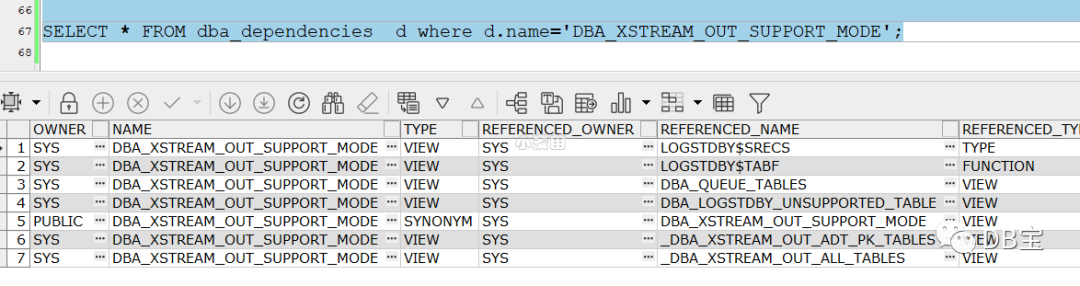
发现挺复杂的,直接找到视图的定义:
 1create or replace view dba_goldengate_support_mode as
 2select "OWNER","OBJECT_NAME","SUPPORT_MODE" from DBA_XSTREAM_OUT_SUPPORT_MODE;
 3comment on table DBA_GOLDENGATE_SUPPORT_MODE is 'List of support mode for objects by GoldenGate';
 4comment on column DBA_GOLDENGATE_SUPPORT_MODE.OWNER is 'Owner of the object';
 5comment on column DBA_GOLDENGATE_SUPPORT_MODE.OBJECT_NAME is 'Name of the object';
 6comment on column DBA_GOLDENGATE_SUPPORT_MODE.SUPPORT_MODE is 'Either FULL, ID KEY, or NONE';
 7
 8
 9create or replace view dba_xstream_out_support_mode
10(owner, object_name, support_mode)
11as
12select owner, table_name, 'FULL' from "_DBA_XSTREAM_OUT_ALL_TABLES" where owner not in
13    ('SYS', 'SYSTEM', 'CTXSYS', 'DBSNMP', 'LBACSYS', 'MDDATA', 'MDSYS',
14     'DMSYS', 'OLAPSYS', 'ORDPLUGINS', 'ORDSYS', 'SI_INFORMTN_SCHEMA',
15     'SYSMAN', 'OUTLN', 'EXFSYS', 'WMSYS', 'XDB', 'DVSYS', 'ORDDATA')
16  MINUS (select owner, table_name, 'FULL' from dba_logstdby_unsupported_table)
17  UNION ALL
18  /* Queue tables are unsupported, so exclude from 'ID KEY' query */
19  select owner, table_name, 'ID KEY' from dba_logstdby_unsupported_table
20    where table_name not like 'AQ$_%' and (owner, table_name) not in
21      (select owner, queue_table from dba_queue_tables) and (owner, table_name) not in
22      (select owner, table_name from "_DBA_XSTREAM_OUT_ADT_PK_TABLES") union all
23  /* Tables with ADT attributes on PK should show up as 'NONE' */
24  select owner, table_name, 'NONE' from "_DBA_XSTREAM_OUT_ADT_PK_TABLES" union all
25  /* For now, only queue tables have support mode 'NONE' */
26  select owner, table_name, 'NONE' from dba_logstdby_unsupported_table
27    where table_name like 'AQ$_%' or (owner, table_name) in
28      (select owner, queue_table from dba_queue_tables);
29comment on table DBA_XSTREAM_OUT_SUPPORT_MODE is 'List of support mode for objects by XStream Out';
30comment on column DBA_XSTREAM_OUT_SUPPORT_MODE.OWNER is 'Owner of the object';
31comment on column DBA_XSTREAM_OUT_SUPPORT_MODE.OBJECT_NAME is 'Name of the object';
32comment on column DBA_XSTREAM_OUT_SUPPORT_MODE.SUPPORT_MODE is 'Either FULL, ID KEY, or NONE';
把视图dba_xstream_out_support_mode分开来查询,发现如下几个部分查询会夯住:
 1select owner, table_name, 'FULL' from dba_logstdby_unsupported_table;
 2
 3select owner, table_name, 'ID KEY' from dba_logstdby_unsupported_table
 4    where table_name not like 'AQ$_%' and (owner, table_name) not in
 5      (select owner, queue_table from dba_queue_tables) and (owner, table_name) not in
 6      (select owner, table_name from "_DBA_XSTREAM_OUT_ADT_PK_TABLES");
 7
 8 select owner, table_name, 'NONE' from dba_logstdby_unsupported_table
 9    where table_name like 'AQ$_%' or (owner, table_name) in
10      (select owner, queue_table from dba_queue_tables);
其实就是视图dba_logstdby_unsupported_table会卡住,继续查定义:
1create or replace view dba_logstdby_unsupported_table as
2select owner, name table_name
3  from table(sys.logstdby$tabf)
4  where gensby = 0;
5comment on table DBA_LOGSTDBY_UNSUPPORTED_TABLE is 'List of all the data tables that are not supported by Logical Standby';
6comment on column DBA_LOGSTDBY_UNSUPPORTED_TABLE.OWNER is 'Schema name of unsupported table';
7comment on column DBA_LOGSTDBY_UNSUPPORTED_TABLE.TABLE_NAME is 'Table name of unsupported table';
DBA_LOGSTDBY_UNSUPPORTED_TABLE
displays the data tables that are not supported by Logical Standby. 该视图展示的是逻辑DG不支持的表。
参考:https://docs.oracle.com/en/database/oracle/oracle-database/19/refrn/DBA_LOGSTDBY_UNSUPPORTED_TABLE.html#GUID-2CF061B2-E31B-48FB-8BE2-96FD64851B33
执行计划:
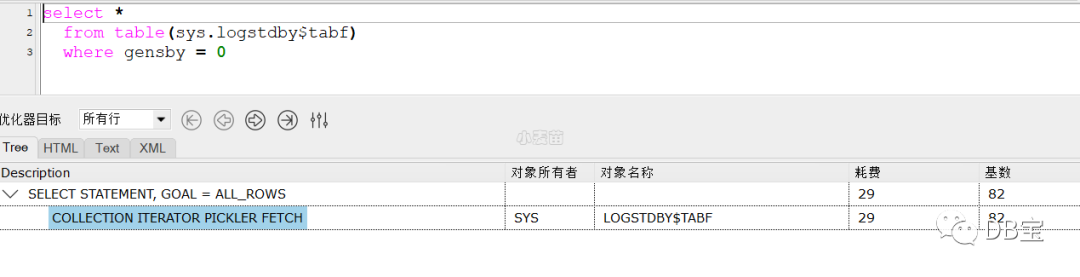
这类优化没接触过,可能是Oracle的bug。
查询Oracle的MOS文档,发现:
**Bug 21281961 - Slow Performance of views DBA_LOGSTDBY_UNSUPPORTED and DBA_LOGSTDBY_UNSUPPORTED_TABLE (Doc ID 21281961.8) **
该bug在12.1.0.2中修复了,在11.2.0.4中已确认存在该问题。
到此确认该问题是bug导致,从开始配置OGG,到找到该问题,时间花费了3天,唉。。。。
解决
方法1:打补丁
https://support.oracle.com/epmos/faces/ui/patch/PatchDetail.jspx?parent=DOCUMENT&sourceId=21281961.8&patchId=21281961
需要注意数据库的版本号:
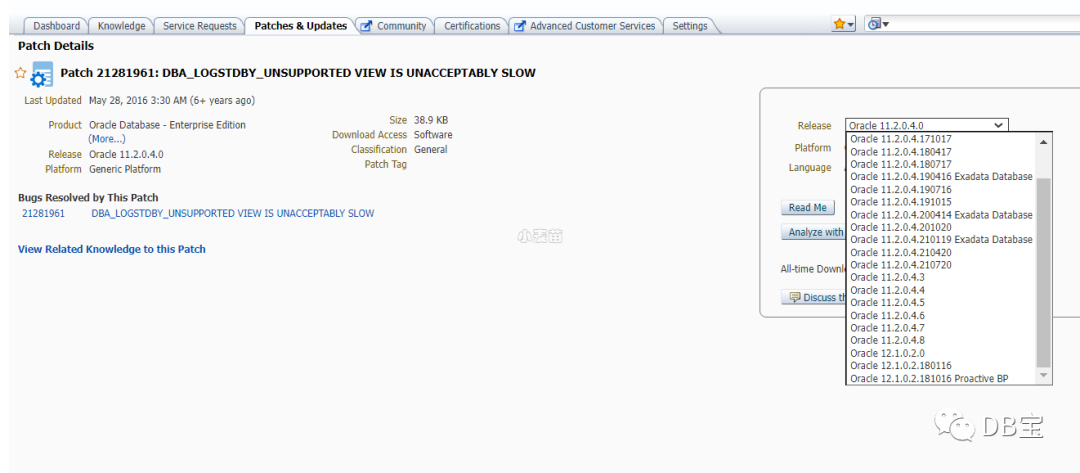
方法2:修改视图的定义
1create or replace view dba_xstream_out_support_mode
2(owner, object_name, support_mode)
3as
4select owner, table_name, 'FULL' from "_DBA_XSTREAM_OUT_ALL_TABLES" where owner not in
5    ('SYS', 'SYSTEM', 'CTXSYS', 'DBSNMP', 'LBACSYS', 'MDDATA', 'MDSYS',
6     'DMSYS', 'OLAPSYS', 'ORDPLUGINS', 'ORDSYS', 'SI_INFORMTN_SCHEMA',
7     'SYSMAN', 'OUTLN', 'EXFSYS', 'WMSYS', 'XDB', 'DVSYS', 'ORDDATA');
这个方法可以快速解决问题,但是有不可预知的问题,大家自行选择。
常用SQL
 1-- ogg命令
 2kill exta
 3START EXTRACT exta BRRESET
 4START EXTRACT exta BRINTERVAL 20M
 5info exta,showch
 6info exta,detail
 7send exta showtrans
 8send extract exta status
 9
10
11
12
13SELECT * FROM dba_apply_error;
14SELECT * FROM dba_apply_progress;
15
16SELECT * FROM dba_capture;
17SELECT * FROM dba_capture_prepared_schemas;
18
19-- 源端
20SELECT * FROM dba_capture_prepared_tables d where TABLE_OWNER='LHR';
21
22-- 目标端scn
23select source_object_name, instantiation_scn, ignore_scn from dba_apply_instantiated_objects;
24
25-- 捕获进程对数据库中表的支持级别的信息
26SELECT * FROM dba_goldengate_support_mode d where d.owner='LHR';
27
28-- 显示所有没有主索引和非空唯一索引的表
29SELECT * FROM DBA_GOLDENGATE_NOT_UNIQUE  d where d.owner='LHR';
Bug 21281961 Slow Performance of views DBA_LOGSTDBY_UNSUPPORTED and DBA_LOGSTDBY_UNSUPPORTED_TABLE
This note gives a brief overview of bug 21281961.
The content was last updated on: 20-JUL-2021
Click here for details of each of the sections below.
Affects:
| Product (*Component*) | Oracle Server (Rdbms) |
|---|---|
| Range of versions *believed* to be affected | Versions BELOW 12.1.0.2 |
| Versions *confirmed* as being affected | 11.2.0.4 |
| Platforms affected | Generic (all most platforms affected) |
Fixed:
| The fix for 21281961 is first included in | 12.2.0.1 (Base Release)12.1.0.2.210420 (APR 2021) Database Proactive Bundle Patch12.1.0.2 (Server Patch Set)1.2.0.4.171017 (Oct 2017) Bundle Patch for Windows Platforms |
|---|---|
Interim patches may be available for earlier versions - click here to check.
| Symptoms: | Related To: |
|---|---|
| Performance Of Query/ies Affected | Streams Logical StandbyDBA_LOGSTDBY_UNSUPPORTEDDBA_LOGSTDBY_UNSUPPORTED_TABLE |
Description
 1Slow Performance of dba_logstdby_unsupported and dba_logstdby_unsupported_table
 2
 3
 4Rediscovery Notes
 5
 6Queries against dba_logstdby_unsupported and dba_logstdby_unsupported_table are slow, and do not take
 7advantage of WHERE clause predicates.
 8
 9Workaround
10
11Query the compat-specific support views directly (e.g.
12dba_logstdby_unsupport_tab_12_1).
Please note: The above is a summary description only. Actual symptoms can vary. Matching to any symptoms here does not confirm that you are encountering this problem. For questions about this bug please consult Oracle Support.
References
Bug:21281961 (This link will only work for PUBLISHED bugs)
Note:245840.1 Information on the sections in this article
其它解法办法
其实,当时考虑的是,如果该问题还不能解决,就考虑使用OGG的经典架构,毕竟经典架构和集成模式架构不一样,肯定可以配置同步的,,,,
另外,可以分析一下AWR报告、addm报告、ash报告等,也许可以获取一些有用的信息,只是我还未排查到这里就找到问题了。。。。
总结
1、采用对比法找差异
2、可以使用的方法论:https://www.xmmup.com/itxingyeyinanzazhengjiejuedafa.html
3、需要看OGG的告警日志、数据库的告警日志
