



注:
本次升级是在初始安装了openGauss 2.0.0集群的基础上,通过先升级到2.0.1,再升级到2.1.0一路打怪升级基础上,想尝试升级到3.1.0。因为未在网上找到openGauss 2升级到 openGauss 3的文档,所以尝试尝鲜使用2.1.0升级到3.1.0。
2.1.0的升级都还比较顺利,但在升级到3.1.0的时候遇到一些坑,比如首先预检查时遇到python3编译不通过的问题,最后尝试加参数重新编译通过预检查。再升级后,查看升级过程信息,发现有failed信息,但检查集群数据库版本也都升级到了3.1.0.
升级后,在执行主备切换的时候,也遇到主备不能正常切换的问题,但将集群停了,仍能正常启动集群,对于这方面的问题,还在摸索学习中。
在实际升级测试过程中,也确实感受到了3.1.0和之前版本升级的一些变化。
第一次做这样的升级,升级过程难免有遗漏和问题,还望这方面的大牛能多多指正。
一、准备工作
1.1 下载3.1.0 软件包
-- 移动 /opt/software/openGauss 目录下除 clusterconfig.xml文件外 至 备份目录
-- 下载 2.1.0 软件包至节点一 /opt/software/openGauss目录
[root@opengauss-node1 ~]# cd /opt/software/openGauss/
[root@opengauss-node1 openGauss]# ll
total 120160
drwxr-xr-x 5 root root       4096 Nov  4 10:24 2.0.1
drwxr-xr-x 6 root root       4096 Nov  4 13:55 2.1.0
drwxr-xr-x 5 root root       4096 Nov  3 10:37 bak
-rw------- 1 omm  dbgrp      2055 Nov  1 17:32 clusterconfig.xml
-rw-r--r-- 1 root root  123022609 Nov  4 13:53 openGauss-3.1.0-CentOS-64bit-all.tar.gz
1.2 解压3.1.0 软件包
-- 节点一root用户执行
[root@opengauss-node1 openGauss]# tar -zxvf openGauss-3.1.0-CentOS-64bit-all.tar.gz
[root@opengauss-node1 openGauss]# tar -zxvf openGauss-3.1.0-CentOS-64bit-om.tar.gz
[root@opengauss-node1 openGauss]# ll
total 241380
drwxr-xr-x  5 root root       4096 Nov  4 10:24 2.0.1
drwxr-xr-x  6 root root       4096 Nov  4 13:55 2.1.0
drwxr-xr-x  5 root root       4096 Nov  3 10:37 bak
-rw-------  1 omm  dbgrp      2055 Nov  1 17:32 clusterconfig.xml
drwxr-xr-x 14 root root       4096 Sep 29 14:34 lib
-rw-r--r--  1 root root  123022609 Nov  4 13:53 openGauss-3.1.0-CentOS-64bit-all.tar.gz
-rw-r--r--  1 root root        105 Sep 29 14:37 openGauss-3.1.0-CentOS-64bit-cm.sha256
-rw-r--r--  1 root root   21853105 Sep 29 14:37 openGauss-3.1.0-CentOS-64bit-cm.tar.gz
-rw-r--r--  1 root root         65 Sep 29 14:34 openGauss-3.1.0-CentOS-64bit-om.sha256
-rw-r--r--  1 root root   11937318 Sep 29 14:34 openGauss-3.1.0-CentOS-64bit-om.tar.gz
-rw-r--r--  1 root root         65 Sep 29 14:37 openGauss-3.1.0-CentOS-64bit.sha256
-rw-r--r--  1 root root   89822788 Sep 29 14:37 openGauss-3.1.0-CentOS-64bit.tar.bz2
drwxr-xr-x 10 root root       4096 Sep 29 14:34 script
drwxr-xr-x  2 root root       4096 Sep 29 14:34 simpleInstall
-rw-------  1 root root         65 Sep 29 14:30 upgrade_sql.sha256
-rw-------  1 root root     468522 Sep 29 14:30 upgrade_sql.tar.gz
-rw-r--r--  1 root root         32 Sep 29 14:34 version.cfg
1.3 健康检查
-- root用户,其中一节点
-- 执行 gs_checkos -i A 命令
[root@opengauss-node1 openGauss]# /opt/software/openGauss/script/gs_checkos -i A
Checking items:
    A1. [ OS version status ]                                   : Normal
    A2. [ Kernel version status ]                               : Normal
    A3. [ Unicode status ]                                      : Normal
    A4. [ Time zone status ]                                    : Normal
    A5. [ Swap memory status ]                                  : Normal
    A6. [ System control parameters status ]                    : Normal
    A7. [ File system configuration status ]                    : Normal
    A8. [ Disk configuration status ]                           : Normal
    A9. [ Pre-read block size status ]                          : Normal
    A10.[ IO scheduler status ]                                 : Normal
    A11.[ Network card configuration status ]                   : Warning
    A12.[ Time consistency status ]                             : Warning
    A13.[ Firewall service status ]                             : Normal
    A14.[ THP service status ]                                  : Normal
Total numbers:14. Abnormal numbers:0. Warning numbers:2.
1.4 检查磁盘空间
-- 通过 df -H 及 df -i 查看磁盘相应信息是否可用
-- df -h 查看磁盘空间
-- df -i 查看inode空闲数
1.3 查询版本信息
-- omm 用户
[root@opengauss-node1 openGauss]# su - omm
Last login: Fri Nov  4 13:51:07 CST 2022 on pts/2
-- 查询所有节点版本信息
[omm@opengauss-node1 ~]$ gs_ssh -c "gsql -V"
Successfully execute command on all nodes.

Output:
[SUCCESS] opengauss-node1:
gsql (openGauss 2.1.0 build 590b0f8e) compiled at 2021-09-30 14:29:04 commit 0 last mr
[SUCCESS] opengauss-node2:
gsql (openGauss 2.1.0 build 590b0f8e) compiled at 2021-09-30 14:29:04 commit 0 last mr
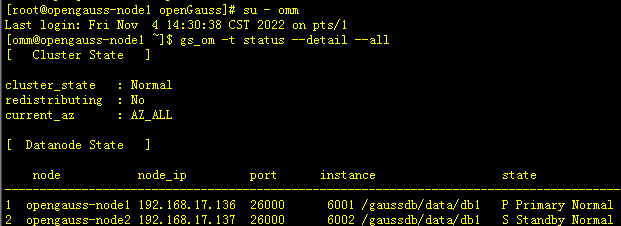
1.4 查询集群状态
-- omm 用户
[root@opengauss-node1 openGauss]# su - omm
Last login: Fri Nov  4 14:30:38 CST 2022 on pts/1
[omm@opengauss-node1 ~]$ gs_om -t status --detail --all
[   Cluster State   ]

cluster_state   : Normal    # Normal 代表数据库状态正常
redistributing  : No
current_az      : AZ_ALL

[  Datanode State   ]

    node           node_ip         port      instance                  state
--------------------------------------------------------------------------------------------
1  opengauss-node1 192.168.17.136  26000      6001 /gaussdb/data/db1   P Primary Normal
2  opengauss-node2 192.168.17.137  26000      6002 /gaussdb/data/db1   S Standby Normal
1.5 停止集群
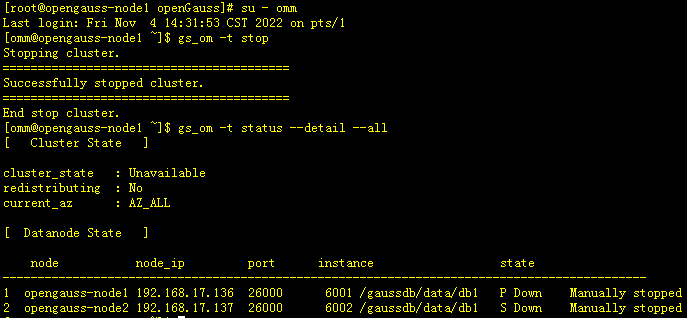
-- 停集群,节点一 omm 用户
[root@opengauss-node1 openGauss]# su - omm
Last login: Fri Nov  4 14:31:53 CST 2022 on pts/1
[omm@opengauss-node1 ~]$ gs_om -t stop
Stopping cluster.
=========================================
Successfully stopped cluster.
=========================================
End stop cluster.
[omm@opengauss-node1 ~]$ gs_om -t status --detail --all
[   Cluster State   ]

cluster_state   : Unavailable   -- Unavailable 代表数据库已停
redistributing  : No
current_az      : AZ_ALL

[  Datanode State   ]

    node           node_ip         port      instance                  state
--------------------------------------------------------------------------------------------
1  opengauss-node1 192.168.17.136  26000      6001 /gaussdb/data/db1   P Down    Manually stopped
2  opengauss-node2 192.168.17.137  26000      6002 /gaussdb/data/db1   S Down    Manually stopped
1.6 备份目录及文件
-- 两节点都需操作
-- 升级前建议参照clusterconfig.xml文件对相应目录及文件进行备份,以防升级失败
-- 本次测试环境数据库相应目录如下
<PARAM name="gaussdbAppPath" value="/opt/gaussdb/app" />
<PARAM name="gaussdbLogPath" value="/opt/gaussdb/log" />
<PARAM name="tmpMppdbPath" value="/opt/gaussdb/tmp" />
<PARAM name="gaussdbToolPath" value="/opt/gaussdb/gausstools/om" />
<PARAM name="corePath" value="/opt/gaussdb/corefile" />
<PARAM name="dataNode1" value="/gaussdb/data/db1,opengauss-node2,/gaussdb/data/db1"/>

-- 备份目录
[root@opengauss-nodeX ~]# cd /opt
[root@opengauss-nodeX opt]# tar -czf gaussdb_2.1.0.tar ./gaussdb/
[root@opengauss-nodeX opt]# cd /
[root@opengauss-node1 /]# tar -czf gaussdb_2.1.0.tar.gz ./gaussdb/
1.7 启动集群
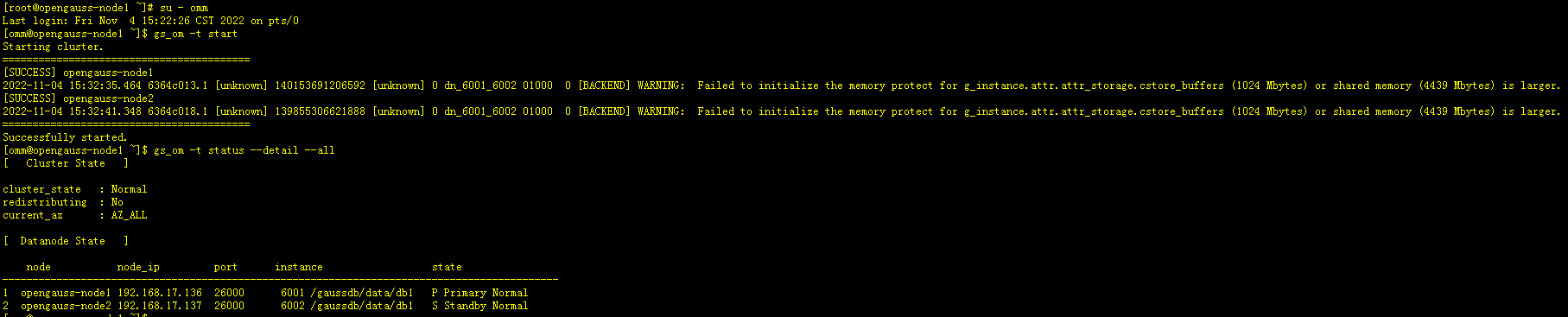
-- omm 用户,节点一操作
[root@opengauss-node1 ~]# su - omm
Last login: Fri Nov  4 15:22:26 CST 2022 on pts/0
[omm@opengauss-node1 ~]$ gs_om -t start
Starting cluster.
=========================================
[SUCCESS] opengauss-node1
2022-11-04 15:32:35.464 6364c013.1 [unknown] 140153691206592 [unknown] 0 dn_6001_6002 01000  0 [BACKEND] WARNING:  Failed to initialize the memory protect for g_instance.attr.attr_storage.cstore_buffers (1024 Mbytes) or shared memory (4439 Mbytes) is larger.
[SUCCESS] opengauss-node2
2022-11-04 15:32:41.348 6364c018.1 [unknown] 139855306621888 [unknown] 0 dn_6001_6002 01000  0 [BACKEND] WARNING:  Failed to initialize the memory protect for g_instance.attr.attr_storage.cstore_buffers (1024 Mbytes) or shared memory (4439 Mbytes) is larger.
=========================================
Successfully started.
[omm@opengauss-node1 ~]$ gs_om -t status --detail --all
[   Cluster State   ]

cluster_state   : Normal
redistributing  : No
current_az      : AZ_ALL

[  Datanode State   ]

    node           node_ip         port      instance                  state
--------------------------------------------------------------------------------------------
1  opengauss-node1 192.168.17.136  26000      6001 /gaussdb/data/db1   P Primary Normal
2  opengauss-node2 192.168.17.137  26000      6002 /gaussdb/data/db1   S Standby Normal
二、集群升级
2.1 升级前预检查
-- root 用户,节点一操作
-- 设置lib库
[root@opengauss-node1 ~]# export LD_LIBRARY_PATH=/opt/software/openGauss/script/gspylib/clib:$LD_LIBRARY_PATH

-- 执行预检查
[root@opengauss-node1 ~]# python3 /opt/software/openGauss/script/gs_preinstall -U omm -G dbgrp -X /opt/software/openGauss/clusterconfig.xml

# 预检查如遇python编译问题,请参照(三、补充 部分内容)

-- 以下是预检查执行过程
Parsing the configuration file.
Successfully parsed the configuration file.
Installing the tools on the local node.
Successfully installed the tools on the local node.
Are you sure you want to create trust for root (yes/no)?yes  --输入root口令
Please enter password for root
Password:
Successfully created SSH trust for the root permission user.
Setting host ip env
Successfully set host ip env.
Distributing package.
Begin to distribute package to tool path.
Successfully distribute package to tool path.
Begin to distribute package to package path.
Successfully distribute package to package path.
Successfully distributed package.
Are you sure you want to create the user[omm] and create trust for it (yes/no)? no --输入no(因已有omm用户)
Preparing SSH service.
Successfully prepared SSH service.
Installing the tools in the cluster.
Successfully installed the tools in the cluster.
Checking hostname mapping.
Successfully checked hostname mapping.
Checking OS software.
Successfully check os software.
Checking OS version.
Successfully checked OS version.
Creating cluster's path.
Successfully created cluster's path.
Set and check OS parameter.
Setting OS parameters.
Successfully set OS parameters.
Warning: Installation environment contains some warning messages.
Please get more details by "/opt/software/openGauss/script/gs_checkos -i A -h opengauss-node1,opengauss-node2 --detail".
Set and check OS parameter completed.
Preparing CRON service.
Successfully prepared CRON service.
Setting user environmental variables.
Successfully set user environmental variables.
Setting the dynamic link library.
Successfully set the dynamic link library.
Setting Core file
Successfully set core path.
Setting pssh path
Successfully set pssh path.
Setting Cgroup.
Successfully set Cgroup.
Set ARM Optimization.
No need to set ARM Optimization.
Fixing server package owner.
Setting finish flag.
Successfully set finish flag.
Preinstallation succeeded.

-- 查看预检查执行详细信息,可执行如下命令,另外也可以进入到/opt/gaussdb/log/omm/om/bin/gs_ctl目录下查看执行过程日志
[root@opengauss-node1 ~]# /opt/software/openGauss/script/gs_checkos -i A -h opengauss-node1,opengauss-node2 --detail

-- 执行结果如下
[root@opengauss-node1 ~]# /opt/software/openGauss/script/gs_checkos -i A -h opengauss-node1,opengauss-node2 --detail
Checking items:
    A1. [ OS version status ]                                   : Normal
        [opengauss-node2]
        centos_7.6.1810_64bit
        [opengauss-node1]
        centos_7.6.1810_64bit

    A2. [ Kernel version status ]                               : Normal
        The names about all kernel versions are same. The value is "3.10.0-957.27.2.el7.x86_64".
    A3. [ Unicode status ]                                      : Normal
        The values of all unicode are same. The value is "LANG=en_US.UTF-8".
    A4. [ Time zone status ]                                    : Normal
        The informations about all timezones are same. The value is "+0800".
    A5. [ Swap memory status ]                                  : Normal
        The value about swap memory is correct.
    A6. [ System control parameters status ]                    : Normal
        All values about system control  parameters are correct.
    A7. [ File system configuration status ]                    : Normal
        Both soft nofile and hard nofile are correct.
    A8. [ Disk configuration status ]                           : Normal
        The value about XFS mount parameters is correct.
    A9. [ Pre-read block size status ]                          : Normal
        The value about Logical block size is correct.
    A10.[ IO scheduler status ]                                 : Normal
        The value of IO scheduler is correct.
    A11.[ Network card configuration status ]                   : Warning
        [opengauss-node2]
BondMode Null
        Warning reason: network 'ens33' 'mtu' RealValue '1500' ExpectedValue '8192'

        [opengauss-node1]
BondMode Null
        Warning reason: network 'ens33' 'mtu' RealValue '1500' ExpectedValue '8192'


    A12.[ Time consistency status ]                             : Warning
        [opengauss-node2]
        The NTPD not detected on machine and local time is "2022-11-07 11:09:29".
        [opengauss-node1]
        The NTPD not detected on machine and local time is "2022-11-07 11:09:30".

    A13.[ Firewall service status ]                             : Normal
        The firewall service is stopped.
    A14.[ THP service status ]                                  : Normal
        The THP service is stopped.
Total numbers:14. Abnormal numbers:0. Warning numbers:2.
-- omm用户
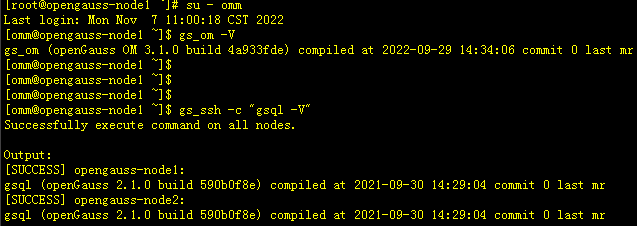
# 预检查执行后会发现数据库版本号信息已发生改变,显示为 2.1.0
[root@opengauss-node1 ~]# su - omm
Last login: Mon Nov  7 11:00:18 CST 2022
[omm@opengauss-node1 ~]$ gs_om -V
gs_om (openGauss OM 3.1.0 build 4a933fde) compiled at 2022-09-29 14:34:06 commit 0 last mr

-- 此时集群两节点数据库版本还未发生改变
[omm@opengauss-node1 ~]$ gs_ssh -c "gsql -V"
Successfully execute command on all nodes.

Output:
[SUCCESS] opengauss-node1:
gsql (openGauss 2.1.0 build 590b0f8e) compiled at 2021-09-30 14:29:04 commit 0 last mr
[SUCCESS] opengauss-node2:
gsql (openGauss 2.1.0 build 590b0f8e) compiled at 2021-09-30 14:29:04 commit 0 last mr
2.2 执行升级
-- 节点一执行
[root@opengauss-node1 ~]# chmod -R 755 /opt/software/openGauss/script/
[root@opengauss-node1 ~]# chown -R omm:dbgrp /opt/software/openGauss/script/

-- 修改version.cfg权限,两节点都需操作
[root@opengauss-nodeX ~]# chown omm:dbgrp /opt/software/openGauss/version.cfg
# 如未修改version.cfg权限,执行升级时会报如下错:
# [omm@opengauss-node1 ~]$ /opt/software/openGauss/script/gs_upgradectl -t auto-upgrade --grey -X /opt/software/openGauss/clusterconfig.xml
# Static configuration matched with old static configuration files.
# Successfully set upgrade_mode to 0.
# [GAUSS-52900] : Failed to upgrade strategy: [Errno 13] Permission denied: '/opt/software/openGauss/version.cfg'. Do nothing this time.
# [GAUSS-52900] : Failed to upgrade strategy: [Errno 13] Permission denied: '/opt/software/openGauss/version.cfg'. Do nothing this time.

-- 切换到omm用户
[root@opengauss-node1 ~]# su - omm
Last login: Mon Nov  7 11:10:41 CST 2022 on pts/0
-- 灰度升级
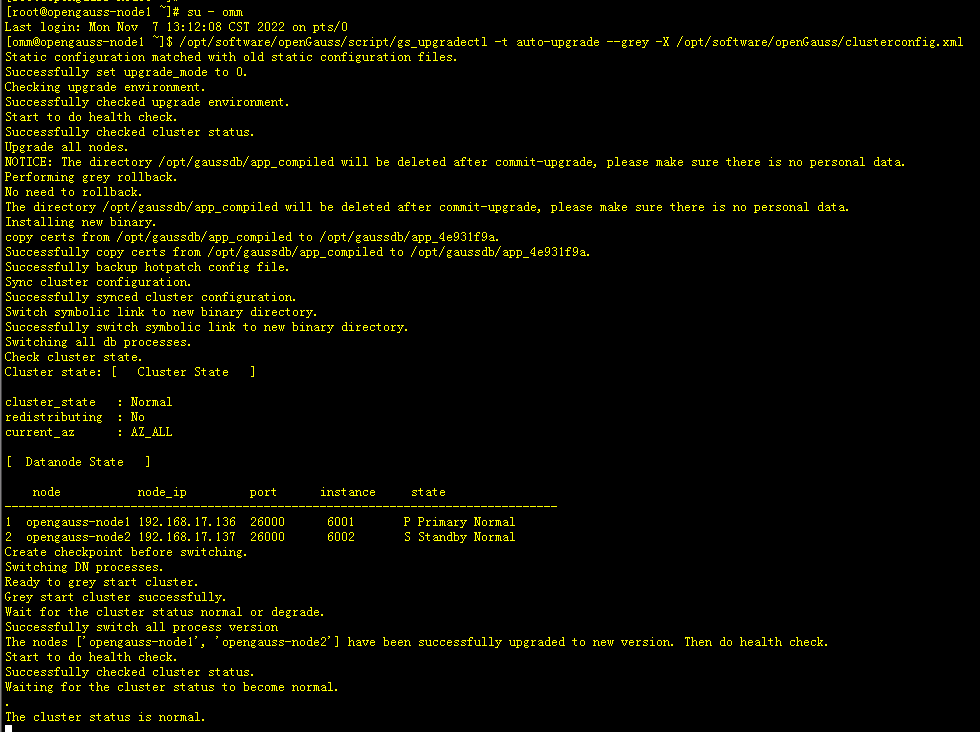
[omm@opengauss-node1 ~]$ /opt/software/openGauss/script/gs_upgradectl -t auto-upgrade --grey -X /opt/software/openGauss/clusterconfig.xml

-- 执行过程如下(因为内容较多,只截取部分内容,详细内容见 3.2 附录日志内容)
[omm@opengauss-node1 ~]$ /opt/software/openGauss/script/gs_upgradectl -t auto-upgrade --grey -X /opt/software/openGauss/clusterconfig.xml
Static configuration matched with old static configuration files.
Successfully set upgrade_mode to 0.
Checking upgrade environment.
Successfully checked upgrade environment.
Start to do health check.
Successfully checked cluster status.
Upgrade all nodes.
NOTICE: The directory /opt/gaussdb/app_compiled will be deleted after commit-upgrade, please make sure there is no personal data.
Performing grey rollback.
No need to rollback.
The directory /opt/gaussdb/app_compiled will be deleted after commit-upgrade, please make sure there is no personal data.
Installing new binary.
copy certs from /opt/gaussdb/app_compiled to /opt/gaussdb/app_4e931f9a.
Successfully copy certs from /opt/gaussdb/app_compiled to /opt/gaussdb/app_4e931f9a.
Successfully backup hotpatch config file.
Sync cluster configuration.
Successfully synced cluster configuration.
Switch symbolic link to new binary directory.
Successfully switch symbolic link to new binary directory.
Switching all db processes.
Check cluster state.
Cluster state: [   Cluster State   ]

cluster_state   : Normal
redistributing  : No
current_az      : AZ_ALL

[  Datanode State   ]

    node           node_ip         port      instance     state
-------------------------------------------------------------------------------
1  opengauss-node1 192.168.17.136  26000      6001       P Primary Normal
2  opengauss-node2 192.168.17.137  26000      6002       S Standby Normal
Create checkpoint before switching.
Switching DN processes.
Ready to grey start cluster.
Grey start cluster successfully.
Wait for the cluster status normal or degrade.
Successfully switch all process version
The nodes ['opengauss-node1', 'opengauss-node2'] have been successfully upgraded to new version. Then do health check.
Start to do health check.
Successfully checked cluster status.
Waiting for the cluster status to become normal.
.
The cluster status is normal.
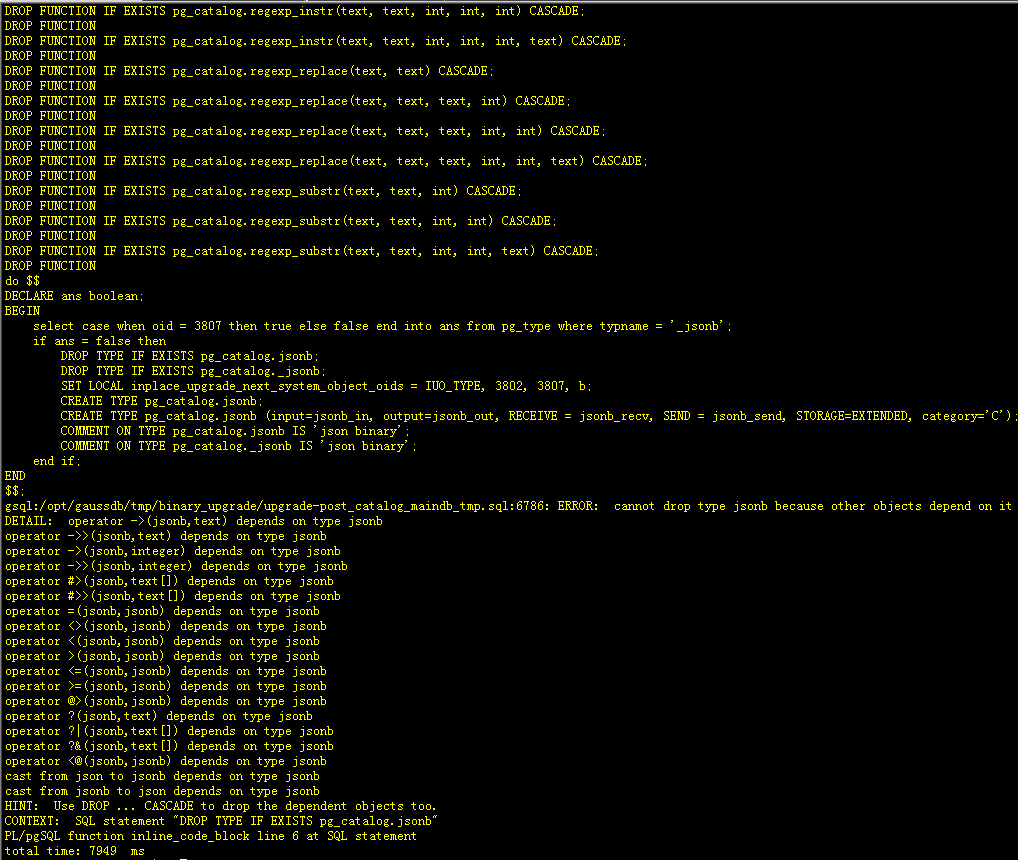
Failed to upgrade-post catalog.
Nodes are new version. Please check the cluster status. ERROR:
[GAUSS-51400] : Failed to execute the command: python3 '/opt/gaussdb/gausstools/om/script/local/UpgradeUtility.py' -t update_catalog -U omm --upgrade_bak_path=/opt/gaussdb/tmp/binary_upgrade --script_type=upgrade-post -l /opt/gaussdb/log/omm/om/gs_local.log. Result:{'opengauss-node1': 'Failure'}.
Error:
[FAILURE] opengauss-node1:
Updating catalog.
Failed to update catalog. Error: START TRANSACTION;
START TRANSACTION
SET IsInplaceUpgrade = on;
......
DROP FUNCTION
DROP FUNCTION IF EXISTS pg_catalog.regexp_substr(text, text, int, int) CASCADE;
DROP FUNCTION
DROP FUNCTION IF EXISTS pg_catalog.regexp_substr(text, text, int, int, text) CASCADE;
DROP FUNCTION
do $$
DECLARE ans boolean;
BEGIN
    select case when oid = 3807 then true else false end into ans from pg_type where typname = '_jsonb';
    if ans = false then
        DROP TYPE IF EXISTS pg_catalog.jsonb;
        DROP TYPE IF EXISTS pg_catalog._jsonb;
        SET LOCAL inplace_upgrade_next_system_object_oids = IUO_TYPE, 3802, 3807, b;
        CREATE TYPE pg_catalog.jsonb;
        CREATE TYPE pg_catalog.jsonb (input=jsonb_in, output=jsonb_out, RECEIVE = jsonb_recv, SEND = jsonb_send, STORAGE=EXTENDED, category='C');
        COMMENT ON TYPE pg_catalog.jsonb IS 'json binary';
        COMMENT ON TYPE pg_catalog._jsonb IS 'json binary';
    end if;
END
$$;
gsql:/opt/gaussdb/tmp/binary_upgrade/upgrade-post_catalog_maindb_tmp.sql:6786: ERROR:  cannot drop type jsonb because other objects depend on it
DETAIL:  operator ->(jsonb,text) depends on type jsonb
operator ->>(jsonb,text) depends on type jsonb
operator ->(jsonb,integer) depends on type jsonb
operator ->>(jsonb,integer) depends on type jsonb
operator #>(jsonb,text[]) depends on type jsonb
operator #>>(jsonb,text[]) depends on type jsonb
operator =(jsonb,jsonb) depends on type jsonb
operator <>(jsonb,jsonb) depends on type jsonb
operator <(jsonb,jsonb) depends on type jsonb
operator >(jsonb,jsonb) depends on type jsonb
operator <=(jsonb,jsonb) depends on type jsonb
operator >=(jsonb,jsonb) depends on type jsonb
operator @>(jsonb,jsonb) depends on type jsonb
operator ?(jsonb,text) depends on type jsonb
operator ?|(jsonb,text[]) depends on type jsonb
operator ?&(jsonb,text[]) depends on type jsonb
operator <@(jsonb,jsonb) depends on type jsonb
cast from json to jsonb depends on type jsonb
cast from jsonb to json depends on type jsonb
HINT:  Use DROP ... CASCADE to drop the dependent objects too.
CONTEXT:  SQL statement "DROP TYPE IF EXISTS pg_catalog.jsonb"
PL/pgSQL function inline_code_block line 6 at SQL statement
total time: 7949  ms

-- 升级提交
[omm@opengauss-node1 ~]$ gs_upgradectl -t commit-upgrade -X /opt/software/openGauss/clusterconfig.xml
-- 升级提交执行结果如下
[omm@opengauss-node1 ~]$ gs_upgradectl -t commit-upgrade -X /opt/software/openGauss/clusterconfig.xml
Start to do health check.
Successfully checked cluster status.
[GAUSS-52916] : Current upgrade status is not pre commit.  # 有些不慎明白是否和之前升级时出现failed有关


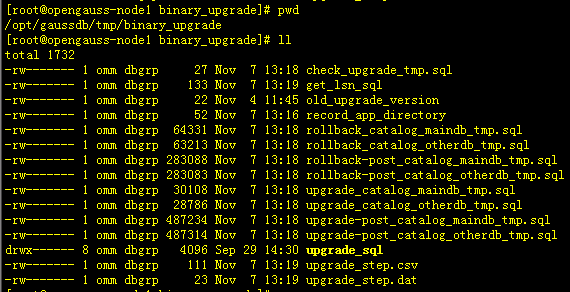
# 升级过程可跟踪查看两节点 /opt/gaussdb/log/omm/bin/gs_ctl 目录下 gs_ctl-*.log 日志,查看升级过程
2.3 信息核查
-- 查看版本信息
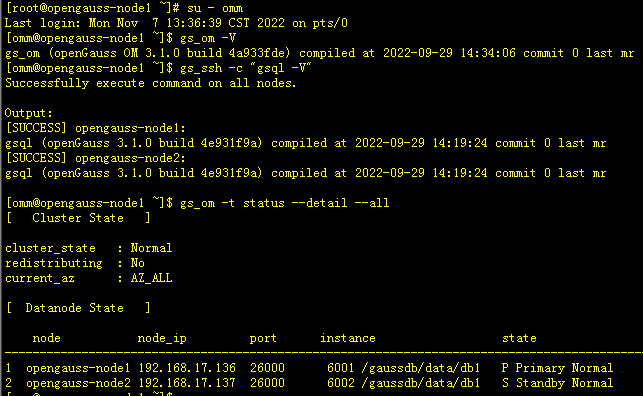
-- 版本信息为 3.1.0
[root@opengauss-node1 ~]# su - omm
Last login: Mon Nov  7 13:36:39 CST 2022 on pts/0
[omm@opengauss-node1 ~]$ gs_om -V
gs_om (openGauss OM 3.1.0 build 4a933fde) compiled at 2022-09-29 14:34:06 commit 0 last mr

-- 查看两节点数据库版本信息,都已升级到2.1.0
[omm@opengauss-node1 ~]$ gs_ssh -c "gsql -V"
Successfully execute command on all nodes.

Output:
[SUCCESS] opengauss-node1:
gsql (openGauss 3.1.0 build 4e931f9a) compiled at 2022-09-29 14:19:24 commit 0 last mr
[SUCCESS] opengauss-node2:
gsql (openGauss 3.1.0 build 4e931f9a) compiled at 2022-09-29 14:19:24 commit 0 last mr


-- 集群状态信息
[omm@opengauss-node1 ~]$ gs_om -t status --detail --all
[   Cluster State   ]

cluster_state   : Normal
redistributing  : No
current_az      : AZ_ALL

[  Datanode State   ]

    node           node_ip         port      instance                  state
--------------------------------------------------------------------------------------------
1  opengauss-node1 192.168.17.136  26000      6001 /gaussdb/data/db1   P Primary Normal
2  opengauss-node2 192.168.17.137  26000      6002 /gaussdb/data/db1   S Standby Normal
三、补充
3.1 python编译报错
-- 预检查时遇到如下报错
[root@opengauss-node1 ~]# export LD_LIBRARY_PATH=/opt/software/openGauss/script/gspylib/clib:$LD_LIBRARY_PATH
[root@opengauss-node1 ~]# python3 /opt/software/openGauss/script/gs_preinstall -U omm -G dbgrp -X /opt/software/openGauss/clusterconfig.xml
Traceback (most recent call last):
  File "/opt/software/openGauss/script/gs_preinstall", line 31, in <module>
    check_python_compiler_option()
  File "/opt/software/openGauss/script/gspylib/common/CheckPythonVersion.py", line 45, in check_python_compiler_option
    carry the -enable-shared and -fpic parameters")
Exception: [GAUSS-52200] : When compiling python,             carry the -enable-shared and -fpic parameters

--最初执行的python编译命令是如下
./configure --prefix=/usr/local/python3 --enable-shared  -- 在2.1.0升级前没问题,但升级到3.1.0时会报错
echo "/usr/local/python3/lib/" >> /etc/ld.so.conf
ldconfig
echo "/usr/local/python3/lib/" >> /etc/ld.so.conf
ldconfig
ln -s /usr/local/python3/bin/python3 /usr/bin/python3
ln -s /usr/local/python3/bin/pip3 /usr/bin/pip3


此时应该对python3重新采用如下方法编译 ./configure --prefix=/usr/local/python3 --enable-shared CFLAGS=-fPIC

3.2 附录升级日志
升级操作过程详细会话日志详见 https://www.modb.pro/doc/81235
最后修改时间:2022-11-29 09:34:13
「喜欢这篇文章,您的关注和赞赏是给作者最好的鼓励」
关注作者
【版权声明】本文为墨天轮用户原创内容,转载时必须标注文章的来源(墨天轮),文章链接,文章作者等基本信息,否则作者和墨天轮有权追究责任。如果您发现墨天轮中有涉嫌抄袭或者侵权的内容,欢迎发送邮件至:contact@modb.pro进行举报,并提供相关证据,一经查实,墨天轮将立刻删除相关内容。
