点亮 ⭐️ Star · 照亮开源之路

重要功能介绍
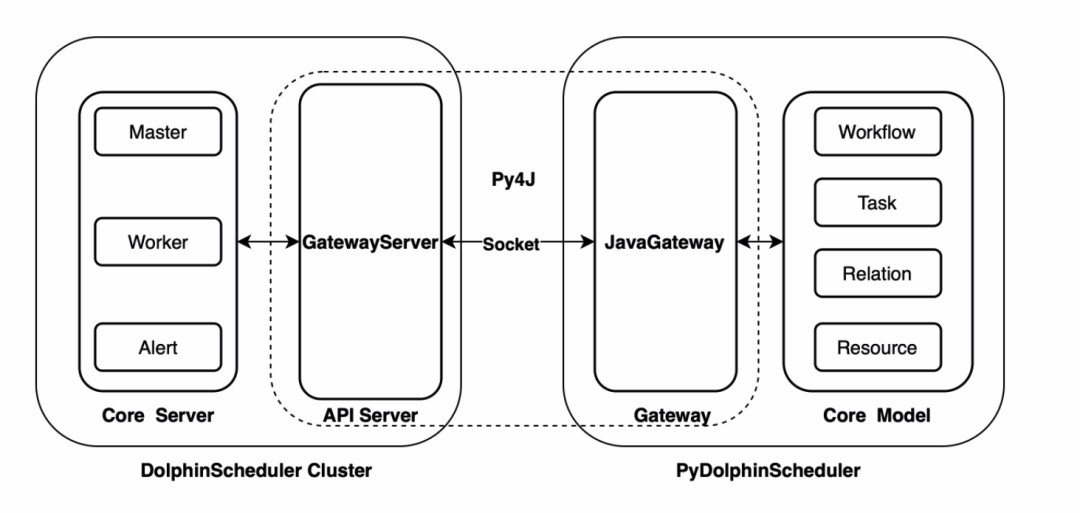
2.0.5 版本更新之后,Apache DolphinScheduler 新增了 Python API 功能,用户可以通过 Python 脚本编排工作流,最后实现工作流的创建、更新、调度等操作,这给 Python 用户带来了很多便利。
1
DolphinScheduler Python
API
01
安装
python -m pip install apache-dolphinscheduler
02
运行
wget https://raw.githubusercontent.com/apache/dolphinscheduler/dev/dolphinscheduler-python/pydolphinscheduler/src/pydolphinscheduler/examples/tutorial.pypython tutorial.py
2
Python API 功能
3
示例
from pydolphinscheduler.core.process_definition import ProcessDefinitionfrom pydolphinscheduler.tasks.python import Pythonfrom pydolphinscheduler.tasks.shell import Shelldownload_dir = "/tmp/demo"store_dir = "dolphinscheduler"download_link = "https://github.com/apache/dolphinscheduler/archive/refs/heads/dev.zip"file_name = download_link.split("/")[-1]def largest_size():from pathlib import Pathdownload_dir = "/tmp/demo"store_dir = "dolphinscheduler"result = (None, 0)paths = Path(download_dir).joinpath(store_dir).glob("**/*")for path in paths:# skip is path is directoryif path.is_dir():continuefile_size = path.stat().st_sizeif result[0] is None or file_size > result[1]:result = (path.name, file_size)print(result)def most_frequently():from pathlib import Pathdownload_dir = "/tmp/demo"store_dir = "dolphinscheduler"ext_cnt = {}paths = Path(download_dir).joinpath(store_dir).glob("**/*")for path in paths:# skip is path is directoryif path.is_dir():continueext = path.suffixext_cnt[ext] = ext_cnt[ext] + 1 if ext in ext_cnt else 1print(max(ext_cnt.items(), key=lambda p: p[1]))with ProcessDefinition(name="top_ten_size_files",tenant="zhongjiajie",) as pd:prepare = Shell(name="prepare_dir",command=f"mkdir -p {download_dir}; rm -rf {download_dir}/*")download = Shell(name="download_resources",command=f"wget -P {download_dir} {download_link}")compress = Shell(name="compress_tar",command=f"cd {download_dir}; unzip {file_name} -d {store_dir}")largest_file = Python(name="largest_file",definition=largest_size,)most_type = Python(name="most_type",definition=most_frequently,)prepare >> download >> compress >> [largest_file,most_type,]pd.run()
4
下载资源
download = Shell(name="download_resources",command=f"wget -P {download_dir} {download_link}")
01
下载资源前后需要做的事
prepare = Shell(name="prepare_dir",command=f"mkdir -p {download_dir}; rm -rf {download_dir}/*")compress = Shell(name="compress_tar",command=f"cd {download_dir}; unzip {file_name} -d {store_dir}")
02
计算体积最大的文件
def largest_size():from pathlib import Pathdownload_dir = "/tmp/demo"store_dir = "dolphinscheduler"result = (None, 0)paths = Path(download_dir).joinpath(store_dir).glob("**/*")for path in paths:# skip is path is directoryif path.is_dir():continuefile_size = path.stat().st_sizeif result[0] is None or file_size > result[1]:result = (path.name, file_size)print(result)largest_file = Python(name="largest_file",definition=largest_size,)
03
计算出现频率最高的文件类型
def most_frequently():from pathlib import Pathdownload_dir = "/tmp/demo"store_dir = "dolphinscheduler"ext_cnt = {}paths = Path(download_dir).joinpath(store_dir).glob("**/*")for path in paths:# skip is path is directoryif path.is_dir():continueext = path.suffix# skip file without suffixif ext == "":continueext_cnt[ext] = ext_cnt[ext] + 1 if ext in ext_cnt else 1print(max(ext_cnt.items(), key=lambda p: p[1]))most_type = Python(name="most_type",definition=most_frequently,)
04
设置任务依赖
05
运行!
pd.run()
http://127.0.0.1:12345/dolphinscheduler。python3 demo.py
5
总结
参与贡献
随着国内开源的迅猛崛起,Apache DolphinScheduler 社区迎来蓬勃发展,为了做更好用、易用的调度,真诚欢迎热爱开源的伙伴加入到开源社区中来,为中国开源崛起献上一份自己的力量,让本土开源走向全球。

参与 DolphinScheduler 社区有非常多的参与贡献的方式,包括:

贡献第一个PR(文档、代码) 我们也希望是简单的,第一个PR用于熟悉提交的流程和社区协作以及感受社区的友好度。
社区汇总了以下适合新手的问题列表:https://github.com/apache/dolphinscheduler/issues/5689
非新手问题列表:https://github.com/apache/dolphinscheduler/issues?q=is%3Aopen+is%3Aissue+label%3A%22volunteer+wanted%22
如何参与贡献链接:https://dolphinscheduler.apache.org/zh-cn/community/development/contribute.html
来吧,DolphinScheduler开源社区需要您的参与,为中国开源崛起添砖加瓦吧,哪怕只是小小的一块瓦,汇聚起来的力量也是巨大的。
参与开源可以近距离与各路高手切磋,迅速提升自己的技能,如果您想参与贡献,我们有个贡献者种子孵化群,可以添加社区小助手微信(Leonard-ds) ,手把手教会您( 贡献者不分水平高低,有问必答,关键是有一颗愿意贡献的心 )。
添加小助手微信时请说明想参与贡献。
来吧,开源社区非常期待您的参与。
☞Apache DolphinScheduler 2.0.7 发布,修复补数及容错故障问题
☞挑战海量数据:基于Apache DolphinScheduler对千亿级数据应用实践
☞金融科技数据中台基于 DolphinScheduler 的应用改造