



多集群管理、存储、微服务落地难?还在测试环境中犹豫不决是否该落地生产?
下周六(5月16日)下午2点,线上直播技术分享+案例实践,由Rancher中国研发总监、资深架构师以及公共安全上市公司辰安科技系统设计师精心呈现,消除你的所有疑惑!还有Rancher实际客户案例分析哟,赶紧报名啦!
点击文末【阅读原文】,或访问以下链接即可报名:
http://z-mz.cn/yh4q
Rancher进入中国已经4年,并在今年2月份完成了中国本土化和国产化。作为一款开源的企业级Kubernetes管理平台,我们一直十分关注Rancher社区用户的各种诉求。在我们的技术社区中,我们常常收到这样的抱怨:从Github上下载资源慢、拉镜像十分耗时、无法使用library和system-library等。这些大大降低了国内用户的Rancher使用体验。
ksd@Hailong-MacBook-Pro tmp wget https://github.com/rancher/rke/releases/download/v1.0.8/rke_linux-amd64--2020-05-07 10:20:30-- https://github.com/rancher/rke/releases/download/v1.0.8/rke_linux-amd64Resolving github.com... 13.250.177.223Connecting to github.com|13.250.177.223|:443... connected.HTTP request sent, awaiting response... 302 FoundLocation: https://github-production-release-asset-2e65be.s3.amazonaws.com/108337180/26415380-8ebd-11ea-834a-af693358e976?X-Amz-Algorithm=AWS4-HMAC-SHA256&X-Amz-Credential=AKIAIWNJYAX4CSVEH53A%2F20200507%2Fus-east-1%2Fs3%2Faws4_request&X-Amz-Date=20200507T022031Z&X-Amz-Expires=300&X-Amz-Signature=f4659696f17f619d1d42bfc0a78d998c12c34506475983eb523f150a22a4ce51&X-Amz-SignedHeaders=host&actor_id=0&repo_id=108337180&response-content-disposition=attachment%3B%20filename%3Drke_linux-amd64&response-content-type=application%2Foctet-stream [following]--2020-05-07 10:20:31-- https://github-production-release-asset-2e65be.s3.amazonaws.com/108337180/26415380-8ebd-11ea-834a-af693358e976?X-Amz-Algorithm=AWS4-HMAC-SHA256&X-Amz-Credential=AKIAIWNJYAX4CSVEH53A%2F20200507%2Fus-east-1%2Fs3%2Faws4_request&X-Amz-Date=20200507T022031Z&X-Amz-Expires=300&X-Amz-Signature=f4659696f17f619d1d42bfc0a78d998c12c34506475983eb523f150a22a4ce51&X-Amz-SignedHeaders=host&actor_id=0&repo_id=108337180&response-content-disposition=attachment%3B%20filename%3Drke_linux-amd64&response-content-type=application%2Foctet-streamResolving github-production-release-asset-2e65be.s3.amazonaws.com... 52.216.65.240Connecting to github-production-release-asset-2e65be.s3.amazonaws.com|52.216.65.240|:443... failed: Operation timed out.Retrying.
无法从Github上下载Rancher资源

拉取镜像慢,等待集群启动时间长
2020/05/07 03:06:27 [INFO] Pulling image [rancher/rke-tools:v0.1.56] on host [172.17.206.119], try #12020/05/07 03:09:16 [INFO] Pulling image [rancher/hyperkube:v1.17.5-rancher1] on host [172.17.206.119], try #12020/05/07 03:09:16 [INFO] cluster [c-zfz4g] provisioning: Pre-pulling kubernetes images
拉取rancher镜像常常出现timeout情况
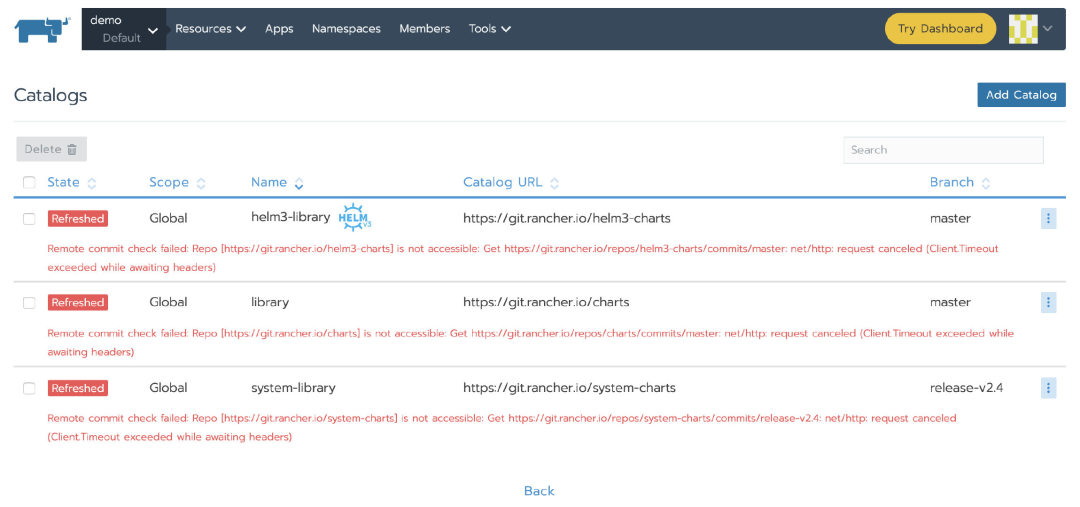
无法使用library和system-library,导致无法使用应用商店
2020/05/07 03:31:31 [ERROR] CatalogController helm3-library [catalog] failed with : Remote commit check failed: Repo [https://git.rancher.io/helm3-charts] is not accessible: Get https://git.rancher.io/repos/helm3-charts/commits/master: net/http: request canceled (Client.Timeout exceeded while awaiting headers)2020/05/07 03:31:33 [ERROR] CatalogController library [catalog] failed with : Remote commit check failed: Repo [https://git.rancher.io/charts] is not accessible: Get https://git.rancher.io/repos/charts/commits/master: net/http: request canceled (Client.Timeout exceeded while awaiting headers)2020/05/07 03:31:34 [ERROR] CatalogController system-library [catalog] failed with : Remote commit check failed: Repo [https://git.rancher.io/system-charts] is not accessible: Get https://git.rancher.io/repos/system-charts/commits/release-v2.4: net/http: request canceled (Client.Timeout exceeded while awaiting headers)
rancher/rancher日志,显示一些关于git.rancher.io timeout的错误日志
为了改善大家的使用体验,我们针对以上问题分别提出了解决方法。

优雅地使用Rancher
为了让大家更流畅地使用Rancher,我们将一些资源mirror到了国内,提供给国内用户使用。接下来,我们将详细介绍如何使用这些资源。
使用国内资源下载Rancher组件
我们已经将Rancher的常用组件放在国内服务器上,访问http://mirror.cnrancher.com,即可下载所需的组件,从此告别failed: Operation timed out
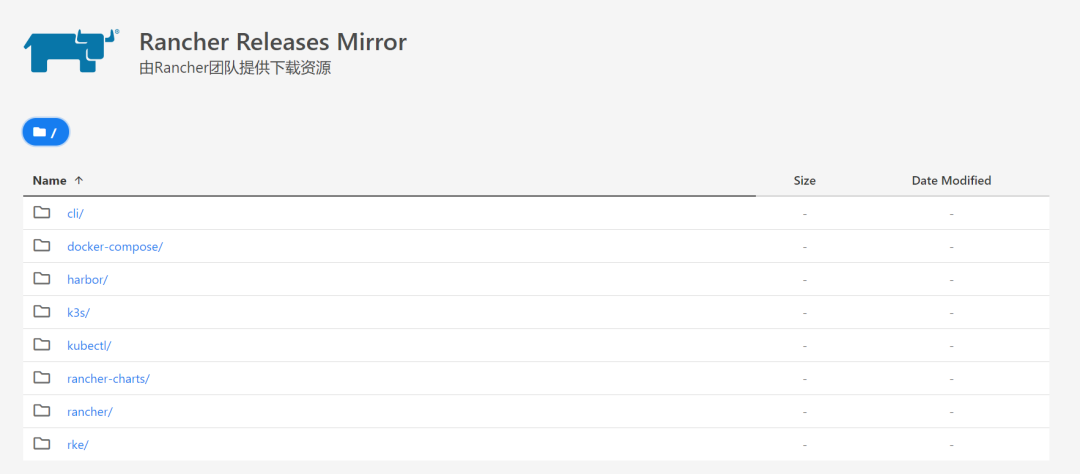
使用阿里云镜像仓库搭建Rancher
我们已经在阿里云镜像仓库中同步了一份原版的镜像,仓库地址: registry.cn-hangzhou.aliyuncs.com
注意:阿里云镜像仓库中的rancher镜像不支持使用 latest、stable等tags,必须指定版本号,例如v2.4.2
接下来,我们来demo如何操作:
1、 使用阿里云镜像仓库的Rancher镜像启动Rancher
docker run -itd -p 80:80 -p 443:443 \--restart=unless-stopped \-e CATTLE_AGENT_IMAGE="registry.cn-hangzhou.aliyuncs.com/rancher/rancher-agent:v2.4.2" \registry.cn-hangzhou.aliyuncs.com/rancher/rancher:v2.4.2
CATTLE_AGENT_IMAGE: 指定rancher-agent的镜像名称
2、 设置默认镜像仓库
从UI导航到Settings,然后编辑system-default-registry,Value设置为registry.cn-hangzhou.aliyuncs.com
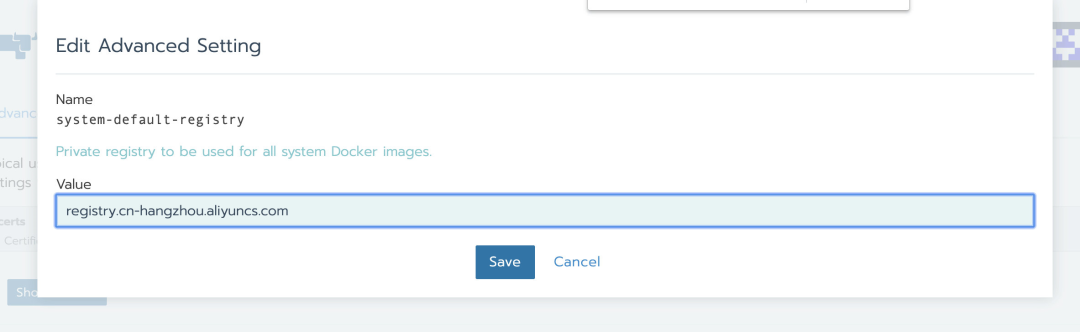
system-default-registry的参数设置请参考官方文档:
https://rancher2.docs.rancher.cn/docs/admin-settings/config-private-registry/_index
接下来,我们按照官方文档添加自定义集群(https://rancher2.docs.rancher.cn/docs/cluster-provisioning/rke-clusters/custom-nodes/_index/),只需要等待集群启动成功即可。下图中列出了system-project中所有的workload,这些workload均使用了阿里云的镜像仓库registry.cn-hangzhou.aliyuncs.com内的镜像:
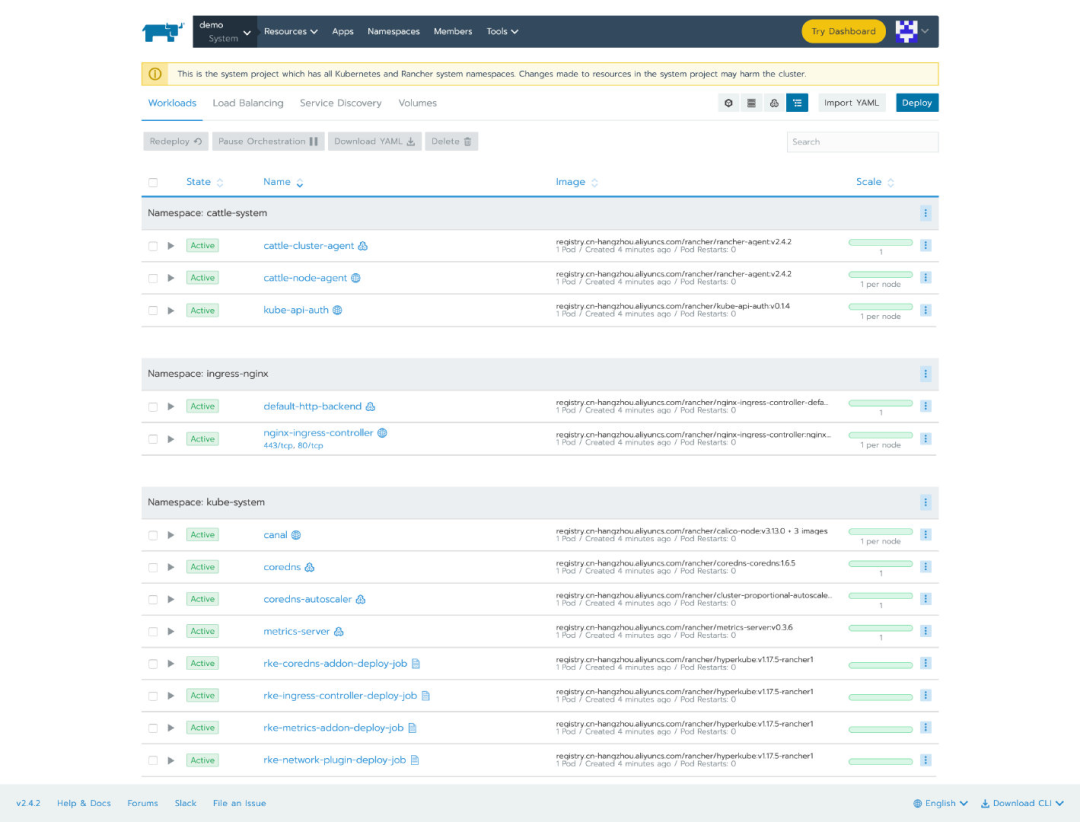
仅需3-5分钟就能完成整个集群的搭建,将大幅节省时间,提高工作效率。
使用码云代替Github
Rancher默认使用Github上的repo作为应用商店的URL,如果出现timeout情况,可以将Catalog URL替换成码云的地址。
每个repo的对应关系如下:
应用商店地址 | RANCHER REPO地址 | GITEE地址 |
https://git.rancher.io/helm3-charts | https://github.com/rancher/helm3-charts | https://gitee.com/rancher/helm3-charts |
https://git.rancher.io/charts | https://github.com/rancher/charts | https://gitee.com/rancher/charts |
https://git.rancher.io/system-charts | https://github.com/rancher/system-charts | https://gitee.com/rancher/system-charts |
那么如何修改Catalog URL呢?
导航到全局或项目级别的Apps -> Manage Catalogs
点击列表右侧的省略号 -> Edit
将Catalog URL替换成码云中的地址即可,点击Save
此时,对应的Catalog的状态变为Refreshed,等待其变为Active之后即可正常使用
同步说明
以上提到的资源,我们会通过定时任务每天从Github上拉取,同步到国内。也许存在延迟或同步失败的情况,如果发现任何问题,欢迎在微信技术交流群或官方论坛中向我们反馈。如果还没有加入微信群,欢迎扫描文末二维码添加小助手为好友,她将邀你进群。

其他资源
About Rancher Labs
Rancher Labs由CloudStack之父梁胜创建。旗舰产品Rancher是一个开源的企业级Kubernetes管理平台,实现了Kubernetes集群在混合云+本地数据中心的集中部署与管理。Rancher一向因操作体验的直观、极简备受用户青睐,被Forrester评为2018年全球容器管理平台领导厂商,被Gartner评为2017年全球最酷的云基础设施供应商。
目前Rancher在全球拥有超过三亿的核心镜像下载量,并拥有包括CCTV、中国联通、华为、中国平安、中国人寿、厦门航空、上汽集团、丰田、中联重科、迪斯尼、IBM、Cisco、Nvidia、辉瑞制药等全球著名企业在内的共40000家企业客户。
Rancher已于2020年2月完成了中国本土化和国产化,从2020年3月1日开始,Rancher在中国大陆及港澳台地区的业务,均由全中资公司云澈信息技术(深圳)有限公司承载,并面向中国企业客户提供中国企业版Rancher产品和中国版k3s边缘计算平台。
点击【阅读原文】,了解Rancher如何上生产
