



基本环境:
操作系统:ubuntu20.04.5
磁盘空间至少剩余60G以上。本次增加了一块100G磁盘。
cpu至少2个,本次给了4个
内存至少8g,本次给了16G
root@cp01:~# apt install net-tools -y
Reading package lists... Done
Building dependency tree
Reading state information... Done
The following NEW packages will be installed:
  net-tools
0 upgraded, 1 newly installed, 0 to remove and 18 not upgraded.
Need to get 196 kB of archives.
After this operation, 864 kB of additional disk space will be used.
Get:1 http://archive.ubuntu.com/ubuntu focal/main amd64 net-tools amd64 1.60+git20180626.aebd88e-1ubuntu1 [196 kB]
Fetched 196 kB in 2s (99.4 kB/s)

Selecting previously unselected package net-tools.
(Reading database ... 109507 files and directories currently installed.)
Preparing to unpack .../net-tools_1.60+git20180626.aebd88e-1ubuntu1_amd64.deb ...
Unpacking net-tools (1.60+git20180626.aebd88e-1ubuntu1) ...
Setting up net-tools (1.60+git20180626.aebd88e-1ubuntu1) ...
Processing triggers for man-db (2.9.1-1) ...

root@cp01:~# apt install wget -y
Reading package lists... Done
Building dependency tree
Reading state information... Done
wget is already the newest version (1.20.3-1ubuntu2).
wget set to manually installed.
0 upgraded, 0 newly installed, 0 to remove and 18 not upgraded.
root@cp01:~# history|grep wget
   33  apt install wget -y
   34  history|grep wget
root@cp01:~# ls
snap
root@cp01:~# pwd
/root
root@cp01:~# ls
snap
root@cp01:~# df -h
Filesystem                         Size  Used Avail Use% Mounted on
udev                               7.8G     0  7.8G   0% /dev
tmpfs                              1.6G  1.0M  1.6G   1% /run
/dev/mapper/ubuntu--vg-ubuntu--lv   24G  9.7G   13G  44% /
tmpfs                              7.9G     0  7.9G   0% /dev/shm
tmpfs                              5.0M     0  5.0M   0% /run/lock
tmpfs                              7.9G     0  7.9G   0% /sys/fs/cgroup
/dev/loop1                          64M   64M     0 100% /snap/core20/1634
/dev/loop0                          64M   64M     0 100% /snap/core20/1623
/dev/loop2                          68M   68M     0 100% /snap/lxd/22753
/dev/sda2                          2.0G  205M  1.6G  12% /boot
/dev/loop3                          48M   48M     0 100% /snap/snapd/17336
/dev/loop4                          48M   48M     0 100% /snap/snapd/16778
tmpfs                              1.6G     0  1.6G   0% /run/user/0
root@cp01:~# vgs
  VG        #PV #LV #SN Attr   VSize   VFree
  ubuntu-vg   1   1   0 wz--n- <48.00g 24.00g
root@cp01:~# pvs
  PV         VG        Fmt  Attr PSize   PFree
  /dev/sda3  ubuntu-vg lvm2 a--  <48.00g 24.00g
root@cp01:~# lsblk
NAME                      MAJ:MIN RM  SIZE RO TYPE MOUNTPOINT
loop0                       7:0    0 63.2M  1 loop /snap/core20/1623
loop1                       7:1    0 63.2M  1 loop /snap/core20/1634
loop2                       7:2    0 67.8M  1 loop /snap/lxd/22753
loop3                       7:3    0   48M  1 loop /snap/snapd/17336
loop4                       7:4    0   48M  1 loop /snap/snapd/16778
sda                         8:0    0   50G  0 disk
├─sda1                      8:1    0    1M  0 part
├─sda2                      8:2    0    2G  0 part /boot
└─sda3                      8:3    0   48G  0 part
  └─ubuntu--vg-ubuntu--lv 253:0    0   24G  0 lvm  /
sdb                         8:16   0  100G  0 disk
sdc                         8:32   0    5G  0 disk
sr0                        11:0    1  1.3G  0 rom
root@cp01:~# pvcreate /dev/sdb
  Physical volume "/dev/sdb" successfully created.
root@cp01:~# vgextend ubuntu-vg /dev/sdb
  Volume group "ubuntu-vg" successfully extended
root@cp01:~# lvextend -l +100%FREE /dev/mapper/ubuntu--vg-ubuntu--lv
  Size of logical volume ubuntu-vg/ubuntu-lv changed from <24.00 GiB (6143 extents) to 147.99 GiB (37886 extents).
  Logical volume ubuntu-vg/ubuntu-lv successfully resized.
root@cp01:~# df -h
Filesystem                         Size  Used Avail Use% Mounted on
udev                               7.8G     0  7.8G   0% /dev
tmpfs                              1.6G  1.0M  1.6G   1% /run
/dev/mapper/ubuntu--vg-ubuntu--lv   24G  9.7G   13G  44% /
tmpfs                              7.9G     0  7.9G   0% /dev/shm
tmpfs                              5.0M     0  5.0M   0% /run/lock
tmpfs                              7.9G     0  7.9G   0% /sys/fs/cgroup
/dev/loop1                          64M   64M     0 100% /snap/core20/1634
/dev/loop0                          64M   64M     0 100% /snap/core20/1623
/dev/loop2                          68M   68M     0 100% /snap/lxd/22753
/dev/sda2                          2.0G  205M  1.6G  12% /boot
/dev/loop3                          48M   48M     0 100% /snap/snapd/17336
/dev/loop4                          48M   48M     0 100% /snap/snapd/16778
tmpfs                              1.6G     0  1.6G   0% /run/user/0
root@cp01:~# df -hT
Filesystem                        Type      Size  Used Avail Use% Mounted on
udev                              devtmpfs  7.8G     0  7.8G   0% /dev
tmpfs                             tmpfs     1.6G  1.0M  1.6G   1% /run
/dev/mapper/ubuntu--vg-ubuntu--lv ext4       24G  9.7G   13G  44% /
tmpfs                             tmpfs     7.9G     0  7.9G   0% /dev/shm
tmpfs                             tmpfs     5.0M     0  5.0M   0% /run/lock
tmpfs                             tmpfs     7.9G     0  7.9G   0% /sys/fs/cgroup
/dev/loop1                        squashfs   64M   64M     0 100% /snap/core20/1634
/dev/loop0                        squashfs   64M   64M     0 100% /snap/core20/1623
/dev/loop2                        squashfs   68M   68M     0 100% /snap/lxd/22753
/dev/sda2                         ext4      2.0G  205M  1.6G  12% /boot
/dev/loop3                        squashfs   48M   48M     0 100% /snap/snapd/17336
/dev/loop4                        squashfs   48M   48M     0 100% /snap/snapd/16778
tmpfs                             tmpfs     1.6G     0  1.6G   0% /run/user/0
root@cp01:~# resize2fs /dev/mapper/ubuntu--vg-ubuntu--lv
resize2fs 1.45.5 (07-Jan-2020)
Filesystem at /dev/mapper/ubuntu--vg-ubuntu--lv is mounted on /; on-line resizing required
old_desc_blocks = 3, new_desc_blocks = 19
The filesystem on /dev/mapper/ubuntu--vg-ubuntu--lv is now 38795264 (4k) blocks long.

root@cp01:~# df -h
Filesystem                         Size  Used Avail Use% Mounted on
udev                               7.8G     0  7.8G   0% /dev
tmpfs                              1.6G  1.0M  1.6G   1% /run
/dev/mapper/ubuntu--vg-ubuntu--lv  146G  9.7G  130G   7% /
tmpfs                              7.9G     0  7.9G   0% /dev/shm
tmpfs                              5.0M     0  5.0M   0% /run/lock
tmpfs                              7.9G     0  7.9G   0% /sys/fs/cgroup
/dev/loop1                          64M   64M     0 100% /snap/core20/1634
/dev/loop0                          64M   64M     0 100% /snap/core20/1623
/dev/loop2                          68M   68M     0 100% /snap/lxd/22753
/dev/sda2                          2.0G  205M  1.6G  12% /boot
/dev/loop3                          48M   48M     0 100% /snap/snapd/17336
/dev/loop4                          48M   48M     0 100% /snap/snapd/16778
tmpfs                              1.6G     0  1.6G   0% /run/user/0
root@cp01:~# vgs
  VG        #PV #LV #SN Attr   VSize   VFree
  ubuntu-vg   2   1   0 wz--n- 147.99g    0
root@cp01:~# scp 192.168.207.151:/root/o.tar.gz ./
The authenticity of host '192.168.207.151 (192.168.207.151)' can't be established.
ECDSA key fingerprint is SHA256:vwNNCwkWXAPKJYzeJBBonaQvuVOQocwiRHvVbEaEAuw.
Are you sure you want to continue connecting (yes/no/[fingerprint])? yes
Warning: Permanently added '192.168.207.151' (ECDSA) to the list of known hosts.
root@192.168.207.151's password:
o.tar.gz                                                                                                                                                                   100%  246MB  80.6MB/s   00:03
root@cp01:~# free -g
              total        used        free      shared  buff/cache   available
Mem:             15           0          14           0           0          15
Swap:             3           0           3
root@cp01:~# lscpu|grep CPU
CPU op-mode(s):                  32-bit, 64-bit
CPU(s):                          4
On-line CPU(s) list:             0-3
CPU family:                      15
CPU MHz:                         1699.998
NUMA node0 CPU(s):               0-3
Vulnerability Mds:               Vulnerable: Clear CPU buffers attempted, no microcode; SMT Host state unknown
root@cp01:~# lsmem
RANGE                                 SIZE  STATE REMOVABLE  BLOCK
0x0000000000000000-0x00000000bfffffff   3G online       yes   0-23
0x0000000100000000-0x000000043fffffff  13G online       yes 32-135

Memory block size:       128M
Total online memory:      16G
Total offline memory:      0B
root@cp01:~# tar -zxvf o.tar.gz
oceanbase-all-in-one/
oceanbase-all-in-one/README.md
省略解压...
安装说明:
参考之前centos7.9上安装的记录https://www.modb.pro/db/544245,之前出现过错误:
obproxy-ce出现failed。
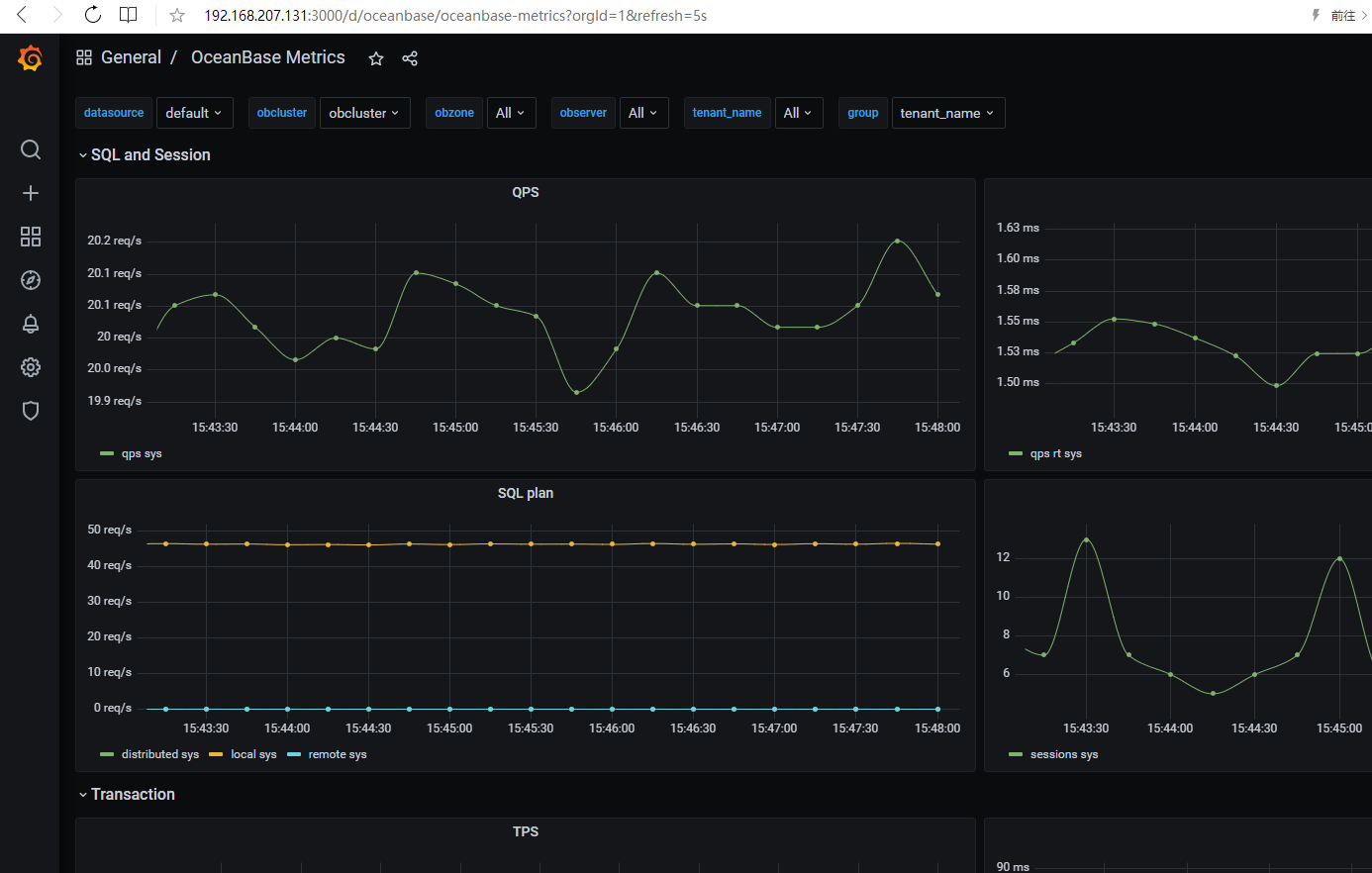
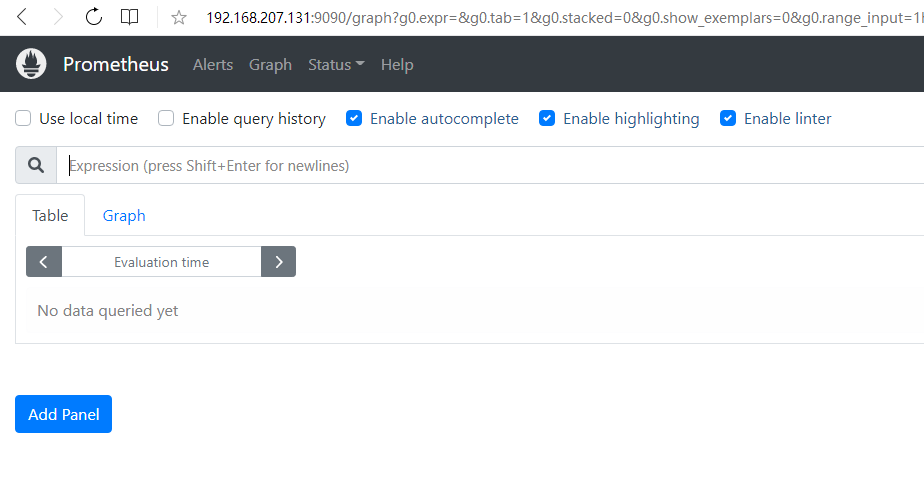
这次在ubuntu20.04系统上很顺利的完成了安装。
唯一的告警提示就是修改/etc/sysctl.conf增加fs.aio-max-nr=1048576
安装步骤:
1.下载介质及安装软件:
wget https://obbusiness-private.oss-cn-shanghai.aliyuncs.com/download-center/opensource/oceanbase-all-in-one/7/x86_64/oceanbase-all-in-one.4.0.0.0-beta-100120221102135736.el7.x86_64.tar.gz
tar -zxvf oceanbase-all-in-one.4.0.0.0-beta-100120221102135736.el7.x86_64.tar.gz
cd oceanbase-all-in-one/bin
./install.sh
2.安装单机OB:
obd demo
3.根据信息取消warning(实际应该先做完,再安装OB)
vi /etc/sysctl.conf
增加fs.aio-max-nr=1048576
安装记录:
root@cp01:~# cd oceanbase-all-in-one/bin
root@cp01:~/oceanbase-all-in-one/bin# ls
env.sh  install.sh  uninstall.sh
root@cp01:~/oceanbase-all-in-one/bin# ./install.sh
name: grafana
version: 7.5.17
release:1
arch: x86_64
md5: 1bf1f338d3a3445d8599dc6902e7aeed4de4e0d6
add /root/oceanbase-all-in-one/rpms/grafana-7.5.17-1.el7.x86_64.rpm to local mirror
name: obagent
version: 1.2.0
release:4.el7
arch: x86_64
md5: 0e8f5ee68c337ea28514c9f3f820ea546227fa7e
add /root/oceanbase-all-in-one/rpms/obagent-1.2.0-4.el7.x86_64.rpm to local mirror
name: obproxy-ce
version: 4.0.0
release:5.el7
arch: x86_64
md5: de53232a951184fad75b15884458d85e31d2f6c3
add /root/oceanbase-all-in-one/rpms/obproxy-ce-4.0.0-5.el7.x86_64.rpm to local mirror
name: oceanbase-ce
version: 4.0.0.0
release:100000272022110114.el7
arch: x86_64
md5: 42611dc51ca9bb28f36e60e4406ceea4a74914c7
add /root/oceanbase-all-in-one/rpms/oceanbase-ce-4.0.0.0-100000272022110114.el7.x86_64.rpm to local mirror
name: oceanbase-ce-libs
version: 4.0.0.0
release:100000272022110114.el7
arch: x86_64
md5: 188919f8128394bf9b62e3989220ded05f1d14da
add /root/oceanbase-all-in-one/rpms/oceanbase-ce-libs-4.0.0.0-100000272022110114.el7.x86_64.rpm to local mirror
name: prometheus
version: 2.37.1
release:10000102022110211.el7
arch: x86_64
md5: 58913c7606f05feb01bc1c6410346e5fc31cf263
add /root/oceanbase-all-in-one/rpms/prometheus-2.37.1-10000102022110211.el7.x86_64.rpm to local mirror
Disable remote ok

#####################################################################
 Install Finished
=====================================================================
Setup Environment:     source ~/.oceanbase-all-in-one/bin/env.sh
Quick Start:           obd demo
More Details:          obd -h
=====================================================================
root@cp01:~/oceanbase-all-in-one/bin# source ~/.oceanbase-all-in-one/bin/env.sh
root@cp01:~/oceanbase-all-in-one/bin# obd demo
[WARN] Use centos 7 remote mirror repository for ubuntu 20.04
Package oceanbase-ce-4.0.0.0-100000272022110114.el7 is available.
[WARN] Use centos 7 remote mirror repository for ubuntu 20.04
Package grafana-7.5.17-1 is available.
[WARN] Use centos 7 remote mirror repository for ubuntu 20.04
Package obproxy-ce-4.0.0-5.el7 is available.
[WARN] Use centos 7 remote mirror repository for ubuntu 20.04
Package obagent-1.2.0-4.el7 is available.
[WARN] Use centos 7 remote mirror repository for ubuntu 20.04
Package prometheus-2.37.1-10000102022110211.el7 is available.
install oceanbase-ce-4.0.0.0 for local ok
install grafana-7.5.17 for local ok
install obproxy-ce-4.0.0 for local ok
install obagent-1.2.0 for local ok
install prometheus-2.37.1 for local ok
Cluster param config check ok
Open ssh connection ok
Generate observer configuration ok
Generate grafana configuration ok
Generate obproxy configuration ok
Generate obagent configuration ok
Generate prometheus configuration ok
[WARN] Use centos 7 remote mirror repository for ubuntu 20.04
[WARN] Use centos 7 remote mirror repository for ubuntu 20.04
[WARN] Use centos 7 remote mirror repository for ubuntu 20.04
[WARN] Use centos 7 remote mirror repository for ubuntu 20.04
[WARN] Use centos 7 remote mirror repository for ubuntu 20.04
install oceanbase-ce-4.0.0.0 for local ok
install grafana-7.5.17 for local ok
install obproxy-ce-4.0.0 for local ok
install obagent-1.2.0 for local ok
install prometheus-2.37.1 for local ok
+--------------------------------------------------------------------------------------------+
|                                          Packages                                          |
+--------------+---------+------------------------+------------------------------------------+
| Repository   | Version | Release                | Md5                                      |
+--------------+---------+------------------------+------------------------------------------+
| oceanbase-ce | 4.0.0.0 | 100000272022110114.el7 | 42611dc51ca9bb28f36e60e4406ceea4a74914c7 |
| grafana      | 7.5.17  | 1                      | 1bf1f338d3a3445d8599dc6902e7aeed4de4e0d6 |
| obproxy-ce   | 4.0.0   | 5.el7                  | de53232a951184fad75b15884458d85e31d2f6c3 |
| obagent      | 1.2.0   | 4.el7                  | 0e8f5ee68c337ea28514c9f3f820ea546227fa7e |
| prometheus   | 2.37.1  | 10000102022110211.el7  | 58913c7606f05feb01bc1c6410346e5fc31cf263 |
+--------------+---------+------------------------+------------------------------------------+
Repository integrity check ok
Parameter check ok
Open ssh connection ok
Cluster status check ok
Initializes observer work home ok
Initializes grafana work home ok
Initializes obproxy work home ok
Initializes obagent work home ok
Initializes prometheus work home ok
Remote oceanbase-ce-4.0.0.0-100000272022110114.el7-42611dc51ca9bb28f36e60e4406ceea4a74914c7 repository install ok
Remote oceanbase-ce-4.0.0.0-100000272022110114.el7-42611dc51ca9bb28f36e60e4406ceea4a74914c7 repository lib check !!
Remote grafana-7.5.17-1-1bf1f338d3a3445d8599dc6902e7aeed4de4e0d6 repository install ok
Remote grafana-7.5.17-1-1bf1f338d3a3445d8599dc6902e7aeed4de4e0d6 repository lib check ok
Remote obproxy-ce-4.0.0-5.el7-de53232a951184fad75b15884458d85e31d2f6c3 repository install ok
Remote obproxy-ce-4.0.0-5.el7-de53232a951184fad75b15884458d85e31d2f6c3 repository lib check ok
Remote obagent-1.2.0-4.el7-0e8f5ee68c337ea28514c9f3f820ea546227fa7e repository install ok
Remote obagent-1.2.0-4.el7-0e8f5ee68c337ea28514c9f3f820ea546227fa7e repository lib check ok
Remote prometheus-2.37.1-10000102022110211.el7-58913c7606f05feb01bc1c6410346e5fc31cf263 repository install ok
Remote prometheus-2.37.1-10000102022110211.el7-58913c7606f05feb01bc1c6410346e5fc31cf263 repository lib check ok
Try to get lib-repository
[WARN] Use centos 7 remote mirror repository for ubuntu 20.04
Package oceanbase-ce-libs-4.0.0.0-100000272022110114.el7 is available.
install oceanbase-ce-libs-4.0.0.0 for local ok
Remote oceanbase-ce-libs-4.0.0.0-100000272022110114.el7-188919f8128394bf9b62e3989220ded05f1d14da repository install ok
Remote oceanbase-ce-4.0.0.0-100000272022110114.el7-42611dc51ca9bb28f36e60e4406ceea4a74914c7 repository lib check ok
demo deployed
Get local repositories ok
Search plugins ok
Open ssh connection ok
Load cluster param plugin ok
Check before start observer ok
[WARN] (127.0.0.1) The recommended value of fs.aio-max-nr is 1048576 (Current value: 65536)
[WARN] (127.0.0.1) failed to get open files
[WARN] (127.0.0.1) failed to get max user processes
[WARN] (127.0.0.1) clog and data use the same disk (/)

Check before start obproxy ok
Check before start obagent ok
Check before start prometheus ok
Check before start grafana ok
Start observer ok
observer program health check ok
Connect to observer ok
Initialize cluster ok
Start obproxy ok
obproxy program health check ok
Connect to obproxy ok
Initialize cluster ok
Start obagent ok
obagent program health check ok
Start promethues ok
prometheus program health check ok
Connect to Prometheus ok
Initialize cluster ok
Start grafana ok
grafana program health check ok
Connect to grafana ok
Initialize cluster ok
Wait for observer init ok
+---------------------------------------------+
|                   observer                  |
+-----------+---------+------+-------+--------+
| ip        | version | port | zone  | status |
+-----------+---------+------+-------+--------+
| 127.0.0.1 | 4.0.0.0 | 2881 | zone1 | ACTIVE |
+-----------+---------+------+-------+--------+
obclient -h127.0.0.1 -P2881 -uroot -Doceanbase

+---------------------------------------------+
|                   obproxy                   |
+-----------+------+-----------------+--------+
| ip        | port | prometheus_port | status |
+-----------+------+-----------------+--------+
| 127.0.0.1 | 2883 | 2884            | active |
+-----------+------+-----------------+--------+
obclient -h127.0.0.1 -P2883 -uroot -Doceanbase
+-----------------------------------------------------+
|                       obagent                       |
+-----------------+-------------+------------+--------+
| ip              | server_port | pprof_port | status |
+-----------------+-------------+------------+--------+
| 192.168.207.131 | 8088        | 8089       | active |
+-----------------+-------------+------------+--------+
+--------------------------------------------------------+
|                       prometheus                       |
+-----------------------------+------+----------+--------+
| url                         | user | password | status |
+-----------------------------+------+----------+--------+
| http://192.168.207.131:9090 |      |          | active |
+-----------------------------+------+----------+--------+
+----------------------------------------------------------------------+
|                               grafana                                |
+-----------------------------------------+-------+-----------+--------+
| url                                     | user  | password  | status |
+-----------------------------------------+-------+-----------+--------+
| http://192.168.207.131:3000/d/oceanbase | admin | oceanbase | active |
+-----------------------------------------+-------+-----------+--------+
demo running
root@cp01:~/oceanbase-all-in-one/bin# vi /etc/sysctl.conf
#
# /etc/sysctl.conf - Configuration file for setting system variables
# See /etc/sysctl.d/ for additional system variables.
# See sysctl.conf (5) for information.
#

#kernel.domainname = example.com

# Uncomment the following to stop low-level messages on console
#kernel.printk = 3 4 1 3

##############################################################3
# Functions previously found in netbase
#

# Uncomment the next two lines to enable Spoof protection (reverse-path filter)
# Turn on Source Address Verification in all interfaces to
# prevent some spoofing attacks
#net.ipv4.conf.default.rp_filter=1
#net.ipv4.conf.all.rp_filter=1

# Uncomment the next line to enable TCP/IP SYN cookies
# See http://lwn.net/Articles/277146/
# Note: This may impact IPv6 TCP sessions too
#net.ipv4.tcp_syncookies=1

# Uncomment the next line to enable packet forwarding for IPv4
#net.ipv4.ip_forward=1

# Uncomment the next line to enable packet forwarding for IPv6
#  Enabling this option disables Stateless Address Autoconfiguration
#  based on Router Advertisements for this host
#net.ipv6.conf.all.forwarding=1


###################################################################
# Additional settings - these settings can improve the network
# security of the host and prevent against some network attacks
# including spoofing attacks and man in the middle attacks through
# redirection. Some network environments, however, require that these
# settings are disabled so review and enable them as needed.
#
# Do not accept ICMP redirects (prevent MITM attacks)
#net.ipv4.conf.all.accept_redirects = 0
#net.ipv6.conf.all.accept_redirects = 0
# _or_
# Accept ICMP redirects only for gateways listed in our default
# gateway list (enabled by default)
# net.ipv4.conf.all.secure_redirects = 1
#
# Do not send ICMP redirects (we are not a router)
#net.ipv4.conf.all.send_redirects = 0
#
# Do not accept IP source route packets (we are not a router)
#net.ipv4.conf.all.accept_source_route = 0
#net.ipv6.conf.all.accept_source_route = 0
#
# Log Martian Packets
#net.ipv4.conf.all.log_martians = 1
#

###################################################################
# Magic system request Key
# 0=disable, 1=enable all, >1 bitmask of sysrq functions
# See https://www.kernel.org/doc/html/latest/admin-guide/sysrq.html
# for what other values do
#kernel.sysrq=438
fs.aio-max-nr=1048576
~
"/etc/sysctl.conf" 68L, 2372C written
root@cp01:~/oceanbase-all-in-one/bin# sysctl -p
fs.aio-max-nr = 1048576
root@cp01:~/oceanbase-all-in-one/bin# obclient -h127.0.0.1 -P2883 -uroot -Doceanbase
Reading table information for completion of table and column names
You can turn off this feature to get a quicker startup with -A

Welcome to the OceanBase.  Commands end with ; or \g.
Your OceanBase connection id is 1
Server version: OceanBase_CE 4.0.0.0 (r100000272022110114-6af7f9ae79cd0ecbafd4b1b88e2886ccdba0c3be) (Built Nov  1 2022 14:57:18)

Copyright (c) 2000, 2018, OB Corporation Ab and others.

Type 'help;' or '\h' for help. Type '\c' to clear the current input statement.

obclient [oceanbase]> \q
Bye
root@cp01:~/oceanbase-all-in-one/bin# obclient -h127.0.0.1 -P2881 -uroot -Doceanbase
Reading table information for completion of table and column names
You can turn off this feature to get a quicker startup with -A

Welcome to the OceanBase.  Commands end with ; or \g.
Your OceanBase connection id is 3221488893
Server version: OceanBase_CE 4.0.0.0 (r100000272022110114-6af7f9ae79cd0ecbafd4b1b88e2886ccdba0c3be) (Built Nov  1 2022 14:57:18)

Copyright (c) 2000, 2018, OB Corporation Ab and others.

Type 'help;' or '\h' for help. Type '\c' to clear the current input statement.

obclient [oceanbase]> \q
Bye
root@cp01:~/oceanbase-all-in-one/bin# netstat -tunlp|grep LISTEN
tcp        0      0 0.0.0.0:2881            0.0.0.0:*               LISTEN      5489/observer
tcp        0      0 0.0.0.0:2881            0.0.0.0:*               LISTEN      5489/observer
tcp        0      0 0.0.0.0:2882            0.0.0.0:*               LISTEN      5489/observer
tcp        0      0 0.0.0.0:2883            0.0.0.0:*               LISTEN      7564/obproxy
tcp        0      0 0.0.0.0:2884            0.0.0.0:*               LISTEN      7564/obproxy
tcp        0      0 0.0.0.0:111             0.0.0.0:*               LISTEN      1/init
tcp        0      0 127.0.0.53:53           0.0.0.0:*               LISTEN      731/systemd-resolve
tcp        0      0 0.0.0.0:22              0.0.0.0:*               LISTEN      785/sshd: /usr/sbin
tcp6       0      0 :::9090                 :::*                    LISTEN      6235/prometheus
tcp6       0      0 :::111                  :::*                    LISTEN      1/init
tcp6       0      0 :::22                   :::*                    LISTEN      785/sshd: /usr/sbin
tcp6       0      0 :::3000                 :::*                    LISTEN      6284/grafana-server
tcp6       0      0 :::8088                 :::*                    LISTEN      6138/monagent
tcp6       0      0 :::8089                 :::*                    LISTEN      6138/monagent
root@cp01:~/oceanbase-all-in-one/bin# free -g
              total        used        free      shared  buff/cache   available
Mem:             15           2          10           0           2          12
Swap:             3           0           3
root@cp01:~/oceanbase-all-in-one/bin# obclient -h127.0.0.1 -uroot@sys#demo -P2883 -c -A -Doceanbase
ERROR 2014 (HY000): Commands out of sync; you can't run this command now
root@cp01:~/oceanbase-all-in-one/bin# obclient -h127.0.0.1 -uroot@sys -P2881 -c -A -Doceanbase
Welcome to the OceanBase.  Commands end with ; or \g.
Your OceanBase connection id is 3221491355
Server version: OceanBase_CE 4.0.0.0 (r100000272022110114-6af7f9ae79cd0ecbafd4b1b88e2886ccdba0c3be) (Built Nov  1 2022 14:57:18)

Copyright (c) 2000, 2018, OB Corporation Ab and others.

Type 'help;' or '\h' for help. Type '\c' to clear the current input statement.

obclient [oceanbase]> \q
Bye
root@cp01:~/oceanbase-all-in-one/bin# obclient -h127.0.0.1 -P2883 -uroot@sys#demo -A -Doceanbase
ERROR 2014 (HY000): Commands out of sync; you can't run this command now
root@cp01:~/oceanbase-all-in-one/bin# obd cluster list
+--------------------------------------------------+
|                   Cluster List                   |
+------+-------------------------+-----------------+
| Name | Configuration Path      | Status (Cached) |
+------+-------------------------+-----------------+
| demo | /root/.obd/cluster/demo | running         |
+------+-------------------------+-----------------+
root@cp01:~/oceanbase-all-in-one/bin# obd cluster --help
Usage: obd cluster <command> [options]

Available commands:

autodeploy     Deploy a cluster automatically by using a simple configuration file.

check4ocp      Check Whether OCP Can Take Over Configurations in Use

chst           Change Deployment Configuration Style

deploy         Deploy a cluster by using the current deploy configuration or a deploy yaml file.

destroy        Destroy a deployed cluster.

display        Display the information for a cluster.

edit-config    Edit the configuration file for a specific deployment.

list           List all the deployments.

redeploy       Redeploy a started cluster.

reinstall      Reinstall a deployed component

reload         Reload a started cluster.

restart        Restart a started cluster.

start          Start a deployed cluster.

stop           Stop a started cluster.

tenant         Create or drop a tenant.

upgrade        Upgrade a cluster.


Options:
  -h, --help     Show help and exit.
  -v, --verbose  Activate verbose output.

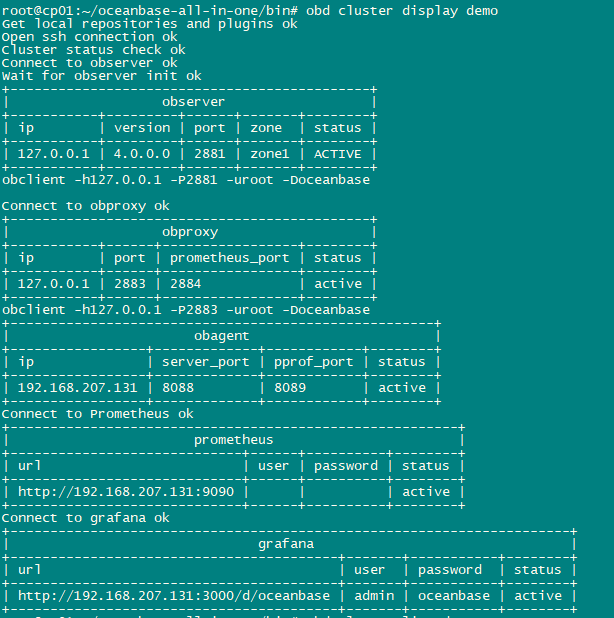
root@cp01:~/oceanbase-all-in-one/bin# obd cluster display demo
Get local repositories and plugins ok
Open ssh connection ok
Cluster status check ok
Connect to observer ok
Wait for observer init ok
+---------------------------------------------+
|                   observer                  |
+-----------+---------+------+-------+--------+
| ip        | version | port | zone  | status |
+-----------+---------+------+-------+--------+
| 127.0.0.1 | 4.0.0.0 | 2881 | zone1 | ACTIVE |
+-----------+---------+------+-------+--------+
obclient -h127.0.0.1 -P2881 -uroot -Doceanbase

Connect to obproxy ok
+---------------------------------------------+
|                   obproxy                   |
+-----------+------+-----------------+--------+
| ip        | port | prometheus_port | status |
+-----------+------+-----------------+--------+
| 127.0.0.1 | 2883 | 2884            | active |
+-----------+------+-----------------+--------+
obclient -h127.0.0.1 -P2883 -uroot -Doceanbase
+-----------------------------------------------------+
|                       obagent                       |
+-----------------+-------------+------------+--------+
| ip              | server_port | pprof_port | status |
+-----------------+-------------+------------+--------+
| 192.168.207.131 | 8088        | 8089       | active |
+-----------------+-------------+------------+--------+
Connect to Prometheus ok
+--------------------------------------------------------+
|                       prometheus                       |
+-----------------------------+------+----------+--------+
| url                         | user | password | status |
+-----------------------------+------+----------+--------+
| http://192.168.207.131:9090 |      |          | active |
+-----------------------------+------+----------+--------+
Connect to grafana ok
+----------------------------------------------------------------------+
|                               grafana                                |
+-----------------------------------------+-------+-----------+--------+
| url                                     | user  | password  | status |
+-----------------------------------------+-------+-----------+--------+
| http://192.168.207.131:3000/d/oceanbase | admin | oceanbase | active |
+-----------------------------------------+-------+-----------+--------+
root@cp01:~/oceanbase-all-in-one/bin# obd cluster list demo
Usage: obd cluster list <deploy name> [options]

Options:
  -h, --help     Show help and exit.
  -v, --verbose  Activate verbose output.

root@cp01:~/oceanbase-all-in-one/bin# obd cluster list -v
- open /root/.obd/version for a+
- mkdir /root/.obd/lock/
- try to get share lock /root/.obd/lock/global
- share lock `/root/.obd/lock/global`, count 1
- cmd: []
- opts: {}
- Get deploy list
- mkdir /root/.obd/cluster/
- mkdir /root/.obd/config_parser/
- try to get share lock /root/.obd/lock/deploy_demo
- share lock `/root/.obd/lock/deploy_demo`, count 1
+--------------------------------------------------+
|                   Cluster List                   |
+------+-------------------------+-----------------+
| Name | Configuration Path      | Status (Cached) |
+------+-------------------------+-----------------+
| demo | /root/.obd/cluster/demo | running         |
+------+-------------------------+-----------------+
- share lock /root/.obd/lock/deploy_demo release, count 0
- unlock /root/.obd/lock/deploy_demo
- share lock /root/.obd/lock/global release, count 0
- unlock /root/.obd/lock/global
root@cp01:~/oceanbase-all-in-one/bin# obclient -h192.168.207.131 -P2881 -uroot -Doceanbase
Reading table information for completion of table and column names
You can turn off this feature to get a quicker startup with -A

Welcome to the OceanBase.  Commands end with ; or \g.
Your OceanBase connection id is 3221495486
Server version: OceanBase_CE 4.0.0.0 (r100000272022110114-6af7f9ae79cd0ecbafd4b1b88e2886ccdba0c3be) (Built Nov  1 2022 14:57:18)

Copyright (c) 2000, 2018, OB Corporation Ab and others.

Type 'help;' or '\h' for help. Type '\c' to clear the current input statement.

obclient [oceanbase]> show databases;
+--------------------+
| Database           |
+--------------------+
| information_schema |
| LBACSYS            |
| mysql              |
| oceanbase          |
| ORAAUDITOR         |
| SYS                |
| test               |
+--------------------+
7 rows in set (0.009 sec)

obclient [oceanbase]>
后续将创建租户进行测试。
参考文档:
https://www.oceanbase.com/docs/community-observer-cn-10000000000901197
最后修改时间:2022-11-09 16:02:39
「喜欢这篇文章,您的关注和赞赏是给作者最好的鼓励」
关注作者
【版权声明】本文为墨天轮用户原创内容,转载时必须标注文章的来源(墨天轮),文章链接,文章作者等基本信息,否则作者和墨天轮有权追究责任。如果您发现墨天轮中有涉嫌抄袭或者侵权的内容,欢迎发送邮件至:contact@modb.pro进行举报,并提供相关证据,一经查实,墨天轮将立刻删除相关内容。
