



习目的
本次练习目的是通过 OceanBase Docker 容器,快速的体验 OceanBase 的 自动化部署过程,以及了解 OceanBase 集群安装成功后的目录特点和使用方法。
练习条件
- 有笔记本或服务器,内存至少12G 。
- 操作系统不限,能安装 Docker 环境即可。
练习内容
请记录并分享下列内容:
- (必选)下载Docker 镜像:OceanBase 官方社区版镜像 53 。
- (必选)使用 OBD 命令完成后续的 OceanBase 集群部署。
- (必选)创建一个业务租户、一个业务数据库,以及一些表等。
一、环境准备
我使用的是wsl2+docker desktop的环境,docker已部署完成
# docker version
Client: Docker Engine - Community
 Cloud integration: v1.0.29
 Version:           20.10.20
 API version:       1.41
 Go version:        go1.18.7
 Git commit:        9fdeb9c
 Built:             Tue Oct 18 18:20:44 2022
 OS/Arch:           linux/amd64
 Context:           default
 Experimental:      true

Server: Docker Desktop
 Engine:
  Version:          20.10.20
  API version:      1.41 (minimum version 1.12)
  Go version:       go1.18.7
  Git commit:       03df974
  Built:            Tue Oct 18 18:18:35 2022
  OS/Arch:          linux/amd64
  Experimental:     false
 containerd:
  Version:          1.6.8
  GitCommit:        9cd3357b7fd7218e4aec3eae239db1f68a5a6ec6
 runc:
  Version:          1.1.4
  GitCommit:        v1.1.4-0-g5fd4c4d
 docker-init:
  Version:          0.19.0
  GitCommit:        de40ad0
二、下载并安装oceanbase镜像
下载docker镜像
# docker pull obpilot/oceanbase-ce:latest

latest: Pulling from obpilot/oceanbase-ce
a1d0c7532777: Pulling fs layer
a1d0c7532777: Pull complete
42e2faadf654: Pull complete
b888a9404e21: Pull complete
426c12926548: Pull complete
a66beb305b92: Pull complete
2d1899456ae1: Pull complete
Digest: sha256:4c2d16106cdc4bd610baf155e43e048d896de4d6bfc777534e75bfa0497bff49
Status: Downloaded newer image for obpilot/oceanbase-ce:latest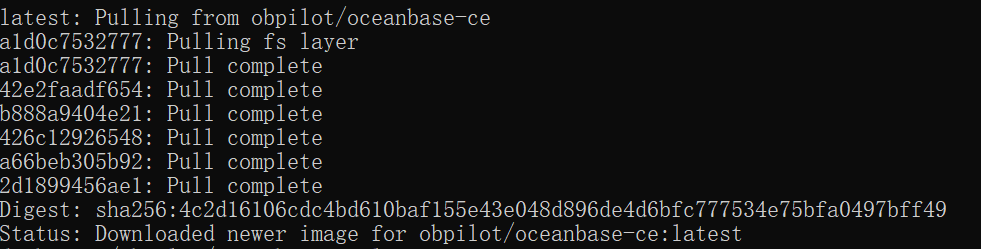
启动镜像设置Docker资源,低于10G内存可能会有问题
# docker images | grep oceanbase
obpilot/oceanbase-ce                                                   latest    ed34156dd401   6 days ago    883MB# docker run -itd -m 10G -p 2881:2881 -p 2883:2883 --name oceanbase-ce obpilot/oceanbase-ce:latest
114f9bda9488a64176e114ded2adfc9c9184866b896a53ed094f36798f92fdb1
三、启动OB集群并创建租户
进入Docker镜像并使用OBD工具启动OB集群
# docker exec -it oceanbase-ce bash
[admin@114f9bda9488 ~]$ obd cluster list
+------------------------------------------------------------+
|                        Cluster List                        |
+--------+---------------------------------+-----------------+
| Name   | Configuration Path              | Status (Cached) |
+--------+---------------------------------+-----------------+
| obdemo | /home/admin/.obd/cluster/obdemo | deployed        |
+--------+---------------------------------+-----------------+[admin@114f9bda9488 ~]$ obd cluster list
+------------------------------------------------------------+
|                        Cluster List                        |
+--------+---------------------------------+-----------------+
| Name   | Configuration Path              | Status (Cached) |
+--------+---------------------------------+-----------------+
| obdemo | /home/admin/.obd/cluster/obdemo | deployed        |
+--------+---------------------------------+-----------------+
[admin@114f9bda9488 ~]$ obd cluster start obdemo
Get local repositories ok
Search plugins ok
Open ssh connection ok
Load cluster param plugin ok
Check before start observer ok
Check before start obproxy ok
Start observer ok
observer program health check ok
Connect to observer ok
Initialize cluster ok
Start obproxy ok
obproxy program health check ok
Connect to obproxy ok
Initialize cluster ok
Wait for observer init ok
+---------------------------------------------+
|                   observer                  |
+-----------+---------+------+-------+--------+
| ip        | version | port | zone  | status |
+-----------+---------+------+-------+--------+
| 127.0.0.1 | 4.0.0.0 | 2881 | zone1 | ACTIVE |
+-----------+---------+------+-------+--------+
obclient -h127.0.0.1 -P2881 -uroot -prootPWD123 -Doceanbase

+---------------------------------------------+
|                   obproxy                   |
+-----------+------+-----------------+--------+
| ip        | port | prometheus_port | status |
+-----------+------+-----------------+--------+
| 127.0.0.1 | 2883 | 2884            | active |
+-----------+------+-----------------+--------+
obclient -h127.0.0.1 -P2883 -uroot -prootPWD123 -Doceanbase
obdemo running
登录OB数据库并创建MySQL租户
[admin@114f9bda9488 ~]$ obclient -h127.0.0.1 -P2883 -uroot -prootPWD123 -Doceanbase
Reading table information for completion of table and column names
You can turn off this feature to get a quicker startup with -A

Welcome to the OceanBase.  Commands end with ; or \g.
Your OceanBase connection id is 4
Server version: OceanBase_CE 4.0.0.0 (r100000272022110114-6af7f9ae79cd0ecbafd4b1b88e2886ccdba0c3be) (Built Nov  1 2022 14:56:31)

Copyright (c) 2000, 2018, OB Corporation Ab and others.

Type 'help;' or '\h' for help. Type '\c' to clear the current input statement.

obclient [oceanbase]>obclient [oceanbase]> CREATE resource unit S4C1G max_cpu=4, min_cpu=4, memory_size='2G', max_iops=1024, min_iops=1024, iops_weight=0, log_disk_size='2G';
Query OK, 0 rows affected (0.068 sec)

obclient [oceanbase]> CREATE resource pool my_pool unit = 'S4C1G', unit_num = 1;
Query OK, 0 rows affected (0.357 sec)

obclient [oceanbase]> create tenant obmysql resource_pool_list=('my_pool'), primary_zone='RANDOM',comment 'mysql tenant/instance', charset='utf8' set ob_tcp_invited_nodes='%', ob_compatibility_mode='mysql';
Query OK, 0 rows affected (2 min 37.998 sec)
登录mysql租户
obclient -h 127.1 -uroot@obmysql#obdemo -P2883 -p -c -A test
Enter password:
Welcome to the OceanBase.  Commands end with ; or \g.
Your OceanBase connection id is 8
Server version: OceanBase_CE 4.0.0.0 (r100000272022110114-6af7f9ae79cd0ecbafd4b1b88e2886ccdba0c3be) (Built Nov  1 2022 14:56:31)

Copyright (c) 2000, 2018, OB Corporation Ab and others.

Type 'help;' or '\h' for help. Type '\c' to clear the current input statement.

obclient [test]> show databases;
+--------------------+
| Database           |
+--------------------+
| information_schema |
| mysql              |
| oceanbase          |
| test               |
+--------------------+
4 rows in set (0.010 sec)
创建数据库和表
obclient [test]> create database sbtest default charset utf8;
Query OK, 1 row affected (0.084 sec)

obclient [test]> use sbtest;
Database changed
obclient [sbtest]>
obclient [sbtest]> create table sbtest1(id bigint, name char);
Query OK, 0 rows affected (0.282 sec)「喜欢这篇文章,您的关注和赞赏是给作者最好的鼓励」
关注作者
【版权声明】本文为墨天轮用户原创内容,转载时必须标注文章的来源(墨天轮),文章链接,文章作者等基本信息,否则作者和墨天轮有权追究责任。如果您发现墨天轮中有涉嫌抄袭或者侵权的内容,欢迎发送邮件至:contact@modb.pro进行举报,并提供相关证据,一经查实,墨天轮将立刻删除相关内容。
