



一、HA状态检查
1.1 状态检查
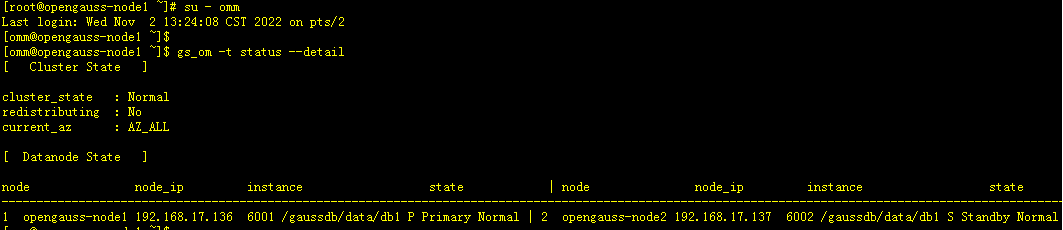
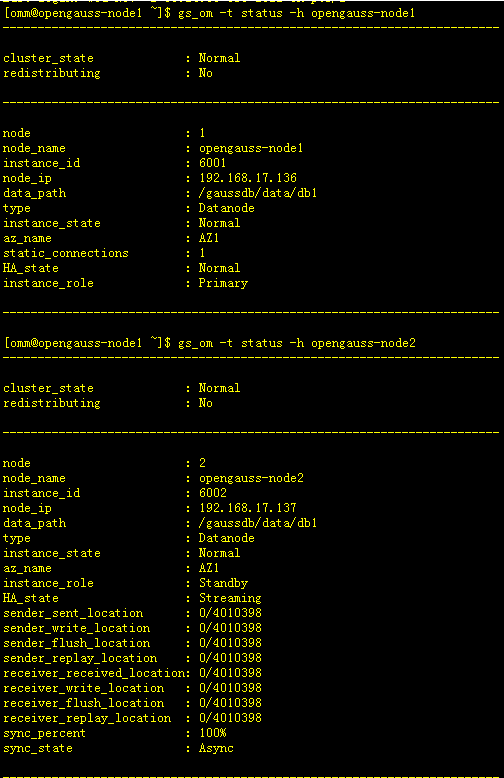
-- 查看各节点状态
[root@opengauss-node1 ~]# su - omm
Last login: Wed Nov  2 13:24:08 CST 2022 on pts/2
[omm@opengauss-node1 ~]$
[omm@opengauss-node1 ~]$ gs_om -t status --detail
[omm@opengauss-node1 ~]$ gs_om -t status -h opengauss-node1
[omm@opengauss-node1 ~]$ gs_om -t status -h opengauss-node2
1.2 信息查看
# omm 用户
-- 登陆数据库
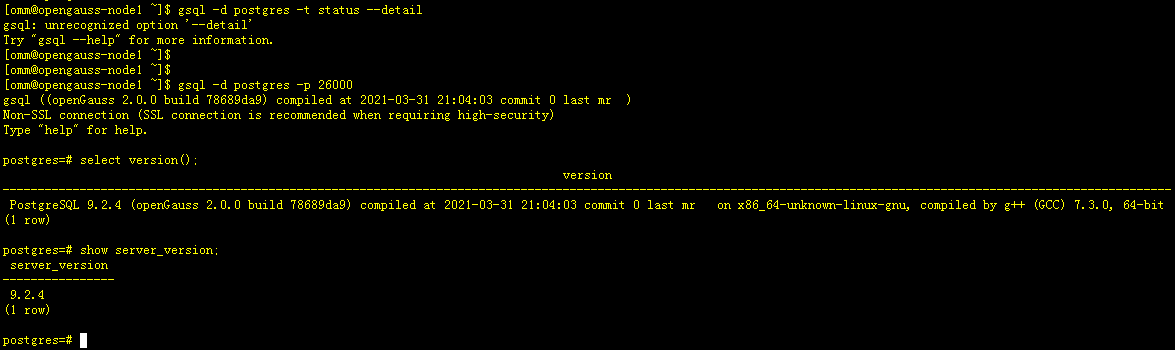
[omm@opengauss-node1 ~]$ gsql -d postgres -p 26000
gsql ((openGauss 2.0.0 build 78689da9) compiled at 2021-03-31 21:04:03 commit 0 last mr  )
Non-SSL connection (SSL connection is recommended when requiring high-security)
Type "help" for help.

-- 查看版本
postgres=# select version();

-- 查看对应PG版本
postgres=# show server_version;
1.3 主备数据验证
-- 节点一
[omm@opengauss-node1 ~]$ gsql -d postgres -p 26000
postgres=# create table pgtb1 (id int,name text);
postgres-# \d+ pgtb1   #查看表结构
postgres=# insert into pgtb1 (id,name) values(1,'Jacky');
postgres=# select * from pgtb1;

-- 节点二
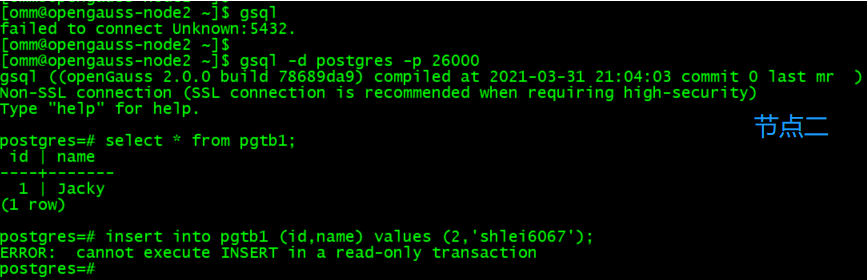
[omm@opengauss-node2 ~]$ gsql -d postgres -p 26000
postgres=# select * from pgtb1;
postgres=# insert into pgtb1 (id,name) values(2,'DBA');   # 提示备库只有只读权限

二、HA切换测试
2.1 切换前状态检查
[omm@opengauss-node1 ~]$ gs_om -t status -h opengauss-node1
[omm@opengauss-node2 ~]$ gs_om -t status -h opengauss-node2

2.2 切换测试
-- omm用户 节点二(备节点)操作
[root@opengauss-node2 ~]# su - omm
[omm@opengauss-node2 ~]$ gs_ctl switchover -D /gaussdb/data/db1  # 执行切换命令

-- 查看HA切换过程日志
[omm@opengauss-node2 ~]$ cd /opt/gaussdb/log/omm/bin/gs_ctl

-- 节点一切换日志(节点一无变化)
[omm@opengauss-node1 gs_ctl]$ tail -100f gs_ctl-2022-11-02_110550-current.log

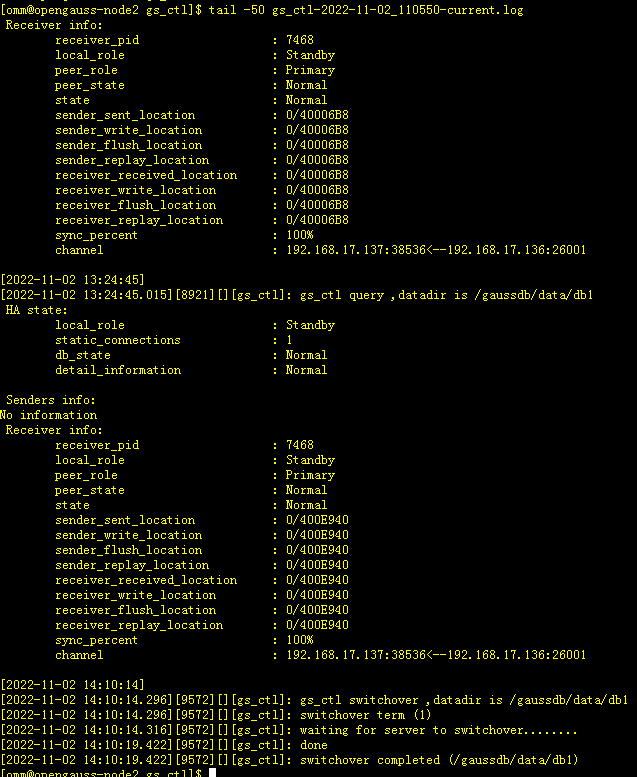
-- 节点二切换日志(显示切换成功)
[omm@opengauss-node2 gs_ctl]$ tail -50 gs_ctl-2022-11-02_110550-current.log
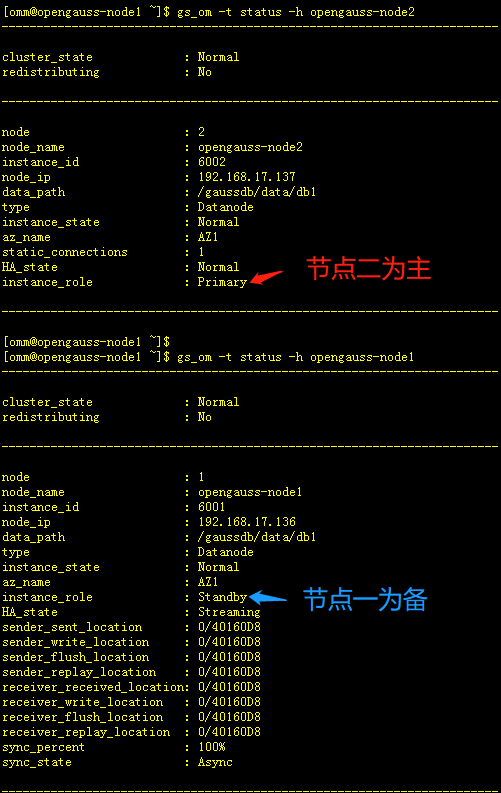
-- 查看切换后状态
[omm@opengauss-node1 ~]$ gs_om -t status -h opengauss-node1
[omm@opengauss-node2 ~]$ gs_om -t status -h opengauss-node2
2.3 数据验证测试
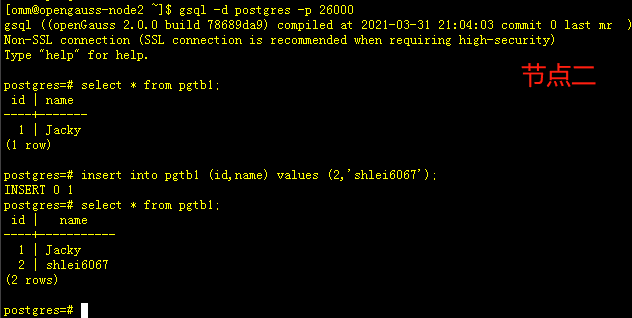
-- 节点二
[omm@opengauss-node2 ~]$ gsql -d postgres -p 26000
postgres=# select * from pgtb1;
postgres=# insert into pgtb1 (id,name) values (2,'shlei6067');
postgres=# select * from pgtb1;
-- 节点一
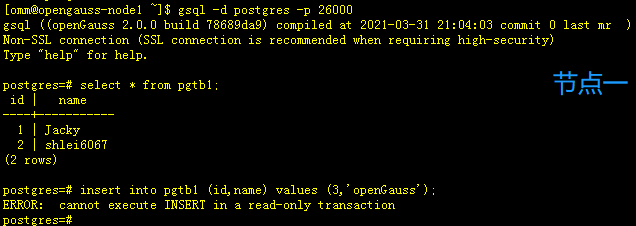
[omm@opengauss-node1 ~]$ gsql -d postgres -p 26000
postgres=# select * from pgtb1;
postgres=# insert into pgtb1 (id,name) values (3,'openGauss');
2.4 再次切换测试
-- omm 用户节点一操作
[omm@opengauss-node1 ~]$ gs_ctl switchover -D /gaussdb/data/db1

-- 查看主备状态
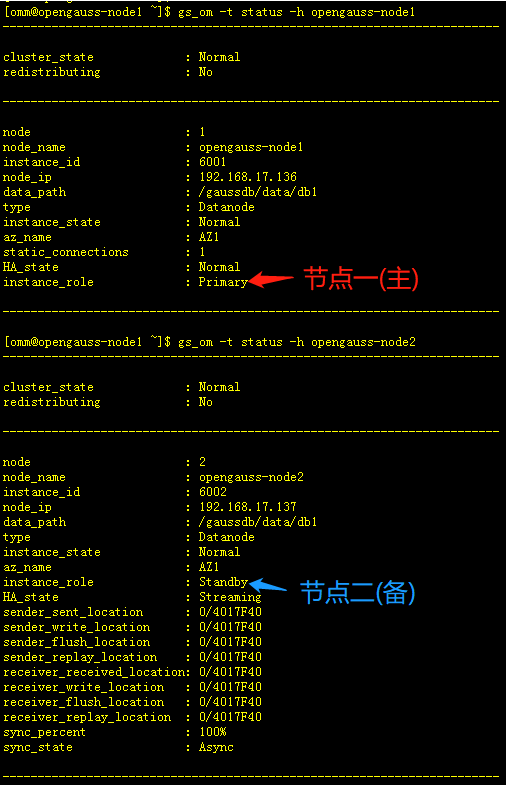
[omm@opengauss-node1 ~]$ gs_om -t status -h opengauss-node1
[omm@opengauss-node2 ~]$ gs_om -t status -h opengauss-node2

# 可看到切换后,节点一重新变为主,节点二变为备
三、主备管理
3.1 关闭HA
-- omm 用户
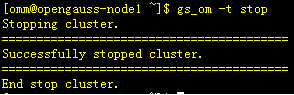
[omm@opengauss-node1 ~]$ gs_om -t stop

# 此时通过gs_ctl日志观察关闭过程
-- 节点一日志
[omm@opengauss-node1 gs_ctl]$ tail -20 gs_ctl-2022-11-02_110550-current.log
 Receiver info:
No information
[2022-11-02 14:37:53]
[2022-11-02 14:37:53.182][16602][][gs_ctl]: gs_ctl switchover ,datadir is /gaussdb/data/db1
[2022-11-02 14:37:53.183][16602][][gs_ctl]: switchover term (1)
[2022-11-02 14:37:53.208][16602][][gs_ctl]: waiting for server to switchover...........
[2022-11-02 14:38:01.403][16602][][gs_ctl]: done
[2022-11-02 14:38:01.403][16602][][gs_ctl]: switchover completed (/gaussdb/data/db1)
[2022-11-02 14:44:13]
[2022-11-02 14:44:13.358][17807][][gs_ctl]: gs_ctl stopped ,datadir is /gaussdb/data/db1
[omm@opengauss-node2 gs_ctl]$ tail -30 gs_ctl-2022-11-02_110550-current.log

-- 节点二日志
[omm@opengauss-node2 gs_ctl]$ tail -30 gs_ctl-2022-11-02_110550-current.log
[2022-11-02 14:44:12]
[2022-11-02 14:44:12.813][10521][][gs_ctl]: gs_ctl stopped ,datadir is /gaussdb/data/db1
3.2 查看主备状态
3.2.1 整体状态检查
[omm@opengauss-node1 ~]$ gs_om -t status --detail
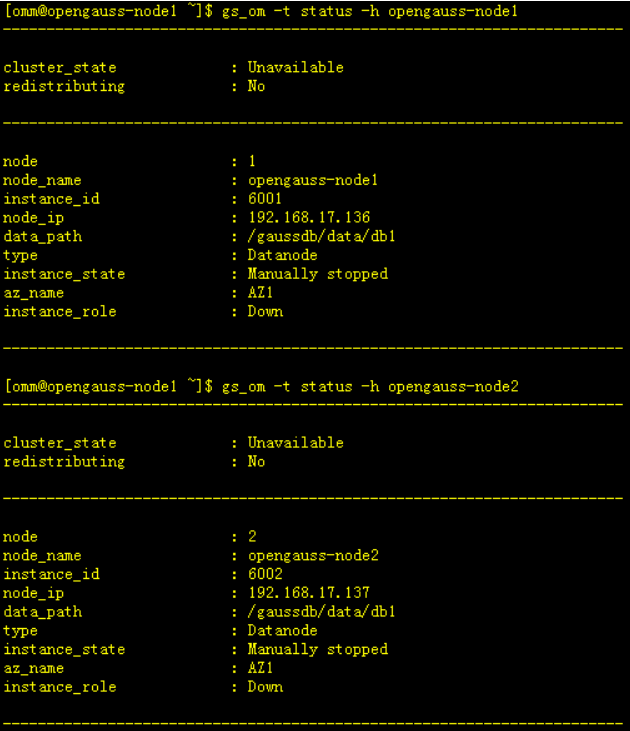
## 集群状态显示为Unavailable

3.2.2 各节点状态检查
[omm@opengauss-node1 ~]$ gs_om -t status -h opengauss-node1
[omm@opengauss-node2 ~]$ gs_om -t status -h opengauss-node2
3.2 启动HA
3.2.1 启动HA
[omm@opengauss-node1 ~]$ gs_om -t start

-- 查看HA启动各节点日志
-- 节点一启动日志
[omm@opengauss-node1 gs_ctl]$ tail -20f gs_ctl-2022-11-02_110550-current.log
[2022-11-02 14:54:34]
[2022-11-02 14:54:34.681][19422][][gs_ctl]: gs_ctl started,datadir is /gaussdb/data/db1
[2022-11-02 14:54:35.504][19422][][gs_ctl]: waiting for server to start...
..
[2022-11-02 14:54:39.341][19422][][gs_ctl]:  done
[2022-11-02 14:54:39.341][19422][][gs_ctl]: server started (/gaussdb/data/db1)
[2022-11-02 14:54:47]
[2022-11-02 14:54:47.417][19799][][gs_ctl]: gs_ctl query ,datadir is /gaussdb/data/db1
 HA state:
        local_role                     : Primary
        static_connections             : 1
        db_state                       : Normal
        detail_information             : Normal

 Senders info:
        sender_pid                     : 19551
        local_role                     : Primary
        peer_role                      : Standby
        peer_state                     : Normal
        state                          : Streaming
        sender_sent_location           : 0/40184D0
        sender_write_location          : 0/40184D0
        sender_flush_location          : 0/40184D0
        sender_replay_location         : 0/40184D0
        receiver_received_location     : 0/40184D0
        receiver_write_location        : 0/40184D0
        receiver_flush_location        : 0/40184D0
        receiver_replay_location       : 0/40183B8
        sync_percent                   : 100%
        sync_state                     : Async
        sync_priority                  : 0
        sync_most_available            : Off
        channel                        : 192.168.17.136:26001-->192.168.17.137:39448

 Receiver info:
No information

-- 节点二启动日志
[2022-11-02 14:54:41]
[2022-11-02 14:54:41.240][10908][][gs_ctl]: gs_ctl started,datadir is /gaussdb/data/db1
[2022-11-02 14:54:41.605][10908][][gs_ctl]: waiting for server to start...
..
[2022-11-02 14:54:45.076][10908][][gs_ctl]:  done
[2022-11-02 14:54:45.076][10908][][gs_ctl]: server started (/gaussdb/data/db1)
[2022-11-02 14:54:48]
[2022-11-02 14:54:48.302][11007][][gs_ctl]: gs_ctl query ,datadir is /gaussdb/data/db1
 HA state:
        local_role                     : Standby
        static_connections             : 1
        db_state                       : Normal
        detail_information             : Normal

 Senders info:
No information
 Receiver info:
        receiver_pid                   : 10967
        local_role                     : Standby
        peer_role                      : Primary
        peer_state                     : Normal
        state                          : Normal
        sender_sent_location           : 0/40184D0
        sender_write_location          : 0/40184D0
        sender_flush_location          : 0/40184D0
        sender_replay_location         : 0/40184D0
        receiver_received_location     : 0/40184D0
        receiver_write_location        : 0/40184D0
        receiver_flush_location        : 0/40184D0
        receiver_replay_location       : 0/40183B8
        sync_percent                   : 100%
        channel                        : 192.168.17.137:39448<--192.168.17.136:26001
3.2.2 状态检查
[omm@opengauss-node1 ~]$ gs_om -t status --detail
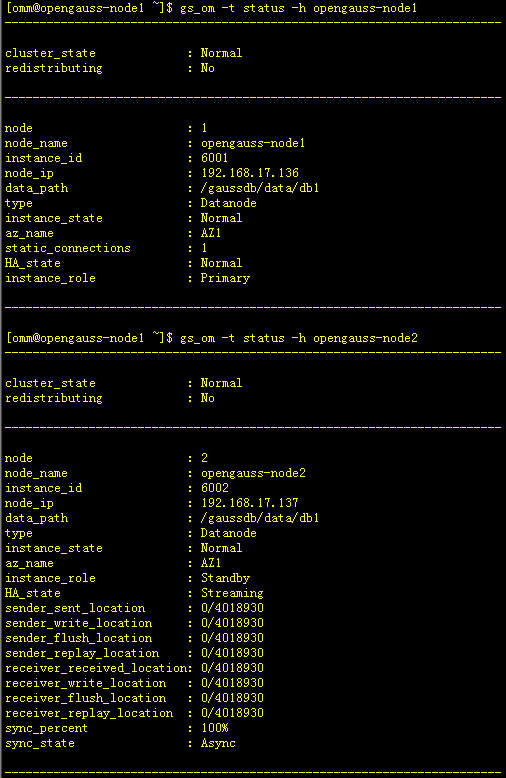
[omm@opengauss-node1 ~]$ gs_om -t status -h opengauss-node1
[omm@opengauss-node1 ~]$ gs_om -t status -h opengauss-node2

最后修改时间:2022-11-29 09:34:55
「喜欢这篇文章,您的关注和赞赏是给作者最好的鼓励」
关注作者
【版权声明】本文为墨天轮用户原创内容,转载时必须标注文章的来源(墨天轮),文章链接,文章作者等基本信息,否则作者和墨天轮有权追究责任。如果您发现墨天轮中有涉嫌抄袭或者侵权的内容,欢迎发送邮件至:contact@modb.pro进行举报,并提供相关证据,一经查实,墨天轮将立刻删除相关内容。
