



前言
Win10安装
ROracle包连接
ODBC包连接
Linux 安装
Ubuntu系统
centos 系统
参考资料
前言
当需要连接oracle数据库时,你搜索将会提示你用ROralce包,但是当你直接install.packages()时将会报错,你能简单搜索到的资料往往说得并不全面,让你一知半解,而且资料比较老。至此,发现让R与Oracle数据库交互,并不是一件特别简单的事情。
至于为什么要连接,那当然是因为工作需要,经过一番折腾搜索资料,成功连接到oracle数据库,由于中文搜索引擎下能找到的有用且完整的资料有限,故将安装资料整理记录,分为win10下安装以及服务器上安装两部分。
需要注意无论在哪种系统下安装该包,你都需要有一定的计算机基础:
配置环境变量,后文中有在win中配置环境变量的gif图
配置rtools,因为该包需要编译,win中R-4.0后安装配置rtools资料,重点是下载后安装配置环境变量。rtools40安装包已放百度网盘。当你使用的R版是4.0版本之前的版本,需自行下载老版本的Rtools。
连接数据库,可以参考我的公众号『宇飞的世界』里面关于连接数据库字符串的文章。
ROracle包官网地址,可以下载包源码,详情前往官网。
在linxu安装ROracle包需要依赖几个软件包,但是下载资料需要有账号且网络原因,故提供相关下载地址。
百度网盘下载地址:
链接:https://pan.baidu.com/s/1R5xUTpR7BlWDnlDojzO7fw
提取码:u1dz
复制这段内容后打开百度网盘手机App,操作更方便哦
Note: ROracle包官方安装资料,适合有计算机背景以及英语好的人直接阅读。
https://github.com/cran/ROracle/blob/master/INSTALL
Win10安装
win系统下面安装相对简单,主要是我们熟悉的界面,像我不懂linxu的人直接在linux配置环境变量这些,简直太麻烦了,而且不知道对错。如果不是非得在linxu上面安装,建议大家就在win10系统中安装配置R语言环境。如果想体验服务器中的rstudio-server或者shiny-server,可以参考我的文章服务器中-R语言环境配置。
ROracle包连接
第一次安装这个包时遇到了很多困难,吃尽苦头。安装需要分为三步:首先安装oracle客户端,其次配置好环境变量,最后安装包验证。
安装Oracle Instant Client
需要安装oracle 客户端,选择64位安装,安装文件【win64_11gR2_client】在提供的云盘中,文件较大600M。
配置环境变量
OCI_INC
与OCI_LIB64
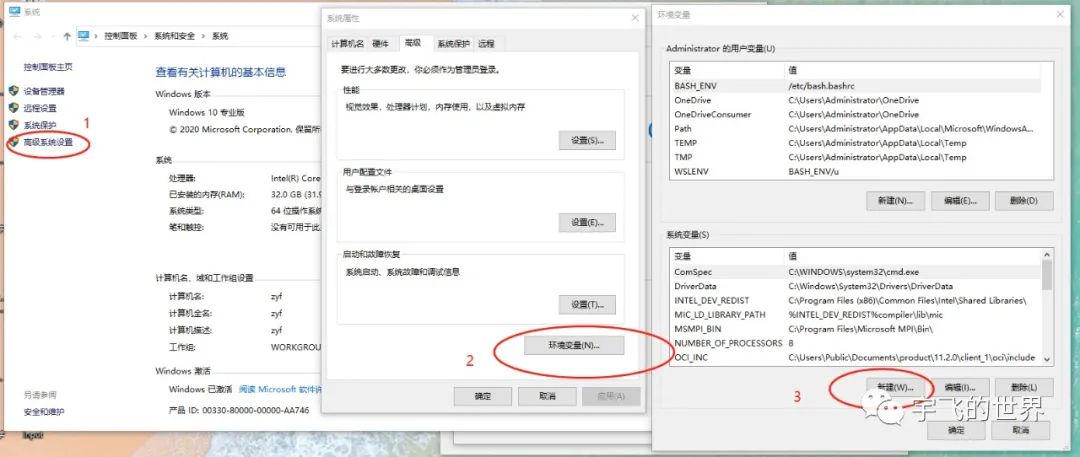
两个环境变量,WIN10怎么配置环境变量,可以参照后文动图或自行搜索。下面两个环境变量的路径是第一步中你按照客户端的路径,可以根据你自己的选择做相应修改。路径中不要有中文或空格等特殊符号,建议直接装某盘下面,像我直接安装在C盘。#配置两个环境变量
# step1
#OCI_INC='D:\app\zhongyf\product\11.2.0\client_1\oci\include'
# step 2
#OCI_LIB64='D:\app\zhongyf\product\11.2.0\client_1\BIN'
#验证
Sys.getenv('OCI_INC')
Sys.getenv('OCI_LIB64')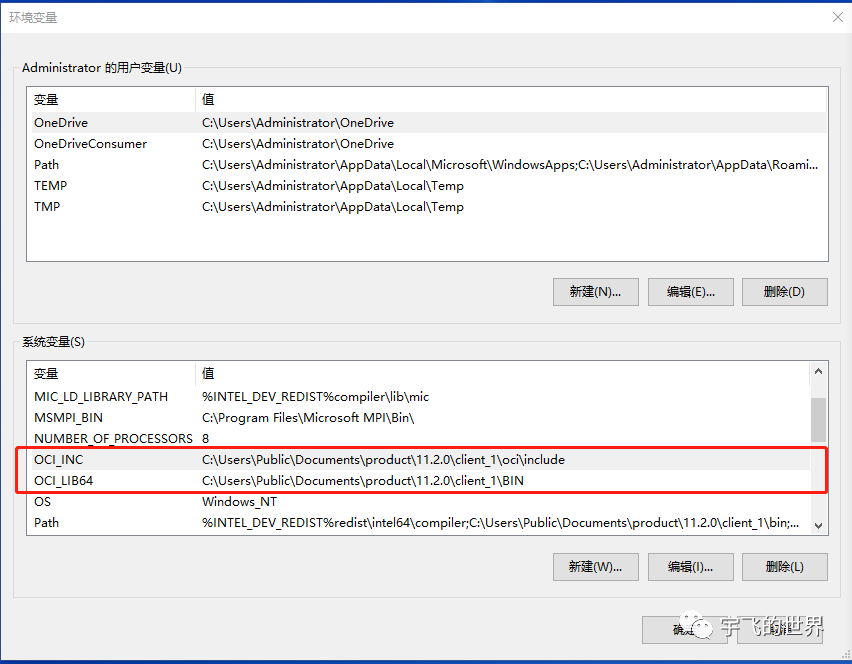
配置
Rtools提前配置好
Rtools
环境,如果已经安装配置好,请跳过。在R中运行以下检查是否安装配置成功,如果未安装成功,请参照官方资料安装配置Sys.which('make')
安装包
可以直接在安装命令中修改安装镜像,或者在Rstudio中修改默认镜像地址。
install.packages('ROracle',repos = "https://mirrors.tuna.tsinghua.edu.cn/CRAN/") #改为国内镜像验证
library(ROracle)
library(DBI)
drv <-dbDriver("Oracle")
connect.string <- "(DESCRIPTION =(ADDRESS = (PROTOCOL = TCP)(HOST = 172.16.88.129)(PORT = 1521))(CONNECT_DATA =(SERVER = DEDICATED)(SERVICE_NAME = bidev)))"
con <- dbConnect(drv,username = "pub_query", password = "pub_query",dbname = connect.string)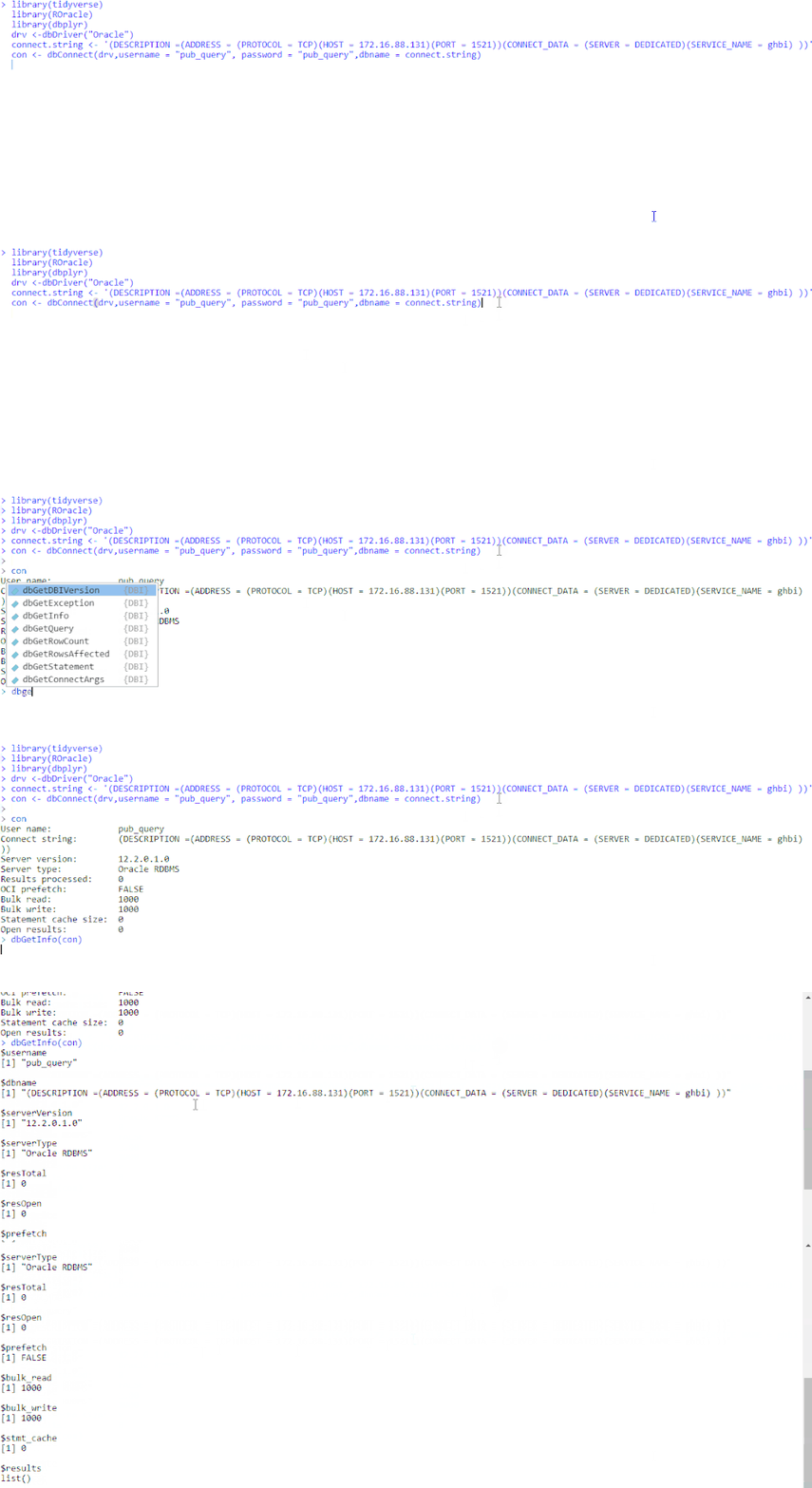
其他数据库
其他数据库以及包的安装使用可以参考我的公众号:宇飞的世界,或者是我的博客 www.zhongyufei.com
怎样配置环境变量
ODBC包连接
其实,后来发现不止ROracle
包可以与R交互,还可以通过odbc
包与之连接,前提是配置好Oracle
客户端。但是经过我自己的测试与官网相关的测试,通过odbc
连接确实相比ROracle
包慢多倍,所以使用以ROracle
包为主。
odbc
连接代码如下:
# use odbc packages connect databse
library(DBI)
con_odbc <- dbConnect(odbc::odbc(), .connection_string = "Driver={Oracle in OraClient11g_home1};
DBQ=172.16.88.131:1521/ghbi;UID=pub_query;PWD=pub_query;", timeout = 10)
# 前提条件是通过 odbc::odbcListDrivers() 检测到当前环境中存在“Oracle in OraClient11g_home1” 驱动。
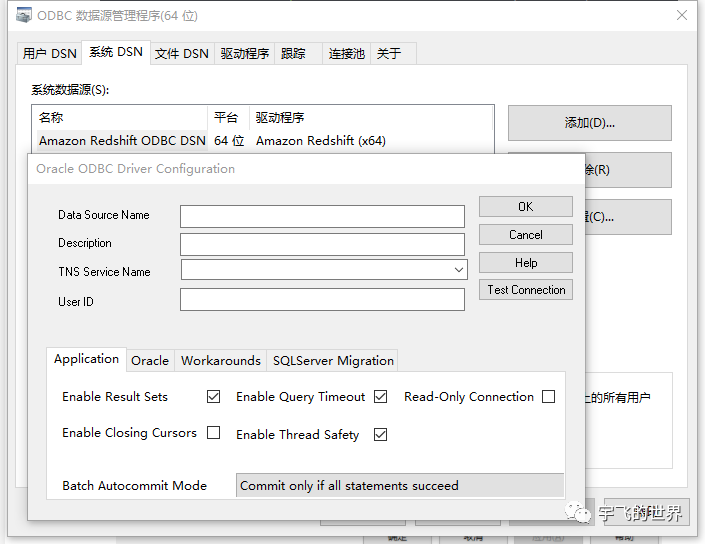
或者通过ODBC数据源配置DSN,然后通过RODBC连接。
后期会整理完善Linux
上系统安装ROracle
包的资料,欢迎持续关注我的公众号:宇飞的世界
Linux 安装
Ubuntu系统
经过验证,以下方式在Ubuntu18.04或Ubuntu20.04上面都成功安装ROracle包,大家在安装时可以在百度网盘下载好安装包,存放在某文件夹下,然后cd到该路径依次执行命令即可成功安装。
install alien for rpm conversion & libaio
sudo apt-get install alien
sudo apt-get install libaio1
官网下载安装包
官网下载必须安装包,https://www.oracle.com/database/technologies/instant-client/linux-x86-64-downloads.html可以下载linux版本的Oracle客户端.
根据需要对应版本的包
# 必须下载安装
oracle-instantclient12.1-basic-12.1.0.2.0-1.x86_64.rpm
oracle-instantclient12.1-devel-12.1.0.2.0-1.x86_64.rpm
oracle-instantclient12.1-sqlplus-12.1.0.2.0-1.x86_64.rpm
# 可安装
oracle-instantclient12.1-jdbc-12.1.0.2.0-1.x86_64.rpm
oracle-instantclient12.1-odbc-12.1.0.2.0-1.x86_64.rpm
cd到下载文件的位置,对于基于debian的系统(如ubuntu),请转换rpm,然后安装:
cd
sudo alien -i oracle-instantclient12.1-basic-12.1.0.2.0-1.x86_64.rpm
sudo alien -i oracle-instantclient12.1-devel-12.1.0.2.0-1.x86_64.rpm
sudo alien -i oracle-instantclient12.1-jdbc-12.1.0.2.0-1.x86_64.rpm
sudo alien -i oracle-instantclient12.1-odbc-12.1.0.2.0-1.x86_64.rpm
sudo alien -i oracle-instantclient12.1-sqlplus-12.1.0.2.0-1.x86_64.rpm
添加环境变量
export LD_LIBRARY_PATH=/usr/lib/oracle/12.1/client64/lib/${LD_LIBRARY_PATH:+:$LD_LIBRARY_PATH}
export ORACLE_HOME=/usr/lib/oracle/12.1/client64
export PATH=$PATH:$ORACLE_HOME/bin
add the path to oracle.conf & update cache
echo "/usr/lib/oracle/12.1/client64/lib" | sudo tee /etc/ld.so.conf.d/oracle.conf
sudo ldconfig -v
验证
test if paths are set and you see the tools:
echo $LD_LIBRARY_PATH
echo $ORACLE_HOME
echo $PATH
sqlplus    # should give you the command prompt
安装R包
cd到
ROracle_1.3-2.tar.gz
文件夹下执行安装命令sudo R CMD INSTALL --configure-args='--with-oci-lib=/usr/lib/oracle/12.1/client64/lib --with-oci-inc=/usr/include/oracle/12.1/client64' ROracle_1.3-2.tar.gz或者在R中执行
install.packages('ROracle_1.3-1.tar.gz', repos=NULL, configure.args='--with-oci-lib=/usr/lib/oracle/12.1/client64/lib --with-oci-inc=/usr/include/oracle/12.1/client64')
centos 系统
以下为照搬参考资料中的代码,经过验证成功。或者采用ubuntu中安装方法安装亦可。
Overview
When tasked with an R-based project, you might find yourself wanting to connect to an Oracle database. ROracle is one library you can use. This post is a guide on installing the library on CentOS 7
.
Oracle Instant Client
First thing we need to do is install the right dependencies.
Install the yum
repo and gpg
key for Oracle Instant Client:
export ORACLE_INSTANT_CLIENT_VERSION=18.3
export ORACLE_YUM_URL=https://yum.oracle.com
export ORACLE_HOME=/usr/lib/oracle/${ORACLE_INSTANT_CLIENT_VERSION}/client64
export ORACLE_YUM_REPO=public-yum-ol7.repo
export ORACLE_YUM_GPG_KEY=RPM-GPG-KEY-oracle-ol7

rpm --import ${ORACLE_YUM_URL}/${ORACLE_YUM_GPG_KEY};
curl -o /etc/yum.repos.d/${ORACLE_YUM_REPO} ${ORACLE_YUM_URL}/${ORACLE_YUM_REPO};
sed -i 's/enabled=1/enabled=0/g' /etc/yum.repos.d/${ORACLE_YUM_REPO};
yum-config-manager --enable ol7_oracle_instantclient;
This allows yum
to see the Instant Client packages. We install those next:
ACCEPT_EULA=Y sudo yum install -y \
  libaio-devel \
  oracle-instantclient18.3-basic \
  oracle-instantclient18.3-sqlplus \
  oracle-instantclient18.3-tools \
  oracle-instantclient18.3-devel;
libaio-devel
is also a required package, per the documentation.
ROracle
Next, set the necessary environment variables for installing ROracle
:
export OCI_LIB=${ORACLE_HOME}/lib
export OCI_INC=/usr/include/oracle/${ORACLE_INSTANT_CLIENT_VERSION}/client64
OCI_LIB
points to a folder where the shared libraries will be. These shared libraries are dynamically linked shared object libraries that the installation program will need in order to run. OCI_INC
points to a folder containing header files; these are collections of functions that other C
programs can use through the include
operator, e.g. include oci.h
.
The installation program will need to know where to look when it attempts to import the shared libraries. To that end, we’ll leverage ldconfig:
echo "/usr/lib/oracle/18.3/client64/lib" | sudo tee /etc/ld.so.conf.d/oracle.conf
sudo ldconfig
Per the documentation, ldconfig
creates the necessary links and cache to the libraries found in the *.conf
files. So we create an oracle.conf
file that tells ldconfig
to create links for shared libraries in /usr/lib/oracle/18.3/client64/lib
, a.k.a. the OCI_LIB
folder.
Finally, we install the ROracle
package:
R -e "install.packages('ROracle')"
Example
I also have a docker-based example here. It basically does everything enumerated in this guide, with the exception that the project uses packrat for package management, and that the ROracle
package is already identified in the snapshot file. It still has to re-install the ROracle
(and other) packages, since the lib
folder (where the packages are installed) isn’t checked into version control.
参考资料
https://medium.com/analytics-vidhya/how-to-install-roracle-on-windows-10-144b0b923dac
https://medium.com/analytics-vidhya/how-to-install-roracle-on-windows-10-144b0b923dac
https://www.cjvirtucio.co/posts/roracle-centos7/
https://github.com/cran/ROracle/blob/master/INSTALL
https://github.com/cran/ROracle/blob/master/INSTALL
