



 我可能又要偷懒了。
@NodeEntity(label = "ProductEntry")@Datapublic class ProductEntryNode {@Idprivate String productEntryId;/*** 模板id*/private String templateId;/*** 词条名称*/private String name;/*** 词条类型 1:产品种类 2:产品类型 3:产品单元*/private String type;/*** 别名*/private String aliasName;/*** 简介*/private String introduction;}
创建关系类@RelationshipEntity(type = "Production")表示关系类型;type = "Production"表示是什么关系,例如生产关系,后续查询会用到;@StartNode 表示开始节点;@EndNode 表示结束节点;其他的对象都是关系的属性,比如生产了多少件等。指定了开始节点和结束节点关系就有了方向,表示公司生产产品。这里的结束节点也可以和开始节点是同一个类,比如公司-公司之间是供给关系,那么这里的@EndNode就是CompanyEntryNode,这个容易理解吧
/*** @Author Created by YangMeng on 2021/3/4 14:09* 公司->生产 产品关系* 指定关系名称为Production*/@Data@RelationshipEntity(type = "Production")public class ProductionRelationship {@Idprivate String uuid;@StartNodeprivate CompanyEntryNode startNode;@EndNodeprivate ProductEntryNode endNode;/*** 收入占比*/private String incomeProportion;/*** 毛利率*/private String productGross;/*** 产品单价*/private String productPrice;/*** 产能*/private String capacity;/*** 产能利用率*/private String capacityRatio;/*** 产能占比*/private String capacityProportion;}
@Repositorypublic interface ProductEntryRepository extends Neo4jRepository<ProductEntryNode, String> {}
@Repositorypublic interface ProductionRelationshipRepository extends Neo4jRepository<ProductionRelationship, String> {/*** 根据产品获取供应商* @param productEntryId* @return*/@Query("match (c:CompanyEntry)-[:Production]->(p:ProductEntry) where p.productEntryId={productEntryId} return c.companyEntryId as companyEntryId,c.name as companyName")List<DicDto> getCompanyByProductId(String productEntryId);}
/*** @Author Created by YangMeng on 2021/3/4 15:29*/public interface ProductionRelationshipService {/*** 添加公司产品 关系** @param startNode* @param toNode* @return*/ProductionRelationship addProductionRelationship(CompanyEntryNode startNode, ProductEntryNode toNode);/*** 添加公司产品 关系** @param startNodeId* @param toNodeId* @return*/ProductionRelationship addProductionRelationship(String startNodeId, String toNodeId);/*** 获取产品的供应商公司** @param productEntryId* @return*/List<DicDto> getCompanyByProductId(String productEntryId);
@Servicepublic class ProductionRelationshipServiceImpl implements ProductionRelationshipService {@Autowiredprivate ProductionRelationshipRepository productionRelationshipRepository;@Autowiredprivate CompanyEntryRepository companyEntryRepository;@Autowiredprivate ProductEntryRepository productEntryRepository;/*** 添加公司产品 关系** @param startNode* @param toNode* @return*/@Overridepublic ProductionRelationship addProductionRelationship(CompanyEntryNode startNode, ProductEntryNode toNode) {ProductionRelationship productionRelationship = new ProductionRelationship();productionRelationship.setStartNode(startNode);productionRelationship.setEndNode(toNode);//添加属性productionRelationship.setUuid(UuidUtils.generate());ProductionRelationship save = productionRelationshipRepository.save(productionRelationship);return save;}/*** 添加公司产品 关系** @param startNodeId* @param toNodeId* @return*/@Overridepublic ProductionRelationship addProductionRelationship(String startNodeId, String toNodeId) {Optional<CompanyEntryNode> byId = companyEntryRepository.findById(startNodeId);Optional<ProductEntryNode> byId1 = productEntryRepository.findById(toNodeId);if (byId.isPresent() && byId1.isPresent()) {return addProductionRelationship(byId.get(), byId1.get());}return new ProductionRelationship();}/*** 获取产品的供应商公司** @param productEntryId* @return*/@Overridepublic List<DicDto> getCompanyByProductId(String productEntryId) {return productionRelationshipRepository.getCompanyByProductId(productEntryId);}}
@RestController@RequestMapping(value = "productionRelationship")@Slf4jpublic class ProductionRelationshipController {@Autowiredprivate ProductionRelationshipService productionRelationshipService;/*** 关联公司产品 关系** @param startId* @param endId* @return*/@GetMapping(value = "addRelationship")public WebResInfo addRelationship(String startId, String endId) {log.info("addRelationship->startId:{},endId:{}", startId, endId);WebResInfo webResInfo = new WebResInfo();try {webResInfo.setCode(WebResCode.Successful);ProductionRelationship productionRelationship = productionRelationshipService.addProductionRelationship(startId, endId);webResInfo.setData(productionRelationship);} catch (Exception e) {log.error("addRelationship error:{}", e);webResInfo.setCode(WebResCode.Server_Bug_Exception);webResInfo.setMessage(e.getMessage());}return webResInfo;}/*** 根据产品获取供应商信息** @param productEntryId* @return*/@GetMapping(value = "getCompanyByProductId")public WebResInfo getCompanyByProductId(String productEntryId) {log.info("getCompanyByProductId->productEntryId:{}", productEntryId);WebResInfo webResInfo = new WebResInfo();try {webResInfo.setCode(WebResCode.Successful);List<DicDto> companyByProductId = productionRelationshipService.getCompanyByProductId(productEntryId);webResInfo.setData(companyByProductId);} catch (Exception e) {log.error("getCompanyByProductId error:{}", e);webResInfo.setCode(WebResCode.Server_Bug_Exception);webResInfo.setMessage(e.getMessage());}return webResInfo;}
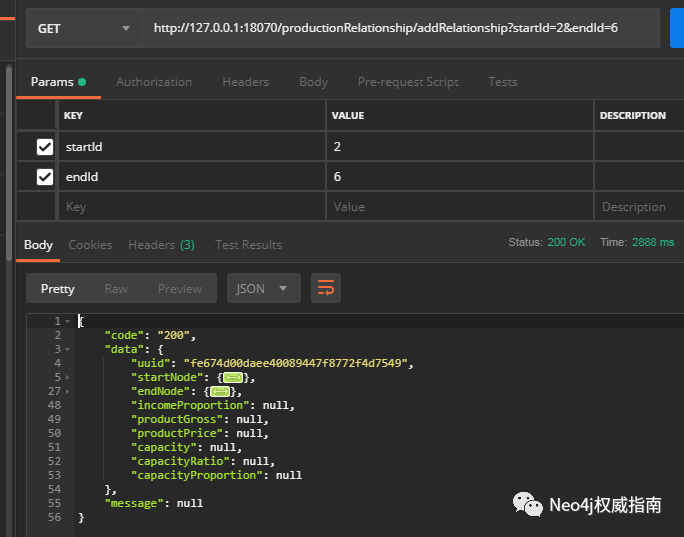

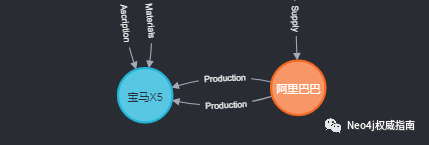
@Query("match (c:CompanyEntry)-[:Production]->(p:ProductEntry) where p.productEntryId={productEntryId} return c.companyEntryId as companyEntryId,c.name as companyName")List<DicDto> getCompanyByProductId(String productEntryId);

本篇主要介绍关系类型,相信大家有了一定的了解,其实neo4j里最主要还是语义化查询,有了关系我们就可以进行这样一系列查询操作,比如我搜索“iPhone12的生产商是谁”可以查询产品节点是iPhone,对应关系是生产,然后就出来了苹果公司了。这只是其中一小部分,后续还有很多。
彩蛋 下篇文章我们来讲讲Springboot同时绑定neo4j和mysql两个数据源。
有问题大家回复我。
文章转载自Neo4j权威指南,如果涉嫌侵权,请发送邮件至:contact@modb.pro进行举报,并提供相关证据,一经查实,墨天轮将立刻删除相关内容。
