1.pt工具介绍
Percona Toolkit简称pt工具,是Percona公司开发用于管理MySQL的工具,包括表中记录归档和清理、在线DDL、检查主从复制的数据一致性、检查重复索引、定位IO占用高的表文件等功能,利用工具提高日常工作效率。
2. pt工具安装
下载地址:https://www.percona.com/downloads/percona-toolkit/LATEST/
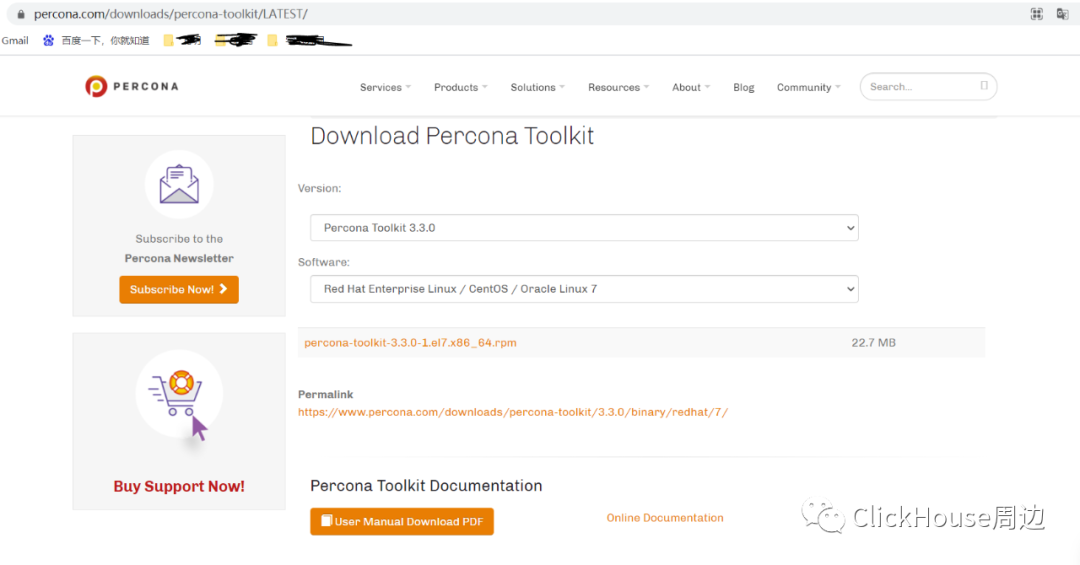
linux下载:wget https://www.percona.com/downloads/percona-toolkit/3.0.1/binary/redhat/7/x86_64/percona-toolkit-3.0.1-1.el7.x86_64.rpmyum localinstall percona-toolkit-3.0.1-1.el7.x86_64.rpm
3.常用工具
3.1 pt-archiver
作用:1.用于将MySQL表中记录归档到另外一个表或者文件中(文件可以用LOAD DATA INFILE进行数据装载,类似历史数据的增量删除);
2.用于对MySQL表中记录进行清除。
场景:1.定期按照时间范围,进行归档表;
2.亿级的大表,delete批量删除100w左右数据。
注意: 需要归档表中至少有一个索引,做好是where条件列有索引
准备环境:
利用MySQL官方提供的t100w的表为基表mysql> source root/t100w.sql;为做归档表中创建索引:mysql> alter table t100w modify id int not null primary key auto_increment;Query OK, 1000000 rows affected (4.88 sec)Records: 1000000 Duplicates: 0 Warnings: 0mysql> desc t100w;+-------+-----------+------+-----+-------------------+-----------------------------+| Field | Type | Null | Key | Default | Extra |+-------+-----------+------+-----+-------------------+-----------------------------+| id | int(11) | NO | PRI | NULL | auto_increment || num | int(11) | YES | | NULL | || k1 | char(2) | YES | | NULL | || k2 | char(4) | YES | | NULL | || dt | timestamp | NO | | CURRENT_TIMESTAMP | on update CURRENT_TIMESTAMP |+-------+-----------+------+-----+-------------------+-----------------------------+5 rows in set (0.00 sec)复制张test1表mysql> create table test1 like t100w;mysql> desc test1;+-------+-----------+------+-----+-------------------+-----------------------------+| Field | Type | Null | Key | Default | Extra |+-------+-----------+------+-----+-------------------+-----------------------------+| id | int(11) | YES | | NULL | || num | int(11) | YES | | NULL | || k1 | char(2) | YES | | NULL | || k2 | char(4) | YES | | NULL | || dt | timestamp | NO | | CURRENT_TIMESTAMP | on update CURRENT_TIMESTAMP |+-------+-----------+------+-----+-------------------+-----------------------------+5 rows in set (0.00 sec)
案例1.归档到数据库
# 重要参数--limit 100 每次取100行数据用pt-archive处理--txn-size 100 设置100行为一个事务提交一次,--where 'id<3000' 设置操作条件--progress 5000 每处理5000行输出一次处理信息--statistics 输出执行过程及最后的操作统计。(只要不加上--quiet,默认情况下pt- archive都会输出执行过程的)--charset=UTF8 指定字符集为UTF8—这个最后加上不然可能出现乱码。--bulk-delete 批量删除source上的旧数据(例如每次1000行的批量删除操作)pt-archiver --source h=127.0.0.1,P=3306,u=root,D=test,t=t100w --dest h=127.0.0.1,P=3306,u=root,D=test,t=test1 --where 'id<=10000' --progress 50 --txn-size=1000 --statistics --no-delete --ask-pass --no-check-charsetEnter password: 源密码Enter password: 目标密码........Started at 2021-04-12T17:19:21, ended at 2021-04-12T17:19:24Source: D=test,P=3306,h=127.0.0.1,p=...,t=t100w,u=rootDest: D=test,P=3306,h=127.0.0.1,p=...,t=test1,u=rootSELECT 10000INSERT 10000DELETE 0Action Count Time Pctselect 10001 1.4474 48.29inserting 10000 1.0556 35.22commit 22 0.0420 1.40other 0 0.4523 15.09查询测试:[root@ansel ~ ]# mysql -uroot -p -e 'select count(*) from test.test1;'Enter password:+----------+| count(*) |+----------+| 10000 |+----------+
案例2.归档到文件
pt-archiver --source h=127.0.0.1,P=3306,u=root,D=test,t=t100w --file='/root/test1_%Y-%m-%d.sql' --where "id <= 10000" --progress=50 --txn-size=1000 --limit=50 --statistics --no-delete --ask-pass --no-check-charsetStarted at 2021-04-12T17:31:55, ended at 2021-04-12T17:23:56Source: D=test,P=3306,h=127.0.0.1,p=...,t=t100w,u=rootSELECT 10000INSERT 0DELETE 0Action Count Time Pctselect 201 0.0477 20.49commit 11 0.0007 0.31print_file 10000 -0.0112 -4.82other 0 0.1958 84.02
案例3.(仅)清理数据
mysql> alter table test1 modify id int not null primary key auto_increment;pt-archiver --source h=127.0.0.1,D=test,t=test1,u=root,p=bulibuqi... --where 'id<10000' --purge --limit=1 --no-check-charset之前导入了--where 'id<=10000',刚才删除了--where 'id=10000'mysql> select * from test1;+-------+--------+------+------+---------------------+| id | num | k1 | k2 | dt |+-------+--------+------+------+---------------------+| 10000 | 607112 | t0 | rs23 | 2019-08-12 11:41:25 |+-------+--------+------+------+---------------------+1 row in set (0.00 sec)
3.2 pt-osc
在线修改表结构,创建、删除索引等,不能加快速度,只能减少业务影响(锁)
pt-osc工作流程:
0、先检查从节点Found 2 slaves:db02 -> 192.168.6.51:socketdb03 -> 192.168.6.52:socketWill check slave lag on:db02 -> 192.168.6.51:socketdb03 -> 192.168.6.52:socket1、检查更改表是否有主键或唯一索引,是否有触发器2、检查修改表的表结构,创建一个临时表,在新表上执行ALTER TABLE语句Created new table test._t100w_new OK.Altering new table...ALTER TABLE `test`.`_t100w_new` add column state int not null default 13、在源表上创建三个触发器分别对于INSERT UPDATE DELETE操作2021-04-12T17:43:56 Creating triggers...2021-04-12T17:43:56 Created triggers OK.4、从源表拷贝数据到临时表,在拷贝过程中,对源表的更新操作会写入到新建表中Copying approximately 997632 rows...5、将临时表和源表rename(需要元数据修改锁,需要短时间锁表)RENAME TABLE `test`.`t100w` TO `test`.`_t100w_old`, `test`.`_t100w_new` TO `test`.`t100w`6、删除源表和触发器,完成表结构的修改。2021-04-12T17:44:03 Dropped old table `test`.`_t100w_old` OK.2021-04-12T17:44:03 Dropping triggers...pt-osc工具限制
1、源表必须有主键或唯一索引,如果没有工具将停止工作在拷贝创建临时表期间有DDL操作,工具停止工作。2、如果线上的复制环境过滤器操作过于复杂,工具将无法工作3、如果开启复制延迟检查,但主从延迟时,工具将暂停数据拷贝工作4、如果开启主服务器负载检查,但主服务器负载较高时,工具将暂停操作5、当表使用外键时,如果未使用--alter-foreign-keys-method参数,工具将无法执行6、只支持Innodb存储引擎表,且要求服务器上有该表1倍以上的空闲空间。pt-osc之alter语句限制
1、不需要包含alter table关键字,可以包含多个修改操作,使用逗号分开,如"drop clolumn c1, add column c2 int"2、不支持rename语句来对表进行重命名操作3、不支持对索引进行重命名操作4、如果删除外键,需要对外键名加下划线,如删除外键fk_uid, 修改语句为"DROP FOREIGN KEY _fk_uid"
pt-osc之命令模板
## --execute表示执行## --dry-run表示只进行模拟测试## 表名只能使用参数t来设置,没有长参数pt-online-schema-change \--host="127.0.0.1" \--port=3306 \--user="root" \--password="root@xxxx" \--max-lag=10 \--check-salve-lag='xxx.xxx.xxx.xxx' \--recursion-method="hosts" \--check-interval=2 \--database="test" \t="tb001" \--alter="add column c4 int" \--execute
例子:
pt-online-schema-change --user=root --password=xxxx --host=127.0.0.1 --alter "add column state int not null default 1" D=test,t=t100w --print --execute
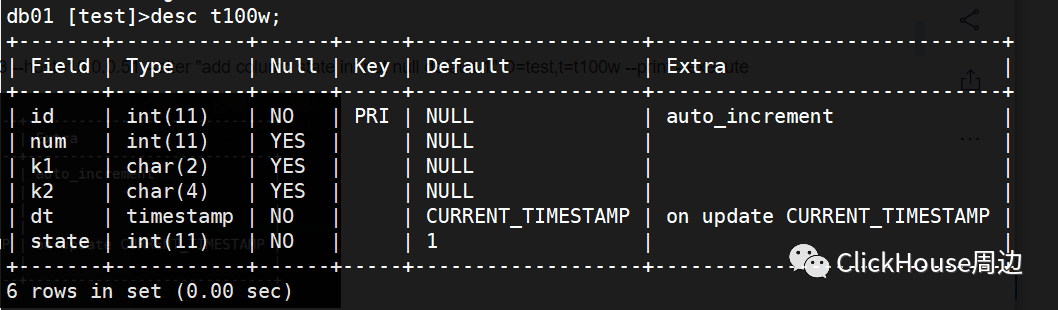
pt-online-schema-change --user=root --password=xxxx --host=127.0.0.1 --alter "add index idx(num)" D=test,t=t100w --print --execute
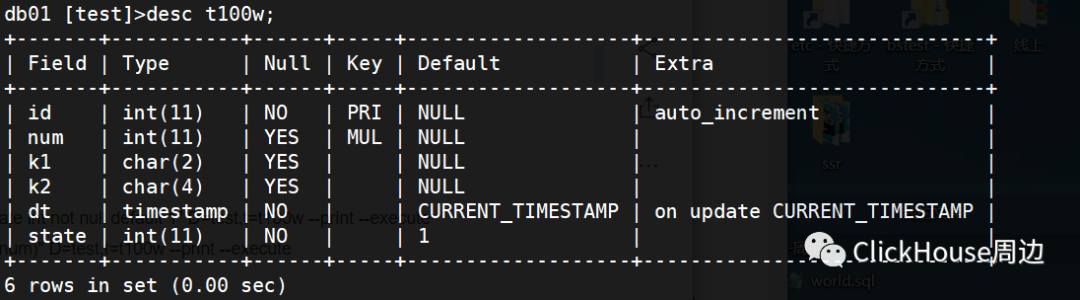
3.3 pt-table-checksum & pt-table-sync
pt-table-checksum是一个基于MySQL数据库主从架构在线数据一致性校验工具。其工作原理在主库上运行, 通过对同步的表在主从段执行checksum, 从而判断数据是否一致。在校验完毕时,该工具将列出与主库存在差异的对象结果。
-- 环境:Master 192.168.1.8, Slave 192.168.1.12,主从已构建-- 复制过滤器如下:[root@ansel ~]# mysql -uroot -p -e "show slave status\G"|grep "ReplicateEnter password:Replicate_Do_DB: sakila,testReplicate_Ignore_DB: mysqla、环境准备--对用于执行checksum的用户授权,注,如果主从复制未开启mysql系统库复制,则从库也同样执行用户创建master@localhost[test]> create database pt CHARACTER SET utf8;master@localhost[test]> grant select, process, super, replication slave on *.* to'checksums'@'192.168.1.%' identified by 'xxx';Query OK, 0 rows affected (0.00 sec)--主库建表及插入记录master@localhost[test]> create table t1(id tinyint primary key auto_increment,ename varchar(20));Query OK, 0 rows affected (0.01 sec)master@localhost[test]> insert into t1(id,ename) values(1,'ansel'),(3,'dba'),(4,'zhang');Query OK, 3 rows affected (0.01 sec)Records: 3 Duplicates: 0 Warnings: 0--从库查询结果slave@localhost[test]> select * from t1;+----+-------+| id | ename |+----+-------+| 1 | ansel || 3 | dba || 4 | zhang |+----+-------+3 rows in set (0.00 sec)--模拟数据不一致,slave端删除记录slave@localhost[test]> delete from t1 where id!=1;
参数描述
–nocheck-replication-filters不检查复制过滤器,建议启用。后面可以用–databases来指定需要检查的数据库。–no-check-binlog-format不检查复制的binlog模式,要是binlog模式是ROW,则会报错。–replicate-check-only只显示不同步的信息。–replicate=把checksum的信息写入到指定表中,建议直接写到被检查的数据库当中。–databases=指定需要被检查的数据库,多个则用逗号隔开。–tables=指定需要被检查的表,多个用逗号隔开h=127.0.0.1 :Master的地址u=root :用户名p=123456 :密码P=3306 :端口
b、单表校验-- 执行pt-table-checksumpt-table-checksum h='192.168.1.8',u='checksums',p='xxx',P=3306 -dtest -tt1 --nocheck-replication-filters --no-check-binlog-format --replicate=test.checksum

TS ERRORS DIFFS ROWS DIDD_ROWS CHUNKS SKIPPED TIME TABLE07-17T22:36:31 0 1 2 2 1 0 0.025 test.t1TS :完成检查的时间。ERRORS :检查时候发生错误和警告的数量。DIFFS :0表示一致,1表示不一致。当指定--no-replicate-check时,会一直为0,当指定--replicate-check-only会显示不同的信息。ROWS :表的行数。CHUNKS :被划分到表中的块的数目。SKIPPED :由于错误或警告或过大,则跳过块的数目。TIME :执行的时间。TABLE :被检查的表名。
此时同步需要pt-table-sync校验,然后同步
参数描述
--replicate指定通过pt-table-checksum得到的表--databases指定执行同步的数据库--tables指定执行同步的表,多个用逗号隔开--sync-to-master指定一个DSN,即从的IP,他会通过show processlist或show slave status 去自动的找主h=127.0.0.1 :Master的地址u=root :用户名p=123456 :密码P=3306 :端口打印,但不执行命令--execute执行命令
处理方式一:
# pt-table-sync --replicate=pt.checksums --databases test --tables t1 h=192.168.1.8,u=checksum,p=checksum,P=3306 h=192.168.1.12,u=checksum,p=checksum,P=3306 --print
处理方式二:
pt-table-sync --replicate=pt.checksums --databases test --tables t1 h=192.168.1.8,u=checksum,p=checksum,P=3306 h=192.168.1.12,u=checksum,p=checksum,P=3306 --execute
3.4 pt-duplicate-key-checker
pt-duplicate-key-checker帮助检测表中重复的索引或者主键。合理的索引会更快查询所需数据,但是过量的索引反而可能会使数据库的性能降低,它可以找到重复的索引并且还会删除重复索引的建立语句,非常实用。
a.准备环境CREATE TABLE `temp` (`id` int(11) NOT NULL AUTO_INCREMENT,`name` varchar(20) DEFAULT NULL,`password` varchar(20) DEFAULT NULL,`age` int(11) DEFAULT NULL,PRIMARY KEY (`id`),KEY `idx_test_temp_name` (`name`),KEY `idx_test_temp_name_new` (`name`)) ENGINE=InnoDB AUTO_INCREMENT=4 DEFAULT CHARSET=utf8mb4;insert into temp values(1,'ansel', '123456', 18);insert into temp values(2,'zhang', 'qwerty', 23);insert into temp values(3,'zheng', 'zxcvbn', 34);CREATE INDEX idx_test_temp_name ON test.temp(name);CREATE INDEX idx_test_temp_name_new ON test.temp(name);show indexes from temp;+-------+------------+------------------------+--------------+-------------+-----------+-------------+----------+--------+------+------------+---------+---------------+| Table | Non_unique | Key_name | Seq_in_index | Column_name | Collation | Cardinality | Sub_part | Packed | Null | Index_type | Comment | Index_comment |+-------+------------+------------------------+--------------+-------------+-----------+-------------+----------+--------+------+------------+---------+---------------+| temp | 0 | PRIMARY | 1 | id | A | 2 | NULL | NULL | | BTREE | | || temp | 1 | idx_test_temp_name | 1 | name | A | 3 | NULL | NULL | YES | BTREE | | || temp | 1 | idx_test_temp_name_new | 1 | name | A | 3 | NULL | NULL | YES | BTREE | | |+-------+------------+------------------------+--------------+-------------+-----------+-------------+----------+--------+------+------------+---------+---------------+3 rows in set (0.00 sec)
b.运行测试pt-duplicate-key-checker --database=test h='127.0.0.1' --user=root --password=xxxxxx# ######################################################################### test.temp# ######################################################################### idx_test_temp_name_new is a duplicate of idx_test_temp_name# Key definitions:# KEY `idx_test_temp_name_new` (`name`)# KEY `idx_test_temp_name` (`name`),# Column types:# `name` varchar(20) default null# To remove this duplicate index, execute:ALTER TABLE `test`.`temp` DROP INDEX `idx_test_temp_name_new`;# ######################################################################### Summary of indexes# ######################################################################### Size Duplicate Indexes 249# Total Duplicate Indexes 1# Total Indexes 6
c.执行删除语句:mysql> ALTER TABLE `test`.`temp` DROP INDEX `idx_test_temp_name_new`;Query OK, 0 rows affected (0.01 sec)Records: 0 Duplicates: 0 Warnings: 0d.再次运行测试pt-duplicate-key-checker --database=test h='127.0.0.1' --user=root --password=xxxxxx# ######################################################################### Summary of indexes# ######################################################################### Total Indexes 5
近期文章推荐
更多精彩内容欢迎关注微信公众号