



由
\l元命令查看数据库引发的思考,写了这篇文章
记录经常容易忘记的关于ACL权限和数据库登录权限等的小知识点
在查看数据库时经常会看到:

问题一:ACL权限
当创建一个object对象时,会分配一个owner。所有者通常是执行创建语句的角色。通常情况下只有superuser和owner的用户可以对该对象做任何事情,为了允许其他角色也可以对该对象做某些操作,必须分配权限。
ACL(Access Control List)访问控制列表:
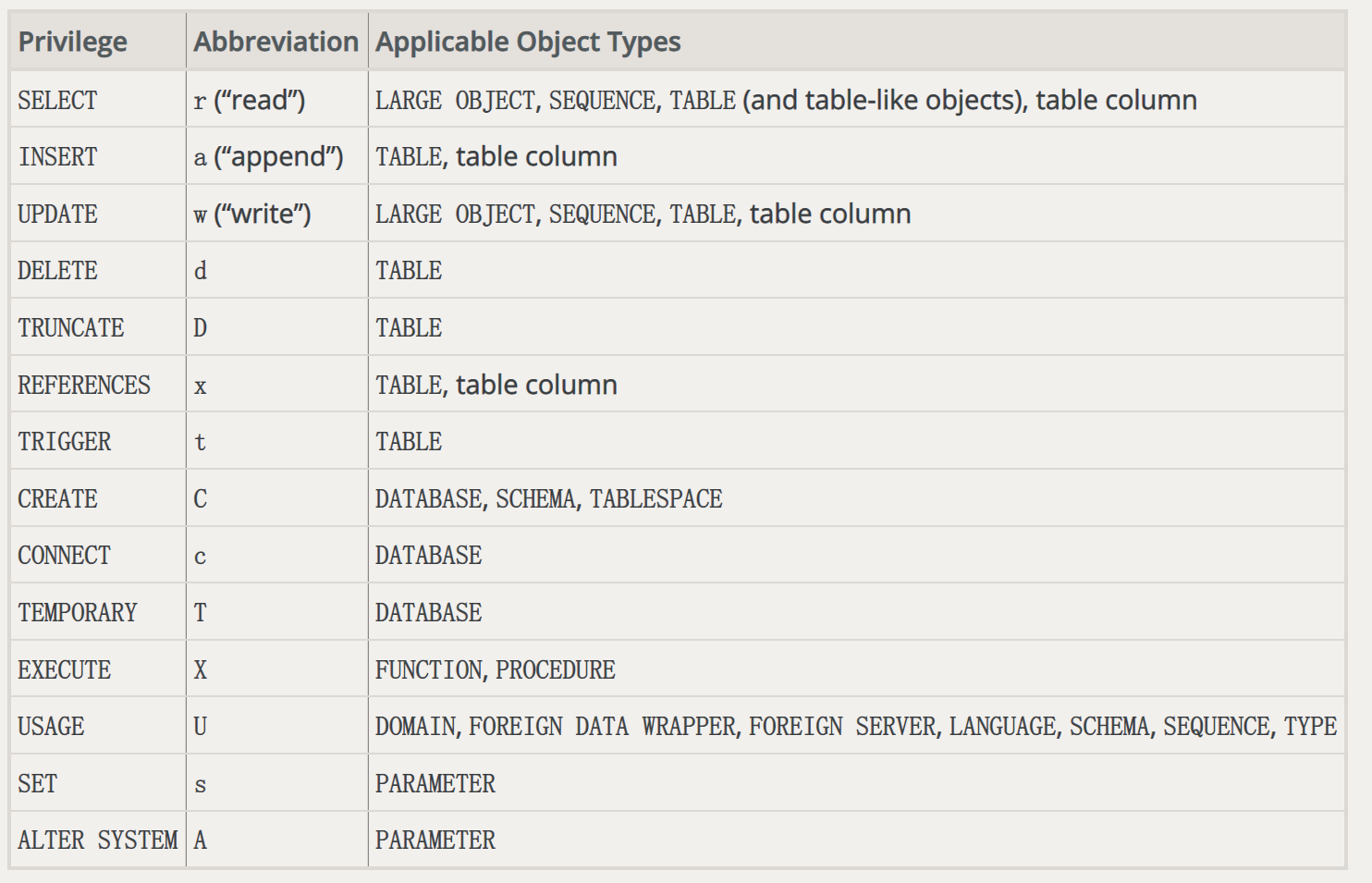
问题二:Access Privileges 如何理解?
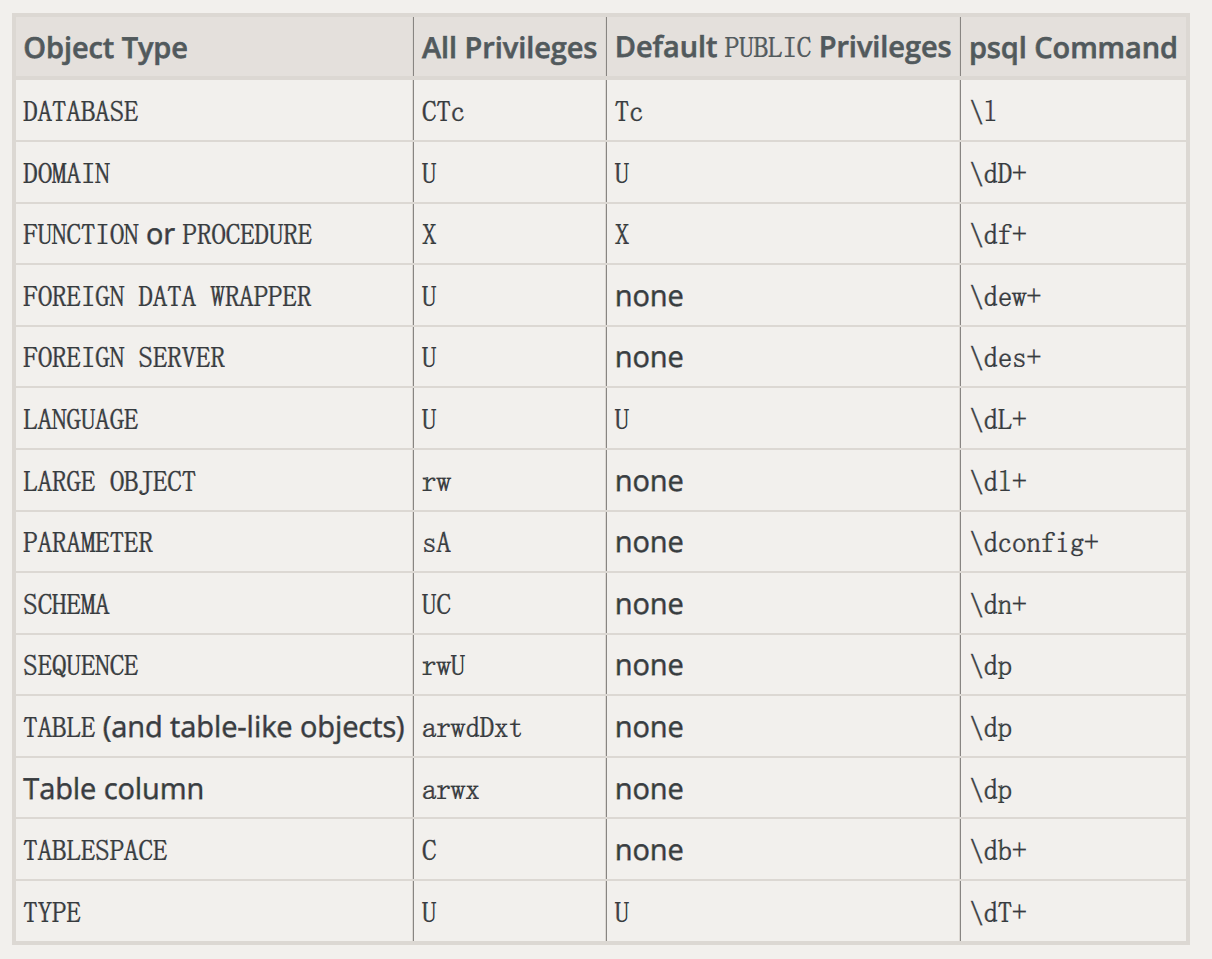
rolename=xxx/yy
- rolename=xxx 其中rolename就是被赋予权限的用户名;rolname缺省(即=xxx)表示这个权限赋予给了PUBLIC角色
- xxx表示具有的权限
- /yy 表示是谁赋予的这个权限
看个关于表的acl权限的例子:
maleah_db=# \dp t
                                Access privileges
 Schema |     Name     | Type  | Access privileges | Column privileges | Policies
--------+--------------+-------+-------------------+-------------------+----------
 public | t            | table |                   |                   |
(1 rows)
Access privileges 列为空值,表示该对象具有默认权限(也就是说,它在相关系统目录中的权限条目为空)。一旦该对象的权限被修改,该列则会显示对应的ACL权限
maleah_db=# select relname,relacl from pg_class where relname = 't';
 relname | relacl
---------+--------
 t       |
(1 row)
赋予utest 普通用户 SELECT 权限后再次查看:
maleah_db=# grant SELECT ON TABLE t to utest ;
GRANT
maleah_db=# \dp t
                              Access privileges
 Schema | Name | Type  |   Access privileges   | Column privileges | Policies
--------+------+-------+-----------------------+-------------------+----------
 public | t    | table | maleah=arwdDxt/maleah+|                   |
        |      |       | utest=r/maleah        |                   |
(1 row)
其中,maleah=arwdDxt/maleah,表示 maleah 用户具有该表t 的所有权限,该权限是 maleah 赋予的。
utest=r/maleah ,表示 utest 用户具有 SELECT 查看表t 的权限,该权限是 maleah 授予的,也就对应 grant SELECT ON TABLE t to utest 语句
由于默认的PUBLIC角色对表没有任何权限,看个数据库的:
maleah_db=# \l template1
                                                 List of databases
   Name    |  Owner   | Encoding |   Collate   |    Ctype    | ICU Locale | Locale Provider |   Access privileges
-----------+----------+----------+-------------+-------------+------------+-----------------+-----------------------
 template1 | postgres | UTF8     | en_US.UTF-8 | en_US.UTF-8 |            | libc            | =c/postgres          +
           |          |          |             |             |            |                 | postgres=CTc/postgres
(1 row)
=c/postgres,表示PUBLIC角色具有connect权限
问题三:用户登录数据库所具备的条件?
-
服务器启动
-
白名单(pg_hba.conf文件配置相应条目)
-
监听地址(listen_addresses参数)
-
登录的用户具有login权限
maleah_db=# select rolname,rolcanlogin from pg_roles where rolname = 'utest' ; rolname | rolcanlogin ---------+------------- utest | f (1 row) maleah_db=# \c - utest connection to server on socket "/tmp/.s.PGSQL.5555" failed: FATAL: role "utest" is not permitted to log in Previous connection kept maleah_db=# -- 修改允许登录 maleah_db=# alter user utest login ; ALTER ROLE -
数据库允许连接
maleah_db=# select datname,datallowconn,datacl from pg_database where datname = 'conntest'; datname | datallowconn | datacl ----------+--------------+-------- conntest | f | (1 row) maleah_db=# \c conntest utest connection to server on socket "/tmp/.s.PGSQL.5555" failed: FATAL: database "conntest" is not currently accepting connections Previous connection kept -- 修改数据库允许连接 maleah_db=# alter database conntest allow_connections on ; ALTER DATABASE maleah_db=# select datname,datallowconn,datacl from pg_database where datname = 'conntest'; datname | datallowconn | datacl ----------+--------------+-------- conntest | t | (1 row) maleah_db=# \c conntest utest You are now connected to database "conntest" as user "utest". conntest=> -
用户具有connect数据库的权限
maleah_db=# select datname,datallowconn,datacl from pg_database where datname = 'conntest';
 datname  | datallowconn | datacl
----------+--------------+--------
 conntest | t            |
(1 row)
问题四:为什么我回收了connect权限还能连接数据库???
maleah_db=# revoke CONNECT on database conntest from utest ;
REVOKE
maleah_db=# \c conntest utest
You are now connected to database "conntest" as user "utest".
conntest=> select datname,datallowconn,datacl from pg_database where datname = 'conntest';
 datname  | datallowconn |             datacl
----------+--------------+--------------------------------
 conntest | t            | {=Tc/maleah,maleah=CTc/maleah}
(1 row)
需要了解的是,在PostgreSQL中有一个public角色,任何新建的用户都会被首先赋予这个角色。默认情况下,在创建数据库之后,允许public角色连接,即允许任何人连接。
通过datacl我们可以看到,PUBLIC 角色还是具有该数据库的connect权限。
可以简答的把PUBLIC角色当作是一个组角色,新建的用户是该组的成员角色,会自动继承该PUBLIC角色的所有权限
简单的只revoke成员角色的某些权限,而PUBLIC角色的权限还在,该角色默认还是会继承PUBLIC角色的connect权限。
因此,如果想要回收某个用户指定数据库的connect权限,需把该数据库中PUBLIC角色的权限收回.
maleah_db=# revoke CONNECT on database conntest from PUBLIC ;
REVOKE
maleah_db=# \c conntest utest
connection to server on socket "/tmp/.s.PGSQL.5555" failed: FATAL:  permission denied for database "conntest"
DETAIL:  User does not have CONNECT privilege.
Previous connection kept
maleah_db=#
关于此问题,前段时间还翻译了一篇国外的文章,文章指路👉:当心PostgreSQL中的’public’
问题五:REVOKE & GRANT 的坑?
[postgres@node4 ~]$ psql -U postgres -d postgres
psql (15.0)
Type "help" for help.

postgres=# grant CONNECT on database conntest to utest ;
GRANT
postgres=> select datname,datdba::regrole,datacl from pg_database where datname = 'conntest';
 datname  | datdba |                    datacl
----------+--------+-----------------------------------------------
 conntest | maleah | {=T/maleah,maleah=CTc/maleah,utest=c/maleah}
(1 row)
当我们使用 postgres 超级用户给 utest 普通用户赋予 CONNECT 权限,结果却显示该权限是该对象的owner赋予的。
maleah_db=# revoke CONNECT on database conntest from utest;
REVOKE
maleah_db=# grant CONNECT on database conntest to utest WITH GRANT OPTION ;
GRANT
maleah_db=# select datname,datdba::regrole,datacl from pg_database where datname = 'conntest';
 datname  | datdba |                    datacl
----------+--------+-----------------------------------------------
 conntest | maleah | {=T/maleah,maleah=CTc/maleah,utest=c*/maleah}
(1 row)

maleah_db=# \c - utest
You are now connected to database "maleah_db" as user "utest".
maleah_db=> grant CONNECT on database conntest to utest2 ;
GRANT
maleah_db=> select datname,datdba::regrole,datacl from pg_database where datname = 'conntest';
 datname  | datdba |                            datacl
----------+--------+--------------------------------------------------------------
 conntest | maleah | {=T/maleah,maleah=CTc/maleah,utest=c*/maleah,utest2=c/utest}
(1 row)
使用superuser权限的用户赋权,/yy显示的都是该对象的owner。
只有当普通用户赋权时,后面才会显示非owner
当回收权限时,
使用超级用户回收权限:(super 用户为 superuser)
maleah_db=> \c - super
You are now connected to database "maleah_db" as user "super".
maleah_db=# revoke CONNECT on database conntest from utest2;
REVOKE
maleah_db=# select datname,datdba::regrole,datacl from pg_database where datname = 'conntest';
 datname  | datdba |                            datacl
----------+--------+--------------------------------------------------------------
 conntest | maleah | {=T/maleah,maleah=CTc/maleah,utest=c*/maleah,utest2=c/utest}
(1 row)
客户端返回REVOKE,但实际的权限回收并未回收。utest用户回收utest2的 CONNECT 权限成功。
conntest=# \c - utest
You are now connected to database "conntest" as user "utest".
conntest=> revoke CONNECT on database conntest from utest2;
REVOKE
conntest=> select datname,datdba::regrole,datacl from pg_database where datname = 'conntest';
 datname  | datdba |                    datacl
----------+--------+-----------------------------------------------
 conntest | maleah | {=T/maleah,maleah=CTc/maleah,utest=c*/maleah}
(1 row)
只允许赋权的人员回收被赋予的权限
💡 注意:做完 REVOKE 操作记得检查该对象的权限是否被回收
仅供参考,文章有不妥的还请多多指教🙃
