官方文档
官方下载参考地址如下:
http://www.oracle.com/technetwork/database/features/instant-client/index-097480.html
Oracle Instant Client enablesapplications to connect to a local or remote Oracle Database for developmentand production deployment. The Instant Client libraries provide the necessarynetwork connectivity, as well as basic and high end data features, to make fulluse of Oracle Database. It underlies the Oracle APIs of popular languages andenvironments including Node.js, Python and PHP, as well as providing access forOCI, OCCI, JDBC, ODBC and Pro*C applications. Tools included in Instant Client,such as SQL*Plus and Oracle Data Pump, provide quick and convenient dataaccess.
Partners can benefitgreatly from being able to bundle Instant Client in their applications.
Instant Client Installation Overview(官方安装指南)
General Instant Client installation steps are:
1. Download the desired Instant Client packages for your platform. All installations require either the Basic or Basic Light package.
2. Unzip the packages into a single directory such as "instantclient_12_2".
3. Set your environment's library loading path (for example LD_LIBRARY_PATH on Linux, or PATH on Windows) to the directory created in Step 2.
4. Start your application.
Refer to any detailed instructions on the download page of your platform formore information.
Linux安装视频指南
https://www.youtube.com/watch?v=Sz69kdItkPw
实施
1.下载如下文件,直接解压到C盘下。
2.在解压后后的文件C:\instantclient_12_2,新建tnsname.ora。3.测试
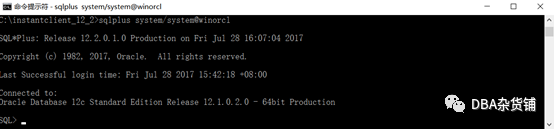
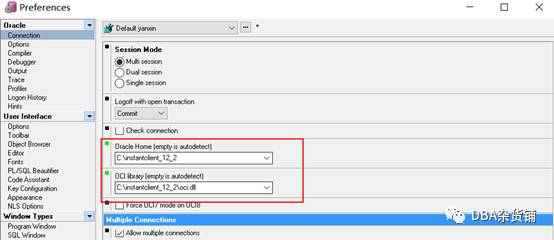
配置PL/SQL连接
注意:确定你的plsql是32位还是64位。
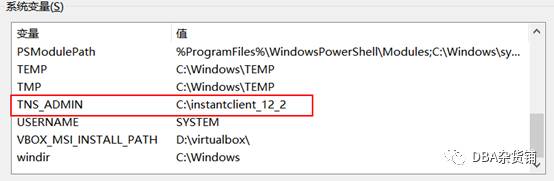
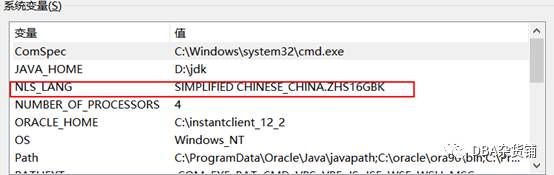
配置环境变量