



删除asm磁盘组报错
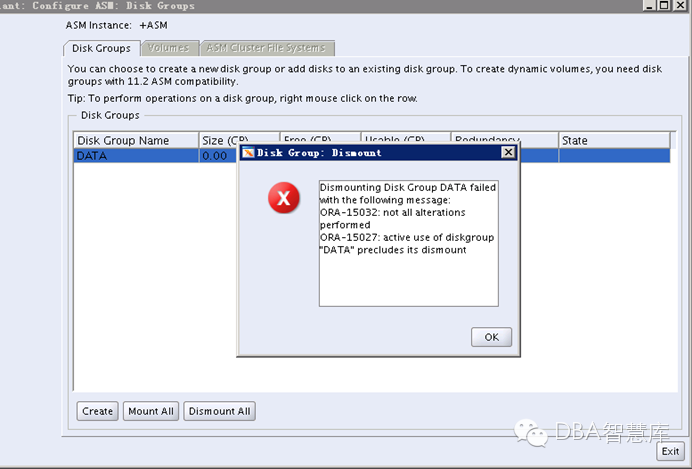
Today We discuss about Error:ORA-15027: active use of diskgroup precludes its dismount.This error occurred we I tried to drop disk group on ASM instance (version 11GR2).
Cause of this error is that ASM spfile is located on Diskgroup
Solution:
In that case you need to create a pfile from the spfile and then startup the ASM instance using the pfile.
1.Find location of AMS spfile with command SQL> show parameter spfile
2.Create pfile from spfile
3.Start ASM instance with pfile, for Example SQL> startup pfile=$ORACLE_HOME/dbs/init+ASM.ora
4.Drop Diskgroup
操作:
[grid@gsdata ~]$ exprot ORACLE_SID=+ASM
-bash: exprot: command not found
[grid@gsdata ~]$ export ORACLE_SID=+ASM
[grid@gsdata ~]$ sqlplus / as sysasm
SQL*Plus: Release 11.2.0.3.0 Production on Mon Nov 3 04:53:01 2014
Copyright (c) 1982, 2011, Oracle. All rights reserved.
Connected to:
Oracle Database 11g Enterprise Edition Release 11.2.0.3.0 - 64bit Production
With the Automatic Storage Management option
SQL> show parameter spfile
NAME TYPE VALUE
------------------------------------ ----------- ------------------------------
spfile string +DATA/asm/asmparameterfile/reg
istry.253.862629277
SQL> create pfile ='/oracle/init.orahsr' from spfile;
File created.
SQL> shutdown immediate
ASM diskgroups dismounted
ASM instance shutdown
SQL> startup pfile='/oracle/init.orahsr'
ASM instance started
Total System Global Area 283930624 bytes
Fixed Size 2227664 bytes
Variable Size 256537136 bytes
ASM Cache 25165824 bytes
ORA-15110: no diskgroups mounted
SQL> startup
ORA-00099: warning: no parameter file specified for ASM instance
ORA-01081: cannot start already-running ORACLE - shut it down first
SQL> shutdown immediate
ASM diskgroups dismounted
ASM instance shutdown
SQL> startup
ORA-00099: warning: no parameter file specified for ASM instance
ASM instance started
Total System Global Area 283930624 bytes
Fixed Size 2227664 bytes
Variable Size 256537136 bytes
ASM Cache 25165824 bytes
ORA-15110: no diskgroups mounted
SQL> exit
