



注:近期在进行去O数据库测试,了解了下openGauss数据库,前期也在测试环境进行了openGauss的安装等方面的学习,根据制定的计划,也希望能对openGauss进行一些压测,观察数据库运行状况,于是网上查找资料,并根据网上的一些资料,并进行了测试和文档整理,也向之前写这方面文档的人致敬,感谢他们的付出。也希望对此熟悉的人能多多指正,以便完善和修改,另外,在生成的报告里,对于操作系统层面的一些数据未显示出来,还在排查中,也希望对此熟悉的能多多指导。
本次是测试环境验证测试,服务器是在虚拟机上,配置也较差,如生产环境还需考虑更多方面。
一、环境准备
1.1、安装依赖包
[root@opengauss-node1 ~]# yum install gcc glibc-headers gcc-c++ gcc-gfortran readline-devel  libXt-devel pcre-devel libcurl libcurl-devel -y

[root@opengauss-node1 ~]# yum install ncurses ncurses-devel autoconf automake zlib zlib-devel bzip2 bzip2-devel xz-devel ant -y
1.2、安装JDK
[root@opengauss-node1 ~]# mkdir -p /opt/module
[root@opengauss-node1 ~]# tar -zxvf jdk-8u321-linux-x64.tar.gz -C /opt/module
-- 配置JAVA_HOME环境变量
[root@opengauss-node1 ~]# vim /etc/profile
-- 添加如下内容
export JAVA_HOME=/opt/module/jdk1.8.0_321
export PATH=$PATH:$JAVA_HOME/bin
export CLASSPATH=.:$JAVA_HOME/lib/tools.jar:$JAVA_HOME/lib/dt.jar:$CLASSPATH

-- 生效配置
[root@opengauss-node1 ~]# source /etc/profile

-- 验证并查看版本
[root@opengauss-node1 ~]# java -version
openjdk version "1.8.0_352"
OpenJDK Runtime Environment (build 1.8.0_352-b08)
OpenJDK 64-Bit Server VM (build 25.352-b08, mixed mode)
1.3、安装R语言
[root@opengauss-node1 ~]# wget https://mirror.bjtu.edu.cn/cran/src/base/R-3/R-3.6.3.tar.gz
[root@opengauss-node1 ~]# tar -zxvf R-3.6.3.tar.gz
[root@opengauss-node1 ~]# cd R-3.6.3
-- 编译
[root@opengauss-node1 R-3.6.3]# ./configure
-- 安装
[root@opengauss-node1 R-3.6.3]# make && make install
-- 验证并查看版本
[root@opengauss-node1 ~]# R --version
R version 3.6.3 (2020-02-29) -- "Holding the Windsock"
Copyright (C) 2020 The R Foundation for Statistical Computing
Platform: x86_64-pc-linux-gnu (64-bit)

R is free software and comes with ABSOLUTELY NO WARRANTY.
You are welcome to redistribute it under the terms of the
GNU General Public License versions 2 or 3.
For more information about these matters see
https://www.gnu.org/licenses/.
1.4、编译安装htop
[root@opengauss-node1 ~]# wget https://github.com/htop-dev/htop/releases/download/3.2.0/htop-3.2.0.tar.xz
[root@opengauss-node1 ~]# tar -zxvf htop-3.2.0.tar.gz
[root@opengauss-node1 ~]# cd htop-3.2.0
[root@opengauss-node1 htop-3.2.0]# ./autogen.sh
[root@opengauss-node1 htop-3.2.0]# ./configure
[root@opengauss-node1 htop-3.2.0]# make && make install
-- 验证并查看版本
[root@opengauss-node1 ~]# htop --version
htop 3.2.0
1.5、安装benchmarksql
[root@opengauss-node1 ~]# wget https://udomain.dl.sourceforge.net/project/benchmarksql/benchmarksql-5.0.zip
[root@opengauss-node1 ~]# unzip benchmarksql-5.0.zip
[root@opengauss-node1 ~]# ls -l benchmarksql-5.0
total 36
-rwxr-xr-x 1 root root 1130 May 26  2016 build.xml
drwxr-xr-x 3 root root 4096 May 26  2016 doc
-rwxr-xr-x 1 root root 6376 May 26  2016 HOW-TO-RUN.txt
drwxr-xr-x 5 root root 4096 May 26  2016 lib
-rwxr-xr-x 1 root root 5318 May 26  2016 README.md
drwxr-xr-x 7 root root 4096 May 26  2016 run
drwxr-xr-x 6 root root 4096 May 26  2016 src
1.6、安装并替换JDBC驱动
-- 下载对应版本jdbc驱动
[root@opengauss-node1 ~]# wget https://opengauss.obs.cn-south-1.myhuaweicloud.com/3.1.0/x86/openGauss-3.1.0-JDBC.tar.gz
-- 解压jdbc驱动
[root@opengauss-node1 ~]# tar -zxvf openGauss-3.1.0-JDBC.tar.gz
postgresql.jar
opengauss-jdbc-3.1.0.jar
README_cn.md
README_en.md
[root@opengauss-node1 ~]# mv /root/benchmarksql-5.0/lib/postgres/postgresql-9.3-1102.jdbc41.jar /root/benchmarksql-5.0/lib/postgres/postgresql-9.3-1102.jdbc41.jar_bak
[root@opengauss-node1 ~]# cp /root/postgresql.jar /root/benchmarksql-5.0/lib/postgres/
[root@opengauss-node1 ~]# ls -lrt /root/benchmarksql-5.0/lib/postgres/
total 1408
-rw-r--r-- 1 root root 592322 May 26  2016 postgresql-9.3-1102.jdbc41.jar_bak
-rw-r--r-- 1 root root 847123 Nov 21 09:31 postgresql.jar
1.7、进行ant编译benchmarksql
[root@opengauss-node1 ~]# cd /root/benchmarksql-5.0/
[root@opengauss-node1 ~]# cd /root/benchmarksql-5.0/
[root@opengauss-node1 benchmarksql-5.0]# ant
Buildfile: /root/benchmarksql-5.0/build.xml

init:
    [mkdir] Created dir: /root/benchmarksql-5.0/build

compile:
    [javac] Compiling 11 source files to /root/benchmarksql-5.0/build

dist:
    [mkdir] Created dir: /root/benchmarksql-5.0/dist
      [jar] Building jar: /root/benchmarksql-5.0/dist/BenchmarkSQL-5.0.jar

BUILD SUCCESSFUL
Total time: 5 seconds
1.8、配置benchmarksql文件
[root@opengauss-node1 ~]# cd /root/benchmarksql-5.0/run/
[root@opengauss-node1 run]# cp -p props.pg props.openGauss
[root@opengauss-node1 run]# vim props.pg props.openGauss
-- 设置如下内容
db=postgres
driver=org.postgresql.Driver
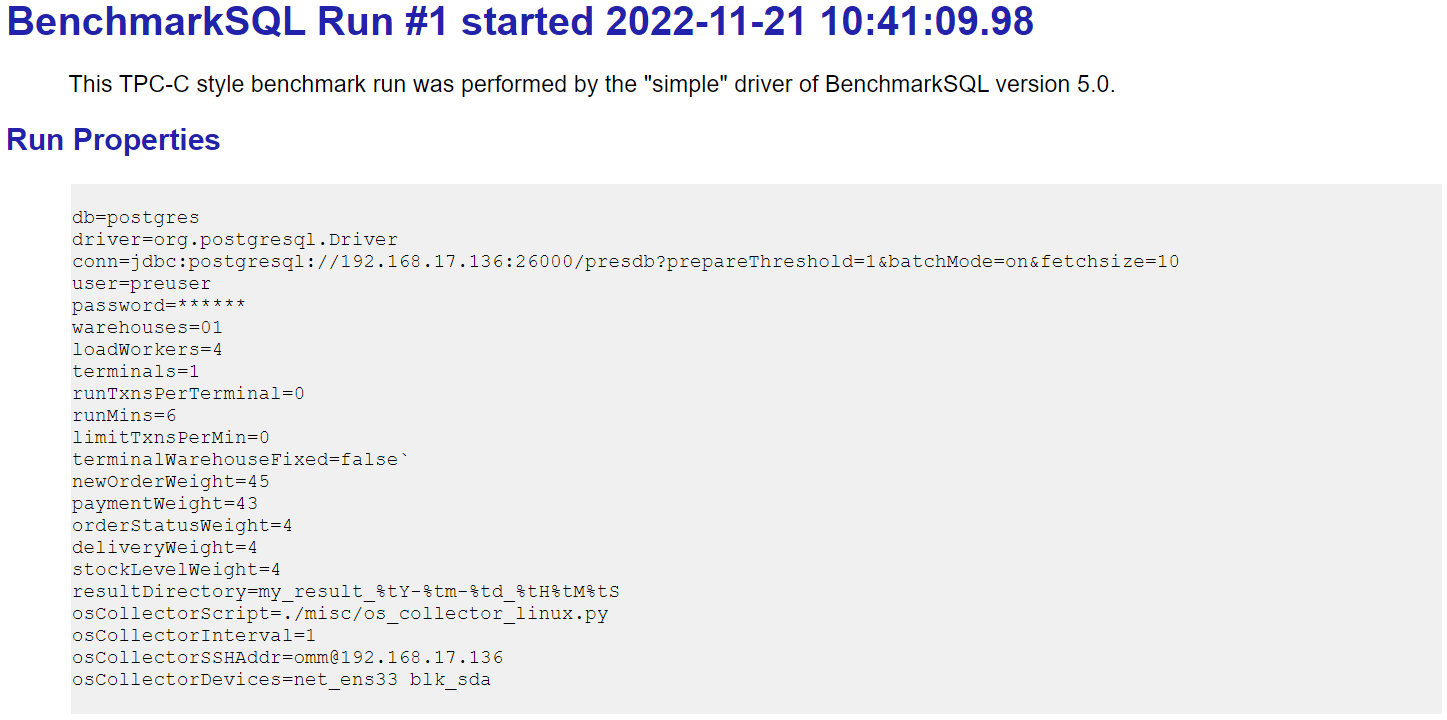
conn=jdbc:postgresql://192.168.17.136:26000/presdb?prepareThreshold=1&batchMode=on&fetchsize=10
user=preuser
password=gauss@123
warehouses=01
loadWorkers=4
terminals=1
runTxnsPerTerminal=0
runMins=6
limitTxnsPerMin=0
terminalWarehouseFixed=false
newOrderWeight=45
paymentWeight=43
orderStatusWeight=4
deliveryWeight=4
stockLevelWeight=4
resultDirectory=my_result_%tY-%tm-%td_%tH%tM%tS
osCollectorScript=./misc/os_collector_linux.py
osCollectorInterval=1
osCollectorSSHAddr=omm@192.168.17.136
osCollectorDevices=net_ens33 blk_sda
1.9、创建数据库及用户
[omm@opengauss-node1 ~]$ gsql -d postgres -p 26000
gsql ((openGauss 3.1.0 build 4e931f9a) compiled at 2022-09-29 14:19:24 commit 0 last mr  )
Non-SSL connection (SSL connection is recommended when requiring high-security)
Type "help" for help.

openGauss=# create user preuser with sysadmin identified by 'gauss@123';
CREATE ROLE
openGauss=# create database presdb encoding='UTF-8' owner=preuser;
CREATE DATABASE
1.10、配置白名单
[root@opengauss-node1 ~]# su - omm
Last login: Mon Nov 21 10:15:07 CST 2022 on pts/1
[omm@opengauss-node1 ~]$ gs_guc reload -N all -I all -h "host  presdb  jack  192.168.17.136/32  sha256"
The gs_guc run with the following arguments: [gs_guc -N all -I all -h host  presdb  jack  192.168.17.136/32  sha256 reload ].
Begin to perform the total nodes: 2.
Popen count is 2, Popen success count is 2, Popen failure count is 0.
Begin to perform gs_guc for datanodes.
Command count is 2, Command success count is 2, Command failure count is 0.

Total instances: 2. Failed instances: 0.
ALL: Success to perform gs_guc!
1.11、修改并配置建表脚本
[root@opengauss-node1 ~]# cd /root/benchmarksql-5.0/run/sql.common/
[root@opengauss-node1 ~]# vim tableCreates.sql
-- 编辑tableCreates.sql文件,创建表空间,并将表分散在不同表空间
CREATE TABLESPACE tbs1 location '/opt/gaussdb/install/data/db1/tbs1';
CREATE TABLESPACE tbs2 location '/opt/gaussdb/install/data/db1/tbs2';

create table bmsql_config (
  cfg_name    varchar(30) primary key,
  cfg_value   varchar(50)
) tablespace tbs2;


create table bmsql_warehouse (
  w_id        integer   not null,
  w_ytd       decimal(12,2),
  w_tax       decimal(4,4),
  w_name      varchar(10),
  w_street_1  varchar(20),
  w_street_2  varchar(20),
  w_city      varchar(20),
  w_state     char(2),
  w_zip       char(9)
)WITH (FILLFACTOR=80) tablespace tbs2;


create table bmsql_district (
  d_w_id       integer       not null,
  d_id         integer       not null,
  d_ytd        decimal(12,2),
  d_tax        decimal(4,4),
  d_next_o_id  integer,
  d_name       varchar(10),
  d_street_1   varchar(20),
  d_street_2   varchar(20),
  d_city       varchar(20),
  d_state      char(2),
  d_zip        char(9)
)WITH (FILLFACTOR=80) tablespace tbs2;


create table bmsql_customer (
  c_w_id         integer        not null,
  c_d_id         integer        not null,
  c_id           integer        not null,
  c_discount     decimal(4,4),
  c_credit       char(2),
  c_last         varchar(16),
  c_first        varchar(16),
  c_credit_lim   decimal(12,2),
  c_balance      decimal(12,2),
  c_ytd_payment  decimal(12,2),
  c_payment_cnt  integer,
  c_delivery_cnt integer,
  c_street_1     varchar(20),
  c_street_2     varchar(20),
  c_city         varchar(20),
  c_state        char(2),
  c_zip          char(9),
  c_phone        char(16),
  c_since        timestamp,
  c_middle       char(2),
  c_data         varchar(500)
)WITH (FILLFACTOR=80) tablespace tbs1;


create sequence bmsql_hist_id_seq;


create table bmsql_history (
  hist_id  integer,
  h_c_id   integer,
  h_c_d_id integer,
  h_c_w_id integer,
  h_d_id   integer,
  h_w_id   integer,
  h_date   timestamp,
  h_amount decimal(6,2),
  h_data   varchar(24)
)WITH (FILLFACTOR=80) tablespace tbs2;


create table bmsql_new_order (
  no_w_id  integer   not null,
  no_d_id  integer   not null,
  no_o_id  integer   not null
)WITH (FILLFACTOR=80) tablespace tbs2;


create table bmsql_oorder (
  o_w_id       integer      not null,
  o_d_id       integer      not null,
  o_id         integer      not null,
  o_c_id       integer,
  o_carrier_id integer,
  o_ol_cnt     integer,
  o_all_local  integer,
  o_entry_d    timestamp
)WITH (FILLFACTOR=80) tablespace tbs2;


create table bmsql_order_line (
  ol_w_id         integer   not null,
  ol_d_id         integer   not null,
  ol_o_id         integer   not null,
  ol_number       integer   not null,
  ol_i_id         integer   not null,
  ol_delivery_d   timestamp,
  ol_amount       decimal(6,2),
  ol_supply_w_id  integer,
  ol_quantity     integer,
  ol_dist_info    char(24)
)WITH (FILLFACTOR=80) tablespace tbs2;


create table bmsql_item (
  i_id     integer      not null,
  i_name   varchar(24),
  i_price  decimal(5,2),
  i_data   varchar(50),
  i_im_id  integer
) tablespace tbs2;


create table bmsql_stock (
  s_w_id       integer       not null,
  s_i_id       integer       not null,
  s_quantity   integer,
  s_ytd        integer,
  s_order_cnt  integer,
  s_remote_cnt integer,
  s_data       varchar(50),
  s_dist_01    char(24),
  s_dist_02    char(24),
  s_dist_03    char(24),
  s_dist_04    char(24),
  s_dist_05    char(24),
  s_dist_06    char(24),
  s_dist_07    char(24),
  s_dist_08    char(24),
  s_dist_09    char(24),
  s_dist_10    char(24)
)WITH (FILLFACTOR=80) tablespace tbs2;
二、进行BenchmarkSQL压测
12.1 导入测试数据
[root@opengauss-node1 ~]# cd /root/benchmarksql-5.0/run/
[root@opengauss-node1 run]# ./runDatabaseBuild.sh props.openGauss
# ------------------------------------------------------------
# Loading SQL file ./sql.common/tableCreates.sql
# ------------------------------------------------------------
Nov 21, 2022 10:34:25 AM org.postgresql.core.v3.ConnectionFactoryImpl openConnectionImpl
INFO: [6150799d-4a27-4ed4-9da9-7df3d9ff7e92] Try to connect. IP: 192.168.17.136:26000
Nov 21, 2022 10:34:25 AM org.postgresql.core.v3.ConnectionFactoryImpl openConnectionImpl
INFO: [192.168.17.136:33644/192.168.17.136:26000] Connection is established. ID: 6150799d-4a27-4ed4-9da9-7df3d9ff7e92
Nov 21, 2022 10:34:25 AM org.postgresql.core.v3.ConnectionFactoryImpl openConnectionImpl
INFO: Connect complete. ID: 6150799d-4a27-4ed4-9da9-7df3d9ff7e92
CREATE TABLESPACE tbs1 location '/opt/gaussdb/install/data/tbs1';
CREATE TABLESPACE tbs2 location '/opt/gaussdb/install/data/tbs2';
create table bmsql_config (
cfg_name    varchar(30) primary key,
cfg_value   varchar(50)
) tablespace tbs2;
create table bmsql_warehouse (
w_id        integer   not null,
w_ytd       decimal(12,2),
w_tax       decimal(4,4),
w_name      varchar(10),
w_street_1  varchar(20),
w_street_2  varchar(20),
w_city      varchar(20),
w_state     char(2),
w_zip       char(9)
)WITH (FILLFACTOR=80) tablespace tbs2;
create table bmsql_district (
d_w_id       integer       not null,
d_id         integer       not null,
d_ytd        decimal(12,2),
d_tax        decimal(4,4),
d_next_o_id  integer,
d_name       varchar(10),
d_street_1   varchar(20),
d_street_2   varchar(20),
d_city       varchar(20),
d_state      char(2),
d_zip        char(9)
)WITH (FILLFACTOR=80) tablespace tbs2;
create table bmsql_customer (
c_w_id         integer        not null,
c_d_id         integer        not null,
c_id           integer        not null,
c_discount     decimal(4,4),
c_credit       char(2),
c_last         varchar(16),
c_first        varchar(16),
c_credit_lim   decimal(12,2),
c_balance      decimal(12,2),
c_ytd_payment  decimal(12,2),
c_payment_cnt  integer,
c_delivery_cnt integer,
c_street_1     varchar(20),
c_street_2     varchar(20),
c_city         varchar(20),
c_state        char(2),
c_zip          char(9),
c_phone        char(16),
c_since        timestamp,
c_middle       char(2),
c_data         varchar(500)
)WITH (FILLFACTOR=80) tablespace tbs1;
create sequence bmsql_hist_id_seq;
[192.168.17.136:33644/192.168.17.136:26000] ERROR: relation "bmsql_hist_id_seq" already exists in schema "public"
  Detail: creating new table with existing name in the same schema
create table bmsql_history (
hist_id  integer,
h_c_id   integer,
h_c_d_id integer,
h_c_w_id integer,
h_d_id   integer,
h_w_id   integer,
h_date   timestamp,
h_amount decimal(6,2),
h_data   varchar(24)
)WITH (FILLFACTOR=80) tablespace tbs2;
create table bmsql_new_order (
no_w_id  integer   not null,
no_d_id  integer   not null,
no_o_id  integer   not null
)WITH (FILLFACTOR=80) tablespace tbs2;
create table bmsql_oorder (
o_w_id       integer      not null,
o_d_id       integer      not null,
o_id         integer      not null,
o_c_id       integer,
o_carrier_id integer,
o_ol_cnt     integer,
o_all_local  integer,
o_entry_d    timestamp
)WITH (FILLFACTOR=80) tablespace tbs2;
create table bmsql_order_line (
ol_w_id         integer   not null,
ol_d_id         integer   not null,
ol_o_id         integer   not null,
ol_number       integer   not null,
ol_i_id         integer   not null,
ol_delivery_d   timestamp,
ol_amount       decimal(6,2),
ol_supply_w_id  integer,
ol_quantity     integer,
ol_dist_info    char(24)
)WITH (FILLFACTOR=80) tablespace tbs2;
create table bmsql_item (
i_id     integer      not null,
i_name   varchar(24),
i_price  decimal(5,2),
i_data   varchar(50),
i_im_id  integer
) tablespace tbs2;
create table bmsql_stock (
s_w_id       integer       not null,
s_i_id       integer       not null,
s_quantity   integer,
s_ytd        integer,
s_order_cnt  integer,
s_remote_cnt integer,
s_data       varchar(50),
s_dist_01    char(24),
s_dist_02    char(24),
s_dist_03    char(24),
s_dist_04    char(24),
s_dist_05    char(24),
s_dist_06    char(24),
s_dist_07    char(24),
s_dist_08    char(24),
s_dist_09    char(24),
s_dist_10    char(24)
)WITH (FILLFACTOR=80) tablespace tbs2;
Starting BenchmarkSQL LoadData

driver=org.postgresql.Driver
conn=jdbc:postgresql://192.168.17.136:26000/presdb?prepareThreshold=1&batchMode=on&fetchsize=10
user=preuser
password=***********
warehouses=01
loadWorkers=4
fileLocation (not defined)
csvNullValue (not defined - using default 'NULL')

Nov 21, 2022 10:34:27 AM org.postgresql.core.v3.ConnectionFactoryImpl openConnectionImpl
INFO: [403c108c-2fbe-480c-93d3-bb4880bb4ad1] Try to connect. IP: 192.168.17.136:26000
Nov 21, 2022 10:34:27 AM org.postgresql.core.v3.ConnectionFactoryImpl openConnectionImpl
INFO: [192.168.17.136:33646/192.168.17.136:26000] Connection is established. ID: 403c108c-2fbe-480c-93d3-bb4880bb4ad1
Nov 21, 2022 10:34:28 AM org.postgresql.core.v3.ConnectionFactoryImpl openConnectionImpl
INFO: Connect complete. ID: 403c108c-2fbe-480c-93d3-bb4880bb4ad1
Worker 000: Loading ITEM
Nov 21, 2022 10:34:28 AM org.postgresql.core.v3.ConnectionFactoryImpl openConnectionImpl
INFO: [50a962f9-72fa-4e1a-b3d2-b98edbfd381e] Try to connect. IP: 192.168.17.136:26000
Nov 21, 2022 10:34:28 AM org.postgresql.core.v3.ConnectionFactoryImpl openConnectionImpl
INFO: [192.168.17.136:33648/192.168.17.136:26000] Connection is established. ID: 50a962f9-72fa-4e1a-b3d2-b98edbfd381e
Nov 21, 2022 10:34:28 AM org.postgresql.core.v3.ConnectionFactoryImpl openConnectionImpl
INFO: Connect complete. ID: 50a962f9-72fa-4e1a-b3d2-b98edbfd381e
Worker 001: Loading Warehouse      1
Nov 21, 2022 10:34:28 AM org.postgresql.core.v3.ConnectionFactoryImpl openConnectionImpl
INFO: [0cede98c-746c-4de6-b532-34fbc5a7f851] Try to connect. IP: 192.168.17.136:26000
Nov 21, 2022 10:34:28 AM org.postgresql.core.v3.ConnectionFactoryImpl openConnectionImpl
INFO: [192.168.17.136:33650/192.168.17.136:26000] Connection is established. ID: 0cede98c-746c-4de6-b532-34fbc5a7f851
Nov 21, 2022 10:34:28 AM org.postgresql.core.v3.ConnectionFactoryImpl openConnectionImpl
INFO: Connect complete. ID: 0cede98c-746c-4de6-b532-34fbc5a7f851
Nov 21, 2022 10:34:28 AM org.postgresql.core.v3.ConnectionFactoryImpl openConnectionImpl
INFO: [2412cc4f-bb50-4e2d-9b64-d9a915d810df] Try to connect. IP: 192.168.17.136:26000
Nov 21, 2022 10:34:28 AM org.postgresql.core.v3.ConnectionFactoryImpl openConnectionImpl
INFO: [192.168.17.136:33652/192.168.17.136:26000] Connection is established. ID: 2412cc4f-bb50-4e2d-9b64-d9a915d810df
Nov 21, 2022 10:34:28 AM org.postgresql.core.v3.ConnectionFactoryImpl openConnectionImpl
INFO: Connect complete. ID: 2412cc4f-bb50-4e2d-9b64-d9a915d810df
Worker 000: Loading ITEM done
Worker 001: Loading Warehouse      1 done
# ------------------------------------------------------------
# Loading SQL file ./sql.common/indexCreates.sql
# ------------------------------------------------------------
Nov 21, 2022 10:36:12 AM org.postgresql.core.v3.ConnectionFactoryImpl openConnectionImpl
INFO: [2d95e83b-c954-45bd-888a-d0169a80d5dd] Try to connect. IP: 192.168.17.136:26000
Nov 21, 2022 10:36:12 AM org.postgresql.core.v3.ConnectionFactoryImpl openConnectionImpl
INFO: [192.168.17.136:33686/192.168.17.136:26000] Connection is established. ID: 2d95e83b-c954-45bd-888a-d0169a80d5dd
Nov 21, 2022 10:36:13 AM org.postgresql.core.v3.ConnectionFactoryImpl openConnectionImpl
INFO: Connect complete. ID: 2d95e83b-c954-45bd-888a-d0169a80d5dd
alter table bmsql_warehouse add constraint bmsql_warehouse_pkey
primary key (w_id);
alter table bmsql_district add constraint bmsql_district_pkey
primary key (d_w_id, d_id);
alter table bmsql_customer add constraint bmsql_customer_pkey
primary key (c_w_id, c_d_id, c_id);
create index bmsql_customer_idx1
on  bmsql_customer (c_w_id, c_d_id, c_last, c_first);
alter table bmsql_oorder add constraint bmsql_oorder_pkey
primary key (o_w_id, o_d_id, o_id);
create unique index bmsql_oorder_idx1
on  bmsql_oorder (o_w_id, o_d_id, o_carrier_id, o_id);
alter table bmsql_new_order add constraint bmsql_new_order_pkey
primary key (no_w_id, no_d_id, no_o_id);
alter table bmsql_order_line add constraint bmsql_order_line_pkey
primary key (ol_w_id, ol_d_id, ol_o_id, ol_number);
alter table bmsql_stock add constraint bmsql_stock_pkey
primary key (s_w_id, s_i_id);
alter table bmsql_item add constraint bmsql_item_pkey
primary key (i_id);
# ------------------------------------------------------------
# Loading SQL file ./sql.common/foreignKeys.sql
# ------------------------------------------------------------
Nov 21, 2022 10:36:16 AM org.postgresql.core.v3.ConnectionFactoryImpl openConnectionImpl
INFO: [8443366d-83dd-4775-a2ab-b6bc70cddf47] Try to connect. IP: 192.168.17.136:26000
Nov 21, 2022 10:36:17 AM org.postgresql.core.v3.ConnectionFactoryImpl openConnectionImpl
INFO: [192.168.17.136:33694/192.168.17.136:26000] Connection is established. ID: 8443366d-83dd-4775-a2ab-b6bc70cddf47
Nov 21, 2022 10:36:17 AM org.postgresql.core.v3.ConnectionFactoryImpl openConnectionImpl
INFO: Connect complete. ID: 8443366d-83dd-4775-a2ab-b6bc70cddf47
alter table bmsql_district add constraint d_warehouse_fkey
foreign key (d_w_id)
references bmsql_warehouse (w_id);
alter table bmsql_customer add constraint c_district_fkey
foreign key (c_w_id, c_d_id)
references bmsql_district (d_w_id, d_id);
alter table bmsql_history add constraint h_customer_fkey
foreign key (h_c_w_id, h_c_d_id, h_c_id)
references bmsql_customer (c_w_id, c_d_id, c_id);
alter table bmsql_history add constraint h_district_fkey
foreign key (h_w_id, h_d_id)
references bmsql_district (d_w_id, d_id);
alter table bmsql_new_order add constraint no_order_fkey
foreign key (no_w_id, no_d_id, no_o_id)
references bmsql_oorder (o_w_id, o_d_id, o_id);
alter table bmsql_oorder add constraint o_customer_fkey
foreign key (o_w_id, o_d_id, o_c_id)
references bmsql_customer (c_w_id, c_d_id, c_id);
alter table bmsql_order_line add constraint ol_order_fkey
foreign key (ol_w_id, ol_d_id, ol_o_id)
references bmsql_oorder (o_w_id, o_d_id, o_id);
alter table bmsql_order_line add constraint ol_stock_fkey
foreign key (ol_supply_w_id, ol_i_id)
references bmsql_stock (s_w_id, s_i_id);
alter table bmsql_stock add constraint s_warehouse_fkey
foreign key (s_w_id)
references bmsql_warehouse (w_id);
alter table bmsql_stock add constraint s_item_fkey
foreign key (s_i_id)
references bmsql_item (i_id);
# ------------------------------------------------------------
# Loading SQL file ./sql.postgres/extraHistID.sql
# ------------------------------------------------------------
Nov 21, 2022 10:36:21 AM org.postgresql.core.v3.ConnectionFactoryImpl openConnectionImpl
INFO: [7bee3d72-1be6-40b3-bd40-f80e2d8f9b67] Try to connect. IP: 192.168.17.136:26000
Nov 21, 2022 10:36:21 AM org.postgresql.core.v3.ConnectionFactoryImpl openConnectionImpl
INFO: [192.168.17.136:33698/192.168.17.136:26000] Connection is established. ID: 7bee3d72-1be6-40b3-bd40-f80e2d8f9b67
Nov 21, 2022 10:36:22 AM org.postgresql.core.v3.ConnectionFactoryImpl openConnectionImpl
INFO: Connect complete. ID: 7bee3d72-1be6-40b3-bd40-f80e2d8f9b67
-- ----
-- Extra Schema objects/definitions for history.hist_id in PostgreSQL
-- ----
-- ----
--      This is an extra column not present in the TPC-C
--      specs. It is useful for replication systems like
--      Bucardo and Slony-I, which like to have a primary
--      key on a table. It is an auto-increment or serial
--      column type. The definition below is compatible
--      with Oracle 11g, using a sequence and a trigger.
-- ----
-- Adjust the sequence above the current max(hist_id)
select setval('bmsql_hist_id_seq', (select max(hist_id) from bmsql_history));
-- Make nextval(seq) the default value of the hist_id column.
alter table bmsql_history
alter column hist_id set default nextval('bmsql_hist_id_seq');
-- Add a primary key history(hist_id)
alter table bmsql_history add primary key (hist_id);
# ------------------------------------------------------------
# Loading SQL file ./sql.postgres/buildFinish.sql
# ------------------------------------------------------------
Nov 21, 2022 10:36:23 AM org.postgresql.core.v3.ConnectionFactoryImpl openConnectionImpl
INFO: [08219958-d717-4365-a908-9c66f657db3d] Try to connect. IP: 192.168.17.136:26000
Nov 21, 2022 10:36:23 AM org.postgresql.core.v3.ConnectionFactoryImpl openConnectionImpl
INFO: [192.168.17.136:33700/192.168.17.136:26000] Connection is established. ID: 08219958-d717-4365-a908-9c66f657db3d
Nov 21, 2022 10:36:23 AM org.postgresql.core.v3.ConnectionFactoryImpl openConnectionImpl
INFO: Connect complete. ID: 08219958-d717-4365-a908-9c66f657db3d
-- ----
-- Extra commands to run after the tables are created, loaded,
-- indexes built and extra's created.
-- PostgreSQL version.
-- ----
vacuum analyze;
12.2 执行TPCC测试
[root@opengauss-node1 ~]# cd /root/benchmarksql-5.0/run/
[root@opengauss-node1 run]# ./runBenchmark.sh props.openGauss
[root@opengauss-node1 run]# ./runBenchmark.sh props.openGauss
10:41:08,383 [main] INFO   jTPCC : Term-00,
10:41:08,394 [main] INFO   jTPCC : Term-00, +-------------------------------------------------------------+
10:41:08,394 [main] INFO   jTPCC : Term-00,      BenchmarkSQL v5.0
10:41:08,395 [main] INFO   jTPCC : Term-00, +-------------------------------------------------------------+
10:41:08,395 [main] INFO   jTPCC : Term-00,  (c) 2003, Raul Barbosa
10:41:08,396 [main] INFO   jTPCC : Term-00,  (c) 2004-2016, Denis Lussier
10:41:08,405 [main] INFO   jTPCC : Term-00,  (c) 2016, Jan Wieck
10:41:08,406 [main] INFO   jTPCC : Term-00, +-------------------------------------------------------------+
10:41:08,406 [main] INFO   jTPCC : Term-00,
10:41:08,407 [main] INFO   jTPCC : Term-00, db=postgres
10:41:08,408 [main] INFO   jTPCC : Term-00, driver=org.postgresql.Driver
10:41:08,408 [main] INFO   jTPCC : Term-00, conn=jdbc:postgresql://192.168.17.136:26000/presdb?prepareThreshold=1&batchMode=on&fetchsize=10
10:41:08,409 [main] INFO   jTPCC : Term-00, user=preuser
10:41:08,409 [main] INFO   jTPCC : Term-00,
10:41:08,410 [main] INFO   jTPCC : Term-00, warehouses=01
10:41:08,410 [main] INFO   jTPCC : Term-00, terminals=1
10:41:08,417 [main] INFO   jTPCC : Term-00, runMins=6
10:41:08,418 [main] INFO   jTPCC : Term-00, limitTxnsPerMin=0
10:41:08,419 [main] INFO   jTPCC : Term-00, terminalWarehouseFixed=false`
10:41:08,419 [main] INFO   jTPCC : Term-00,
10:41:08,419 [main] INFO   jTPCC : Term-00, newOrderWeight=45
10:41:08,420 [main] INFO   jTPCC : Term-00, paymentWeight=43
10:41:08,420 [main] INFO   jTPCC : Term-00, orderStatusWeight=4
10:41:08,420 [main] INFO   jTPCC : Term-00, deliveryWeight=4
10:41:08,421 [main] INFO   jTPCC : Term-00, stockLevelWeight=4
10:41:08,421 [main] INFO   jTPCC : Term-00,
10:41:08,421 [main] INFO   jTPCC : Term-00, resultDirectory=my_result_%tY-%tm-%td_%tH%tM%tS
10:41:08,422 [main] INFO   jTPCC : Term-00, osCollectorScript=./misc/os_collector_linux.py
10:41:08,423 [main] INFO   jTPCC : Term-00,
10:41:08,507 [main] INFO   jTPCC : Term-00, copied props.openGauss to my_result_2022-11-21_104108/run.properties
10:41:08,510 [main] INFO   jTPCC : Term-00, created my_result_2022-11-21_104108/data/runInfo.csv for runID 1
10:41:08,511 [main] INFO   jTPCC : Term-00, writing per transaction results to my_result_2022-11-21_104108/data/result.csv
10:41:08,515 [main] INFO   jTPCC : Term-00, osCollectorScript=./misc/os_collector_linux.py
10:41:08,516 [main] INFO   jTPCC : Term-00, osCollectorInterval=1
10:41:08,517 [main] INFO   jTPCC : Term-00, osCollectorSSHAddr=omm@192.168.17.136
10:41:08,518 [main] INFO   jTPCC : Term-00, osCollectorDevices=net_ens33 blk_sda
10:41:08,778 [main] INFO   jTPCC : Term-00,
Nov 21, 2022 10:41:08 AM org.postgresql.core.v3.ConnectionFactoryImpl openConnectionImpl
INFO: [beaafb49-e280-4ff4-a693-bebb929a6fc6] Try to connect. IP: 192.168.17.136:26000
omm@192.168.17.136's password: Nov 21, 2022 10:41:09 AM org.postgresql.core.v3.ConnectionFactoryImpl openConnectionImpl
INFO: [192.168.17.136:33794/192.168.17.136:26000] Connection is established. ID: beaafb49-e280-4ff4-a693-bebb929a6fc6
Nov 21, 2022 10:41:09 AM org.postgresql.core.v3.ConnectionFactoryImpl openConnectionImpl
INFO: Connect complete. ID: beaafb49-e280-4ff4-a693-bebb929a6fc6
10:41:09,685 [main] INFO   jTPCC : Term-00, C value for C_LAST during load: 86
10:41:09,687 [main] INFO   jTPCC : Term-00, C value for C_LAST this run:    165
10:41:09,688 [main] INFO   jTPCC : Term-00,
Nov 21, 2022 10:41:09 AM org.postgresql.core.v3.ConnectionFactoryImpl openConnectionImpl48MB
INFO: [1b54fced-29e6-4149-880b-88caabda8191] Try to connect. IP: 192.168.17.136:26000
Nov 21, 2022 10:41:09 AM org.postgresql.core.v3.ConnectionFactoryImpl openConnectionImpl
INFO: [192.168.17.136:33796/192.168.17.136:26000] Connection is established. ID: 1b54fced-29e6-4149-880b-88caabda8191
Nov 21, 2022 10:41:09 AM org.postgresql.core.v3.ConnectionFactoryImpl openConnectionImpl
INFO: Connect complete. ID: 1b54fced-29e6-4149-880b-88caabda8191
Term-00, Running Average tpmTOTAL: 2420.61    Current tpmTOTAL: 95640    Memory Usage: 9MB / 129MB
三、查看压测结果
3.1 benchmarksql压测数据
-- 通过运行runBenchmark.sh看直接看到的压测结果是
10:47:09,991 [Thread-2] INFO   jTPCC : Term-00,
10:47:09,992 [Thread-2] INFO   jTPCC : Term-00,
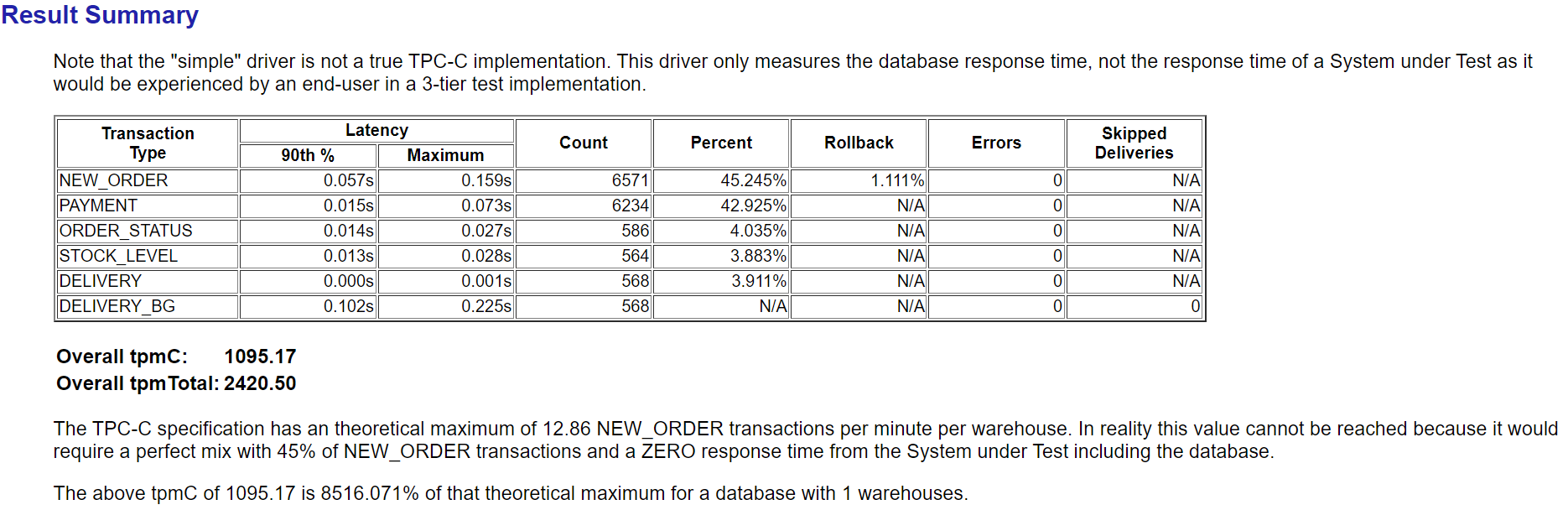
10:47:09,994 [Thread-2] INFO   jTPCC : Term-00, Measured tpmC (NewOrders) = 1095.13
10:47:09,994 [Thread-2] INFO   jTPCC : Term-00, Measured tpmTOTAL = 2420.59
10:47:09,994 [Thread-2] INFO   jTPCC : Term-00, Session Start     = 2022-11-21 10:41:09
10:47:09,995 [Thread-2] INFO   jTPCC : Term-00, Session End       = 2022-11-21 10:47:09
10:47:09,995 [Thread-2] INFO   jTPCC : Term-00, Transaction Count = 14523
3.2 生成html报告
[root@opengauss-node1 ~]# cd /root/benchmarksql-5.0/run/
[root@opengauss-node1 run]# ./generateReport.sh my_result_2022-11-21_104108
Generating my_result_2022-11-21_104108/tpm_nopm.png ... OK
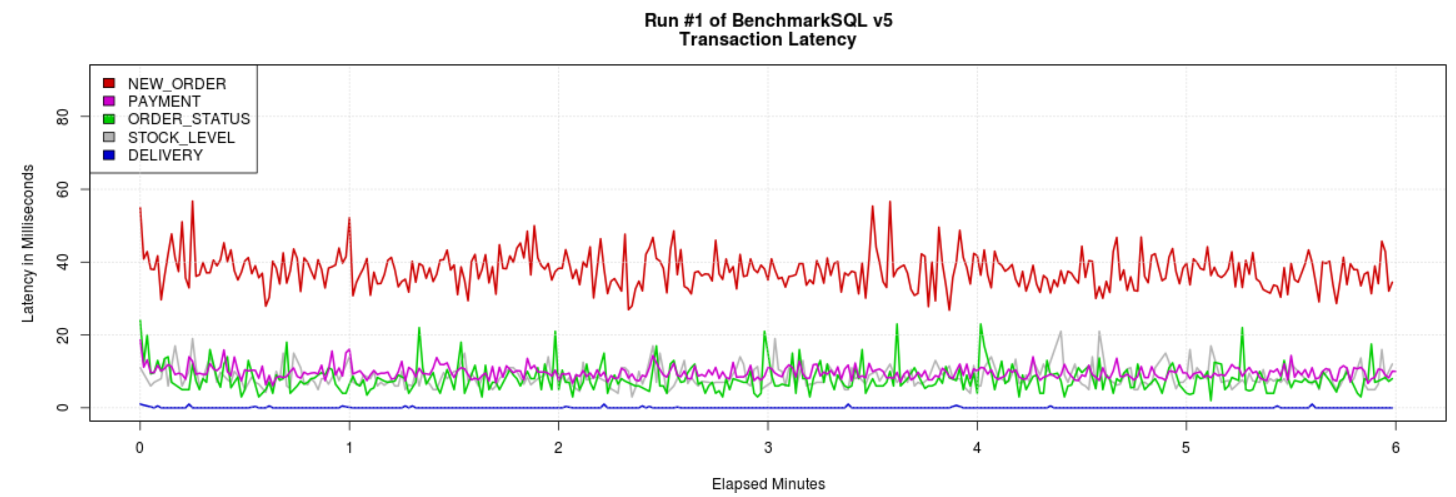
Generating my_result_2022-11-21_104108/latency.png ... OK
Generating my_result_2022-11-21_104108/cpu_utilization.png ... Error in read.table(file = file, header = header, sep = sep, quote = quote,  :
  no lines available in input
Calls: read.csv -> read.table
Execution halted
ERROR

R version 3.6.3 (2020-02-29) -- "Holding the Windsock"
Copyright (C) 2020 The R Foundation for Statistical Computing
Platform: x86_64-pc-linux-gnu (64-bit)

R is free software and comes with ABSOLUTELY NO WARRANTY.
You are welcome to redistribute it under certain conditions.
Type 'license()' or 'licence()' for distribution details.

  Natural language support but running in an English locale

R is a collaborative project with many contributors.
Type 'contributors()' for more information and
'citation()' on how to cite R or R packages in publications.

Type 'demo()' for some demos, 'help()' for on-line help, or
'help.start()' for an HTML browser interface to help.
Type 'q()' to quit R.

> # ----
> # R graph to show CPU utilization
> # ----
>
> # ----
> # Read the runInfo.csv file.
> # ----
> runInfo <- read.csv("data/runInfo.csv", head=TRUE)
>
> # ----
> # Determine the grouping interval in seconds based on the
> # run duration.
> # ----
> xmax <- runInfo$runMins
> for (interval in c(1, 2, 5, 10, 20, 60, 120, 300, 600)) {
+     if ((xmax * 60) / interval <= 1000) {
+         break
+     }
+ }
> idiv <- interval * 1000.0
>
> # ----
> # Read the recorded CPU data and aggregate it for the desired interval.
> # ----
> rawData <- read.csv("data/sys_info.csv", head=TRUE)
Generating my_result_2022-11-21_104108/report.html ... OK
[root@opengauss-node1 my_result_2022-11-21_104108]# pwd
/root/benchmarksql-5.0/run/my_result_2022-11-21_104108
[root@opengauss-node1 my_result_2022-11-21_104108]# ls -lrt
total 224
-rw-r--r-- 1 root root    571 Nov 21 10:41 run.properties
-rw-r--r-- 1 root root  96663 Nov 21 10:53 tpm_nopm.png
drwxr-xr-x 2 root root   4096 Nov 21 10:53 data
-rw-r--r-- 1 root root 114412 Nov 21 10:53 latency.png
-rw-r--r-- 1 root root   6749 Nov 21 10:53 report.html
3.2 查看html报告
-- 打包my_result_2022-11-21_104108并下载
[root@opengauss-node1 ~]# /root/benchmarksql-5.0/run
[root@opengauss-node1 run]# tar -cf my_result_2022-11-21_104108.tar ./my_result_2022-11-21_104108/

以下一些系统性能报告,不知为何未出图,问题在排查中,也希望对此熟悉的能给与指导。
最后修改时间:2022-11-29 09:31:38
「喜欢这篇文章,您的关注和赞赏是给作者最好的鼓励」
关注作者
【版权声明】本文为墨天轮用户原创内容,转载时必须标注文章的来源(墨天轮),文章链接,文章作者等基本信息,否则作者和墨天轮有权追究责任。如果您发现墨天轮中有涉嫌抄袭或者侵权的内容,欢迎发送邮件至:contact@modb.pro进行举报,并提供相关证据,一经查实,墨天轮将立刻删除相关内容。
