



课程作业
1.从操作系统层面查看数据库进程和线程,判断数据库是否启动。
2.使用gs_ctl工具查看数据库状态,判断数据库是否启动。
3.使用gs_ctl 查看数据文件的目录
4.从环境变量查看数据文件的目录
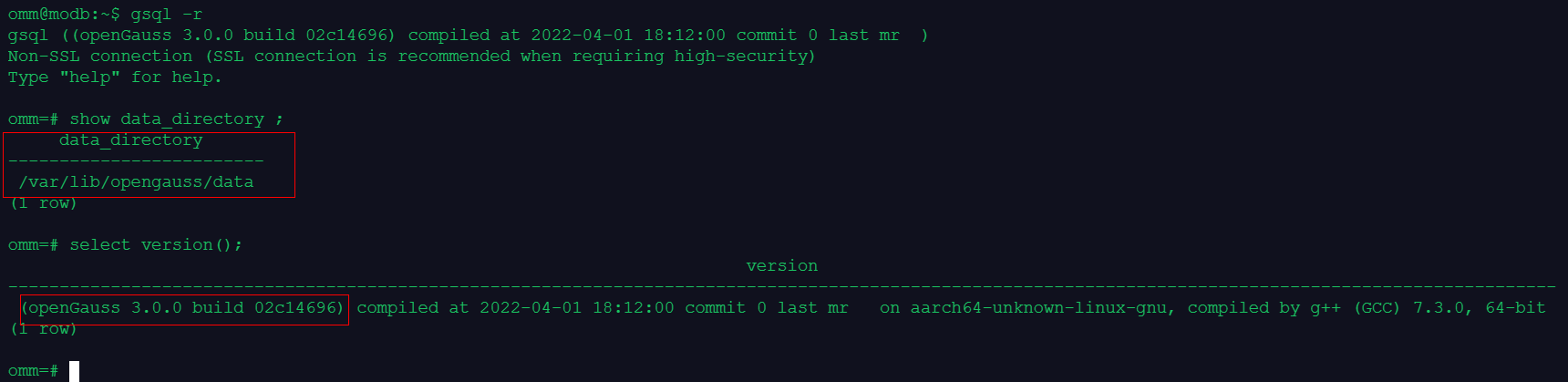
5.在gsql中查看数据文件目录、数据库版本
在线实训环境信息
Welcome to 墨天轮.
This is Web Terminal of modb.pro; Good Good Study, Day Day Up.


root@modb:~#
root@modb:~# su - omm
omm@modb:~$ uname -a
Linux modb 4.18.0-80.7.2.el7.aarch64 #1 SMP Thu Sep 12 16:13:20 UTC 2019 aarch64 GNU/Linux
omm@modb:~$ cat /etc/os-release
PRETTY_NAME="Debian GNU/Linux 10 (buster)"
NAME="Debian GNU/Linux"
VERSION_ID="10"
VERSION="10 (buster)"
VERSION_CODENAME=buster
ID=debian
HOME_URL="https://www.debian.org/"
SUPPORT_URL="https://www.debian.org/support"
BUG_REPORT_URL="https://bugs.debian.org/"
omm@modb:~$ lscpu
Architecture:        aarch64
Byte Order:          Little Endian
CPU(s):              12
On-line CPU(s) list: 0-11
Thread(s) per core:  1
Core(s) per socket:  6
Socket(s):           2
NUMA node(s):        2
Vendor ID:           0x48
Model:               0
Stepping:            0x1
CPU max MHz:         2400.0000
CPU min MHz:         2400.0000
BogoMIPS:            200.00
L1d cache:           64K
L1i cache:           64K
L2 cache:            512K
L3 cache:            32768K
NUMA node0 CPU(s):   0-5
NUMA node1 CPU(s):   6-11
Flags:               fp asimd evtstrm aes pmull sha1 sha2 crc32 atomics fphp asimdhp cpuid asimdrdm jscvt fcma dcpop asimddp asimdfhm
omm@modb:~$ free -g
              total        used        free      shared  buff/cache   available
Mem:             23           5          11           2           6          11
Swap:             0           0           0
omm@modb:~$
omm@modb:~$ df -PhT
Filesystem     Type     Size  Used Avail Use% Mounted on
overlay        overlay   98G   64G   30G  69% /
tmpfs          tmpfs     64M     0   64M   0% /dev
tmpfs          tmpfs     12G     0   12G   0% /sys/fs/cgroup
shm            tmpfs     64M   64K   64M   1% /dev/shm
/dev/vda2      ext4      98G   64G   30G  69% /etc/hosts
tmpfs          tmpfs     12G     0   12G   0% /proc/acpi
tmpfs          tmpfs     12G     0   12G   0% /proc/scsi
tmpfs          tmpfs     12G     0   12G   0% /sys/firmware
查看数据库进程和线程
omm@modb:~$ ps -ef |grep gauss | grep -v grep
omm          1     0  0 10:24 ?        00:00:10 gaussdb
omm@modb:~$ ps -Tp 1
  PID  SPID TTY          TIME CMD
    1     1 ?        00:00:00 gaussdb
    1   287 ?        00:00:00 jemalloc_bg_thd
    1   295 ?        00:00:00 jemalloc_bg_thd
    1   293 ?        00:00:00 gaussdb
    1   294 ?        00:00:00 syslogger
    1   296 ?        00:00:00 alarm
    1   297 ?        00:00:00 reaper
    1   298 ?        00:00:00 jemalloc_bg_thd
    1   299 ?        00:00:00 jemalloc_bg_thd
    1   343 ?        00:00:00 checkpointer
    1   344 ?        00:00:00 Spbgwriter
    1   346 ?        00:00:00 pagewriter
    1   345 ?        00:00:01 pagewriter
    1   347 ?        00:00:00 pagewriter
    1   348 ?        00:00:00 pagewriter
    1   349 ?        00:00:00 pagewriter
    1   350 ?        00:00:00 WALwriter
    1   351 ?        00:00:00 WALwriteraux
    1   352 ?        00:00:00 AVClauncher
    1   353 ?        00:00:00 Jobscheduler
    1   354 ?        00:00:00 asyncundolaunch
    1   355 ?        00:00:00 globalstats
    1   356 ?        00:00:00 applylauncher
    1   357 ?        00:00:00 statscollector
    1   358 ?        00:00:01 percentworker
    1   359 ?        00:00:03 ashworker
    1   360 ?        00:00:01 TrackStmtWorker
    1   361 ?        00:00:00 auditor
    1   362 ?        00:00:00 2pccleaner
    1   363 ?        00:00:00 faultmonitor
    1   364 ?        00:00:00 WLMworker
    1   365 ?        00:00:00 WLMmonitor
    1   366 ?        00:00:00 WLMarbiter
    1   367 ?        00:00:00 undorecycler
使用gs_ctl工具查看数据库状态,数据库running状态,启动中
omm@modb:~$ gs_ctl status
[2022-11-24 11:06:43.921][597][][gs_ctl]: gs_ctl status,datadir is /var/lib/opengauss/data
gs_ctl: server is running (PID: 1)
/usr/local/opengauss/bin/gaussdb
omm@modb:~$

gs_ctl 查看数据文件的目录
omm@modb:~$ gs_ctl notify
[2022-11-24 11:02:40.690][579][][gs_ctl]: gs_ctl notify ,datadir is /var/lib/opengauss/data
[2022-11-24 11:02:40.690][579][][gs_ctl]: the parameter of notify must be specified

从环境变量查看数据文件的目录
omm@modb:~$  grep -i PGDATA ~/.bashrc
export PGDATA=/var/lib/opengauss/data

登录数据库查看数据文件目录及数据库版本信息
omm@modb:~$ gsql -r
gsql ((openGauss 3.0.0 build 02c14696) compiled at 2022-04-01 18:12:00 commit 0 last mr  )
Non-SSL connection (SSL connection is recommended when requiring high-security)
Type "help" for help.

omm=# show data_directory ;
     data_directory
-------------------------
 /var/lib/opengauss/data
(1 row)

omm=# select version();
                                                                        version
-------------------------------------------------------------------------------------------------------------------------------------------------------
 (openGauss 3.0.0 build 02c14696) compiled at 2022-04-01 18:12:00 commit 0 last mr   on aarch64-unknown-linux-gnu, compiled by g++ (GCC) 7.3.0, 64-bit
(1 row)

omm=#
.bashrc信息
omm=# \q
omm@modb:~$ cat .bashrc
# ~/.bashrc: executed by bash(1) for non-login shells.
# see /usr/share/doc/bash/examples/startup-files (in the package bash-doc)
# for examples

# If not running interactively, don't do anything
case $- in
    *i*) ;;
      *) return;;
esac

# don't put duplicate lines or lines starting with space in the history.
# See bash(1) for more options
HISTCONTROL=ignoreboth

# append to the history file, don't overwrite it
shopt -s histappend

# for setting history length see HISTSIZE and HISTFILESIZE in bash(1)
HISTSIZE=1000
HISTFILESIZE=2000

# check the window size after each command and, if necessary,
# update the values of LINES and COLUMNS.
shopt -s checkwinsize

# If set, the pattern "**" used in a pathname expansion context will
# match all files and zero or more directories and subdirectories.
#shopt -s globstar

# make less more friendly for non-text input files, see lesspipe(1)
#[ -x /usr/bin/lesspipe ] && eval "$(SHELL=/bin/sh lesspipe)"

# set variable identifying the chroot you work in (used in the prompt below)
if [ -z "${debian_chroot:-}" ] && [ -r /etc/debian_chroot ]; then
    debian_chroot=$(cat /etc/debian_chroot)
fi

# set a fancy prompt (non-color, unless we know we "want" color)
case "$TERM" in
    xterm-color|*-256color) color_prompt=yes;;
esac

# uncomment for a colored prompt, if the terminal has the capability; turned
# off by default to not distract the user: the focus in a terminal window
# should be on the output of commands, not on the prompt
#force_color_prompt=yes

if [ -n "$force_color_prompt" ]; then
    if [ -x /usr/bin/tput ] && tput setaf 1 >&/dev/null; then
        # We have color support; assume it's compliant with Ecma-48
        # (ISO/IEC-6429). (Lack of such support is extremely rare, and such
        # a case would tend to support setf rather than setaf.)
        color_prompt=yes
    else
        color_prompt=
    fi
fi

if [ "$color_prompt" = yes ]; then
    PS1='${debian_chroot:+($debian_chroot)}\[\033[01;32m\]\u@\h\[\033[00m\]:\[\033[01;34m\]\w\[\03_aliases, instead of adding them here directly.
# See /usr/share/doc/bash-doc/examples in the bash-doc package.

if [ -f ~/.bash_aliases ]; then
    . ~/.bash_aliases
fi

# enable programmable completion features (you don't need to enable
# this, if it's already enabled in /etc/bash.bashrc and /etc/profile
# sources /etc/bash.bashrc).
if ! shopt -oq posix; then
  if [ -f /usr/share/bash-completion/bash_completion ]; then
    . /usr/share/bash-completion/bash_completion
  elif [ -f /etc/bash_completion ]; then
    . /etc/bash_completion
  fi
fi
export GAUSSHOME=/usr/local/opengauss
export PATH=$GAUSSHOME/bin:$PATH
export LD_LIBRARY_PATH=$GAUSSHOME/lib:$LD_LIBRARY_PATH
export PGDATA=/var/lib/opengauss/data
3[00m\]\$ '
else
    PS1='${debian_chroot:+($debian_chroot)}\u@\h:\w\$ '
fi
unset color_prompt force_color_prompt

# If this is an xterm set the title to user@host:dir
case "$TERM" in
xterm*|rxvt*)
    PS1="\[\e]0;${debian_chroot:+($debian_chroot)}\u@\h: \w\a\]$PS1"
    ;;
*)
    ;;
esac

# enable color support of ls and also add handy aliases
if [ -x /usr/bin/dircolors ]; then
    test -r ~/.dircolors && eval "$(dircolors -b ~/.dircolors)" || eval "$(dircolors -b)"
    alias ls='ls --color=auto'
    #alias dir='dir --color=auto'
    #alias vdir='vdir --color=auto'

    #alias grep='grep --color=auto'
    #alias fgrep='fgrep --color=auto'
    #alias egrep='egrep --color=auto'
fi

# colored GCC warnings and errors
#export GCC_COLORS='error=01;31:warning=01;35:note=01;36:caret=01;32:locus=01:quote=01'

# some more ls aliases
#alias ll='ls -l'
#alias la='ls -A'
#alias l='ls -CF'

# Alias definitions.
# You may want to put all your additions into a separate file like
# ~/.bashomm@modb:~$
最后修改时间:2022-11-24 11:30:02
「喜欢这篇文章,您的关注和赞赏是给作者最好的鼓励」
关注作者
【版权声明】本文为墨天轮用户原创内容,转载时必须标注文章的来源(墨天轮),文章链接,文章作者等基本信息,否则作者和墨天轮有权追究责任。如果您发现墨天轮中有涉嫌抄袭或者侵权的内容,欢迎发送邮件至:contact@modb.pro进行举报,并提供相关证据,一经查实,墨天轮将立刻删除相关内容。
